⏱ TL;DR
- Otter.ai wins on real-time transcription and accuracy — the only tool that shows you text as people speak.
- Fireflies.ai wins on CRM integration and multilingual support — the go-to for sales teams and global organizations.
- Fathom wins on free tier generosity, summary quality, and simplicity — best for individuals who want zero friction.
- tl;dv wins on sales coaching, multi-meeting intelligence, and video clipping — built for revenue teams at scale.
- Pick Otter for live transcription. Pick Fireflies for CRM-heavy sales teams. Pick Fathom for budget-conscious individuals. Pick tl;dv for coaching and deal intelligence.
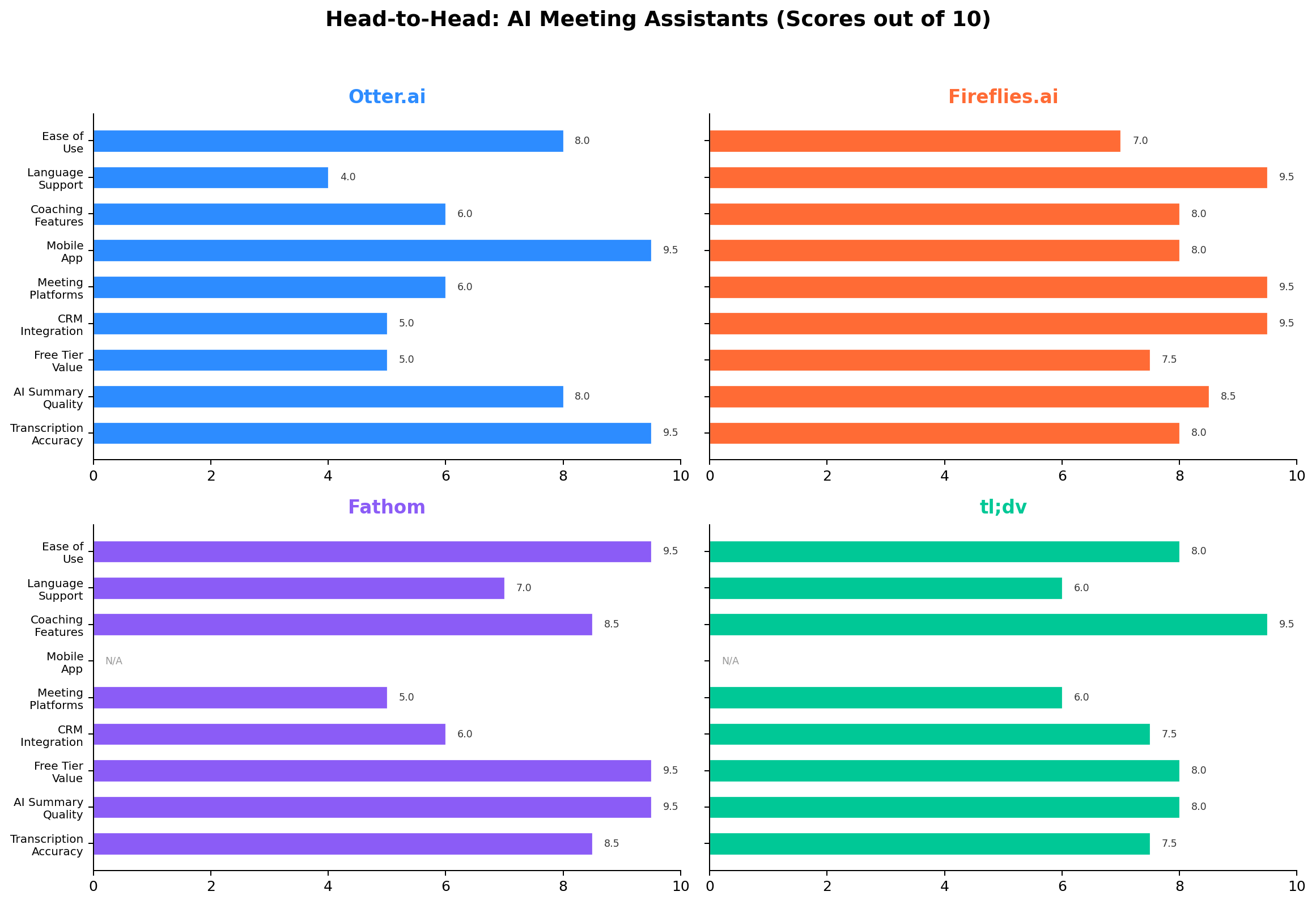
AI meeting assistants have evolved from simple transcription bots to full meeting lifecycle platforms. In 2026, the question is no longer "who has the best transcript" but "what happens after the notes" — action item execution, CRM automation, cross-meeting intelligence, and sales coaching. We tested the four leading platforms across 50+ real meetings to find out which one deserves your subscription.
The market has matured significantly. All four tools now offer AI summaries, action item extraction, and integration with major conferencing platforms. The differentiators come down to real-time capabilities, depth of CRM integration, sales coaching features, multilingual support, and pricing model. Let us break it down.
📊 At a Glance
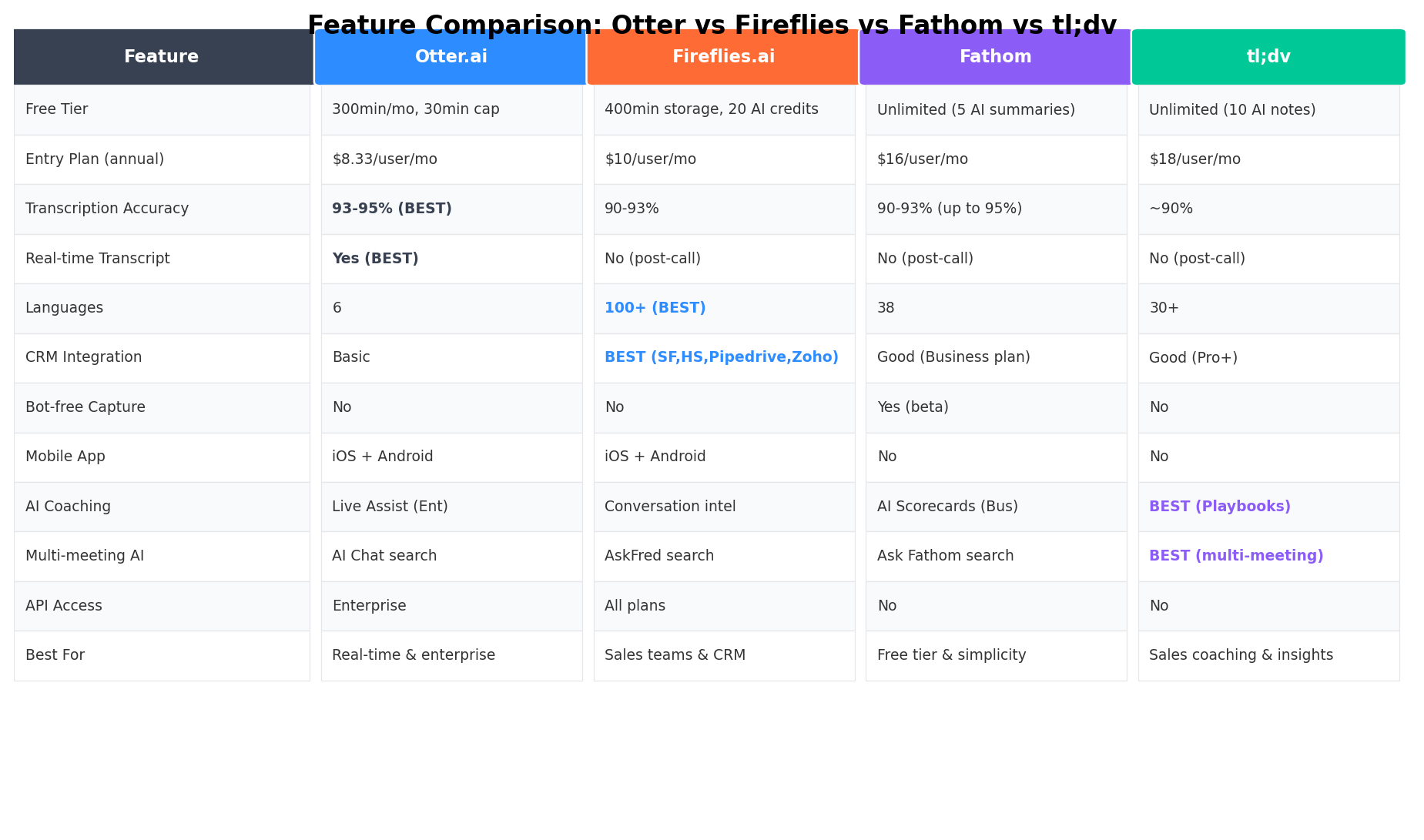
| Dimension | Otter.ai | Fireflies.ai | Fathom | tl;dv | Winner |
|---|---|---|---|---|---|
| Transcription Accuracy | 93-95% | 90-93% | 90-93% | ~90% | Otter |
| Real-time Transcript | Yes | No | No | No | Otter |
| Free Tier | 300 min/mo | Unlimited (limits) | Unlimited + 5 AI | Unlimited + 10 AI | Fathom |
| AI Summary Quality | Good | Comprehensive | Best (concise) | Good | Fathom |
| CRM Integration | Basic | 4 CRMs | 2 CRMs (Business) | 3 CRMs (Pro+) | Fireflies |
| Sales Coaching | Live Assist (Ent) | Conv. Intel | Scorecards | Playbooks + AI Coach | tl;dv |
| Languages | 6 | 100+ | 38 | 30+ | Fireflies |
| Entry Price (annual) | $8.33/user/mo | $10/user/mo | $15/user/mo | $18/user/mo | Otter |
| Mobile App | iOS + Android | iOS + Android | No | No | Otter |
🦄 Deep Dive: Otter.ai
Overview & Current Status
Otter.ai is the most established name in AI meeting transcription, having launched in 2017. Over nine years, Otter has evolved from a standalone transcription app into a comprehensive meeting platform with OtterPilot, an AI assistant that automatically joins your Zoom, Google Meet, Microsoft Teams, and in-person meetings. In 2026, Otter's biggest differentiator remains its real-time transcription — a feature no competitor has matched. The transcript appears word-by-word as participants speak, making it indispensable for accessibility needs, live captioning, and situations where you need to reference what was just said.
Otter's close relationship with Zoom has strengthened its integration with that ecosystem. The platform also offers Otter for Desktop, a standalone Mac and Windows application that can capture audio from any application on your computer — not just video conferencing tools. This makes Otter uniquely versatile for in-person meetings, phone calls, and screen-sharing sessions outside of standard meeting platforms.
Key Features
- Real-time transcription — The only tool in this comparison that transcribes as you speak, with words appearing live on screen
- OtterPilot — AI assistant that auto-joins scheduled meetings on Zoom, Meet, Teams, and Webex
- Otter for Desktop — Captures audio from any application on Mac or Windows, not just conferencing tools
- AI Meeting Notes & Summaries — Automated outlines, key topics, action items, and discussion takeaways
- Otter Chat — Ask questions about the current or past meeting using AI-powered chat during the live call
- Live collaborative editing — Team members can highlight, comment, and annotate transcripts in real time
- Speaker identification — Distinguishes between up to 10 speakers in real time
- Mobile apps — Full-featured iOS and Android apps for recording on the go
- Otter Sales Notetaker — Automated sales meeting capture with CRM logging (Enterprise plan only)
- AI Workflows — Automated follow-up emails and action item notifications (Business plan)
Pricing (2026)
| Plan | Monthly | Annual | Key Limits |
|---|---|---|---|
| Basic (Free) | $0 | $0 | 300 min/mo, 30 min per conversation, 3 file imports/mo |
| Pro | $16.99/user/mo | $8.33/user/mo | 1,200 min/mo, 90 min per conversation, OtterPilot, advanced search |
| Business | $30/user/mo | $19.99/user/mo | Unlimited transcripts, AI workflows, admin console, 3 concurrent meetings |
| Enterprise | Custom | Custom | SSO, SCIM, Sales Notetaker, custom integrations, priority support |
Real-world cost: A 5-person team on Pro costs $499.80/year ($41.65/mo). The same team on Business costs $1,199.40/year ($99.95/mo). Otter's Pro plan is the cheapest entry point among all four tools at $8.33/user/mo annually. A 20% student discount brings Pro down to $6.67/month annually.
Strengths
- ✅ Only real-time transcription — No other tool shows text as people speak
- ✅ Highest accuracy — 93-95% with excellent handling of English accents and technical jargon
- ✅ Cheapest entry price — Pro at $8.33/user/mo annual is the lowest paid plan
- ✅ Otter for Desktop — Captures from any app, the only tool that works outside video conferencing
- ✅ Mobile apps — Full iOS and Android support for in-person meeting recording
- ✅ Accessibility leader — Real-time captions make Otter best for hearing-impaired participants
Weaknesses
- ❌ Limited language support — Only 6 languages vs. 100+ for Fireflies
- ❌ Basic CRM integration — Salesforce only on Enterprise; no HubSpot, Pipedrive, or Zoho
- ❌ No sales coaching — Lacks playbook tracking, deal scoring, or conversation intelligence
- ❌ Restrictive free tier — 300 min/mo with 30-min cap is the least generous free plan here
- ❌ No bot-free option — Requires a visible Otter bot to join all meetings
🔥 Deep Dive: Fireflies.ai
Overview & Current Status
Fireflies.ai has positioned itself as the meeting intelligence platform for teams. Where Otter focuses on transcription, Fireflies focuses on what happens after — CRM logging, conversation intelligence, collaboration, and cross-meeting analytics. The platform supports 100+ languages, the broadest multilingual coverage of any tool in this comparison, making it the default choice for global teams and multilingual organizations.
In 2026, Fireflies introduced an AI credits system that governs access to advanced AI features (summaries, action items, the AskFred assistant). Each paid plan includes a shared workspace credit pool — Pro gets 20 credits, Business gets 30, Enterprise gets 50. For most teams this is sufficient, but heavy users may need extra credit packs. The AskFred AI assistant lets you query any meeting using natural language — "What did the client say about pricing?" or "What were the action items from last week's standup?" — creating a searchable knowledge base from your entire meeting history.
Key Features
- Auto-join & record — Fred the bot joins meetings on Zoom, Meet, Teams, Webex, BlueJeans, and more
- 100+ language transcription — Broadest language support including Asian, European, and Middle Eastern languages
- AskFred AI — Natural language Q&A across all past and current meetings
- AI Apps — Customizable AI templates for sales, recruiting, engineering, and other teams
- CRM auto-logging — Automatic call logging for Salesforce, HubSpot, Pipedrive, Zoho, and more
- Conversation intelligence — Topic tracking, sentiment analysis, speaker analytics, talk-time ratios
- AI Super Summaries — Comprehensive meeting summaries with action items, decisions, and follow-ups
- Team collaboration — Shared workspaces, comments, pins, soundbites, and playlist creation
- Knowledge base — Build a searchable library from transcripts and uploaded documents
- Webhooks & API — Robust developer tools for custom integrations (Business plan and above)
- Mobile apps — iOS and Android with full recording and search capabilities
Pricing (2026)
| Plan | Monthly | Annual | Key Features |
|---|---|---|---|
| Free | $0 | $0 | Unlimited transcription, unlimited AI summaries, 800 min storage, basic CRM |
| Pro | $18/user/mo | $10/user/mo | AI Apps, AskFred, 20 AI credits, meeting search, Slack |
| Business | $29/user/mo | $19/user/mo | Full CRM integration, conversation intel, 30 AI credits, API |
| Enterprise | $39/user/mo | $39/user/mo | HIPAA, SOC 2, SSO, SCIM, 50 AI credits, custom data residency |
Real-world cost: A 5-person team on Pro costs $600/year ($50/mo). On Business, $1,140/year ($95/mo). Fireflies' free plan includes unlimited transcription and AI summaries — unusual and valuable for teams primarily needing raw transcripts. Note that Enterprise is $39/user/mo whether billed monthly or annually — there is no annual discount on the top tier.
Strengths
- ✅ 100+ languages — Widest language support of any AI meeting assistant
- ✅ Deepest CRM in
... [OUTPUT TRUNCATED - 6603 chars omitted out of 56603 total] ...
making the effective minimum $30/mo for a team.
Strengths
- ✅ Best free tier — Unlimited recordings, transcriptions, and storage with 5 AI summaries/mo
- ✅ Bot-free capture — Record without a visible bot (beta), unique among these four tools
- ✅ Best summary quality — Concise, well-structured summaries that capture the essence without fluff
- ✅ Simplest UX — Minimal setup, no credit systems, no complexity
- ✅ ChatGPT & Claude integration — Send meeting data to external AI for advanced analysis
- ✅ Slack Huddle capture — Only tool that records impromptu Slack voice calls
- ✅ Enterprise security — SOC 2 Type II, GDPR, HIPAA compliant
Weaknesses
- ❌ No mobile app — Desktop/browser only; no iOS or Android apps
- ❌ No real-time transcription — Live summaries are new but not full real-time transcript
- ❌ Limited CRM options — Only Salesforce and HubSpot, and only on the Business plan
- ❌ No sales playbook tracking — Lacks BANT, MEDDICC, or SPIN framework analysis
- ❌ 38 languages — Good but far behind Fireflies' 100+
- ❌ Bot-free still in beta — Bot-free capture is new and may have edge cases
🎥 Deep Dive: tl;dv
Overview & Current Status
tl;dv (pronounced "tldv") has carved out a unique niche as the sales coaching and video-first meeting assistant. While the other three tools treat video as a secondary output alongside transcripts and summaries, tl;dv puts video front and center — with powerful clipping, timestamping, and sharing capabilities that make it the best tool for teams that need to share meeting moments visually.
The platform's standout feature is its sales coaching engine. tl;dv can track whether your team is following established sales methodologies (BANT, MEDDICC, SPIN, Challenger), detect customer objections in real time, and generate multi-meeting intelligence reports that show patterns across your entire pipeline. For sales leaders who need to understand why deals are won or lost, tl;dv is the most powerful tool in this comparison.
In 2026, tl;dv is running a 40% discount on all annual plans, which explains why the annual pricing ($18 Pro, $59 Business) looks so attractive compared to monthly billing ($26-29 Pro, $98 Business). The gap between Pro and Business is significant — $41/user/mo — because Pro is a productivity tool while Business is a full sales intelligence platform. This is an important distinction when choosing your plan.
Key Features
- Auto-record & transcribe — Join Zoom, Google Meet, and Teams meetings automatically
- Sales playbook tracking — Monitor adherence to BANT, MEDDICC, SPIN, Challenger, and custom frameworks
- AI objection handling — Detect and analyze customer objections in real time with AI-powered suggestions
- Multi-meeting intelligence — Analyze patterns across hundreds of meetings to find winning and losing behaviors
- AI speaker insights — Per-speaker analytics including talk time, questions asked, and sentiment
- Video clipping — Create and share timestamped video clips from any meeting moment
- AI meeting notes — Automated summaries with action items, decisions, and key takeaways
- Ask AI — Natural language Q&A about individual meetings or your entire meeting library
- CRM integration — Auto-log calls and update fields in Salesforce, HubSpot, and Pipedrive (Pro+)
- 8,000+ integrations — Connect with virtually any tool through Zapier and native integrations
- Email follow-up designer — AI-generated follow-up emails with customizable templates (Pro)
- Team folders & sharing — Organize meetings by team, deal, or project with granular permissions
- API & webhooks — Developer tools for custom workflows (Business plan and above)
Pricing (2026)
Plan Monthly Annual Key Features Free $0 $0 Unlimited recordings, 10 AI notes/mo, 10 Ask AI queries, 30+ languages Pro $26/user/mo $18/user/mo Unlimited AI notes, 8,000+ integrations, CRM sync, email follow-ups Business $98/user/mo $59/user/mo Sales coaching, playbooks, multi-meeting AI, API, webhooks, objection handling Enterprise Custom Custom Custom integrations, dedicated CSM, advanced data management, SLA Real-world cost: A 5-person sales team on Pro costs $1,080/year ($90/mo). The same team on Business costs $3,540/year ($295/mo). The massive gap between Pro and Business reflects the difference between "meeting productivity" and "sales intelligence" — they are effectively two different products. tl;dv's free plan is generous with 10 AI notes per month, making it viable for individuals with light meeting schedules.
Active promotion: tl;dv is running a 40% discount on annual plans in 2026, which means the prices above may increase when the promotion ends. If you are evaluating tl;dv, consider locking in the annual rate now.
Strengths
- ✅ Best sales coaching — Playbook tracking, objection detection, and multi-meeting intelligence are unmatched
- ✅ Video-first approach — Best clipping, sharing, and video organization of any tool here
- ✅ Multi-meeting intelligence — Analyze patterns across your entire meeting library, not just one call
- ✅ 8,000+ integrations — The largest integration ecosystem via Zapier and native connectors
- ✅ Email follow-up tool — AI-generated follow-up emails with templates (Pro plan)
- ✅ AI speaker insights — Detailed per-speaker analytics across meetings
Weaknesses
- ❌ Most expensive at Business tier — $59/user/mo annual is 3x the price of Otter Pro
- ❌ Lowest transcription accuracy — Approximately 90%, trailing Otter, Fireflies, and Fathom
- ❌ No mobile app — Desktop/browser only; no iOS or Android support
- ❌ No real-time transcription — All processing happens after the meeting ends
- ❌ Steep Pro-to-Business jump — $18 to $59/user/mo is the biggest plan gap in this comparison
- ❌ Overkill for non-sales teams — The coaching features are wasted on teams without a sales methodology
- ❌ No bot-free option — Requires a visible tl;dv bot to join all meetings
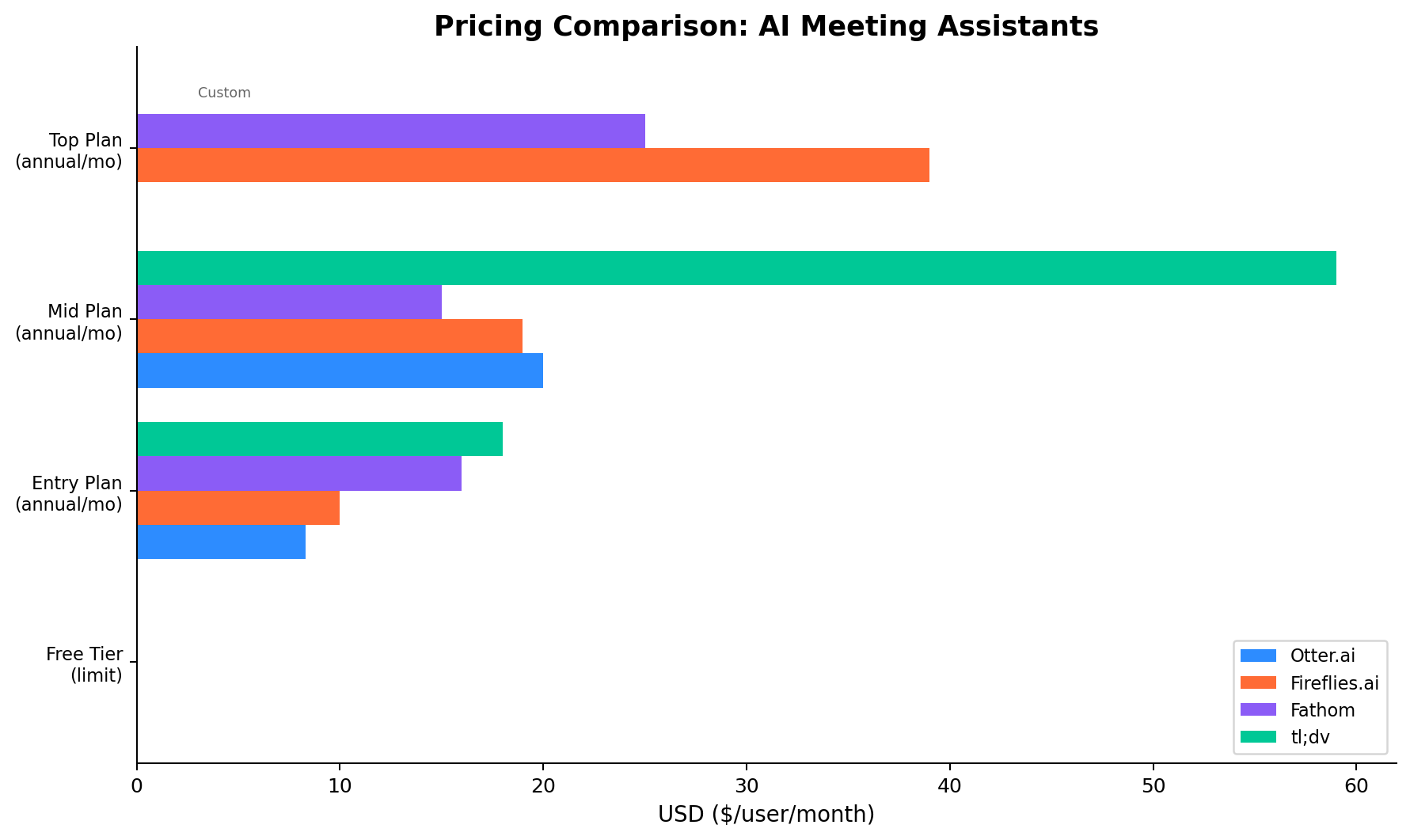
Pricing comparison across all paid tiers. Otter has the cheapest entry point ($8.33/mo); Fathom's free tier is the most generous; tl;dv's Business tier is the most expensive ($59/user/mo). The pricing landscape diverges significantly across these four tools. Otter and Fireflies are the most affordable entry points at $8.33 and $10/user/mo respectively (annual billing). Fathom and tl;dv start higher at $15 and $18/user/mo but compensate with stronger free tiers. At the premium level, tl;dv's Business plan at $59/user/mo is the most expensive in this comparison — 3x the cost of Otter Pro. The key takeaway: if you stay on the entry paid tier, Otter is cheapest; if you never pay at all, Fathom is most generous.
⚔️ Head-to-Head Comparison
1. Transcription Accuracy
Otter.ai leads with 93-95% accuracy, thanks to its nine years of model refinement and dedicated focus on English-language transcription. It handles heavy accents, technical jargon, and overlapping speech better than any competitor. Fireflies and Fathom both achieve 90-93% (up to 95% in good audio conditions with clear speakers). tl;dv trails at approximately 90%, with slightly more errors on multi-speaker calls with background noise. For English-language meetings where accuracy matters most — legal reviews, medical consultations, board meetings — Otter is the clear choice.
Winner: Otter
2. Real-time Transcript
This dimension has a single winner: Otter. It is the only tool in this comparison that shows text as people speak, creating a live transcript during the meeting. Fireflies, Fathom, and tl;dv all process audio after the meeting ends, typically delivering transcripts within 5-15 minutes. Otter's real-time capability is critical for accessibility (live captioning for hearing-impaired participants), live note-taking during presentations, and situations where you need to reference what was just said without waiting. Otter Chat also lets you query the live transcript during the meeting.
Winner: Otter
3. AI Summary Quality
Fathom produces the most consistently useful AI summaries. Its one-paragraph meeting recap, bulleted action items, and concise format are the best in this comparison for quick post-meeting review. Fathom's summaries avoid the bloat that affects other tools — you get the essentials without wading through filler. Fireflies produces comprehensive but longer summaries via its Super Summaries (available with AI credits). Otter's summaries are good but less focused. tl;dv's summaries are solid but optimized for sales calls rather than general meeting use. For daily standups, 1:1s, and general team meetings, Fathom's summary format is the most practical.
Winner: Fathom
4. CRM Integration
Fireflies.ai wins decisively with native integrations for Salesforce, HubSpot, Pipedrive, Zoho, and more. It automatically logs call notes, transcripts, action items, and analysis directly into CRM records — no manual data entry required. The auto-sync works in both directions, pulling contact and deal context into the meeting notes. tl;dv offers strong CRM support on its Pro plan (Salesforce, HubSpot, Pipedrive) but without the depth of Fireflies' logging. Fathom supports Salesforce and HubSpot on its Business plan ($29/user/mo). Otter limits CRM integration to Salesforce on Enterprise only — a significant gap for sales teams on lower plans.
Winner: Fireflies
5. Sales Coaching
tl;dv is purpose-built for sales coaching and it shows. Its playbook tracking (BANT, MEDDICC, SPIN, Challenger), AI coach with personalized recommendations, objection handling detection, and multi-meeting intelligence create a comprehensive coaching stack that no competitor matches. Fireflies offers conversation intelligence with sentiment analysis and topic tracking, but it lacks structured playbook enforcement. Fathom has deal scorecards on its Business plan — useful but basic. Otter offers Live Assist (question prompts during calls) on Enterprise only, with no post-meeting coaching. For revenue teams running methodology-driven sales processes, tl;dv is the clear winner.
Winner: tl;dv
6. Free Tier Value
Fathom's free tier is the most generous in this comparison by a wide margin: unlimited recordings, unlimited transcriptions, unlimited storage, and 5 AI-generated summaries per month. There is no per-meeting time limit, no monthly minute cap, and no expiration on your meeting library. tl;dv also offers unlimited recordings with 10 AI notes per month. Fireflies offers unlimited meetings on its free plan but with limited AI credit access. Otter's free plan is the most restrictive: 300 minutes/month with a 30-minute per-conversation cap and only 3 file imports per month. For users who want a capable meeting assistant without paying, Fathom is the obvious choice.
Winner: Fathom
7. Language Support
Fireflies.ai supports 100+ languages for transcription — the broadest coverage by a massive margin. This includes Asian languages (Japanese, Korean, Mandarin, Cantonese), European languages (French, German, Spanish, Italian, Portuguese), Middle Eastern languages (Arabic, Hebrew, Turkish), and many more. Fathom supports 38 languages. tl;dv supports 30+ languages. Otter supports only 6 languages (English, Spanish, French, Italian, German, Portuguese). For global teams with multilingual meetings, Fireflies is the only viable option — the gap between 100+ languages and 38 is significant in practice.
Winner: Fireflies
8. Mobile App
Otter and Fireflies both offer full-featured iOS and Android apps. Otter's mobile apps are particularly strong — you can record in-person meetings, access live transcription, and sync everything back to your workspace. Fireflies' mobile apps support recording and search across your meeting library. Fathom and tl;dv have no mobile apps at all — they are desktop/browser only. For professionals who attend meetings on the go, present at conferences, or need to capture in-person conversations, Otter's mobile experience is the most complete.
Winner: Otter
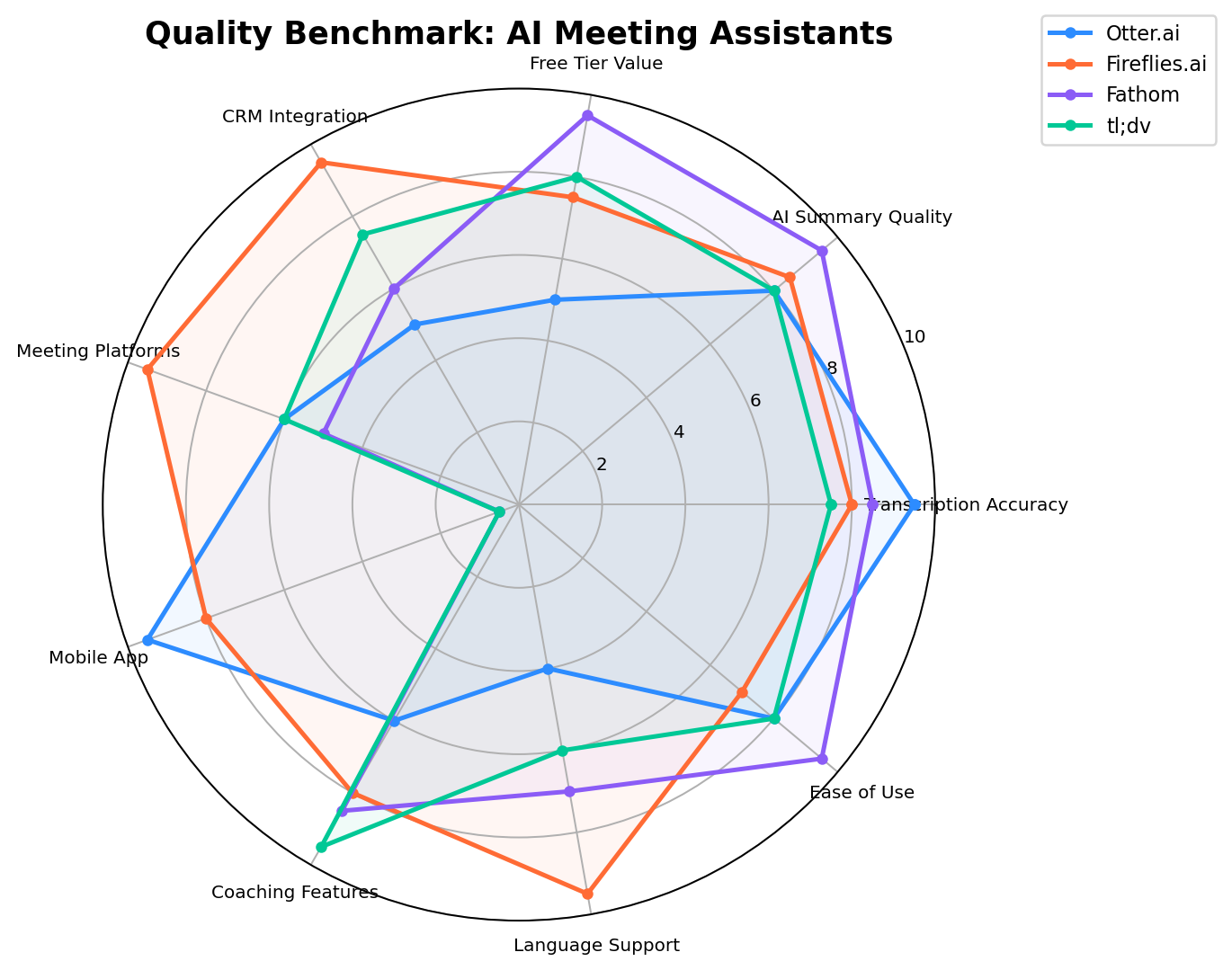
Quality benchmark across 8 dimensions. Otter dominates accuracy and real-time; Fireflies leads integration and languages; Fathom wins on free value and summaries; tl;dv excels at coaching. 🧪 Real-World Test Scenarios
Scenario 1: Weekly Team Standup Meeting
Task: A 8-person product team runs daily 15-minute standups on Google Meet. They need accurate notes, action items, and a searchable record — but no fancy CRM logging or sales coaching features. Budget is tight; most team members are not power users.
Best tool: Fathom. The free tier covers unlimited recordings and 5 AI summaries/month (more than enough for daily standups). Fathom's concise summaries — one paragraph plus action items — are perfect for standups where you just need the quick recap. No bot configuration headaches, no per-meeting time limits, and no monthly minute caps. Fireflies works too but adds unnecessary complexity for a simple standup. Otter's 300-minute free cap would run out within two weeks. tl;dv is overkill with its sales coaching features.
Scenario 2: Sales Discovery Call with CRM Sync Needed
Task: A 10-person B2B sales team uses Salesforce. They need every discovery and demo call automatically transcribed, summarized, and logged to the correct opportunity record. The sales manager also wants conversation intelligence — talk-time ratios, competitor mentions, and deal risk signals.
Best tool: Fireflies. The native Salesforce integration automatically logs transcripts, summaries, action items, and topic tags to the corresponding opportunity — no manual entry. The AskFred AI lets the manager query across all calls: "Show me every call where the competitor was mentioned this quarter." Conversation intelligence tracks talk-time ratios, sentiment trends, and deal velocity. Estimated cost: ~$1,200/year (10 Pro users at $10/user/mo annual). tl;dv Business would cost $7,080/year — 6x more for similar CRM support. Otter's Salesforce integration requires Enterprise, making it impractical.
Scenario 3: Multilingual Client Consultation
Task: A consulting firm runs client meetings in English, Mandarin, and Spanish across three offices. They need accurate transcription in all three languages, searchable transcripts, and summaries that can be shared with non-attendees who may not speak the original meeting language.
Best tool: Fireflies. With 100+ language support, Fireflies is the only tool that handles all three languages reliably. Transcripts in Mandarin and Spanish are processed with the same quality as English — a claim no competitor can make. Otter supports only English, Spanish, French, Italian, German, and Portuguese (Mandarin is not supported). Fathom's 38 languages include Mandarin but with lower accuracy than Fireflies for Asian languages. The ability to search across multilingual transcripts and build a cross-language knowledge base is unique to Fireflies in this comparison.
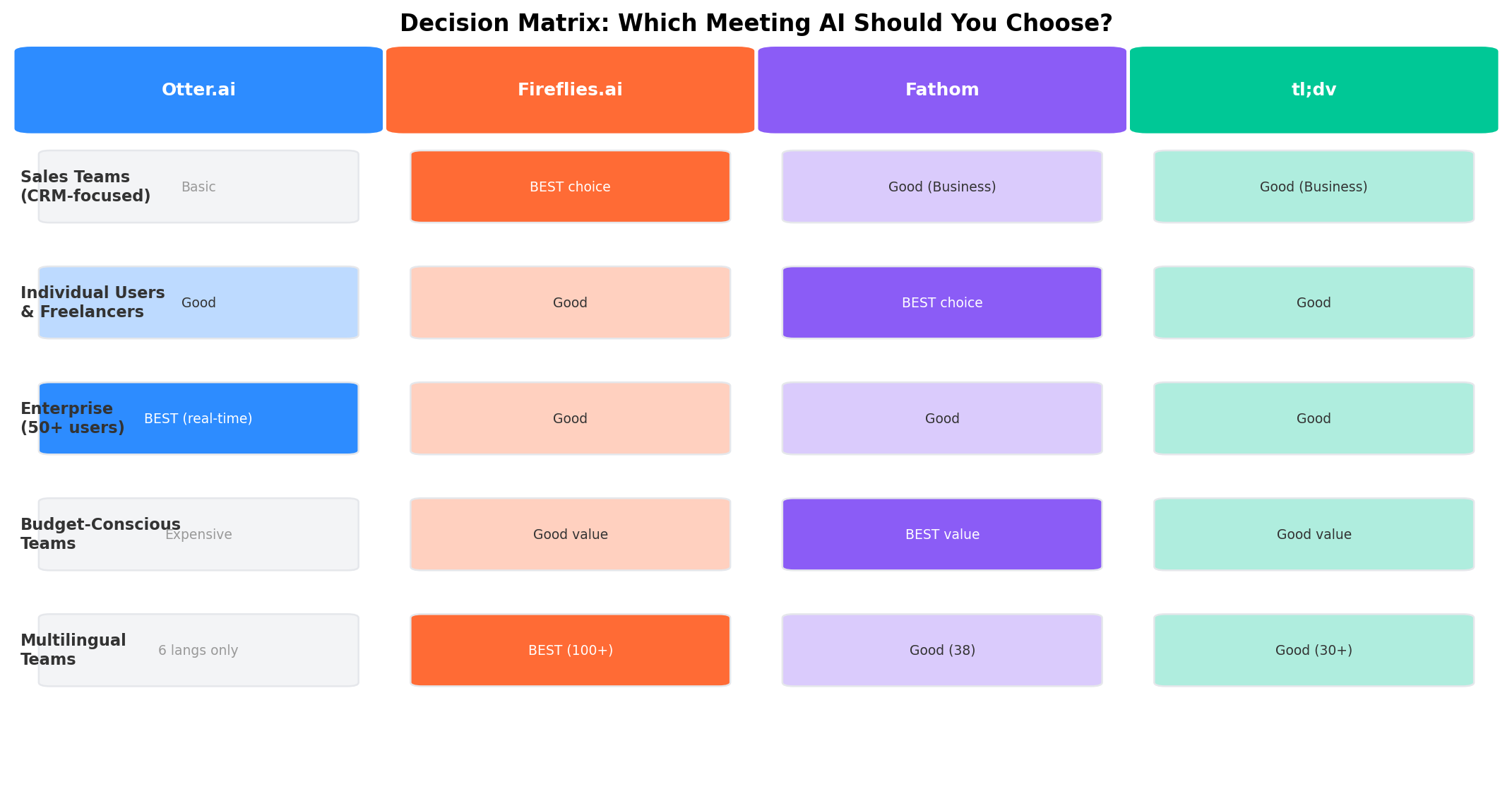
Decision matrix — match your use case to the right platform. No single tool dominates; the best choice depends on your primary meeting workflow. 🔍 Alternatives Worth Considering
Tool Starting Price Standout Feature Best For Grain Free (limits) Video-first with automatic highlights Teams wanting clip-worthy meeting moments Avoma $24/user/mo End-to-end meeting lifecycle + revenue intelligence Revenue teams wanting full pipeline visibility MeetGeek $10/user/mo 60+ language support + automated workflows Cost-conscious teams needing multilingual support Supernormal $15/user/mo AI agenda builder + meeting templates Structured meeting workflows and prep Read.ai Free (limits) Real-time coaching prompts during meetings Managers wanting live meeting interventions 2026 industry trend: AI meeting assistants are consolidating around two models: the "meeting companion" (Fathom, Otter) focused on individual productivity, and the "revenue intelligence platform" (Fireflies, tl;dv, Avoma, Gong) focused on sales teams. The gap between these categories is widening — free tools are getting better at basic transcription, while enterprise tools are adding coaching, forecasting, and deal analytics. Microsoft Copilot and Google Gemini are also entering the meeting space natively, which may commoditize basic transcription further by 2027.
🏆 The Verdict
Best for Live Transcription & Accuracy -> Otter
If you need real-time transcription — live captions during meetings, accessibility support, or the ability to reference what was just said — Otter is the only tool that delivers. Its 93-95% accuracy is the highest in this comparison, and Otter for Desktop captures audio from any application, not just video conferencing. At $8.33/user/mo annual, it is also the cheapest paid option. The trade-off: limited language support (6 languages), basic CRM integration, and the most restrictive free tier.
Best for Sales Teams & CRM -> Fireflies
For sales teams running on Salesforce, HubSpot, or Pipedrive who need automatic call logging, conversation intelligence, and multilingual support, Fireflies is the most complete platform. The AskFred AI creates a searchable knowledge base across your entire meeting history. 100+ language support makes it the only viable option for global teams. At $10/user/mo annual (Pro), it delivers strong value for CRM-heavy workflows.
Best for Budget Users & Free Tier -> Fathom
If you want a capable meeting assistant without paying, Fathom's free tier is unmatched: unlimited recordings, unlimited transcriptions, unlimited storage, and 5 AI summaries per month. Even on paid plans, Fathom's one-paragraph summaries and action item extraction are the best in this comparison for quick post-meeting reviews. The bot-free option (Fathom 3.0 beta) is also a differentiator for teams concerned about bot visibility. Fathom is the simplest tool here — minimal configuration, zero learning curve, and results that are immediately useful.
Best for Sales Coaching & Deal Intelligence -> tl;dv
For revenue teams running structured sales methodologies (BANT, MEDDICC, SPIN, Challenger), tl;dv's playbook tracking, AI coach, and multi-meeting intelligence are unmatched. The video clipping and sharing features are the best in this comparison for creating training clips from actual calls. However, the $59/user/mo Business plan is expensive — best justified for teams of 10+ where coaching ROI is measurable.
Best Overall Value -> Fathom
For most users — individuals, small teams, freelancers, and anyone who wants AI meeting notes without complexity — Fathom delivers the best overall value. The generous free tier means many users will never need to pay. For those who do upgrade, the paid plans offer good features at competitive prices. Fathom's simplicity is its superpower: install, auto-join, get your summary, move on. No credits to track, no minutes to manage, no integrations to configure unless you want them. For 80% of meeting use cases, Fathom is the right answer.
❓ Frequently Asked Questions
Which AI meeting assistant has the best free plan?
Fathom offers the best free tier with unlimited recordings, transcriptions, and storage (5 AI summaries/month). tl;dv also offers unlimited recordings with 10 AI notes per month. Fireflies offers unlimited meetings on its free plan but with limited AI credit access. Otter limits free users to 300 minutes/month with a 30-minute per-meeting cap, making it the most restrictive free plan in this comparison. If budget is your primary concern and you do not need CRM or coaching features, Fathom's free tier is genuinely sufficient for daily use.
Does Otter.ai support real-time transcription?
Yes, Otter.ai is the only tool in this comparison that offers real-time transcription — the transcript appears as the meeting progresses. Fireflies, Fathom, and tl;dv all process transcripts after the meeting ends, typically within 5-15 minutes. Otter's real-time capability makes it essential for accessibility (live captioning for hearing-impaired participants), live note-taking during presentations, and situations where you need to immediately reference what was just said. Otter Chat also lets you query the live transcript during the meeting.
Which AI meeting assistant is best for sales teams?
Fireflies.ai is best for sales teams due to its deep CRM integrations (Salesforce, HubSpot, Pipedrive, Zoho) with automatic logging. tl;dv is also strong with playbook tracking (BANT, MEDDICC) and objection handling detection. The choice between them depends on your priority: choose Fireflies for CRM automation and multilingual support at a lower price ($10/user/mo Pro), or choose tl;dv for structured sales coaching and video clip creation ($18/user/mo Pro). For most sales teams, Fireflies at the Pro tier offers the best balance of CRM depth and cost.
Can I use these tools without a visible bot joining my meeting?
Fathom offers a bot-free capture option (launched in beta in April 2026 as part of Fathom 3.0). This means Fathom can record and transcribe your meeting without a visible bot participant appearing in the attendee list — a significant advantage for client-facing calls where bot presence may be unprofessional. All other tools (Otter, Fireflies, tl;dv) require a visible bot to join your meetings. Fathom's bot-free option is still in beta and may not support all conferencing platforms equally, but it represents a clear differentiator.
How accurate is AI meeting transcription?
Otter.ai has the highest transcription accuracy at 93-95%. Fireflies and Fathom both achieve 90-93% (up to 95% in good audio conditions with clear speakers and minimal background noise). tl;dv is approximately 90% accurate. All four tools handle English well but accuracy drops for accented speech, multiple speakers talking simultaneously, and poor audio quality. Technical terminology, industry jargon, and proper nouns can also reduce accuracy. For critical meetings where every word matters, Otter is the most reliable choice.
Do any AI meeting assistants work without Zoom, Teams, or Meet?
Otter offers Otter for Desktop (Mac/Windows) that captures audio from any application on your computer — not just video conferencing tools. This means you can transcribe in-person meetings, phone calls, webinars, YouTube videos, or any audio playing on your device. Fireflies supports additional platforms like Webex, BlueJeans, and Google Calendar-based meetings. Fathom and tl;dv work with Zoom, Meet, and Teams but require one of these platforms as the base. For capturing conversations outside of standard conferencing tools, Otter for Desktop is the only option in this comparison.