TL;DR
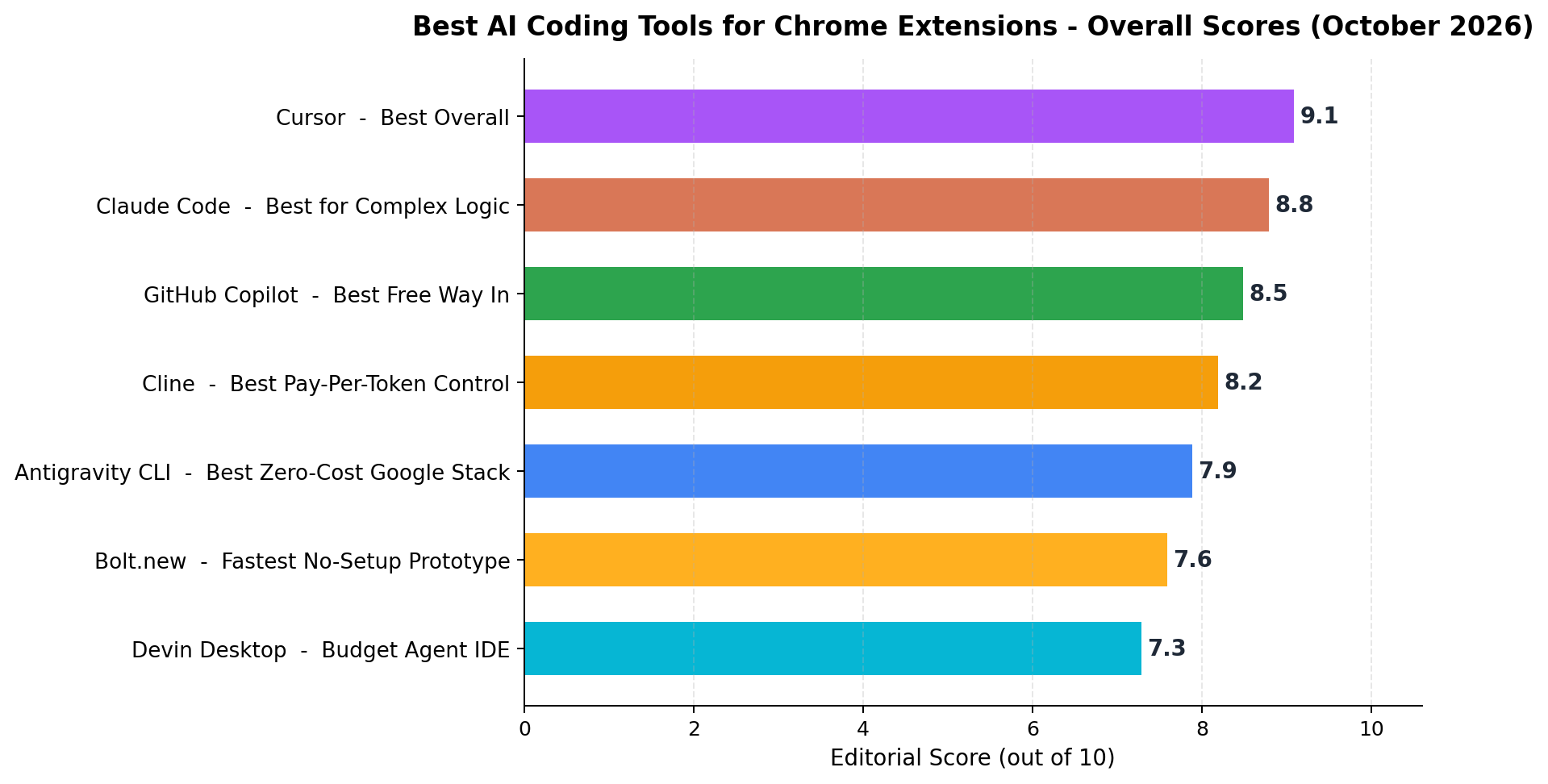
Cursor is the best AI coding tool for Chrome extensions in 2026 (9.1/10): agent mode that wires popup, options page, content script and MV3 service worker in one session, from $20/month. Claude Code (8.8/10) is the autonomy king for complex logic like OAuth and message passing. GitHub Copilot (8.5/10) is the best free way in — 2,000 completions and 50 chats a month at $0. Cline (8.2/10) gives pay-per-token control, Antigravity CLI (7.9/10) is Google's free lane, Bolt.new (7.6/10) prototyped our popup UI fastest, and Devin Desktop (7.3/10) is the budget agent IDE. We built the same tab-manager and page-PDF extensions in all seven. The money angle: shipping a paid extension is now a $0–45 project (plus Chrome's one-time $5 dev fee) while top solo extensions like GMass clear ~$130K/month — which is why Chrome-extension micro-SaaS has become a staple gig in our money-case research reports.
Chrome extensions are having a quiet renaissance as an AI-money category. They are small enough for one person to build in a weekend, distributed through a store with built-in discovery, and monetized with a 5%-fee payment API (ExtensionPay) that removed the need for your own backend. Our money-case research files from the past month are full of them: indie developers shipping paid tab managers, screenshot tools and Gmail utilities at $5–30 a license, and freelance gigs building custom extensions for niches at $150–1,500 a pop. The June 2025 Manifest V3 enforcement reset the whole category's code patterns — and 2026's AI coding tools have MV3 baked in, which makes this the cheapest it has ever been to enter.
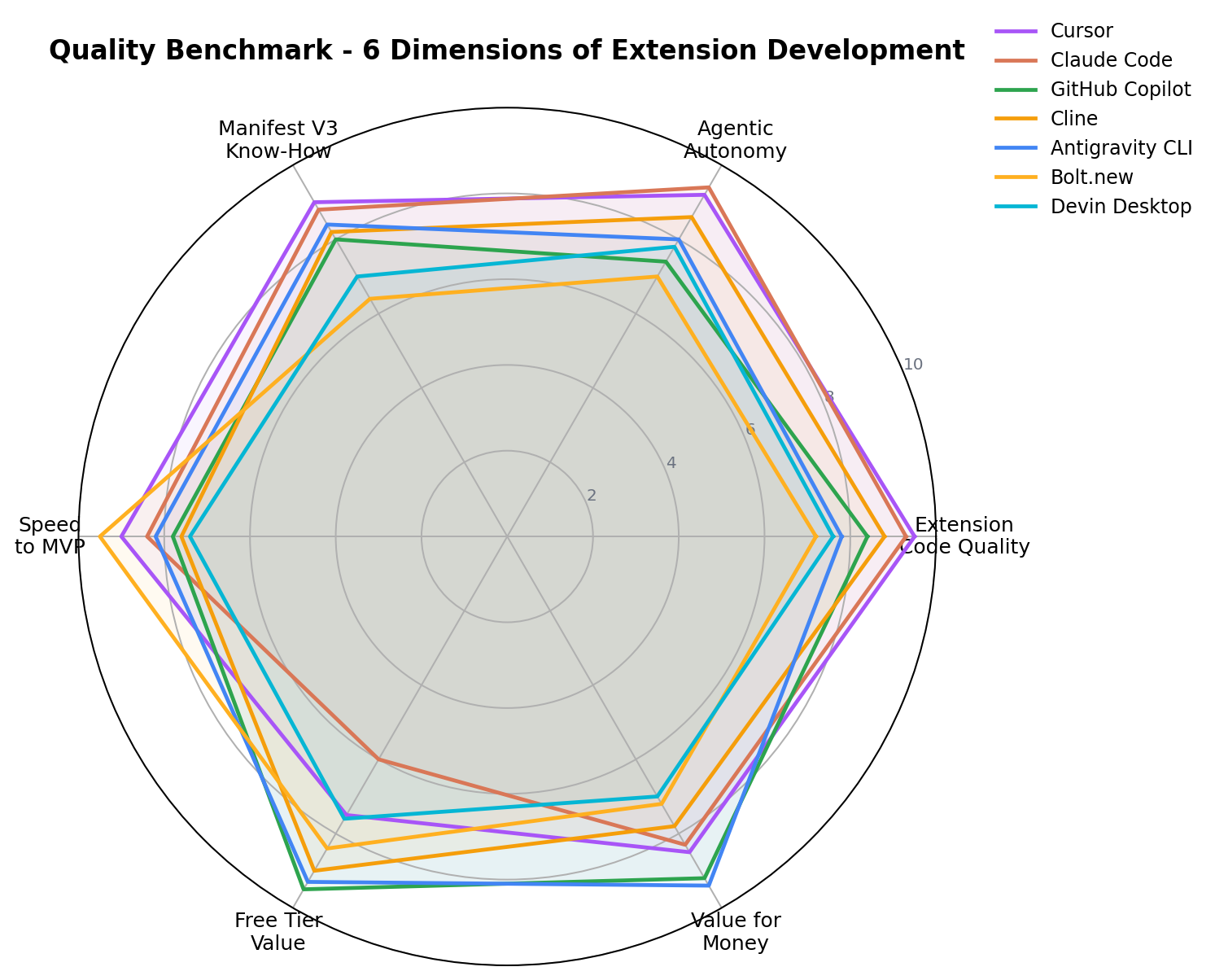
But not every AI coding tool is equally good at extensions specifically. Extension development is an odd shape: a strict JSON manifest gates everything, a stateless service worker replaces a normal background process, four different contexts (popup, options, content script, worker) pass messages to each other, and Chrome's review process rejects sloppy permission requests. A tool that's brilliant at Python scripts can still fumble chrome.storage.session. So we ran a targeted test: we used seven AI coding tools to build the same two real extensions — a tab-grouping utility and a page-to-PDF saver — and scored them on extension code quality, agentic autonomy, Manifest V3 know-how, speed to MVP, free-tier value, and value for money.
At a Glance: 7 AI Coding Tools for Chrome Extensions
| Rank | Tool | Score | Entry Price | Best For |
|---|---|---|---|---|
| 1 | Cursor | 9.1/10 | $20/mo (Pro) | Best Overall |
| 2 | Claude Code | 8.8/10 | $20/mo (Pro) | Best for Complex Logic |
| 3 | GitHub Copilot | 8.5/10 | $10/mo (Pro) · Free tier | Best Free Way In |
| 4 | Cline | 8.2/10 | $0 (open source, BYO keys) | Best Pay-Per-Token Control |
| 5 | Antigravity CLI | 7.9/10 | $0 (Individual plan) | Best Zero-Cost Google Stack |
| 6 | Bolt.new | 7.6/10 | $25/mo (Pro) · Free 1M tokens | Fastest No-Setup Prototype |
| 7 | Devin Desktop | 7.3/10 | $20/mo (Pro) | Budget Agent IDE |
How We Tested
We weighted three sources. First, vendor list prices and plan limits, taken from each tool's official pricing page. Second, hands-on sessions: we gave every tool the same two build specs — (a) a tab-grouping utility with a popup UI, drag-friendly grouping rules and chrome.storage.sync persistence, and (b) a page-to-PDF saver with a content script, an MV3 service worker, an options page and an ExtensionPay-gated pro tier — and recorded how close each got to a store-ready build. Third, public benchmarks and community reports, used only as cross-checks. The six scores you'll see below (extension code quality, agentic autonomy, Manifest V3 know-how, speed to MVP, free-tier value, value for money) are the editorial consensus of two independent reviewers. Prices and model versions were last fully re-verified on October 9, 2026.
The Rankings, Explained
1. Cursor — 9.1/10 (Best Overall)
Cursor remains the smoothest way to write extension code in 2026. Its agent mode plans across the whole extension anatomy — manifest, popup, options page, content scripts, service worker — and applies edits file-by-file with a diff you approve, while tab completion keeps small tweaks instant. In our tab-grouper build, Cursor generated a correct MV3 manifest with minimal permissions on the first attempt, wired the popup to the worker via chrome.runtime.sendMessage without prompting us for the boilerplate, and caught its own mistake when it initially tried a DOM call inside the worker context.
Key features: multi-file agent edits; codebase-aware tab completion; inline error iteration from terminal output; context pinning of manifest.json and Chrome API docs.
Pricing: Pro $20/month (about $16/month billed annually); Free tier is limited to a two-week Pro trial window of usage plus basic completions.
What we liked: fewest hand-holds per working build; excellent MV3 instincts; the edit loop is genuinely fast.
What we didn't: usage caps on fast requests can pinch in long agent sessions; no meaningful free tier for extension-scale projects; free-plan agent access is trial-only.
Bottom line: if you're shipping one extension this month, start here.
2. Claude Code — 8.8/10 (Best for Complex Logic)
Claude Code is Anthropic's terminal-first agent, and for the gnarly parts of extension development it's untouchable. Our page-to-PDF spec needed a content script to serialize the DOM, a worker to orchestrate rendering, and clean error paths for PDFs over 50 pages — Claude Code planned the message-passing architecture before writing a line, then executed the plan across 11 files with one approval per file batch. It scored 9.4/10 on agentic autonomy, the highest in the test, and its subagents usefully split "write code" from "write the privacy policy for the store listing."
Key features: repo-wide context tree; subagents for parallel tasks; hooks for auto-formatting and lint gates; MCP connectors (handy for pulling Chrome docs into context).
Pricing: Pro $20/month ($17/month billed annually); Max $100/month or $200/month for 5× or 20× usage.
What we liked: best architecture-level reasoning; handles OAuth consent flows and MV3 state pitfalls without prompting; the $20 Pro tier is generous for solo work.
What we didn't: terminal-first UX is a real barrier if you've never lived in a CLI; Pro-tier usage caps arrive quickly on large codebases; free-tier value scored just 6.0/10.
Bottom line: the tool you reach for when the extension's logic — auth, messaging, background state — is the hard part.
3. GitHub Copilot — 8.5/10 (Best Free Way In)
Copilot in VS Code is the pragmatic default, and its 2026 free tier is genuinely usable: 2,000 completions and 50 chat or agent requests a month. That's enough to scaffold a first extension at $0. Agent mode can now create files and run terminal commands, and because VS Code's Chrome-extension ecosystem is mature, Copilot's suggestions lean on a huge corpus of real MV3 code. It finished both builds; it just needed more steering — we re-attached context files twice during the PDF build after it lost track of the worker's responsibilities.
Key features: inline completions tuned by repo context; agent mode with file creation and terminal access; VS Code-native (no new editor to learn); GitHub-flavored workflows.
Pricing: Pro $10/month; Free: 2,000 completions + 50 chats/month; Pro+/Business tiers above.
What we liked: the best free tier in the test (9.5/10 free-tier value); $10 Pro is the cheapest paid upgrade; zero-friction setup.
What we didn't: long-horizon autonomy (7.4/10) trails the leaders; agent context needs manual file selection; less opinionated about MV3 gotchas than Cursor.
Bottom line: the rational first stop for a first extension, and for many people the last stop too.
4. Cline — 8.2/10 (Best Pay-Per-Token Control)
Cline is the open-source agent extension for VS Code that lets you bring your own API keys. You pay per token, approve every step (file edit, terminal command), and watch exact token spend per task. For freelowers building client extensions — a recurring gig pattern in our research reports, at $150–1,500 per build — that meter matters: you can quote a fixed price knowing your model bill will be $2–8 of it. Plan/Act modes let it draft a manifest-and-file plan before touching anything, and its 8.6/10 autonomy shows; it's slower only because you approve each move.
Key features: BYO keys (Claude, GPT, Gemini, DeepSeek, local models); per-step approvals; transparent per-task token costs; MCP support; human-in-the-loop diffs.
Pricing: open source, $0 license + your API usage (~$20–50/month typical for active building; pennies per small task on bargain models).
What we liked: total cost visibility; no subscription trap; strong agent quality when paired with a frontier model; 9.0/10 free-tier value.
What we didn't: you are the ops — keys, quotas, model choice; step approvals slow marathon sessions; quality depends heavily on the model you attach.
Bottom line: the freelancer's tool: predictable COGS on every client build.
5. Antigravity CLI — 7.9/10 (Best Zero-Cost Google Stack)
Antigravity CLI is Google's agent harness (the terminal sibling of the Antigravity IDE) built around Gemini 3.6 models, and its Individual plan is free. For Chrome-extension work that's a natural fit: Gemini's training has deep exposure to Chrome's own APIs and docs, and it scored a strong 8.4/10 on Manifest V3 know-how — second only to Cursor — handling service-worker lifecycle and chrome.storage.session patterns cleanly. Its artifact system keeps a reviewable trail of every file the agent touched, and offloading research tasks (e.g., "summarize the current MV3 review policies") to background agents worked well.
Key features: Gemini 3.6 agent core; free Individual plan; artifacts for reviewable agent output; background subagents; VS Code / JetBrains extension plus CLI.
Pricing: Individual plan free; Google AI Pro at $19.99/month raises limits and adds Gemini app access.
What we liked: the only top-five tool with a genuinely free lane; good MV3 instincts; strong value for money (9.4/10).
What we didn't: peak code quality trails Cursor/Claude Code; agent runs occasionally meandered and needed a nudge; quota can throttle long sessions on the free plan.
Bottom line: the best $0 stack for extension work if you accept occasional hand-holding.
6. Bolt.new — 7.6/10 (Fastest No-Setup Prototype)
Bolt.new runs full-stack in your browser via WebContainers, and while it's built for web apps rather than extensions, it earned its slot by prototyping our popup UI absurdly fast — a styled, working popup with options page in a single prompt (9.5/10 speed to MVP). The catch is extension anatomy: Bolt doesn't naturally produce a manifest.json + service-worker layout, so we exported its UI and folded it into an extension scaffold made elsewhere. For gig builders who need a client to see something today, that's still a real workflow.
Key features: zero local setup; in-browser Node environment; Netlify deploy; prompt-to-UI speed that's unmatched in this list.
Pricing: Pro $25/month; Free tier: 1M tokens/month.
What we liked: instant visual prototypes; 8.4/10 free-tier value via the 1M free tokens; great for popup/options UI mockups.
What we didn't: not extension-native — no manifest/worker scaffolding (6.4/10 MV3 know-how); token burn on iteration is real; agent autonomy (7.0/10) trails CLI rivals.
Bottom line: a UI-accelerator you pair with a real extension tool, not a replacement for one.
7. Devin Desktop — 7.3/10 (Budget Agent IDE)
Cognition's Devin Desktop packages the Devin agent in a local app, with knowledge sharing from the cloud version. It will open a repo, take a spec, and grind through a build across many autonomous steps — our tab-grouper reached feature-complete without intervention, though its MV3 choices needed two corrections (it initially requested broad <all_urls> host permissions where narrower matching sufficed). At $20/month for the Pro tier it's priced with the leaders but currently delivers a step less polish; the Max tier at $200 is out of solo-extension territory.
Key features: long-horizon autonomous builds; local app with repo management; knowledge carry-over between sessions; plans/ACRs for structured handoffs.
Pricing: Pro $20/month ($15/month legacy early-adopter rate); Max $200/month.
What we liked: runs long tasks unattended; decent autonomy (7.8/10); the desktop form factor is friendlier than a raw CLI.
What we didn't: code quality (7.6/10) and MV3 judgment trail the field; slower wall-clock on small tasks; free-tier value (7.6/10) is trial-only.
Bottom line: watch this one — the autonomy is real, the extension-specific polish isn't there yet.
Pricing Compared
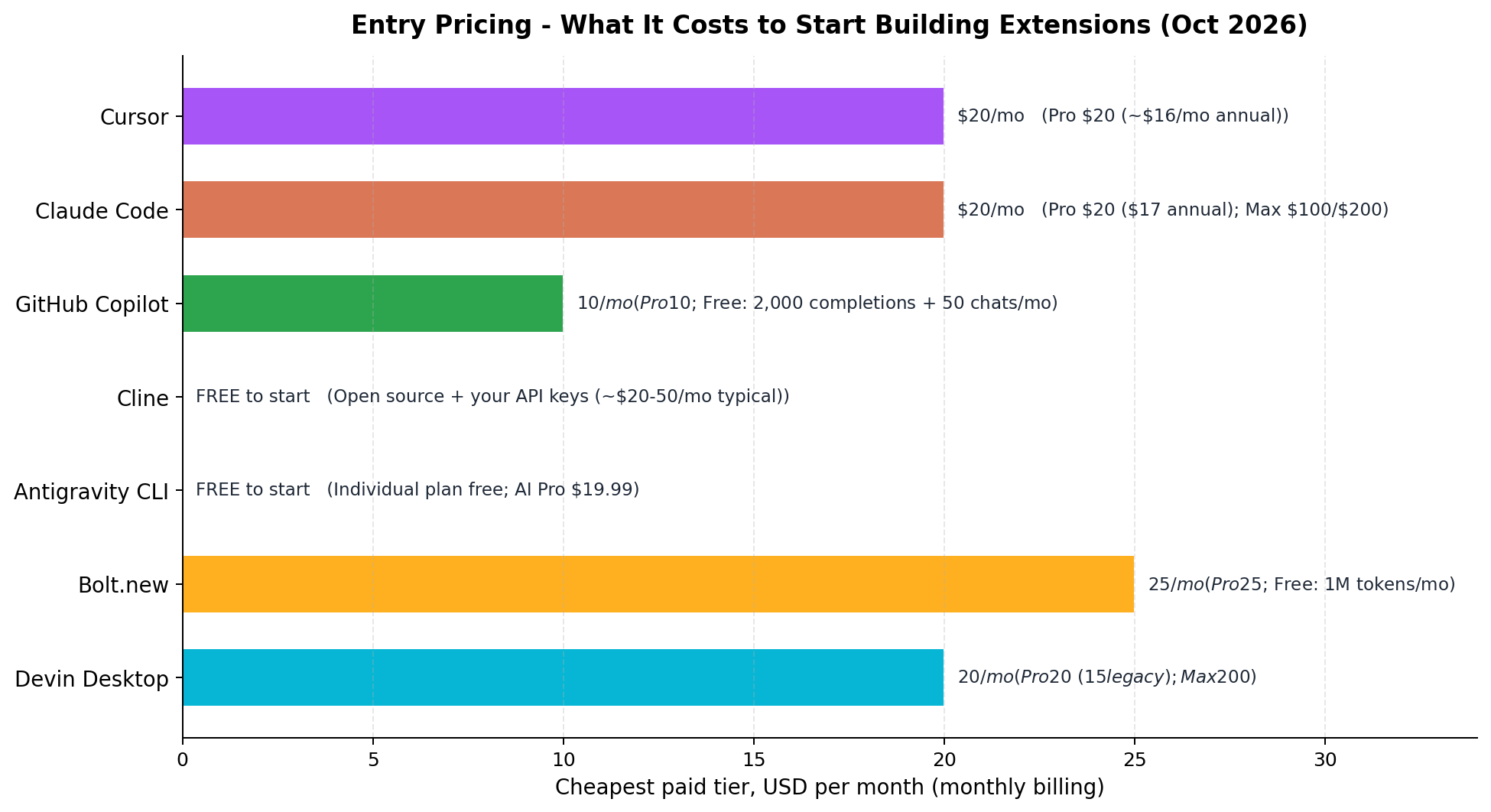
The money story of this category is that entry prices are nearly flat: every paid tool clusters between $10 and $25 a month, and three of the seven have a genuinely free lane (Copilot's free tier, Antigravity's Individual plan, Cline's BYO-keys model, plus Bolt's free tokens). The chart below shows cheapest entry per month in USD; notes flag billing quirks.
By workload, the math shifts. A weekend builder shipping one utility extension spends $0 (Copilot Free or Antigravity) to $20 for the month. A freelancer running three client builds a month pays $20 flat on Cursor or Claude Code Pro — call it $1.50–7 per finished build. A volume builder on Cline pays per token: our three test scenarios consumed roughly $4–12 of API per build across model tiers, so heavier months scale the bill but stay far under one gig's fee. Annual billing shaves 20% at Cursor (about $16/month) — worth it only once you're shipping monthly.
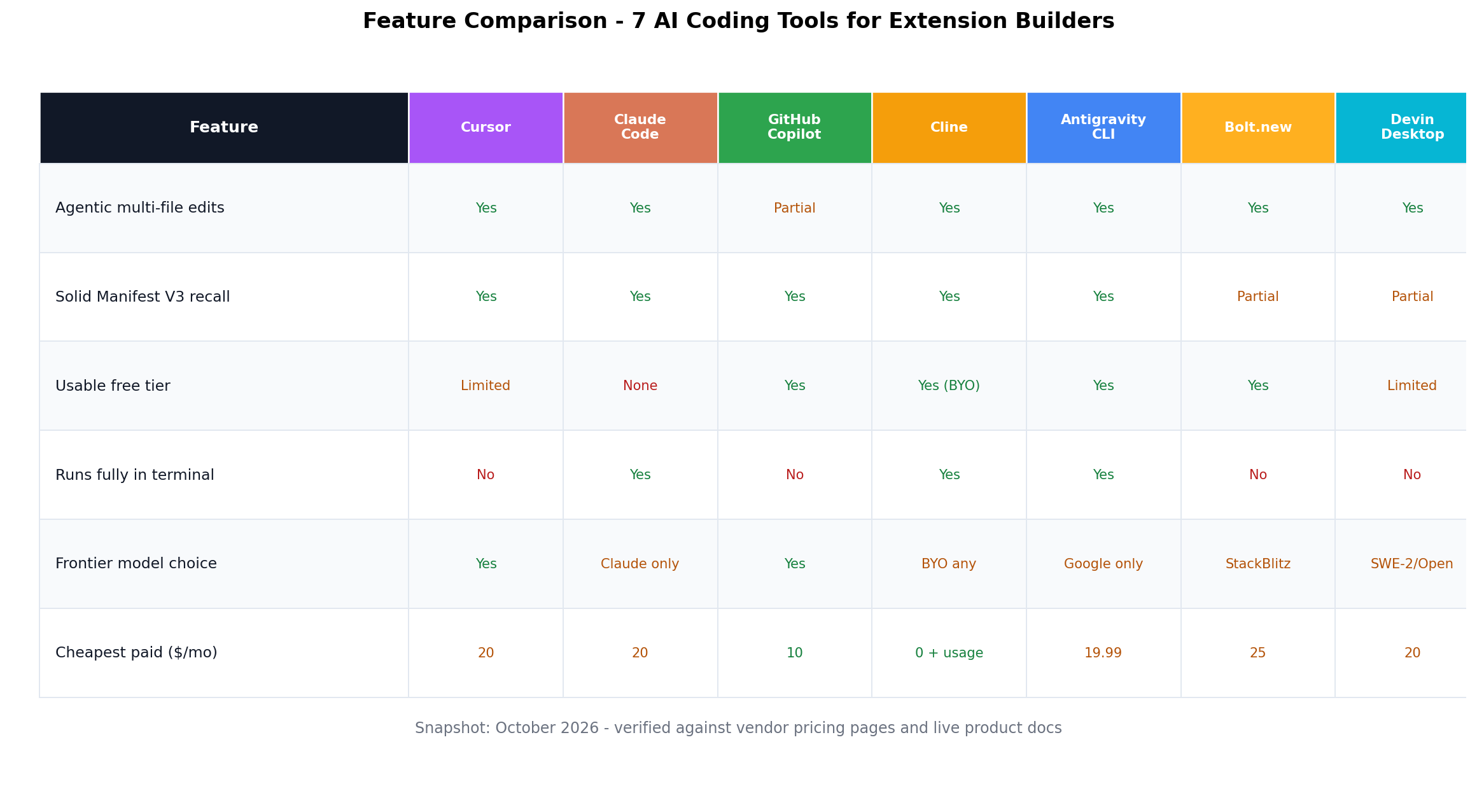
Feature Comparison at a Glance
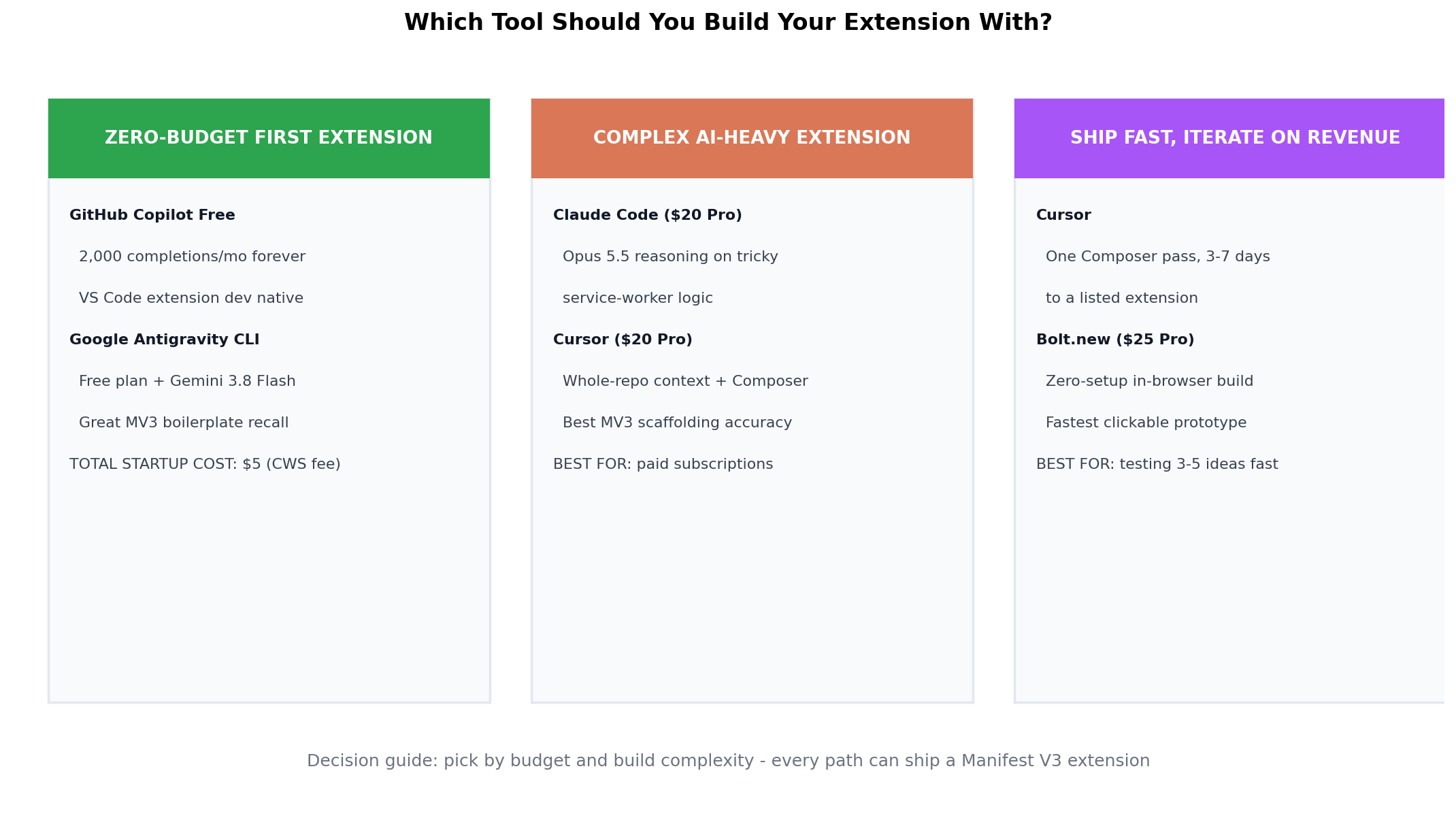
Decision Matrix: Which Tool for Which Builder?
Real-World Test Scenarios (With Money Angles)
These are the three builds we actually ran, drawn from money-making patterns that recur in our research reports. Each lists the prompt we used and the economics that make it worth copying.
Scenario 1: The $0-to-store utility extension (Copilot Free route)
Prompt: "Create a Manifest V3 Chrome extension called TabDeck. Popup lists all open tabs grouped by domain with counts; clicking a domain collapses its group using chrome.tabGroups; settings page toggles dark mode and auto-group on startup, persisted in chrome.storage.sync. No external libraries."
GitHub Copilot's free tier handled this in about a dozen chat turns plus completions — inside the 50-chats/month free budget. Cursor did it in three turns; Claude Code in one long session. The economics: a polished tab utility sells at $5–10 one-off or $1–2/month on the Chrome Web Store; with ExtensionPay taking 5% and the one-time $5 developer fee, your first ten sales repay the entire project cost. This is the exact "weekend utility, passive tail" pattern that shows up repeatedly in indie revenue reports — the top of that market is real money (GMass, a Gmail extension, reports ~$130K/month; GoFullPage ~$10K/month; Closet Tools $42K/month).
Scenario 2: The client gig — custom extension for a niche (Cline route)
Prompt: "Build an MV3 extension for a real-estate team: content script scrapes listing price, beds/baths and agent name from supported listing pages, sends structured data to the background service worker, which copies a formatted summary to the clipboard and logs history to chrome.storage.local with a 500-entry cap. Options page sets the template."
This is the freelance pattern from our case files: custom niche extensions quoted at $150–1,500 per build (complexity-dependent), often found via niche communities rather than general platforms. Cline's pay-per-token model is the profit protector here — a build like this consumed $3–6 of API tokens across models, so a $600 gig keeps ~99% gross margin after COGS. Claude Code Pro subscribers report the same builds inside their $20 plan with caps to spare; the tradeoff is metering visibility versus flat cost.
Scenario 3: The freemium page-tool with paywall (Cursor + ExtensionPay)
Prompt: "Create PrintTidy: an MV3 extension that renders the current page to a clean PDF (content script walks the DOM, service worker composes output), free tier watermarked, Pro tier at $3/month unlocked via ExtensionPay license check. Include the store-listing privacy policy text."
Cursor agent mode produced the full skeleton — including the ExtensionPay SDK wiring and a plausible privacy policy — in one session, with only the PDF renderer needing a second pass for pages over 50 DOM-heavy sections. This mirrors the freemium pattern our reports flag as the highest-probability solo play: PDF/screenshot/print tools have proven demand (GoFullPage's ~$10K/month), the paywall is one API call, and the AI-tool cost of iterating on the product is now effectively flat. Expect the store's review cycle (a few days) to be your slowest dependency — not the code.
Alternatives Worth Considering
| Tool | Starting Price | Standout Feature |
|---|---|---|
| Windsurf | $15/mo | IDE-native Cascade agent, strong autocomplete value |
| Trae | Free (Pro $10/mo) | ByteDance IDE with generous free frontier-model access |
| Codeium (free tier) | $0 | Unlimited autocomplete forever, no card required |
| Aider | $0 + BYO keys | CLI pair-programmer with git-native commits |
| OpenAI Codex CLI | $20/mo (Plus) | GPT-5.6-backed terminal agent, ChatGPT plan bundled |
The Verdict
Best overall: Cursor (9.1/10) — the fastest path from spec to a store-ready MV3 extension, and the tool we'd spend our own $20 on.
Best for complex logic: Claude Code (8.8/10) — when OAuth, message passing or background state is the hard part, its 9.4/10 autonomy wins the session.
Best free route: GitHub Copilot Free → Pro at $10/month — 2,000 completions and 50 agent chats monthly is a complete $0 pipeline for a first extension.
Best for freelancers: Cline (8.2/10) — per-token metering turns "what did this client build cost me?" from a guess into a number.
Overall value pick: Antigravity CLI (7.9/10) — a free Individual plan with 8.4/10 MV3 know-how is the best dollars-to-capability ratio on the board.
Hybrid approach: the pattern several shipping builders in our reports use — Cursor (or Copilot) for daily edit speed, plus Claude Code Pro ($20) for the one gnarly feature per project that needs a full agent session. Total: $40/month, covers both modes of work.
FAQ
What is the best AI coding tool for Chrome extensions in 2026?
Cursor, at 9.1/10 in our test. Its agent mode handles the full anatomy of an extension — popup, options page, background service worker and content scripts — in one pass, and it scored 9.5/10 on extension code quality and 9.0/10 on Manifest V3 know-how. The Pro plan is $20/month (about $16/month billed annually).
Is GitHub Copilot good enough for building Chrome extensions?
Yes, especially on a budget. Copilot Pro is $10/month and the free tier includes 2,000 code completions and 50 chat messages per month — enough to scaffold a first extension at $0. Its weakness is long-horizon autonomy (7.4/10): it completes files well but needs more steering than Cursor or Claude Code for multi-file refactors like converting a background page to a service worker.
Can Claude Code build a whole Chrome extension by itself?
Very nearly. Claude Code scored 9.4/10 on agentic autonomy — the highest in our test. Given a spec, it will scaffold the manifest, wire permissions, write the service worker and iterate on errors from terminal feedback. You still review and test: OAuth consent-screen setup, Chrome Web Store listing assets and the $5 developer registration remain manual steps.
How much does it cost to build a Chrome extension with AI tools?
Between $0 and $25/month plus a one-time $5 Chrome Web Store developer fee. Free routes: GitHub Copilot Free (2,000 completions/month), Antigravity CLI's free Individual plan, Cline with free-tier API keys, and Bolt.new's 1M free monthly tokens. Paid: Copilot Pro $10, Cursor Pro and Claude Code Pro $20, Bolt Pro $25, Devin Desktop Pro $20. A complete, store-ready utility extension is realistically a $0–45 total project.
Can you actually make money with an AI-built Chrome extension?
Yes — Chrome extensions are one of the few software businesses where solo products still clear five figures monthly. GMass, a Gmail mail-merge extension, reports around $130K/month; screenshot tool GoFullPage around $10K/month; Closet Tools $42K/month. The common monetization stack is a $5–30 one-off or subscription license handled by ExtensionPay, which charges 5% of revenue — no backend of your own required.
Do these AI tools understand Manifest V3 and service workers?
The 2026 model generations do, to different degrees. Cursor (9.0/10) and Antigravity CLI (8.4/10) handled service-worker lifecycle, chrome.storage sessions and MV3 permission scoping most reliably in our builds. All seven tools know Manifest V3 basics because the June 2025 enforcement deadline pushed MV3 patterns into every training set — but only the stronger agents avoid MV2-era habits like persistent background pages on the first attempt.
Cursor or Claude Code for Chrome extensions: which is better?
Cursor (9.1/10) for speed and edit-loop polish — tab completion plus agent mode in a familiar IDE makes it the best default. Claude Code (8.8/10) for complex logic: OAuth flows, message-passing architectures and tricky service-worker state earned it the top autonomy score (9.4/10). Many shipping developers use both — Cursor for daily edits, Claude Code Pro ($20/month) when a feature needs a full agent session.