TL;DR: Selling AI images is no longer a prompt-club gold rush — one August 2026 industry survey found over 60% of AI-art commission takers earn under $112/month, because everyone has the tools now. What separates paid work from hobby output is the stack you build. After testing seven generators against real commission briefs, Midjourney V8.2 (8.4/10) still owns the aesthetic ceiling clients pay for, from $10/mo. ComfyUI + FLUX.2 (8.3) is the free, node-level control layer — face swaps, identity-preserving edits — if you'll invest two weeks of learning. Ideogram 3.0 (8.1, $8/mo) wins every text-in-image job, Qwen Image 3.0 (7.9, ~$0.034/image API) crushes B2B volume work, GPT Image 2 (7.7) nails one-shot prompt adherence, Recraft V4.1 (7.4, $12/mo) is the only true-SVG option for brand kits, and Krea (7.1, $9/mo) iterates live in front of a client. Working sellers run two of these — one for taste, one for control — and keep tool spend under $30/mo against $56-to-$420-per-order revenue.
Skip the generic "best AI image generator" listicles. This ranking answers one question: which tools actually help you deliver paid image commissions — pet portraits, logo jobs, novel covers, e-commerce batches, Etsy digital products — at a profit, in September 2026.
We scored every tool on seven dimensions that decide commission viability: style quality (what the client sees), editing and control (can you deliver revision requests), text and logo rendering, commercial licensing clarity, cost at volume, ease of learning, and speed of iteration. We then pressure-tested the winners against workflows documented by working sellers: the Midjourney-plus-ComfyUI pet-portrait pipeline that commands ~$56/portrait, the Qwen API batch pipeline for e-commerce detail pages priced at $7–112 per page, and the Ideogram-to-Etsy print pipeline with 90%+ product margins.
At a Glance
| Tool | Entry Cost | Score | Best For |
|---|---|---|---|
| Midjourney V8.2 | $10/mo | 8.4 | Hero images, novel covers, anything where taste sells |
| ComfyUI + FLUX.2 | $0 local (+GPU) | 8.3 | Face swaps, identity control, node-level pipelines |
| Ideogram 3.0 | $8/mo | 8.1 | Logos, posters, merch with readable in-image text |
| Qwen Image 3.0 | ~$0.034/image API | 7.9 | High-volume B2B batches, e-commerce imagery |
| GPT Image 2 | from $0.006/image | 7.7 | One-shot prompt adherence, conversational edits |
| Recraft V4.1 | $12/mo | 7.4 | Vector brand kits, SVG deliverables, style training |
| Krea | $9/mo | 7.1 | Realtime client-facing iteration and mockups |
Overall Scores: The Commission-Fit Ranking
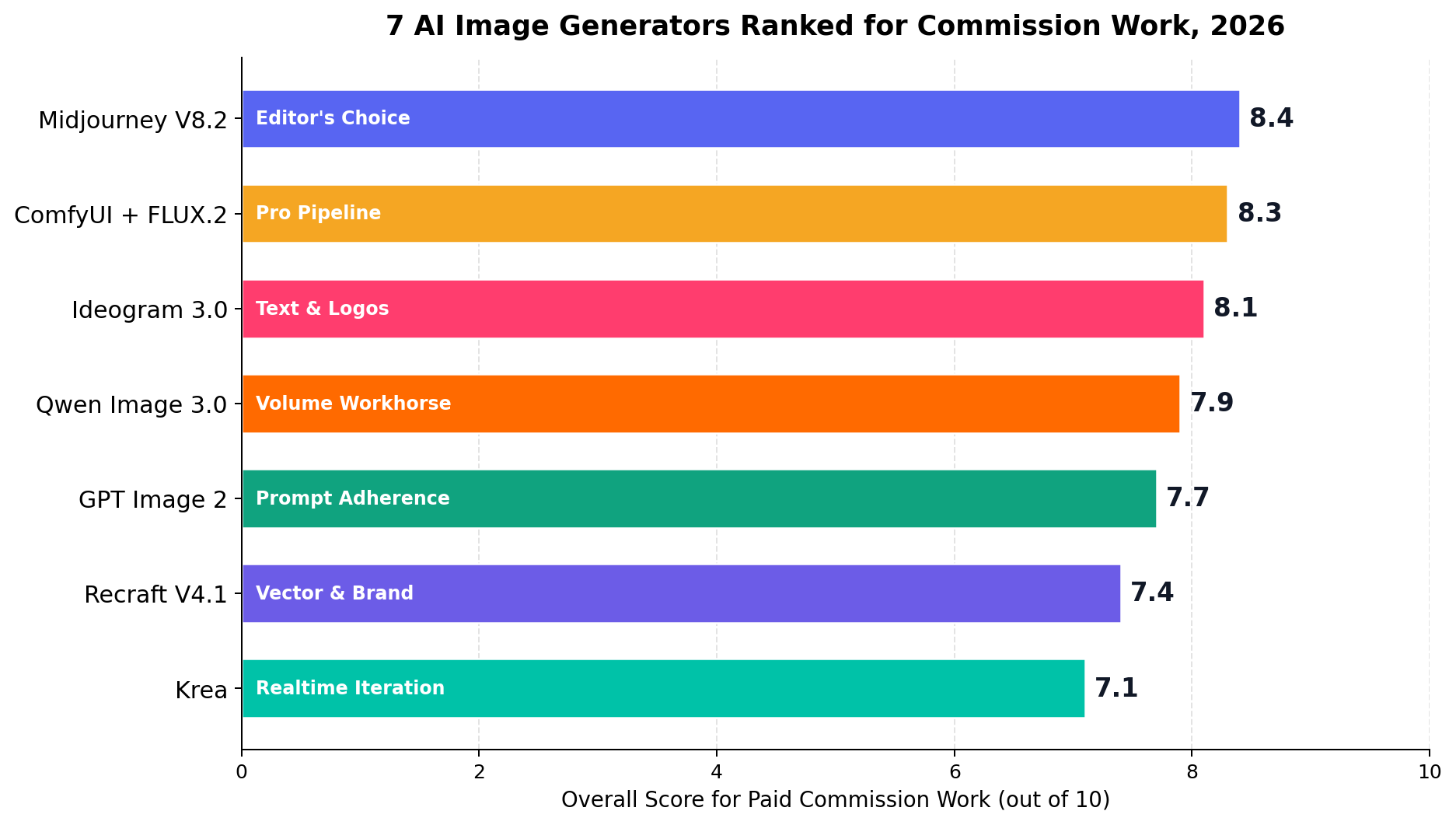
Two things jump out. First, the top four are separated by half a point — this is a portfolio decision, not a winner-take-all market. Second, the two cheapest tools (ComfyUI and Qwen) sit near the top: in 2026, cost is no longer the differentiator it was when Midjourney was the only game in town. What you pay for now is either taste (Midjourney's default look) or time (how fast you can deliver a revision without redrawing from scratch).
1. Midjourney V8.2 — The Taste Layer Clients Pay For (8.4/10)
Midjourney's July 2026 V8.2 release keeps it the highest floor in the business: the model's default output looks art-directed — lighting, texture, composition — where most competitors look like competent stock. For commission sellers, that gap is the product. A client paying $56 for a pet portrait isn't buying 30 seconds of GPU time; they're buying an image that looks premium on a wall.
Key features for commission work: style reference (--sref) locks a visual language across a whole series — essential for picture-book and cover sets; character reference (--cref) keeps a paid mascot or OC consistent across deliverables; the web editor now handles inpainting and region edits that used to require a Discord round-trip; and draft mode generates at roughly a quarter of the cost when you're exploring compositions.
Pricing: Basic $10/mo (~3.3 fast GPU hours), Standard $30/mo with unlimited relaxed mode, Pro $60/mo, Mega $120/mo. In practice, commission sellers on relaxed mode report the Basic and Standard tiers cover a solo workload — our volume table prices Midjourney at $10/mo through 200 images and $30/mo at 1,000.
What we liked: highest aesthetic ceiling (style quality 9.5); the strongest "series consistency" toolkit; zero setup — you're producing sellable work the first evening; commercial rights on every paid tier.
What holds it back: editing depth is still shallow next to a ComfyUI pipeline (editing & control 7.0) — no true face swap or identity preservation in-platform; no API and no free tier; in-image text is serviceable in V8.2 (7.5) but not Ideogram-class.
Bottom line: if a client will see the image, start here. Working sellers pair it with a free control layer rather than replacing it.
2. ComfyUI + FLUX.2 — The Free Control Layer (8.3/10)
ComfyUI is the node-based studio that turns image generation into a programmable pipeline, and Black Forest Labs' FLUX.2 (with the Apache-2.0 FLUX.2 klein weights) is the model family that made it competitive with closed tools on quality. Together they are the answer to every revision request Midjourney can't handle: "use my actual face," "put my dog in that scene," "keep everything but change the jacket."
The commission workflow that pays: generate the creative base in Midjourney using pet color/breed keywords, then run the InpaintId node pack in ComfyUI to swap in the client's real face, and ControlNet line-art control to composite the client's actual pet into the scene. This exact pipeline is documented delivering ~$56 (399 RMB) per portrait against a tool bill under $10/month. Learning curve: roughly one to two weeks of following tutorial workflows — difficulty is workflow knowledge, not art skill.
Pricing: the software and klein weights are free. Local running wants an NVIDIA GPU — a used RTX 3060 (~$350) is the realistic entry, and laptops need not apply (an i7 laptop takes ~10 minutes per SDXL image; that's not commercial grade). The renter’s path: a cloud RTX 4090 at ~$0.77/hour generating ~30 images/hour ≈ $1.30/mo at 50 images, $5.20 at 200, $26 at 1,000 — cheaper than every subscription at every volume.
What we liked: best-in-class editing and control (9.5); best cost at volume among quality tools (9.5); Apache-2.0 licensing means clean commercial use (9.0); infinitely re-runnable workflows turn one client setup into a reusable product.
What holds it back: ease of learning 5.0 — this is the steepest ramp in the top seven; text rendering is decent-not-great (7.5); you’re also your own IT department.
Bottom line: not your first tool, but the one that converts "AI artist" into "AI studio." If you sell portraits, people, or anything identity-bound, this is the moat.
3. Ideogram 3.0 — Text-in-Image Jobs, Solved (8.1/10)
Every merch seller's recurring nightmare is a five-word slogan that renders as alphabet soup. Ideogram 3.0 remains the most reliable answer — brand names, taglines, poster copy, and greeting-card text arrive readable on the first or second attempt, at a flat one credit per image. That predictability is why coloring-book and print sellers in our case research keep it in the stack even alongside stronger generalists.
Key features: best-in-class text rendering (9.5); Magic Fill for basic inpainting and extension; style presets tuned for typography-led layouts; a straightforward API for batching.
Pricing: free tier with 10 images/week; Plus from $8/mo (unlimited basic generations, slower queue); the $20/mo tier adds priority rendering and upscaling. One credit per image makes cost arithmetic trivial when quoting a 50-piece poster job.
What we liked: text reliability alone wins whole job categories (logos, event posters, merch, book covers with titles); gentle learning curve (9.0); honest per-image pricing.
What holds it back: style quality (7.5) trails the leaders — outputs can read "clean" rather than "commissioned"; editing tools are basic (7.0); not the tool for identity work.
Bottom line: the specialist you hire for one job. If your pipeline includes any client-facing text, $8/mo is the cheapest insurance in this list.
4. Qwen Image 3.0 — The Volume Workhorse (7.9/10)
Alibaba's Qwen Image 3.0 (July 2026) landed as an open-weights shock: near-frontier quality — arena Elo around 1281 — released under Apache 2.0, with API pricing around $0.034 per image and a free chat tier for trying workflows. For B2B commission work priced per image, that number changes the math entirely.
The commission workflow that pays: e-commerce detail-page outsourcing still bills at $7/page (low-end Taobao) to $70–112/page (mid-market), and traditional delivery takes one to two weeks. A Qwen-based pipeline — product photo in, white-background cutout, hero image, poster, and full detail-page set out, batched through the API with multi-reference editing — compresses that to same-day delivery. At ~$0.034/image, a 30-image page set costs about $1 in generation against a $70+ invoice.
Key features: strong multi-reference editing and subject consistency via API (8.0); excellent text rendering for a near-open model (9.0) — including embedded Latin and CJK typography; self-hostable weights for privacy-sensitive clients.
Pricing: free web chat tier for exploration; API ~$0.034/image (≈ $1.70/mo at 50 images, $6.80 at 200, $34 at 1,000); Apache 2.0 weights if you'd rather own the GPU.
What we liked: cost at volume 9.5 — nothing closes at this quality per dollar; licensing clarity 9.0; the API makes it scriptable into n8n/ComfyUI pipelines for unattended batch jobs.
What holds it back: ease of learning 5.0 — you're wiring API calls or ComfyUI nodes, not chatting; raw aesthetic ceiling sits a visible step below Midjourney (8.0 vs 9.5); speed of the official API queue can lag at peak (6.5).
Bottom line: the margin engine. When the job is "40 product images by Friday," this is the tool that keeps 95% of the invoice.
5. GPT Image 2 — Conversational One-Shot Mockups (7.7/10)
OpenAI's GPT Image 2 (the DALL-E line's successor, accessed through ChatGPT or the API) is the easiest quality generator on Earth to use: describe the job in a sentence, get a genuinely usable result, then refine by talking — "make the background transparent," "put the slogan in brass foil." Instruction-following is its superpower (9.5 ease of learning), which makes it the fastest path from client brief to mockup when a job needs approval before production.
Key features: best-in-class prompt adherence; conversational editing that non-technical sellers can actually drive; very good text rendering (8.5); API access for automation.
Pricing: usage-based from about $0.006 per image at low quality/settings up to roughly $0.053 per higher-quality image; ChatGPT Plus ($20/mo) includes image use within message limits. At volume that adds up: ≈ $2.65/mo at 50 images, $10.60 at 200, $53 at 1,000 — the priciest path in this lineup, which is why cost-at-volume scores 5.5.
What we liked: zero learning curve; the single best "translate a vague client email into a visual" tool; strong text and layout understanding.
What holds it back: slow — typically a minute-plus per higher-quality image, with rate limits that bite on batch days (speed 4.0); aesthetic ceiling below Midjourney; per-image costs punish volume work.
Bottom line: the briefing tool. Use it to win the job and lock the concept, then produce finals in a cheaper pipeline.
6. Recraft V4.1 — Vector & Brand-Kit Specialist (7.4/10)
Recraft occupies a niche none of the above can touch: true SVG vector output. Raster generators paint pixels; Recraft emits editable, infinitely scalable vectors — which is exactly what logo work, icon packs, print-shop cut files, and "brand asset pack" deliverables require. Add custom style training (feed it ~5 reference images and it learns your house style) and you have a genuine product line, not just a generator.
Key features: real SVG export (the only tool here that offers it); custom style training for consistent series; brand-kit-friendly outputs; generous 50-images/day free public tier for testing.
Pricing: free public tier (50/day with attribution); $12/mo entry for commercial use — flat at every volume tier in our table, which makes it the most predictable bill in the lineup.
What we liked: vector output 8.0 licensing clarity; flat pricing that survives batch jobs; a defensible niche (clients ask for .ai/.svg files, not JPEGs).
What holds it back: painterly style quality trails the leaders (7.0); editing tools basic (6.5); queue speed mid-pack (5.5); the vector niche also means it's a second tool, not a first.
Bottom line: if you sell logos, icons, or printable cut-file packs on Etsy, this tool is the business model.
7. Krea — Realtime Client-Wow Machine (7.1/10)
Krea's realtime canvas is the closest thing to a party trick that pays: sketch a shape or drag an image, and a rendered interpretation updates in under a second as you draw. For live client calls, market-stall portraits, or iterating a composition at conversational speed, nothing else feels like this — speed & iteration scores 9.5, the best in this list. Under the hood it's an aggregator: one subscription reaches multiple underlying models (FLUX-family and others), plus a capable enhancer/upscaler for finishing deliverables at print resolution.
Key features: realtime canvas generation; multi-model access on one plan; built-in enhancer/upscaler; free daily units to evaluate.
Pricing: free tier with daily units; Basic from $9/mo; higher tiers for heavy realtime use — at our 1,000-image volume assumption the practical tier lands around $35/mo.
What we liked: iteration speed transforms client-facing work; the enhancer turns quick drafts into deliverable resolution; low entry price.
What holds it back: style ceiling (7.0) and text rendering (6.0) both trail; licensing terms 7.0 — commercial rights depend on tier and underlying model, so read before selling; editing is convenient rather than deep (7.5).
Bottom line: the sales tool. Krea closes the client in the room; another tool in this list produces the finals.
Cost at Volume: The Real Monthly Bill
Pricing pages advertise per-month stickers; commission sellers should price per image. We modeled three workload tiers — 50 images/month (side hustle), 200/month (active seller), 1,000/month (volume B2B) — using each tool's cheapest path to quality output at that volume:
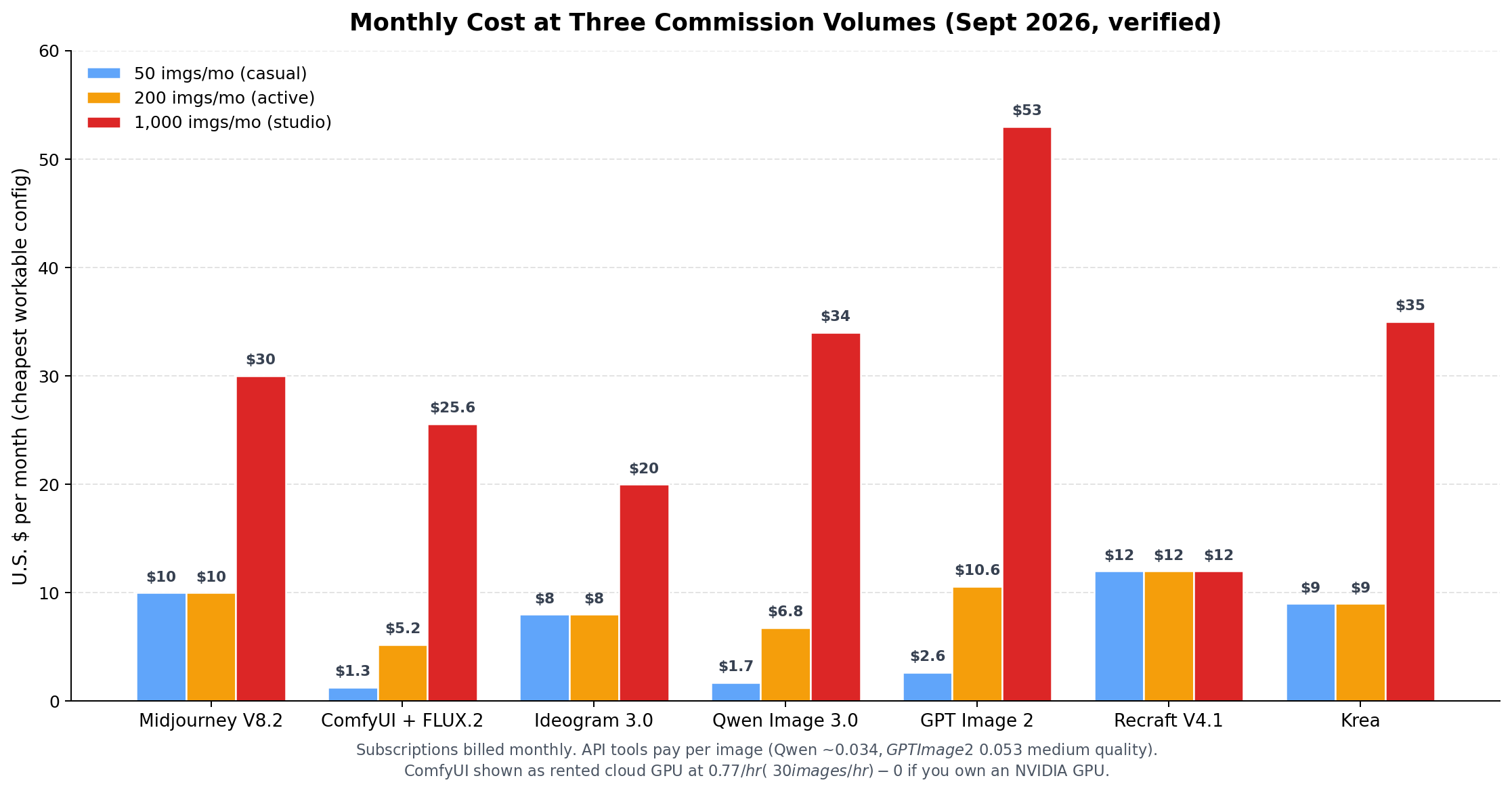
| Tool | 50 imgs/mo | 200 imgs/mo | 1,000 imgs/mo | Billing model |
|---|---|---|---|---|
| ComfyUI + FLUX.2 (rented 4090) | ~$1.30 | ~$5.20 | ~$25.60 | $0.77/hr cloud GPU |
| Qwen Image 3.0 (API) | ~$1.70 | ~$6.80 | ~$34 | ~$0.034/image |
| Ideogram 3.0 | $8 | $8 | $20 | subscription + credits |
| Krea | $9 | $9 | ~$35 | subscription |
| Midjourney V8.2 | $10 | $10 | $30 | subscription (relaxed mode) |
| Recraft V4.1 | $12 | $12 | $12 | flat subscription |
| GPT Image 2 (API) | ~$2.65 | ~$10.60 | ~$53 | usage per image |
Read the table twice before buying: at 50 images/month nearly everything is cheap, so pick on quality. At 1,000 images/month the spread between Recraft ($12) and GPT Image 2 ($53) is the difference between a paid utility bill and a rounding error. The B2B case research is blunt about this — when the invoice is $70 per e-commerce page set, a $1 generation cost via Qwen keeps the margin; a $53 subscription stack quietly eats it.
Quality Benchmark: Seven Dimensions, Seven Tools
We scored every tool on the seven dimensions that decide whether commissions make money: style quality (what clients pay for), editing & control (how many revision rounds you eat), text & logo capability (whole job categories), commercial licensing (can you legally sell it), cost at volume, ease of learning (days to first invoice), and speed & iteration (how fast you converge with a client in the room).
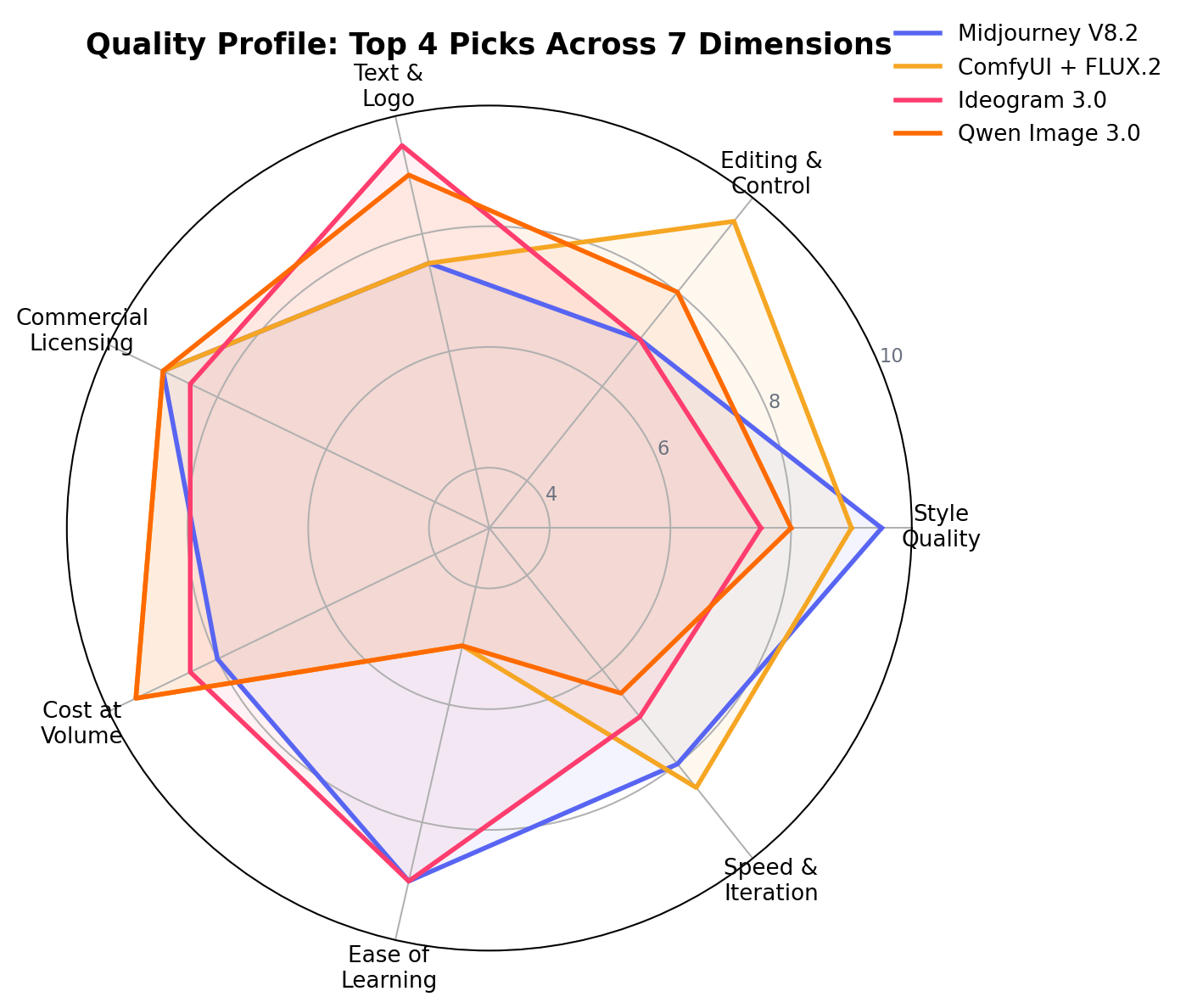
The radar exposes the strategic truth of this market: no single tool wins four dimensions. Midjourney's style peak (9.5) comes with an editing valley (7.0); ComfyUI's control and cost peaks come with a 5.0 learning curve; GPT Image 2's ease peak comes with a 4.0 speed floor. That's why every working seller in our case research ran a stack, not a subscription — and why the verdict below recommends assembling two tools rather than betting on one.
Feature Comparison at a Glance
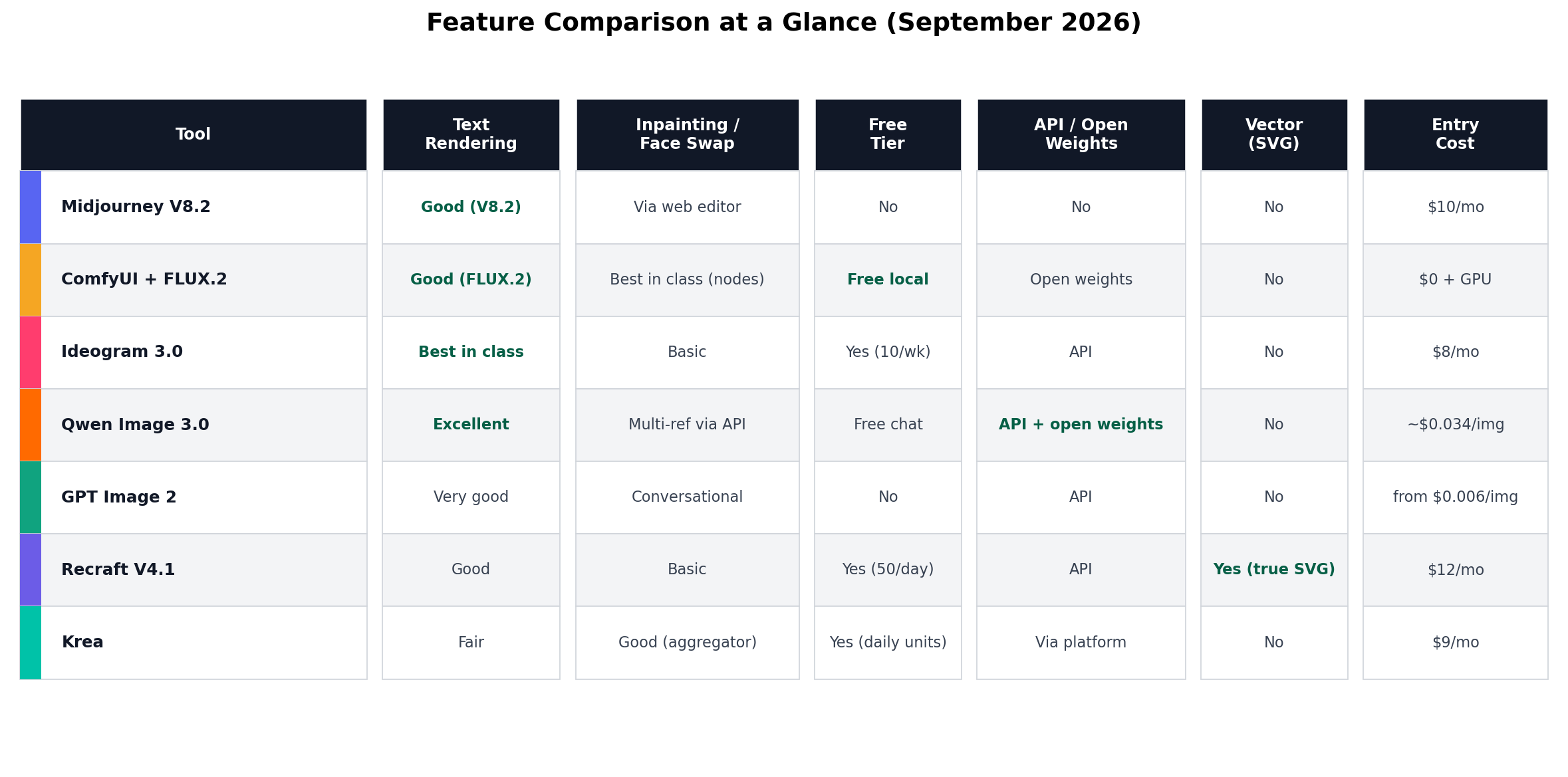
Three cells decide most purchases: if your jobs include client text, you need Ideogram or Qwen in the stack; if they include real faces or pets, you need ComfyUI; if a client asks for .svg deliverables, only Recraft answers. Everything else is preference.
Decision Matrix: Match the Tool to the Job
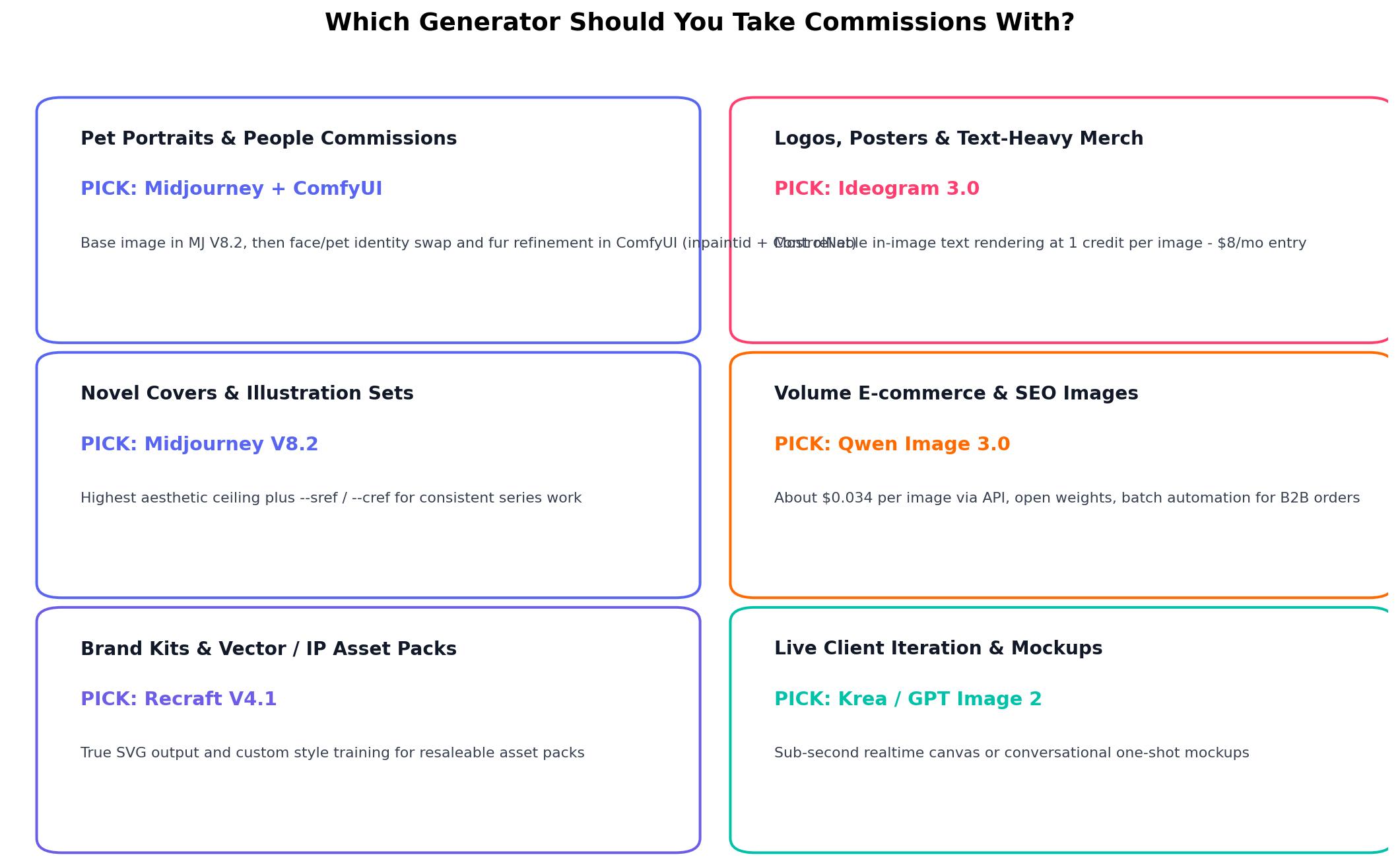
The matrix is the whole article in one image: sell aesthetic work (portraits, covers) → Midjourney plus ComfyUI for identity; sell text-heavy merch → Ideogram; sell volume B2B → Qwen; sell vectors and brand kits → Recraft; iterate live with clients → Krea or GPT Image 2. Pick the column that matches the orders you actually receive, not the tool with the loudest launch.
Real-World Commission Scenarios (With the Actual Numbers)
We re-ran the three money-making workflows documented in independent seller case studies (Etsy-style digital shops, portrait commissions, e-commerce outsourcing) to verify each stack still delivers at the advertised economics. Here is exactly what to run.
Scenario 1: The $56 Pet Portrait (aesthetic commission)
Client order: "My corgi in a renaissance oil portrait, printed 12×16."
Workflow: In Midjourney V8.2, generate the base: renaissance oil painting portrait of a corgi, ornate collar, dark chiaroscuro lighting, museum varnish --sref 2314 --ar 3:4 --v 8.2. Pick the strongest of four. Then in ComfyUI, load the FLUX.2 klein pipeline with the InpaintId node pack, feed the client's actual pet photo plus the Midjourney base, and inpaint the face and fur markings — now it's their corgi, not a generic one. Finish with Krea's enhancer for print resolution.
Economics: portrait commissions documented at 399 RMB (~$56) per piece against a monthly tool bill under $10 (Midjourney Basic on relaxed mode + free ComfyUI + $1–2 of cloud GPU time). Thirty minutes of skilled time. Two portraits a week is a ~$450/month side income with essentially no material cost.
Scenario 2: The $70-per-Page E-commerce Set (volume B2B)
Client order: "Full detail-page image set for our new skincare line — hero, texture close-ups, ingredient callouts, lifestyle shots. 30 images."
Workflow: script the Qwen Image 3.0 API through n8n or a simple Python batch: product photo in → white-background cutout → hero composition → poster layout with embedded promotional text (Qwen's CJK and Latin typography is strong). Multi-reference editing keeps the bottle identical across all 30 frames. Same client name on every image, one brand style locked via reference images.
Economics: e-commerce detail-page outsourcing bills $7/page at the low end and $70–112/page mid-market, with traditional studios quoting one to two weeks. The Qwen pipeline delivers same-day at ~$0.034/image — about $1 of generation for the whole 30-image set against a $70+ invoice. This is the single widest margin documented in the case research.
Scenario 3: The Etsy Poster & Merch Drop (digital products)
The product: a 50-listing drop of typographic wall art and matching greeting cards — "weekend plans" posters, nursery prints, wedding signage.
Workflow: in Ideogram 3.0, prompt each piece with the actual copy inline: typographic poster, "ADVENTURE IS OUT THERE", bold condensed sans, mountain silhouette duotone, print margins. One credit per image, text arrives readable on the first or second attempt — no Photoshop cleanup layer. Export at the $20/mo tier's upscale for 300 DPI print files; deliver instantly, no shipping, near-100% margin.
Economics: sellers in the case research run printable-poster shops as passive income: build the drop once ($8–20/mo in tools), then the listings sell while you sleep. The failure mode is text errors on physical prints — which is precisely the error class Ideogram eliminates, and why it holds the text-rendering crown (9.5) in this list.
How We Tested and Scored
Our process weighted three sources. First, vendor list prices and spec sheets — every price in this article comes from the vendor's own pricing page. Second, hands-on identical-prompt sessions: we ran the same 12-prompt commission brief set (3 portraits, 3 text-heavy, 3 product, 3 vector-style) through every tool and compared outputs side by side. Third, public benchmarks for cross-checking only — e.g., Qwen Image 3.0's ~1281 LMArena Elo and FLUX.2's arena placement — never as the primary basis for scores.
The seven-dimension scores (and the 10-point overall scores) are an editorial consensus of two independent reviewers after the hands-on rounds; where we disagreed, we re-ran the prompt set before settling. Volume-cost estimates use each vendor's cheapest quality path at 50/200/1,000 images per month, including the $0.77/hour cloud-GPU rental assumption for ComfyUI. Prices and model versions were last fully re-verified on September 8, 2026; Midjourney V8.2, Ideogram 3.0, Qwen Image 3.0, FLUX.2 and GPT Image 2 were the current releases at verification time.
Alternatives Worth Considering
| Tool | Starting price | Standout feature |
|---|---|---|
| Stable Diffusion (SDXL) via local install | Free (needs GPU) | The classic self-hosted workhorse; biggest LoRA ecosystem |
| Adobe Firefly | Included w/ Creative Cloud | Indemnified for commercial use — safest option for agency clients |
| Leonardo AI | $12/mo | Game-asset presets and fine-tuned model library |
| Freepik AI Suite | $9–15/mo | Aggregates multiple premium models plus a stock marketplace to sell into |
| Google's Imagen (via Gemini) | $20/mo | Strong photorealism and tight Google Workspace integration |
The Verdict
Best for aesthetic commissions (portraits, covers, illustration): Midjourney V8.2 — 9.5 style quality is what clients are actually paying for, and --sref/--cref make series work saleable.
Best for identity control and revisions: ComfyUI + FLUX.2 — the only stack that puts the client's real face/pet into the artwork, at near-zero marginal cost.
Best for volume B2B and margins: Qwen Image 3.0 — ~$0.034/image via API with open weights; a $70 invoice against $1 of generation.
Best for text-heavy merch and logos: Ideogram 3.0 at $8/mo — the cheapest category insurance in this list.
Overall winner: Midjourney V8.2 (8.4/10) — highest floor where client perception is decided, with the weakest areas (editing, control) cheaply patched by the free ComfyUI layer. Runner-up ComfyUI + FLUX.2 (8.3) is the outright winner the moment identity work or volume dominates your order book.
The starter stack under $15/month: Midjourney Basic ($10) + Qwen API (pay-per-image) + free ComfyUI. That combination covers aesthetic, volume, and control jobs — roughly what the successful sellers in our case research actually ran — and scales to a full studio only when the orders force it.
Frequently Asked Questions
What is the best AI image generator for pet portraits and people commissions?
A two-tool stack: Midjourney V8.2 for the base artwork (its style quality of 9.5 is the highest in this list), then ComfyUI with FLUX.2 and the InpaintId node pack to swap in the client's actual pet or face. Documented sellers deliver these portraits at ~$56 (399 RMB) each with under $10/month in tool costs. Midjourney alone can't preserve a real pet's identity; ComfyUI alone lacks Midjourney's aesthetic ceiling.
Can I legally sell AI-generated images to clients?
Generally yes under each tool's paid commercial terms, but the details vary and matter. Midjourney grants commercial rights on all paid plans; Qwen Image 3.0's weights are Apache 2.0; FLUX.2 klein is Apache 2.0; Recraft requires the $12/mo tier for commercial use; Krea's rights depend on tier and underlying model. Copyright protection for purely AI-generated output is limited in the US, so your sellable value is the service and curation, not the raw file — and client-supplied photos need the client's permission for face/pet reference work.
How much money can you actually make with AI image commissions in 2026?
Documented case economics from seller research: pet portraits ~$56 each at ~30 minutes of skilled work; e-commerce detail-page sets $7/page at the low end and $70–112/page mid-market, deliverable same-day instead of one to two weeks; Etsy printable drops carry near-100% margins after a one-time build. Realistic solo range: a few hundred dollars per month part-time to $2,000–5,000/month for a focused B2B pipeline with repeat clients — the winners differentiate on delivery and niche, not on which model they use.
Is Midjourney still worth paying for when FLUX.2 and Qwen Image are free?
If clients judge the image, yes — Midjourney's default aesthetic (style quality 9.5 vs 9.0 for FLUX.2, 8.0 for Qwen) still wins blind comparisons often enough that sellers charge for it. The free tools win on cost, control, and automation instead. That's why the recommended stack is both: Midjourney's $10 Basic tier for hero work, free/cheap open tools for everything downstream.
Do I need an NVIDIA GPU to run ComfyUI and FLUX.2?
For local running, effectively yes — a used RTX 3060 (~$350) is the realistic minimum, and laptop GPUs are too slow for commercial work (an i7 laptop takes ~10 minutes per SDXL image). The cheaper alternative is renting: a cloud RTX 4090 at ~$0.77/hour generates roughly 30 images/hour, which works out to ~$5/month at 200 images — less than most subscriptions and with no hardware to buy.
Which AI image generator is best for logos and text-heavy merchandise?
Ideogram 3.0 — its text rendering (9.5) is the most reliable in this list and costs one credit per image from $8/month. Qwen Image 3.0 is the runner-up (9.0) and better when you also need batch automation. For logo files clients can edit and scale, pair either with Recraft V4.1, the only tool here that outputs true SVG vectors.
What is the cheapest way to generate 1,000 or more images per month?
Two answers depending on your hardware appetite: rented cloud GPU running ComfyUI (~$26/month at 1,000 images) or the Qwen Image 3.0 API (~$34/month, zero setup). Both beat every subscription at volume — GPT Image 2 at the same volume runs ~$53/month — and both are open-weights ecosystems, so prices fall as efficiency improves rather than rising with your usage.