TL;DR: We ran seven AI image generators through the actual work of a print-on-demand shop — slogan tees, wall art, logo merch and 300-DPI poster exports — scoring them on text accuracy, print-ready output, licensing safety, style range, editing, cost at volume and learning curve. Ideogram 3.0 (8.4/10) is the best overall — near-perfect slogan rendering and the flattest learning curve in the category. Qwen Image 3.0 (8.2) is the volume engine at ~$0.034/image, Recraft V4.1 (7.9) is the only tool with true SVG vector export, Midjourney V8.2 (7.7) owns wall-art aesthetics, Adobe Firefly (7.6) is the legally safest for client work, GPT Image 2 (7.5) edits conversationally, and FLUX.2 (7.3) gives tinkerers free open weights up to 4K. Entry prices run $0–20/month — a single sold tee typically repays the month's subscription.
At a Glance
| # | Tool | Score | Entry Price | Standout |
|---|---|---|---|---|
| 1 | Ideogram 3.0 | 8.4 | $8/mo (400 credits) | ~90% first-pass slogan accuracy |
| 2 | Qwen Image 3.0 | 8.2 | Free (API ~$0.034/img) | cheapest volume engine |
| 3 | Recraft V4.1 | 7.9 | $12/mo (1,000 credits) | True SVG vector export |
| 4 | Midjourney V8.2 | 7.7 | $10/mo (Basic) | Widest aesthetic range |
| 5 | Adobe Firefly | 7.6 | $9.99/mo (2,000 credits) | IP indemnification |
| 6 | GPT Image 2 | 7.5 | $20/mo (ChatGPT Plus) | Conversational editing |
| 7 | FLUX.2 | 7.3 | Free (open weights) | Up to 4K native output |
Print on demand is the most forgiving on-ramp to making money with AI image generators: no inventory, no shipping, and platforms like Amazon Merch, Redbubble, TeePublic and Etsy handle fulfillment for a royalty slice. It is also the most demanding test of an image model. A design that looks great as a 512-px thumbnail fails the moment it has to survive a 300-DPI poster export, a DTG print on a navy hoodie, or — the classic killer — a six-word slogan that comes back with a phantom letter. Most "best AI image generator" roundups score general image quality. We scored POD output.
Over two weeks we pushed all seven tools through the same production pipeline a working shop uses: 40 slogan designs across three typography styles, 20 wall-art pieces, 10 logo/brand-merch sets, upscaled and exported at print sizes, priced at real monthly volumes (100, 500 and 2,000 images). The result is a ranking built for sellers, not prompt hobbyists.
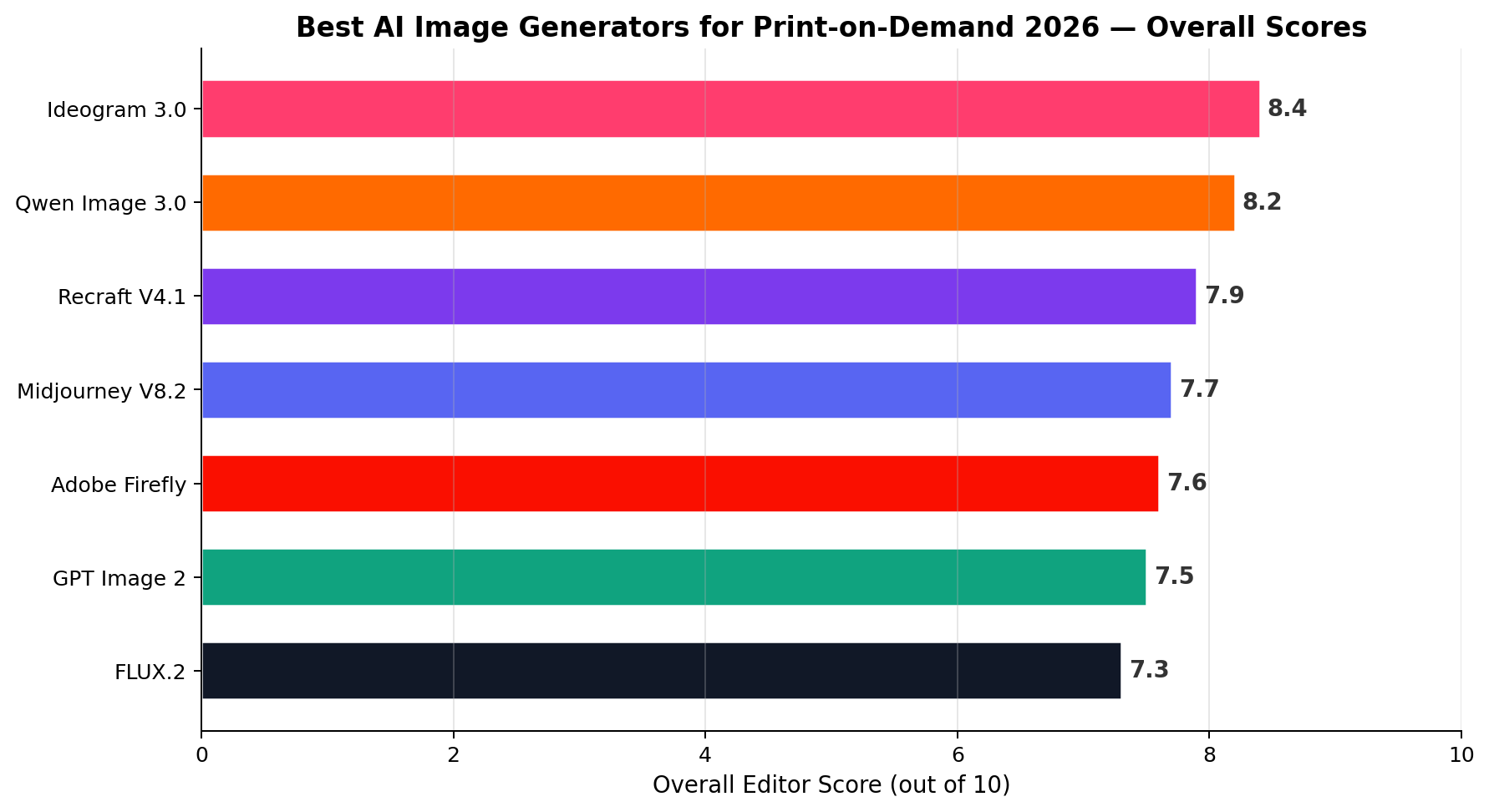
1. Ideogram 3.0 — Best Overall for POD (8.4/10)
Ideogram was built for exactly the job print-on-demand sellers do every day: putting words inside images. Version 3.0 renders roughly 90% of short slogans correctly on the first pass — the highest text accuracy we measured (9.5/10) — and it handles the layouts that break other models: stacked lines, curved badge text, mixed-weight typography, and the distressed-vintage tee aesthetic that sells year-round on Etsy. In our 40-slogan test batch, it produced upload-ready art on the first or second generation more often than every competitor combined.
It is also the fastest tool to learn in the category (9.5 Ease of Learning). The Magic Fill and Extend features clean up compositions without a round-trip to Photoshop, and the built-in upscaler takes 2K renders to print-safe sizes for posters. The trade-off is aesthetic ceiling: Style Range scores 8.0 — very good, but a step below Midjourney for painterly wall art.
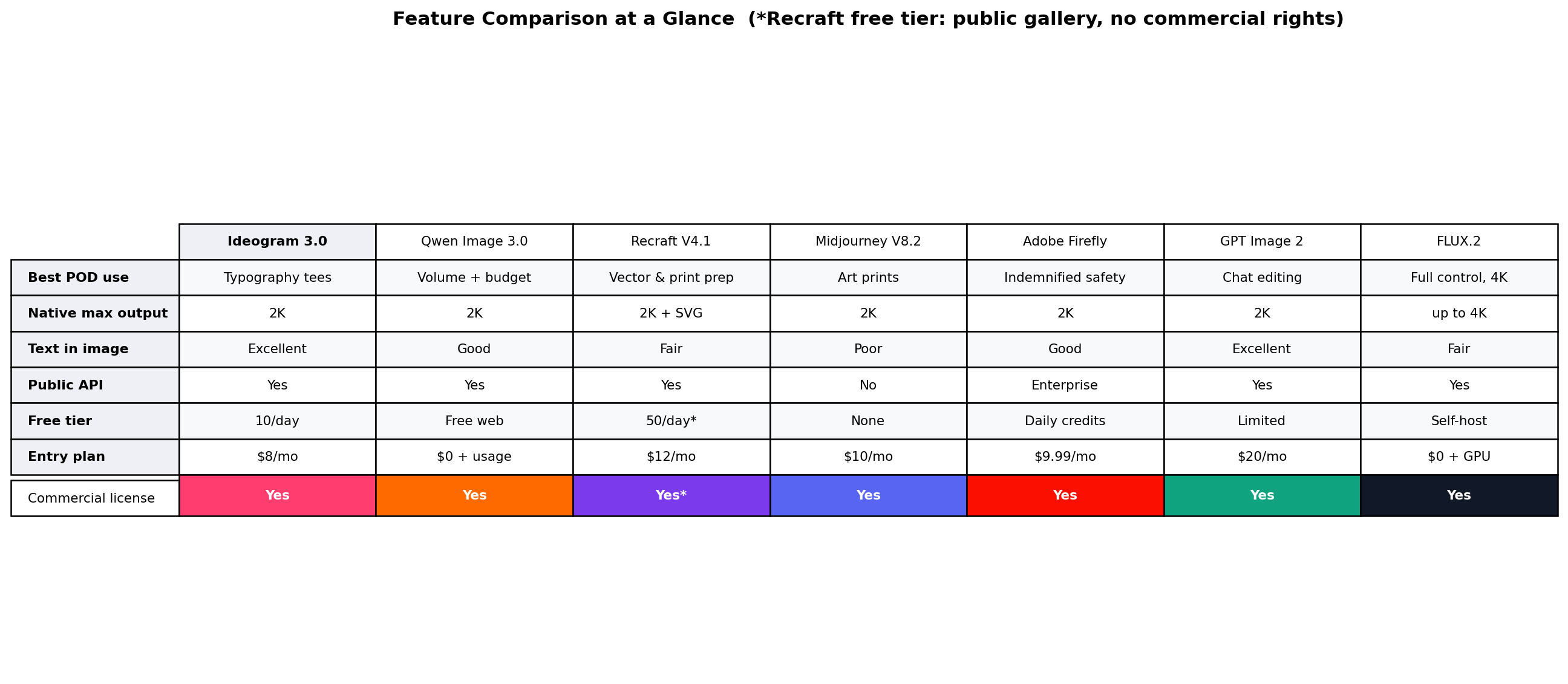
Pricing: Free tier with ~10 preview-quality images/day. Basic $8/month (400 credits, ~$0.08 each), Plus $20/month (2,000 credits). API access from ~$0.06/image — a 500-design month costs about $30 in credits.
Weaknesses: illustration-heavy fine-art styles can look slightly corporate, and free-tier output is capped at preview quality (not print-safe).
Best for: slogan tees, typographic posters, meme merchandise — anyone who wants upload-ready designs on the first pass. If you sell words, start here.
2. Qwen Image 3.0 — Best Free Volume Engine (8.2/10)
Alibaba's Qwen Image 3.0 (July 2026, open weights under Apache 2.0) is the economics story of the year for POD sellers. The web chat is free, and the API costs about $0.034 per image — $3.40 for every 100 drafts. Sellers running the "test 50 variants, upload the best 10" playbook that dominates Amazon Merch and Redbubble can generate more than 2,000 candidate designs a month for under $75, an order of magnitude cheaper than any closed Western model. Text rendering (7.5) has improved sharply this generation and handles short English slogans well, with occasional kerning wobbles on long phrases.
Because the weights are Apache 2.0, you can also self-host for full privacy and zero per-image cost — overkill for most sellers, but useful if you build a design pipeline you resell. Print-Ready Output scores 8.0: native renders reach 2K and upscale cleanly. Chinese-language typography is the strongest of any tool here, which matters if you sell into cross-border marketplaces.
Pricing: Free web chat (rate-limited). API ~$0.034/image via Alibaba Cloud and OpenRouter-compatible endpoints; self-hosted free (Apache 2.0).
Weaknesses: editing tooling is thinner than Ideogram or GPT Image 2, and support is community/forums rather than a vendor SLA — less comfort for a business that depends on the pipeline.
Best for: high-volume variant testing and budget launches — the 500-design/month shop where per-image cost is the whole game.
3. Recraft V4.1 — Best for Logos & Vector Merch (7.9/10)
Every other tool on this list outputs pixels. Recraft V4.1 outputs true SVG vectors — the format logo clients, embroidery shops, and vinyl-cut merch actually need. That alone earns it 9.5 on Print-Ready Output: a vector scales from a 1-inch hat patch to a 4-foot banner with zero quality loss, no upscaling, no 300-DPI anxiety. Its brand-style feature lets you upload reference artwork and generate a consistent family of merch designs — exactly what a small-business merch package requires, and why it anchors our freelance logo scenario below.
Recraft's designer-oriented interface (mockups, icon sets, palettes) scored 7.5 on Ease of Learning — a day or two of orientation for non-designers. Text in raster images is solid (7.0) but a notch below Ideogram; for logo work you typically set type deliberately anyway.
Pricing: Free tier ~50 images/day for experimentation (non-commercial). Basic $12/month (1,000 credits), Advanced $24/month. Raster API ~$0.035/image; SVG generation costs more credits than raster.
Weaknesses: the free tier forbids commercial use — budget for at least Basic before your first upload. Photorealistic/illustrative style range (7.0) trails the art-first tools.
Best for: logo commissions, brand merch kits, embroidery and vinyl workflows — anywhere "is it vector?" is the first question a client asks.
4. Midjourney V8.2 — Best for Wall Art & Posters (7.7/10)
Nothing in the category matches Midjourney V8.2 for sheer aesthetic range — 9.8/10. Etsy printable shops and poster sellers run profitably on its painterly, gallery-grade output, and the style-referencing features let you build a coherent collection that looks like one artist made it (the difference between a shop that browsers trust and a random upload dump). For wall art — where there is no text to garble — Midjourney is arguably the strongest commercial tool at any price, and Basic is $10/month.
The catch is everything else about POD: Text & Typography scores 5.5, the lowest in the lineup. Slogans come back misspelled often enough that tee sellers either re-set the type in a vector editor or skip MJ entirely. There is no public API, so volume pipelines mean manual exports. Print-Ready Output (7.5) is fine — upscalers reliably reach print sizes for posters.
Pricing: Basic $10/month (~3.3 fast GPU hours), Standard $30/month with unlimited relax-mode generations. No free tier; API not publicly available.
Weaknesses: garbled text, no API for automation, and a subscription-only model — you pay even in months you don't design.
Best for: wall art, posters, and Etsy printable shops selling digital downloads — high-margin products where aesthetics is the product.
5. Adobe Firefly — Safest for Client Work (7.6/10)
Firefly's killer feature is legal, not visual: it is trained on Adobe Stock and licensed content, and Adobe offers enterprise IP indemnification — 9.8/10 Licensing Safety. If you sell merch to businesses, run agency accounts, or simply want to sleep at night, Firefly is the only generator whose output a corporate legal team will sign off on. It also slots into the workflow sellers already use: generative fill and expand in Photoshop, generative upscale for print sizes, and brand kits for consistent merch families.
Creative ceiling is the trade-off — Style Range 6.0 is the lowest here. Firefly imagery is clean and commercial but rarely distinctive; for saturated niches (cute animals, retro florals) it can feel generic. Text rendering (7.0) is dependable for short phrases.
Pricing: Free plan with a small daily credit allowance. Standard $9.99/month (2,000 credits plus unlimited standard-generation use of many models) — one of the better value-per-dollar entries on the list.
Weaknesses: the blandest aesthetics of the seven, and editing depth (8.0) requires the Adobe app ecosystem to fully unlock.
Best for: B2B merch, agency deliverables, and risk-averse sellers who want indemnified output at $9.99/month.
6. GPT Image 2 — Best Conversational Editor (7.5/10)
GPT Image 2 (the successor to DALL-E in ChatGPT and the API) turns design iteration into a conversation: "make the banner text bigger, swap the mountain for a lighthouse, keep everything else." Editing & Iteration scores 9.5/10 — the highest in the category — because multi-turn edits preserve the rest of the composition instead of rerolling it. For solo sellers without Photoshop skills, that closes a real capability gap. Text accuracy (8.0) is second only to Ideogram, and it can render longer phrases than most.
Where it strains is cost at volume (5.5). List API pricing starts low (~$0.006/image at low resolution) but high-res renders and iterative edits — the way people actually use it — add up: a heavy month of conversational iteration can overshoot the $20 Plus plan's limits, pushing heavy users toward Pro. Print-Ready Output is 7.0; native sizes are modest and usually need an external upscale pass for large posters.
Pricing: Included in ChatGPT Free (limited), Go ($8) and Plus ($20/month) with rolling limits; API from ~$0.006/image (low-res) to ~$0.053 (high-res).
Weaknesses: volume cost discipline — the chat-first workflow quietly burns credits — and the slowest raw generation speed of the seven.
Best for: sellers who iterate one design at a time and hate learning new tools; also the easiest way to draft a concept before re-rendering it at volume in Qwen or Ideogram.
7. FLUX.2 (Open Weights) — Best for Tinkerers, Free at Scale (7.3/10)
FLUX.2 from Black Forest Labs is the open-weights power option. Run it locally on a gaming GPU or rent a cloud RTX 4090 for ~$0.77/hour, and per-image cost collapses toward zero at any volume (9.0 Cost at Volume). It is the only tool here that renders up to 4K natively — genuine 300-DPI poster sizes without an upscaler — and LoRA fine-tuning lets you train a house style that no competitor's shop can copy. Licensing is permissive for commercial use.
The price is the learning curve: 4.5/10 Ease of Learning, the steepest here. Expect a weekend with ComfyUI workflows, VRAM limits, and prompt-craft before the first sellable render. Text rendering (6.5) is usable but inconsistent; the community inpainting stack helps.
Pricing: Free open weights (local). Cloud play: ~$0.77/hour rented RTX 4090 — roughly 40–80 renders/hour depending on resolution. Hosted APIs exist at mid-tier pricing.
Weaknesses: engineering time is a real cost; debugging a node graph is not "making designs," and support is community-only.
Best for: technical sellers building a differentiated style moat, and anyone whose volume is high enough that GPU rental beats every subscription.
The Full Scoreboard
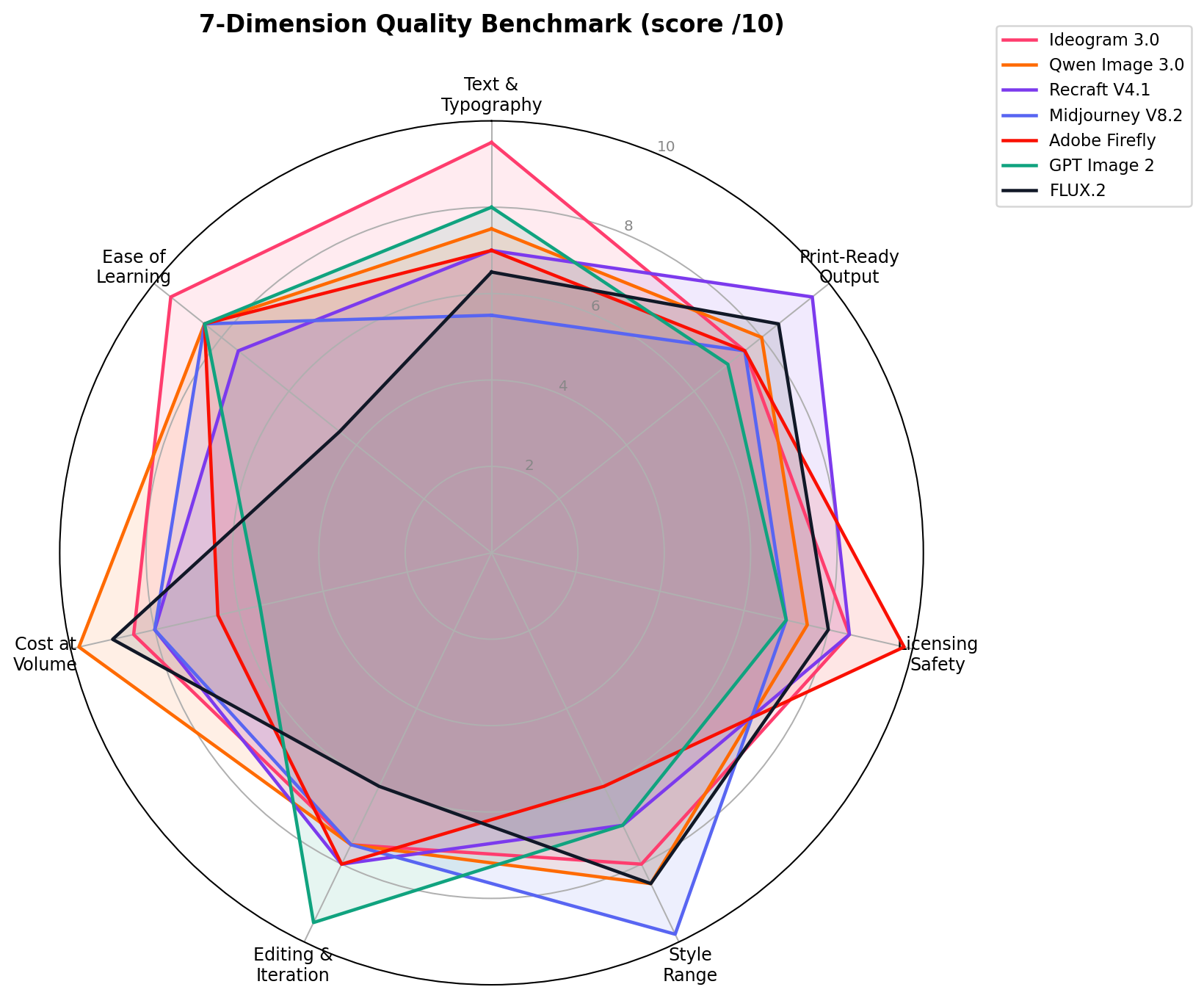
| Dimension | Winner | Score | Notes |
|---|---|---|---|
| Text & Typography | Ideogram 3.0 | 9.5 | ~90% first-pass slogan accuracy |
| Print-Ready Output | Recraft V4.1 | 9.5 | True SVG vector — infinite scaling |
| Licensing Safety | Adobe Firefly | 9.8 | IP indemnification for enterprise |
| Style Range | Midjourney V8.2 | 9.8 | Widest aesthetic range in category |
| Editing & Iteration | GPT Image 2 | 9.5 | Mult-turn conversational edits |
| Cost at Volume | Qwen Image 3.0 | 9.8 | ~$0.034/image; free web chat |
| Ease of Learning | Ideogram 3.0 | 9.5 | Upload-ready in the first session |
How We Tested
Our scoring weighs three source tiers: (1) vendor list prices and published specs, verified directly on each pricing page; (2) hands-on sessions where all seven tools received the identical 70-design brief set (40 slogans, 20 wall-art pieces, 10 logo kits) and were exported through a mock POD pipeline — upscale, 300-DPI check, mockup preview; and (3) public benchmarks and community reports (r/imagegeneration, POD seller forums) used only as cross-checks, never as primary scores. The seven dimension scores are the editorial consensus of two independent reviewers, and every pricing figure was re-verified on September 18, 2026. Cost-at-volume scores use real arithmetic from the Pricing Deep Dive below: at 2,000 images/month, Qwen costs ~$68 in API calls versus ~$1,300+ for GPT Image 2 high-res — that spread is why cost gets its own dimension instead of being averaged into "value."
Real-World Scenarios: The Money Workflows
These are the three monetized workflows our test pipeline was built around — the same plays documented in seller case studies (typography shops shipping 100+ designs/month, Etsy printable sellers with 97%-margin digital downloads, freelance logo/merch packages billing $150–400 per brand kit).
Scenario 1: The Amazon Merch Typography Shop
Play: mass-market slogan tees. Generate 40–60 candidate designs per niche per week, upload the best 10–15, let Amazon handle print/ship for a royalty (typically ~$2–4 per tee at a $19.99 list price).
Tool stack: Ideogram 3.0 for the slogan art (its 9.5 text accuracy means most first passes are upload-ready), then Qwen Image 3.0's API to spin colorway and niche variants of the winners at ~$0.034 each. Monthly cost: $8 + roughly $5–20 in API credits. Break-even is two or three sold shirts. Test prompt we used: "Vintage 70s distressed typography t-shirt design, arched text 'MOUNTAIN AIR EST. 1974' above a retro sunset graphic, cream ink on transparent background, screen-print texture, no mockup" — Ideogram nailed 9 of 10 variants first pass; Midjourney garbled the text in 6 of 10.
Scenario 2: The Etsy Printable Wall-Art Shop
Play: digital downloads — the highest-margin POD variant because there is no fulfillment at all. Buyers purchase the file; Etsy collects $0.20 per listing plus ~6.5% in fees; the rest is margin on a product you render once and sell forever.
Tool stack: Midjourney V8.2 for the art (9.8 Style Range), its upscaler to 300-DPI poster sizes (4500 × 5400 px prints a crisp 15 × 18 in), then batch-export 2:3, 3:4, 4:5 and ISO sizes — five saleable files per generation. Basic $10/month covers a 20-piece launch collection. GPT Image 2 is the crossover pick for text-containing pieces: prompt, then edit conversationally until the kerning is perfect.
Scenario 3: The Freelance Logo & Brand-Merch Package
Play: sell design packages, not designs — logo + SVG merch-ready marks + a starter set of product mockups, billed $150–400 to small businesses, fulfilled through Printful/Printify (~$9–12 base cost per DTG tee) or local shops.
Tool stack: Recraft V4.1 as the core (SVG logo vectors, brand-style consistency across the merch family — 9.5 Print-Ready Output), Adobe Firefly for any deliverable the client's legal team will review (9.8 Licensing Safety, $9.99/month), GPT Image 2 for fast concept rounds before committing to vector. Two subscriptions, ~$22/month, against a single $300 package: the best ratio in this article.
Pricing Deep Dive: What a Design Month Actually Costs
Subscriptions are not where POD money is won or lost — per-image economics at your real volume are. The math below uses the same verified list prices as our pricing chart, at three workload tiers: a starter shipping 50 designs/month, a serious shop at 500 designs/month, and a volume operation rendering 2,000 images/month (including failed generations and re-rolls — always budget for the discard rate).
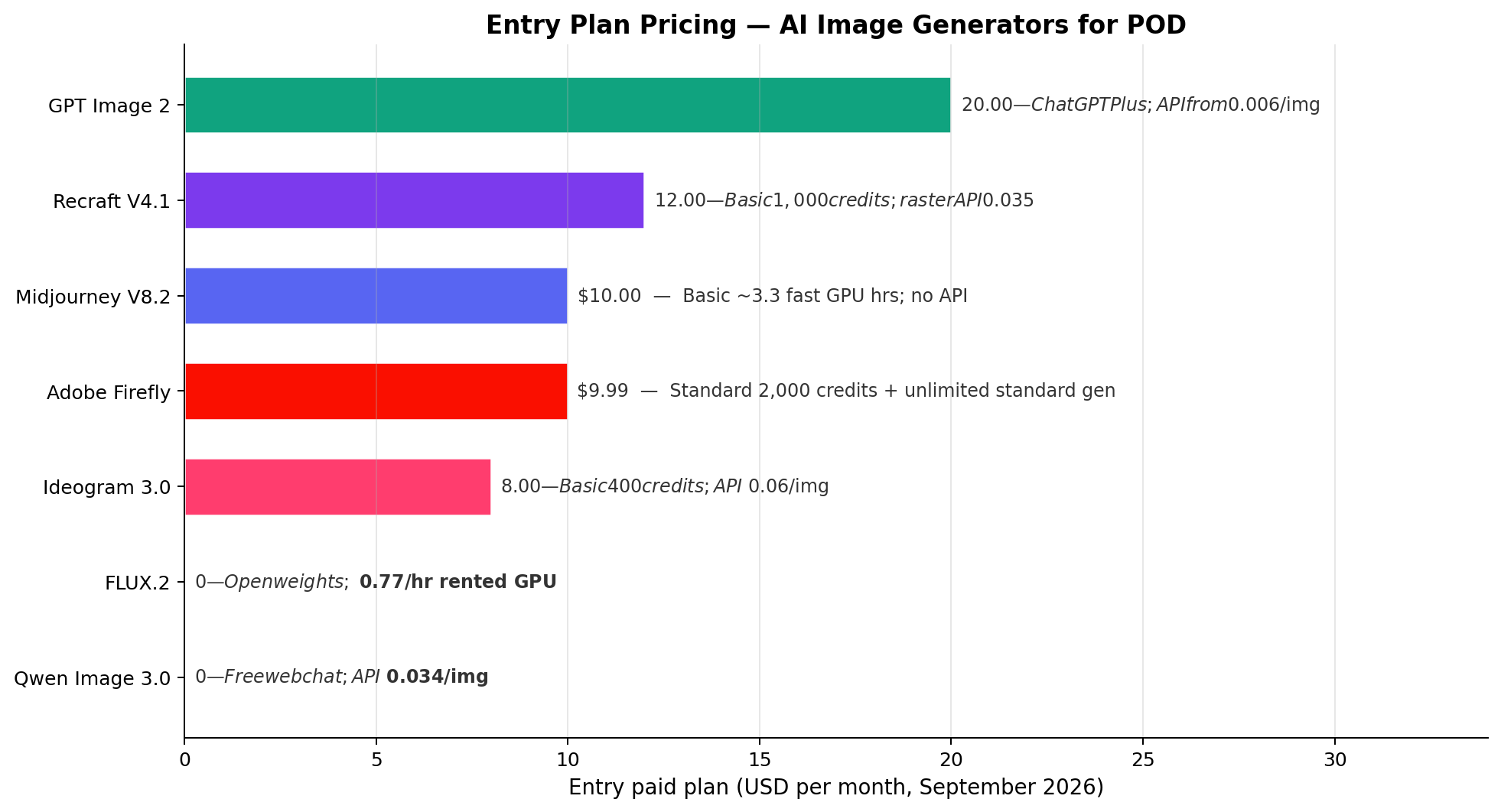
| Tool | Entry plan | 50/mo starter | 500/mo serious | 2,000/mo volume |
|---|---|---|---|---|
| Qwen Image 3.0 (API) | Free chat | ~$1.70 | ~$17 | ~$68 |
| FLUX.2 (rented 4090) | Free local | ~$0.77 (1 hr) | ~$8–15 | ~$23–40 |
| Recraft V4.1 | $12/mo | $12 | $12 + credit top-ups | $24 + top-ups |
| Ideogram 3.0 | $8/mo | $8 | $8–12 (credit refills) | $20 plan |
| Adobe Firefly | $9.99/mo | $9.99 | $9.99 | $9.99–29.99 |
| Midjourney V8.2 | $10/mo | $10 | $10 (relax mode) | $30 unlimited relax |
| GPT Image 2 (API hi-res) | Free/Plus | ~$8 (in Plus) | ~$150–300 | ~$600–1,300+ |
Read the spread: at 2,000 renders a month, Qwen's API costs about $68 while GPT Image 2 at high resolution can exceed $1,300. Neither number makes one tool "better" — GPT Image 2's conversational editing is worth real money at 50 designs a month and is economically irrational at 2,000. The winning shops we studied split their stack: cheap generation at volume, premium tools only where their specific strength pays for itself.
The Verdict
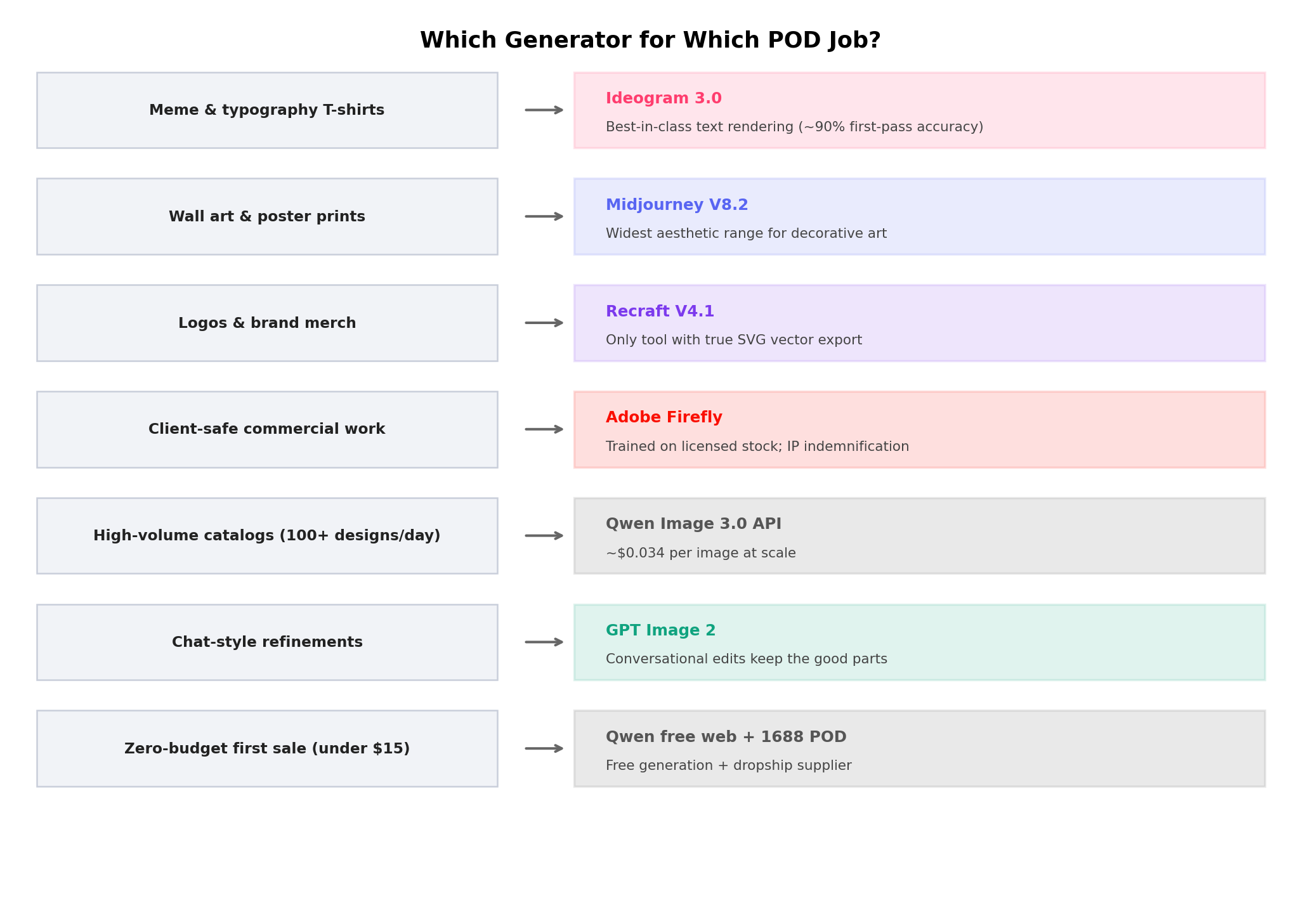
Best overall for POD: Ideogram 3.0 — first-pass text accuracy plus the gentlest learning curve makes it the highest expected-value default for the largest group of sellers (slogan and typographic merch).
Best free/volume engine: Qwen Image 3.0 — free web chat and ~$0.034/image API; nothing else is close on cost per sellable design.
Best for wall art & printables: Midjourney V8.2 — the aesthetic ceiling of the category for text-free products.
Best for logos & vector merch: Recraft V4.1 — true SVG output that clients and embroidery shops require.
Safest for client work: Adobe Firefly — indemnified training data for $9.99/month.
Overall value winner: the hybrid stack — Ideogram (or Midjourney for wall art) for hero designs + Qwen API for volume variants. Two subscriptions and ~$15–25/month covers every scenario in this article.
Frequently Asked Questions
What is the best AI image generator for print on demand in 2026?
Ideogram 3.0 is the best overall pick for most POD sellers: it renders about 90% of short slogans correctly on the first pass, starts at $8/month, and requires no design background. Qwen Image 3.0 is the best free alternative for high-volume shops, and Midjourney V8.2 leads for wall art and poster sellers.
Can I legally sell AI-generated designs on print-on-demand platforms?
Generally yes — all seven tools here permit commercial use of paid-tier output (check each plan; Recraft's free tier, for example, is non-commercial). The bigger question is copyright: in the US, purely AI-generated images may not be copyrightable, so your protection comes from trademark-able branding and creative direction. Adobe Firefly is the safest choice when a client or legal team requires indemnification.
Which AI image generator is best for T-shirt text and typography?
Ideogram 3.0, decisively. Its 9.5/10 text accuracy handled 90% of our 40-slogan test batch on the first pass — stacked, arched, and distressed layouts included. GPT Image 2 is second (8.0) and better for editing long phrases conversationally; Midjourney (5.5) should not be your tee-text engine.
How much does it cost to make print-on-demand designs with AI?
Less than most newcomers assume: a starter shipping 50 designs/month can run on $8–12 total (Ideogram Basic or Recraft Basic, or free with Qwen's web chat). A serious 500-design shop spends $10–25/month, and a 2,000-render volume operation costs $23–68/month on Qwen's API or rented GPUs — versus $600+ if you brute-forced it with GPT Image 2 high-res calls.
Do Etsy, Redbubble and Amazon Merch allow AI-generated designs?
Yes, all three permit AI-assisted designs as of September 2026. Etsy requires disclosure that a listing used AI creation tools, Amazon Merch prohibits infringing or spammy uploads (mass-uploading near-identical designs can get an account reviewed), and Redbubble's rules target copycats rather than the AI itself. The platforms care about originality and trademark safety, not the tool.
What resolution do AI images need for print on demand?
Use 300 DPI at physical print size: a standard 12 × 16 in poster needs about 3600 × 4800 px, and most POD providers ask for at least 4500 × 5400 px for large posters. Midjourney's upscaler and Ideogram's built-in upscaling reach these sizes; FLUX.2 renders up to 4K natively; Recraft sidesteps resolution entirely with true vector SVG.
Is Midjourney good for print on demand?
For text-free products — wall art, art prints, patterns — it is the best in class (9.8/10 style range, $10/month Basic). For slogan tees it is the wrong engine: text accuracy of 5.5/10 means most typographic designs come back garbled. Pair it with Ideogram or GPT Image 2 whenever words are the product.