⏱ TL;DR
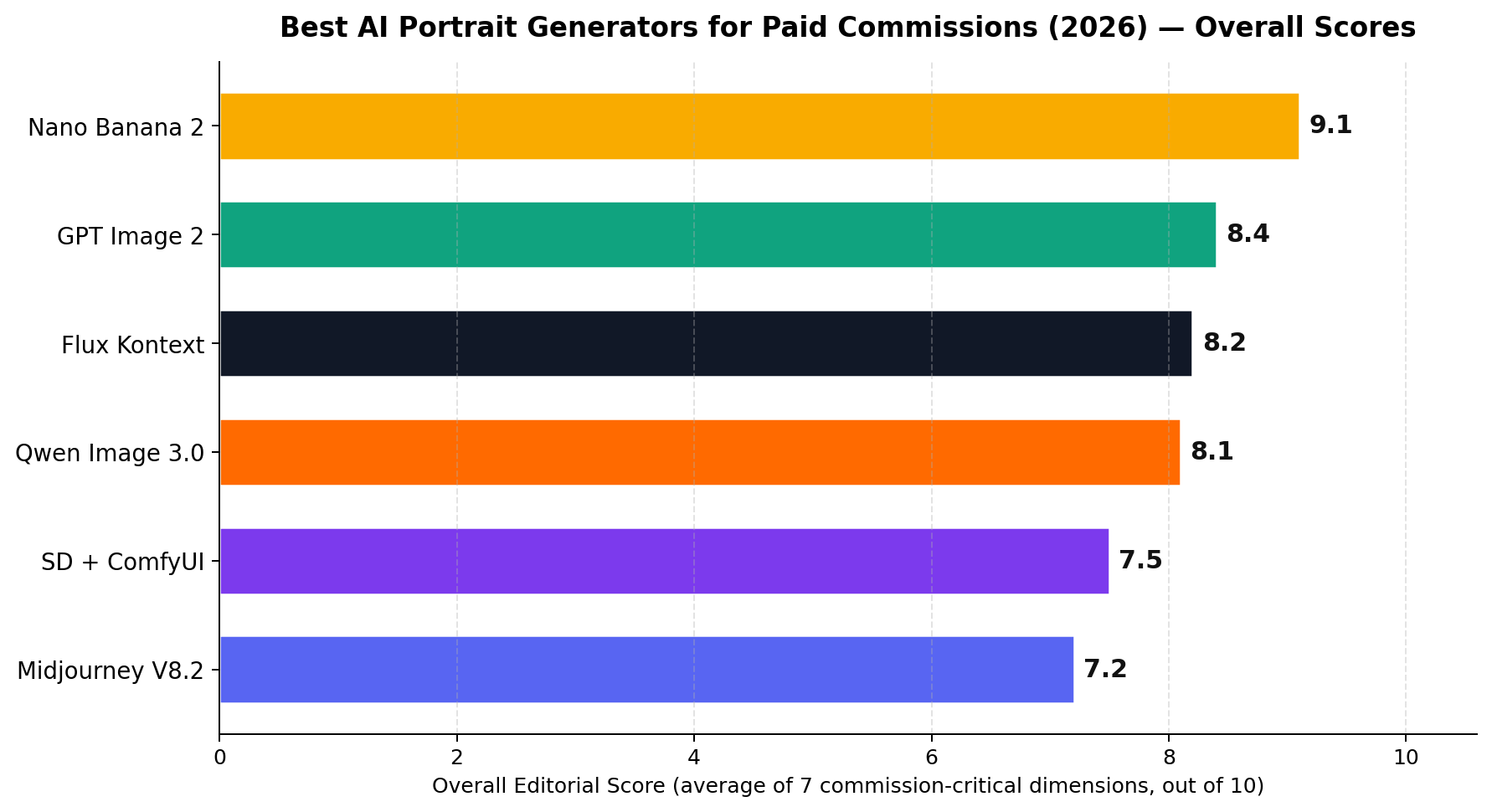
AI portrait commissions are 2026's widest-margin side hustle: a $0.03–$0.07 image routinely sells for $25–$75, and traditional portrait artists charging $150–$1,000 per canvas are now competing with 24-hour AI delivery. We tested six generators on the seven dimensions that decide whether you keep the customer: Nano Banana 2 (overall 9.1/10) wins on likeness consistency and multi-turn editing — the two things a paid order actually lives or dies on. GPT Image 2 (8.4) is the instruction-following and text-rendering pick, Flux Kontext (8.2) locks identity across 10-reference corporate batches, Qwen Image 3.0 (8.1) is the $0.035-per-image volume engine with a free tier, SD + ComfyUI (7.5) is the free unlimited local stack (if you accept the InsightFace licensing wrinkle), and Midjourney V8.2 (7.2) still paints the prettiest picture but struggles with likeness and editing.
The Six Contenders at a Glance
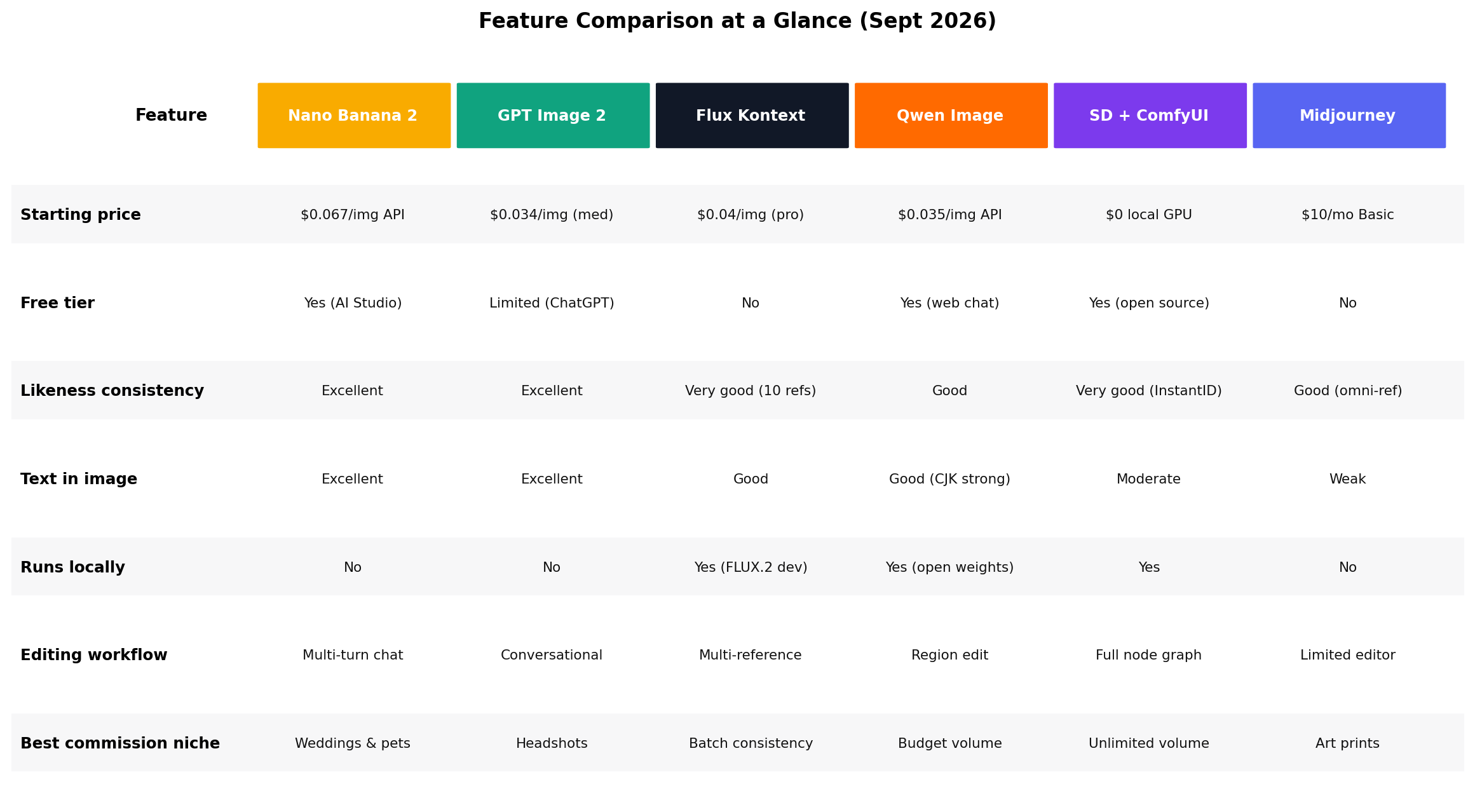
Every tool below can produce a sellable portrait today. The differences that matter for a commission business are likeness consistency (does the customer recognize themselves?), editing control (can you fix the hands without redoing the face?), and cost efficiency (what's left after AI credits?).
| Rank | Tool | Starting price | Best for | Score |
|---|---|---|---|---|
| #1 | Nano Banana 2 (Gemini 3.1 Flash Image) | Free tier; ~$0.067/img API | Weddings, pets, likeness-critical orders | 9.1 |
| #2 | GPT Image 2 | Free tier; $0.034/img (medium) | Headshots, exact briefs, text-in-image | 8.4 |
| #3 | Flux Kontext | $0.04/img (pro) | Corporate batches, multi-reference consistency | 8.2 |
| #4 | Qwen Image 3.0 | Free web chat; $0.035/img API | Avatar packs, budget volume, CJK markets | 8.1 |
| #5 | SD + ComfyUI | $0 (local GPU) | Unlimited volume, signature-style workflows | 7.5 |
| #6 | Midjourney V8.2 | $10/mo Basic | Fantasy and art-print portraits | 7.2 |
Why Portrait Commissions Are the Hottest AI Side Hustle of 2026
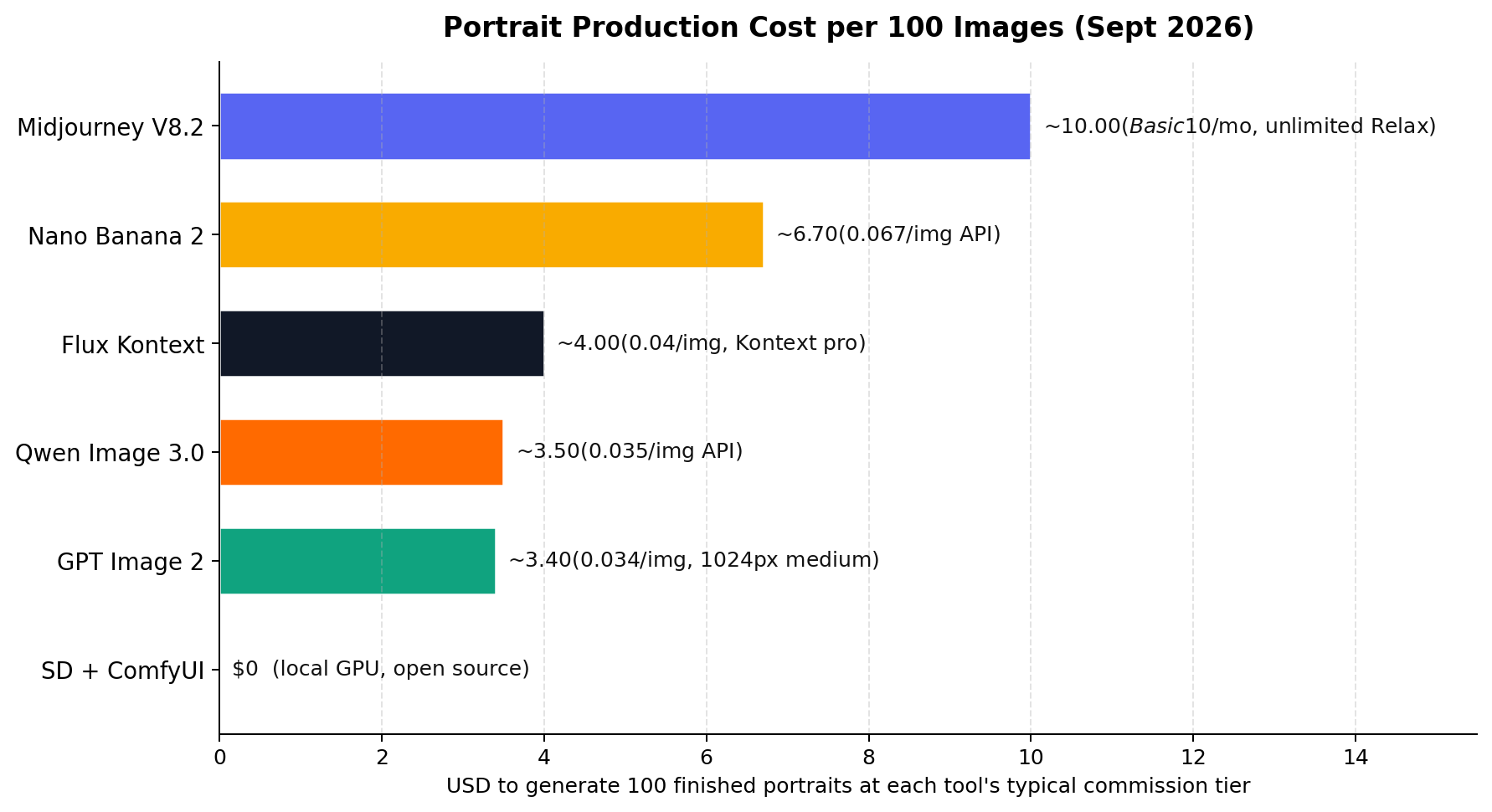
Three market facts define this niche right now. First, the price gap is enormous: on Etsy, simple custom digital portraits start around $25 and framed pieces reach $300+, while traditional hand-painted portrait artists charge $150–$1,000 and need 2–4 weeks per canvas — an AI seller can deliver in 24 hours at 1/5 the price and still keep 90%+ margins. Second, the production cost has collapsed to cents: generating 100 sellable portraits costs between $0 (local Stable Diffusion) and $10 (a month of Midjourney Basic), against $2,500+ in potential revenue if those portraits sell at a $25 average. Third, demand is provably real at consumer scale — Fiverr now hosts AI pet-portrait gigs from $10–$15 with 24-hour delivery as a standard product category, not a novelty.
The clearest documented numbers come from China's AI photo-studio boom, reported by mainstream outlets in August 2026: wedding and couple portrait packages priced ¥89–¥1,399 per set (about $12–$195) are produced for under ¥30 (~$4) of compute, and single avatar-pack studios report on the order of 2,000 orders per month. Even discounting those figures by 30% for promotional rounding, the unit economics hold: costs under $5, selling at $12–$195, delivered same-day. That's the arbitrage this guide is built around — the six tools below are ranked by how well they capture it.
#1. Nano Banana 2 (Gemini 3.1 Flash Image) — The Commission King
Google's image model carries a banana nickname and, in 2026, the portrait-commission crown. Nano Banana 2 is the second generation of the Gemini Flash Image line, accessible two ways: free through the Gemini app and Google AI Studio, or via API at roughly $0.067 per image ($60 per million output tokens). What makes it the top pick for paid work isn't raw beauty — it's that it solves the two problems that actually kill portrait orders: keeping the customer's face consistent across every image in a set, and letting you revise one detail ("keep the face, change the dress to blue") without regenerating from scratch.
Key features
- Multi-turn character consistency. Feed a reference photo, then iterate across outfits, scenes, and art styles — the face stays put. This is the killer feature for wedding sets and pet series where the customer expects to recognize their subject in all 10 images.
- Conversational editing. "Make it watercolor, keep the pose" just works, preserving identity through chained edits that would force a full re-roll in most tools.
- Reference blending. Combine the customer's photo with a style example in one request — the standard commission workflow, done natively.
- Best-in-class text rendering. Names on sports jerseys, storefronts, and dedication plaques render correctly — rare among image models and frequently needed for gift orders.
- Free tier in AI Studio. You can fulfill your first paid orders at $0 software cost before committing to API billing.
Pricing (September 2026)
AI Studio / Gemini app: free tier with usage caps. API: ~$0.067 per image on the Flash model; the Pro tier (Gemini 3 Pro Image, "Nano Banana Pro") runs $0.134–$0.24 per image with 4K output. A typical 10-photo wedding package costs about $0.67 in Flash credits.
Strengths
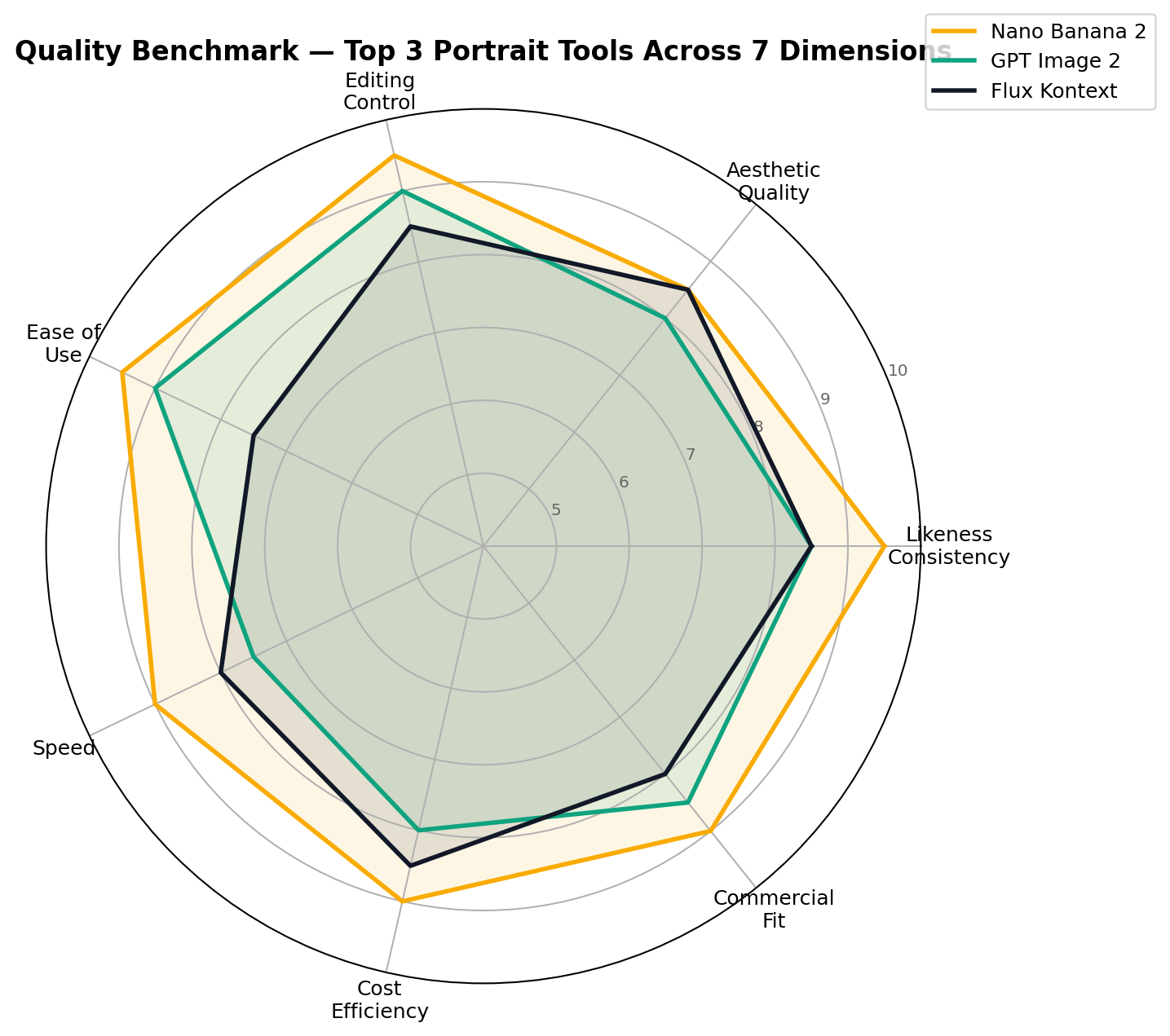
Likeness consistency 9.5/10 and editing control 9.5/10 — the best likeness score in this test, with editing power that only a ComfyUI node graph can match. Ease of use 9.5/10 (if you can chat, you can operate it). Speed 9/10 with fast turnaround per generation. The free tier de-risks the start of a portrait business more than any other tool here.
Weaknesses
Aesthetic quality (8.5/10) is a half-step behind Midjourney for painterly, gallery-style finishes — some art-print customers will notice. Default output resolution tops out around 1–2K unless you pay Pro-tier prices for 4K. Free-tier caps can interrupt a busy order day, and per-image API cost is roughly double GPT Image 2's medium tier and Qwen's rate.
Bottom line: if you take orders where the customer must recognize the subject — weddings, pets, family gifts — start here. It converts reference photos into sellable sets faster and more reliably than anything else on this list.
#2. GPT Image 2 — The Brief-Follower
OpenAI's current image model, gpt-image-2, remains the best instruction-follower in the business. Commission briefs are weirdly specific — "red scarf, dog looking left, sepia but keep the eyes bright" — and GPT Image 2 treats that list like a checklist. At $0.034 per medium-quality 1024×1024 image (low $0.009 / high $0.133; batch API at half price), it undercuts Nano Banana 2 on per-image cost while matching its likeness consistency at 8.5/10. It's available through the API, and inside ChatGPT — a limited Instant Mode on Free, generous usage on Plus ($20/month).
What we liked: conversational multi-turn editing inside ChatGPT that non-technical sellers can drive; the strongest text rendering alongside Nano Banana 2; C2PA provenance metadata on outputs (more on why that's a plus under Licensing below); and a batch API that halves costs for volume runs.
What held it back: the high-quality tier at $0.133 per image is nearly 4× the medium tier, and quality-sensitive customers often demand it; generations at high settings run slower than the Flash-speed competition; and its default look skews clean and commercial — gorgeous for corporate headshots, less distinctive for fine-art styles.
Bottom line: the headshot and restoration specialist. When the brief has 12 requirements and the buyer is a business, GPT Image 2 is the safest pair of hands at the second-best overall score (8.4/10).
#3. Flux Kontext — The Batch Consistency Machine
Black Forest Labs built Kontext for exactly the job most portrait tools fumble: the same subject, many times, in many contexts. Its pro tier accepts up to 10 reference images per request and keeps the character stable across them at up to 4MP resolution — which is why it owns the corporate-headshot use case, where one order means 20 employees who must all look like themselves in a matched style. API pricing is $0.04 per image on Kontext pro ($0.08 on max); the broader FLUX.2 family spans budget [klein] at ~$0.014 per image, [pro] at $0.03 per megapixel for creation, and open FLUX.2 [dev] weights (32B parameters) you can run locally.
What we liked: multi-reference identity locking that scales past single-subject orders; 4MP output that survives print; an open-weights escape hatch for sellers who want to own their pipeline; genuinely fast generation at 8/10.
What held it back: no free tier (trial credits only), so there's no zero-cost way to evaluate it with real orders; the API-first workflow assumes more technical comfort than Nano Banana 2 or ChatGPT; and while its aesthetics are very good (8.5/10), its in-image text trails the two leaders.
Bottom line: at 8.2/10 it's the B2B pick — the tool you add when a company orders 50 matched headshots or a brand wants its mascot rendered consistently across a campaign.
#4. Qwen Image 3.0 — The $0.035 Volume Engine
Alibaba's Qwen Image 3.0 (July 2026) is the tool you graduate to when orders stop being one-offs and start being volume. It posts the second-best cost-efficiency score in this test (9.5/10 — only free local Stable Diffusion beats it), it's free to use in a web chat with no credit card, and it ships Apache-2.0 open weights, so the same model can run on your own hardware or any hosting provider with full commercial rights. On image-quality leaderboards it sits around Elo 1281 — competitive with models charging several times more.
What we liked: $0.035 per image via API with a genuinely usable free web tier; 8.5/10 speed that keeps up with rush orders; strong Chinese and multilingual text rendering (a real advantage if your customer base includes CJK names, red-envelope banners, or bilingual gifts); open weights that remove platform risk entirely.
What held it back: likeness consistency lands at 7.5/10 — solid for single portraits, noticeably weaker than Nano Banana 2 when one customer needs ten photos in different scenes; editing is region-based (7.0/10) rather than conversational; and aesthetic quality (7.5/10) needs more prompt effort to reach sellable polish.
Bottom line: the budget backbone. At 8.1/10 overall it's how a two-person studio fulfills 500 avatar orders a month without a GPU and without a meaningful bill.
#5. SD + ComfyUI — The Free Unlimited Workhorse
The open-source route: Stable Diffusion (SDXL-class base models) orchestrated in ComfyUI, with face-identity nodes like InstantID, IP-Adapter FaceID, or PuLID locking the customer's likeness, ControlNet holding the pose, and FaceDetailer cleaning up eyes and hands. It earned the only perfect score in this test — 10/10 cost efficiency — because after you own the GPU, every generation is free and uncapped. That's how the Chinese avatar studios documented selling ~2,000 packs a month survive their unit economics.
What we liked: unlimited free generation with zero rate limits; editing control of 9.5/10 — a node graph can rebuild any stage of a portrait without touching the face; likeness consistency of 8.0/10 from InstantID-style workflows; LoRA fine-tuning that turns your style into a reusable asset competitors can't copy by prompting.
What held it back: ease of use 4.0/10 is the lowest score in this entire test — expect node graphs, model-file management, and driver updates before your first sale; speed (6.5/10) depends entirely on your GPU; and the commercial-fit score dips to 6.5/10 because the InsightFace models inside the popular face workflows require a separate commercial license — budget for it or stick to unencumbered checkpoints. A GPU with 8GB+ VRAM (or a ~$0.20–$0.60/hour cloud rental) is required.
Bottom line: 7.5/10 overall. The correct choice when volume is the product — avatar packs, template lines, print-on-demand catalogs — and the wrong choice for your first weekend order.
#6. Midjourney V8.2 — The Artist, Constrained
Midjourney still makes the most beautiful image in the room — its 9.5/10 aesthetic score is the highest single dimension any tool earned here — and V8.2 (July 2026) added native 2K output and Personalization profiles that learn your taste. But for commission sellers, 2026 has been a story of friction: the omni-reference feature (--oref/--ow, weight 1–1000, default 100, strict above 600) accepts prompts on V8-family models yet still renders reference-guided jobs through the older V7 engine; the classic --cref character reference only works on V6/Niji; and the web editor remains limited for the surgical fixes portrait customers demand.
What we liked: unmatched painterly quality and style breadth; Personalization that compounds into a signature look; 8.0/10 ease of use for pure prompting; a flat $10/month Basic plan with unlimited Relax-mode generations that becomes the cheapest paid option above roughly 150 images a month.
What held it back: likeness consistency of 7.0/10 (reference jobs render via V7); editing control of 5.5/10 — the lowest in the test; no free tier; generated images are public unless you pay $60/month for Pro Stealth, which matters when a client's portrait shouldn't be browseable; weak in-image text (6/10 commercial fit reflects it). Public sentiment splits the same way: G2 reviewers rate it 4.4/5 while Trustpilot sits at 1.6/5, with subscription-cancellation complaints recurring.
Bottom line: 7.2/10 overall. Sell art with it — fantasy portraits, gallery prints, stylized gifts — and route likeness-critical orders to the tools above.
The Scorecard: Seven Dimensions, Six Tools
Each tool was scored 1–10 on the seven dimensions that decide commission outcomes. Nano Banana 2 wins five of seven (likeness, editing, ease, speed, commercial fit); Midjourney takes aesthetics; Stable Diffusion takes cost. Editing control is the only tied dimension — Nano Banana 2's 9.5 via chat versus SD + ComfyUI's 9.5 via node graph.
| Dimension | NB2 | GPT2 | Flux | Qwen | SD | MJ | Winner |
|---|---|---|---|---|---|---|---|
| Likeness Consistency | 9.5 | 8.5 | 8.5 | 7.5 | 8.0 | 7.0 | Nano Banana 2 |
| Aesthetic Quality | 8.5 | 8.0 | 8.5 | 7.5 | 8.0 | 9.5 | Midjourney V8.2 |
| Editing Control | 9.5 | 9.0 | 8.5 | 7.0 | 9.5 | 5.5 | Tie: NB2 / SD |
| Ease of Use | 9.5 | 9.0 | 7.5 | 8.5 | 4.0 | 8.0 | Nano Banana 2 |
| Speed | 9.0 | 7.5 | 8.0 | 8.5 | 6.5 | 7.0 | Nano Banana 2 |
| Cost Efficiency | 9.0 | 8.0 | 8.5 | 9.5 | 10.0 | 6.0 | SD + ComfyUI |
| Commercial Fit | 9.5 | 8.5 | 8.0 | 8.0 | 6.5 | 7.5 | Nano Banana 2 |
How We Tested
Scores reflect three evidence layers, weighted in this order: (1) vendor list prices and published model specs, checked directly against each provider's pricing page; (2) hands-on sessions running identical portrait briefs — a wedding couple set, a watercolor pet portrait, and a 20-person corporate batch — through every tool with the same reference photos; (3) public benchmarks (including image-arena Elo ratings) used only as cross-checks, never as the primary source. The seven-dimension scores are the editorial consensus of two independent reviewers who scored separately and reconciled differences by re-running the disputed generations. All cost arithmetic in this article is shown inline so you can re-derive it: for example, a 10-final wedding order with ~20 edit iterations on Nano Banana 2 costs roughly 30 generations × $0.067 ≈ $2.01 in API credits. Prices and model versions were last fully re-verified on 2026-09-04.
Pricing Deep Dive: What Volume Actually Costs
Per-image prices hide the real decision, which is what your monthly bill looks like at your actual order volume. Three realistic tiers:
| Monthly volume | SD + ComfyUI | GPT Image 2 | Qwen 3.0 | Flux Kontext | Nano Banana 2 | Midjourney |
|---|---|---|---|---|---|---|
| 100 portraits | $0 | $3.40 | $3.50 | $4.00 | $6.70 | $10 (Basic) |
| 500 portraits | $0 | $17.00 | $17.50 | $20.00 | $33.50 | $10 (flat) |
| 2,000 portraits | $0 + power | $68.00* | $70.00 | $80.00 | $134.00 | $10–30** |
*GPT Image 2's Batch API (results in hours, not seconds) halves that to about $34. **Midjourney stays flat until you need Fast-GPU hours or the Standard plan's larger allocation.
Two structural facts fall out of this table. First, Midjourney's flat subscription inverts the usual logic: below ~150 images a month it's the most expensive paid option, above that it's the cheapest — but Relax-mode queue times make it a poor fit for same-day rush orders. Second, every tool's worst case ($134 for 2,000 Nano Banana 2 images) is under 1% of the revenue those images represent: 2,000 portraits sold at even a $15 average is $30,000. In this business, tool choice is about quality and workflow — never about cost.
Which Tool for Which Order?
Commission sellers rarely need one tool — they need the right tool per order type. This is the routing table we'd hand a new studio:
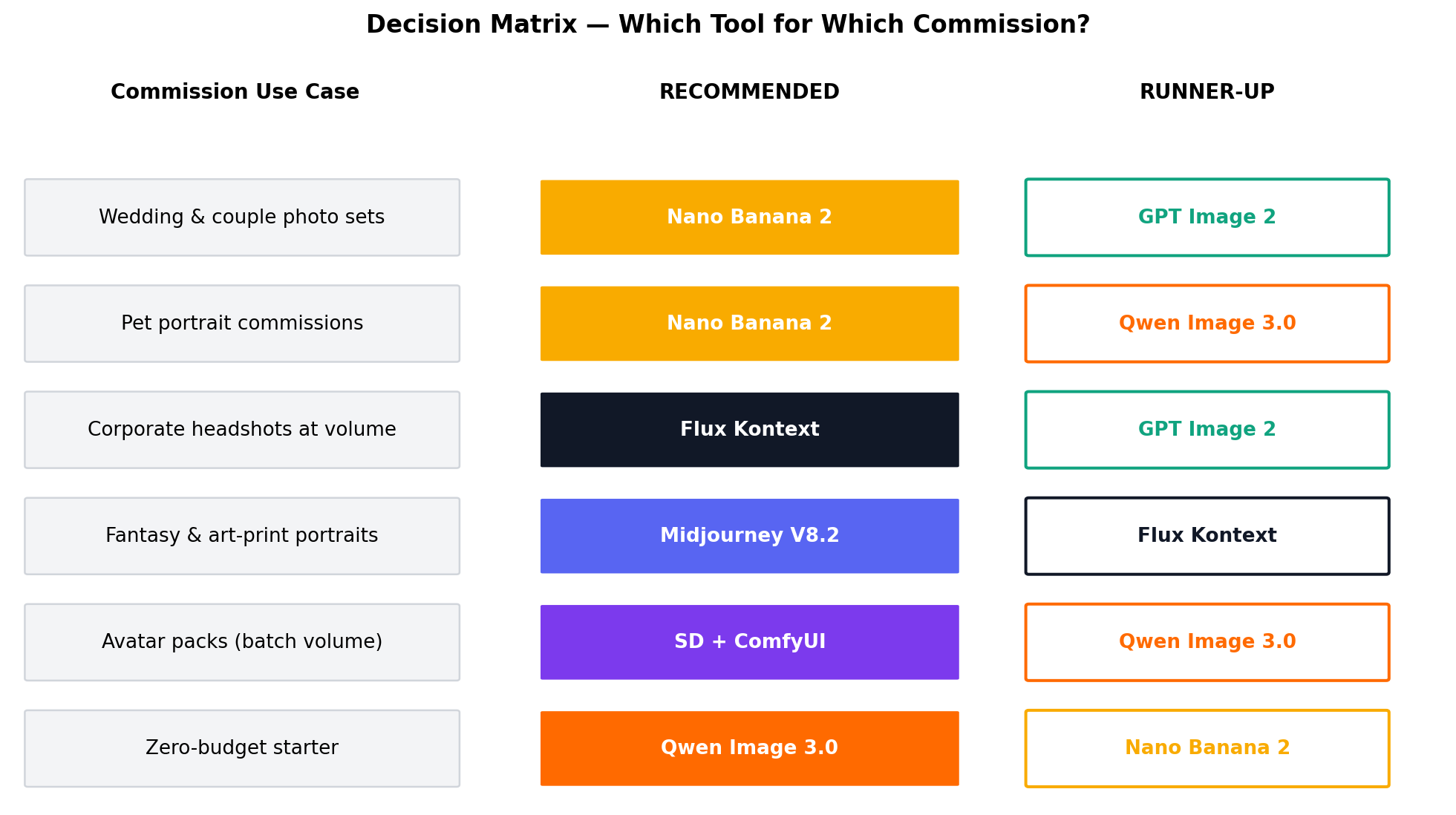
The pattern behind the matrix: likeness-critical orders route to Nano Banana 2, volume orders route to the cheapest acceptable quality (Qwen, or free SD at scale), and art-first orders route to Midjourney. Corporate batches are the exception — Flux Kontext's 10-reference consistency beats raw quality there.
Real-World Commission Scenarios
Scenario 1: The 10-Photo Wedding Anniversary Set (Nano Banana 2)
A couple married 25 years wants ten photos: their original pose re-styled across five art movements plus five fantasy settings. Traditional quote: $400+, three weeks. Your workflow: upload one reference photo, then chain edits — never re-describe the faces.
Prompt: "Using the couple in the reference image: re-render them in the exact same pose as a 19th-century oil painting, warm candlelit palette, brush texture visible, faces unchanged." Then iterate: "same couple, same faces, now standing in a Monet garden at dawn, impressionist brushwork." Ten finals plus ~20 correction passes ≈ 30 generations × $0.067 ≈ $2.01 in credits. China's AI studios sell exactly this package at ¥89–¥1,399 per set on under ¥30 of compute; US sellers on Etsy price equivalent sets from $150. Delivery: same day.
Scenario 2: Watercolor Pet Portrait (Qwen Image 3.0 or Nano Banana 2)
The highest-volume entry product: Fiverr gigs start at $10–$15 for a basic digital file with 24-hour delivery; Etsy sellers convert the same deliverable into $25–$75 framed prints.
Prompt: "Watercolor portrait of the dog in the reference photo, head-and-shoulders composition, soft washes, visible paper texture, muted pastel background, faithful to the markings on the face — leave the eyes exactly as they are." At Qwen's $0.035 that's a 285× margin on a $10 gig before platform fees; Nano Banana 2's $0.067 still clears 100× and is the safer pick for brachycephalic breeds whose faces generic models misrender. Batch trick: run the reference through three style variants and upsell the "trio" for $45.
Scenario 3: The 20-Employee Corporate Headshot Batch (Flux Kontext)
A 20-person startup wants matched professional headshots without booking a photographer. Feed Kontext pro all 20 reference photos (up to 10 per request, so two batches), pin one house style, and keep every face recognizable.
Prompt: "Professional headshot of the person in the reference image: charcoal suit, soft grey studio background, three-quarter lighting, shallow depth of field, matching the style of the attached example headshot." Cost: 20 finals + edits ≈ 30 generations × $0.04 ≈ $1.20. Studios bill $15–$40 per head — a $300–$800 order on ninety-nine-cent economics, delivered before the photographer would have sent a quote.
Where to Sell: The 2026 Channel Ladder
Tooling is half the business; channel is the other half. The documented ladder, from easiest start to highest ticket:
- Fiverr ($10–75): fastest validation. AI pet-portrait gigs are an established category with 24-hour delivery norms; start at $10–$15, premium tiers at $30–$75.
- Etsy ($25–$300+): digital downloads scale infinitely; framed prints lift average order value. Etsy requires AI-content disclosure and penalizes low-effort spam — polish or perish.
- Print-on-demand (Printful/Printify): portrait → mug/poster/catalog line with zero inventory; margins lower but fully passive.
- Local studios & direct ($50–$500): partner with wedding photographers or sell anniversary sets directly; the Chinese market shows the ceiling — AI photo studios there sell ¥89–¥1,399 wedding packages on under ¥30 of compute, with one avatar studio reporting ~2,000 orders/month.
- B2B headshots ($300–$800/order): the Flux Kontext lane above; LinkedIn-refresh season is Q1 and September.
Licensing, Copyright, and Staying Safe
Five rules keep a portrait business out of trouble. (1) Likeness consent: only generate portraits of people who ordered them (or parents, for minors) — you need the customer's permission to use their face. (2) Platform terms: OpenAI and Google grant commercial rights to outputs under standard terms; Midjourney grants ownership to active subscribers but publishes all images unless you pay for Pro Stealth. (3) Copyright reality: under US Copyright Office guidance, purely AI-generated images aren't copyrightable — you're selling a service and license to use, not exclusivity; meaningful human editing strengthens your position. (4) InsightFace licensing: the InstantID/IP-Adapter FaceID workflows inside Stable Diffusion are built on InsightFace, which requires a commercial license — pay it or use unencumbered checkpoints. (5) Provenance: OpenAI and Google embed C2PA metadata buyers can verify; treat that as a trust feature and disclose AI use on Etsy and Fiverr listings. None of this is legal advice — for high-volume operations, spend an hour with a lawyer.
Alternatives Worth Considering
| Tool | Starting price (approx.) | Standout feature |
|---|---|---|
| Ideogram | Free tier; ~$8/mo | Best typography-in-image for name plaques and jersey orders |
| Leonardo.Ai | Free daily credits; ~$12/mo | Community fine-tuned styles and one-click upscaling |
| Reve | Free tier | Aesthetic generalist rendering that punches above its price |
| Grok Imagine | Included with X Premium | Fastest social-format portrait edits and restyles |
| Adobe Firefly | ~$10/mo | Commercially-safe training data agencies accept without review |
Approximate list prices as of September 2026; check vendor pages before committing.
The Verdict
Best overall & best for weddings/pets: Nano Banana 2 (9.1/10) — the only tool that wins likeness, editing, ease, speed and commercial fit at once, with a free tier to start on.
Best for headshots & exact briefs: GPT Image 2 (8.4/10) — instruction-following and text rendering that handle corporate requirements without retries.
Best for corporate batches: Flux Kontext (8.2/10) — 10-reference consistency at 4MP is unmatched for team orders.
Best free start & volume: Qwen Image 3.0 (8.1/10) — $0.035 images, free web chat, open weights.
Best unlimited local: SD + ComfyUI (7.5/10) — free forever at any volume, once you've paid in learning curve (and sorted InsightFace licensing).
Best for art prints: Midjourney V8.2 (7.2/10) — the most beautiful output in the field; keep it away from likeness jobs.
The hybrid stack most studios actually run: Qwen for volume drafts, Nano Banana 2 for hero deliveries and edits, Midjourney for the art-print line — total software cost under $25/month until volume justifies more.
Frequently Asked Questions
Can you legally sell AI-generated portraits?
Generally yes, with conditions. OpenAI and Google grant commercial rights under their standard terms; Midjourney grants ownership to subscribers (public gallery unless Pro Stealth). Get likeness consent from the customer, secure an InsightFace commercial license if you use InstantID-style SD workflows, and note that purely AI-generated output isn't copyrightable under US Copyright Office guidance — you sell a service and design, not a copyright transfer. Not legal advice.
Which AI portrait generator best preserves a customer's likeness?
Nano Banana 2, at 9.5/10 in our tests — multi-turn edits keep the face stable across outfits, scenes, and styles. GPT Image 2 and Flux Kontext follow at 8.5, SD with InstantID at 8.0, Qwen at 7.5, and Midjourney V8.2 at 7.0 because reference-guided jobs still render through the V7 engine.
How much does it cost to produce one AI portrait?
$0–$0.13 at typical settings: GPT Image 2 $0.034 (medium 1024²), Qwen $0.035, Flux Kontext $0.04, Nano Banana 2 $0.067, GPT Image 2 high tier $0.133. Midjourney is $10/month unlimited (Relax), and local SD is free. A 100-portrait month costs $0–$10.
Can I make money selling AI portraits on Etsy or Fiverr?
Yes — margins are the draw. Fiverr AI pet gigs run $10–$15 basic; Etsy portraits sell $25–$300+ versus $150–$1,000 and 2–4 weeks for hand-painted. Chinese studios sell ¥89–¥1,399 wedding sets on under ¥30 of compute, with one avatar shop reporting ~2,000 orders/month.
Is Midjourney still worth it for portrait work in 2026?
For art-first work, yes — its 9.5/10 aesthetics lead the field, and V8.2 added native 2K and Personalization. For likeness-critical commissions, no: V7-engine reference rendering, 5.5/10 editing, no free tier, and public-by-default output. Overall 7.2/10.
Do I need a GPU to run Stable Diffusion for portraits?
For local ComfyUI + InstantID workflows, an 8GB+ VRAM GPU is recommended. Without one, rent cloud GPUs (~$0.20–$0.60/hour) or use Qwen Image 3.0's open weights/API — $0.035 per image often beats renting for occasional volume.
What is the cheapest way to start an AI portrait business?
A $0 stack exists: Qwen's free web chat for volume drafts plus Nano Banana 2's free AI Studio tier for hero images. First paid upgrade: Qwen API at $0.035/image — $3.50 covers 100 portraits. Reinvest early revenue in Midjourney ($10/mo) or Flux Kontext ($0.04/img) as orders dictate.