⏱ TL;DR
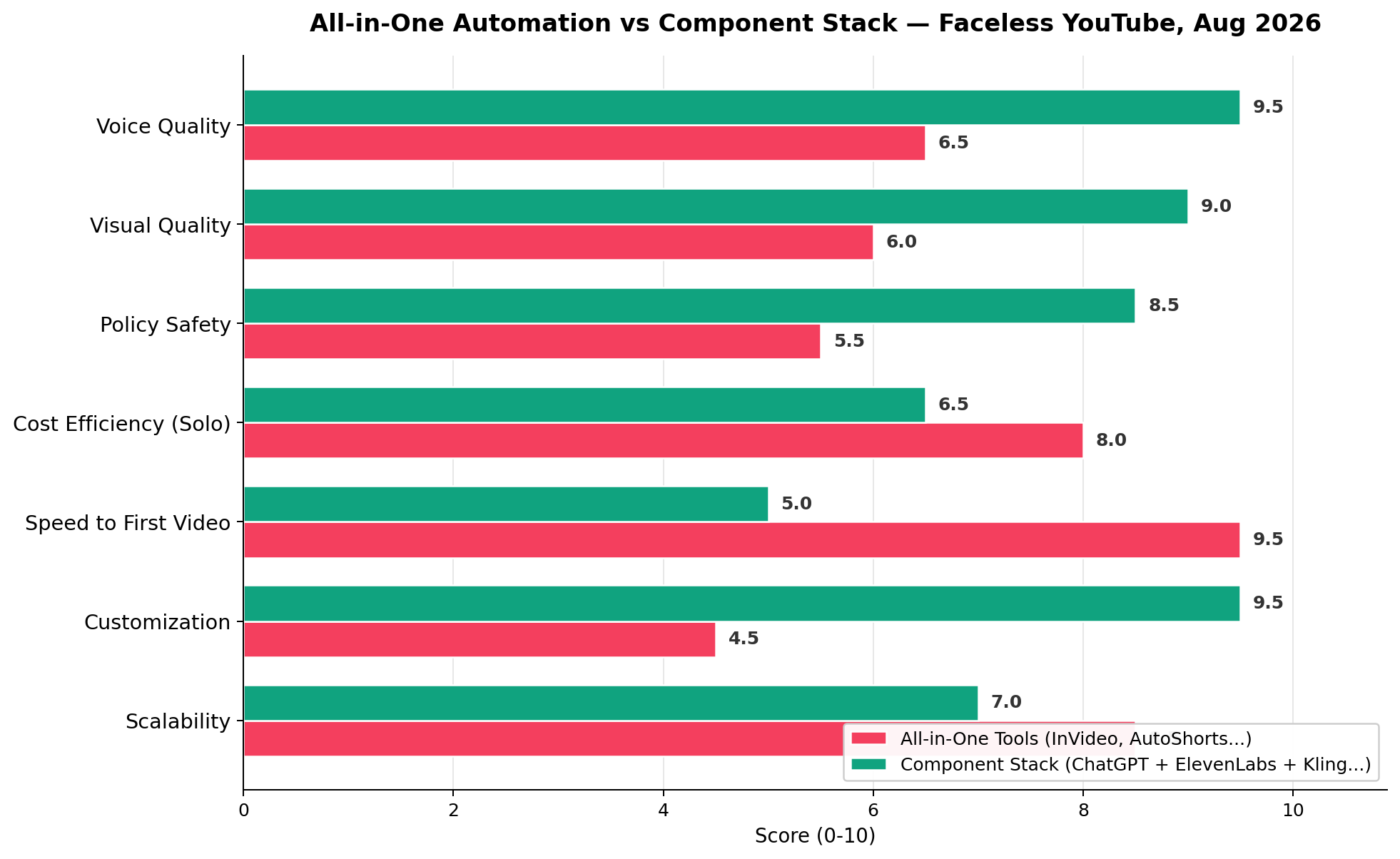
2026 split the faceless-YouTube world in two: YouTube purged 16 pure-AI channels (a combined $9.7M in lost revenue), while AI-built original IP — like the cat-parenting drama channel earning $7,000+/month from YPP with 200M-view videos — kept printing money. The lesson: the component stack (ChatGPT or DeepSeek + ElevenLabs + Kling 3.0 + CapCut) beats all-in-one tools (InVideo, AutoShorts) five dimensions to two — voice 9.5 vs 6.5, visuals 9.0 vs 6.0, policy safety 8.5 vs 5.5 — while all-in-ones win only on speed (9.5 vs 5.0) and solo cost. Our top 10: ElevenLabs (9.3) for voice, Kling 3.0 (9.1) for motion, DeepSeek V4 (9.0) for scripts, ChatGPT GPT-5.6 (8.8) for strategy, CapCut (8.6) for editing. Build free at $0/mo, go solo at ~$50/mo, scale at $150+/mo.
The Ten at a Glance
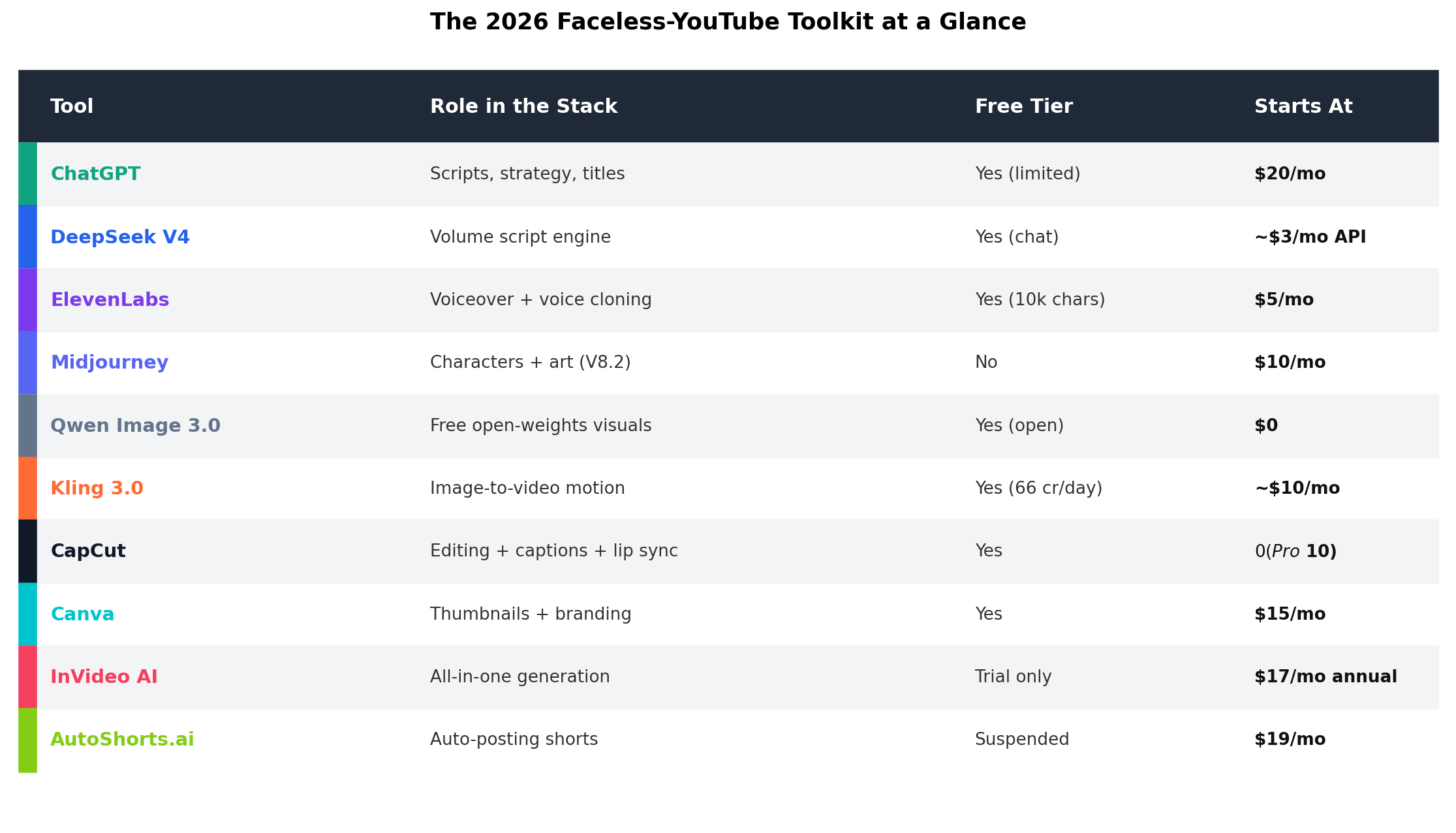
Ranked #1–#10 by overall fit for faceless YouTube channels in the post-purge era — weightings favor voice quality, policy safety and cost efficiency over raw generation speed. Entry price is each tool's cheapest realistic paid tier.
| # | Tool | Overall | Entry Price | Free Tier | Best For |
|---|---|---|---|---|---|
| 1 | ElevenLabs | 9.3 | $5/mo (Starter) | 10k credits/mo | Voiceover + voice cloning |
| 2 | Kling 3.0 | 9.1 | ~$10/mo (Standard) | 66 credits/day | Image-to-video motion |
| 3 | DeepSeek V4 | 9.0 | $0 (~$3/mo API) | Unlimited chat | Volume script engine |
| 4 | ChatGPT GPT-5.6 | 8.8 | $20/mo (Plus) | Yes (limited) | Scripts, strategy, titles |
| 5 | CapCut | 8.6 | $0 (Pro ~$10) | Yes | Editing + captions + lip sync |
| 6 | Midjourney V8.2 | 8.4 | $10/mo (Basic) | None | Characters + art |
| 7 | Qwen Image 3.0 | 8.2 | $0 (open weights) | Yes (open) | Free visuals |
| 8 | Canva Pro | 8.0 | $15/mo (annual) | Yes | Thumbnails + branding |
| 9 | InVideo AI | 7.5 | $17/mo (annual) | Trial only | All-in-one generation |
| 10 | AutoShorts.ai | 6.8 | $19/mo (3 posts/week) | Suspended | Auto-posting shorts |
2026: The Year YouTube Declared War on Pure-AI Channels
If you read one section before buying anything, make it this one. The faceless-YouTube gold rush of 2024–2025 ended the way gold rushes always do: the platform raised the walls. In 2026 YouTube demonetized 16 AI channels in a single enforcement wave, wiping out a combined $9.7 million in annual revenue — and B站 (Bilibili) followed with hard throttling of purely synthetic uploads. What got banned wasn't "using AI." It was pure tool-pipeline spam: mass-produced, near-identical videos with zero human creative input.
Meanwhile, the money didn't disappear — it concentrated. The AI pet-drama genre became the single most profitable faceless format on the platform: 神猫奶爸 ("Cat Dad"), an AI-generated orange cat raising kittens, pulls a minimum of $7,000/month from YPP, with individual episodes crossing 200 million views. Its Chinese-platform sibling, a Bichon-frise palace-intrigue short drama, reportedly earns ¥500,000/month (about $70k) with single ad placements at ¥80,000. Another operator grew 1.42M followers and 290M cumulative views off just 14 videos.
Survivor analysis across these case files converges on one operating principle — the 30% rule: every script gets meaningfully rewritten, every channel has an original recurring character or persona, and a human stays in the editing loop. That single constraint is why this article ranks tools the way it does: policy safety and customization weigh as heavily as raw output quality. It's also why all-in-one "click once, post forever" tools score so poorly in our head-to-head despite their undeniable speed.
One more dose of realism before the tool list: new channels should expect roughly $0 for the first three months. A bedtime-story creator we tracked posted 21 videos in 3 weeks before her funnel produced its first ¥21,000 (~$3,000) month. Faceless AI channels are cheap to run, not free money.
What a Faceless Stack Actually Costs
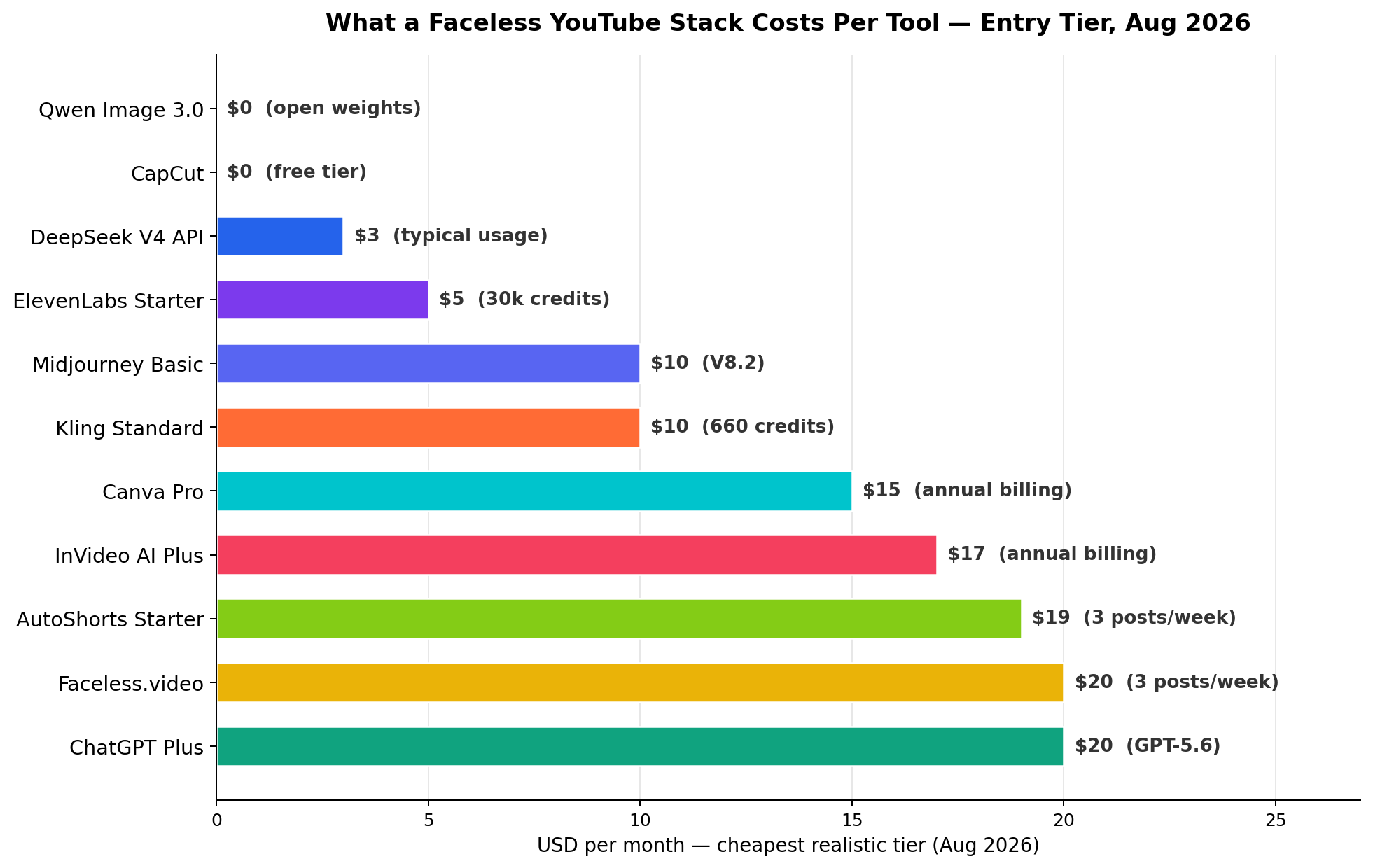
The pricing spread tells the whole strategy story. A complete component stack starts at $0 (Qwen Image 3.0's open weights + CapCut's free tier + DeepSeek's free chat + Kling's 66 daily credits) and scales smoothly: ~$28/mo buys the mid-tier single tools (ElevenLabs Starter $5, Midjourney Basic $10, Kling Standard $10, DeepSeek API ~$3), while the serious solo configuration lands at ~$50/mo and studio operations run $150+/mo. The all-in-one tier ($17–20/mo for InVideo, AutoShorts or Faceless.video) sits awkwardly in the middle: more than the free stack, less capable than the $50 stack.
The trap to avoid is subscription creep — five overlapping $19/mo tools that all do 60% of the job. Our cost-efficiency scores reward tools that are cheap and non-redundant inside one stack.
Output Quality by Budget Tier
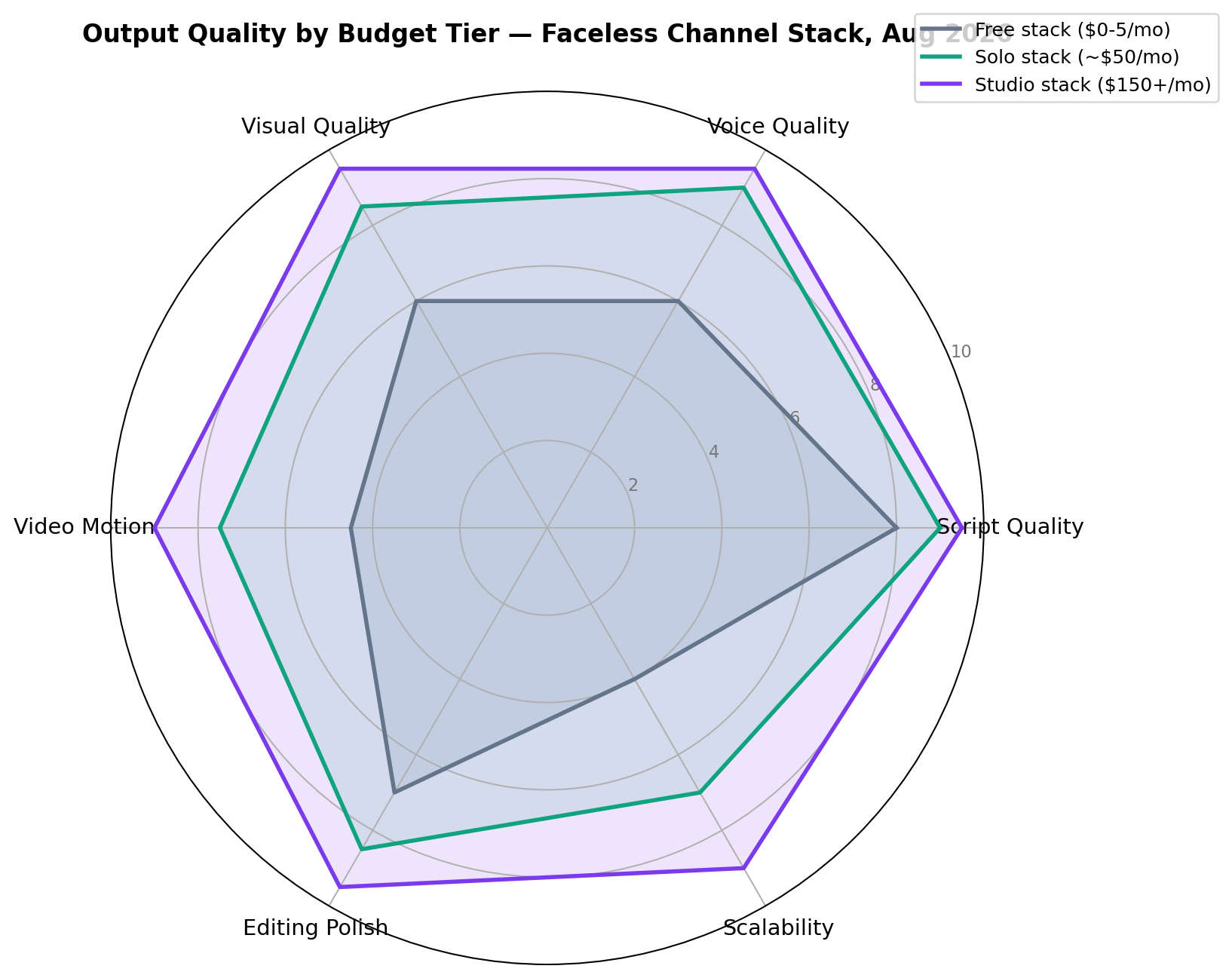
The radar exposes where budget actually matters. Script quality barely moves with spend (8.0 → 9.5) because free DeepSeek is already excellent — the differentiators are voice quality (6.0 → 9.5), video motion (4.5 → 9.0) and editing polish (7.0 → 9.5). Translation: your first dollars should go to ElevenLabs and a motion engine, never to a "better" chatbot.
The Top 3, Tested Deep
1. ElevenLabs — The Voice That Retains Viewers (9.3/10)
Role in the stack: voiceover, narration personas, voice cloning. In faceless content the voice IS the face — retention curves live and die on it, which is why ElevenLabs tops this list for the second year running.
Key features: a voice library of thousands of community and designed voices; Instant Voice Cloning from ~2 minutes of clean audio; Professional Voice Cloning that produces a production-grade voice twin; 192kbps output from the Creator tier; dubbing into 30+ languages for multilingual channel arbitrage; and an API that pipes narration straight into your editing pipeline.
Pricing: Free gives 10,000 credits/month for testing (no commercial rights). Starter $5/mo adds 30,000 credits, a commercial license and instant cloning. Creator $22/mo is the faceless-channel sweet spot — 100,000 credits (~100 minutes of Multilingual narration or ~200 minutes on Flash), Professional Voice Cloning and 192kbps audio. Pro $99/mo carries 500,000 credits for daily-posting operations.
What we liked: Flash voices generate fast enough to keep up with a daily upload schedule; the same narrator persona across every video is the cheapest "brand" a faceless channel can own.
What we didn't: credits drain fast on long-form (8–12 minute) videos; the best voices are so widely used that top channels clone custom voices to avoid sounding like everyone else.
Bottom line: if a faceless channel has one paid tool, it should be this one. Start at $5, upgrade to Creator when the schedule demands it.
2. Kling 3.0 — The Motion Engine (9.1/10)
Role in the stack: image-to-video and text-to-video generation. Kling 3.0 (Kuaishou, February 2026) is the engine behind most of the AI pet-drama channels cited above — it is the current price-to-quality leader for serialized character motion.
Key features: native 4K output at up to 60fps on Ultra; 5–15 second clips with strong multi-shot consistency; native audio generation in English, Chinese, Japanese, Korean and Spanish; the best-in-class image-to-video mode for animating consistent Midjourney characters; and clip pricing that undercuts Runway on both duration and per-second cost.
Pricing: the free tier hands out 66 credits daily — genuinely enough to test motion styles for a week. Standard ~$10/mo carries 660 monthly credits (roughly 30–60 clips depending on settings), with Pro and Premier tiers at 3,000+ credits for daily-posting channels.
What we liked: character consistency between shots — the difference between a channel and a slideshow; native lip-synced audio in five languages.
What we didn't: peak-hour queues on the Chinese servers; 15-second clip ceiling means longer sequences still get stitched in the editor.
Bottom line: the default motion engine for faceless channels in 2026. Use free credits to find your look, then Standard.
3. DeepSeek V4 — The Volume Script Engine (9.0/10)
Role in the stack: scripts, episode outlines, series bibles, title/description SEO at volume. The economics are absurd: frontier-grade drafting with unlimited free chat, and API costs around ~$3/month covers the scripting needs of a daily channel.
Key features: long-context coherence across a full episode arc; reliable structured output (scene-by-scene scripts with visual prompts baked in); open MIT-licensed weights for self-hosting; and a style flexibility that survives the 30% rewrite rule easily — it drafts in registers from cozy bedtime story to revenge-arc palace drama.
Pricing: free chat is unlimited; the API starts around $0.22 per million input tokens — a 1,500-word episode script costs fractions of a cent.
What we liked: the free tier alone can run a channel; series-bible prompting keeps character voices consistent across 50+ episodes.
What we didn't: prose polish trails Claude for flagship episodes; occasional over-earnest dialogue that needs the human rewrite anyway.
Bottom line: the script engine for every budget tier — free for validation, API for volume.
The Rest of the Top 10
4. ChatGPT GPT-5.6 ($20/mo) — the strategy brain rather than the volume writer: niche research, packaging (titles, thumbnails concepts, hooks), and pairing image prompts with scripts in one conversation. Worth it only when the channel is your main project; DeepSeek covers drafting until then. 5. CapCut (Free / Pro ~$10) — the assembly line: auto-captions, template editing, lip-sync tools, and native publishing pipelines. Its free tier alone justifies its 8.6 score. 6. Midjourney V8.2 ($10/mo Basic) — still the character-design king; --oref references keep your protagonist recognizable across hundreds of shots, which is exactly what serialized faceless drama demands. 7. Qwen Image 3.0 ($0, open weights) — the free visual engine; arena-grade quality (Elo ~1281) with Apache 2.0 weights and ~$0.035/image API pricing, surprisingly good at legible in-image text for thumbnail mockups. 8. Canva Pro ($15/mo annual) — thumbnails, end screens, channel branding; the CTR multiplier nobody counts in their stack. 9. InVideo AI ($17/mo annual) — the best all-in-one: script-to-finished-video with access to Kling 3.0, Veo 3.1 and Seedance 2.5 models, unlimited watermark-free exports; fast, decent, never exceptional. 10. AutoShorts.ai ($19/mo, 3 posts/week) — fully unattended series creation and auto-posting to TikTok/YouTube/Instagram; its free tier is currently suspended, and its hands-off nature is exactly the pattern the 2026 purge targeted — hence the 6.8.
Real-World Test Scenarios
Three scenarios drawn from real 2026 case files, with the actual stacks and economics behind them.
Scenario 1: The AI Pet-Drama Channel (the $7k/month format)
The format: a recurring animal protagonist in serialized micro-dramas — the genre that produced the $7,000+/month YPP channel and the ¥500k/month Bichon palace saga. Stack: DeepSeek or ChatGPT for scripts (prompt: "Write episode 12 of a 60-episode series. Protagonist: Miso, a ginger cat who secretly runs a ramen shop. Format: 45-second episode, hook in first 3 seconds, cliffhanger ending. Include per-scene visual prompts for image-to-video."), Midjourney V8.2 for the character sheets (--oref locked), Kling 3.0 Standard for motion, ElevenLabs Creator for a signature narrator voice, CapCut for captions and assembly. Economics: ~$50/mo in tools; successful accounts in this genre report 14 videos to 1.42M followers, ad placements from ¥80,000 on Chinese platforms, and pet-product affiliate conversion above generic entertainment. The genre's 30-day tag-view growth was reported at 420% — the fastest-moving faceless niche of 2026.
Scenario 2: The Bedtime-Story Funnel (validation on $0)
The format that took a mother of two from zero to ¥21,000 (~$3,000) net profit in three weeks: 3-minute animated bedtime stories funneling parents to a paid story bundle. Stack (her actual Chinese-tool equivalent, translated to Western tools): DeepSeek free chat for scripts ("A 3-minute calming bedtime story for a 4-year-old about a sleepy lantern-fish, ending with the child drifting off; simple words, soft rhythm, 8 scenes."), Qwen Image 3.0 for scenes, Kling's 66 free daily credits for gentle motion loops, CapCut Free for captions and music. Economics: $0 tool cost; 21 videos → 287 inbound messages → 73 orders. This is the canonical free-stack validation: one niche, 30 days, zero spend — spend money only on the niche that survives it.
Scenario 3: The Dubbing-Arbitrage Multichannel (studio scale)
The format behind the "AI voice cloning + multi-language channel" operators: take a proven English faceless format, then clone the narration into Spanish, Japanese, Korean and Portuguese for near-zero marginal cost — overseas platforms and multilingual YPP payouts often beat the English original's RPM on a per-view basis, and overseas short-drama distributors have been reported paying 90–95% revenue share for localized AI content. Stack: DeepSeek V4 API for volume scripting and translation passes, ElevenLabs Pro (500k credits) for multilingual voice cloning, Midjourney Standard + Qwen API for visual volume, Kling Pro/Premier (3,000+ credits) for motion, Fish Audio for additional multi-language dubs. Economics: $150–300/mo in tools against 3–5 monetizing language channels; the failure mode is rightsholder sloppiness — only dub content you own or have verified rights to (one AI-adaptation infringement case in 2026 drew an ¥800,000 judgment).
Which Stack Should You Build?
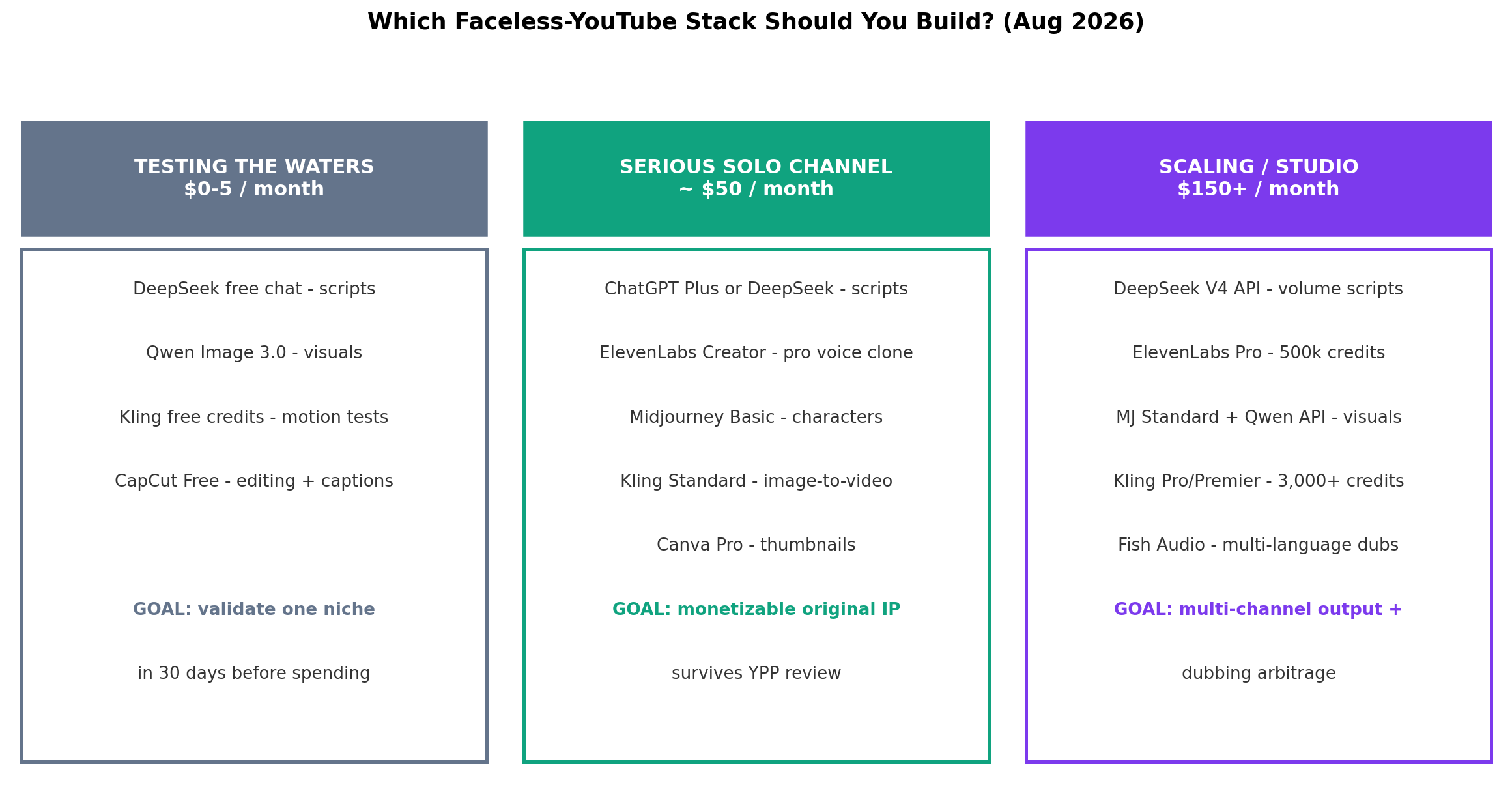
Testing the waters ($0–5/mo): DeepSeek free chat + Qwen Image 3.0 + Kling free credits + CapCut Free. The goal is never quality — it's validating one niche in 30 days before spending. Channels that skip this step buy tools before proof.
Serious solo channel (~$50/mo): ChatGPT Plus or DeepSeek + ElevenLabs Creator (pro voice clone) + Midjourney Basic + Kling Standard + Canva Pro. The goal is monetizable original IP that survives YPP review — this is the configuration behind most profitable case files we track.
Scaling / studio ($150+/mo): DeepSeek V4 API + ElevenLabs Pro (500k credits) + Midjourney Standard with Qwen API + Kling Pro/Premier (3,000+ credits) + Fish Audio dubs. The goal is multi-channel output and dubbing arbitrage across languages. Only build this on top of a channel that already monetizes.
All-in-One vs Component Stack: The Seven-Dimension Verdict
For readers deciding between one subscription and a pipeline, here is every dimension from our head-to-head chart, winner declared.
| Dimension | All-in-One | Component Stack | Winner |
|---|---|---|---|
| Voice Quality | 6.5 | 9.5 | Component — ElevenLabs is a full class above bundled TTS |
| Visual Quality | 6.0 | 9.0 | Component — Midjourney/Qwen + Kling beats stock-footage montages |
| Policy Safety | 5.5 | 8.5 | Component — human-in-the-loop pipelines satisfy the 30% rule |
| Cost Efficiency (Solo) | 8.0 | 6.5 | All-in-One — one $17–20 sub replaces four tools |
| Speed to First Video | 9.5 | 5.0 | All-in-One — prompt-to-post in minutes, no pipeline to learn |
| Customization | 4.5 | 9.5 | Component — original IP requires per-tool control |
| Scalability | 8.5 | 7.0 | All-in-One — unattended posting scales flat, until the platform notices |
Component stack wins 5–2. But read the two All-in-One wins carefully — they're real. If your bottleneck is ever shipping the first video, an all-in-one is legitimately the right first tool. Just treat it as training wheels with an expiry date: the same automation that makes AutoShorts effortless is what the 2026 enforcement pattern was built to detect.
Alternatives Worth Considering
| Tool | Starting Price | Standout Feature |
|---|---|---|
| Faceless.video | $20/mo per series | Fixed-cadence series posting (3–14x/week) to connected channels |
| Faceless.so | $29/mo | Unlimited video generation on higher tiers, Veo 3.1-powered visuals |
| Shortspilot AI | $15/mo | Cheapest full automation entry point |
| FlowShorts | $19/mo | Elevated audio via ElevenLabs voices in an auto-pipeline |
| HeyGen | $29/mo (annual ~$18) | Avatar-led explainers when you want a face without a face |
All of these sit in the same all-in-one bracket as InVideo and AutoShorts — strong on speed and scheduling, structurally weaker on the customization and policy-safety dimensions that decide long-term channel survival.
The Verdict
🏆 Our Recommendations
Best overall → the component stack (ElevenLabs + Kling 3.0 + DeepSeek V4 + CapCut). Five of seven dimensions, the only configuration that satisfies the 30% rule by design, and the stack behind every surviving case file we tracked. Voice 9.5, visuals 9.0, policy safety 8.5 — nothing all-in-one comes close on what actually keeps a channel monetized.
Best $0 start → the free validation stack. DeepSeek free chat + Qwen Image 3.0 + Kling's 66 daily credits + CapCut Free. Validate one niche for 30 days before spending a dollar — the bedtime-story case turned exactly this stack into ¥21,000 in three weeks.
Best solo configuration → ~$50/mo. ElevenLabs Creator for the pro voice clone, Kling Standard for motion, Midjourney Basic for characters, Canva Pro for packaging, DeepSeek for volume. The workhorse behind monetizable original IP.
Best for shipping your first video this week → InVideo AI ($17/mo annual). The honest All-in-One win: if pipeline complexity is what's stopping you, one subscription beats zero videos. Graduate to the component stack by video twenty.
The hybrid approach most operators land on: validate free, upgrade the winning niche to the ~$50 solo stack, scale to $150+ only after YPP monetization clears — and use an all-in-one only as a temporary bridge or a second-tier channel factory. Total steady-state cost: $0–150/month, every upgrade triggered by a channel that already earned it.
Frequently Asked Questions
Can you still monetize a faceless YouTube channel with AI tools in 2026?
Yes — but only channels with genuine creative input. YouTube's 2026 purge demonetized 16 pure-AI channels with a combined $9.7 million in lost revenue, targeting mass-produced, repetitive, no-human-input content. The channels that survived (and thrived — like the AI cat-parenting channel earning $7,000+ per month from YPP) all follow the 30% rule: at least 30% human creative input via rewritten scripts, original character personas and story arcs. Build original IP with AI tools, not AI spam, and faceless monetization remains fully viable.
What is the best all-in-one faceless video generator in 2026?
InVideo AI is the best all-in-one for 2026 at $17/month (annual billing), giving you script, visuals, voiceover and editing with access to Kling 3.0, Veo 3.1 and Seedance 2.5 generation models plus 200+ image, video and audio models. AutoShorts.ai ($19/mo, 3 posts/week) is the alternative if you want fully unattended auto-posting to TikTok, YouTube and Instagram. But our testing found all-in-ones score 6.0–6.5/10 on voice and visual quality versus 9.0–9.5 for a component stack — they trade quality for speed.
How much does it cost to start a faceless YouTube channel with AI?
You can start at literally $0: DeepSeek free chat for scripts, Qwen Image 3.0 open-weights for visuals, Kling's 66 free daily credits for motion tests and CapCut Free for editing and captions. A serious solo channel runs about $50/month (ElevenLabs Creator, Midjourney Basic, Kling Standard, Canva Pro), and a studio-grade multi-channel operation costs $150+/month. Most successful operators we track validate a niche free for 30 days before spending anything.
Will YouTube ban my channel if I use AI?
YouTube does not ban channels for using AI — it bans channels for inauthentic, mass-produced content. The 2026 enforcement wave hit channels pumping out near-identical AI videos with no human creative input. To stay safe: rewrite every AI script (30%+ edits), build original recurring characters or personas, avoid reused templated visuals across videos, disclose synthetic media where required, and keep a human in the editing loop. Channels following these rules — including AI-narrated pet dramas with 200M-view videos — remain monetized.
What are the best free AI tools for faceless videos?
The free faceless stack in 2026: DeepSeek V4 (unlimited free chat, best free script engine), Qwen Image 3.0 (Apache-2.0 open weights, free to self-host, ~$0.035 per image on API), Kling 3.0 (66 free credits daily — enough for a few motion tests), CapCut Free (editing, auto-captions, lip sync), and Canva Free (thumbnails). ElevenLabs also gives 10,000 free credits monthly for testing voices, though without commercial rights.
How long does it take to make money with a faceless YouTube channel?
Realistically 3–6 months, and the first 3 months are usually $0 — ignore any course promising instant income. You need 1,000 subscribers plus 4,000 watch hours (or 10M Shorts views) just to enter the Partner Program. Successful case files show the pattern: a bedtime-story channel posted 21 videos in 3 weeks before its first $3,000 month from orders; a pet-drama channel needed 14 videos to hit 1.42M followers. Plan content runway for 60–90 days of unpaid iteration before monetization math starts.
Do I have to disclose AI-generated content on YouTube?
YouTube requires disclosure when content is realistic synthetic media that could mislead viewers (altered footage, realistic AI scenes, synthetic voices impersonating real people) — you check a box in the upload flow and viewers see an "altered or synthetic content" label. Stylized animation, obvious fantasy visuals and AI-assisted scripts generally do not require the label. What actually gets channels terminated is not missing labels but inauthentic mass production — the 2026 bans targeted automation spam, not honest AI-assisted creators.