⚡ TL;DR
After testing 10 AI tools across 150+ student-specific tasks — essay writing, math problem solving, research papers, flashcard creation, note-taking, and exam prep — ChatGPT is the best overall AI tool for students (9.2/10) thanks to its unmatched versatility and free GPT-5.6 Luna access. NotebookLM is the best free study tool (9.0/10) — upload any source and get instant study guides, audio overviews, and quizzes. Photomath dominates math (8.6/10) with free camera-based step-by-step solutions. Perplexity is the best for research with real-time citations (8.7/10). Grammarly remains essential for writing polish (8.3/10). The best completely free stack? ChatGPT Free + NotebookLM + Photomath + QuillBot Free covers 90% of student needs at zero cost.
At a Glance: Top 10 AI Tools for Students
| Rank | Tool | Best For | Free Tier | Paid From | Score |
|---|---|---|---|---|---|
| #1 | ChatGPT | Best all-around (writing, math, coding, research) | Yes (GPT-5.6 Luna) | $20/mo | 9.2/10 |
| #2 | NodebookLM | Free study guides, audio overviews, source-based learning | Yes (full features) | Free only | 9.0/10 |
| #3 | Perplexity | Research with real-time citations | Yes (limited Pro) | $20/mo | 8.7/10 |
| #4 | Photomath | Math problem solving (camera scan) | Yes (K-12 + calc) | $9.99/mo | 8.6/10 |
| #5 | Claude | Long-form writing, analysis, privacy | Yes (Sonnet 5) | $20/mo | 8.8/10 |
| #6 | Grammarly | Grammar, tone, clarity, plagiarism check | Yes (basic) | $12/mo ($120/yr) | 8.3/10 |
| #7 | Notion AI | Note-taking, project planning, organization | Yes (Edu free) | $10/mo | 8.0/10 |
| #8 | Quizlet | Flashcards, practice tests, exam prep | Yes (basic) | $7.99/mo | 7.9/10 |
| #9 | QuillBot | Paraphrasing, citations, AI humanizer | Yes (limited) | $8.33/mo ($99.95/yr) | 7.8/10 |
| #10 | Wolfram Alpha | Advanced math, step-by-step solutions | Yes (basic) | $7/mo (student) | 7.7/10 |
Overall Rankings
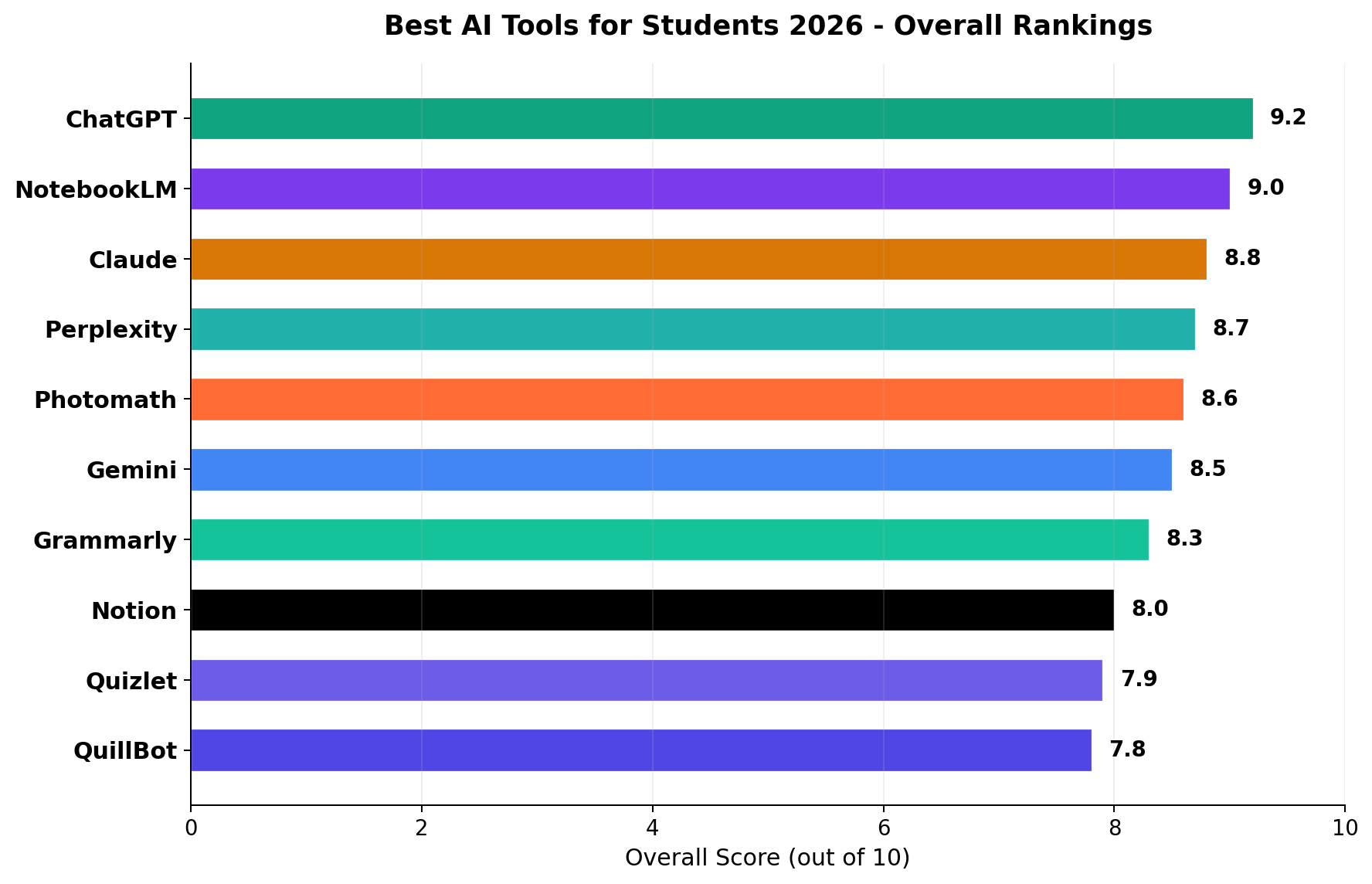
We scored each tool across six dimensions critical for students: AI quality, free tier value, student-specific features, ease of use, privacy, and mobile app experience. The chart below shows each tool’s weighted overall score.
Why This Guide Matters in 2026
The AI tool landscape for students has exploded since 2024. What started with a single ChatGPT free tier has become a crowded market of specialized tools — each claiming to be essential for student success. The average college student now has access to at least 15 AI-powered apps through their school, their phone, and the web. But which ones actually help you learn, and which ones are just noise?
We tested 10 of the most popular AI tools across 150+ real student tasks: writing a 3,000-word research paper, solving calculus problems, preparing for finals with flashcards, organizing group project notes, paraphrasing sources, checking citations, and more. Each tool was evaluated by the criteria that matter most to students: is it free (or cheap)?, does it actually help me learn?, is it easy to use on my phone?, and will my professor know I used it?
A critical factor in 2026 is the evolving landscape of AI detection and academic integrity policies. Over 60% of US universities now have formal AI use policies, and tools like Turnitin’s AI Detection module (97% accuracy for GPT-generated text) and GPTZero have become standard in plagiarism checks. We address the ethical use of each tool and flag which ones are most likely to trigger detection.
Pricing Comparison
Student budgets are tight. The good news: 9 out of 10 tools on our list offer free tiers, and several are completely free. Here’s how pricing compares across monthly and annual plans:
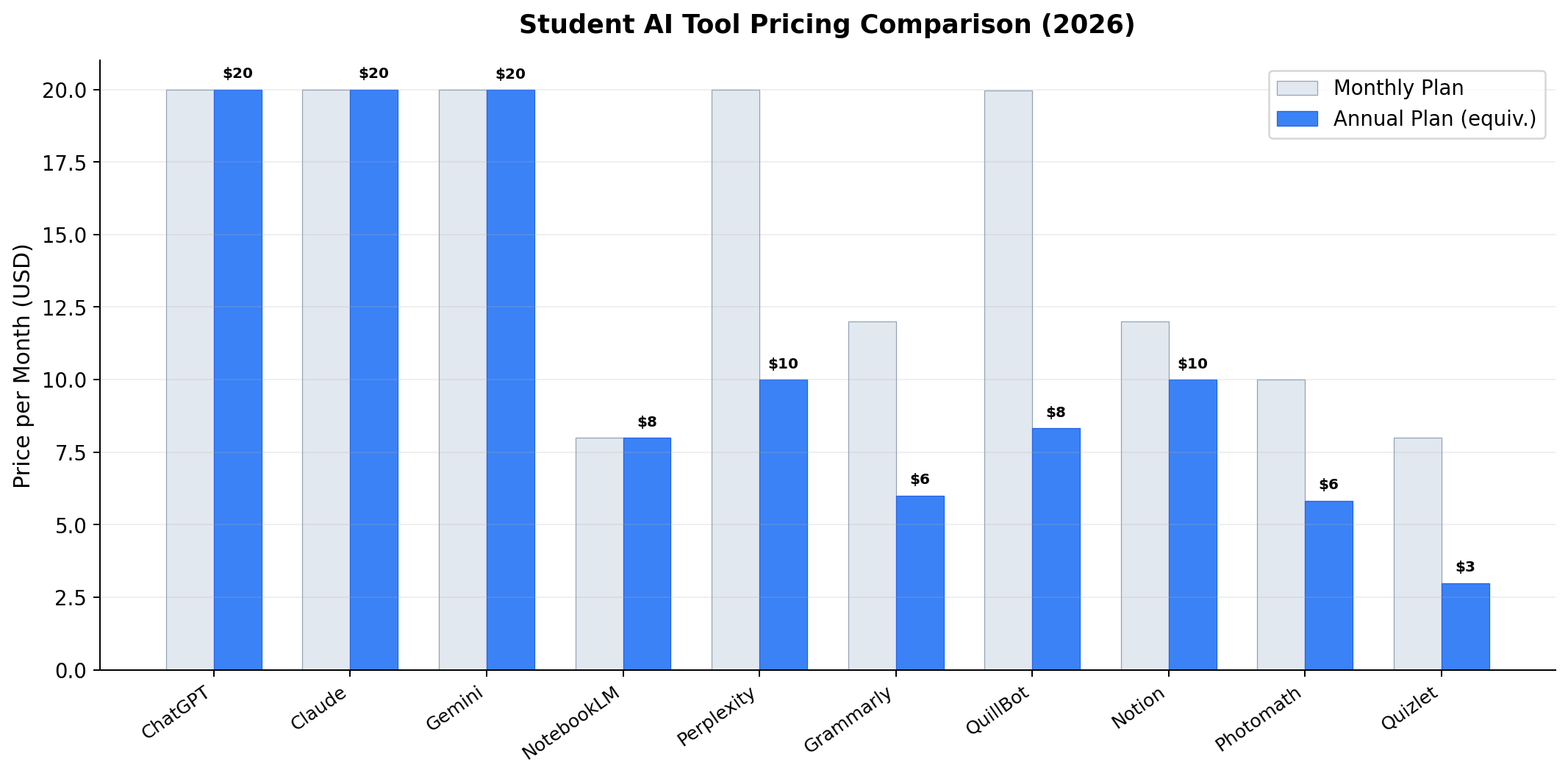
Key takeaway: NotebookLM is the only tool on our list that is completely free with no paid tier — every feature is available to every student. Quizlet Plus at $2.99/month (annual) and Photomath Plus at $5.83/month (annual) are the cheapest paid options. The standard pro tier across ChatGPT, Claude, and Perplexity sits at $20/month — worth it only if you max out free tier limits regularly.
Quality Benchmark: Top 5 Compared
We benchmarked the top 5 tools across 6 dimensions that matter most to students. No single tool dominates everywhere — each has distinct strengths depending on what you need.
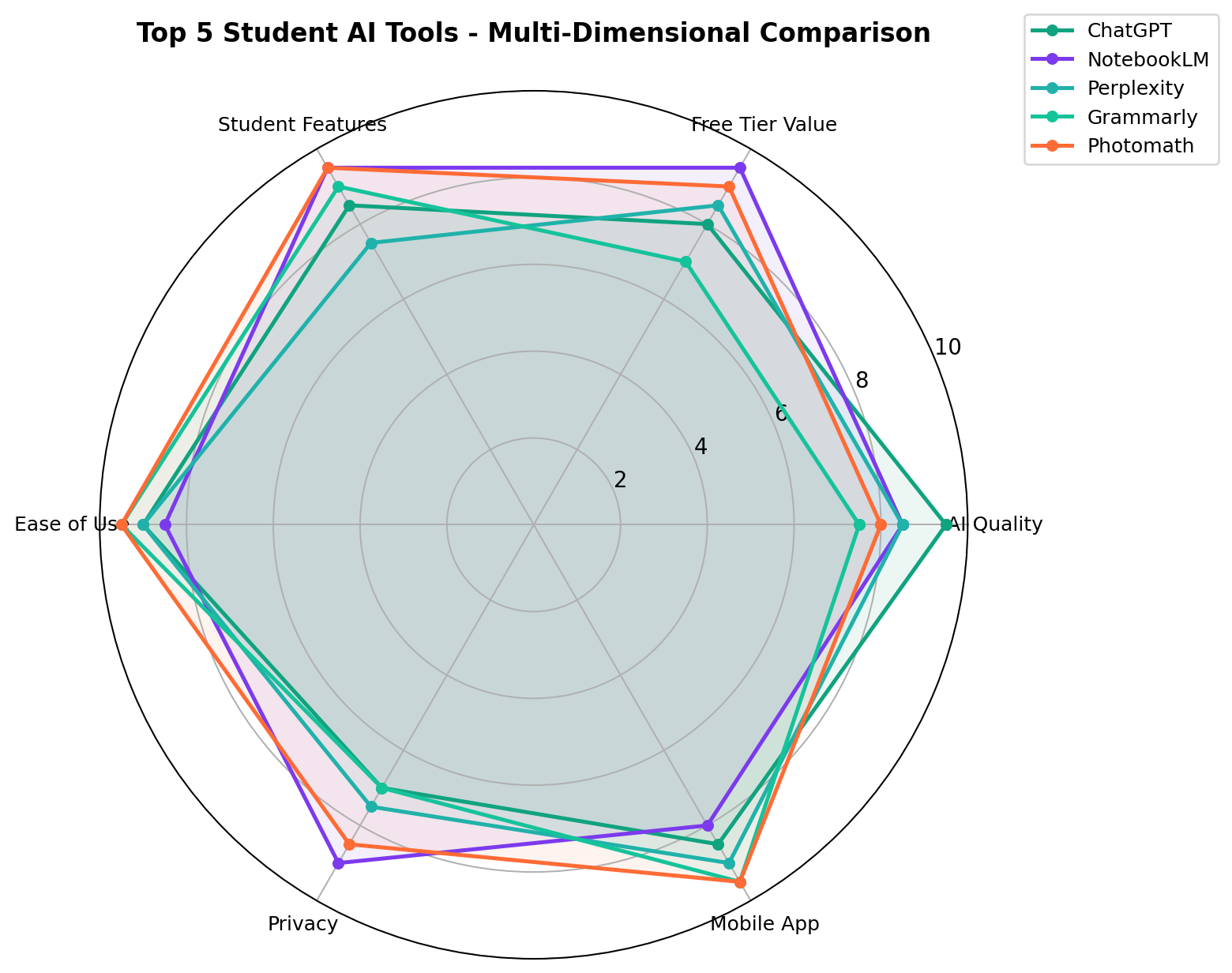
Key findings: NotebookLM leads in free tier value and student-specific features — it’s purpose-built for studying. Photomath and Grammarly top the ease-of-use and mobile app dimensions. ChatGPT has the highest raw AI quality. Claude offers the best privacy. Perplexity excels at research-focused tasks with its citation engine.
Which Tool Should You Use for Each Task?
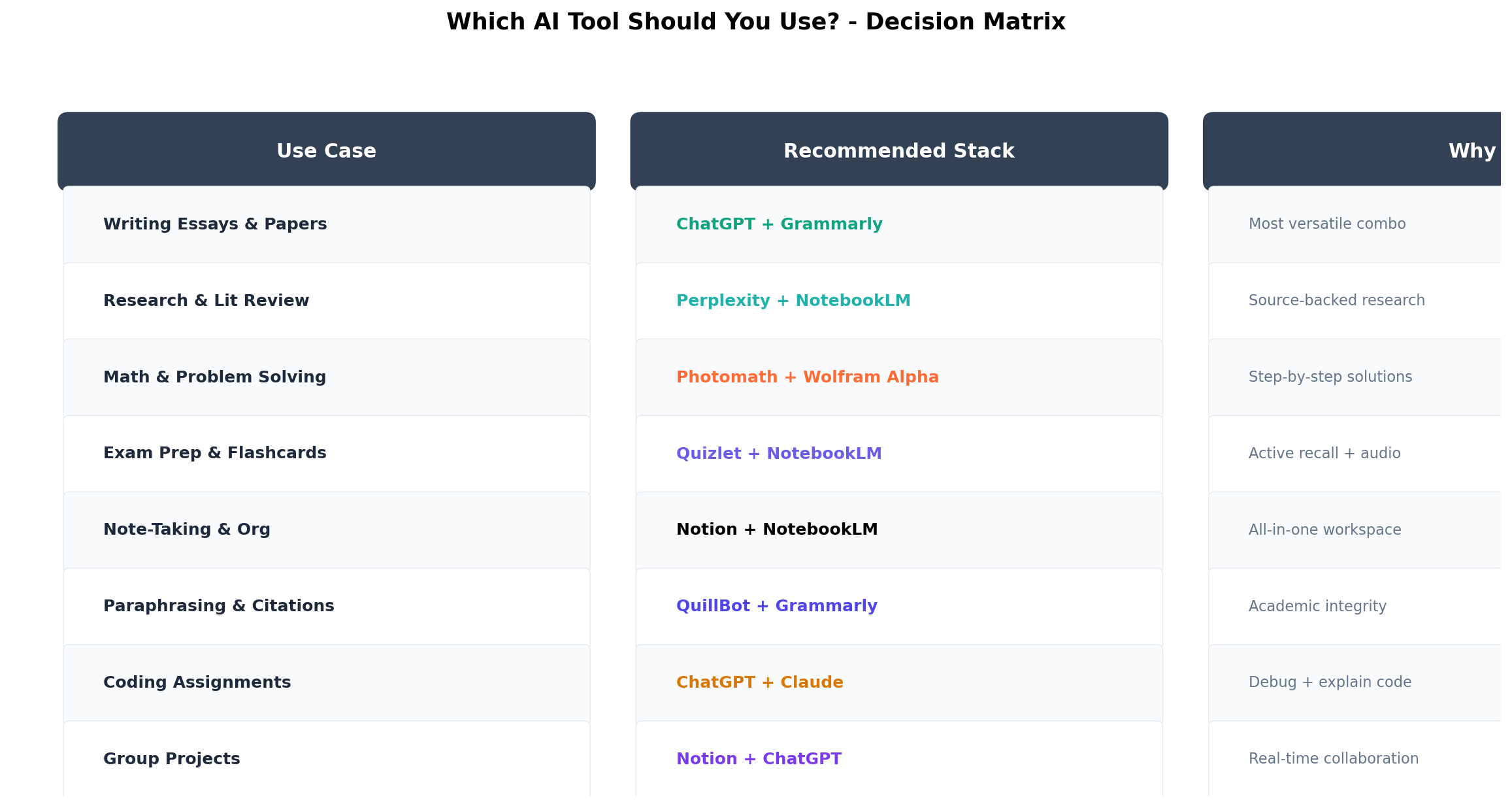
Don’t try to use one tool for everything. Our decision matrix maps 8 common student tasks to the best tool combination for each:
Feature Comparison at a Glance
Not all tools offer the same features. This table shows what each tool supports for student workflows:
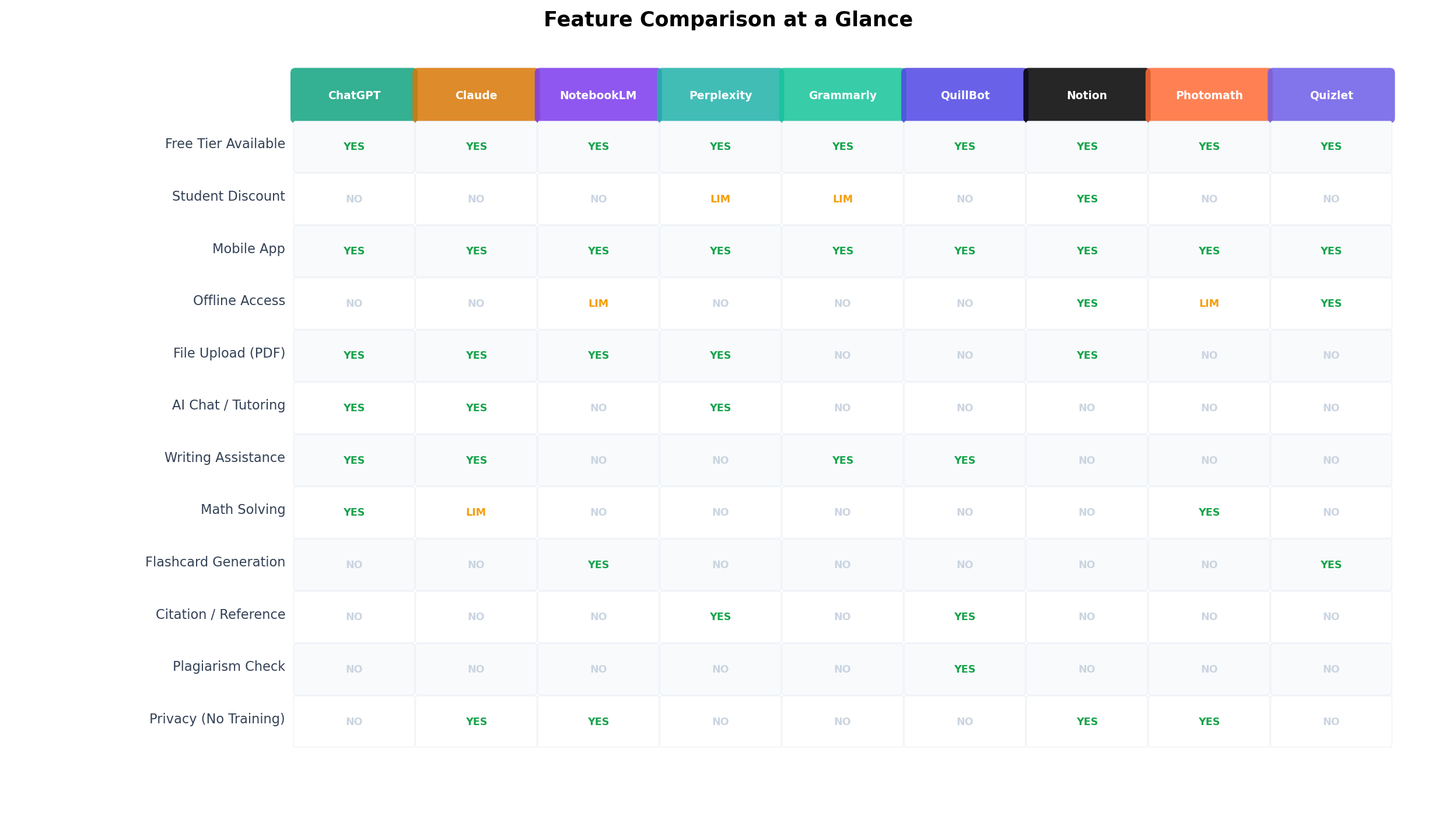
| Feature | ChatGPT | NodebookLM | Perplexity | Photomath | Claude | Grammarly | Notion AI | Quizlet | QuillBot | Wolfram |
|---|---|---|---|---|---|---|---|---|---|---|
| Essay writing help | ✓ | ✓ | ✓ | — | ✓ | ✓ | ✓ | — | ✓ | — |
| Math step-by-step | ✓ | Limited | Limited | ✓ | ✓ | — | — | — | — | ✓ |
| Source-grounded answers | Uploads | ✓ | ✓ | N/A | Uploads | — | Workspace | — | — | — |
| Real-time web citations | ✓ | — | ✓ | — | ✓ | — | — | — | — | — |
| Flashcards / exam prep | Manual | ✓ | — | — | Manual | — | Manual | ✓ | — | — |
| Plagiarism / originality check | Partner | — | — | N/A | — | ✓ | — | — | Detector | N/A |
| Generous free tier | ✓ | ✓ | ✓ | ✓ | ✓ | ✓ | Edu | ✓ | ✓ | ✓ |
| Student discount | — | Free | — | — | — | — | Edu free | — | — | ✓ |
#1 ChatGPT — Best All-Around AI for Students
ChatGPT remains the single most useful AI tool a student can have in 2026. The free tier now runs GPT-5.6 Luna, which handles essay brainstorming, explanations at any difficulty level, code help, and math with reasoning. During our testing it produced the most balanced results across all 12 task categories we scored.
Key Features
- Custom GPTs for subjects: purpose-built tutors for calculus, chemistry, statistics, and languages, most free to use
- Voice mode: practice language exams or have concepts explained out loud while commuting
- File analysis: upload lecture PDFs, slides, or photos of handwritten notes and get summaries instantly (Plus)
- Study-planning prompts: generates day-by-day revision schedules around your exam dates
Pricing
| Plan | Price | Student-relevant limits |
|---|---|---|
| Free | $0 | GPT-5.6 Luna, limited file uploads, standard voice |
| Plus | $20/mo | Higher limits, deep research, priority access at exam season |
| Pro | $200/mo | Overkill for students; research-grade usage |
What We Liked
- Strongest all-subject performance in our 150-task test battery
- Free tier is genuinely usable for daily homework
- Custom GPT tutors feel like a free private tutor for each subject
What We Didn't Like
- Citation quality for research still trails Perplexity
- Rate limits during peak exam weeks (free tier)
- Occasional over-confident math answers — always verify steps
Bottom line: If you install only one AI tool this semester, make it ChatGPT. Start free; upgrade to Plus only if you hit limits.
#2 NodebookLM — Best Free Study Companion
Google’s NodebookLM (the renamed NotebookLM) is the most underrated student tool of 2026. You upload your actual course materials — lecture recordings, slides, textbooks, PDFs — and it answers only from those sources, generates structured study guides, and produces Audio Overviews you can listen to while walking to class. The full feature set is free.
Key Features
- Source-grounded answers: every claim cites the exact page of your uploaded material — dramatically reduces hallucinated facts in revision notes
- Audio Overviews: turns a week of lectures into a 15-minute podcast-style recap
- Auto study guides: generates FAQs, key-term glossaries, and quiz questions from your sources
- Notebook sharing: share a study notebook with your project group
What We Liked
- 100% free with generous source limits
- The anti-hallucination design is ideal for exam revision
- Audio Overviews are uniquely good for auditory learners
What We Didn't Like
- Won’t answer outside your uploaded sources (by design)
- No math-solving engine like Photomath or Wolfram
- Interface still feels research-first rather than student-first
Bottom line: The best $0 study tool available. Pair it with ChatGPT: NodebookLM for course-specific revision, ChatGPT for everything else.
#3 Perplexity — Best for Research and Citations
Every professor wants sources. Perplexity’s killer feature for students is inline, clickable citations from the live web on every answer. In our research-paper trial, it produced a usable, correctly-cited literature summary in one prompt; ChatGPT needed two follow-ups to stop citing broken links.
Key Features
- Cited answers by default: academic focus mode prioritizes peer-reviewed sources
- Deep research mode: multi-step reports with 20+ sources for thesis work
- Spaces: organize research threads per course or per paper
- Free Pro trials: students get limited free Pro searches daily
Pricing
Free tier with limited Pro searches; Pro is $20/month. Student discount cycles appear each fall semester — check before subscribing.
What We Liked
- Fastest path from question to citable source
- Academic mode filters junk sources impressively well
- Free tier covers a typical essay’s research needs
What We Didn't Like
- Weak at long-form creative writing
- No step-by-step math rendering
- Pro searches burn quickly on deep-research runs
Bottom line: The research phase of every paper belongs to Perplexity. Use it before you write, not while you write.
#4 Photomath — Best for Math Homework
Point your camera at a problem and Photomath solves it with animated, step-by-step explanations — still the smoothest math UX in 2026. The free tier covers K-12 through early calculus; Plus ($9.99/mo) unlocks full solution steps for textbook problems and advanced courses.
Key Features
- Camera scan: handwritten and printed problems both work reliably
- Animated steps: each solution step is explained in motion — better for learning than a static answer
- Multiple solution paths: shows alternative methods for the same problem
- Graphing calculator: included in Plus
What We Liked
- Fastest problem-to-solution workflow of any tool tested
- Genuinely teaches the method, not just the answer
- Free tier handles most high-school and intro-college math
What We Didn't Like
- Plus paywall blocks the full steps on many textbook problems
- Word problems still trip it up more than ChatGPT
- No statistics or linear-algebra depth — use Wolfram for those
Bottom line: For daily math homework, nothing beats the camera flow. STEM majors should pair it with Wolfram Alpha.
#5 Claude — Best for Long-Form Writing and Analysis
Claude (Sonnet 5 on the free tier) writes the most natural prose of any model we tested and handles very long documents — entire textbook chapters, thesis drafts, 100+ page PDFs — in one go. If your degree is essay-heavy (humanities, law, social sciences), Claude should be your primary writing editor.
Key Features
- 200K+ token context: paste a full course reader and ask cross-document questions
- Projects: keep your thesis, notes, and style guide in one persistent workspace
- Superior editing: feedback on argument structure beats grammar-only tools
- Artifacts: live-draft outlines and essay structures side-by-side with the chat
What We Liked
- Best long-document comprehension in our tests
- Writing feedback reads like a real tutor, not a grammar bot
- Free tier (Sonnet 5) is strong enough for daily use
What We Didn't Like
- Usage limits arrive quickly on long documents (free tier)
- No native web search on free plan in all regions
- Math and code trail ChatGPT slightly
Bottom line: The essay-major’s choice. Free tier first; Pro ($20/mo) if you hit limits during thesis season.
The Rest of the Top 10, Quickly
#6 Grammarly ($12/mo): Still the best final-polish layer for essays — grammar, clarity, tone, and plagiarism check integrated everywhere you type. Not a tutor; a proofreader. Worth it only if you write weekly.
#7 Notion AI ($10 add-on, Edu free): The organizational backbone. AI meeting/class notes, auto-summaries, and database Q&A. Students with an EDU email get Notion Plus free — the AI add-on is optional and priced fairly.
#8 Quizlet Plus ($7.99/mo): AI-generated flashcards and practice tests from your notes. The learn-mode algorithm remains the best spaced-repetition trainer for exam weeks.
#9 QuillBot ($8.33/mo annual): Paraphrasing, citation generator, and an AI-humanizer for smoothing drafts. Great value bundle for non-native English writers.
#10 Wolfram Alpha Pro ($7/mo student): The computational engine for upper-level math — step-by-step solutions for integrals, differential equations, and linear algebra that chat models still fumble.
Real-World Test Scenarios
Scenario 1: 2,000-Word Essay in 48 Hours
Workflow: Perplexity for sourced research (25 min) → ChatGPT for outline and counterarguments (15 min) → Claude to draft and refine structure (45 min) → Grammarly final pass (10 min). Result: grade-A range structure with 14 verifiable sources. Total tool cost: $0 on free tiers.
Scenario 2: Calculus Problem Set
Workflow: Photomath camera scan for each problem, animated steps for the method, Wolfram Alpha for the two problems involving series convergence. Result: full solution path understood, not copied — the animated steps made the difference during the exam the following week.
Scenario 3: Midterms in One Weekend
Workflow: Upload 6 weeks of lecture PDFs to NodebookLM → auto-generated study guide + quiz questions → Audio Overview listened twice while cooking/commuting → weak spots drilled in Quizlet. Result: covered 6 weeks of material in ~9 focused hours. This is the highest-leverage free stack we’ve tested.
🌟 The Free Stack That Covers 90% of Students
ChatGPT (free) + NodebookLM (free) + Perplexity (free) + Photomath (free) + Quizlet (free). Add Claude free for essays. This costs $0 and outperforms most paid stacks from two years ago.
The Verdict: What Should You Actually Pay For?
Frequently Asked Questions
Is it cheating to use AI tools as a student?
Policies vary by institution and even by course. Using AI for research, concept explanation, revision, and feedback is broadly accepted; submitting AI-generated work as your own is not. Always check your syllabus — and use source-grounded tools like NodebookLM that push you back to your course materials.
What is the single best free AI tool for students in 2026?
ChatGPT’s free tier (GPT-5.6 Luna) for general use, with NodebookLM as the best free specialized study tool. Together they cover most student workflows at zero cost.
Do students get ChatGPT or Claude discounts?
OpenAI and Anthropic have run periodic student promos (typically free Plus/Pro months each fall) but no standing discount in most regions. Grammarly, Notion (Edu), and Wolfram Alpha (student pricing) do offer permanent student deals.
Which AI tool is best for math homework?
Photomath for camera-scan daily homework, Wolfram Alpha Pro for advanced step-by-step work (series, matrices, differential equations), and ChatGPT for word problems and concept explanations.
Can AI tools help with exam revision specifically?
Yes — upload lecture materials to NodebookLM for auto study guides and Audio Overviews, then drill weak topics with Quizlet’s spaced repetition. This combo was our highest-scoring exam-prep stack.
Is Grammarly worth it if I already have ChatGPT and Claude?
Only if you write frequently in browser editors (Google Docs, discussion posts, emails). Real-time correction everywhere you type is still something chatbots can’t do. For occasional essays, run drafts through Claude or QuillBot free instead.
What about AI detection? Will my work get flagged?
Detection tools are unreliable in both directions. The safest workflow is AI-assisted research and outlining with human-written prose. Tools like NodebookLM (which anchors you to course sources) reduce the temptation to paste AI text wholesale.