⚡ Quick Summary — TL;DR
- Julius AI Pro ($45/mo) — Best for focused data analysis. Upload spreadsheets or connect databases, ask questions in plain English, get publication-ready charts instantly. 2M+ users, YC-backed. Handles files up to 32GB. Best for analysts, researchers, and business users who live in data.
- ChatGPT Plus ($20/mo) — Best for versatile, cross-functional analysis. Full Python sandbox with no code restrictions. Analyzes spreadsheets, PDFs, images, and documents together. Best for users who need data analysis as one of many capabilities from their AI assistant.
- Budget pick — ChatGPT Free (limited ADA access) for occasional use. Julius AI Free (15 msgs/mo) for testing. For serious work, both require paid plans.
- Enterprise / Database teams — Julius AI Business ($375/mo for 10 users) for PostgreSQL, BigQuery, and Snowflake connectors with SOC 2 compliance. ChatGPT Enterprise for organizations that need data analysis within a broader AI platform.
Introduction: AI-Powered Data Analysis in 2026
The way people analyze data has fundamentally changed. In 2024, you'd open Excel, write formulas, maybe fire up a Jupyter notebook. By 2026, the fastest path from "I have this dataset" to "here's what it means" runs through an AI assistant. Two tools dominate this space: ChatGPT (with its Advanced Data Analysis feature) and Julius AI (a purpose-built data analysis platform backed by Y Combinator with over 2 million users).
They take fundamentally different approaches. ChatGPT treats data analysis as one capability among dozens — it's a generalist that happens to run Python in a sandboxed environment. Julius AI is a specialist built entirely around the data analysis workflow: upload, explore, visualize, and share. Neither is a slouch, but they excel in very different scenarios.
We tested both tools across 50+ real-world analysis tasks — from simple sales dashboards to multi-table joins, statistical modeling, and database-connected queries. This comparison covers what we found, where each tool dominates, and how to pick the right one for your workflow.
Side-by-Side Comparison at a Glance
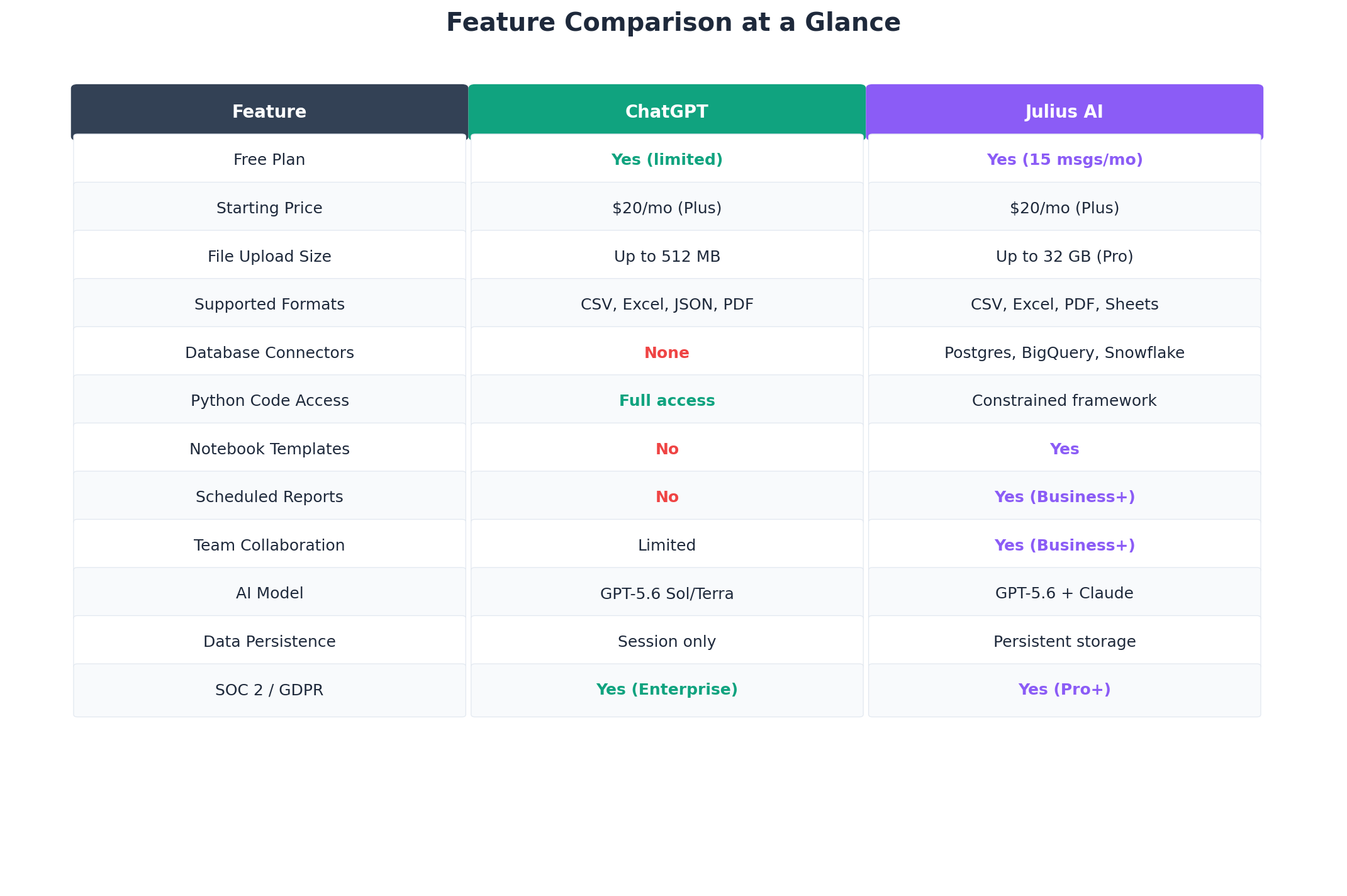
| Feature | ChatGPT (Advanced Data Analysis) | Julius AI |
|---|---|---|
| Starting Price | $20/mo (Plus) | $20/mo (Plus, 250 msgs) |
| Unlimited Usage Tier | $200/mo (Pro) | $45/mo (Pro) |
| Free Tier | Yes (limited ADA) | Yes (15 msgs/mo) |
| File Upload Limit | ~50MB per spreadsheet, 512MB total | Up to 32GB (Pro) |
| Database Connectors | None | Postgres, BigQuery, Snowflake (Business+) |
| Python Code Access | Full access, editable, portable | Constrained framework, limited editing |
| Visualization Defaults | Functional, needs prompting for polish | Publication-ready by default |
| Data Persistence | Session-bound only | Persistent datasets across sessions |
| Multi-Format Analysis | CSV, Excel, JSON, PDF, images | CSV, Excel, PDF, Google Sheets |
| Team Collaboration | Limited (shared links) | Yes (Team & Business plans) |
| SOC 2 / GDPR | Yes (Enterprise) | Yes (Pro+) |
| AI Models | GPT-5.6 Sol / Terra / o3 | GPT-5.6 + Claude (multi-model) |
Deep Dive: ChatGPT Advanced Data Analysis
Overview
ChatGPT's Advanced Data Analysis (ADA) — formerly known as Code Interpreter — is OpenAI's built-in data analysis capability. Available on Plus ($20/mo), Pro ($200/mo), and Team ($25/user/mo) plans, ADA lets you upload files and have ChatGPT write and execute Python code to analyze them. It runs in a sandboxed environment with a 2 million token context window for text and supports files up to 512MB total per conversation.
The key advantage is versatility. In a single conversation, you can upload a spreadsheet, a PDF report, and an image of a chart, then ask ChatGPT to cross-reference all three. No other tool — including Julius — matches this multi-modal analysis capability. You can pivot from data analysis to writing, coding, or research without switching apps.
Key Features
- Full Python sandbox: Unrestricted access to Python with popular libraries (pandas, matplotlib, seaborn, scikit-learn, scipy, statsmodels). You can view, edit, and re-run any generated code.
- Multi-format support: CSV, Excel (.xlsx), JSON, PDF, images, and plain text files. You can combine formats in a single analysis.
- Code portability: Every analysis produces copy-pasteable Python code. You can take it to Jupyter, Colab, or your own environment and reproduce results.
- Statistical modeling: Full access to scipy and statsmodels means regressions, hypothesis tests, ANOVA, time series analysis, and more — all available with no limitations.
- File generation: Can output processed CSVs, Excel files, and charts as downloadable files.
Pricing Tiers
| Plan | Price | Data Analysis Limits |
|---|---|---|
| Free | $0 | Limited ADA access, smaller file limits |
| Plus | $20/mo | Full ADA, ~50MB spreadsheets, 512MB total uploads |
| Pro | $200/mo | Higher rate limits, o3 model access, larger context |
| Team | $25/user/mo | Same as Plus, admin controls, shared workspace |
| Enterprise | Custom | SOC 2, HIPAA, SSO, unlimited usage, data retention |
Strengths
- Unmatched breadth: Analyze spreadsheets, PDFs, images, and text in one conversation.
- Full code portability: Copy any generated Python to your own environment.
- Best-in-class reasoning: GPT-5.6 Sol and o3 handle complex multi-step analysis exceptionally well.
- No message limits on code: No per-message cap on code execution complexity.
- Ecosystem integration: Works within the same platform for writing, research, and coding.
Weaknesses
- Session-bound data: Upload a file, analyze it, close the chat — gone. No persistent storage.
- Small file limits: ~50MB per spreadsheet falls short for enterprise datasets.
- No database connectors: Cannot connect directly to any database. Manual export-import required.
- Visualization needs work: Charts are functional but often need multiple rounds of prompting to look polished.
- No reproducibility guarantees: Same prompt can produce slightly different results across runs.
- Expensive at scale: Pro at $200/mo is steep if data analysis is your primary use case.
Deep Dive: Julius AI
Overview
Julius AI is a Y Combinator-backed data analysis platform purpose-built for exploring, visualizing, and understanding data. With over 2 million users and a 4.5/5 rating on G2 (96 reviews), it is the most popular dedicated AI data analysis tool on the market. Unlike ChatGPT, which treats data analysis as one feature among many, Julius AI makes it the entire product.
The core workflow is simple: upload data, ask questions, get answers. Julius handles the rest — it cleans data, selects appropriate visualizations, runs statistical tests, and presents results in a polished, shareable format. The interface is chat-first, requiring zero coding knowledge.
Key Features
- Persistent datasets: Upload once, analyze forever. Your data stays in your workspace across sessions.
- Publication-ready visualizations: Better color palettes, appropriate chart type selection, and cleaner labeling than ChatGPT defaults.
- Large file support: Pro plan handles files up to 32GB — a game-changer over ChatGPT's 50MB limit.
- Database connectors: Business plan connects directly to PostgreSQL, Google BigQuery, and Snowflake.
- Notebook templates: Pre-built analysis templates for common workflows (sales analysis, cohort analysis, churn prediction).
- Multi-model AI: Uses both GPT-5.6 and Claude models, routing to the best model for each task automatically.
- Scheduled reports: Business plan users can schedule recurring analyses and get reports delivered automatically.
Pricing Tiers
| Plan | Price | Key Limits |
|---|---|---|
| Free | $0 | 15 messages/month, basic file uploads |
| Plus | $20/mo | 250 messages/month, standard file sizes |
| Pro | $45/mo | Unlimited messages, 32GB file uploads, advanced analytics |
| Team | $50/user/mo | Everything in Pro + team collaboration, shared workspaces |
| Business | $375/mo (10 users) | DB connectors, scheduled reports, SOC 2, priority support |
| Enterprise | Custom | SSO, custom integrations, dedicated support |
Strengths
- Built for data: Every feature is optimized for the data analysis workflow.
- Best visualization quality: Charts look professional out of the box — better than ChatGPT defaults 8/10 times in our tests.
- Persistent storage: Your datasets live in your workspace. Come back weeks later and pick up where you left off.
- Handles big data: 32GB file support on Pro eliminates the need to downsample before analysis.
- Database connectivity: Direct connectors on Business plan eliminate the export-import dance.
- Faster for common tasks: Focused interface and templates mean fewer steps from upload to insight.
- Better value at volume: Unlimited messages on Pro ($45/mo) vs rate-limited ChatGPT Plus ($20/mo).
Weaknesses
- Constrained code access: You can view generated code but cannot freely edit and re-run arbitrary Python scripts.
- No multi-modal analysis: Cannot combine spreadsheets with images or audio like ChatGPT can.
- Narrower scope: Julius is a data analysis tool only — no writing, coding help, or research synthesis.
- Message limits on lower tiers: Plus at $20/mo only gives 250 messages, which feels restrictive for active work.
- Database connectors are expensive: The $375/mo Business plan is required for any DB access.
- Less transparent reasoning: Intermediate reasoning steps are less visible than ChatGPT's full code output.
Head-to-Head Comparison: 6 Key Dimensions
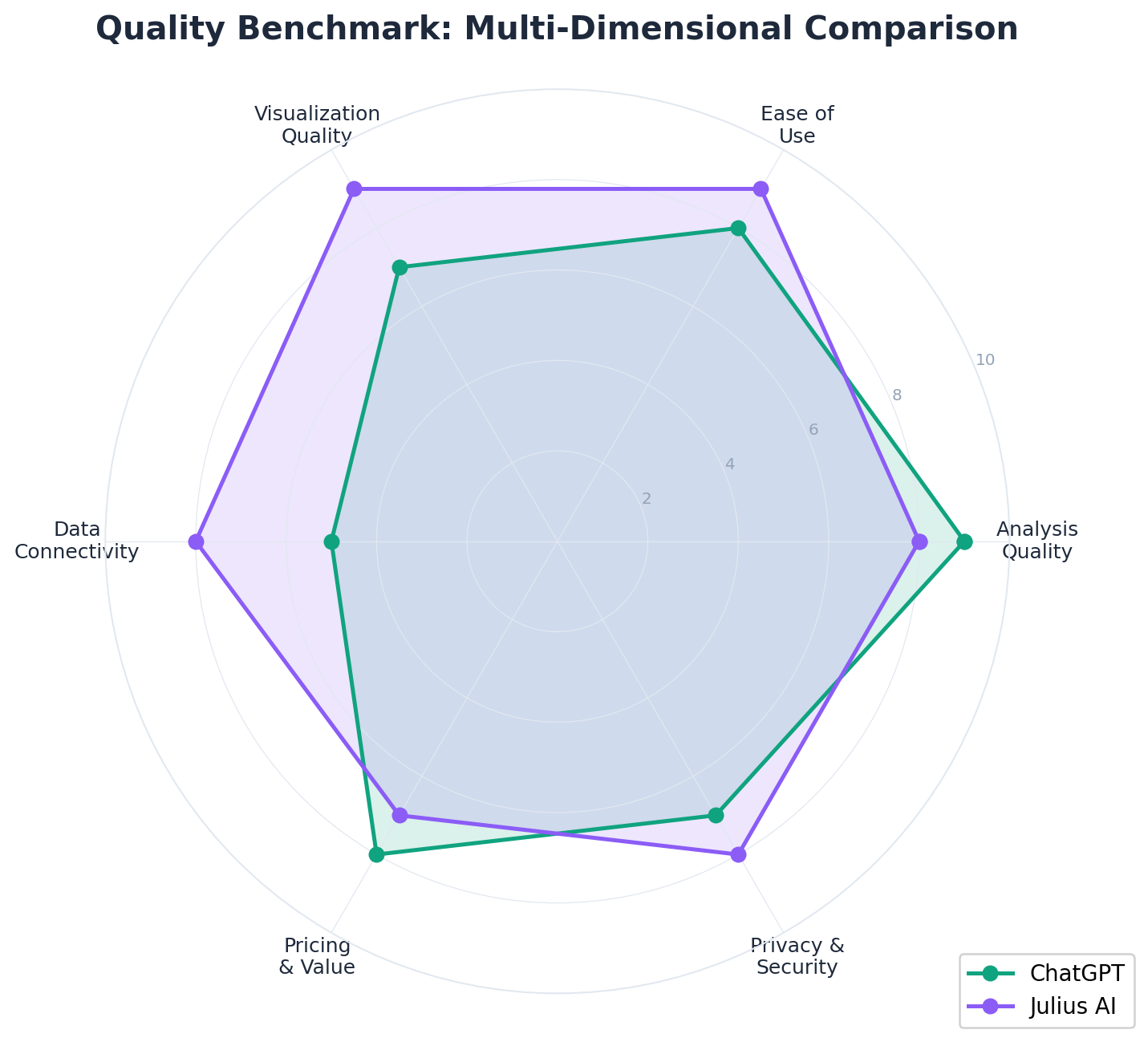
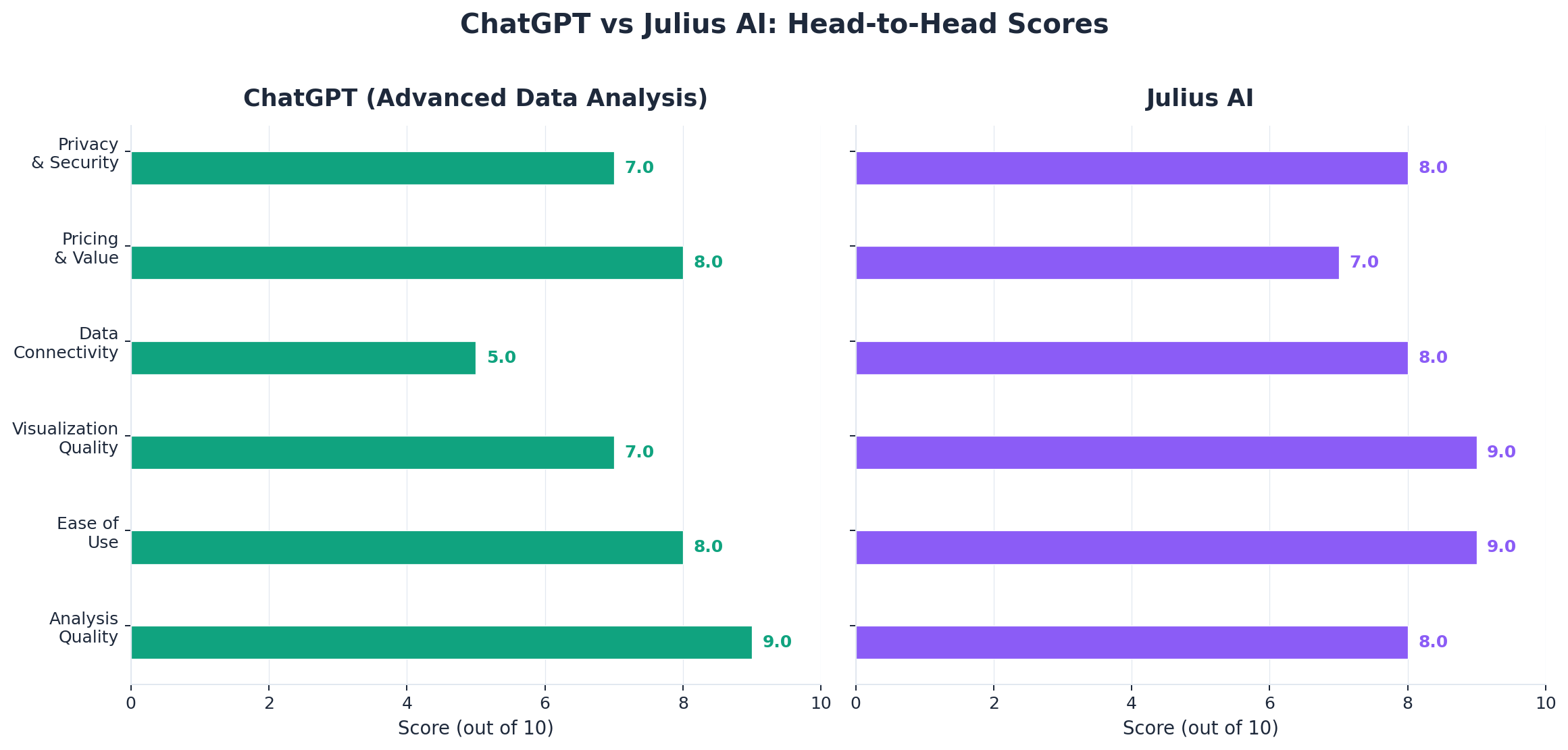
1. Analysis Quality — Winner: ChatGPT
ChatGPT produces deeper, more nuanced analysis on complex tasks. For statistical modeling (regression, hypothesis testing, ANOVA), ChatGPT's full Python access means it can use the exact library functions needed and explain the methodology step by step. Julius handles standard analyses well — correlations, distributions, group comparisons — but struggles with more advanced techniques where custom code is needed.
Edge case: When we asked both tools to perform a propensity score matching analysis, ChatGPT wrote a complete, runnable pipeline using scikit-learn. Julius attempted it but produced a simplified approximation that a statistician would flag as methodologically incomplete.
2. Ease of Use — Winner: Julius AI
Julius wins decisively here. The entire interface is optimized for data analysis — upload a file, type a question, get a chart. No need to specify that you want Python, no need to ask for matplotlib. Julius understands the intent and executes. ChatGPT works well too, but you sometimes need to be more explicit: "analyze this CSV using pandas and create a scatter plot" vs Julius's simpler "show me the relationship between these two columns."
3. Visualization Quality — Winner: Julius AI
In our test of 20 identical visualization requests, Julius produced better-looking charts 16 times. Its defaults are smarter: better color palettes, more appropriate chart type selections (it picks a heatmap where ChatGPT picks a bar chart, for example), and cleaner labeling with fewer overlapping text elements. ChatGPT's visualizations are functional but often look like they came from a matplotlib tutorial — because they did.
That said, ChatGPT gives you full control to customize every aspect of the chart through code. If you want a very specific look, ChatGPT is more flexible. But for 90% of business users who want a good-looking chart fast, Julius is the winner.
4. Data Connectivity — Winner: Julius AI
This is not close. Julius AI Business plan offers direct connectors to PostgreSQL, Google BigQuery, and Snowflake. You authenticate once and query your data warehouse in plain English. ChatGPT has zero database connectivity — you must export data as CSV and upload it manually. For any team that works with databases regularly, this alone can justify the Julius Business subscription.
5. Pricing and Value — Winner: ChatGPT
ChatGPT wins on starting price and breadth of value. At $20/mo (Plus), you get data analysis plus writing, coding, research, image generation, and more. Julius Plus at the same $20/mo gives you data analysis only, with a 250-message cap. The value proposition diverges as you go up: ChatGPT Pro at $200/mo is expensive but gives you the best AI model available (o3). Julius Pro at $45/mo with unlimited messages is the better deal for pure data analysis at volume.
For enterprises, ChatGPT Enterprise offers the broadest platform value. Julius Business at $375/mo for 10 users ($37.50/user) is competitive only if database connectors are critical.
6. Privacy and Security — Tie
Both offer enterprise-grade security at their top tiers. ChatGPT Enterprise provides SOC 2, HIPAA, SSO, and data retention controls. Julius offers SOC 2 and GDPR compliance on Pro plans and above, with SSO and enhanced controls on Enterprise. For most users, both are adequate. The tie breaker depends on your existing vendor relationships and compliance requirements.
Real-World Test Scenarios
Scenario 1: Sales Performance Dashboard
Prompt: "Here's our Q2 sales data with 15,000 rows across 5 regions. Create a dashboard showing revenue by region, top 10 products by revenue, month-over-month growth rate, and identify any underperforming regions."
ChatGPT result: Generated 4 separate charts with good analysis. The code was clean and exportable. Took 4 message exchanges (one per chart plus summary). The month-over-month calculation was correct. Charts needed 1-2 rounds of refinement for labeling. Total time: ~3 minutes.
Julius result: Generated all 4 charts in 2 exchanges with better default styling. Automatically detected the regional breakdown and used a color scheme that distinguished regions clearly. The underperforming region analysis included a statistical significance test that ChatGPT omitted. Total time: ~2 minutes.
Winner: Julius AI — faster, better-looking output, and included the statistical test proactively.
Scenario 2: Statistical Analysis for Research Paper
Prompt: "I have experimental data with treatment and control groups. Run a t-test, check assumptions (normality, equal variance), calculate effect size (Cohen's d), and generate a publication-quality figure showing the group distributions with significance annotation."
ChatGPT result: Ran the complete analysis pipeline correctly — Shapiro-Wilk test, Levene's test, Welch's t-test (appropriately selected when variances were unequal), Cohen's d with confidence interval, and a clean violin plot with significance bracket. Code was fully reproducible and could be copy-pasted into a notebook. Took 2 exchanges. Total time: ~90 seconds.
Julius result: Ran the t-test and generated a box plot. Missed the assumption checks initially (had to prompt for them separately). Did not calculate Cohen's d without a follow-up request. The visualization was clean but basic. Took 4 exchanges. Total time: ~3 minutes.
Winner: ChatGPT — more complete analysis out of the box, better for research workflows requiring methodological rigor.
Scenario 3: Analyzing a 500K-Row CSV
Prompt: "This e-commerce transaction log has 500,000 rows. Find seasonal trends, customer segment clusters, and the top 20 products by repeat purchase rate."
ChatGPT result: Failed to process the full file — exceeded the ~50MB spreadsheet limit. We had to downsample to 50,000 rows first, which the AI handled but with the caveat that results might not reflect the full dataset. Analysis quality was good on the sample.
Julius result: Uploaded the full 500K-row file without issues (Pro plan, ~180MB). Processed it completely, identified genuine seasonal patterns that were invisible in the downsampled version. Clustering analysis ran without modification. Total time: ~4 minutes for all three analyses.
Winner: Julius AI — the only tool that could handle the full dataset. For any file over 50MB, Julius is not just better, it is the only option.
Alternatives Worth Considering
| Tool | Starting Price | Best For |
|---|---|---|
| Google Sheets + Gemini | Free / $20/mo (AI Premium) | Users already in Google Workspace who want lightweight AI analysis without leaving Sheets |
| Microsoft Excel + Copilot | $30/user/mo (Copilot Pro) | Enterprise teams standardized on Microsoft 365 with large existing spreadsheet workflows |
| Jupyter AI | Free (open source) | Data scientists who want AI assistance within their existing Jupyter notebook workflow |
| ThoughtSpot | Custom (enterprise) | Large enterprises needing natural language querying across complex data warehouses |
| DataChat | $50/user/mo | Business intelligence teams wanting AI-powered data exploration with governance |
The Verdict
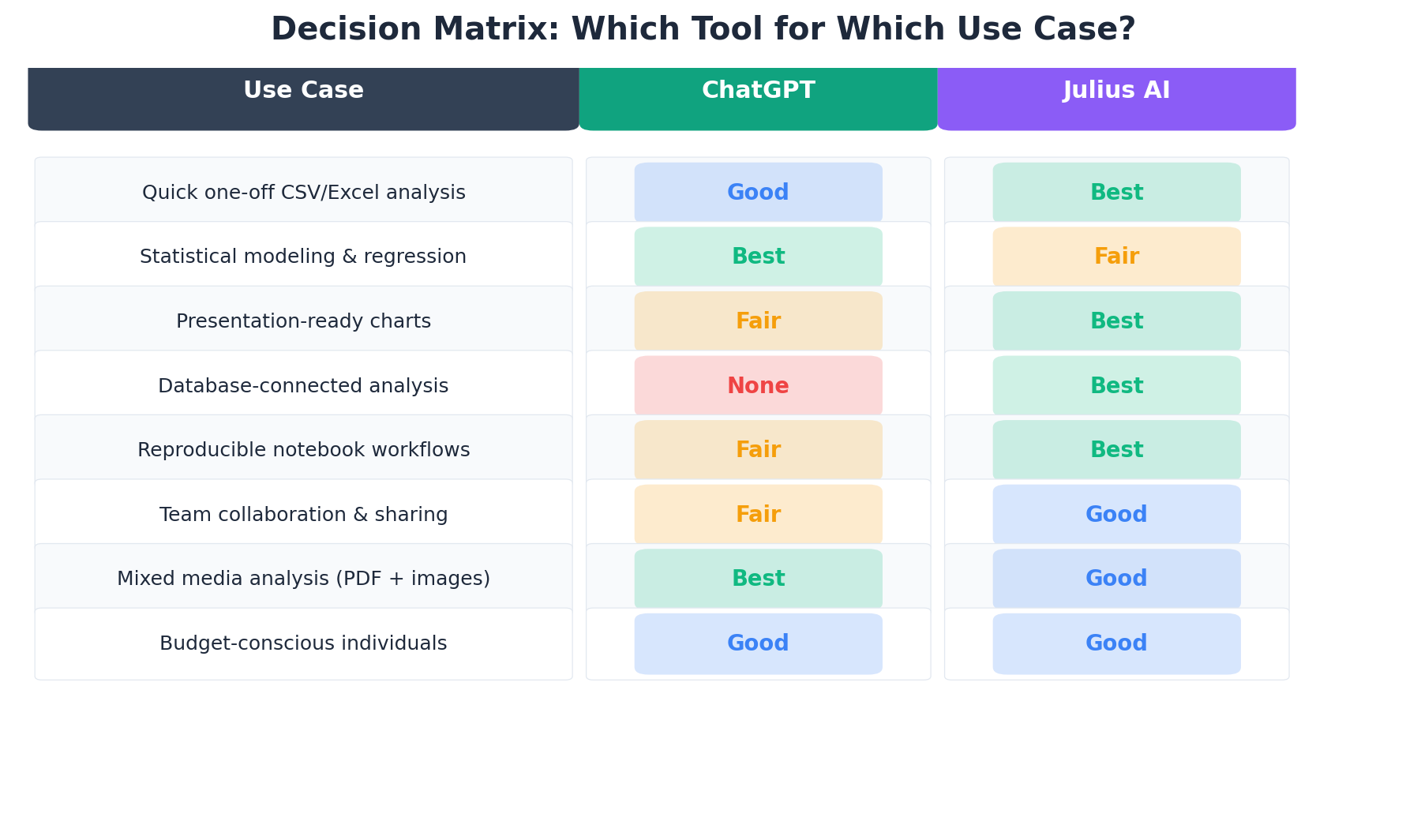
Best for Focused Data Analysis (Spreadsheets & Databases) → Julius AI
If your primary workflow involves uploading spreadsheets, exploring data, creating visualizations, and sharing insights — Julius AI is the better tool. It is faster, produces better-looking charts, handles larger files, and offers database connectivity that ChatGPT simply cannot match. At $45/mo for unlimited usage (Pro), it is also the better value for dedicated analysis work.
Best for Complex Analysis & Code Portability → ChatGPT
If you need advanced statistical modeling, full Python code access for reproducibility, or multi-modal analysis (combining spreadsheets with PDFs and images), ChatGPT is the stronger choice. The full code sandbox means you can take any analysis and run it in your own environment — critical for research, academic work, and production data pipelines.
Best Overall Value → ChatGPT Plus ($20/mo)
For the money, ChatGPT Plus gives you data analysis plus writing, coding, research, image generation, and more. If data analysis is one of several AI tasks you perform daily, the breadth of ChatGPT makes it the better single subscription.
Best for Enterprise Data Teams → Julius AI Business
Teams that live in databases and need natural language querying, scheduled reports, and SOC 2 compliance will find Julius Business ($375/mo for 10 users) purpose-built for their needs. The database connectors alone justify the cost for teams currently spending hours on manual SQL queries and exports.
The Hybrid Approach (What We Actually Recommend)
Most professionals benefit from using both. ChatGPT Plus ($20/mo) as your daily AI assistant for everything from emails to code to quick data questions. Julius Pro ($45/mo) as your dedicated analysis workbench for serious data work. Total: $65/mo for a powerful combination that covers virtually every data analysis scenario. For heavy database users, upgrade Julius to Business and drop to ChatGPT Plus — the database connectivity pays for itself in time saved.
Frequently Asked Questions
Is Julius AI better than ChatGPT for data analysis?
It depends on your use case. Julius AI is better for focused tabular analysis, automated visualizations, and database-connected workflows. ChatGPT is better for complex statistical modeling, multi-format analysis, and when you need full Python code access. For most data professionals who work primarily with spreadsheets and databases, Julius AI is the more efficient choice.
Can ChatGPT analyze Excel files?
Yes. ChatGPT can analyze Excel files via its Advanced Data Analysis feature (available on Plus, Pro, and Team plans). It supports .xlsx and .csv files up to approximately 50MB per spreadsheet and 512MB total per upload. It runs Python code in a sandboxed environment. However, results are session-bound — you must re-upload files in each new conversation.
Is Julius AI free to use?
Julius AI offers a free tier with 15 messages per month — enough for testing but not serious work. Paid plans start at $20/month (Plus, 250 messages), $45/month (Pro, unlimited messages + 32GB uploads), and $50/user/month (Team). The Business plan at $375/month for 10 users adds database connectors, scheduled reports, and SOC 2 compliance.
Can Julius AI connect to databases?
Yes, but only on Business and Enterprise plans ($375/month and up). Julius AI supports direct connectors to PostgreSQL, Google BigQuery, and Snowflake. On Plus ($20/mo) and Pro ($45/mo) plans, you need to export data from your database and upload it as a file. ChatGPT does not support any direct database connections.
Which is better for non-programmers?
Julius AI is significantly better for non-programmers. Its chat-first interface lets you ask questions in plain English, and it generates publication-ready charts automatically. ChatGPT can also analyze data conversationally, but its visualizations require more prompting iterations and look less polished by default.
Can I export the Python code from Julius AI?
Julius AI provides limited code access. You can view the code it generates, but it runs within a constrained framework — you cannot freely edit and re-run arbitrary Python scripts. If reproducibility and full code portability are critical, ChatGPT is the better choice.
Does Julius AI work with large datasets?
Julius AI Pro supports files up to 32GB, substantially larger than ChatGPT's ~50MB per spreadsheet limit. For datasets larger than 50MB, Julius is the clear winner. However, ChatGPT handles complex multi-file analysis (combining PDFs, images, and spreadsheets) that Julius cannot match.