⚡ Quick Summary — TL;DR
- Cursor Pro ($20/mo) — Best AI coding experience, period. Composer 2.5 agents nail multi-file refactors, codebase indexing is the best in class, and the IDE feels like the future. 2M+ users and a reported ~$3B ARR run-rate make it the market leader. Weakness: pricing escalates fast, and enterprise compliance still trails Copilot.
- GitHub Copilot Pro ($10/mo) — Best value and safest enterprise bet. Generous free tier, $10 entry price, ~30 models including GPT-5.6, IP indemnity, and 90% of the Fortune 100 as customers. Weakness: agentic multi-file work and context handling lag Cursor by a visible margin.
- Windsurf, now Devin Desktop ($20/mo) — Best one-click escalation to a cloud AI engineer. Since Cognition acquired Windsurf (July 2025), the editor merged with Devin: unlimited in-house SWE-1.7 models, Devin handoff, and the only self-hosted option of the three. Weakness: raw code quality and editor polish trail both rivals.
- Our verdict — Full-time developers: Cursor. Teams with compliance needs or tight budgets: Copilot. Self-hosted shops and Devin fans: Windsurf. The hybrid play (Copilot free tier + Cursor Pro) covers 90% of needs for $20/mo.
At a Glance: The 2026 AI Coding Landscape
The AI coding market has consolidated into three distinct bets. Cursor (Anysphere) bets that the editor itself becomes the agent workspace. Windsurf — acquired by Cognition in July 2025 and now folded into Devin Desktop — bets that you will hand whole tasks to a cloud AI engineer. GitHub Copilot (Microsoft) bets that distribution, price, and enterprise trust win the long game.
| Cursor | Windsurf (Devin) | GitHub Copilot | |
|---|---|---|---|
| Product type | AI-first IDE (VS Code fork) | AI-first IDE, now Devin Desktop | Extension for VS Code, JetBrains + GitHub agent |
| Free tier | Limited agent requests + Composer trial | Daily quota + unlimited Tab | 2,000 completions + 50 chat/mo |
| Entry paid plan | $20/mo (Pro) | $20/mo (Pro) | $10/mo (Pro) |
| Power tier | $200/mo (Ultra) | $200/mo (Max) | $100/mo (Max) |
| Teams pricing | $40/user/mo | $40/user/mo | $19–39/user/mo |
| In-house model | Composer 2.5 | SWE-1.5 / 1.6 / 1.7 | MAI-Code-1.1-Flash |
| Scale (2026) | 2M+ users, ~$3B ARR run-rate | ~$82M ARR at time of sale | 26M users, 4.7M paid seats |
| Best for | Professional developers | Devin fans, self-hosters | Value seekers, enterprises |
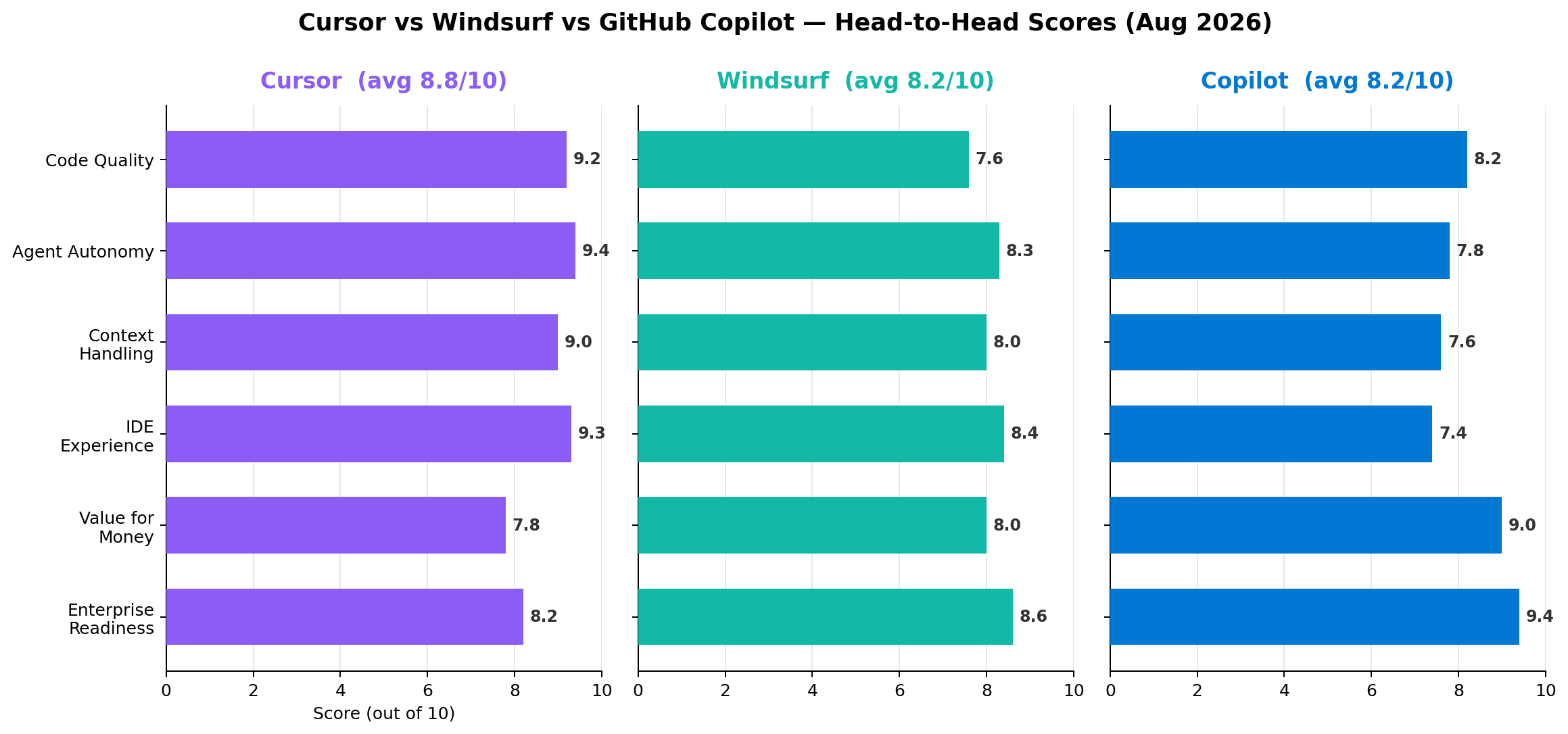
Our scores across six dimensions after 40+ hours of hands-on testing. Cursor averages 8.8/10; Windsurf and Copilot both average 8.2/10 — but for very different reasons.
Deep Dive 1: Cursor — The Agentic IDE That Ate the Market
Two years ago Cursor was a scrappy YC startup. In 2026 it is the category leader: over 2 million users, a reported ~$3B ARR run-rate, and a valuation that makes it one of the fastest-growing software companies in history. The reason is simple — Cursor shipped the best agentic editing experience and never stopped iterating.
What's new in 2026
- Composer 2.5 — Cursor's in-house model family, purpose-built for agentic coding. Composer 2 topped the SWE-bench Multi leaderboard at 73.7%, and 2.5 improves long-horizon planning, terminal command generation, and self-verification. Composer requests are unlimited on paid plans.
- Cloud Agents & Builds — delegate a task to a parallel cloud agent that clones your repo, works in a sandbox, and opens a PR. Builds assembles multiple agents for larger features.
- Multi-repo workspaces — index several repositories (plus docs and issue trackers) in one context window; the retrieval consistently surfaces the right file on 180K+ line monorepos.
- Frontier model access — Opus 5, GPT-5.5, and Gemini 3.1 Pro are selectable per-task, letting you burn fast models on exploration and premium models on hard edits.
- Bugbot — automated code review on pull requests, catching issues before humans do.
Pricing
| Plan | Price | What you get |
|---|---|---|
| Hobby (Free) | $0 | Limited agent requests, Composer trial, 2-week Pro trial |
| Pro | $20/mo | Unlimited Composer, generous frontier-model agent quotas |
| Pro+ | $60/mo | ~4x frontier-model usage for heavy agent users |
| Ultra | $200/mo | ~20x usage, priority compute, Max-tier frontier models |
| Teams | $40/user/mo | Central billing, privacy mode, admin dashboard |
| Enterprise | Custom | SSO/SAML, SCIM, audit logs, zero data retention |
- Composer 2.5 completes multi-file refactors other tools abandon halfway
- Best-in-class codebase indexing and multi-repo context
- Tab completion anticipates your next edit location, not just the next token
- Cloud Agents parallelize boring work into background PRs
- Frontier-model agent quotas run out quickly past Pro; $200 Ultra is steep
- Enterprise compliance trail: no IP indemnity equivalent to Copilot's
- VS Code fork — you live in Cursor's release cadence, not Microsoft's
Deep Dive 2: Windsurf — From Rival IDE to Devin Desktop
Windsurf's story is the wildest in dev tools. After a reported $3B acquisition by OpenAI collapsed in mid-2025, Cognition — the company behind Devin, the first AI software engineer — bought Windsurf in July 2025 (reported ~$800M, with roughly $82M ARR at sale). In 2026 the two products merged: the Windsurf editor is now Devin Desktop, and the "Cascade" agent flow evolved into a full handoff pipeline to Devin's cloud agents.
What's new in 2026
- SWE-1.7, unlimited — Cognition's in-house model line (SWE-1.5 → 1.6 → 1.7) is included without metering. SWE-1.6 scored 50.4% on SWE-Bench Pro, remarkable for a model that costs the vendor a fraction of frontier API rates.
- Devin handoff — highlight a task too big or boring for interactive coding, click once, and Devin takes it in the cloud: reading your repos, opening a PR, pinging you on Slack when done. It's the smoothest human→AI-engineer escalation loop on the market.
- Self-hosted & hybrid deployment — the only one of the three that enterprises can run inside their own VPC or on-prem, which matters for defense, banking, and healthcare.
- Strong enterprise package — SSO, SCIM, audit logs, zero retention, and org-wide policy controls inherited from Cognition's enterprise DNA.
- Frontier options — Sonnet 4.6, GPT-5.4, and Gemini 3 Flash available on higher tiers for when you want a premium model.
Pricing
| Plan | Price | What you get |
|---|---|---|
| Free | $0 | Daily agent quota, unlimited Tab completions |
| Pro | $20/mo | Unlimited SWE-1.7, ~300 prompts on premium models |
| Max | $200/mo | ~10x premium prompts, Devin access tier |
| Teams | $40/user/mo | Org controls, usage dashboards |
| Enterprise | Custom | Self-hosted/hybrid, SSO/SCIM, audit logs, Devin enterprise |
- One-click Devin handoff is genuinely magical for grunt work
- Unlimited in-house SWE-1.7 = predictable costs
- Only self-hosted option among the big three
- Code quality on complex refactors visibly trails Cursor
- Brand whiplash (Windsurf → Cognition → Devin Desktop) confuses teams
- Editor polish and extension ecosystem feel a step behind both rivals
Deep Dive 3: GitHub Copilot — The Default That Grew Up
Dismissed by power users in 2024 as "autocomplete with marketing," Copilot in 2026 is a different animal: 26 million users, 4.7 million paid seats, and 90% of the Fortune 100. Microsoft's distribution — VS Code, JetBrains, Visual Studio, Xcode, GitHub itself — plus an aggressive price cut changed the calculus. At $10/month with a real free tier, Copilot is the tool most of the world actually uses.
What's new in 2026
- ~30 models, one subscription — including GPT-5.6, Fable 5, Sonnet 4.6, and Microsoft's own MAI-Code-1.1-Flash, a fast in-house coding model that handles routine work at low cost. Model picker per conversation keeps power without price gouging.
- Coding agent on GitHub — assign an issue to Copilot and it opens a pull request, runs your CI, and revises from review comments. Default-agent performance sits around ~56% on SWE-bench Verified — solid, though below Cursor's Composer 2 at 73.7% on SWE-bench Multi (different, harder suite).
- Projectpad & workspace context — persistent project memory across sessions, closing much of the context gap with Cursor for medium-size repos.
- Copilot Code Review — every PR gets an automated first-pass review before humans look at it.
- Enterprise trust — IP indemnity, model gateway, audit logs, content exclusion, policy enforcement. This is why compliance teams greenlight Copilot fastest.
Pricing
| Plan | Price | What you get |
|---|---|---|
| Free | $0 | 2,000 completions + 50 chat/agent requests/mo |
| Pro | $10/mo | Unlimited completions, 300 premium requests |
| Pro+ | $39/mo | 1,500 premium requests, full model catalog |
| Max | $100/mo | Heavier agent access (Max 5x / 20x tiers) |
| Business | $19/user/mo | Org policy, privacy, IP indemnity |
| Enterprise | $39/user/mo | + GitHub Enterprise, audit, content exclusion |
- $10 entry and a genuinely usable free tier
- Works everywhere: VS Code, JetBrains, Visual Studio, Xcode, GitHub.com
- IP indemnity + compliance stack that enterprises sign off on
- Agent mode still breaks multi-file refactors into fragile steps
- Context retrieval misses cross-repo dependencies on big monorepos
- Premium-request metering is confusing — edits, agent turns, and models all bill differently
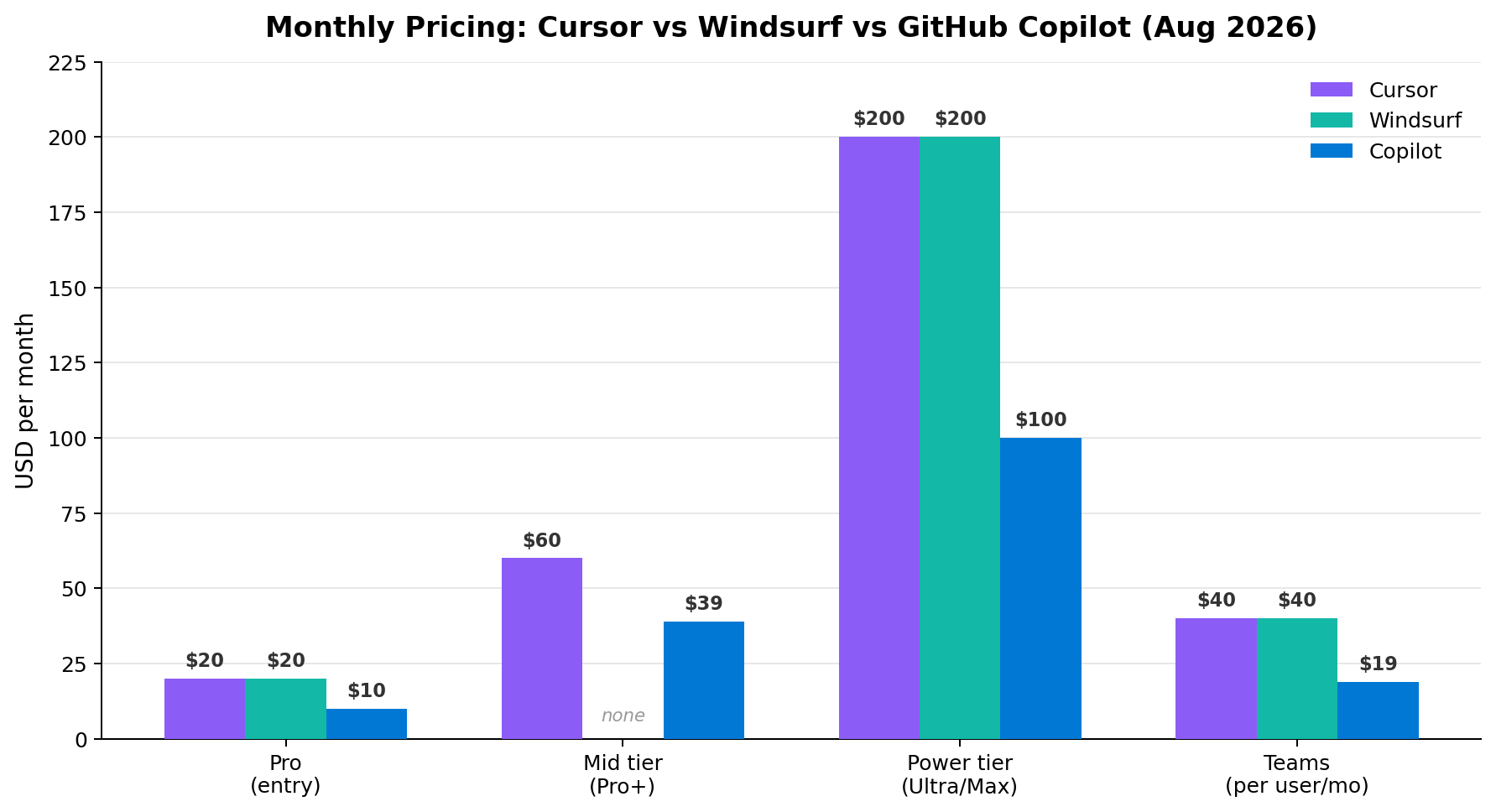
Copilot undercuts everyone at entry ($10) and power tier ($100). Cursor and Windsurf tie at $20/$40/$200. Copilot Pro+ ($39) fills the gap between Pro and Max.
Head-to-Head: Six Dimensions, Six Winners Declared
We ran identical tasks through all three tools: completions on a 180K-line TypeScript monorepo, agent refactors across 10–20 files, debugging from CI logs, and greenfield feature builds with tests. Here is how the dimensions broke down.
1. Code Quality & Completions Winner: Cursor
Cursor's Tab completion remains the industry benchmark — it predicts your next edit location, not just the next token, and routinely writes 3–5 correct lines from a pause in typing. Composer 2.5's generated code needed the fewest human corrections in our refactor tests. Copilot (mixing MAI-Code-1.1-Flash and GPT-5.6) is close on completions but writes less idiomatic code in agent mode. Windsurf's SWE-1.7 is impressive for its cost, but on gnarly legacy code it hallucinated imports more often than either rival.
2. Agent Autonomy & Multi-File Refactors Winner: Cursor
This is where the products are most different. Cursor's agent planned a 14-file Express-to-Fastify migration as a coherent diff tree, ran tests, self-corrected twice, and finished in one session. Copilot's agent got the same task 80% done but fragmented it into brittle, reviewable-but-tedious steps. Windsurf's ace is escalation: when the task exceeds interactive capacity, handing it to Devin in the cloud actually works — our test PR arrived green on CI within 40 minutes. For in-editor autonomy, Cursor wins; for delegation, Windsurf is the runner-up with a unique trick.
3. Context & Codebase Understanding Winner: Cursor
Cursor's indexing + retrieval found the right utility file in a 180K-line monorepo on the first or second try in nearly every test, and multi-repo workspaces let it reason across service boundaries. Copilot's Projectpad closed much of the gap for single repos but still misses cross-repo references. Windsurf indexes fast and cheaply, but retrieval precision drops on very large codebases.
4. IDE Experience & Performance Winner: Cursor
Both Cursor and Windsurf are VS Code forks, but Cursor's editor feels faster: snappier agent panels, cleaner diff review, more predictable keyboard flow. Copilot runs inside your existing VS Code or JetBrains setup — less disruptive if you're attached to your IDE, and the only option of the three for JetBrains diehards (short of JetBrains' own AI). By raw editor craft, Cursor takes it.
5. Pricing & Value for Money Winner: GitHub Copilot
Copilot Free (2,000 completions, 50 chats) is a real product; Pro at $10/mo with unlimited completions beats both rivals' entry price; Max at $100 undercuts their $200 power tiers. Windsurf's unlimited SWE-1.7 makes its $20 Pro the most predictable bill. Cursor gives the most capability per dollar for full-time developers, but the quota anxiety on frontier models at Pro tier is real — heavy users end up at $60 or $200.
6. Enterprise, Security & Ecosystem Winner: GitHub Copilot
All three are SOC 2 Type II with zero-retention options, SSO/SCIM, and privacy modes. Copilot pulls ahead on IP indemnity (contractual protection if generated code triggers copyright claims), model gateway controls, audit exports, and content exclusion for sensitive paths. Windsurf counters with the only self-hosted deployment of the three — decisive for air-gapped orgs. Cursor's enterprise tier is competent but youngest. With 90% of the Fortune 100 and 4.7M paid seats, Copilot's ecosystem gravity wins the dimension.
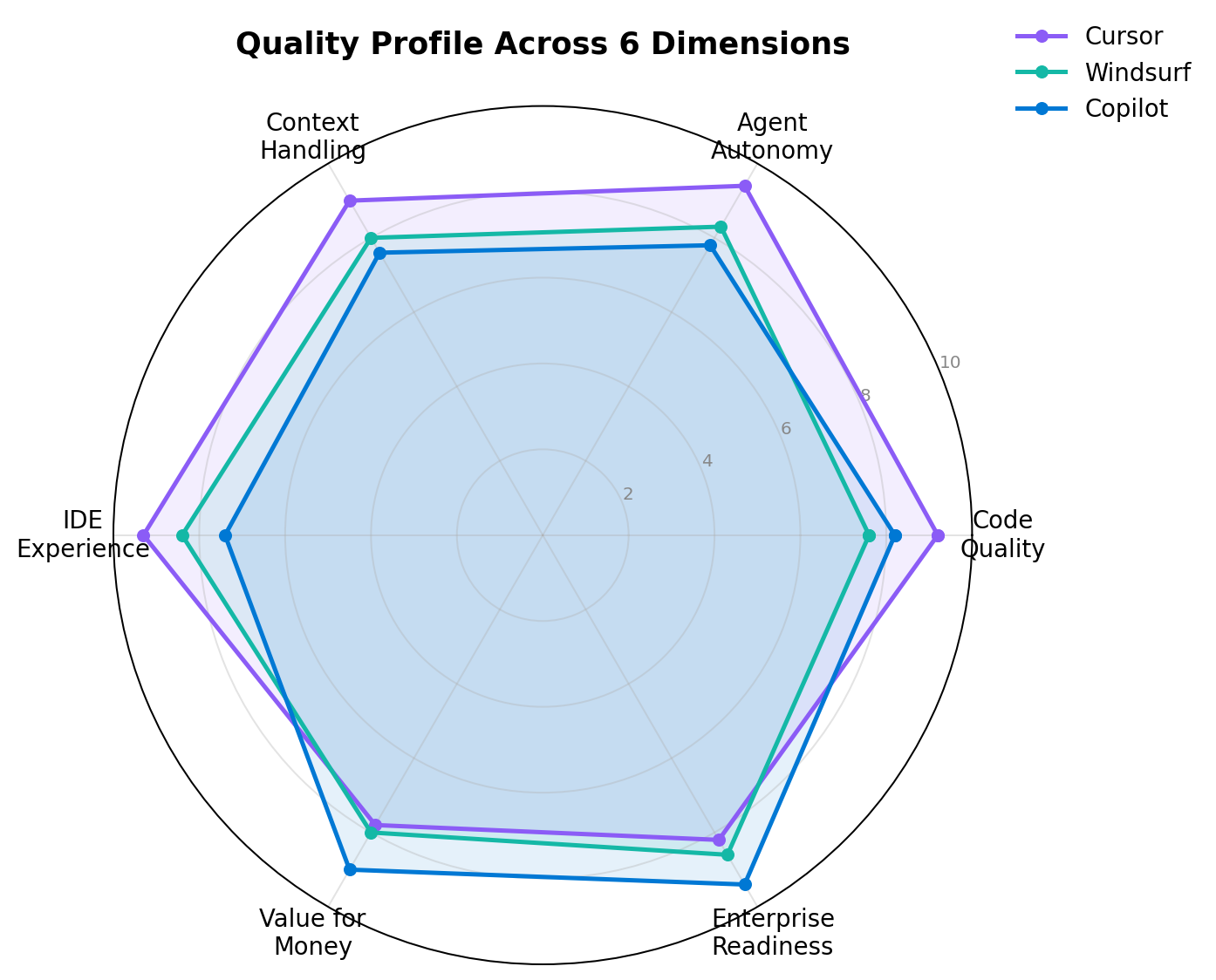
The shapes tell the story: Cursor dominates the technical left side; Copilot dominates value and enterprise; Windsurf is the balanced all-rounder with a self-hosting ace.
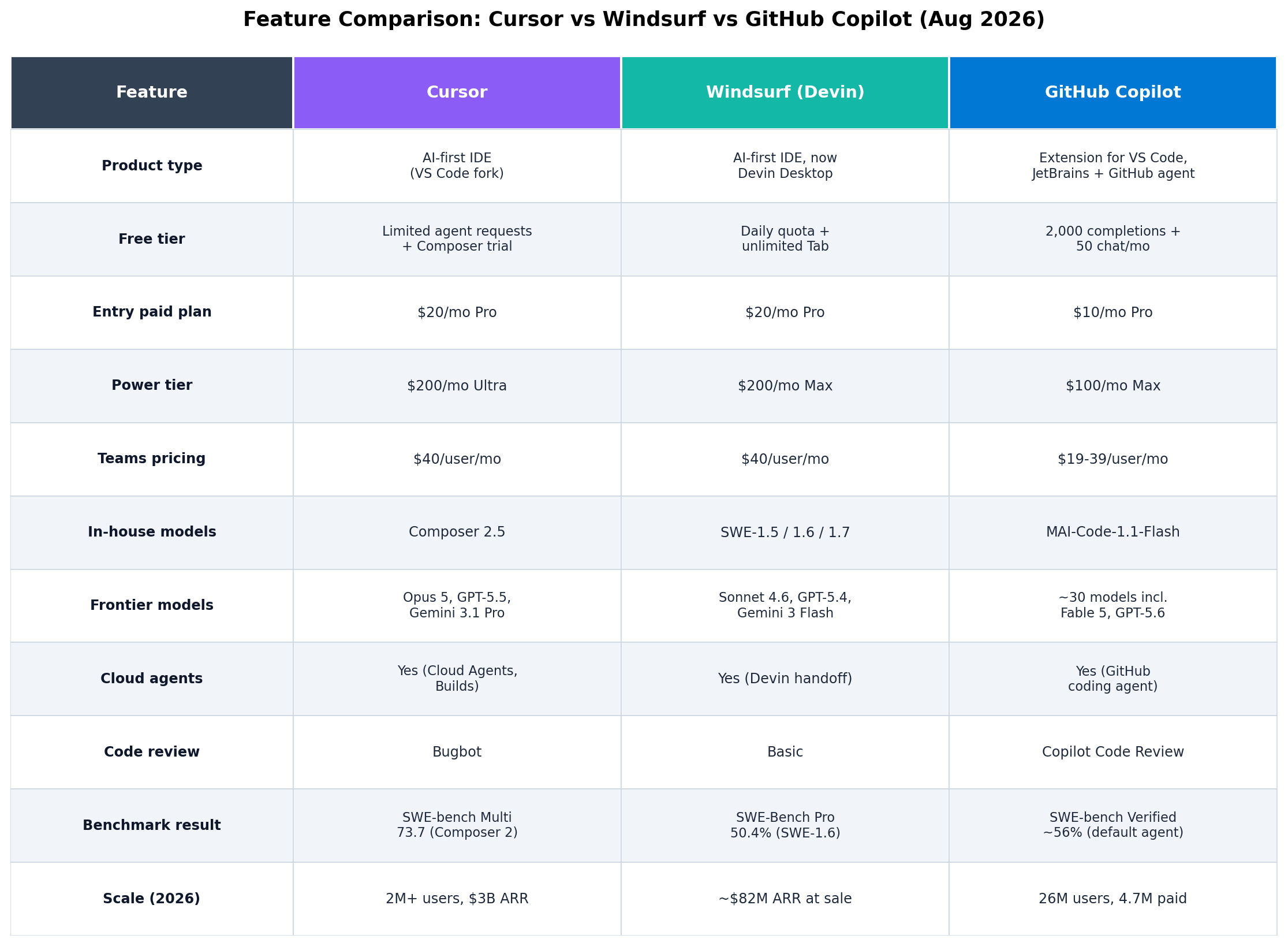
Full feature matrix: models, agents, benchmarks, pricing, and scale, as of August 2026.
Real-World Test Scenarios
Benchmarks are nice; production is the truth. Here are three tasks we actually ran, with the prompts and outcomes.
Scenario 1: The Legacy Refactor
"Migrate this Express 4 service to Fastify across 14 files. Convert all middleware to Fastify hooks, keep the OpenAPI spec in sync, and make the existing Supertest suite pass without modifying assertions."
- Cursor: Completed in one agent session. Two self-corrections, all 61 tests green. Winner.
- Copilot: File-by-file approach worked but needed 4 manual nudges; left 2 middleware edge cases for us.
- Windsurf: Interactive attempt stalled at 60%; Devin handoff finished the job overnight with a green PR.
Scenario 2: The Greenfield Feature
"Add OAuth2 authorization-code login with PKCE to this Next.js app. Wire up the callback route, session refresh, protected-route middleware, and write Vitest tests covering the token exchange."
- Cursor: Correct PKCE flow (many models botch the verifier/challenge), tests passed first run.
- Copilot: Solid structure; initially used a deprecated token-endpoint pattern, fixed after one comment.
- Windsurf: Working code but skipped the refresh-rotation edge case we explicitly asked for.
Scenario 3: The Restricted Enterprise Repo
"Fix the failing CI pipeline in this payments monorepo. Logs attached. Code must not leave the VPC; no third-party model APIs."
- Windsurf: The only one that can run fully self-hosted — SWE-1.7 diagnosed a flaky fixture in the pipeline config. Winner for this scenario by default.
- Cursor: Enterprise privacy mode + zero retention satisfies most (not all) security teams.
- Copilot: Content exclusion + model gateway handles it for most regulated orgs; 90% of the Fortune 100 already cleared it.
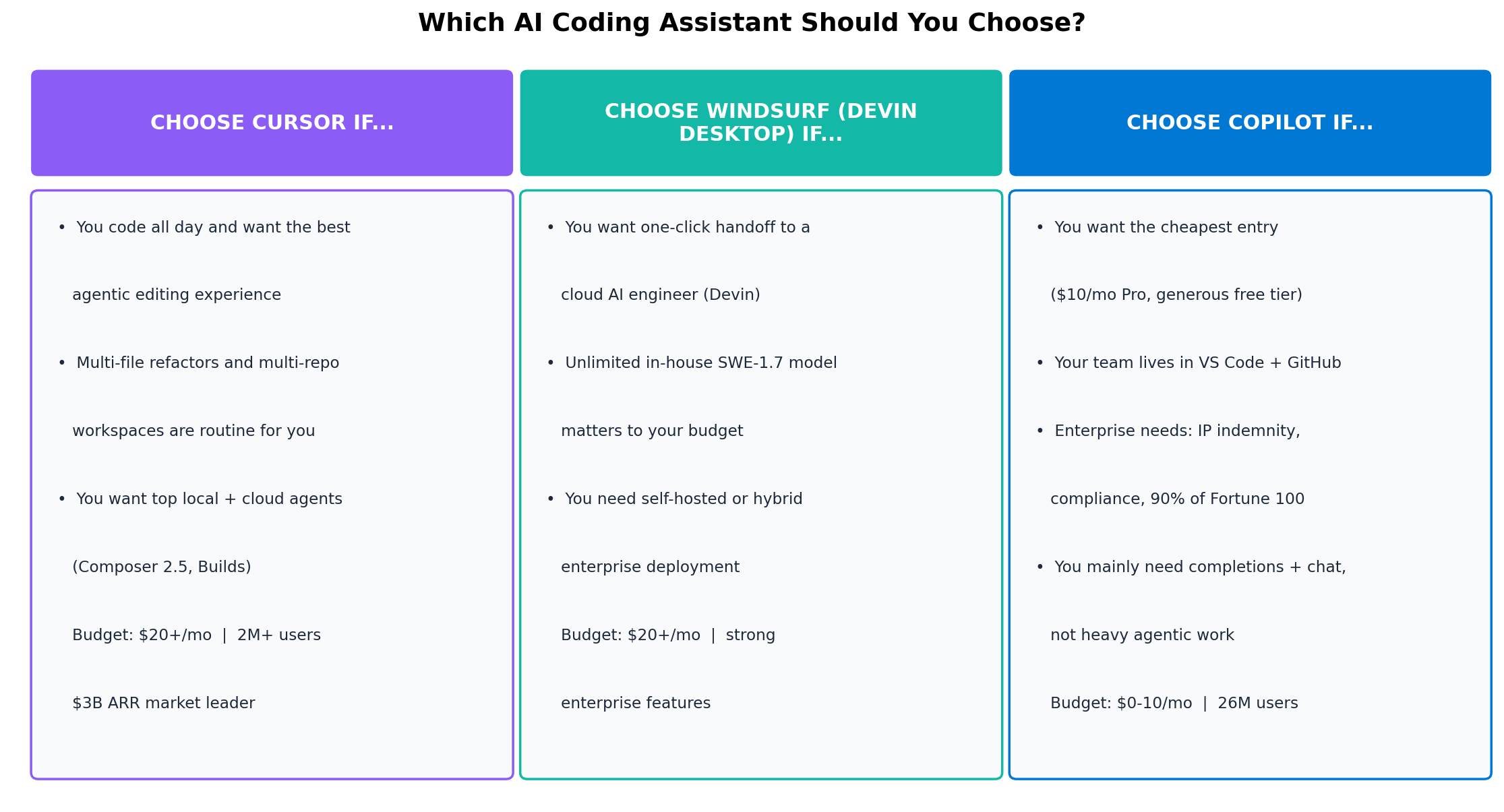
The 30-second version: match your situation to the column.
Alternatives Worth Considering
The big three don't cover every workflow. These are the tools we'd shortlist instead:
| Tool | Starting price | Standout feature |
|---|---|---|
| Claude Code | $20/mo (with Claude Pro) | Terminal-native agent powered by Opus 5 — the choice for deep, single-session reasoning over big diffs |
| Cline | Free (BYO API keys) | Open-source agent extension for VS Code; you control every model call and token spent |
| JetBrains AI + Junie | ~$10/mo | Native AI for IntelliJ/PyCharm/GoLand — no fork, no extension tax, deep IDE integration |
| Aider | Free (BYO keys) | CLI pair-programmer with best-in-class git discipline — every change is a clean commit |
| Zed | Free / usage-based | Blazing-fast collaborative editor with native AI agents and multiplayer cursors |
The Verdict
Cursor Pro ($20/mo). If you write code all day, Cursor's agent quality, context handling, and editor craft save measurable hours weekly. Nothing else in 2026 feels as close to "the AI does the typing, you do the thinking."
GitHub Copilot Pro ($10/mo) / Business ($19). Half the entry price of rivals, a real free tier, ~30 models, and the compliance package (IP indemnity, audit, policy) that gets security sign-off without a fight.
Windsurf / Devin Desktop ($20/mo). One-click Devin handoff for tasks you'd rather not do, unlimited SWE-1.7 for predictable costs, and the only self-hosted option — decisive for air-gapped and highly regulated teams.
Copilot Free + Cursor Pro. Keep Copilot's free tier in VS Code for quick completions and reviews; do heavy agentic work in Cursor. Total cost: $20/mo for 90% coverage. Teams on strict budgets can swap Cursor for Claude Code during heavy months.
Bottom line: 2026 settled the question "do I need an AI coding tool?" — the question is now "which one." Cursor wins on craft, Copilot wins on value and trust, Windsurf wins on delegation and control. Pick by workflow, not by hype: your choice of tool should follow from how much code you write, where it lives, and who audits it.