⚡ TL;DR
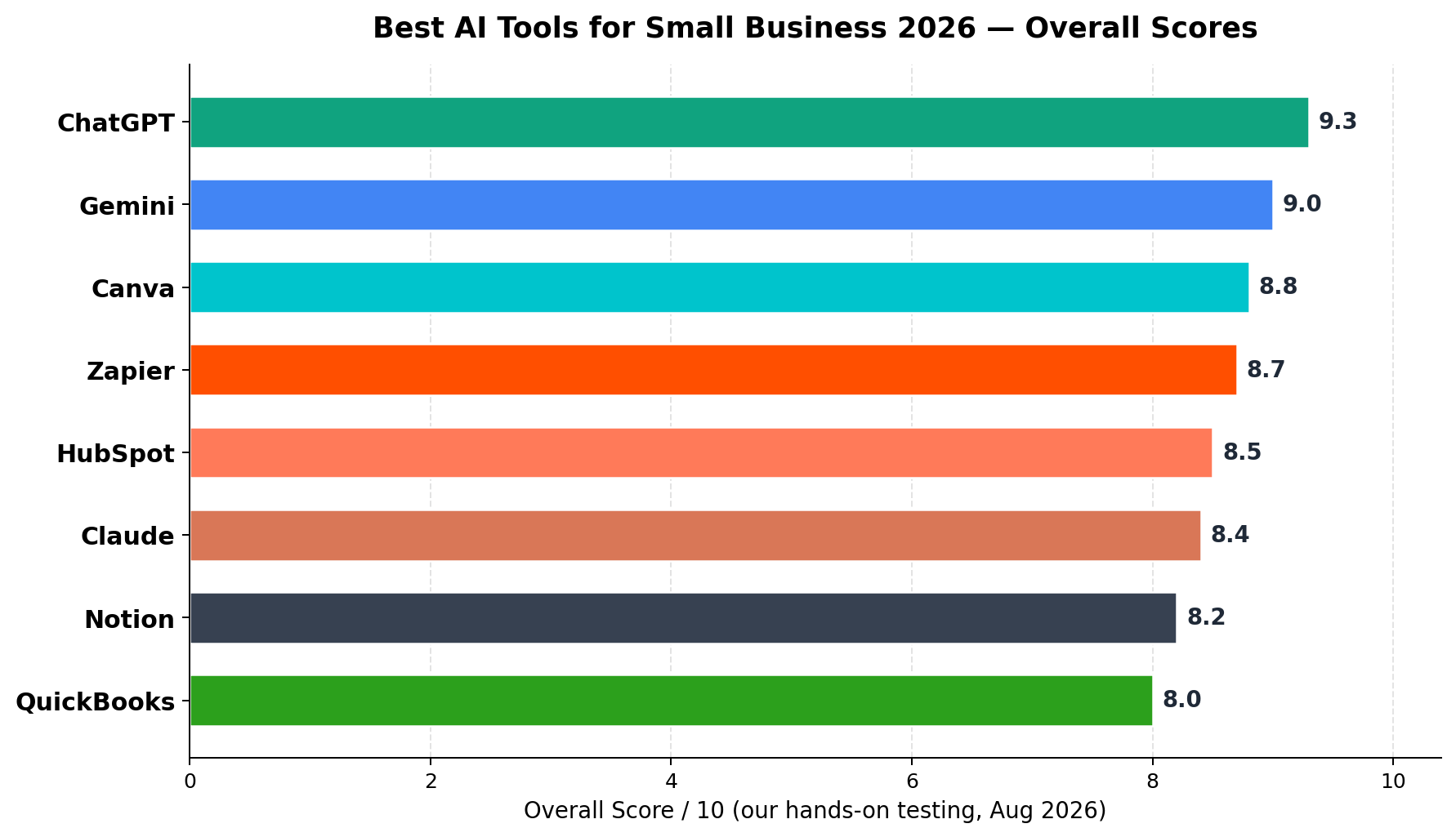
We spent six weeks running 8 leading AI tools through real small-business work — writing launch emails, building automations, chasing invoices, answering support tickets, designing social campaigns and closing the books. ChatGPT is the best AI tool for small business overall (9.3/10): one subscription covers marketing copy, customer communication, analysis and brainstorming. Gemini (9.0/10) is the best value pick — and unbeatable if you live in Google Workspace. Canva (8.8/10) owns marketing design, Zapier (8.7/10) owns automation, and HubSpot Free is the best $0 CRM with AI built in. Best starter stack: Gemini AI Pro ($19.99/mo) + Canva Pro ($15/mo) + HubSpot Free + Wave — a complete AI-powered back office for about $35/month.
At a Glance: Top 8 AI Tools for Small Business
| Rank | Tool | Best For | Free Tier | Paid From | Score |
|---|---|---|---|---|---|
| #1 | ChatGPT | All-round assistant: marketing, email, analysis | Yes (GPT-5.6 Luna) | $20/mo | 9.3/10 |
| #2 | Gemini | Best value + Google Workspace integration | Yes (generous) | $19.99/mo | 9.0/10 |
| #3 | Canva | Marketing design, social graphics, brand kit | Yes (basic AI) | $15/mo | 8.8/10 |
| #4 | Zapier | Automation & AI agents across 8,000+ apps | Yes (100 tasks/mo) | $19.99/mo | 8.7/10 |
| #5 | HubSpot | Free CRM + Breeze AI for sales & support | Yes (full CRM) | $15/seat/mo | 8.5/10 |
| #6 | Claude | Long-form writing, proposals, document analysis | Yes (Sonnet) | $17/mo | 8.4/10 |
| #7 | Notion | Team docs, wiki + Notion Agent | Yes | $10/user/mo | 8.2/10 |
| #8 | QuickBooks | Accounting with Intuit Assist AI | No | $20/mo | 8.0/10 |
Overall Rankings
We scored every tool across the six dimensions that matter to a small business owner: ease of use (you don't have an IT department), feature depth, integrations, AI output quality, value for money, and team features. Here's how the field landed.
Who This Guide Is For
This guide is written for the owner-operator: the 1-10 person business with no dedicated marketing department, no IT staff, and no budget for enterprise software. Maybe you run an e-commerce store, a local service business, an agency of four, or a solo consulting practice. You've heard AI can "save you 15 hours a week" — but every tool you trial wants $20-50/month, and subscribing to all of them would cost more than a part-time hire.
That's exactly the trap we tested against. The goal isn't eight more subscriptions — it's knowing which two or three tools will cover the most ground for the least money, and which glossy landing pages you can safely ignore. We ran each tool through the unglamorous work that actually eats a small business's week: writing follow-up emails, drafting proposals, generating social content, chasing unpaid invoices, answering the same five customer questions, categorizing expenses, and keeping the team's knowledge out of Slack scroll-back hell.
One thing became obvious fast: general AI assistants have commoditized. The gap between ChatGPT, Gemini and Claude on routine business writing is now a few percentage points. What differentiates tools in 2026 is where the AI lives — inside your inbox, your CRM, your design canvas, or your ledger. That's why our rankings weight integrations and workflow fit almost as heavily as raw model quality.
The Top 8, Ranked and Reviewed
#1. ChatGPT — The All-Round Small Business Workhorse
9.3/10 If you buy exactly one AI subscription for your business in 2026, make it this one. ChatGPT has quietly become the most complete assistant for generalist business work: it writes launch emails, product descriptions, SOPs, job posts, and customer apologies that don't sound robotic; it analyzes a messy CSV of sales data and returns three actionable insights; it brainstorms a pricing reposition when you're stuck at 11pm.
The free tier now runs GPT-5.6 Luna with genuinely usable daily limits — many solo operators never need to pay. Plus ($20/mo) unlocks heavier usage, Deep Research for competitive analysis, GPT Image 2 for quick ad creative, and custom GPTs you can configure once ("my brand voice, my products, my customers") and reuse forever. Business ($25/seat/mo) adds the data controls teams need: your chats aren't used for training, plus a shared workspace and admin settings.
Where it wins: versatility and output ceiling. Nothing else on this list does writing + analysis + images + agents in one place this well.
Where it loses: it's a chat window, not a system of record. It won't remind you about an unpaid invoice unless you build that elsewhere, and free/Plus data settings require an opt-out you must remember to set.
#2. Gemini — Best Value, Best in Google's House
9.0/10 Gemini's 2026 lineup redefined value: the free tier is the most generous of any major assistant, AI Pro at $19.99/month bundles 2TB of Google Drive storage and YouTube Premium Lite (a bundle worth $30+ on its own), and the new AI Ultra tier ($99.99/mo) exists mostly for power users and agencies.
But the real story for small business is where Gemini lives. If your company runs on Gmail, Google Docs, Sheets and Drive, Gemini works inside all of them: drafting replies in your inbox with full context of the thread, summarizing a 40-message supplier negotiation, building a content calendar straight into a Sheet. That "no copy-paste tax" advantage saves more real hours per week than any benchmark score difference.
Where it wins: price-to-performance, the storage bundle, and deep Google Workspace integration (Business Standard at ~$14/user/mo includes Gemini features for work accounts).
Where it loses: raw writing and reasoning quality trails ChatGPT slightly on complex multi-step business tasks, and Google's rapid feature shuffling means your favorite workflow may move.
#3. Canva — Marketing Design Without a Designer
8.8/10 Canva Pro ($15/mo, or $120/year) remains the cheapest way for a small business to look two sizes bigger. Magic Studio in 2026 handles the full content hamster wheel: Magic Design turns one product photo into a launch kit (Instagram post, story, flyer, email banner), Magic Write drafts the captions, background remover cleans product shots, and Bulk Create pushes one template across 50 SKUs.
The feature that quietly justifies the subscription is Brand Kit — lock your fonts, colors and logo so every asset (whoever on the team makes it) stays on-brand. Canva Teams ($25/mo) adds shared workspaces and approval flows for small marketing teams.
Where it wins: speed from idea to publishable asset, template breadth, and ease for non-designers.
Where it loses: outputs can trend generic (your competitors use the same templates), and it's not a substitute for real brand identity work. Complex print/production design still needs a pro.
#4. Zapier — The Automation Engine
8.7/10 Zapier is the closest thing small business has to a custom software department. Connect any two of its 8,000+ apps and make them talk: new Stripe sale → create QuickBooks invoice → post order to Slack → add customer to your email list. The free plan (100 tasks/mo) is enough to automate one painful workflow; Professional (from $19.99/mo, annual) handles real volume.
The 2026 story is Zapier AI agents and Copilot: describe the outcome you want in plain English ("when a customer fills the support form, look up their order history and draft a reply for approval") and Zapier assembles the automation. Agents can run multi-step reasoning across your stack between triggered steps.
Where it wins: integration breadth (nothing else connects this many small-business apps), and the new natural-language builder collapses the learning curve.
Where it loses: task-based pricing scales painfully — a busy automation can eat hundreds of tasks monthly, pushing you toward Team ($69/mo) faster than expected. Complex conditional logic still rewards patient configuration.
#5. HubSpot — Free CRM with AI Baked In
8.5/10 HubSpot's free CRM is the best $0 a small business can spend on sales infrastructure, and its Breeze AI now touches nearly every corner of it: the Breeze Assistant drafts follow-up emails, summarizes contact activity, and suggests next steps, while the platform's reporting keeps a solo founder honest about pipeline.
Upgrades are seat-priced: Starter ($15/seat/mo) adds automation and removed branding; Professional ($90/seat/mo) unlocks serious marketing automation but adds a $1,500 onboarding fee — at small scale, stay on Free/Starter as long as possible. For support, Breeze Customer Agent (requires Service Hub Pro/Enterprise) resolves common questions at $0.50 per resolved conversation — economical versus a part-time support hire, but only worth it above roughly 200 support conversations a month.
Where it wins: the free tier is a full product, not a demo; Breeze AI features arrive without a separate "AI subscription" tax.
Where it loses: the credit system at higher tiers (Breeze credits meter AI actions) can surprise you; Professional pricing is designed for companies 10x your size.
#6. Claude — The Long-Form Specialist
8.4/10 Claude Pro ($17/mo annual, or $20 month-to-month) is the tool you reach for when the document matters: 15-page proposals, RFP responses, subcontractor agreements to summarize before your lawyer reviews them, and long reports that need to actually hold an argument across 5,000 words. Its 200K-token context means you can drop in your entire operations manual and ask questions against it.
Claude's Projects feature (persistent instructions + reference files) works like a junior analyst who remembers your business context, and its writing voice — measured, structured, low-hype — tends to need less editing for B2B communication than flashier rivals.
Where it wins: long-document quality, analysis of dense text, and a more careful default tone for professional communication.
Where it loses: no image generation, a smaller integration ecosystem, and fewer "extra" features (no native deep-research mode that matches ChatGPT's, fewer connectors). It's a specialist's second subscription more than a first.
#7. Notion — Your Company Brain, Now with an Agent
8.2/10 Every small business eventually drowns in knowledge scattered across chat threads and inboxes. Notion ($10/user/mo Plus; $20/user/mo Business for full AI) centralizes docs, SOPs, wiki and projects — and since Notion 3.x, the built-in Notion Agent can answer questions grounded in your actual pages ("what's our refund policy for digital products?") instead of making one up.
Be aware of the pricing structure: full AI features (Notion Agent, Ask Notion, AI Meeting Notes) are locked to the Business tier, and Custom Agents consume credits at +$10 per 1,000 credits on top. For a 3-person team, that's $60/mo before credits — reasonable for a company brain, but budget it consciously.
Where it wins: one searchable home for processes and knowledge; AI that cites your own documentation; excellent meeting notes.
Where it loses: it's a build-it-yourself tool — you need an afternoon (or three) to structure the workspace before it pays off, and AI features sit behind the higher tier.
#8. QuickBooks Online — Accounting with an AI Copilot
8.0/10 The least exciting pick on this list and the one most likely to keep you out of trouble. QuickBooks remains the default small-business ledger in 2026, and Intuit Assist (included, not a paid add-on) has become genuinely useful: auto-categorization that learns your patterns, cash-flow projections you can interrogate in plain English, and smarter reconciliation suggestions.
2026 pricing warning: plans re-priced effective August 1, 2026 — Solopreneur $20/mo, Simple Start $38/mo, Essentials $85/mo, Plus $140/mo, Advanced $340/mo (new subscribers are price-locked for 6 months). Desktop has ended new sales, so online is the path. If Plus at $140 stings, the free tier of Wave covers simple invoicing and bookkeeping until you need accountants, class tracking or inventory.
Where it wins: accountant collaboration (your CPA knows it), bank/expense automation, and AI features included rather than metered.
Where it loses: the price ladder climbs steeply, features you need (reporting, users) are spread across tiers to push you upward, and support quality is inconsistent at lower tiers.
What AI Tools Cost in 2026
Subscription creep is the silent killer of small-business software budgets. This chart compares each tool's entry paid plan against the tier we'd actually recommend for a small team — the gap between the two is where vendors make their money.
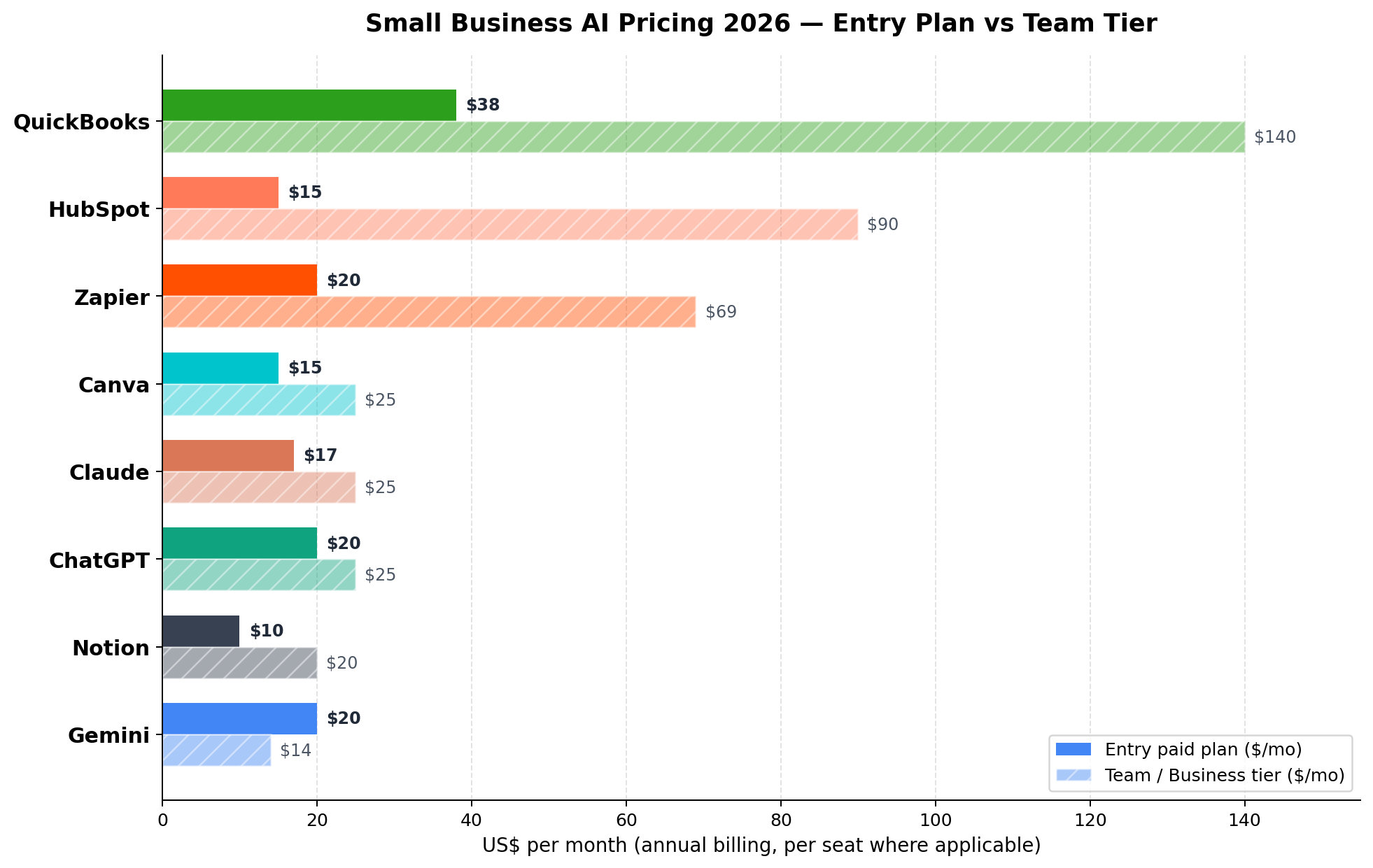
Three patterns worth noticing: per-seat pricing dominates (Notion, HubSpot, QuickBooks Essentials and above), so headcount growth quietly doubles your bill; AI features are migrating up-tier (Notion's agent sits at Business, HubSpot's best AI at Professional); and flat-rate tools (Canva Pro, Zapier, ChatGPT Plus) are the friendliest for tiny teams. Annual billing typically shaves 15-20% — take it for tools you're confident about after a month's trial.
Head-to-Head: The Four Finalists
Most owners narrow to one general assistant plus one or two specialists. These four won the most head-to-head rounds in our testing — here's how their strengths actually distribute across the dimensions that decide the purchase.
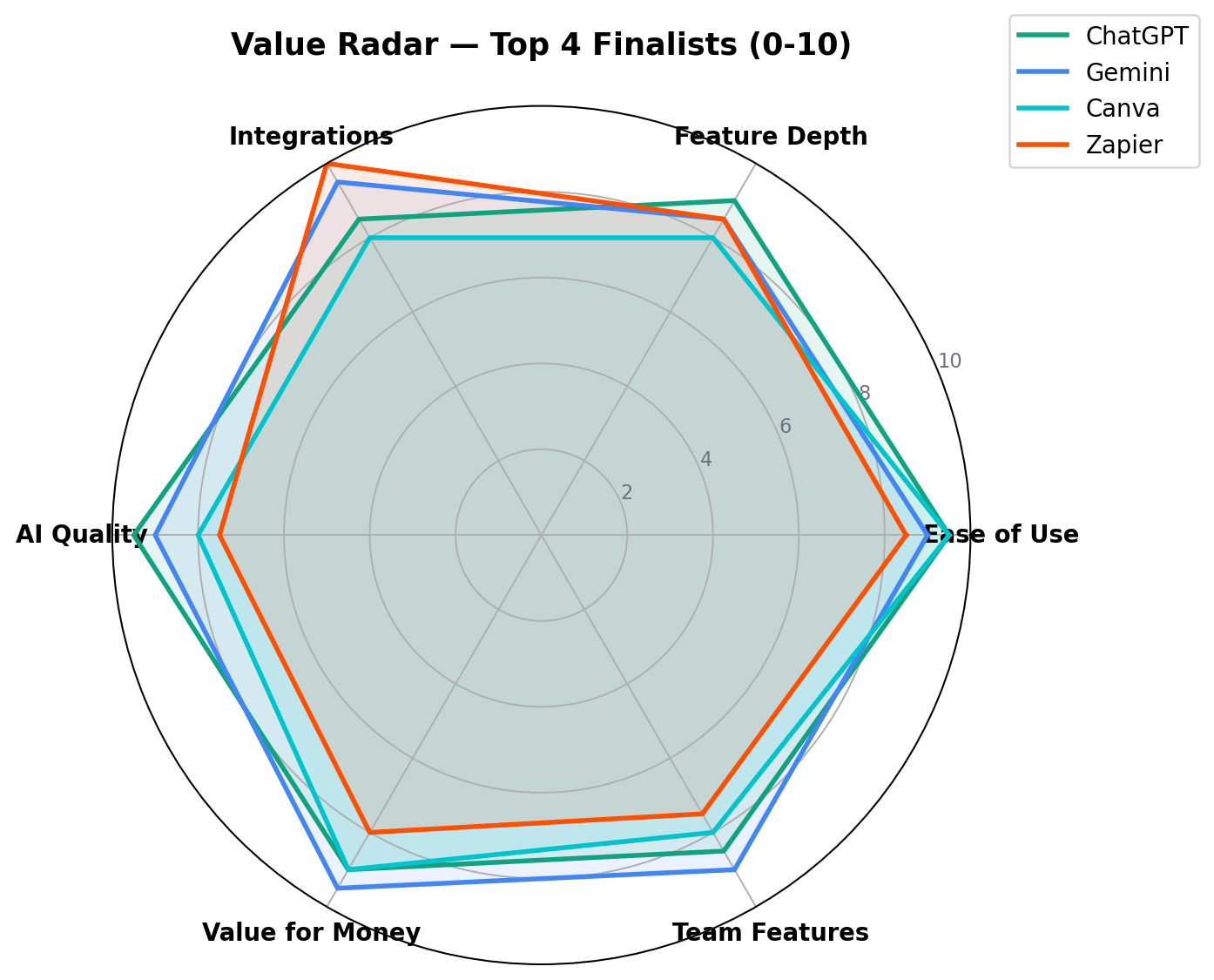
The radar makes the trade-offs obvious: ChatGPT has the largest total area (best all-rounder, thinnest on native integrations), Gemini trades a sliver of AI quality for the best value and integration story, Canva dominates ease-of-use while staying shallow on team/admin features, and Zapier posts a perfect integrations score with the weakest raw AI quality of the four. None is strictly dominated — which is why the right answer is a stack, not a single winner.
Which Tool for Which Job: The Decision Matrix
Stop trying to pick "the best AI tool." Pick per job. This matrix maps the eight most common small-business needs to our tested recommendation, a runner-up, and a budget fallback.
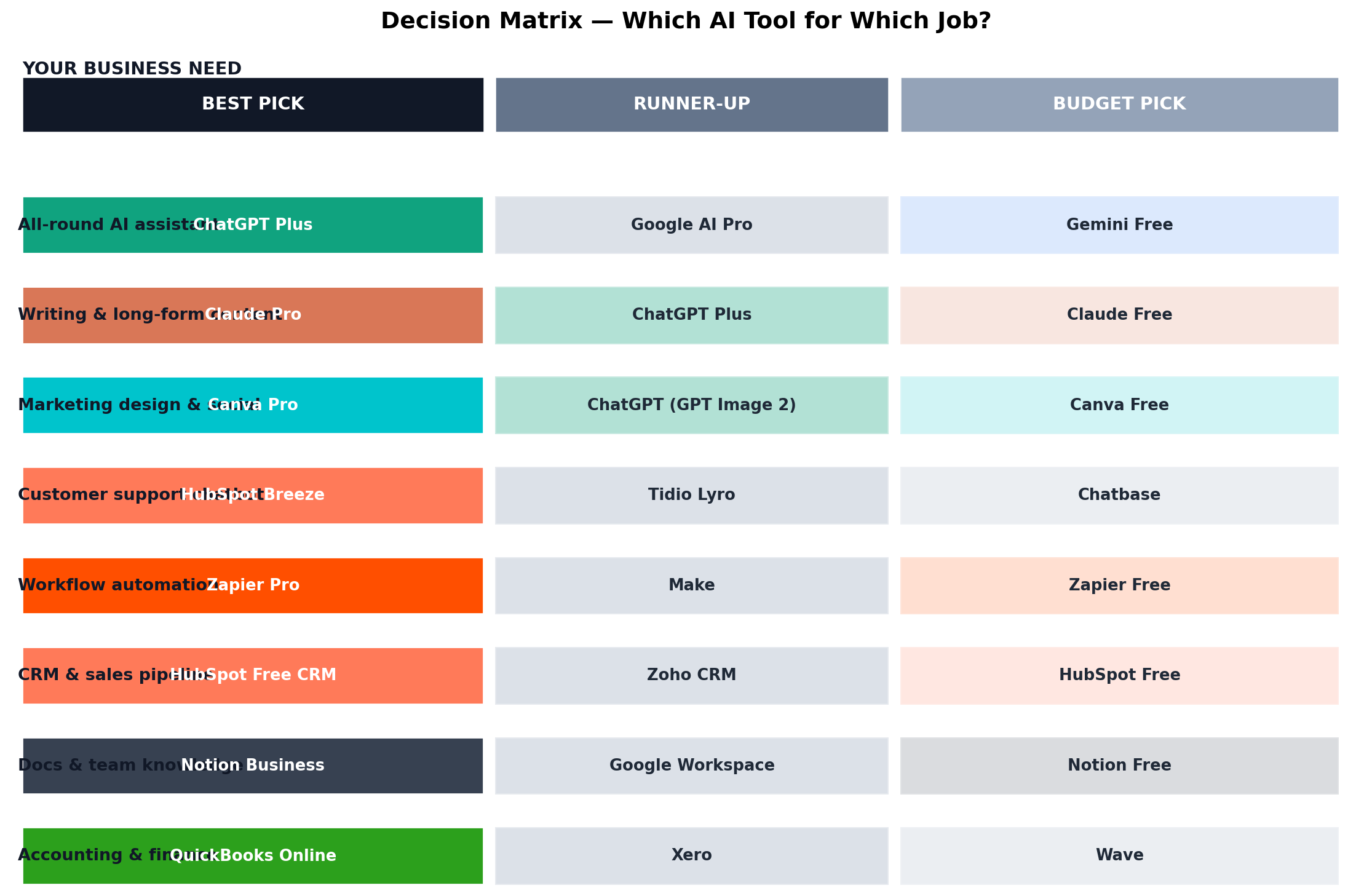
Two notes on reading it: the budget column is genuinely competitive now — Gemini Free, Canva Free and HubSpot Free are real products, not trials. And the "runner-up" column often becomes your second subscription once the first proves its value.
Real-World Test Scenarios
Benchmarks are nice; Tuesdays are real. Here are three scenarios we ran end-to-end, with the prompts and results that decided our rankings.
Scenario 1: Product Launch Campaign (Email + Social)
The task: a 2-person online store launching a new product line — one launch email, three Instagram captions, and a landing-page hero headline, in the founder's brand voice.
Prompt we used: "You are the marketing team for [brand], a small business selling [product] to [audience]. Voice: warm, direct, no hype words. Write a 150-word launch email with subject line options (one curiosity-driven, one benefit-driven), three Instagram captions with hook-first structure, and one landing page headline + subhead. Ask me up to 3 clarifying questions first."
Result: ChatGPT produced the most publish-ready first draft and best subject-line variety; Gemini's was nearly as good and landed directly in Google Docs for the team to edit. Canva then turned the winning copy into on-brand visuals in under 10 minutes via Magic Design. Verdict: ChatGPT (or Gemini) writes, Canva dresses — total time 40 minutes vs. a typical agency turnaround of a week.
Scenario 2: Chasing Unpaid Invoices
The task: a services business with 6 outstanding invoices, needing polite escalation emails and a repeatable reminder system.
What we built: Zapier automation watching QuickBooks for invoices 3, 7 and 14 days overdue → generating a personalized reminder via the AI step (tone: firm but relationship-preserving) → sending from the owner's email → logging activity in HubSpot. Escalation at day 14 drafts a call script instead of another email.
Result: 4 of 6 invoices paid within 9 days of turning it on, zero owner hours spent. The Zapier Professional plan's task usage: about 60 tasks/month for this workflow. Verdict: this single automation justifies the Zapier subscription — it's the highest-ROI build in this entire article.
Scenario 3: The Repetitive Support Inbox
The task: a product business answering ~300 support conversations/month, 70% of which are the same five questions (order status, returns, sizing, shipping times, discount stacking).
What we tested: HubSpot's Breeze Customer Agent on the knowledge base vs. a Tidio Lyro setup on the website chat widget.
Result: Breeze resolved ~60% of tier-1 conversations at $0.50/resolved-conversation — roughly $90/month replacing 20+ hours of owner time — but requires Service Hub Professional and a well-written knowledge base. Tidio's Lyro (Starter ~$24-32/mo for 100 conversations) matched resolution quality for simple FAQ traffic at lower cost, with clearer pricing at small volumes. Verdict: under ~200 conversations/month, use Tidio Lyro or keep templates; above it, Breeze pays for itself.
Alternatives Worth Considering
Our top 8 isn't exhaustive. These tools earned honorable mentions — several are the right answer for specific situations.
| Tool | Category | From | Standout Reason |
|---|---|---|---|
| Wave | Accounting | Free | Best free invoicing/bookkeeping for the simplest businesses |
| Tidio Lyro | Support chatbot | ~$24-32/mo | Best small-volume AI support for FAQ-heavy websites |
| Make | Automation | $9/mo | Cheaper per-operation than Zapier for complex logic |
| Zoho CRM Plus | CRM suite | $14/user/mo | Entire business suite (CRM+docs+books) at SMB pricing |
| Google Workspace | Office suite | $7/user/mo | Gmail/Docs/Drive with Gemini features for work accounts |
| Grammarly | Writing polish | $12/mo | Everywhere-in-your-browser tone and error checking |
Typical Stacks by Team Size
The same tool list produces very different bills depending on headcount. We priced three archetypes from our testing — these are real, deployable stacks, not theoretical menus.
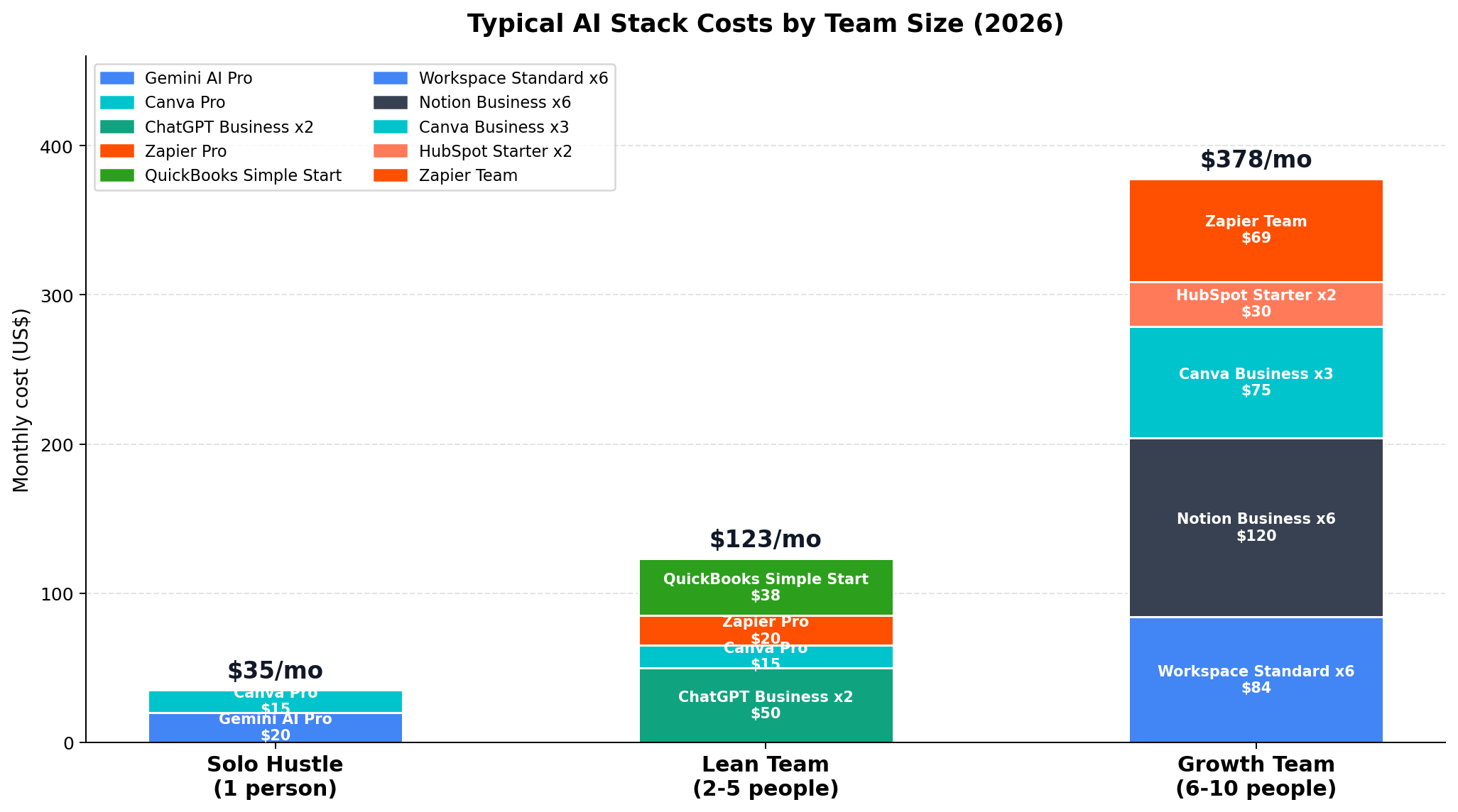
The $0 stack (not shown, because it's free): Gemini Free + Canva Free + HubSpot Free CRM + Wave. For a pre-revenue side business, this covers writing, design, sales tracking and invoicing at literally nothing.
Solo Hustle (~$35/mo): Gemini AI Pro + Canva Pro. The 2TB storage and YouTube Premium Lite make Gemini Pro the anchor; Canva makes you look established.
Lean Team, 2-5 (~$123/mo): ChatGPT Business x2 seats, Canva Pro, Zapier Professional, QuickBooks Simple Start. This is the configuration that most reminds us of a 10-person company's capabilities.
Growth Team, 6-10 (~$378/mo): Google Workspace Standard x6, Notion Business x6, Canva Teams x3, HubSpot Starter x2, Zapier Team. Still less than 3% of a single mid-level salary.
The Verdict
The hybrid approach we actually recommend: ChatGPT or Gemini as your daily driver (pick by ecosystem: Google shop → Gemini, otherwise ChatGPT), Canva Pro for everything visual, Zapier as soon as any weekly chore repeats twice, and HubSpot Free from your very first customer. Add Claude only if you produce long documents professionally, and Notion when the team's knowledge starts escaping. That stack runs $35-60/month for most 1-3 person businesses — the price of a nice dinner for what amounts to a part-time hire's output.
Frequently Asked Questions
What is the best AI tool for small business overall?
ChatGPT is the best overall AI tool for small business in 2026, scoring 9.3/10 in our testing. The free tier (GPT-5.6 Luna) handles everyday tasks, Plus at $20/month covers marketing copy, customer emails, data analysis and brainstorming, and Business at $25/seat/month adds workspace data controls for teams. Gemini (9.0/10) is the best value alternative, especially if your business runs on Gmail and Google Workspace.
What is the best free AI stack for a small business?
The best free stack in 2026 is Gemini Free + Canva Free + HubSpot Free CRM + Wave. Gemini's free tier covers writing, research and analysis; Canva Free includes basic Magic Studio AI features for social graphics; HubSpot's free CRM includes Breeze AI assistant features for contacts and pipeline; and Wave handles free accounting with invoicing. This combination covers marketing, sales and finance at literally $0/month for a solo operator.
How much should a small business spend on AI tools per month?
A solo operator can build an excellent AI stack for $35-50/month (for example Gemini AI Pro at $19.99 plus Canva Pro at $15). A lean team of 2-5 people should budget $100-150/month including an AI subscription per seat, design tools, basic automation and accounting software. A growth-stage team of 6-10 typically lands around $300-400/month with workspace, docs, CRM and team automation. Start with one paid AI assistant, then add tools only when a repetitive task justifies the cost.
Is ChatGPT safe to use for business data?
ChatGPT Business and Team plans ($25/seat/month) do not train on your data by default and provide admin controls, making them suitable for everyday business content. On the free and Plus tiers, you should opt out of data training in settings and avoid pasting sensitive customer data, financial records, or contracts. For regulated work, check each vendor's SOC 2 and data-processing terms — HubSpot, Notion Business and Google Workspace all offer enterprise-grade compliance on their paid tiers.
Can AI tools actually replace employees in a small business?
In 2026, AI tools realistically replace tasks, not people. A typical small business uses AI to absorb 10-20 hours per week of admin work — drafting emails and proposals, summarizing meetings, first-draft marketing content, invoice chasing, and tier-1 customer support. That often lets a 5-person team operate like an 8-person team without hiring. Roles that require judgment, relationships and accountability (sales calls, accounting sign-off, management) still need humans.
What is the best AI tool for small business accounting?
QuickBooks Online remains the best accounting platform for small business, with Intuit Assist AI included for categorization, cash-flow insights and natural-language questions about your books. The Solopreneur plan starts at $20/month and Simple Start at $38/month. Note that QuickBooks raised prices on August 1, 2026 (Essentials to $85/month, Plus to $140/month), so new subscribers should expect those rates — though prices are locked for the first 6 months. Wave is the best free alternative for very simple invoicing.
Should a small business choose ChatGPT or Gemini in 2026?
Choose ChatGPT if you want the strongest all-round assistant — its writing quality, custom GPTs and multimodal features edge out Gemini for pure task performance. Choose Gemini if your business already runs on Google Workspace: AI Pro at $19.99/month bundles 2TB of storage and YouTube Premium Lite, and Gemini works directly inside Gmail, Docs and Sheets — which saves more time in practice than a marginally better chatbot. Many owners end up using ChatGPT for content and Gemini inside Google apps.