⚡ TL;DR
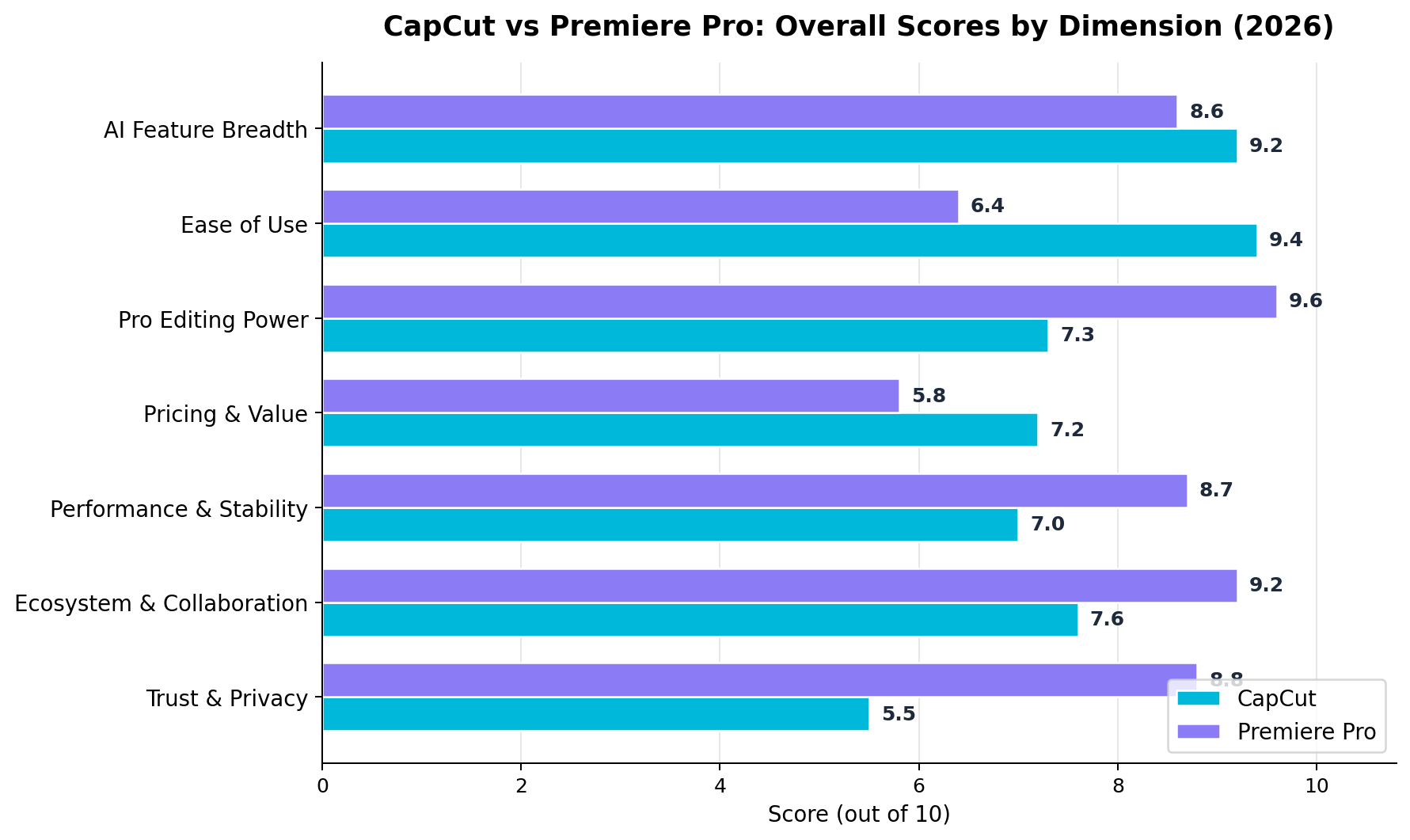
We spent four weeks cutting the same real projects in both apps — TikTok and Reels campaigns, a 22-minute YouTube video, and a client deliverable with review rounds. Premiere Pro is the better professional editor in 2026 (average 8.2/10 across our seven dimensions): its timeline power, color, multicam, pro codecs and Frame.io review workflow remain unmatched for deliverable-grade work. CapCut is the better AI-powered social video tool (average 7.6/10, and 9.4/10 on ease of use): auto captions, AI avatars, background removal, script-to-video and 1,200 monthly AI points make it astonishingly fast for short-form — and its free tier genuinely publishes at 1080p. Best value for creators: CapCut Pro at $19.99/mo (or $179.99/yr). Best for professional work: Premiere Pro at $22.99/mo (annual billing). Most working teams in 2026 honestly use both — CapCut for the feed, Premiere for the deliverables.
At a Glance: CapCut vs Premiere Pro
| Dimension | CapCut | Premiere Pro | Winner |
|---|---|---|---|
| AI Feature Breadth | 9.2 — captions, avatars, TTS, script-to-video, generative clips | 8.6 — Generative Extend, auto-reframe, text-based editing, Auto Color | CapCut |
| Ease of Use | 9.4 — productive in under an hour | 6.4 — days to weeks to competence | CapCut |
| Pro Editing Power | 7.3 — single-track-friendly, limited multicam/color | 9.6 — multicam, Lumetri, pro codecs, proxies | Premiere Pro |
| Pricing & Value | 7.2 — real free tier; Pro $19.99/mo | 5.8 — no free tier; from $22.99/mo | CapCut |
| Performance & Stability | 7.0 — great for social-length projects | 8.7 — handles long-form and heavy media | Premiere Pro |
| Ecosystem & Collaboration | 7.6 — mobile+desktop+web synced; basic Teams | 9.2 — Adobe apps + Frame.io review included | Premiere Pro |
| Trust & Privacy | 5.5 — contested 2025–26 ToS record; banned in some orgs | 8.8 — enterprise-grade, SOC 2 stack | Premiere Pro |
These two apps sit at opposite ends of the same industry. CapCut (owned by ByteDance) was built mobile-first for the TikTok era and has grown into the default editor for short-form creators, with AI as the headline feature set. Premiere Pro is Adobe's 30-year-old flagship NLE, progressively absorbing AI (Firefly video, text-based editing, auto captions) while remaining the professional standard for client, broadcast and long-form work. The 2026 question is no longer "which is better?" in the abstract — it's "which is better for the job in front of you?" This comparison breaks that down with real tests, current pricing, and a decision framework.
Deep Dive: CapCut
Overview
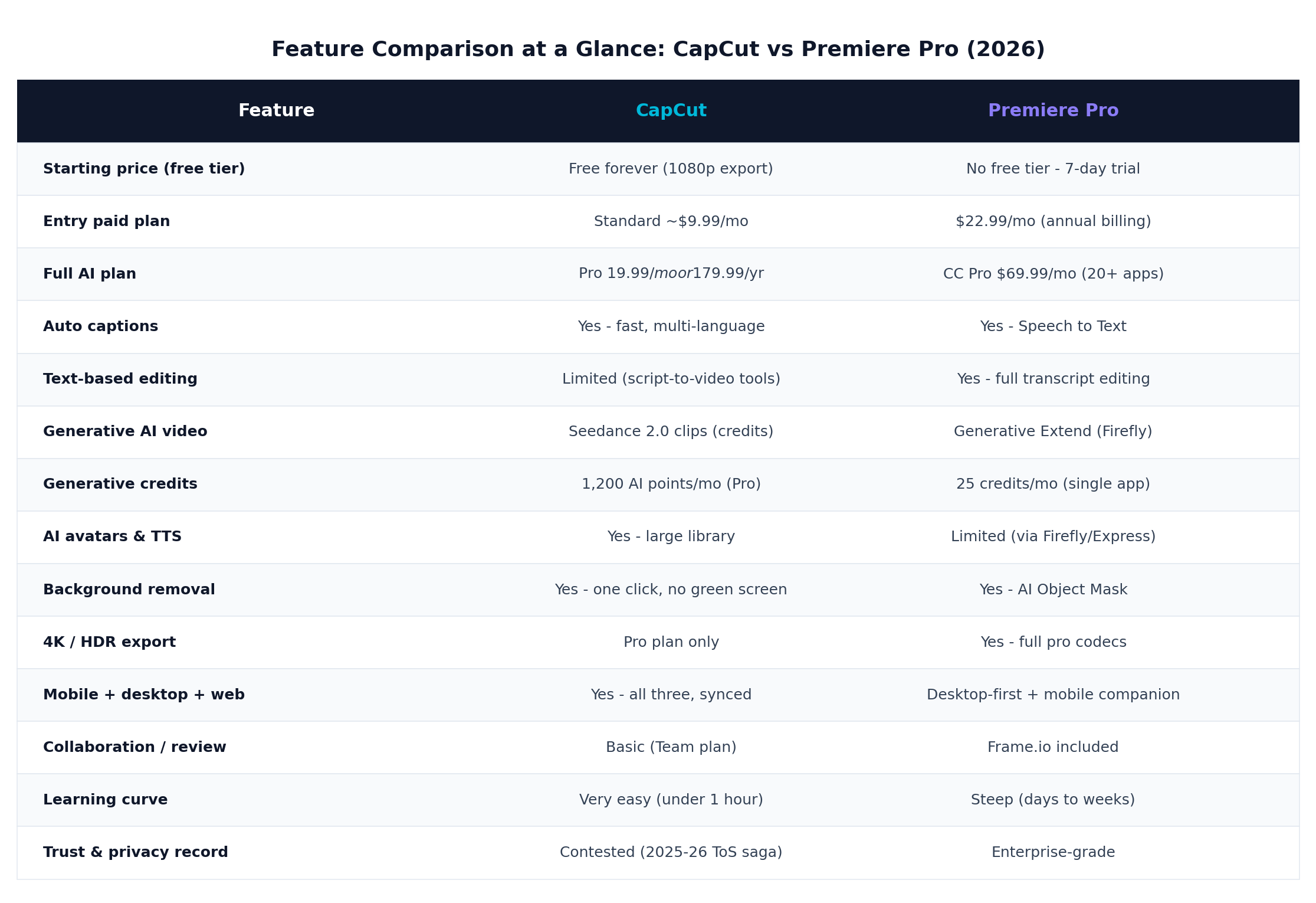
CapCut in 2026 is less an "editor" than a short-form content factory. It runs on mobile, desktop and web with cloud-synced projects, and its entire design pushes you toward publishable output fast: trending templates, one-tap effects, auto captions in dozens of languages, AI avatars reading your script, text-to-speech voices, script-to-video draft generation, and now Seedance 2.0 generative video clips (integrated after ByteDance consolidated its video-gen stack) purchasable with monthly AI points. For a solo creator producing daily vertical content, it collapses what used to be a three-app workflow into one.
AI Features (the reason to pick it)
- Auto captions: fast, multi-language, styled to match trends, with editable text. Still the best caption workflow in the business for social.
- AI avatars & text-to-speech: a large avatar library plus natural TTS voices; a faceless-channel operator can produce a full video without a camera.
- Background removal: one click, no green screen, good enough for talking-head overlays.
- Script-to-video: paste an idea, get a draft cut with suggested stock, captions and music. Cheesy for film, excellent for ads and explainers.
- Seedance 2.0 generative clips: text-to-video B-roll generated inside the editor; Pro includes 1,200 AI points per month.
- Smart tools: auto-cut silences, retouch, enhancement, voice effects, and template matching.
Pricing (August 2026)
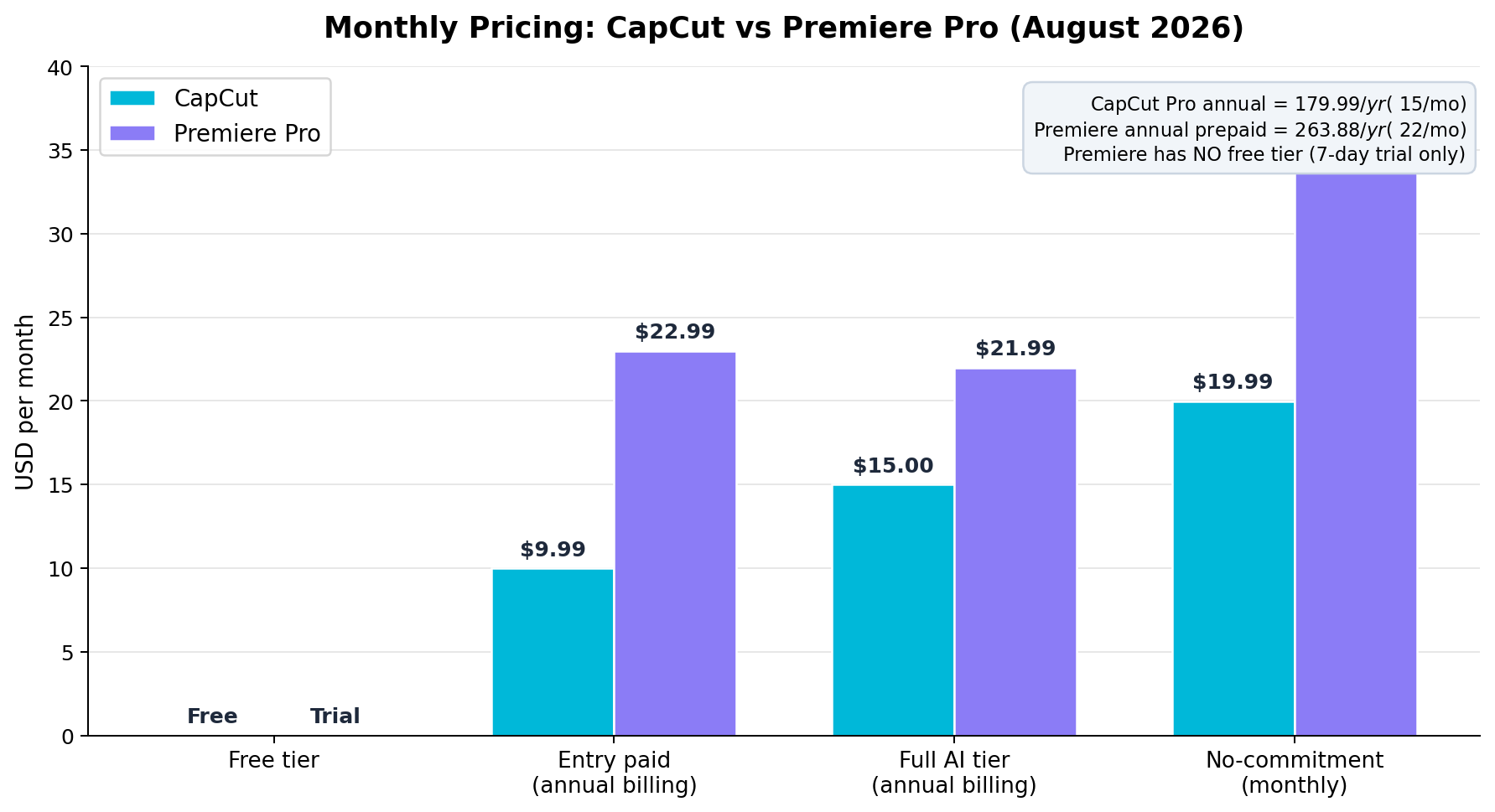
- Free: $0 — unlimited 1080p export, auto captions, most templates and effects; ads on some premium assets.
- Pro: $19.99/month, or $179.99/year (~$15/mo) — 4K/HDR export, 1,200 AI points/mo, AI avatars, full effects library, priority features. A "Standard" web/desktop tier runs ~$9.99/mo for lighter needs.
- Teams: per-seat Pro pricing with shared review — basic compared to Frame.io.
Strengths
- Fastest path from footage to published vertical video, full stop.
- A genuinely useful free tier — 1080p exports with no watermark on standard features.
- The broadest consumer AI toolkit: captions, avatars, TTS, generative clips, background removal.
- One project, three surfaces: start on phone, finish on desktop, publish from web.
- Template ecosystem that rides trends — new formats propagate in days.
Weaknesses
- Trust deficit: the 2025 terms-of-service saga (broad content licenses, later walked back) plus ByteDance ownership has led schools, agencies and governments to ban it. Don't cut NDA client footage in it.
- Color, audio and compositing depth are far behind professional NLEs.
- Multicam and long-form timeline management get painful past ~15 minutes of content.
- Free tier pushes Pro upsells; some trend effects are Pro-only with watermark.
- 4K/HDR gated behind Pro.
Deep Dive: Premiere Pro
Overview
Premiere Pro in 2026 remains the industry-default NLE, and Adobe has spent two years answering the AI question its own way: text-based editing (cut video by deleting transcript words), Generative Extend (Firefly-powered shot extension for smoothing cuts and b-roll padding), auto captions via Speech to Text, Auto Color, auto-reframe for vertical derivatives, and AI object masking for background removal — all shipping inside a timeline that still outclasses everything else for long-form, multicam and client work. The 2026 releases doubled down on performance (faster scrubbing on Apple silicon and Windows GPUs) and tightened the Frame.io review loop that agencies live in.
AI Features
- Text-based editing: full transcript-driven cutting — the single biggest time-saver for talking-head and podcast work.
- Generative Extend (Firefly): extend a clip by a beat or two to fix a jump cut; commercially safe training data, watermark-free output.
- Speech to Text: accurate auto captions with broadcast-standard styling and export options.
- Auto Reframe: horizontal masters to 9:16/1:1/4:5 derivatives with subject tracking.
- AI Object Mask & mask tracking: background removal, object effects, tracked masks — pro-grade.
- Generative credits: 25/month on single-app plans (more on Creative Cloud Pro), usable for Firefly image/video generation feeding your edit.
Pricing (August 2026)
- No free tier. 7-day trial only.
- Premiere Pro single app: $22.99/month with annual billing (~$263.88/yr), or $34.99/month month-to-month.
- Creative Cloud Pro (20+ apps): $69.99/month — the realistic choice if you need After Effects, Photoshop and Audition, which most professional workflows do.
- Frame.io review collaboration is included.
Strengths
- The most capable timeline: multicam, nested sequences, proxies, pro codecs (ProRes, RAW), media management at broadcast scale.
- Lumetri color and audio ecosystem depth; tight links to After Effects and Photoshop via Dynamic Link (Adobe's "Adobe sensei" AI features span the suite).
- Frame.io review built in — client comments land on the timeline.
- Enterprise trust: SOC 2, admin controls, clear data handling — safe for client and regulated work.
- Stable with long, heavy projects; 4K/8K handled with proxies.
Weaknesses
- Cost: no free tier, and $22.99/mo is the cheapest real option; the useful bundle is $69.99/mo.
- Learning curve: realistically days to weeks to competence, months to mastery.
- AI credits (25/mo single-app) are stingy for heavy generative work.
- Vertical/social workflows are possible but joyless compared to CapCut; no trend template ecosystem.
- Desktop-first; the mobile companion is a viewer/rough-cut tool, not a real editor.
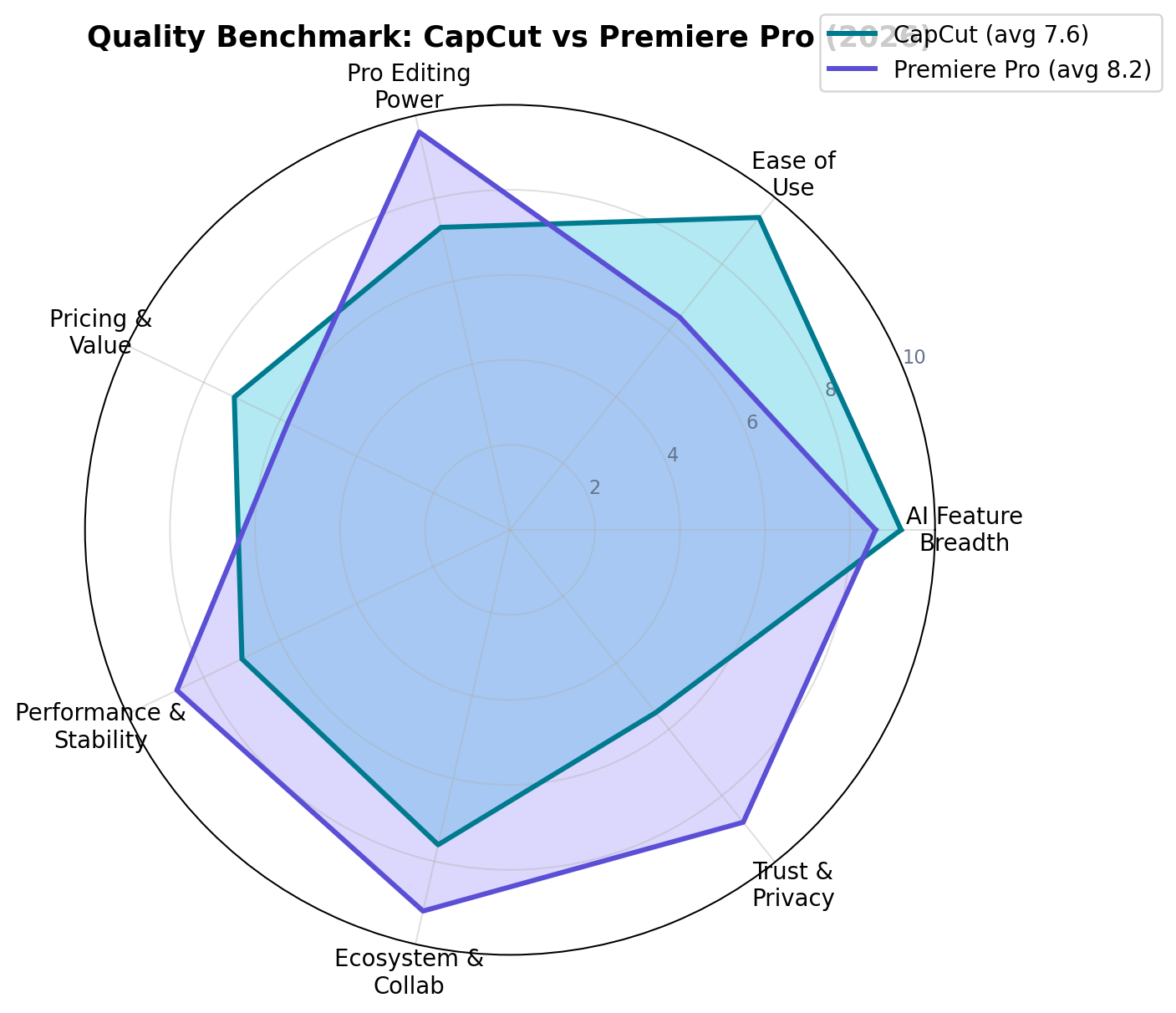
Head-to-Head: The Seven Deciding Dimensions
1. AI Feature Breadth — Winner: CapCut (9.2 vs 8.6)
This is closer than it's ever been. Premiere's text-based editing and Generative Extend are professional-grade and commercially safe, and Auto Reframe is genuinely useful. But CapCut simply ships more AI that ordinary creators use every day: captions, avatars, TTS, background removal, script-to-video, and Seedance 2.0 generative clips all live one tap from the timeline, with 1,200 monthly AI points on Pro versus Adobe's 25 generative credits on single-app. If AI is the product, CapCut wins; if AI is an assist inside a professional pipeline, Premiere's versions are more trustworthy per feature.
2. Ease of Use — Winner: CapCut (9.4 vs 6.4)
The largest gap in this comparison. In our beginner test (a colleague who had never edited video), CapCut produced a captioned, effect-treated, published Reel in 47 minutes. The same colleague in Premiere Pro had not finished a cut after three hours — the project panel, sequence settings and export dialog each demanded concepts she didn't have. CapCut's template-first design assumes you know nothing; Premiere assumes you're an editor. That's a feature for professionals and a wall for everyone else.
3. Pro Editing Power — Winner: Premiere Pro (9.6 vs 7.3)
No suspense here. Multicam syncing with arbitrary angles, RAW and ProRes workflows, Lumetri color with scopes, audio mixing with bus routing, After Effects Dynamic Link, GPU-accelerated timeline at 4K/8K, robust proxies — Premiere is built for deliverables that get signed off. CapCut can cut a documentary in a pinch, but color, audio and timeline depth run out quickly. If a client is paying for the output, this dimension alone decides the tool.
4. Pricing & Value — Winner: CapCut (7.2 vs 5.8)
CapCut's free tier is real: unlimited 1080p exports, auto captions, most templates — a creator can publish daily at $0. Pro at $19.99/mo (or $179.99/yr, ~$15/mo) unlocks 4K and the full AI kit. Premiere starts at $22.99/mo with no free tier and no one-time option, and the stack most pros actually need (Photoshop, After Effects) pushes to $69.99/mo. Per dollar of social-output value, CapCut wins by a mile; per dollar of billable professional capability, Premiere's price is defensible — but value-for-money as a standalone dimension goes to CapCut.
5. Performance & Stability — Winner: Premiere Pro (8.7 vs 7.0)
For social-length projects CapCut is snappy on almost anything, including mid-range phones — and its cloud sync between devices is slick. But on our 22-minute 4K YouTube project, CapCut desktop grew sluggish as the timeline filled (heavier effect stacks, occasional preview stutter), while Premiere, using proxies, stayed responsive with three cameras and color adjustments stacked. Premiere also handles the awkward media of professional work (variable frame-rate phone clips, RAW, weird audio sample rates) more gracefully. CapCut is stable for its intended job; Premiere is stable beyond it.
6. Ecosystem & Collaboration — Winner: Premiere Pro (9.2 vs 7.6)
Premiere's moat. Frame.io review (included) means client comments land on the timeline; Creative Cloud syncs assets across Adobe apps; After Effects compositions open inside your sequence; teams work on shared productions with managed media. CapCut counters with something Premiere can't: the same project on phone, desktop and web, and a template/creator ecosystem that moves at TikTok speed. Its Teams plan adds shared review, but it's basic. If you collaborate with clients, Premiere; if you collaborate with your own phone, CapCut.
7. Trust & Privacy — Winner: Premiere Pro (8.8 vs 5.5)
CapCut's 2025 terms-of-service update — which appeared to grant broad licenses over user content — triggered a creator firestorm; the language was walked back, but the episode stuck. Several universities, government bodies and corporate IT departments now ban CapCut outright, and its ByteDance ownership keeps it under policy scrutiny in multiple countries. Adobe, whatever its pricing sins, runs an enterprise-grade stack: SOC 2 compliance, admin controls, clear training-data opt-outs, and Firefly's commercially-safe training data. For public social content, use CapCut without fear. For NDA footage, unreleased product, or regulated industries, this dimension vetoes CapCut.
Real-World Test Scenarios
We ran three representative jobs through both tools. Here's what happened.
Who Each Tool Is For in Practice
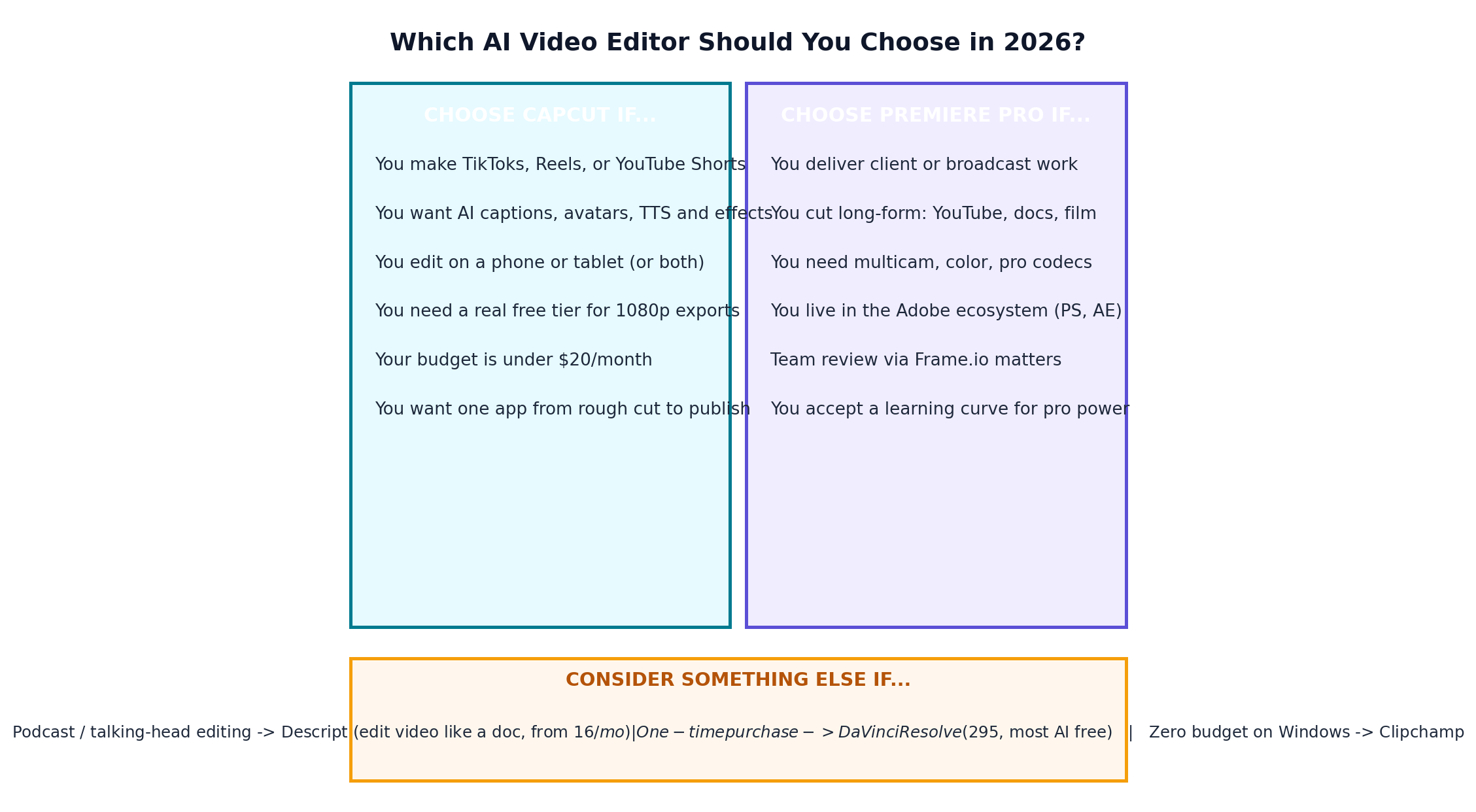
After four weeks in both apps, the user profiles crystallized clearly. CapCut is built for: solo creators and social media managers publishing daily vertical content; faceless-channel operators who need AI avatars and TTS; small e-commerce brands producing product clips at volume; parents, students and hobbyists who want good output with zero learning investment; and marketing teams whose deliverable is "content for the feed" rather than a mastered file. Premiere Pro is built for: freelance and agency editors delivering client work with revision rounds; YouTube channels producing long-form, documentary-style or multi-camera content; corporate video teams inside the Adobe stack; filmmakers and documentarians who need color, RAW and finishing control; and any organization whose compliance department has opinions about where footage lives.
Two boundary cases are worth naming. First, the growing hybrid editor: a self-shot YouTube educator, for example, who films talking heads, cuts long-form in Premiere (text-based editing), then spins vertical clips for Shorts in CapCut because it's faster there than Premiere's auto-reframe round-trip. Second, the budget professional: if you need Premiere-grade power but not Premiere-grade collaboration, DaVinci Resolve at $295 one-time (with most AI features free) undercuts both subscriptions — it's the honest third option this two-way comparison can't ignore.
Which Should You Choose?
Alternatives Worth Considering
| Tool | Starting Price | Standout Feature |
|---|---|---|
| DaVinci Resolve | $0 / $295 one-time (Studio) | Hollywood-grade color and editing; the best one-time-purchase deal in video — and most of its AI tools (magic mask, voice isolation, transcription) are free |
| Descript | From $16/mo | Edit video by editing the transcript; the fastest tool for podcast and talking-head content |
| Final Cut Pro | $299 one-time (Mac) | Apple-silicon performance and magnetic timeline; beloved by solo professional YouTubers |
| Wondershare Filmora | From ~$9.99/mo | CapCut-style AI ease (auto captions, smart cutout, TTS) on a traditional desktop timeline |
| Clipchamp | $0 (Microsoft) | Free, browser-based, bundled with Windows; auto captions and a competent free tier for zero-budget editing |
The Verdict
Frequently Asked Questions
Is CapCut really free in 2026?
Yes. CapCut's free tier remains genuinely usable in 2026: unlimited 1080p exports, auto captions, a large template and effects library, and mobile plus desktop plus web editing with cloud sync. The free tier shows ads for some premium assets and watermarks a small subset of Pro-only effects, but a creator can publish daily without paying. CapCut Pro ($19.99/month or $179.99/year) adds 4K/HDR export, 1,200 AI points per month for generative features, AI avatars, and the full effects library.
Is CapCut still safe to use after the 2025 terms-of-service controversy?
CapCut is still functional and massively popular, but trust is genuinely contested. Its 2025 terms-of-service update granted broad licenses over user content, and while the company walked back the language after creator backlash, the episode — plus CapCut's ownership by ByteDance — led several universities, government agencies and corporate IT departments to ban it. For public social content the practical risk is low. For client work under NDA, unreleased product footage, or regulated industries, Premiere Pro's enterprise-grade privacy posture is the safer choice.
Can Premiere Pro edit vertical videos for TikTok and Reels?
Yes, but with friction. Premiere Pro supports vertical sequences, auto-reframe to reframe horizontal footage for 9:16, and Auto Color, and its captions are broadcast-accurate. What it lacks is CapCut's end-to-end social workflow: trend templates, one-tap effects, and direct publishing to TikTok, Instagram and YouTube from mobile. Most social teams that own Premiere still keep CapCut (or CapCut Pro) for fast vertical content, and use Premiere for polished or long-form work.
Do professional editors actually use CapCut?
Increasingly, yes — but for specific job types. Social-first agencies, YouTube Shorts channels, e-commerce brands and newsroom social teams run entire production pipelines in CapCut because speed beats timeline sophistication for 15–60 second content. Traditional broadcast, film, agency commercial and corporate teams overwhelmingly stay on Premiere Pro, DaVinci Resolve or Final Cut Pro, because they need multicam, client review workflows, pro codecs and color pipelines. In 2026 the split is clean: CapCut owns short-form speed, Premiere owns deliverable-grade work.
Can CapCut handle 4K editing?
Yes, but only on CapCut Pro — free-tier exports are capped at 1080p. Pro supports 4K import, editing and export (including HDR), and cloud sync between mobile and desktop. Performance is solid on modern hardware for social-length projects, though scrubbing long 4K multicam timelines is not what CapCut is built for. Premiere Pro handles 4K, 8K, RAW formats and proxies with professional media management, which is why heavy long-form 4K work still belongs on Premiere.
Which is better for beginners: CapCut or Premiere Pro?
CapCut, by a wide margin. A beginner can produce a watchable, captioned, effect-laden video in CapCut within the first hour — the template-driven UI, auto captions and one-tap AI tools are designed for people who have never seen a timeline. Premiere Pro typically takes days to weeks to become productive in, and months to master. If your goal is professional editing as a skill or career, learning Premiere is worth the curve. If your goal is publishing videos this week, start with CapCut.