TL;DR
For most office workers in 2026, Notion AI is the clear winner. Its built-in AI Agent can draft emails, query your team's knowledge base, auto-fill databases, and even run autonomous Custom Agents that handle standup reports and ticket triage — all within the workspace where your team already works. At $20/user/month (annual), it's not cheap, but the integration depth justifies the cost for teams that live in Notion.
Obsidian is the privacy champion. Your notes stay as local Markdown files, and AI plugins like Copilot and Smart Connections let you chat with your vault using any LLM. It costs nothing beyond API fees, and with 1,400+ plugins, it's the most flexible option — but it's a solo tool with no real-time collaboration.
Logseq is the budget pick for plaintext purists. It's completely free, open source, and has an innovative outliner-based approach. However, its AI capabilities are the weakest of the three, and real-time collaboration is still in alpha. Best for personal PKM enthusiasts, not office teams.
At a Glance
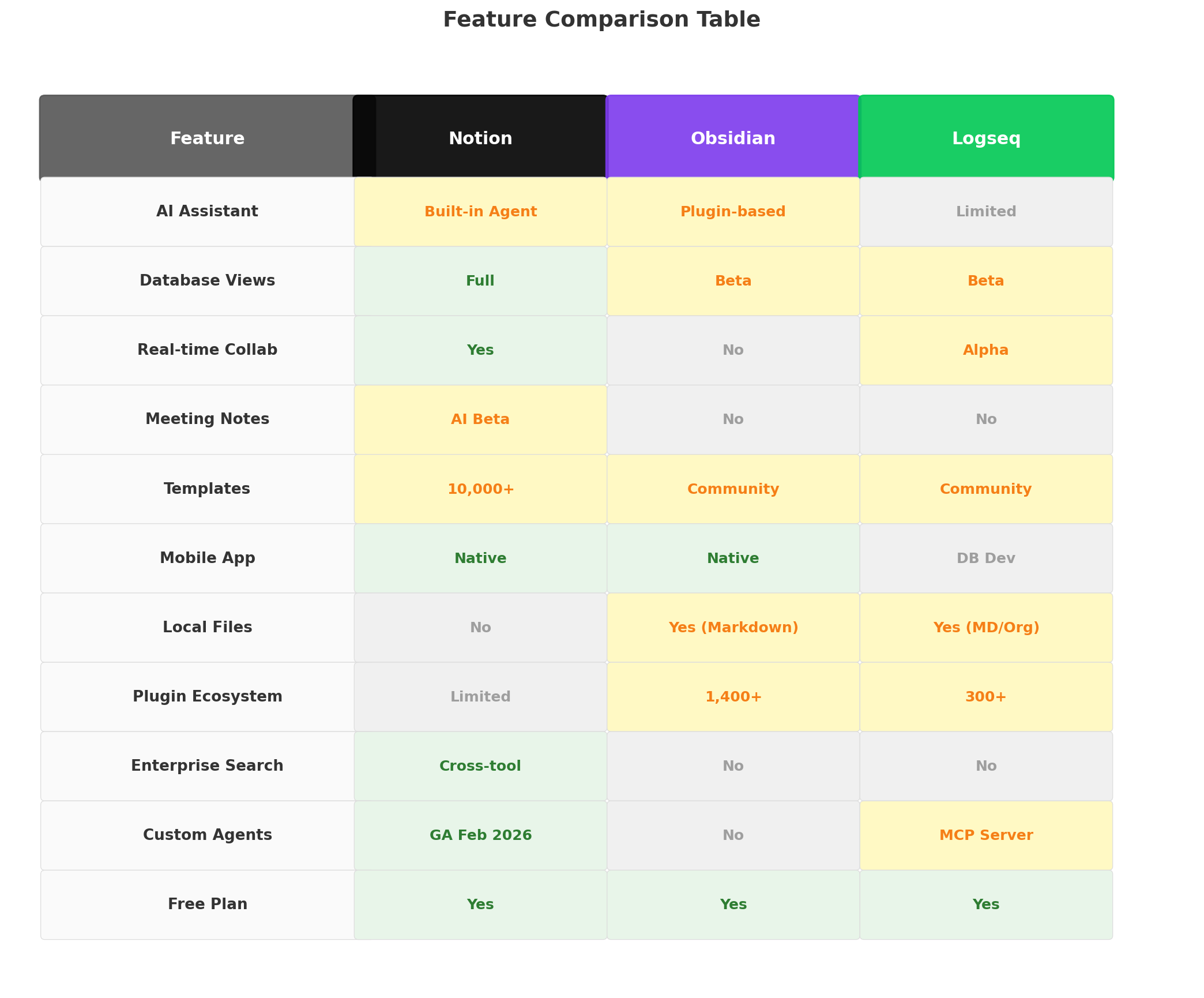
| Feature | Notion AI | Obsidian | Logseq |
|---|---|---|---|
| AI Approach | Built-in Agent + Custom Agents | Plugin-based (Copilot, Text Generator) | Plugin-based (limited) |
| Min Cost for AI | $20/user/mo (Business) | $0 + API costs | $0 + API costs |
| Free Plan | Yes (no AI features) | Yes (full app free) | Yes (everything free) |
| Data Storage | Cloud (Notion servers) | Local (Markdown files) | Local (Markdown/org files) |
| Real-time Collab | Native, excellent | Shared vaults (limited) | Alpha (pre-production) |
| Meeting Notes AI | Yes (beta) | No | No |
| Enterprise Search | Cross-tool (Slack, Drive, GitHub) | No | No |
| Custom AI Agents | Yes (GA Feb 2026) | No | MCP server (emerging) |
| Plugin Ecosystem | Limited | 1,400+ plugins | 300+ plugins |
| Best For | Teams & enterprise | Privacy-first knowledge workers | Personal PKM on a budget |
Deep Dive: Notion AI — The AI-Powered Team Workspace
Notion has evolved from a simple note-taking app into a full-blown AI workspace. As of mid-2026, it serves over 100 million users and has transformed its AI offering from basic writing assistance into something much more ambitious: autonomous agents that can manage workflows, query external tools, and make decisions within your team's knowledge base.
What's New in 2026
The biggest headline is Custom Agents, which launched in general availability in February 2026 as part of Notion 3.3. Unlike the standard Notion Agent that answers questions and drafts content, Custom Agents are autonomous workflows triggered by schedules, Slack messages, emails, or database changes. Early testers created over 21,000 agents, and Notion itself runs 2,800 agents internally for standup reports, ticket triage, and inbox management.
The AI Meeting Notes feature (still in beta) lets you record meetings directly from your desktop — capturing system audio and microphone input. It transcribes the conversation, extracts action items, decisions, and key topics, then saves everything as a structured Notion page. It's not as polished as dedicated meeting tools like Otter.ai or Fireflies, but for teams already in Notion, it eliminates the need to switch apps.
Enterprise Search is another standout. Using AI Connectors, Notion can search across Slack, Google Drive, GitHub, Linear, Jira, and Notion Mail simultaneously. Ask "What did the design team decide about the checkout flow last week?" and get a cited answer pulling from multiple sources. No other tool in this comparison comes close to this level of cross-tool intelligence.
AI Features for Daily Office Work
For daily productivity, Notion's AI touches nearly every workflow:
- Database autofill: Highlight a column, tell AI what data you need, and it populates rows using web research or your existing workspace context. Perfect for CRM tracking, project status boards, or content calendars.
- Multi-step Agent: Give one prompt like "Research our top 5 competitors and create a comparison page" and the Agent browses the web, synthesizes findings, and generates a formatted page — all in one request with up to 20 minutes of autonomy.
- In-editor writing: Select any text and access summarization, translation, tone adjustment, brainstorming, and formatting tools. The AI understands your page context, so suggestions are relevant to your project.
- Research Mode: Web + workspace search with source citations on every claim. Great for preparing client proposals or research briefs.
- Multi-model picker: Switch between GPT-5.2, Claude Opus 4.5, and Gemini 3 depending on the task — use Claude for nuanced writing, GPT for data tasks, Gemini for long context.
Pricing
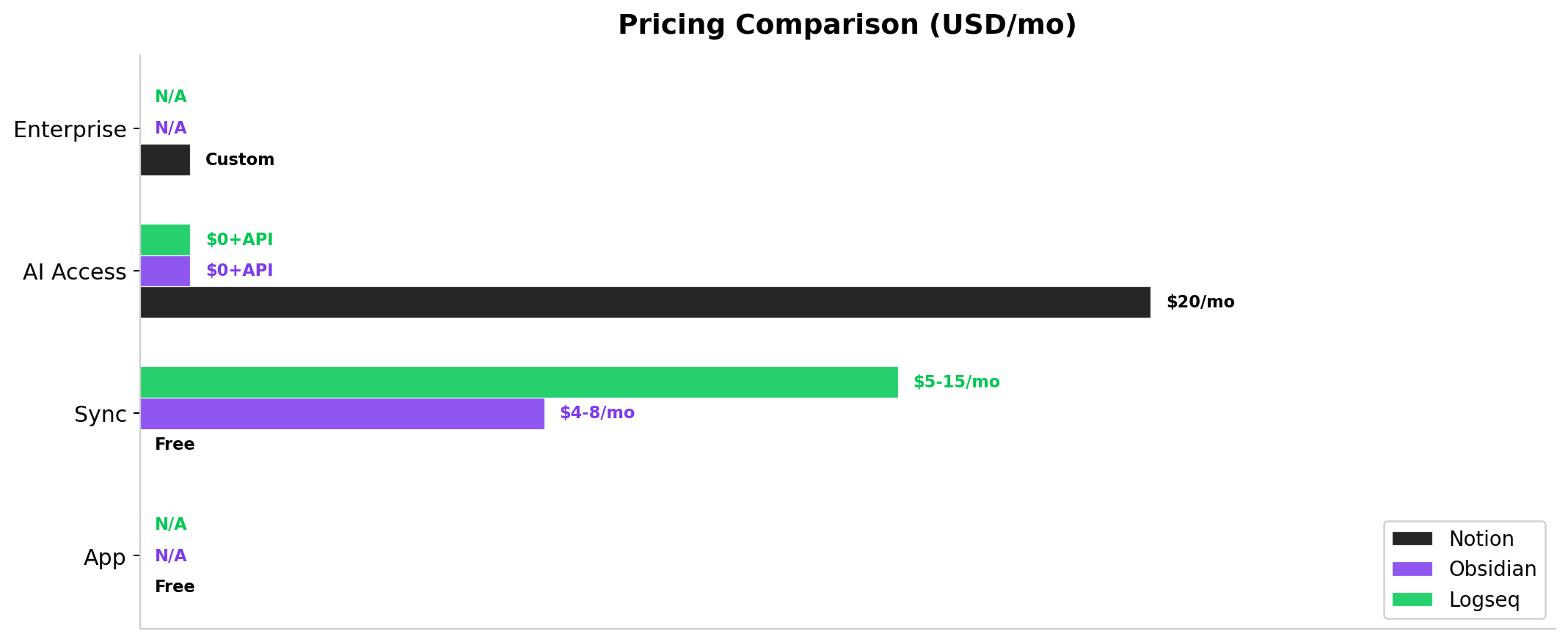
| Plan | Monthly | Annual | AI Access |
|---|---|---|---|
| Free | $0 | $0 | ~20 trial responses |
| Plus | $12 | $10 | Trial only (no ongoing AI) |
| Business | $24 | $20 | Full AI included |
| Enterprise | Custom | Custom | Full AI + zero data retention |
Custom Agents use a credit system: $10 per 1,000 Notion credits, pooled per workspace. Standard AI features (Agent queries, writing tools, database autofill, AI Search) are unlimited within Business and Enterprise plans. The standalone $10 AI add-on was retired in May 2026.
Strengths
- Most deeply integrated AI in any workspace — agents that modify your databases, not just chat
- Enterprise Search across Slack, Google Drive, GitHub, and more is unique in this category
- Custom Agents replace entire workflows (standups, ticket triage, inbox management)
- 100M+ users, 10,000+ templates, massive community
- Real-time collaboration is native and polished
Weaknesses
- Most expensive: $20/user/month minimum for AI access, plus credit costs for Custom Agents
- AI completely locked behind Business plan — no a la carte option
- Cloud-only, no local storage or offline access
- No end-to-end encryption for stored data
- Image generation capped at 10/day, 30/month even on paid plans
Deep Dive: Obsidian — The Privacy-First Knowledge Vault
Obsidian takes a fundamentally different approach. Instead of a cloud service, it's a local app that stores everything as plain Markdown files on your computer. There's no account required to use it, no server dependency, and no vendor lock-in. Your knowledge base is a folder of .md files that will outlive any app.
Obsidian has no built-in AI — and that's by design. Instead, it offers a plugin ecosystem of 1,400+ community-built extensions, several of which bring powerful AI capabilities to your vault.
AI Features for Daily Office Work
The AI experience in Obsidian depends on which plugins you install. Here are the most relevant for office work:
- Copilot plugin: Chat with your vault using RAG (Retrieval-Augmented Generation). Ask questions about your notes, get answers grounded in your specific documents. Supports OpenAI, Anthropic, Google, and local models via Ollama.
- Text Generator: Create content using any LLM through a flexible template engine. Generate meeting summaries, draft emails based on your notes, or brainstorm ideas — all within Obsidian's editor.
- Smart Connections: Semantic search over your vault using AI embeddings. Finds related notes that keyword search would miss. The Pro tier adds inline badges and persistent panels.
- Canvas AI editing: Community plugins offer AI-assisted writing in a canvas view, similar to ChatGPT's Canvas feature, but vault-aware.
- Local model support: Run LLMs entirely offline through Ollama integration. Your most sensitive notes never leave your machine.
Practical Office Use Cases
Obsidian excels at personal knowledge management tasks that happen before and after collaborative work:
- Research compilation: Clip web articles, PDFs, and meeting notes into your vault. Use Smart Connections to discover unexpected links between research topics.
- Writing projects: Use Text Generator to draft sections of reports, then refine with Obsidian's linking and graph view to ensure consistency.
- Personal CRM: Track professional relationships, meeting notes, and follow-up tasks in linked Markdown files — fully private, no SaaS subscription needed.
- Project knowledge base: Build a personal encyclopedia of technical decisions, vendor evaluations, and process documentation that syncs via Obsidian Sync or your own Git repo.
Pricing
Obsidian's pricing model is radically different from Notion's:
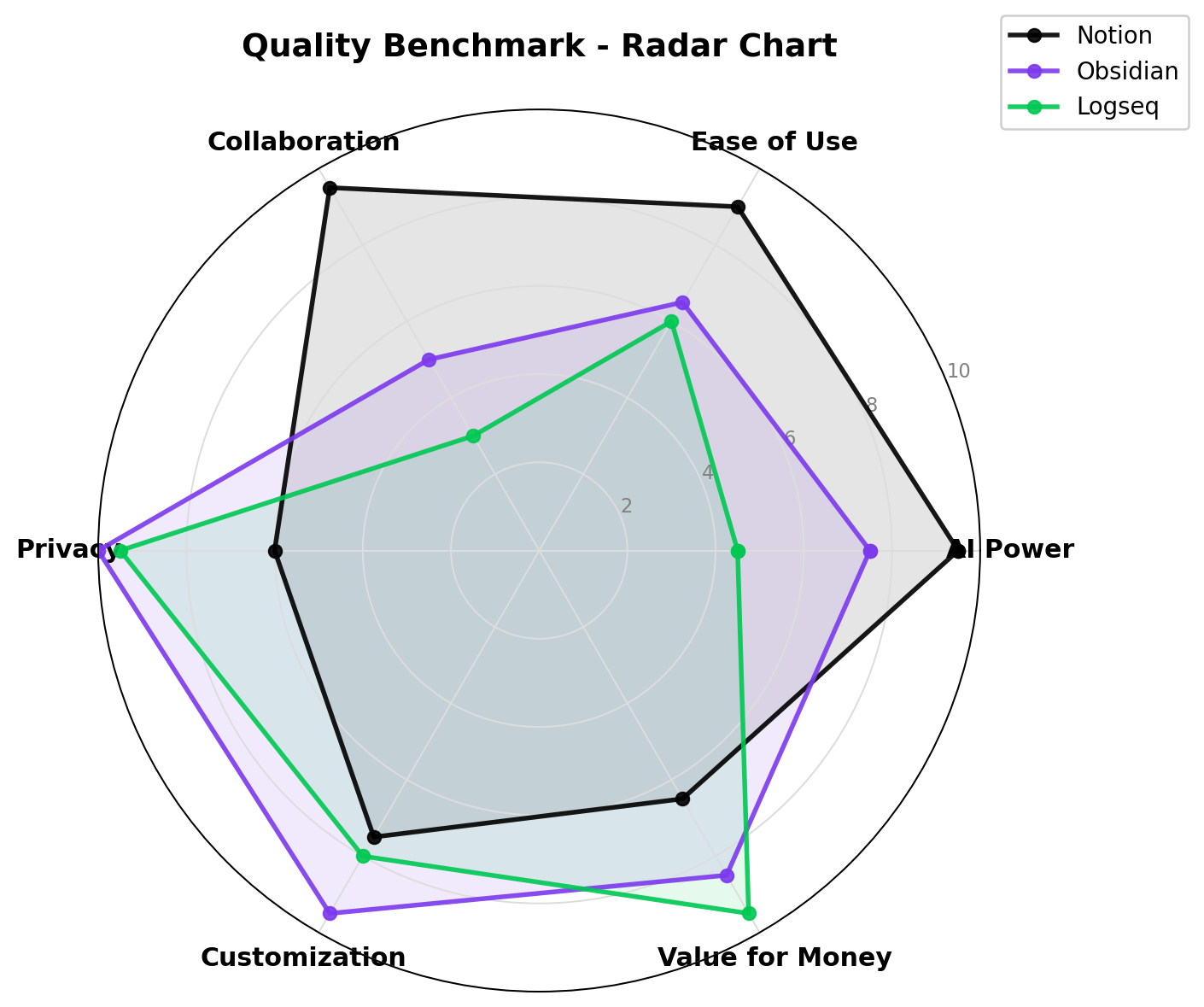
| Component | Price |
|---|---|
| Obsidian app (desktop + mobile) | Free |
| Obsidian Sync Standard | $4/user/month (annual) / $5 monthly |
| Obsidian Sync Plus | $8/user/month (annual) |
| Obsidian Publish | $8/site/month (annual) / $10 monthly |
| Commercial license | $50/user/year (optional, voluntary) |
| AI plugins | Free (open source) — you pay API costs only |
The key insight: AI costs in Obsidian are whatever you spend on API calls. Using GPT-4o-mini for vault chat costs roughly $0.15 per 1 million tokens — you could chat with your notes all day for pennies. Running local models via Ollama costs nothing beyond electricity.
Strengths
- Strongest privacy: data stays 100% local, end-to-end encrypted sync available
- No subscription required for core features; AI costs are just API usage
- Works with any AI provider — no vendor lock-in
- Massive plugin ecosystem (1,400+) beyond just AI
- Markdown-native, future-proof file format
- Local model support for air-gapped environments
Weaknesses
- No built-in AI — requires plugin setup (API keys, model configuration)
- Not designed for real-time team collaboration (single-player by nature)
- No web app — desktop and mobile only
- Medium-high learning curve for non-technical users
- Some AI plugins maintained by single developers (maintenance risk)
- No meeting notes, no enterprise search, no cross-tool integration
Deep Dive: Logseq — The Free Outliner for Knowledge Workers
Logseq is the open-source alternative in this comparison. It's free under the MIT license, stores data locally as Markdown or Org-mode files, and uses a unique outliner-based block linking paradigm. If you think in bullet points and nested lists, Logseq's interface feels natural in a way that other tools don't.
Like Obsidian, Logseq has no built-in AI. But unlike Obsidian, the AI plugin ecosystem is much more limited and fragmented.
AI Capabilities in 2026
Logseq's AI story is the weakest of the three tools:
- Community plugins: Basic AI summarization and rewriting via plugins connecting to OpenAI or ChatGPT. Quality varies, setup is manual, and features are limited compared to Obsidian's plugin ecosystem.
- MCP Server: Logseq offers an optional MCP (Model Context Protocol) server that lets external AI clients like Claude Desktop read and write to your graph. This is forward-thinking but requires technical setup.
- logseq-answer-machine: A new agent skill added in May 2026 that provides question-answering workflows against your graph. Still early-stage.
For daily office work, Logseq's AI capabilities are not competitive with Notion or Obsidian. You can get basic summarization and rewriting, but there's no semantic search over your vault, no RAG-based Q&A, and no automated workflows.
Current Status
Logseq is actively maintained but in a transitional phase. The Logseq DB (SQLite-based backend) is in beta, replacing the original file-per-graph approach. RTC (Real Time Collaboration) is in alpha — iOS is available, Android is coming. Both features carry data loss warnings.
The core outliner (non-DB) remains stable and reliable. Open Collective backing stands at $251,839 total, with active monthly sponsors getting access to DB beta and RTC.
Where Logseq Shines
- PDF annotation: Built-in PDF highlighting and annotation with linked references — excellent for research workflows.
- Block-level linking: Link individual bullet points across pages, creating a web of connected ideas that's more granular than page-level linking.
- Daily journaling: Automatic daily notes with seamless linking to previous entries — great for work journals and meeting notes.
- Completely free: No subscription, no premium tier, no paywalled features.
- Flashcards: Built-in spaced repetition for studying — useful for professionals learning new skills.
Where Logseq Falls Short for Office Work
- No real-time collaboration ready for production use
- AI capabilities are primitive compared to Notion and Obsidian
- DB version in beta with data loss risk
- Small core development team (3-4 visible devs)
- No meeting notes, no enterprise features, no team management
Head-to-Head Comparison
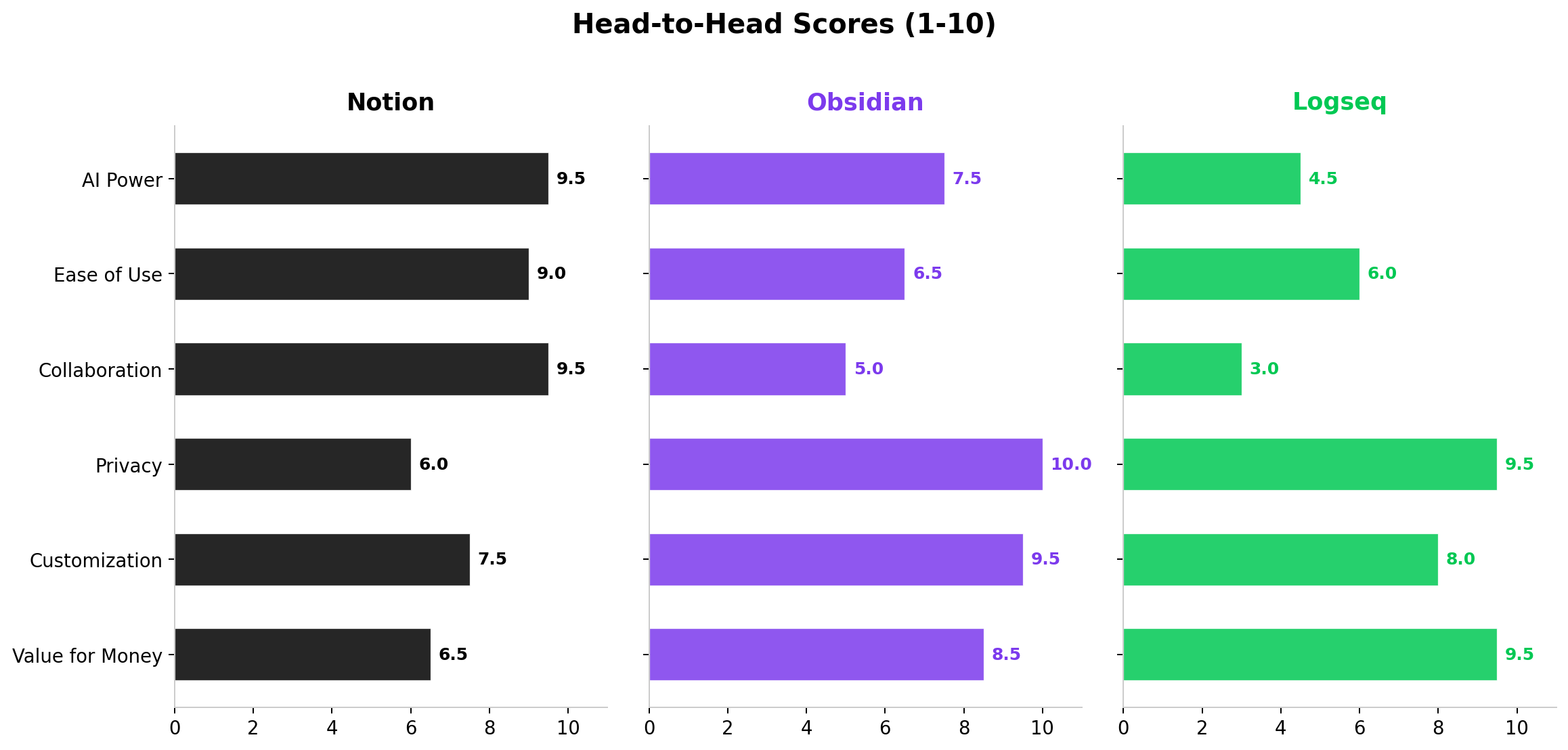
1. AI Power & Capabilities — Winner: Notion AI
Notion's AI is the most capable by a wide margin. The built-in Agent handles multi-step tasks, Custom Agents automate workflows, Enterprise Search spans multiple tools, and meeting transcription is built in. Obsidian's plugin-based AI is flexible and powerful for personal use, but it requires assembly and doesn't match Notion's integration depth. Logseq's AI is nascent and not ready for serious office work.
2. Ease of Use — Winner: Notion AI
Notion requires no setup — AI works out of the box for Business plan users. The interface is intuitive, and AI features are accessible through natural language prompts anywhere in the workspace. Obsidian has a steeper learning curve due to plugin installation, API key configuration, and the graph-based mental model. Logseq's outliner paradigm takes getting used to, and its AI plugins are poorly documented.
3. Team Collaboration — Winner: Notion AI
This isn't close. Notion was built for teams from day one — real-time collaboration, shared workspaces, permission controls, and team databases. Obsidian supports shared vaults but it's clunky for concurrent editing. Logseq's collaboration is in alpha and not production-ready.
4. Privacy & Data Control — Winner: Obsidian
Obsidian wins decisively. Your data stays as local Markdown files, sync is end-to-end encrypted, and you can run AI entirely offline with local models. Logseq is nearly as good — it's open source and local-first — but its encrypted sync is less mature. Notion is cloud-based with no E2E encryption, making it unsuitable for highly sensitive environments without Enterprise's zero data retention option.
5. Customization & Flexibility — Winner: Obsidian
With 1,400+ community plugins, Obsidian is infinitely extensible. You can customize themes, editing behaviors, AI models, graph views, and workflows to an extraordinary degree. Notion is more rigid — what Notion gives you is what you get, though Templates offer some flexibility. Logseq falls between the two, with 300+ plugins and a more structured data model.
6. Value for Money — Winner: Logseq
Logseq is completely free — app, sync alternatives, plugins, everything. For personal knowledge management on a budget, it's unbeatable. Obsidian offers tremendous value at $0 for the core app (API costs are minimal), and Sync at $4/month is reasonable. Notion's $20/user/month floor for AI access is steep, though justified for teams that leverage its full feature set.
Real-World Office Test Scenarios
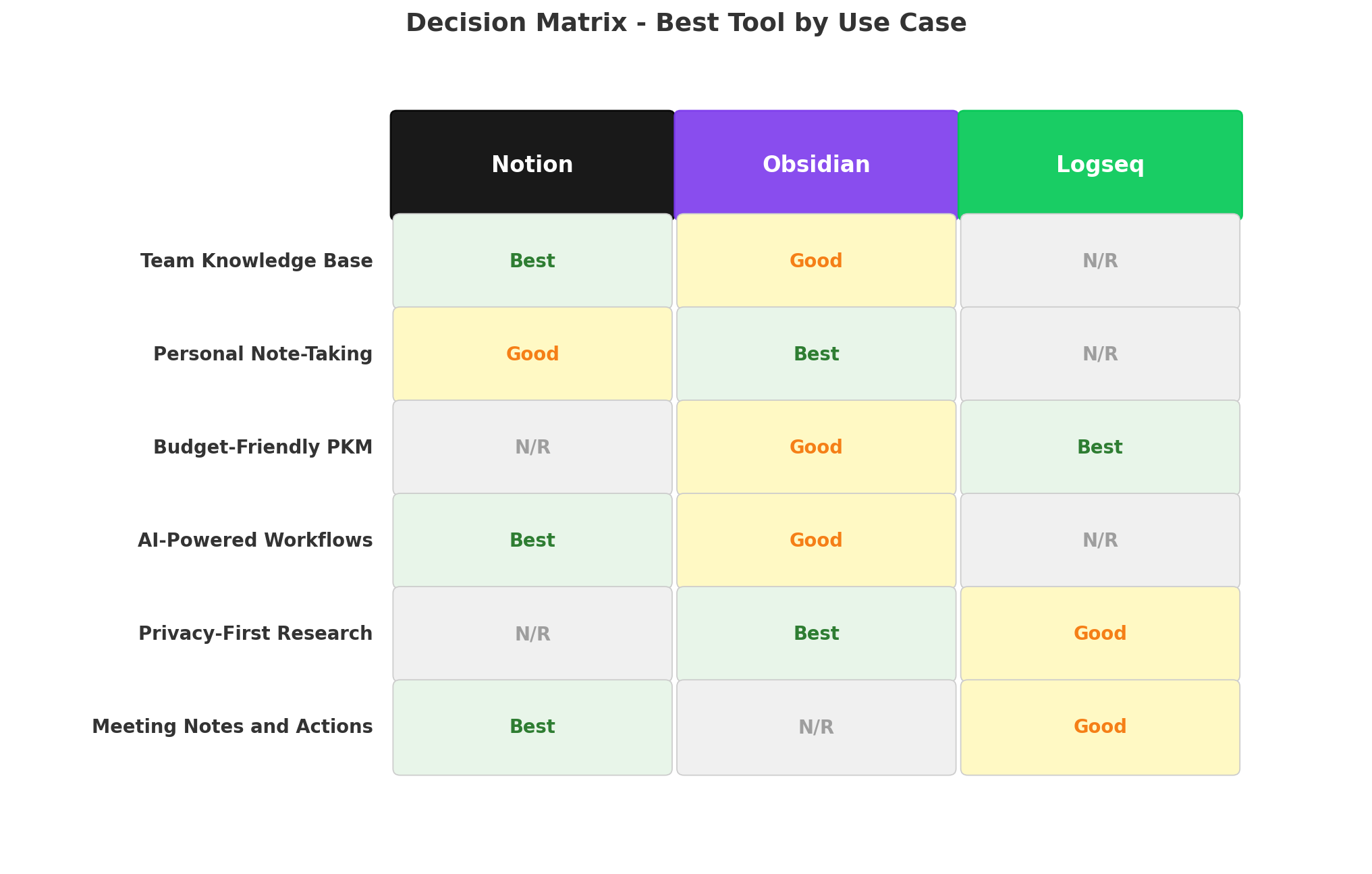
Scenario 1: "Summarize last week's team meetings and create action items"
Notion AI: With AI Meeting Notes enabled, Notion captures the meeting audio, transcribes it, and extracts action items into a structured page. You can ask the Agent to compile all meetings from the past week and generate a consolidated action list. Result: 9/10 — seamless if meetings happen in-app or desktop audio is captured.
Obsidian: No native meeting recording. You'd need to manually paste notes or transcripts into your vault, then use the Copilot plugin to summarize and extract actions. Result: 5/10 — works but requires manual data entry.
Logseq: Similar to Obsidian — paste notes manually, use a basic AI plugin to summarize. Result: 4/10 — less capable plugins, more manual work.
Scenario 2: "Research competitors and create a comparison matrix for a client proposal"
Notion AI: Tell the Agent: "Research our top 5 competitors in the CRM space and create a comparison page." The Agent browses the web for 10-15 minutes, synthesizes findings, and generates a formatted comparison table with sources cited. Result: 9/10 — the multi-step autonomy is genuinely useful for research tasks.
Obsidian: Use Text Generator to create an initial draft, then refine with manual research. Smart Connections helps find existing notes on competitors. No built-in web browsing in AI plugins. Result: 6/10 — good drafting tools but no automated research.
Logseq: Manual research and note-taking with limited AI assistance. Result: 3/10 — AI doesn't add meaningful value here.
Scenario 3: "I need a private system to track confidential client information and internal notes"
Notion AI: Data lives on Notion's cloud servers. Enterprise plan offers zero data retention and SOC 2 compliance, but it requires the full Enterprise contract. Result: 6/10 — adequate for most businesses, but not air-gapped.
Obsidian: Files stay on your local machine. Sync is E2E encrypted. AI runs via local models (Ollama) for complete air-gapping. Result: 10/10 — maximum privacy, full control.
Logseq: Also local-first and open source, but encrypted sync is less mature. Result: 8/10 — strong privacy, slightly less polished tooling.
Alternatives Worth Considering
| Tool | Starting Price | Standout Feature | Best For |
|---|---|---|---|
| Microsoft OneNote | Free (with M365) | Deep Office integration, freeform canvas | Microsoft ecosystem users |
| Evernote | $14.99/mo | Web clipper, document search | Legacy users, web research |
| Roam Research | $15/mo | Daily notes + bidirectional links | Bidirectional linking purists |
| Joplin | Free | Open source, E2E sync | Privacy-focused Evernote alternative |
| Reflect Notes | $10/mo | Built-in AI + daily notes + graph | Personal knowledge management |
The Verdict
🏆 Best for Teams & Enterprise → Notion AI
If your team collaborates on documents, manages projects, or maintains knowledge bases, Notion AI is the only tool here with production-ready collaboration AND deep AI integration. Custom Agents that automate standups, ticket triage, and inbox management represent a genuine productivity leap. At $20/user/month, it's a significant investment, but the ROI is clear for teams that go all-in on the Notion ecosystem.
🛡️ Best for Privacy & Personal Knowledge Management → Obsidian
If you handle confidential information, work in regulated industries, or simply value data ownership, Obsidian is unmatched. Local Markdown files, E2E encrypted sync, local AI models — no other tool in this comparison offers this level of data sovereignty. The plugin ecosystem (1,400+) makes it endlessly customizable, though you'll need technical comfort to set up AI features.
💰 Best Free Option → Logseq
For personal knowledge management on a zero budget, Logseq delivers a solid outliner-based experience with local file storage and open-source transparency. The AI capabilities aren't competitive, and collaboration isn't ready — but as a free, privacy-respecting note-taking tool with PDF annotation and spaced repetition, it's a remarkable value.
🔄 Hybrid Approach
Some power users run both Notion (team workspace) and Obsidian (personal knowledge vault). Use Notion's AI for collaborative work, meeting notes, and team knowledge bases. Use Obsidian for private research, personal journaling, and confidential notes. The Notion-to-Obsidian export plugin makes it possible to sync content between the two.
Overall Winner: Notion AI — the most complete package for office workers who need AI-powered note-taking, team collaboration, and workflow automation in a single tool.
Frequently Asked Questions
Is Notion AI worth $20/month?
Notion AI is worth $20/month if you use Notion daily as your team's workspace. The AI Agent can draft documents, query databases, auto-fill entries, and run Custom Agents that automate workflows like standup reports and ticket triage. For individuals who only need basic note-taking, it's expensive — alternatives like Obsidian with an API key cost far less.
Does Obsidian have built-in AI?
No. Obsidian has no built-in AI features. All AI capabilities come from community plugins like Copilot, Text Generator, and Smart Connections. You connect your own API key from OpenAI, Anthropic, or run local models via Ollama. This gives you full control and no vendor lock-in, but requires technical setup.
Can Logseq be used for team collaboration?
Not yet. Logseq's real-time collaboration (RTC) feature is in alpha as of mid-2026, and its new DB backend is still in beta with potential data loss. Logseq is best suited for personal knowledge management. For team work, Notion or Obsidian (with shared vaults) are much more reliable.
Which is best for privacy: Notion, Obsidian, or Logseq?
Obsidian and Logseq are both local-first, meaning your data stays on your device. Obsidian offers end-to-end encrypted sync. Logseq is open source. Notion is cloud-based with no end-to-end encryption — your data lives on Notion's servers. For maximum privacy, Obsidian is the strongest choice.
Can Notion AI replace meeting tools like Otter or Fireflies?
Partially. Notion's AI Meeting Notes (currently in beta) can record, transcribe, and extract action items from meetings. It's not as specialized as Otter.ai or Fireflies for dedicated meeting workflows, but if you already live in Notion, it reduces the need for a separate tool.
Is Notion AI better than ChatGPT for writing?
Notion AI's writing tools are integrated into your workspace — it can reference your databases, pull context from team pages, and auto-fill content. For standalone writing quality, ChatGPT with GPT-5.6 produces comparable or better text. Notion's advantage is context-awareness: it writes with your team's knowledge base in mind.