TL;DR
Microsoft Copilot wins for enterprises already invested in the Microsoft ecosystem. Its deep integration with Microsoft Graph — pulling context from emails, Teams chats, SharePoint docs, and calendar — creates an AI assistant that understands your entire work life. Copilot's Excel capabilities (including Python code generation), Copilot Studio for custom agent building, and enterprise-grade security with Microsoft Purview make it the clear choice for large organizations running M365.
Google Gemini for Workspace wins for budget-conscious SMBs and teams that value rapid innovation. At $14/user/month for Business Standard (with full Gemini included), it costs 34% less than Copilot Business. Gemini's 1-million-token context window is unmatched, and Google is rolling out new features at a blistering pace — Workspace Studio for no-code automation, Vids for AI video creation, and native presentation generation in Slides are all 2026 additions that Copilot can't match.
The real deciding factor isn't which AI is "better" — it's which ecosystem your office runs on. If you're on Outlook/Teams/SharePoint, Copilot fits naturally. If you're on Gmail/Docs/Sheets, Gemini does. Switching ecosystems for AI alone rarely makes financial sense.
At a Glance
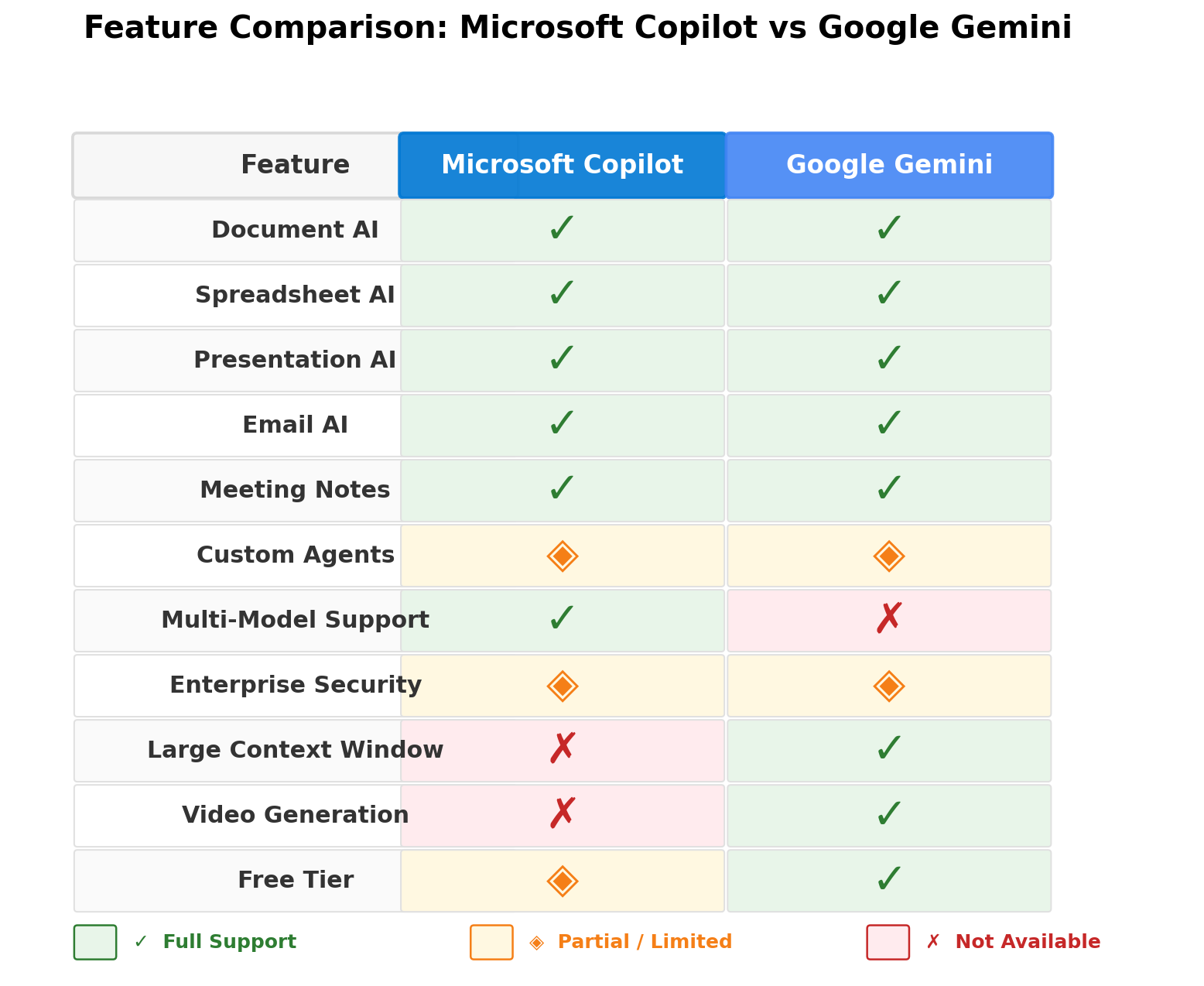
| Feature | Microsoft Copilot | Google Gemini |
|---|---|---|
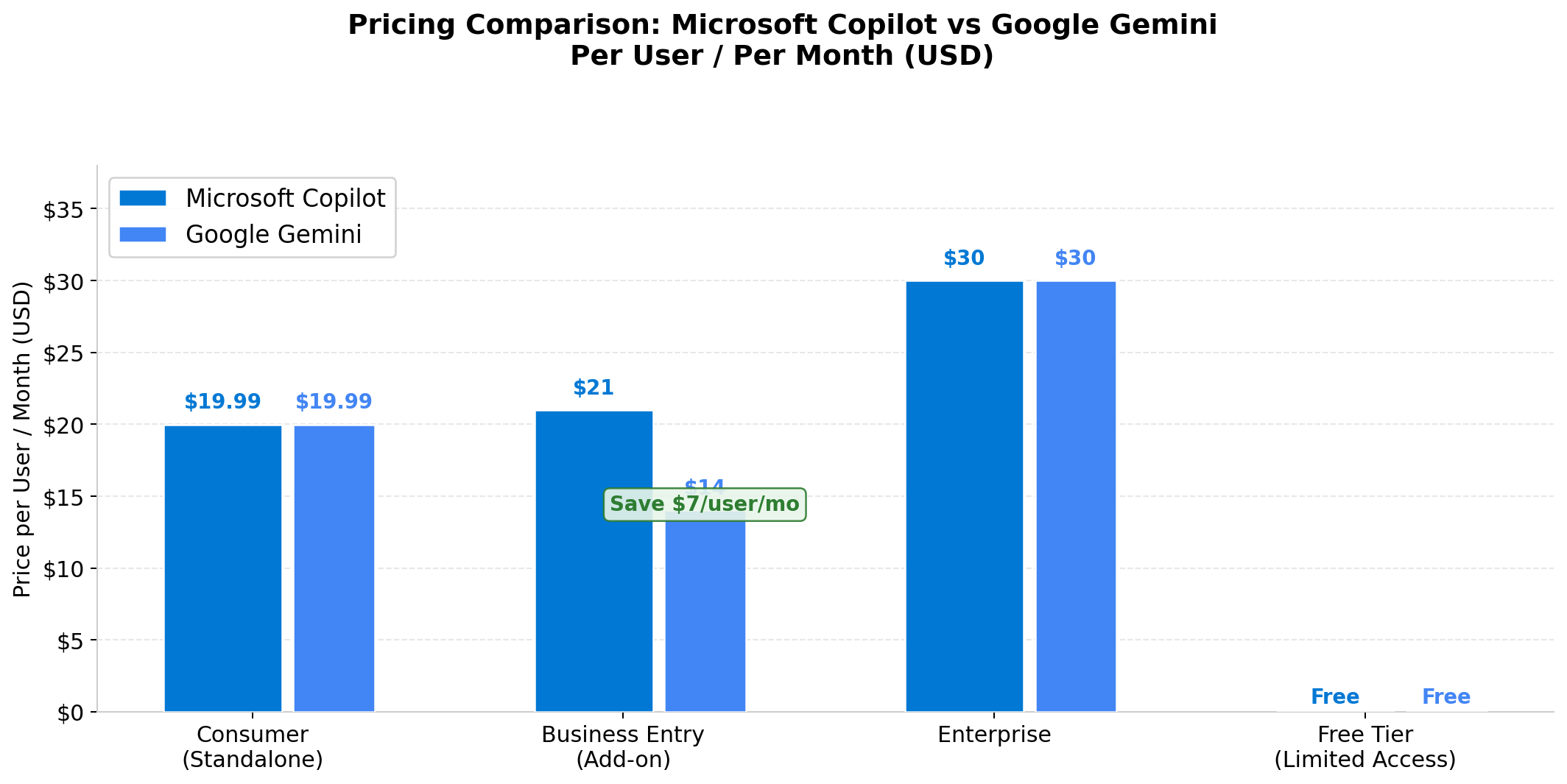
| Business Entry Price | $21/user/mo (add-on) | $14/user/mo (bundled) |
| Enterprise Price | $30/user/mo (add-on) | Custom (bundled) |
| Consumer Premium | $19.99/mo (M365 Premium) | $19.99/mo (Google AI Pro) |
| Free Tier | Copilot Chat (limited) | Gemini Free |
| Office Apps | Word, Excel, PPT, Outlook, Teams, OneNote | Docs, Sheets, Slides, Gmail, Meet, Chat, Drive |
| AI Model Options | GPT-5.6, Claude Opus 5, Claude Sonnet 5 | Google models only (Gemini 3.x) |
| Context Window | Standard (varies by model) | 1M tokens (AI Pro/Ultra) |
| Custom Agents | Copilot Studio (mature) | Workspace Studio (newer) |
| Enterprise Security | Purview, DLP, FedRAMP, HIPAA | SOC 2, ISO 27001 |
| Video Generation | No | Yes (Vids + Veo 3.1) |
Deep Dive: Microsoft Copilot — The Enterprise AI Powerhouse
Microsoft Copilot for Microsoft 365 has matured significantly in 2026. What started as a simple chat sidebar has evolved into a pervasive AI layer that touches every Office app, connects to your entire organizational data through Microsoft Graph, and even lets you build custom AI agents with Copilot Studio.
What Changed in 2026
The Copilot Pro standalone plan was retired in late 2025, replaced by Microsoft 365 Premium at $19.99/month, which bundles Copilot with Office apps for consumers. For businesses, Copilot's pricing was cut from $30 to $21/user/month (Copilot Business), making it more accessible for SMBs.
August 2026 brought multi-model support: you can now choose between GPT-5.6, Claude Opus 5, and Claude Sonnet 5 for different tasks directly in Copilot Chat. Microsoft also added Word Track Changes integration — watch Copilot rewrite sections with visible change tracking, so you can accept or reject edits like a human colleague's suggestions.
Copilot Pages (April 2026) introduced interactive content pages with visuals, dashboards, and reports that blend AI-generated content with Work IQ data. Copilot Notebooks added a research workspace with mind maps, document references, and one-click export to Word or PowerPoint.
AI in Each Office App
Here's how Copilot actually helps in daily office work:
- Word: Draft reports, proposals, and memos from prompts. Summarize long documents. Rewrite sections with tone adjustment. Convert text to tables. The new Track Changes integration lets you see every AI edit before accepting. Copilot can reference SharePoint content and generate documents from notebook research.
- Excel: This is Copilot's biggest strength. Ask questions in natural language: "Which region had the highest quarter-over-quarter growth?" Copilot analyzes your data, identifies trends, creates charts, and — uniquely — can generate Python code for advanced analysis. Integration with Power BI adds enterprise analytics depth.
- PowerPoint: Generate full presentations from Word documents, meeting notes, or reports. Speaker notes are auto-generated. Brand Kit integration (July 2026) lets you apply company logos, icons, themes, and fonts. AI handles background removal, text overlay, and image enhancement.
- Outlook: Draft and rewrite emails with tone detection ("Make this more diplomatic"). Summarize 40+ email threads into key decisions and action items. Inbox prioritization surfaces the most important messages first. The new action-based processing lets Copilot take actions on emails — forwarding, filing, flagging — based on your instructions.
- Teams: Real-time meeting summaries with decisions, action items, and key discussion points. Catch-up summaries for late joiners. Chat thread summarization across 30-day history. Start group chats from Copilot based on context.
Copilot Studio: Custom AI Agents
Copilot Studio is Microsoft's agent-building platform, and it's significantly more mature than Google's Workspace Studio. You can build custom AI agents with:
- Computer Use (GA May 2026): Agents that interact with applications, navigate websites, and perform multi-step tasks
- MCP-compliant tools (GA October 2026): Connect agents to external data sources
- Multi-model selection: Choose GPT-5.6 for analytical tasks, Claude for nuanced writing, or other models
- Work IQ integration: Connect agent workflows to operational pipelines via REST API and CLI
Enterprise organizations are using Copilot Studio to build agents for sales forecasting, IT helpdesk automation, compliance document review, and customer onboarding — tasks that go far beyond simple chat.
Pricing Breakdown
| Tier | Price | Includes |
|---|---|---|
| Copilot Chat (free) | $0 | Basic AI chat, no Office integration |
| M365 Premium (consumer) | $19.99/mo | Office apps + Copilot AI |
| Copilot Business | $21/user/mo | Copilot add-on for M365 Business (up to 300 users) |
| Copilot Enterprise | $30/user/mo | Full Copilot + Copilot for Sales/Service/Finance |
| Copilot Studio capacity | $200/mo | 25,000 Copilot Credits (tenant-wide) |
Total enterprise cost: Copilot Enterprise requires a base M365 license ($36-$60/user/month after July 2026 increases) plus the $30 Copilot add-on, totaling $66-$90+/user/month. This is a significant investment, but for organizations deeply embedded in the Microsoft ecosystem, the integration value justifies it.
Strengths
- Deepest organizational integration via Microsoft Graph (emails, docs, chats, calendar)
- Multi-model support: GPT-5.6, Claude Opus 5, Claude Sonnet 5 selectable per task
- Excel with Python code generation has no equal in Google Sheets
- Copilot Studio is the most mature enterprise agent platform
- Enterprise security: Purview DLP, FedRAMP, HIPAA, SOC 2, ISO 27001
- Track Changes in Word for transparent AI editing
Weaknesses
- High all-in enterprise cost ($66-$90+/user/month total)
- Heavy reliance on cloud — limited offline functionality
- Can struggle with very long documents and large PDFs
- Frequent UI changes and rapid feature rollouts cause user confusion
- Excel Copilot works best with well-structured tabular data
- Integration issues with outdated infrastructure (~1/3 of enterprise adopters report problems)
Deep Dive: Google Gemini for Workspace — The Agile Challenger
Google took a radically different approach to AI pricing. Instead of selling Gemini as an add-on, Google bundled it into every Workspace plan in March 2025, raising prices 16-22%. Love it or hate it, the result is simple: every Google Workspace user gets Gemini, and the entry price for full AI features is significantly lower than Microsoft's.
The Value Proposition
Google Workspace Business Standard at $14/user/month includes full Gemini across all apps — Docs, Sheets, Slides, Drive, Meet, Chat, and the new Vids app. For the same AI capabilities, Microsoft charges $21/user/month (on top of a base M365 license). The math is straightforward: Google saves SMBs $7+/user/month while delivering comparable AI features.
What's New in 2026
Google has been on a feature tear:
- Google Docs "Help me Create" (March 2026): Generate first drafts using files and emails as context. Match writing style and document format from reference documents. Ask questions about long reports for executive summaries, risk analysis, and recommendations.
- Google Sheets "Fill with Gemini" (July 2026): Intelligently populate cells based on patterns and context. Available in 11+ languages. Build entire spreadsheets from a single prompt, pulling data from Gmail, Chat, and Drive.
- Google Slides (June-July 2026): Generate fully native and editable presentations from descriptions. Auto-match brand formatting from existing decks. Gather context from Docs, Sheets, PDFs, and previous presentations automatically.
- Google Vids: A new AI-native video creation app. Generate scripts, visual suggestions, and storyboards. Veo 3.1 video generation with personal AI avatars. Use for demos, training videos, and team announcements.
- Workspace Studio: No-code agentic automation. Create multi-step workflows in plain English: "Label customer emails by sentiment and create follow-up task docs."
- Google AI Ultra price cut (May 2026): Dropped from $249.99 to $99.99/month, making advanced features more accessible.
AI in Each Workspace App
- Gmail: "Help me Write" generates emails from bullet points with formality control. Thread summarization condenses 40+ reply chains into key decisions. "Help me Schedule" detects coordination needs and proposes meeting times across calendars. AI-powered Smart Reply now has contextual awareness.
- Docs: The biggest 2026 upgrade. "Help me Create" generates drafts referencing specific documents. Style matching unifies voice across multi-author documents. Format matching aligns structure to reference docs. Action on comments (July 2026) synthesizes comment threads and suggests edits.
- Sheets: "Help me Organize" builds sheet structure from descriptions. "Fill with Gemini" is the standout — it understands column context and fills data intelligently, supporting 11+ languages. Natural language formula writing and data analysis queries work well for common business tasks.
- Slides: The June 2026 update was a game-changer. Gemini now generates fully editable, native slides (not image exports). It matches brand formatting from existing decks, auto-gathers context from across Workspace, and creates speaker notes. Not quite as deep as Copilot for PowerPoint with complex enterprise templates, but more fluid for everyday use.
- Meet: "Take notes for me" transcribes meetings into structured Google Docs with summaries, decisions, and action items. "Catch me up" for late joiners. Live speech translation rolling out across languages in 2026.
- Drive: "Ask Gemini" queries your entire file library. Compare contracts, find project files, summarize documents — all in natural language. Chat with files: analyze CSV, PDF, PPTX, XLSX files directly.
The 1-Million Token Advantage
Gemini Pro's 1-million-token context window is a genuine differentiator for office work. You can upload entire project folders — dozens of documents, spreadsheets, and presentations — and ask Gemini to synthesize them. Need to compare three 50-page contracts? Feed them all to Gemini and ask for a summary of differences. Copilot's context window varies by model but doesn't match this scale.
Strengths
- Cost-effective: full Gemini included at $14/user/month (34% less than Copilot Business)
- 1M token context window — unmatched for processing large document sets
- Rapid feature rollout: Google is shipping AI updates faster than Microsoft
- Google Vids: unique AI video creation capability no competitor offers
- Workspace Studio: no-code agentic automation accessible to non-technical users
- "Fill with Gemini" in Sheets is excellent for data population tasks
Weaknesses
- Mandatory Gemini: no opt-out from Workspace plans, even if you don't use AI
- Business Starter only gets Gmail-side-panel Gemini — very limited
- Security controls less granular than Microsoft Purview for complex enterprise environments
- Google models only — no multi-model flexibility like Copilot's GPT/Claude options
- Less mature enterprise agent platform (Workspace Studio vs Copilot Studio)
- Variable response quality — sometimes brief unless explicitly prompted for detail
Head-to-Head Comparison
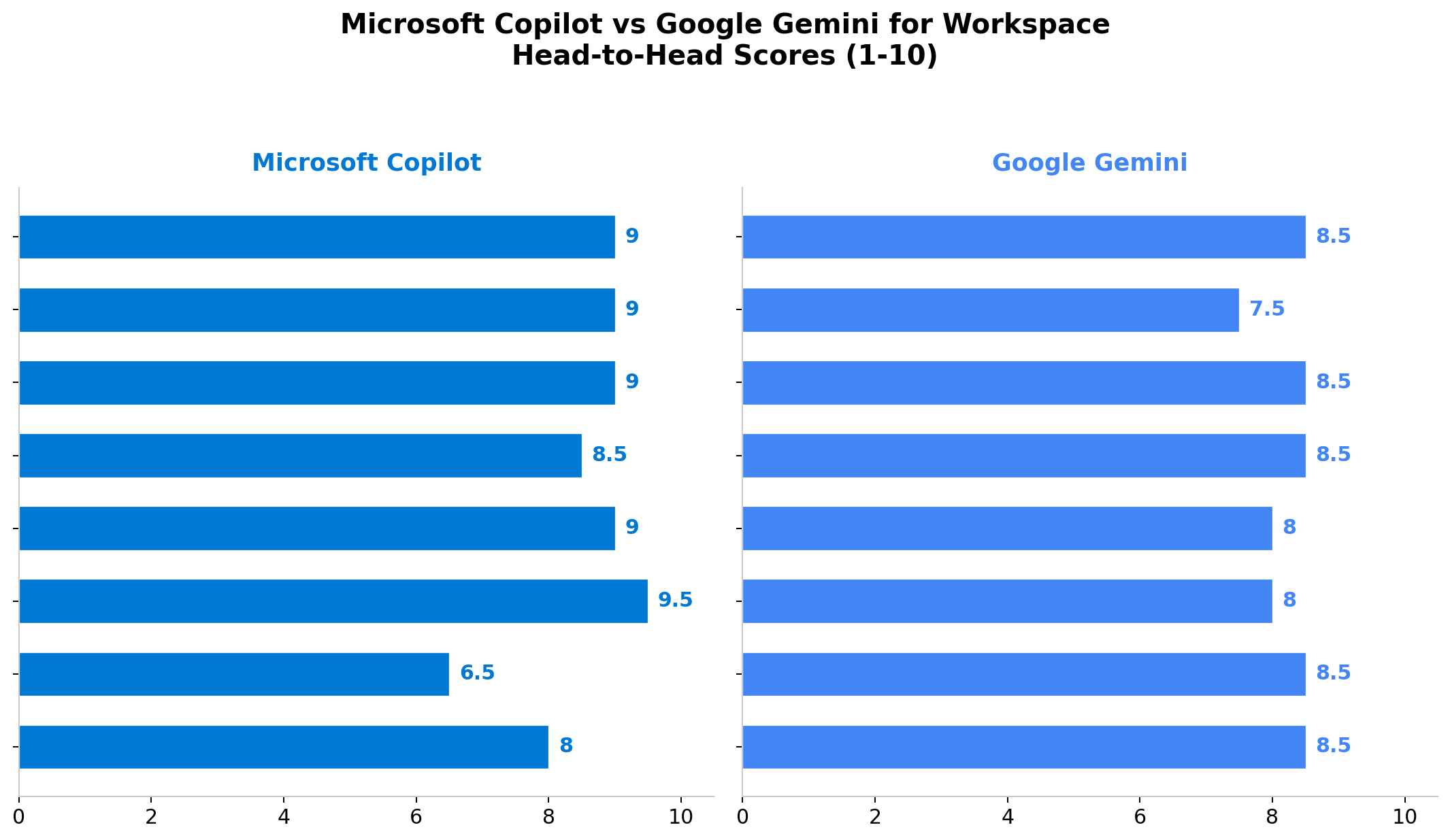
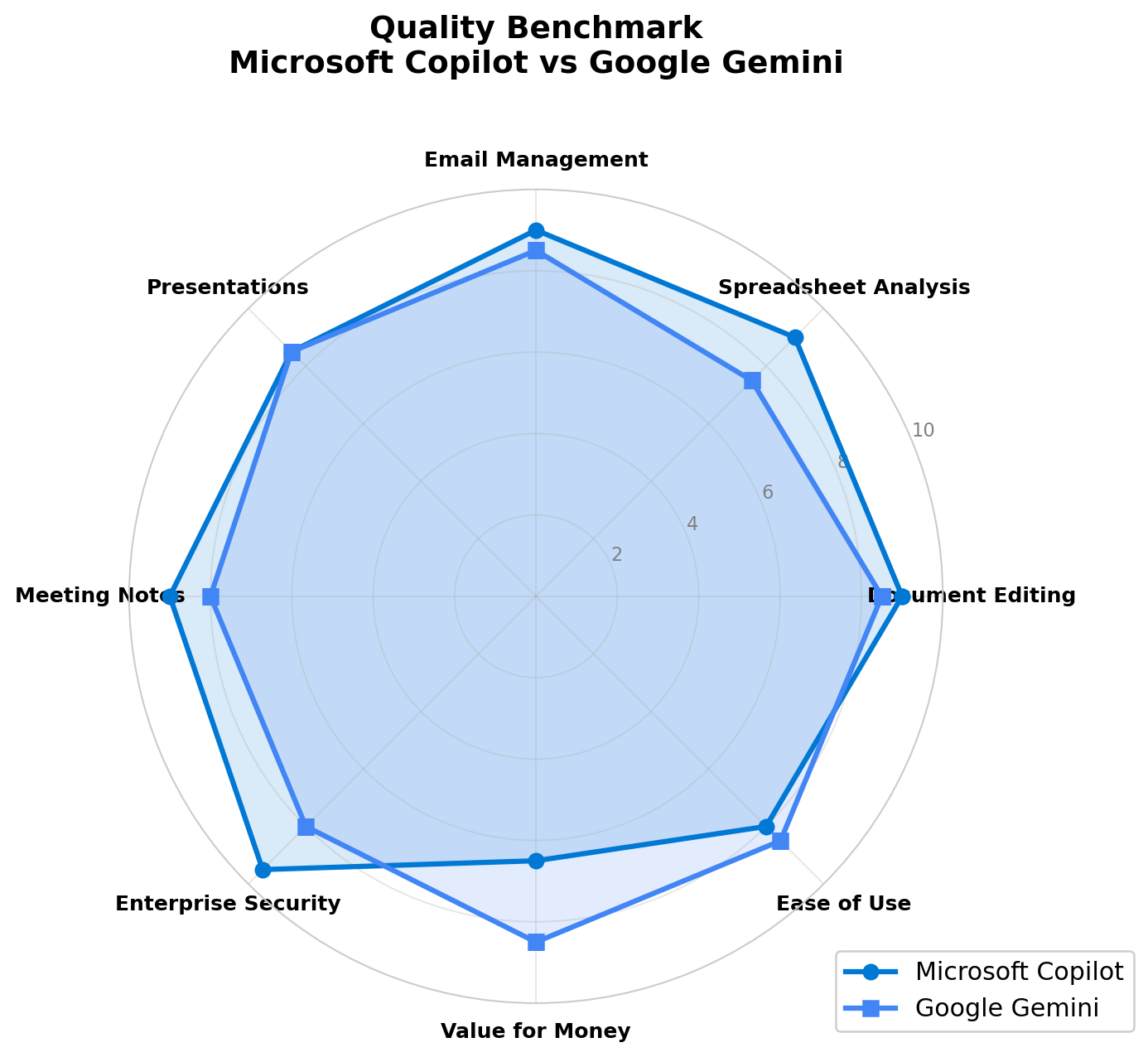
1. Document Editing (Word vs Docs) — Winner: Copilot by a nose
Both tools generate, summarize, and rewrite documents effectively. Copilot's edge comes from Microsoft Graph integration — it can reference SharePoint content, Teams discussions, and Outlook threads to create documents grounded in your organizational context. The new Track Changes integration is also uniquely transparent. Gemini in Docs has caught up with "Help me Create" and style/format matching, and its larger context window helps with very long documents. For most daily office work, the difference is small.
2. Spreadsheet Analysis (Excel vs Sheets) — Winner: Copilot
This is Copilot's biggest advantage. The ability to generate Python code for advanced analysis, integrate with Power BI, and work with complex data models makes Copilot in Excel the clear leader for data-heavy roles — finance, operations, analytics. Gemini in Sheets has improved significantly with "Fill with Gemini," but it lacks Python code generation and enterprise analytics integration. For simple formulas and data organization, they're comparable.
3. Email Management (Outlook vs Gmail) — Winner: Copilot
Copilot in Outlook offers deeper capabilities: action-based email processing (forwarding, filing, flagging based on instructions), inbox prioritization grounded in Microsoft Graph context, and tone coaching. Gmail's "Help me Write" and thread summarization are good, but Copilot understands your full organizational context — who you're meeting with, what projects are active, what deadlines are approaching — which makes its suggestions more relevant.
4. Presentations (PowerPoint vs Slides) — Winner: Gemini (slightly)
This is closer than expected. Copilot generates presentations from documents and notes, with Brand Kit integration for corporate identity. But Gemini's June 2026 update — fully native and editable presentations, automatic brand matching from existing decks, auto-context gathering — makes it slightly more fluid for everyday use. Gemini also generates better visual layouts from text descriptions. For enterprise template compliance, Copilot's Brand Kit has the edge.
5. Meeting Notes — Winner: Copilot
Copilot in Teams offers real-time summaries, catch-up for late joiners, 30-day chat history lookback, and the ability to start group chats from meeting context. Meet's transcription is good, but Copilot's integration with the broader Microsoft ecosystem (Outlook calendar, Teams channels, SharePoint docs) creates a more complete meeting-to-action workflow.
6. Enterprise Security — Winner: Copilot
Microsoft's enterprise security is more comprehensive. Copilot integrates with Purview for data loss prevention, supports FedRAMP and HIPAA compliance, and offers granular conditional access controls. Google Workspace meets SOC 2 and ISO 27001 standards, but its security controls are less fine-grained, especially for hybrid Active Directory environments. For highly regulated industries (defense, healthcare, finance), Copilot is the safer choice.
7. Value for Money — Winner: Gemini
At $14/user/month with full AI included versus $21/user/month as an add-on, Gemini delivers significantly more AI per dollar. The 1M token context window, Vids for video creation, and Workspace Studio for automation all come included. Copilot justifies its premium with deeper integration and security, but for cost-conscious SMBs, Gemini is the obvious choice.
8. Ease of Use — Winner: Gemini (slightly)
Gemini's interface feels more conversational and less cluttered. Google's natural language processing for Sheets and Docs is more forgiving — you don't need to structure prompts as precisely. Copilot is powerful but can feel overwhelming with its many entry points (sidebar, inline, Business Chat, Pages, Notebooks) and frequent UI changes.
Real-World Office Test Scenarios
Scenario 1: "Analyze Q2 sales data and create a summary report with charts"
Copilot: Upload the Excel file, ask "Analyze Q2 sales by region, identify trends, and create a summary with charts." Copilot generates Python code for analysis, creates Power BI-connected charts, and drafts a Word summary with data-grounded insights. Result: 9.5/10 — the Python + Power BI integration is unmatched for data analysis.
Gemini: Upload the Sheets file, ask the same question. Gemini analyzes the data, creates summary statistics, and generates a Docs report with observations. Charts require manual creation or simpler formula-based approaches. Result: 7/10 — good analysis, but lacks the depth of Python code generation and BI integration.
Scenario 2: "Create a 10-slide client presentation from our last 5 project documents"
Copilot: In PowerPoint, prompt Copilot to generate a deck from the 5 SharePoint documents. It creates slides with content summaries, but layout customization requires manual work. Brand Kit applies corporate identity. Result: 8/10 — solid content generation, good brand consistency.
Gemini: In Slides, reference the 5 Drive documents and generate a presentation. Gemini auto-gathers context, matches brand formatting from an existing deck, and creates fully editable native slides with speaker notes. Result: 8.5/10 — slightly more fluid editing and better visual layouts.
Scenario 3: "Summarize 200 unread emails from the past week and identify urgent action items"
Copilot: In Outlook, Copilot prioritizes inbox by importance, summarizes long threads into key decisions, and flags action items. It understands project context from Teams and SharePoint, so it knows which emails relate to active projects. Result: 9/10 — the Microsoft Graph context makes prioritization remarkably accurate.
Gemini: In Gmail, thread summarization works well for individual conversations, but bulk processing across 200 emails requires multiple queries. The Gmail side-panel AI is helpful but less integrated with project context. Result: 7/10 — good for individual threads, less effective for bulk triage.
Scenario 4: "Create a training video for new employees explaining our product features"
Copilot: Can draft a training document in Word and create a presentation in PowerPoint, but no native video generation. You'd need a separate tool. Result: 4/10 — document creation only.
Gemini: Use Google Vids to generate a script from product documentation, create visual suggestions, add a personal AI avatar, and produce a video with Veo 3.1 generation. Result: 8.5/10 — unique video capability that Copilot can't match.
Alternatives Worth Considering
| Tool | Starting Price | Standout Feature | Best For |
|---|---|---|---|
| Notion AI | $20/user/mo | All-in-one workspace with custom AI agents | Teams wanting unified docs + databases + AI |
| Zoho Zia | $1/user/mo | AI across 50+ Zoho apps, extreme cost | Budget SMBs on Zoho ecosystem |
| Amazon Q Business | $5/user/mo | Enterprise AI with AWS integration | AWS-heavy organizations |
| Apple Intelligence | Free (with Apple hardware) | On-device AI, privacy-focused | Mac/iPhone users, personal productivity |
| Jasper | $49/seat/mo | Marketing-specific AI writing | Marketing teams needing brand voice |
The Verdict
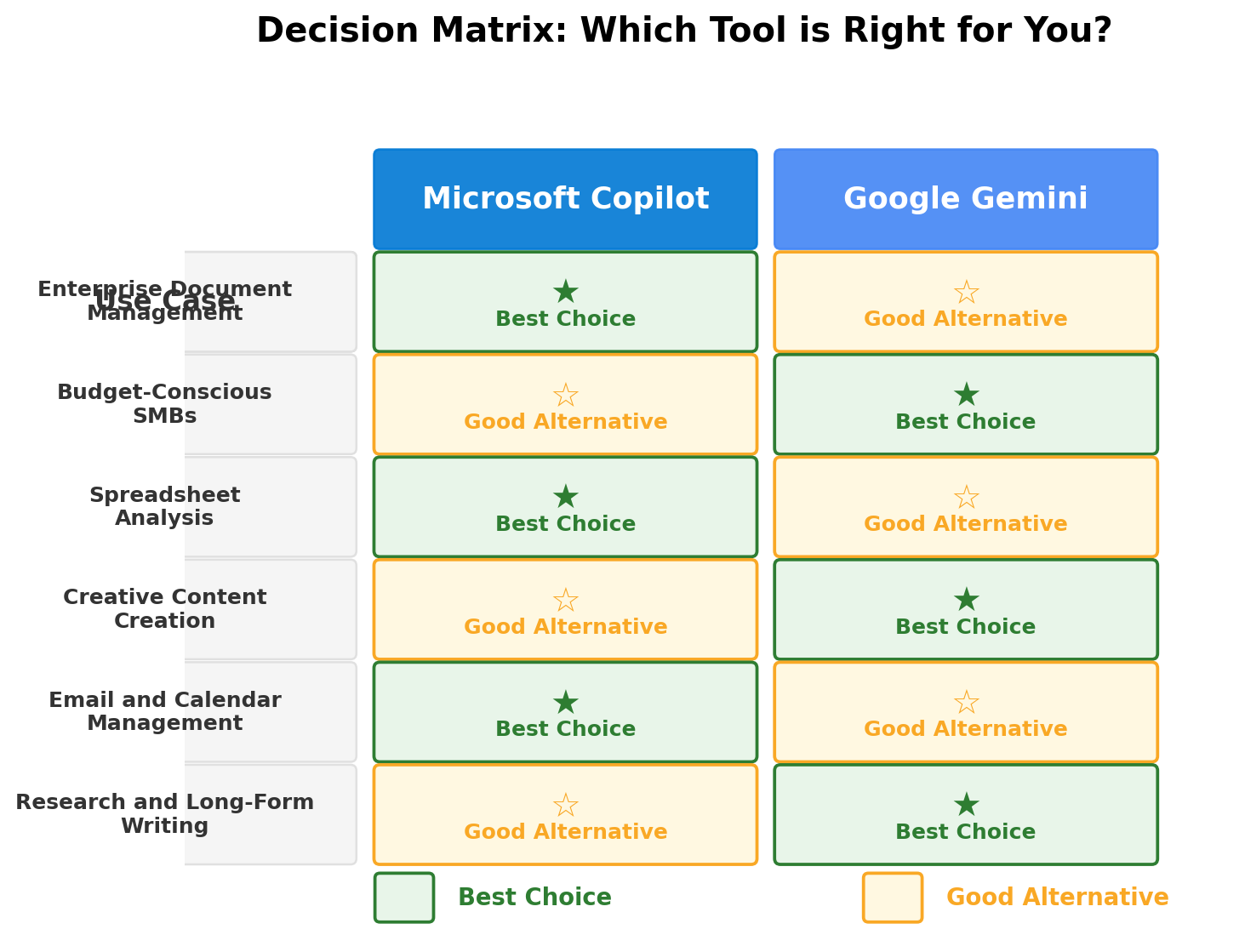
🏆 Best for Microsoft-First Organizations → Microsoft Copilot
If your company runs on Outlook, Teams, SharePoint, and Active Directory, Copilot is the natural choice. The Microsoft Graph integration creates AI that understands your organizational context in ways Google simply can't replicate. Excel with Python code generation, Copilot Studio's mature agent platform, and enterprise security with Purview make Copilot the clear enterprise leader. Expect to pay $66-$90+/user/month all-in — but for organizations that need this depth, the ROI is there.
💰 Best for Budget-Conscious SMBs → Google Gemini
At $14/user/month with full AI across all Workspace apps, Gemini delivers the best AI value per dollar in 2026. The 1M token context window, rapid feature innovation, and unique tools like Vids and Workspace Studio make it more than "good enough" — for many teams, it's genuinely excellent. If you're already on Google Workspace (or choosing between ecosystems), Gemini gives you enterprise AI at SMB pricing.
📊 Best for Data Analysis → Microsoft Copilot
Copilot in Excel with Python code generation, Power BI integration, and advanced formula capabilities has no equal. If your team's work involves financial modeling, operations analytics, or data science workflows, Copilot pays for itself in productivity gains.
🎬 Best for Creative Content → Google Gemini
Google Vids for AI video creation, Veo 3.1 for video generation, and Gemini's strong multimodal capabilities (image generation in Docs and Slides) make it the better choice for marketing, creative, and communications teams. No other office suite offers native AI video creation.
🔄 Bottom Line
Don't switch ecosystems for AI alone. Both Copilot and Gemini are excellent in 2026. If you're on Microsoft 365, Copilot maximizes your existing investment. If you're on Google Workspace, Gemini delivers more AI per dollar. The cost of migrating your entire organization's documents, email, workflows, and muscle memory far exceeds the $7/user/month price difference. Choose the AI that matches the tools you already use.
Overall Winner: Microsoft Copilot for enterprises — deeper integration, stronger security, unmatched Excel AI. Google Gemini for everyone else — 34% cheaper, rapid innovation, unique creative tools.
Frequently Asked Questions
Is Microsoft Copilot included in Microsoft 365?
No. Copilot is an add-on for business plans: Copilot Business at $21/user/month or Copilot Enterprise at $30/user/month. For consumers, Microsoft 365 Premium at $19.99/month includes Copilot. A free Copilot Chat tier exists with limited functionality.
Is Google Gemini free with Google Workspace?
Gemini is bundled into all Google Workspace plans since March 2025. Business Standard at $14/user/month includes full Gemini across all apps. Business Starter at $7/user/month gets Gmail-side-panel Gemini only. There's no opt-out — all plans include Gemini, with prices raised 16-22% to cover it.
Which is better for Excel: Copilot or Gemini?
Microsoft Copilot is significantly stronger for spreadsheet analysis. It generates Python code for advanced analysis, integrates with Power BI, and handles complex data models. Gemini in Sheets has improved with "Fill with Gemini," but it lacks Python code generation and enterprise analytics integration.
Can Copilot use Claude and other non-Microsoft models?
Yes. As of August 2026, Copilot supports multi-model selection including GPT-5.6, Claude Opus 5, and Claude Sonnet 5. You can choose different models for different tasks. Google Gemini only supports Google's own models.
Is Google Gemini better for presentations than Copilot?
They're close. Copilot generates presentations from documents with Brand Kit integration. Gemini (updated June 2026) generates fully editable native slides with automatic brand matching and cross-document context gathering. Copilot has the edge for enterprise template compliance; Gemini is more fluid for everyday use.
Which has better enterprise security: Copilot or Gemini?
Microsoft Copilot has the edge. It integrates with Purview for DLP, supports FedRAMP/HIPAA, and offers granular conditional access. Google Workspace meets SOC 2 and ISO 27001, but Microsoft's controls are more comprehensive, especially for hybrid environments. Both are enterprise-grade — the choice depends on your existing infrastructure.