⏱ TL;DR
Canva is the complete package and the best choice for most people in 2026 — the largest template library (1.6M+), the deepest AI suite (Canva AI 2.0 + Magic Studio), and the only one with a real template-sharing economy. Microsoft Designer is the fastest free option for one-off AI images if you live in the Microsoft 365 ecosystem, but it is being absorbed into Copilot and caps free users at ~15 watermarked generations a month. Adobe Express produces the best AI images of the three (Firefly Image 5 plus 30 partner models) with the strongest commercial-safety story, at $9.99/month.
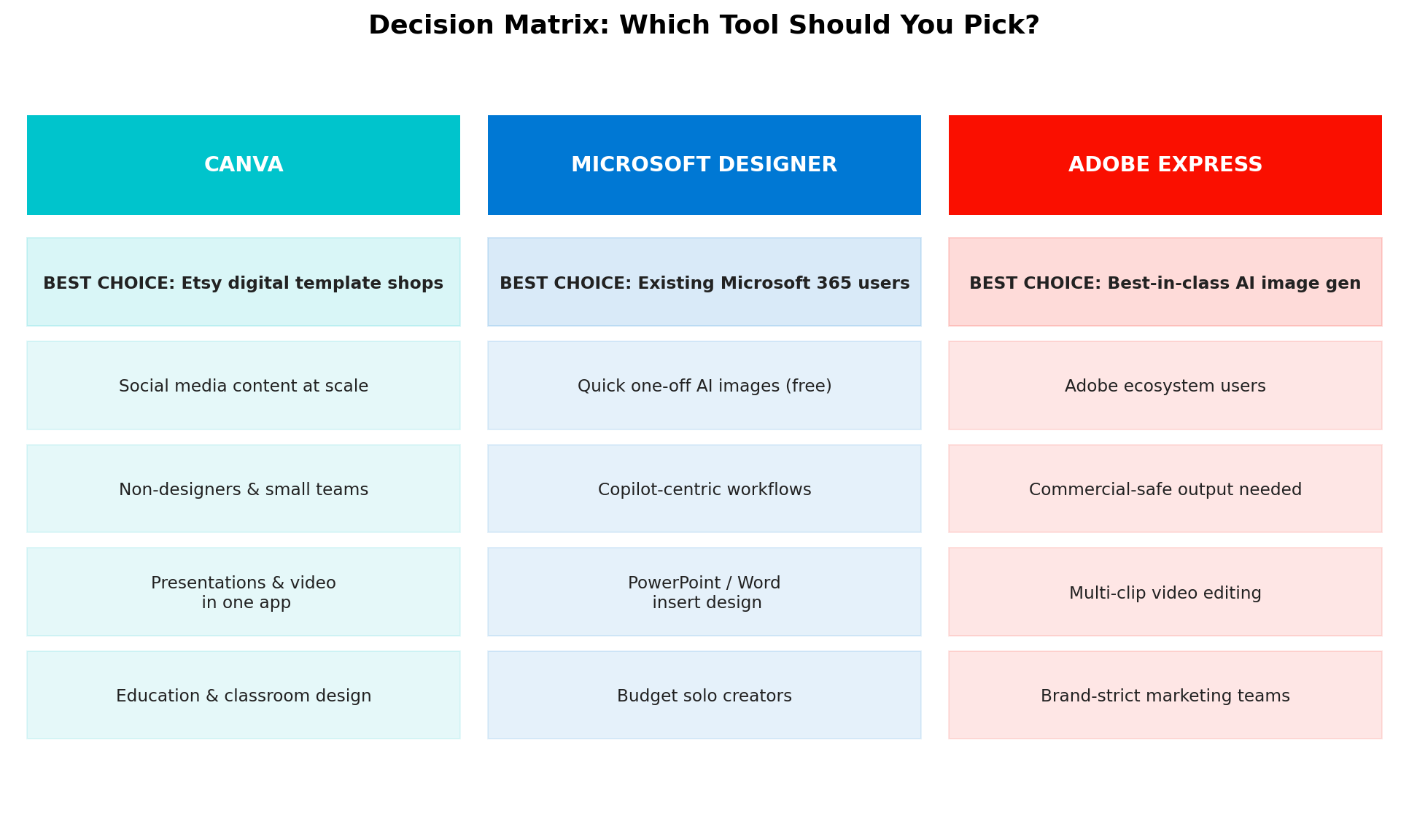
Pick Canva if you sell digital products, manage social media, or design for a team. Pick Microsoft Designer if you want free AI images and already pay for Microsoft 365. Pick Adobe Express if AI image quality, video editing, or commercially safe output matter most.
Why This Comparison Matters More Than Ever
AI design tools stopped being a convenience and became a business infrastructure layer somewhere in the last two years. Consider the real economics we found while researching this article: a single $5 travel-checklist Canva template on Etsy sold 25,000+ copies — over $125,000 in revenue from a digital product made in a browser tab. Instagram Canva template packs at $7.99 per 30-template bundle routinely rack up 2,000+ reviews. A knitting-pattern seller working at $6–9 per order moves roughly 10,000 orders a month. Kindle publishers use the same tools to design KDP book covers for titles that earn $2–4 profit each at 70% royalty.
The tool you pick is not a matter of taste — it determines what you can sell, how fast you can produce, and whether your buyers can actually use what you make. That is the lens for this comparison: not "which app has the nicest gradients," but which one turns design hours into revenue most efficiently, and where each one genuinely wins.
At a Glance
| Feature | Canva | Microsoft Designer | Adobe Express |
|---|---|---|---|
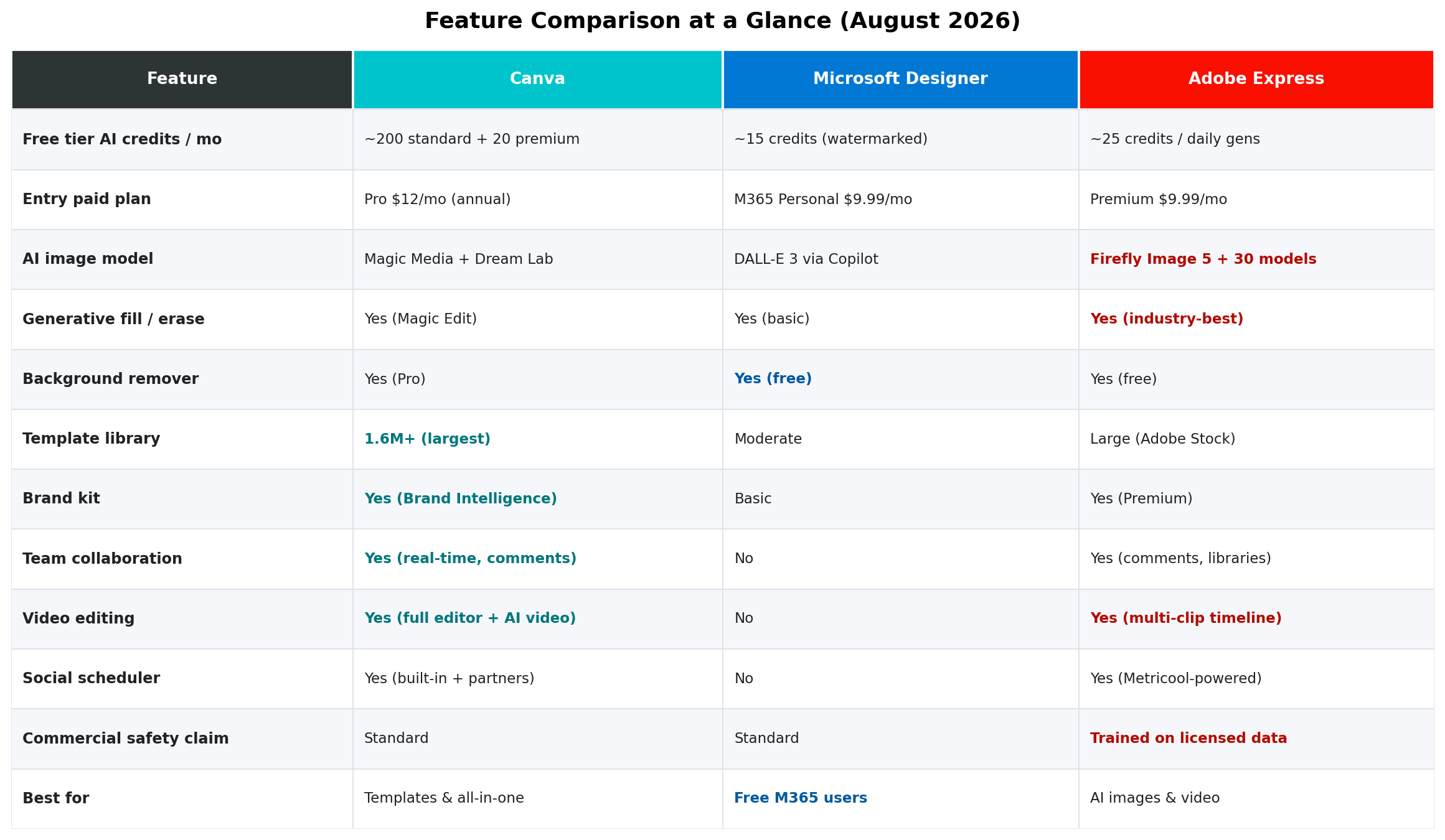
| Best for | All-in-one design & digital products | Free AI images in the M365 ecosystem | Best-in-class AI image generation |
| Free tier | 1.6M+ templates, ~200 standard + 20 premium AI credits/mo | ~15 credits/mo, watermarked, 1 image/prompt | ~25 credits/mo (daily free generations) |
| Entry paid plan | Pro $18/mo or $144/yr ($12/mo) | Via M365 Personal $9.99/mo | Premium $9.99/mo |
| AI image engine | Magic Media + Dream Lab + Canva AI 2.0 | DALL-E 3 via Copilot | Firefly Image 5 + 30 partner models |
| Templates | 1.6M+ (largest anywhere) | Moderate library | Large (Adobe Stock powered) |
| Team collaboration | Real-time, comments, approvals | None | Comments, shared libraries |
| Video editing | Full editor + AI video | None | Multi-clip timeline |
| Verdict score | 9.0/10 — Winner | 7.0/10 | 8.4/10 |
Deep Dive: Canva
Canva enters this comparison from a position of overwhelming scale: roughly 265 million monthly active users, 31 million paid subscribers, and $4B in annual recurring revenue — profitable for eight straight years, valued around $42B, with an IPO widely expected in the second half of 2026. That scale matters to you in one concrete way: the ecosystem. Canva is where the template economy actually lives.
What's new in 2026
The headline release is Canva AI 2.0 (announced at Canva Create, April 2026), built on what Canva calls the "Canva Design Model" — claimed to be the first foundation model purpose-built for design structure. Unlike a typical image generator, it produces fully layered, editable designs from a single prompt: a flyer where every text block, shape, and photo is a separate object you can restyle. It ships with four core capabilities: conversational design (iterate by chatting), agentic orchestration (AI coordinates multi-step campaigns across formats), layered object intelligence, and a memory library that persists your brand and preferences.
Around it, Canva added a wave of features through 2026: Image-to-Video (3-second animations from stills, February), Style Match (auto-generate on-brand graphics from a reference), Canva Code 2.0 (interactive sites and forms), Sheets AI, connectors to Slack, Gmail, Google Drive, Notion, and HubSpot, and Canva Grow 2.0 (June) — a marketing automation layer that generates ads from a prompt plus a URL and bulk-publishes to Meta, TikTok, and LinkedIn. AI features have been used 27 billion+ times, tripling year over year.
Pricing (August 2026)
- Free — $0: 1.6M+ templates, 5GB storage, ~200 standard + 20 premium AI credits/month. Genuinely usable; this is the tier most Etsy sellers start on.
- Pro — $18/month or $144/year ($12/month): 1 user, 100GB, 2,000 standard + 200 premium + 20 ultra AI credits, background remover, Brand Kit, magic resize.
- Business — $25/user/month or $250/user/year: 4,000 standard + 400 premium + 40 ultra credits per seat, brand controls, approvals. (The legacy flat-rate Teams plan is discontinued for new signups — billing is now per-seat.)
- AI Pass add-on — $100/person/month for a ~40x AI allowance bump. Only relevant for heavy production shops; it unlocks higher limits, not new tools.
Strengths
- The template economy. 1.6M+ templates and shareable template links — the mechanism behind the $125K travel-checklist Etsy product. Buyers get an editable link instead of a static file, which slashes refunds and support.
- One app, every format. Social posts, presentations, videos, websites, print — the same skills and brand assets transfer across all of them.
- Real collaboration. Real-time co-editing, comments, and brand approvals that small teams actually use daily.
- Momentum. Five acquisitions in Q1 2026 alone (Affinity ecosystem, Cavalry, Ortto, and more); features ship monthly.
Weaknesses
- AI image quality trails Adobe. Magic Media and Dream Lab are solid, but Firefly Image 5 (and Adobe's 30 partner models) produce noticeably better photorealistic output.
- Credit anxiety. Premium AI credits run out fast, and failed generations still consume credits — a recurring user complaint.
- Price creep. Pro has climbed from $12.99 to $18/month over three years; the $100/month AI Pass signals where pricing is heading.
Deep Dive: Microsoft Designer
Microsoft Designer is the most changed product in this comparison — not because of new features, but because of a strategic retreat. In 2026, Designer is best understood as "Copilot's design engine" rather than a standalone Canva competitor. The Teams integration was retired in February 2026, Bing Image Creator was folded into Copilot, and Copilot Pro itself was replaced by the new Microsoft 365 Premium consumer plan. The standalone app (web, Windows, mobile — last updated February 2026) survives, free, with tight limits.
What it does well
Describe a design ("Instagram post for a summer sale") and Designer generates complete layouts with suggested fonts, colors, and placement — not just a single image. AI image generation runs on DALL-E 3 via Copilot, and quality per image remains high. Photo tools cover background removal, object erasure, blur, and the newer "Restyle Image" in Photos. Everything plugs directly into the Microsoft 365 world: OneDrive sync, one-click insertion into PowerPoint, Word, and Outlook. And the Copilot chat layer understands design language — "make this more formal," "resize for LinkedIn" just works.
Pricing (August 2026)
- Free — ~15 AI credits/month, watermarked output, one image per prompt (down from four in earlier versions).
- Microsoft 365 Basic — $1.99/month: 60 credits/month.
- Microsoft 365 Personal — $9.99/month: 60 credits/month, watermarks removed.
- Microsoft 365 Premium — $19.99/month or $199.99/year: "extensive" AI usage without the fixed credit cap, priority models, 6TB storage. This replaced Copilot Pro.
Note the pricing structure: you are not buying "Microsoft Designer." You are buying Microsoft 365, and Designer's credit pool rides along — covering image generation in Designer, Paint, Photos, and Copilot.
Strengths
- Cheapest useful entry. $1.99/month (M365 Basic) gets you 60 unwatermarked-capable credits — hard to beat for occasional use.
- Deep M365 integration. If your workday lives in Outlook, PowerPoint, and OneDrive, nothing else inserts this smoothly.
- Simple. The fastest path from idea to one decent image, with almost no learning curve.
Weaknesses
- Shrinking free tier. From unlimited generations (pre-2025) to 15 watermarked credits with a single image per prompt — the direction of travel is clear.
- No collaboration, weak brand tools. No real-time co-editing, no approvals, a basic brand kit. Not a team tool.
- Strategic uncertainty. Features keep migrating into Copilot. Betting a product business on Designer's standalone roadmap is a risk.
- No video, no scheduler, modest template library. For a digital-product seller, there is simply less to work with.
Deep Dive: Adobe Express
Adobe Express is the quiet overachiever of this comparison. It does not get Canva's press coverage, but in 2026 it became the best AI image engine in the browser-design category. Firefly Image 5 — announced at MAX October 2025, generally available March 19, 2026 — leads on photorealism and text rendering, and Adobe layered something no competitor matches: 30+ partner models in one hub, including Google's Nano Banana 2, Veo 3.1, Runway Gen-4.5, Kling 2.5 Turbo, FLUX.2, and GPT Image. One subscription, every frontier model.
What's new in 2026
Beyond Image 5, Express picked up a beta AI Assistant for prompt-based editing (April), semantic search across Firefly (June), multi-clip timeline video editing with camera-motion control from reference video, SVG import and editing, an ad-focused add-on ecosystem (TikTok, Amazon, LinkedIn, Google), and a Metricool-powered content scheduler with calendar analytics. Custom Models let brands fine-tune Firefly on their own assets. The 2026 Firefly plan lineup runs Standard ($9.99, 2,000 credits) through Premium ($199.99, 50,000 credits + unlimited Firefly Video) — and on paid tiers, standard text-to-image and Generative Fill are effectively unlimited; credits are consumed by premium features like video and partner models.
Pricing (August 2026)
- Free — $0: daily free generations (~25 credits/month equivalent), 5GB storage, 1M+ Adobe Stock free assets, watermarked premium templates.
- Premium — $9.99/month: 250 generative credits, brand kits, scheduler, premium templates, one-click resize. (Adobe's US store shows monthly billing only as of July 30, 2026; one third-party source still lists $99.99/year.)
- Firefly Pro — $19.99/month: Express Premium + Photoshop web/mobile + 4,000 credits/month. The best value in Adobe's stack for heavy AI users.
- Teams — $4.99/license/month intro (renews at $7.99), 2-seat minimum.
- Express Premium is also bundled with Creative Cloud All Apps.
Strengths
- AI image quality. Firefly Image 5 + partner models beat both Canva and Designer on photorealism, text-in-image, and style range.
- Commercial safety. Firefly is trained on licensed Adobe Stock content with content credentials attached — the defensible choice for merchandise, client work, and anything where IP risk keeps you up at night.
- Adobe ecosystem ladder. Your skills, assets, and libraries move up into Photoshop and Illustrator without friction.
- Video capability neither Canva (at this polish) nor Designer (at all) matches for clip-based editing.
Weaknesses
- Template library trails Canva in both count and community freshness — fewer starting points means more blank-page work.
- No template-link economy. You cannot sell "an editable Adobe Express template" the way Etsy sellers sell Canva links; buyers export files instead.
- Slightly steeper learning curve, and the plan/credit matrix (Express vs Firefly plans vs CC) is genuinely confusing.
Pricing Compared
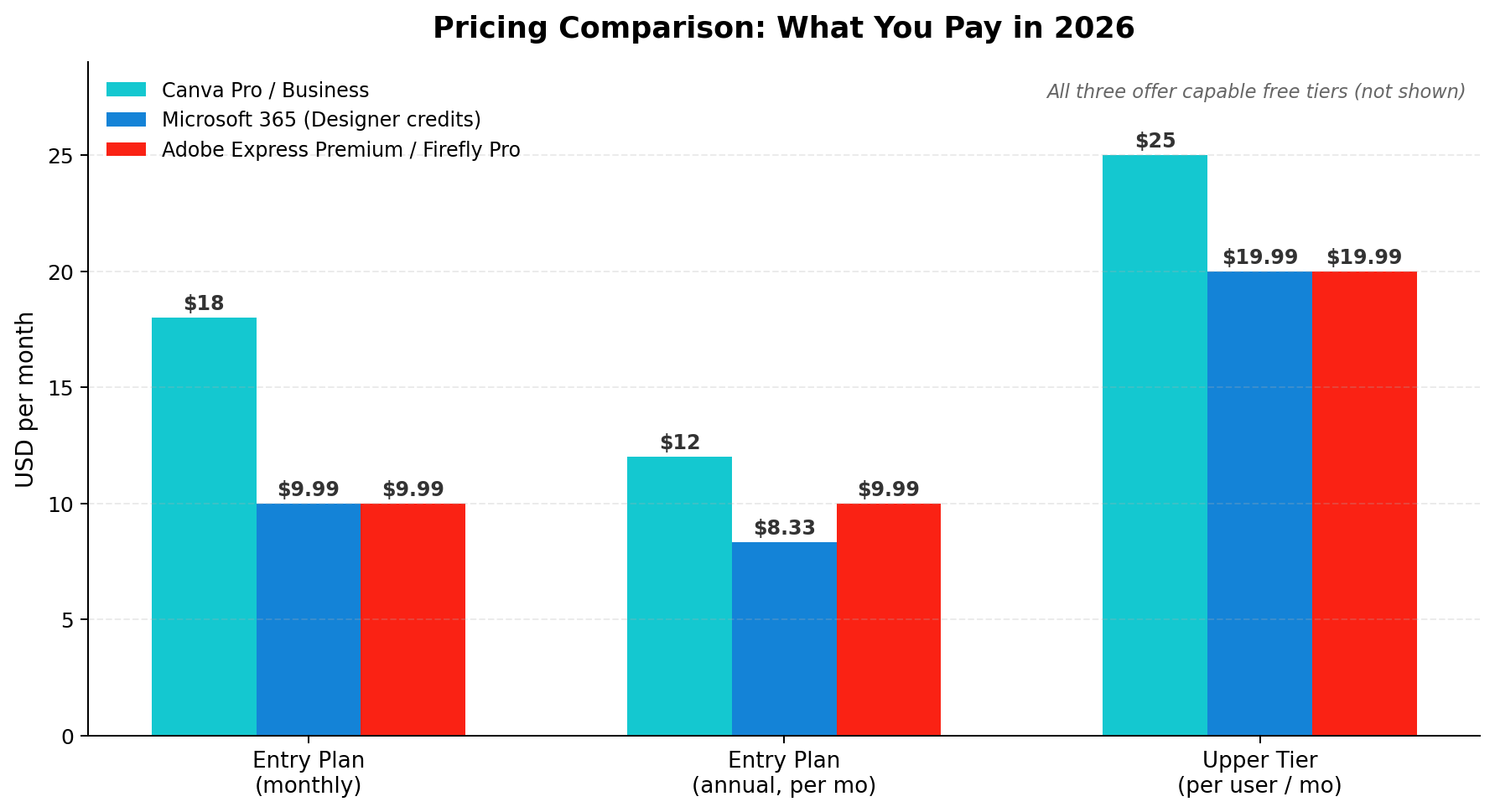
Three different pricing philosophies are on display. Canva prices the design tool itself ($18 monthly, $12 on annual commitment). Microsoft prices an office suite and gives design credits away inside it ($9.99 Personal, $19.99 Premium). Adobe prices the AI engine ($9.99 Express, $19.99 Firefly Pro with Photoshop included). For a solo digital-product seller, the meaningful comparison is Canva Pro annual ($144/year) vs Adobe Express Premium ($120/year) vs M365 Basic ($24/year) — and what you get at each rung differs more than the price tags suggest.
Head-to-Head: 8 Dimensions, 8 Winners
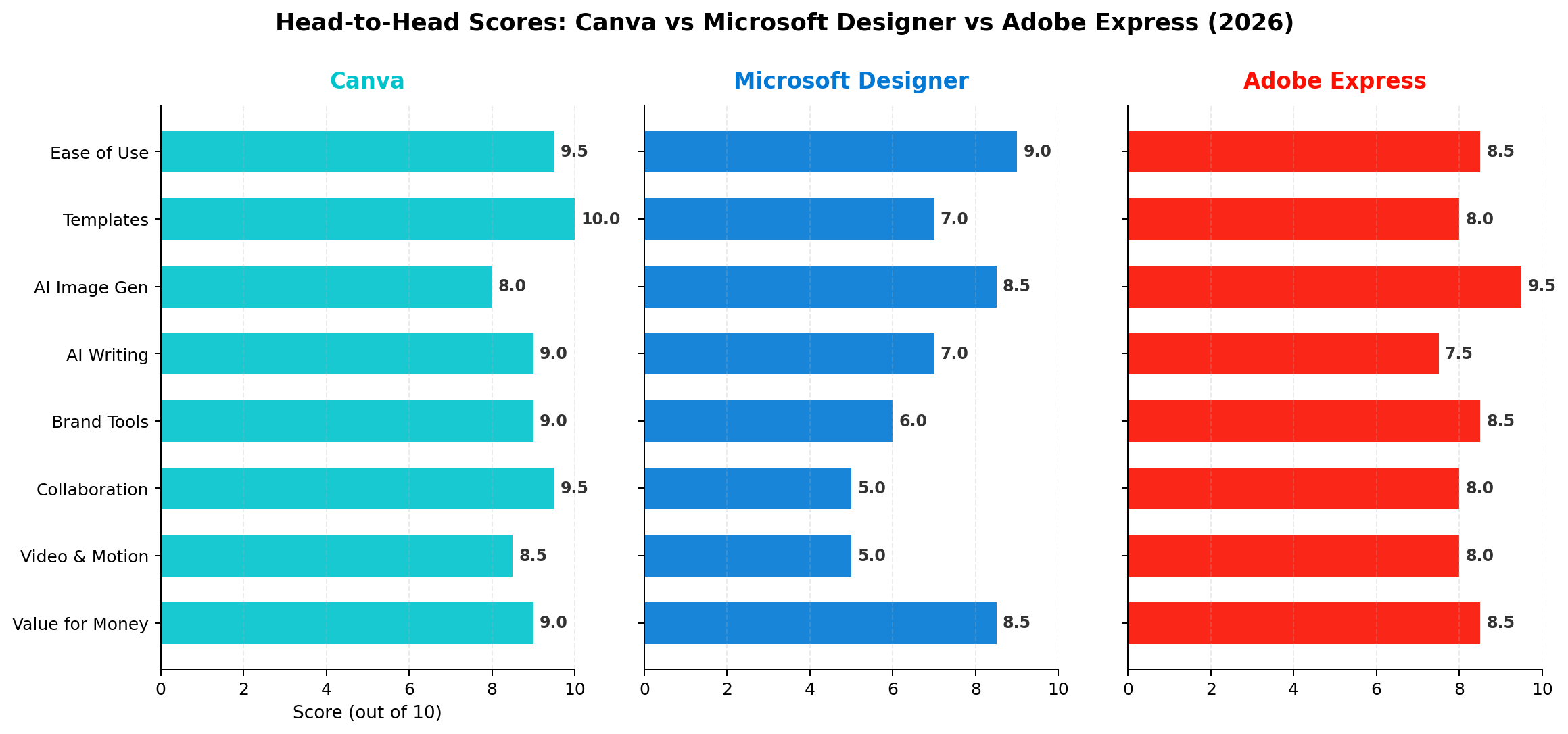
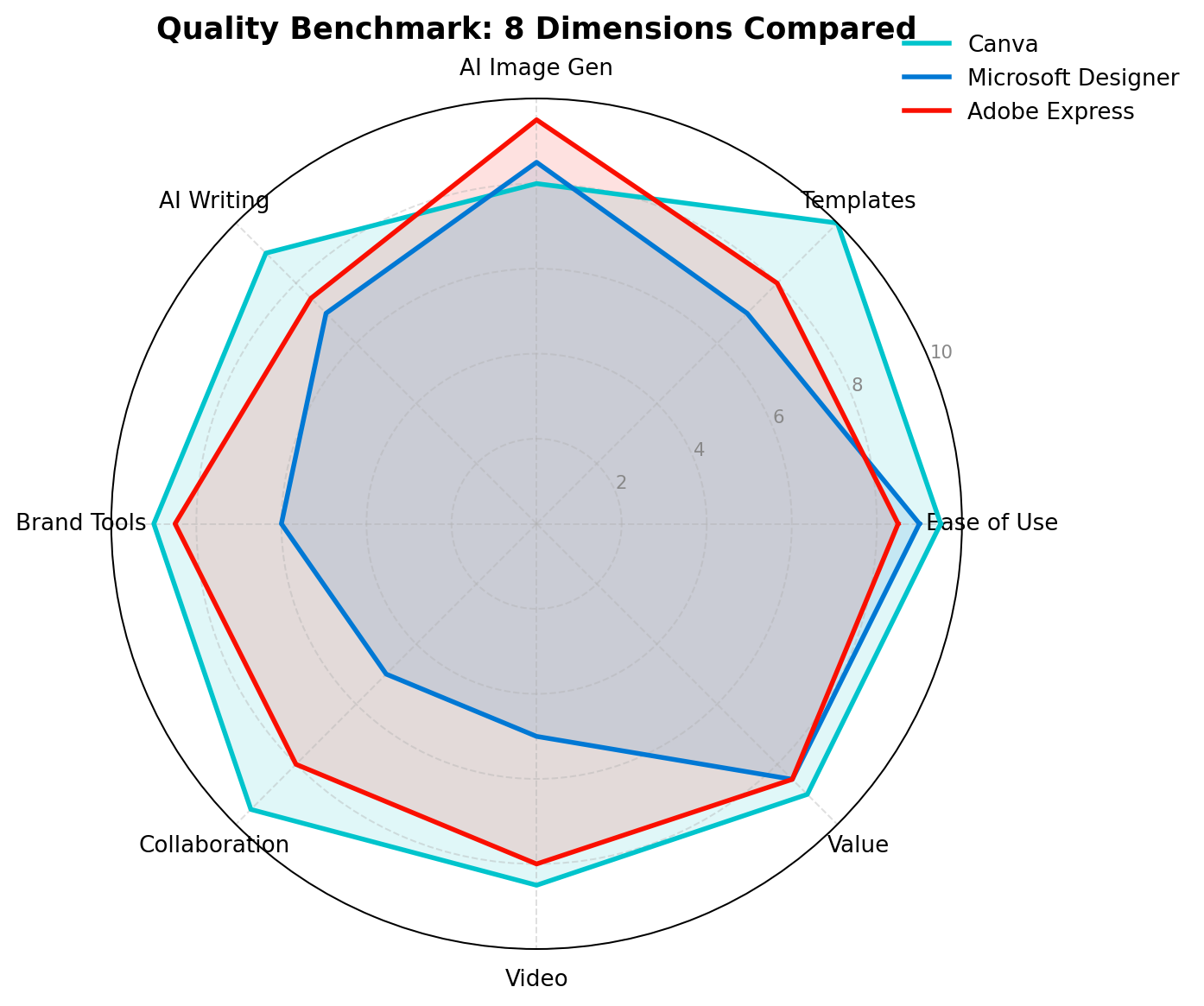
1. Ease of Use — Winner: Canva (9.5 vs 9.0 vs 8.5)
All three are beginner-friendly, but Canva's onboarding has been polished by a decade and 265M users. Microsoft Designer is arguably the simplest for one-shot tasks; Adobe Express asks slightly more of you upfront. Canva wins on the journey: templates, editing, publishing, and scheduling live in one coherent flow.
2. Templates & Assets — Winner: Canva (10.0 vs 7.0 vs 8.0)
1.6M+ templates against Adobe's large-but-smaller Stock-backed library and Microsoft's modest collection. For digital-product sellers this is the whole ballgame: Canva templates are not just starting points, they are sellable products with their own marketplace gravity.
3. AI Image Generation — Winner: Adobe Express (9.5 vs 8.5 vs 8.0)
Firefly Image 5 with 30 partner models is simply a different class of image engine than Magic Media/Dream Lab or single-image DALL-E 3. If the image is the product — pet portraits, wall art, merch mockups — Adobe Express is the tool.
4. AI Writing — Winner: Canva (9.0 vs 7.0 vs 7.5)
Magic Write plus Canva AI 2.0's conversational design and agentic workflows handle copy inside the design canvas naturally. Adobe's caption writer is competent; Microsoft leans on Copilot chat. Canva's writing-to-design pipeline is the most integrated.
5. Brand Tools — Winner: Canva (9.0 vs 6.0 vs 8.5)
Canva's Brand Intelligence — including retroactive re-branding of old designs — edges Adobe's solid brand kits. Microsoft's basic kit is barely a feature by comparison. Agencies and multi-brand sellers should shortlist Canva and Adobe Express only.
6. Collaboration — Winner: Canva (9.5 vs 5.0 vs 8.0)
Real-time co-editing, comments, and approval flows versus Adobe's comments-and-libraries versus Microsoft's nothing. If more than one person touches your designs, this dimension alone can decide the purchase.
7. Video & Motion — Winner: Canva (8.5 vs 5.0 vs 8.0)
Canva's full video editor plus Image-to-Video and AI video generation covers social-motion needs end to end. Adobe Express's multi-clip timeline is arguably more capable for actual editing; Designer effectively offers nothing. We gave Canva the edge for workflow integration, with Adobe close behind.
8. Value for Money — Winner: Canva (9.0 vs 8.5 vs 8.5)
A genuinely close call. Microsoft's $1.99 Basic is unbeatable per dollar for light users; Adobe's $9.99 tier packs enormous AI value. But Canva's annual Pro at $12/month unlocks the broadest capability set — and for sellers, it's the only tier that directly feeds a revenue ecosystem.
Real-World Money-Making Scenarios
We test design tools the way people actually use them to earn. These three workflows come from documented creator businesses, with the real numbers attached.
Scenario 1: Etsy Digital Template Shop (Canva runs away with it)
The business: Sell printable and editable templates on Etsy — travel checklists, wedding planners, social media bundles. Real economics from documented shops: a $5 travel checklist that sold 25,000+ units ($125K+), Instagram template packs at $7.99 per 30-bundle with 2,000+ reviews, and knitting-pattern shops doing ~$75K/month at $6–9 per order. Costs are trivial: $0.20 Etsy listing fee + 6.5% transaction + payment processing.
The workflow: Use ChatGPT or Claude to brainstorm 15 "high-demand, low-competition" digital product niches, validate by scanning Etsy review counts, then design in Canva — starting from a template, customizing heavily (niche research matters more than design skill here). Deliver as a shareable Canva template link inside a PDF instruction file, so buyers can personalize names and colors themselves. Optimize the listing title for Etsy search, then drive traffic with Pinterest and Instagram.
Tool verdict: This workflow is functionally Canva-only. The template-link delivery mechanism, 1.6M+ starting templates, and free tier that "is enough" for production are why. Typical sellers earn $150–1,000/month; dedicated ones reach $2,000–5,000/month.
Scenario 2: Kindle KDP Covers (Adobe Express pulls ahead)
The business: Self-publishing low-content and niche books on Amazon KDP. Price at $3.99–$6.99, earn 70% royalty minus delivery fees — about $2–4 profit per copy. The cover is the conversion lever; the core design rule is brutally practical: the title must stay legible when the cover is thumbnail-sized on a phone.
The workflow: Research keywords with a tool like Publisher Rocket ($97 one-time), draft interior content with ChatGPT or Claude, then design the cover. This is where Adobe Express shines: Firefly Image 5 generates cleaner illustrative backgrounds and better text-adjacent art than either rival, Generative Fill patches composition gaps, and — critically for commercial publishing — Firefly output carries the strongest IP-safety posture of the three. Export print-ready PDFs at the exact KDP trim sizes with one-click resize handling multiple formats.
Tool verdict: Adobe Express for the cover art itself, Canva as a fast alternative with its dedicated KDP-ready templates. Microsoft Designer's watermarking and 15-credit free tier make it a non-starter for this volume.
Scenario 3: Client Social Media Packages (Canva + hybrid)
The business: Monthly retainer content for small businesses — 20–30 branded posts plus stories, delivered on a schedule. Typical pricing runs $300–$1,500/month per client depending on volume and niche.
The workflow: Set up the client's Brand Kit once (logo, fonts, palette), generate the month's copy with Magic Write, batch-produce posts from on-brand templates, then use Canva's scheduler or Canva Grow 2.0 to bulk-publish to Meta, TikTok, and LinkedIn. Adobe Express competes well here with its Metricool-powered scheduler and stronger AI imagery — a sensible hybrid is Express for hero images, Canva for assembly and scheduling.
Tool verdict: Canva's Business plan ($25/user/month) for the team workflow; Adobe Express as the image engine inside it. Microsoft Designer has no scheduling, no collaboration, and no seat management — it cannot serve this scenario.
Alternatives Worth Considering
| Tool | Starting Price | Standout Feature |
|---|---|---|
| Figma | Free; $16/editor/mo | Professional UI/UX design with real-time multiplayer — the serious-designer path |
| Kittl | Free; $10/mo | Print-on-demand and merchandise design with vintage vector tools Etsy sellers love |
| VistaCreate (ex-Crello) | Free; $10/mo | Canva-style editor with 70M+ stock assets, strong for small-business print |
| Looka | $20 one-time logo; $96/mo brand kit | AI logo and full brand-identity generation for new businesses |
| Pixlr | Free; $1.49/mo | Photoshop-style browser photo editing at pocket-change pricing |
The Verdict
🏆 Our Recommendations
Best for digital product sellers & content teams → Canva. The template-link economy, 1.6M+ template head start, and end-to-end workflow (design → schedule → publish) are unmatched. Annual Pro at $12/month is the single best tool investment an Etsy or KDP seller can make.
Best free/budget option in the Microsoft ecosystem → Microsoft Designer. If you already pay for Microsoft 365, its credits are effectively free, and DALL-E 3 output remains high quality per image. Just respect its limits: no collaboration, shrinking free tier, and a roadmap that points inward toward Copilot.
Best for AI image quality & commercial safety → Adobe Express. Firefly Image 5 plus 30 partner models is the strongest image stack in this category, its video timeline is real, and licensed-data training makes it the defensible choice for merchandise and client work. Firefly Pro at $19.99 (with Photoshop) is the power-user bargain.
Overall Value → Canva (9.0/10). It wins six of eight dimensions outright, and the two it loses (AI image gen, budget entry) are covered by pairing it with Adobe Express for hero images when needed.
The hybrid playbook used by real sellers: Canva Pro annual as the production hub ($144/year) + Adobe Express free tier for AI hero images + Microsoft Designer's free credits as overflow. Total cost: under $150/year for a tool stack that powers five-figure digital-product businesses.
Frequently Asked Questions
Is Canva still worth paying for in 2026 after the price increase?
Yes, for most creators. Canva Pro now costs $18/month (or $12/month billed annually at $144/year) and includes 2,000 standard plus 200 premium AI credits, 100GB storage, and the full Magic Studio and Canva AI 2.0 feature set. If you sell digital products, one template sale per month at typical Etsy prices ($5–$8) covers the annual plan. The free tier remains genuinely usable with roughly 200 standard AI generations per month.
Is Microsoft Designer free to use?
Microsoft Designer has a free tier with roughly 15 AI credits per month, but generated images are watermarked and limited to one image per prompt. Removing watermarks and getting 60 credits per month requires Microsoft 365 Personal at $9.99/month. Heavy users need the new Microsoft 365 Premium plan at $19.99/month. Microsoft has also been folding Designer into Copilot, retiring its Teams integration in February 2026.
Which tool is best for selling digital products on Etsy?
Canva, by a wide margin. Successful Etsy sellers use Canva's 1.6M+ templates and shareable template links (buyers open and customize the template themselves), which dramatically reduces refund requests. Real examples include a $5 travel checklist template that sold over 25,000 copies ($125,000+) and Instagram template packs at $7.99. Neither Microsoft Designer nor Adobe Express offers an equivalent template-sharing ecosystem.
Is Adobe Express included with Creative Cloud?
Yes. Adobe Express Premium is bundled with Creative Cloud All Apps plans, and Firefly Pro at $19.99/month includes both Adobe Express Premium and Photoshop web/mobile access with 4,000 generative credits. Standalone Adobe Express Premium costs $9.99/month with 250 generative credits.
Can I use AI-generated images from these tools commercially?
All three tools allow commercial use of output on paid plans, but Adobe Express has the strongest legal position: Firefly models are trained on licensed Adobe Stock content and Adobe offers indemnification for enterprise customers. Canva and Microsoft allow commercial use but rely on third-party models trained on broader data. If you sell products where IP risk matters (merchandise, stock-like assets, client work), Adobe Express is the safest choice.
Which of the three is best for complete beginners?
Microsoft Designer is the simplest, but its ceiling is low. Canva is the best learning path: it is nearly as easy to start, has the largest template library (1.6M+) to learn from, and scales all the way to team workflows. Adobe Express has a slightly steeper learning curve but rewards you with the best AI image generation via Firefly Image 5.
What happened to Microsoft Designer in 2026?
Microsoft Designer still exists as a web, Windows, and mobile app, but it is being repositioned as the design engine inside the Copilot ecosystem rather than a standalone Canva competitor. Its Microsoft Teams integration was retired in February 2026, Bing Image Creator was folded into Copilot, and Copilot Pro was replaced by Microsoft 365 Premium at $19.99/month. The standalone app remains free with tight limits (about 15 credits/month, watermarked).