⏱ TL;DR
Midjourney V8.2 delivers the best out-of-the-box image quality and artistic aesthetics — nothing matches its cinematic photorealism and style consistency. Starting at $10/month with no API and no self-hosting. Flux 2 Pro offers the best balance of quality and API-driven automation, with strong text rendering, multi-reference control, and open-source weights for Dev and Klein models. Pay-per-image, starting around $0.03. Stable Diffusion 3.5 Large remains the king of customization and privacy — completely free to self-host with the largest ecosystem of LoRAs, ControlNets, and community extensions, though it requires more technical skill and powerful hardware.
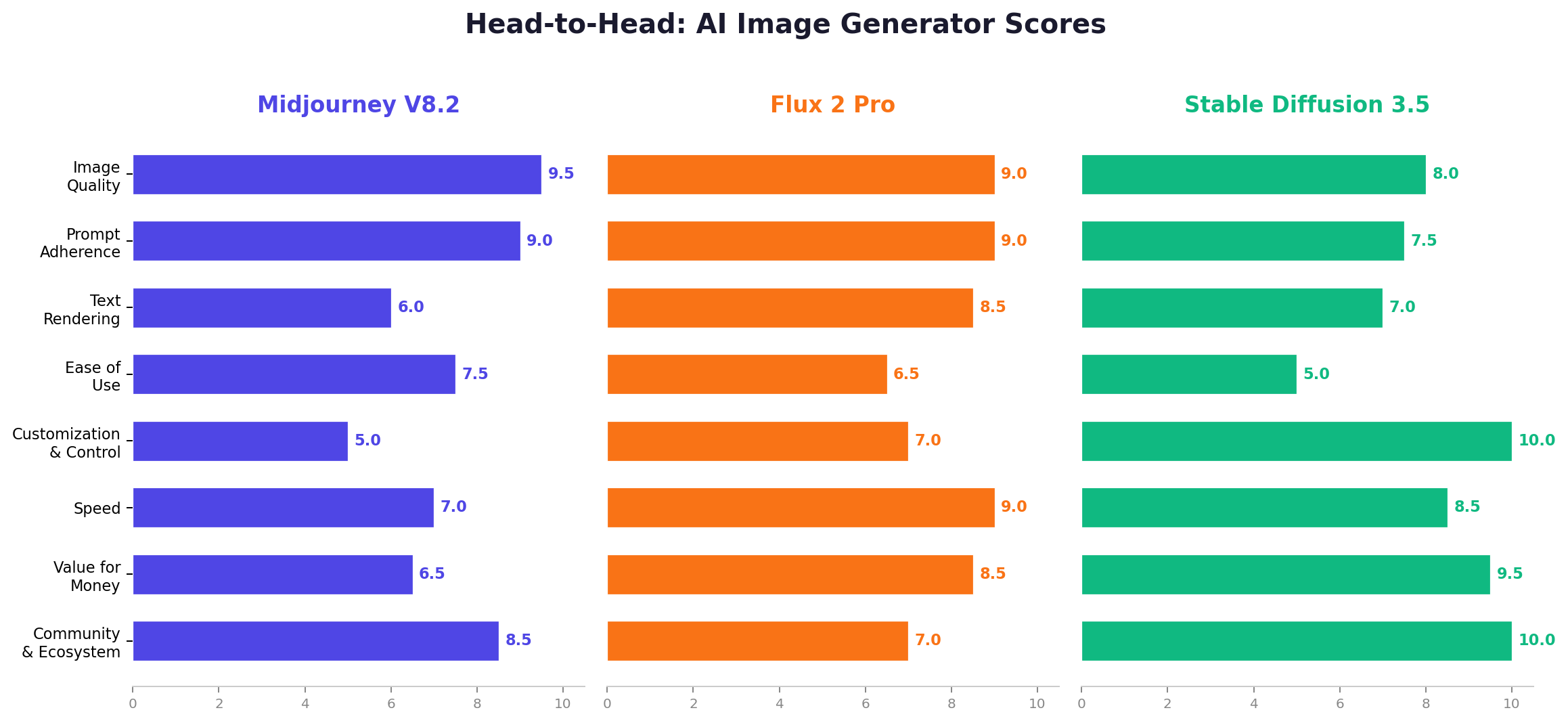
📊 At a Glance
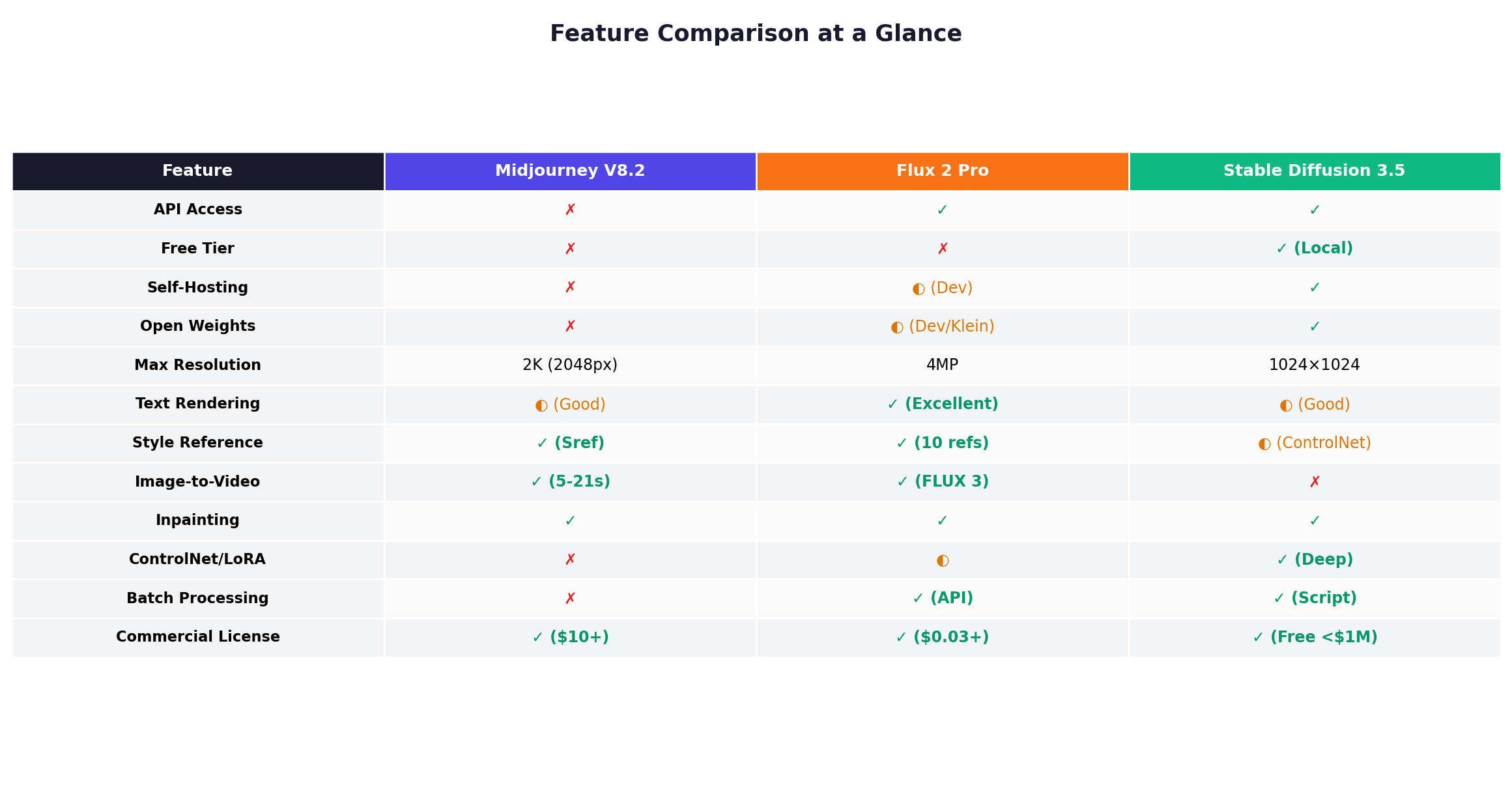
| Dimension | Midjourney V8.2 | Flux 2 Pro | Stable Diffusion 3.5 | Winner |
|---|---|---|---|---|
| Image Quality | Cinematic, artistic, industry-leading | Excellent photorealism, 4MP output | Good, but below Midjourney/Flux | Midjourney |
| Prompt Adherence | Very good, V8.2 improved reading | Excellent, 32K token input | Good, needs more prompt engineering | Flux |
| Text Rendering | Improved (~60% accuracy) | Excellent (Flex excels) | Good (SD 3.5 improved) | Flux |
| Ease of Use | Web app, conversational input | API-first, needs dev setup | Steep learning curve | Midjourney |
| Customization | Style refs, personalization only | Multi-ref, JSON control | LoRAs, ControlNet, infinite mods | Stable Diffusion |
| API Access | ❌ No public API | ✅ Full API ($0.03-0.07/img) | ✅ Third-party APIs | Flux |
| Free Option | ❌ None ($10 minimum) | ❌ No free tier | ✅ Free self-host | Stable Diffusion |
| Starting Price | $10/month | ~$0.03/image (API) | $0 (self-host) / $0.035/image (API) | Stable Diffusion |
🎨 Deep Dive: Midjourney V8.2
Overview
Midjourney has been the gold standard for AI image generation quality since 2022, and V8.2 — released July 24, 2026 — continues that tradition. The latest version focuses on bolder, more sophisticated aesthetics with dramatically reduced random low-quality outputs. Midjourney's personalization system has also matured significantly, learning your aesthetic preferences from image ratings to deliver increasingly tailored results.
Operating exclusively through a web-based interface (and still partially through Discord), Midjourney takes a "closed ecosystem" approach. There's no API, no self-hosting option, and no free tier. You pay a monthly subscription starting at $10, and in exchange you get access to what most professionals consider the best-looking AI-generated images available.
Key Features
- HD 2K Native Output: V8.1 introduced native 2048px images via the
--hdflag, eliminating the need for post-generation upscaling. HD generation costs 1.3 GPU minutes vs. 0.8 for standard. - Personalization: Midjourney builds an aesthetic profile from your image ratings. V8.2 dramatically improved this — the system now "understands" your taste better, especially for users with large rating histories. The larger, improved image pool creates more accurate personalization profiles.
- Style References (Srefs): Upload reference images to match artistic style. V7 Sref codes carry over to V8.x using the SV6 style reference system. Moodboard uploads support multiple reference images simultaneously.
- Image-to-Video: Convert still images into 5-second video clips, extendable to approximately 21 seconds. Available on Standard plans and above. HD video (720p) also available.
- Conversational Mode: Enhanced web interface with natural language and voice input. Tell Midjourney what you want in plain English and refine iteratively.
- Stealth Mode: Pro and Mega plans can hide generations from the public gallery, essential for commercial work under NDA.
- Remix Mode: Modify prompts between variations, enabling iterative creative exploration.
Pricing
| Plan | Monthly | Annual | Fast GPU Hours | Relax Mode |
|---|---|---|---|---|
| Basic | $10 | $96/yr ($8/mo) | ~3.3 hrs (~200 min) | ❌ No |
| Standard | $30 | $288/yr ($24/mo) | ~15 hrs | ✅ Unlimited images |
| Pro | $60 | $576/yr ($48/mo) | ~30 hrs | ✅ Images + SD video |
| Mega | $120 | $1,152/yr ($96/mo) | ~60 hrs | ✅ Everything |
Note: Companies with over $1M in annual revenue must use Pro or Mega plans for commercial use. Unused Fast hours expire each billing cycle. Extra GPU time can be purchased at $4/hour and never expires.
Strengths
- Unmatched aesthetic quality: No other generator produces images as consistently beautiful, cinematic, and "gallery-worthy" as Midjourney V8.2.
- Personalization that actually works: The more you use it, the better it gets at matching your creative vision.
- Zero technical barrier: Type a prompt, get a beautiful image. No installation, no GPU requirements, no configuration.
- Active creative community: Millions of users sharing prompts, techniques, and inspiration. The community alone is worth the subscription for many creators.
Weaknesses
- No API: Cannot be integrated into automated workflows, content pipelines, or production systems. This is the single biggest limitation for businesses.
- No free tier: $10 minimum to try anything. Compare this to Ideogram's 10 free credits/week or SD's completely free self-hosting.
- No self-hosting: Your data goes through Midjourney's servers. Not suitable for sensitive or regulated industries.
- Text rendering still behind: While improved in V8.x, Midjourney still achieves only ~60% text accuracy. Flux and Ideogram far exceed this.
- Limited customization: No LoRA training, no ControlNet, no fine-tuning. You get what Midjourney gives you.
⚡ Deep Dive: Flux 2 Pro
Overview
Flux, developed by Black Forest Labs (founded by former Stability AI researchers who created Stable Diffusion), has rapidly become the top contender for production-grade AI image generation. With $300M in Series B funding (December 2025, total $500M) and open-source downloads exceeding 400 million, Flux represents the most serious challenge to Midjourney's quality crown — and unlike Midjourney, Flux offers full API access and open-source weights.
The current production line is FLUX.2, with the headline model being FLUX.2 [pro]. In July 2026, Black Forest Labs launched FLUX 3 as early access — their first multimodal model combining image, video, and audio — signaling their ambition to become a comprehensive generative AI platform.
Key Features
- 4MP Photorealistic Output: FLUX.2 Pro produces images up to 4 megapixels in any aspect ratio, matching or exceeding Midjourney's 2K output in raw resolution.
- Multi-Reference Control: Reference up to 10 images simultaneously for character consistency, style transfer, and scene composition. This is the best character consistency system in any commercial image generator.
- Professional Text Rendering: Excellent typography accuracy, with the specialized FLUX.2 [flex] model offering the best text-in-image capabilities for UI mockups, infographics, and branded content.
- JSON-Based Control: Precise, programmatic prompt engineering using structured JSON input for enterprise workflows that need deterministic outputs.
- Exact Color Matching: Specify hex codes and brand colors that Flux renders accurately — critical for product photography and brand guidelines.
- 32K Token Input: Extremely long, detailed prompts with 32,000 text tokens. Describe scenes with precision that Midjourney's shorter context can't match.
- Sub-10-Second Generation: Pro images generate in under 10 seconds, Klein models in 2-3 seconds. Faster than Midjourney's typical 30-60 second generation time.
- Open Weights: FLUX.2 [dev] (Apache 2.0, non-commercial), FLUX.2 [klein] 4B and 9B (Apache 2.0) are available for self-hosting. Klein 4B runs in just 2.6GB of VRAM when quantized.
Pricing
Flux uses a megapixel-based API pricing model (the more resolution you need, the more you pay):
| Model | Text-to-Image (per 1MP) | Image Editing (per 1MP) | Best For |
|---|---|---|---|
| FLUX.2 [klein] 4B | $0.014 | $0.014 | High-volume, budget |
| FLUX.2 [klein] 9B | $0.015 | $0.015 | Speed + quality balance |
| FLUX.2 [pro] | $0.03 | $0.045 | Production workflows |
| FLUX.2 [max] | $0.07 | $0.07 | Highest quality |
| FLUX.2 [flex] | $0.05 | $0.05 | Typography specialist |
Third-party providers offer competitive rates: Fal.ai (~$0.05/image for Pro), DeepInfra (~$0.015/image for Pro), Kie.ai (~$0.025). Self-hosting FLUX.2 [dev] or [klein] is free with your own GPU. Commercial licenses for self-hosting are available via BFL's Builder ($10K images/mo) and Platform ($100K images/mo) plans.
Strengths
- API-first architecture: Designed for integration. Plug into any production pipeline, content management system, or creative application.
- Open-source ecosystem: Dev and Klein models are freely available for self-hosting, creating a thriving community around Flux.
- Multi-reference mastery: 10-image reference input with industry-leading character consistency. No other tool matches this for production character work.
- Text rendering excellence: Flux Flex handles complex typography, multi-language text, and design layouts better than almost anything else.
- Speed advantage: Sub-10-second generation for Pro, 2-3 seconds for Klein. Faster iterative workflows.
Weaknesses
- No consumer web app: Unlike Midjourney, there's no polished consumer interface from BFL. Users rely on third-party integrations (Krea, NightCafe, Fal.ai playground) or API calls.
- No free tier: Every image costs money via API, even if just $0.014. No subscription with unlimited generation like Midjourney's Relax Mode.
- Aesthetic quality slightly behind Midjourney: Flux produces technically excellent images, but Midjourney still edges ahead in artistic composition, atmospheric depth, and that "wow factor."
- Newer ecosystem: While growing fast, Flux's community of extensions, tutorials, and shared resources is smaller than Stable Diffusion's massive ecosystem.
🔧 Deep Dive: Stable Diffusion 3.5
Overview
Stable Diffusion is the pioneer of open-source AI image generation, and despite the landscape evolving rapidly around it, SD 3.5 Large (released October 2024) remains the most customizable image generation platform available. Important note: Stable Diffusion 4 does not exist as of August 2026. Claims of an "SD4" release are fabricated — Stability AI's 2026 releases have focused on audio (Stable Audio 3.0, May 2026) and the enterprise Brand Studio platform.
What makes Stable Diffusion unique isn't the model itself — it's the massive ecosystem built around it. With over 45 million downloads on Hugging Face, 10 million registered users on Civitai, and 1 million+ community-created model files, SD offers an ocean of possibilities that no closed-source tool can match. You can fine-tune it with LoRAs, control it with ControlNet, animate it with AnimateDiff, upscale it with ESRGAN, and build complex multi-step pipelines with ComfyUI.
Key Features
- Complete Self-Hosting: Download the model weights and run everything locally. No data ever leaves your machine. Essential for privacy-sensitive industries, healthcare, defense, and enterprise environments.
- LoRA Fine-Tuning: Train custom models on specific styles, characters, products, or brand aesthetics. The Kohya_ss trainer makes LoRA creation accessible. Thousands of community-made LoRAs available for free download on Civitai.
- ControlNet: Edge maps, depth maps, pose skeletons, and segmentation maps give you precise control over image composition. Want a character in a specific pose? ControlNet makes it reliable.
- Inpainting and Outpainting: Precise editing of specific image regions. Remove objects, change backgrounds, modify clothing, extend images beyond their borders.
- ComfyUI Workflow Engine: Node-based visual programming for complex generation pipelines. Chain together models, upscalers, ControlNets, and post-processing into reusable workflows.
- Massive Community Ecosystem: SDXL has the deepest library of community extensions. From AnimateDiff for animation to IP-Adapter for style transfer, if you can imagine it, someone has probably built a ComfyUI node for it.
- Free Commercial Use: Stability AI's community license allows free commercial use for businesses under $1M annual revenue. No per-image costs, no subscription required.
Pricing
Self-hosting: Completely free. Download SD 3.5 Large or SDXL from Hugging Face and run on your own hardware. GPU requirements: 8GB VRAM minimum for SDXL, 16GB+ recommended for SD 3.5 Large.
Stability AI API: Credit-based system at 1 credit = $0.01:
| Service | Credits | Cost Per Image |
|---|---|---|
| Stable Image Ultra (SD 3.5 Large) | 8 credits | $0.08 |
| SD 3.5 Large Turbo | 4 credits | $0.04 |
| SD 3.5 Medium | 3.5 credits | $0.035 |
| Stable Image Core (SDXL) | 3 credits | $0.03 |
| Edit Tools (Inpaint, etc.) | 5 credits each | $0.05 |
Third-party APIs offer SD at even lower costs. Fal.ai provides SDXL at ~$0.01/image. Stability AI offers an API membership at $20/month for 6,000 credits (~$200 worth of single generations).
Strengths
- Unlimited customization: LoRAs, ControlNet, IP-Adapter, AnimateDiff, ESRGAN — the ecosystem of add-ons is unmatched by any other platform.
- Complete privacy: Run entirely locally with no data transmission. The only option for regulated industries, IP-sensitive work, or users who simply value privacy.
- Zero marginal cost at scale: Once you own the GPU, generating 10 or 10,000 images costs the same in software: $0. Only electricity and hardware depreciation.
- Community and knowledge base: Years of tutorials, shared workflows, troubleshooting guides, and community support. Every problem you encounter has likely been solved already.
- Maximum control: No "AI decides" black box. You control every parameter, every step, every intermediate output in your pipeline.
Weaknesses
- Steep learning curve: Mastering ComfyUI, prompt engineering, LoRA training, and ControlNet takes significant time. The technical barrier is high compared to Midjourney's "just type a prompt" approach.
- Lower out-of-box quality: Without LoRAs or fine-tuning, SD 3.5 Large produces images that are technically good but aesthetically behind Midjourney V8.2 and Flux 2 Pro. The "default" look is noticeably less polished.
- Hardware requirements: SD 3.5 Large needs 16GB+ VRAM for comfortable use. SDXL needs 8GB+. This is a significant hardware investment that Midjourney and Flux API users don't face.
- Text rendering still lacking: While SD 3.5 improved text generation, it still falls behind Flux and Ideogram for typography-heavy tasks.
- Aging model: SD 3.5 Large was released October 2024 — nearly two years old. The open-source field has moved to Flux 2 and Ideogram 4.0 as the quality leaders. SD's ecosystem keeps it relevant, but the base model is showing its age.
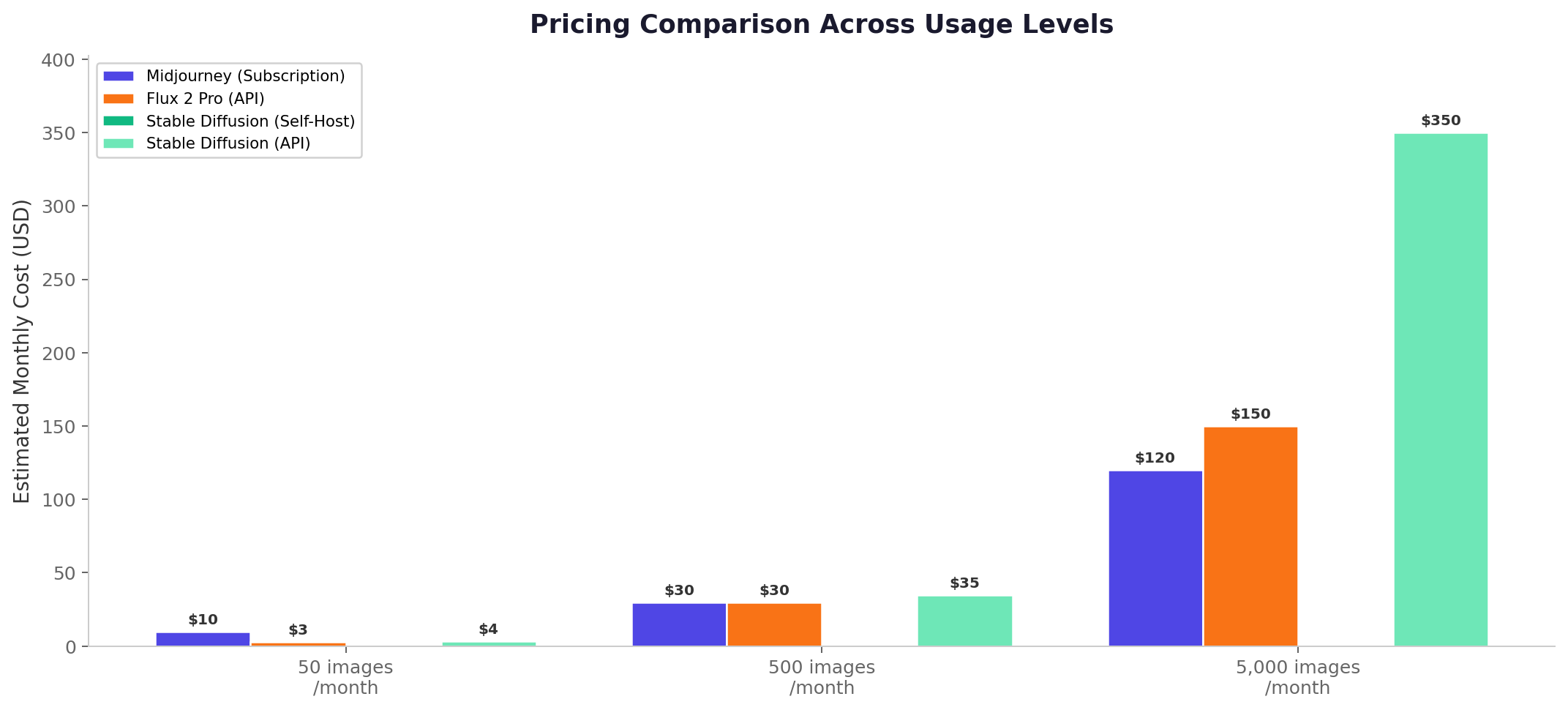
⚔️ Head-to-Head Comparison
1. Image Quality — Winner: Midjourney V8.2
Midjourney V8.2 remains the quality benchmark. Its images have a distinctive cinematic quality — rich color grading, sophisticated lighting, and artistic composition that makes outputs look like professional photographs or concept art. Flux 2 Pro produces technically excellent photorealistic images with impressive detail at 4MP, but it can lack Midjourney's "soul" — that intangible artistic quality that makes an AI image feel curated rather than generated. Stable Diffusion 3.5 Large is a step below both when using default settings, though with the right LoRA and workflow, skilled users can achieve impressive results.
2. Prompt Adherence — Winner: Flux 2 Pro
Flux's 32,000-token context window and structured JSON input system give it the precision advantage. If you need to specify exact camera angles, color palettes, lighting conditions, and compositional rules, Flux delivers with the highest fidelity. Midjourney V8.2 has improved significantly in prompt reading — V8.2 "understands" prompts better than any previous version — but it still takes creative liberties that can diverge from your intent. Stable Diffusion is the least reliable out of the box, often requiring negative prompts, weighting syntax, and iterative refinement to match what you described.
3. Text Rendering — Winner: Flux 2 Pro
This isn't close. Flux 2 Pro (and especially the specialized Flex variant) produces near-perfect text in images — signs, logos, book covers, UI mockups, and multi-line typography render accurately. Ideogram 4.0 actually leads the industry at 90-95% accuracy, but among these three, Flux is the clear winner. Midjourney V8.2 has improved to roughly 60% accuracy for short phrases but still struggles with anything beyond a few words. Stable Diffusion 3.5 is similar — better than earlier versions but inconsistent enough that text-heavy tasks require multiple retries.
4. Ease of Use — Winner: Midjourney V8.2
Midjourney's conversational web interface lets anyone generate stunning images within minutes of signing up. Type what you want, click generate, pick your favorite from four variations. The learning curve is nearly flat. Flux requires API setup or third-party tool integration — not difficult for developers, but intimidating for non-technical users. Stable Diffusion has the steepest curve by far: installing ComfyUI or Forge, downloading models, configuring hardware, learning prompt syntax with weights and brackets, and building workflows requires serious time investment.
5. Customization & Control — Winner: Stable Diffusion 3.5
This is Stable Diffusion's domain, and it's not competitive — it's a different league entirely. LoRAs for style training, ControlNet for precise spatial control, IP-Adapter for style transfer, AnimateDiff for animation, ESRGAN for upscaling, and ComfyUI for building complex multi-step pipelines. The sheer depth of customization is staggering. Flux offers some customization through multi-reference input and JSON control, and Midjourney provides style references and personalization, but neither comes close to SD's fine-grained control.
6. Speed — Winner: Flux 2 Pro
Flux Klein models generate in 2-3 seconds; Flux Pro in under 10 seconds. This enables rapid iteration and real-time creative exploration. Midjourney typically takes 30-60 seconds per generation in Fast Mode, though the V8.x architecture is 4-5x faster than earlier versions. Stable Diffusion speed depends entirely on your hardware — SDXL on a fast GPU can match or beat Flux, but SD 3.5 Large on consumer hardware typically takes 15-30 seconds per image.
7. Value for Money — Winner: Stable Diffusion 3.5
At scale, nothing beats free. Self-hosted Stable Diffusion has zero marginal cost per image. For someone generating 1,000 images per month, that's $0 vs. $30-120 for Midjourney or $30-150 for Flux. Even via API, SDXL costs just $0.03/image. Midjourney offers excellent value at medium usage ($30 Standard with unlimited Relax Mode), but at high volume the subscription model becomes expensive. Flux is cost-efficient for API-driven workflows where you only pay for what you use, but heavy API users can rack up substantial bills.
8. Community & Ecosystem — Winner: Stable Diffusion 3.5
Stable Diffusion's ecosystem is years ahead. Civitai hosts millions of LoRAs, checkpoints, and embeddings. ComfyUI has thousands of custom nodes. Tutorials, workflow templates, and troubleshooting guides cover every conceivable use case. Midjourney has a vibrant creative community sharing prompts and inspiration, but no extension ecosystem. Flux's open-source community is growing fast (400M+ downloads) but remains younger and smaller than SD's.
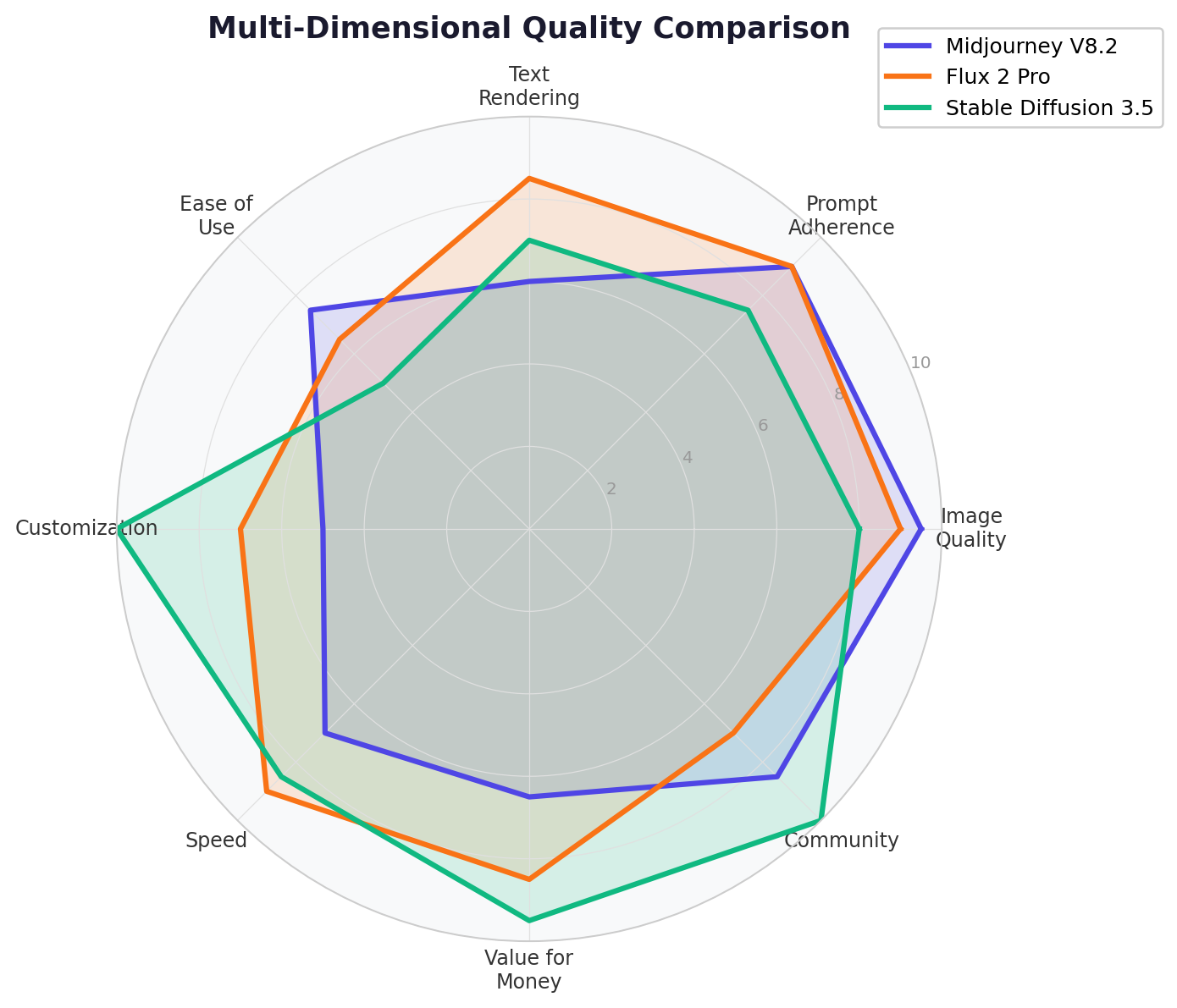
🧪 Real-World Test Scenarios
Scenario 1: Social Media Brand Content
Prompt: "A luxury watch photographed on dark marble with dramatic side lighting, water droplets on the crystal, shallow depth of field, commercial product photography, 85mm lens"
Midjourney V8.2: Stunning result. The lighting is cinematic, the marble texture is hyper-realistic, and the water droplets catch the light perfectly. The watch itself looks aspirational and premium. This would work in a magazine ad without any editing. Score: 9.5/10
Flux 2 Pro: Excellent technical quality with faithful prompt adherence. The watch renders accurately at 4MP resolution, but the overall mood feels slightly less "curated" than Midjourney's output. Still professional-grade. Score: 8.5/10
Stable Diffusion 3.5 Large: Good quality with correct composition, but the lighting lacks Midjourney's dramatic quality and the watch details are less precise. Would benefit from a product photography LoRA. Score: 7/10
Scenario 2: Text-in-Image Design Mockup
Prompt: "A modern mobile app onboarding screen mockup with the headline 'Start Your Journey' in clean sans-serif font, gradient purple-to-blue background, minimalist illustration of a mountain path, iOS style"
Flux 2 Pro: Near-perfect execution. The text "Start Your Journey" renders cleanly in a readable sans-serif font. The gradient background matches the specification. The mountain illustration has a professional, polished feel. Score: 9/10
Stable Diffusion 3.5: The gradient and layout are reasonable, but the text rendering is hit-or-miss — might need 3-4 attempts for readable output. The illustration style is less refined. Score: 6.5/10
Midjourney V8.2: Beautiful gradient and composition, but the text "Start Your Journey" likely renders with errors — perhaps "Stort Yout Joumey" or similar artifacts. Great for visual reference, not for production text. Score: 5.5/10
Scenario 3: Consistent Character Across Multiple Scenes
Task: Generate the same character in 5 different environments (coffee shop, office, park, airport, home kitchen) with consistent facial features, clothing, and style.
Flux 2 Pro: With multi-reference input (up to 10 images), Flux maintains the best character consistency among all three tools. Upload a reference character image, and Flux keeps the face, build, and clothing consistent across scenes. Minor variations in lighting and angle, but clearly the same person. Score: 9/10
Stable Diffusion 3.5: With IP-Adapter and a character reference LoRA, SD can achieve strong consistency. However, setup requires technical expertise and the results vary more across environments. Without LoRA training, consistency drops significantly. Score: 7.5/10
Midjourney V8.2: V7's Omni Reference was the best character consistency feature, but it's not available in V8.x. Style references in V8.x maintain aesthetic consistency but not character consistency. You'll get the same style across scenes but potentially different faces. Score: 6/10
🔄 Alternatives Worth Considering
| Tool | Starting Price | Standout Feature | Best For |
|---|---|---|---|
| Ideogram 4.0 | Free (10 credits/week) | 90-95% text rendering accuracy | Design, typography, branded content |
| GPT Image 2 | $20/mo (ChatGPT Plus) | Best text rendering overall, ChatGPT integration | Casual users, integrated workflows |
| Adobe Firefly 4 | $5/mo (Starter) | Commercially safe training data, Photoshop integration | Enterprise, agencies, safe IP |
| Google Imagen 4 | Pay-per-use API | Google ecosystem integration, fast | Google Workspace users, apps |
| Leonardo AI | Free (150 tokens/day) | Game asset generation, character consistency | Game developers, concept artists |
🏆 The Verdict
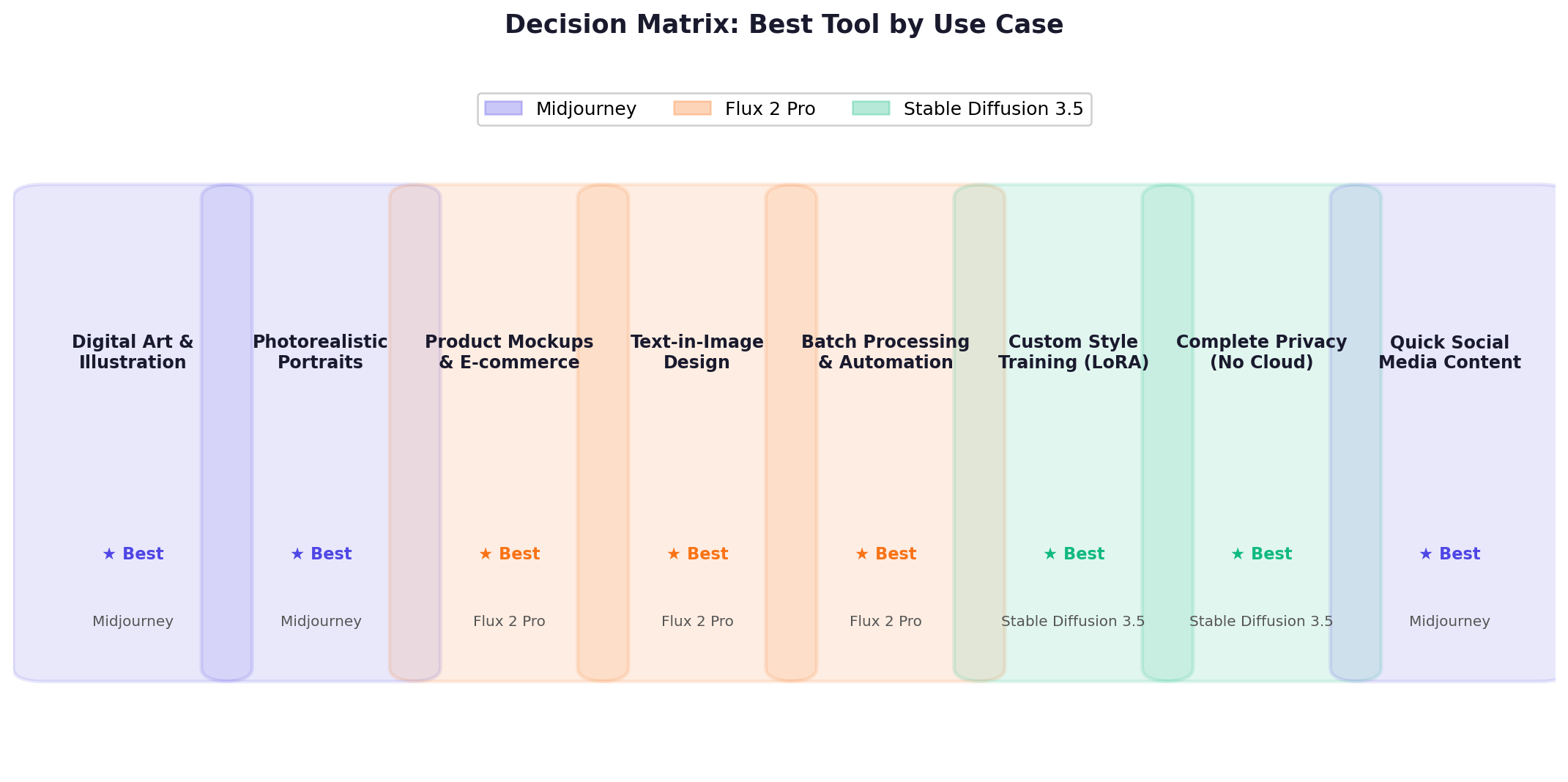
Best for Artistic Quality & Creative Exploration → Midjourney V8.2
If you're a designer, artist, content creator, or marketer who needs consistently beautiful, publication-ready images without technical fuss, Midjourney is still the one to beat. The $30/month Standard plan with unlimited Relax Mode is the sweet spot for most creative professionals.
Best for Production Workflows & API Integration → Flux 2 Pro
If you're building a product, automating content generation, or need programmatic control over image output, Flux is the clear choice. Its API-first design, multi-reference control, excellent text rendering, and open-source options make it the most versatile tool for technical teams. The per-image pricing model scales efficiently for variable workloads.
Best for Customization, Privacy & Cost Efficiency → Stable Diffusion 3.5
If you need complete control over your generation process, want to train custom models, work in a privacy-sensitive environment, or generate images at massive scale without ongoing costs, Stable Diffusion is unmatched. The learning curve is real, but the payoff in capability and cost savings is enormous for users willing to invest the time.
Overall Value → Midjourney V8.2 (for most users) | Stable Diffusion 3.5 (at scale)
For individuals and small teams generating under 1,000 images per month, Midjourney's $30 Standard plan offers the best quality-per-dollar ratio. For teams generating thousands of images monthly, Stable Diffusion's zero marginal cost wins decisively. For API-driven businesses, Flux's pay-per-image model offers the right balance of quality and scalability.
The Hybrid Approach Most Pros Use
Many professional studios and agencies use all three: Midjourney for initial creative exploration and moodboards, Flux for production-ready assets and API-driven workflows, and Stable Diffusion for custom fine-tuning, character consistency at scale, and privacy-sensitive work. At $30/month for Midjourney plus API costs for Flux, the combined cost is modest for professional results.
❓ Frequently Asked Questions
Is Midjourney better than Stable Diffusion?
Midjourney produces better out-of-the-box aesthetic quality with less effort. Stable Diffusion offers far more customization through LoRAs, ControlNet, and self-hosting, but requires more technical skill. For most users who want great images quickly, Midjourney wins. For developers and tinkerers who want full control, Stable Diffusion wins.
Is Flux better than Midjourney?
It depends on your use case. Midjourney V8.2 still leads in artistic quality, cinematic photorealism, and style consistency. Flux 2 Pro matches or exceeds Midjourney in prompt adherence, text rendering, and API-based automation. Flux also offers open-source weights (Dev and Klein) that Midjourney doesn't provide. For API-driven workflows, Flux is the clear choice.
Can I use Stable Diffusion for free?
Yes, completely. SD 3.5 Large, SDXL, and all older models are free to download and run locally. Stability AI's community license allows free commercial use for businesses under $1M in annual revenue. You'll need a capable GPU (8GB+ VRAM for SDXL, 16GB+ for SD 3.5 Large). Third-party APIs like Fal.ai also offer SD at very low per-image costs.
Does Midjourney have an API?
Midjourney does not offer a public API. All generation happens through their web app or Discord bot. If you need API access for automated workflows — product image generation at scale, dynamic ad creative, content pipelines — Flux 2 Pro via the Black Forest Labs API or Stable Diffusion via third-party providers are your options.
What is the best AI image generator for professionals in 2026?
For most professional visual work, Midjourney V8.2 remains the quality leader at $30/month. For production pipelines and API integration, Flux 2 Pro is the best choice. For maximum control, privacy, and cost efficiency at scale, Stable Diffusion 3.5 with ComfyUI is unmatched. Many agencies use a combination of all three.
Does Stable Diffusion 4 exist?
No. As of August 2026, Stable Diffusion 4 does not exist. The latest image model from Stability AI is Stable Diffusion 3.5 Large, released in October 2024. Stability AI has focused its 2026 releases on audio (Stable Audio 3.0) and enterprise tools (Brand Studio), not a new image model. Any websites claiming otherwise are publishing fabricated information.
Which AI image generator is best for beginners?
Midjourney is the most beginner-friendly for quality output — just type a prompt and get beautiful results. However, it has no free tier ($10 minimum). For a completely free option, Stable Diffusion via Clipdrop (100 generations/day) offers an easier entry point than local installation. Flux through third-party apps like Krea.ai or NightCafe also provides a simplified interface with pay-per-generation pricing.