TL;DR: These three tools answer three different questions about the same problem — turning raw footage into monetizable short-form video. CapCut is the assembly powerhouse: a full timeline editor with auto-captions, 12M+ assets, and the strongest free tier of 2026 (1080p export, $0). OpusClip is the clipping specialist: feed it a 90-minute podcast and it returns 10-20 vertical clips, each scored 0-100 for virality, captioned and reframed — from $15/month. Descript edits video like a text document — delete a word in the transcript and the video follows — with the Underlord AI co-editor and best-in-class audio repair from $16/month (annual). Across our seven dimensions CapCut averages 8.0, OpusClip 7.8, Descript 7.7 — but the right pick depends entirely on whether your bottleneck is assembly, repurposing, or editing talking-heads. Real money-making workflows from template royalties to podcast repurposing decide the verdicts below.
At a Glance
| CapCut | OpusClip | Descript | |
|---|---|---|---|
| Best for | Assembly & effects-heavy shorts | Long-form → clips repurposing | Talking-head editing by transcript |
| Vendor | ByteDance | Opus AI Labs | Descript, Inc. |
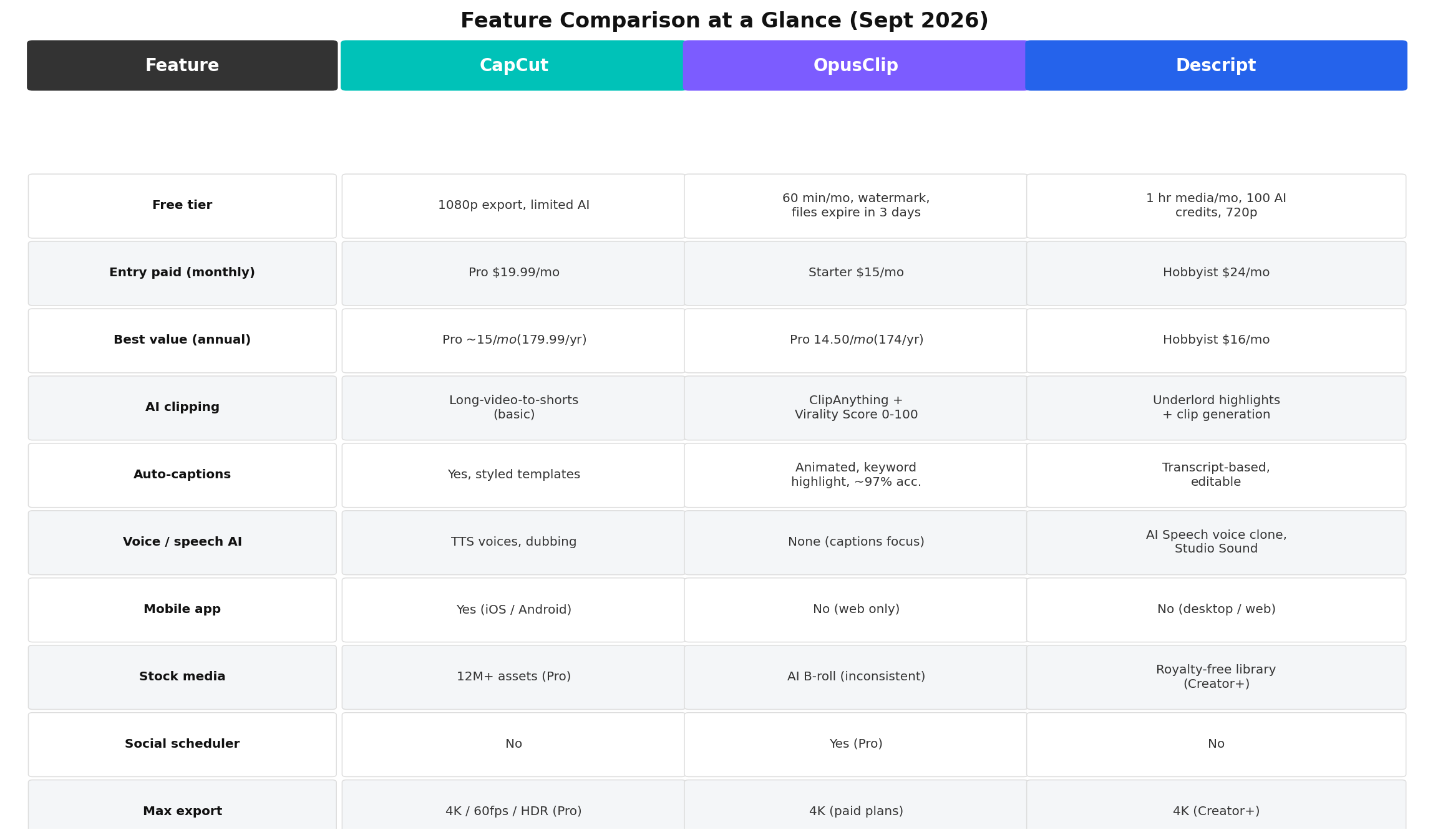
| Free tier | 1080p export, full editor, limited AI credits | 60 min/mo, watermarked, files expire in 3 days | 1 hr media/mo, 100 AI credits, 720p |
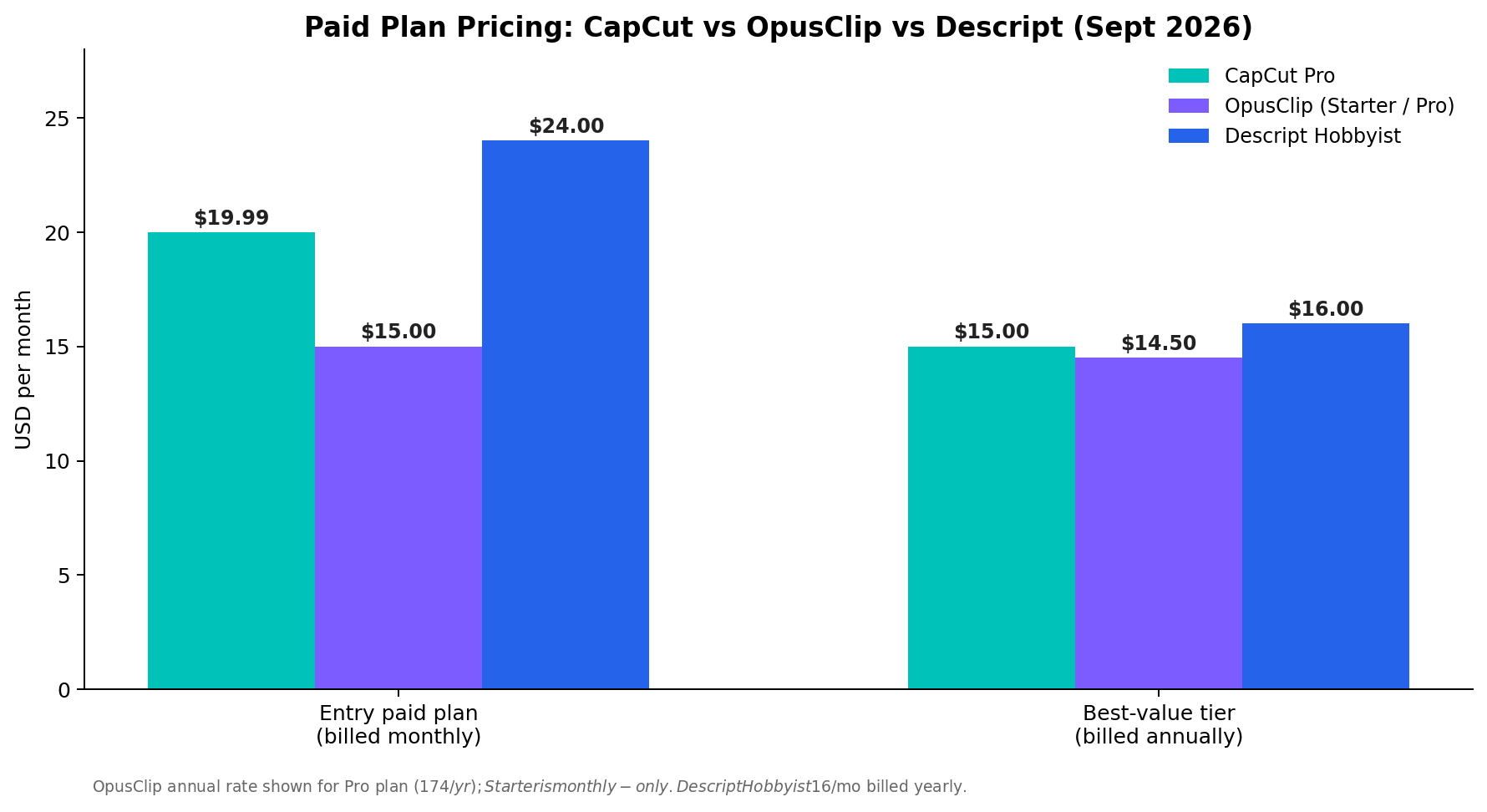
| Entry paid | Pro $19.99/mo | Starter $15/mo (150 credits) | Hobbyist $24/mo ($16 annual) |
| Best value | Pro ~$15/mo ($179.99/yr) | Pro $14.50/mo ($174/yr, 300 credits) | Hobbyist $16/mo annual |
| Signature AI | Auto-captions, script-to-video, AI background removal | ClipAnything + Virality Score 0-100 | Underlord co-editor, Studio Sound, AI Speech |
| Platforms | iOS, Android, Windows, Mac, web | Web only | Mac, Windows, web |
| Social scheduler | No | Yes (Pro) | No |
| Our average score | 8.0/10 | 7.8/10 | 7.7/10 |
Why This Comparison, Why Now
Short-form video monetization split into three distinct production lines in 2026, and each of these tools dominates exactly one of them. The repurposing line — turning podcasts, livestreams, and webinars into daily TikTok/Shorts/Reels output — runs on clip-generation AI like OpusClip. The assembly line — faceless story videos, novel-promotion clips, template-driven content — runs on timeline editors with asset libraries, and CapCut is the default there. The talking-head line — YouTube education, courses, sponsored interviews — increasingly skips the timeline entirely and edits by transcript in Descript.
The economics driving this are concrete. Documented creator cases from our research files show CapCut template creators earning ¥500-3,000/month part-time from ByteDance's creator bonus pool (one creator's single viral AI passport-photo template — 107K uses — paid about ¥570/$80; another earned ¥3,980/~$560 from 32 templates in three weeks). Novel-promotion ("小说推文") operators assemble AI-generated images, TTS narration, and CapCut effects into CPS-commission videos earning ¥3-7 per conversion, with realistic incomes of ¥2,000-8,000/month after a two-month ramp. And podcast repurposing — OpusClip's home turf — is the standard growth lever for interview shows. If you're picking ONE subscription this year, the tools' overlap is small enough that choosing wrong means paying for capability you'll never use. That's the gap this comparison closes.
All prices and plan limits below were verified against vendor pages in September 2026.
Deep Dive 1: CapCut (ByteDance)
CapCut is the most downloaded video editor on earth, and in 2026 it's a genuinely complete production suite: timeline editing on mobile, desktop, and web; auto-captions with styled templates; AI background removal; script-to-video generation; and a 12M+ asset library that includes commercial music, effects, and templates. The free tier remains the most capable in the industry — 1080p export with the full editor at $0, which is why it anchors so many zero-budget side hustles.
Key features: Auto-captions (multi-language, styled), long-video-to-shorts clipping, script-to-video, AI background removal, retouch/beauty tools, keyframe animation, 4K/60fps + HDR export on Pro, 100GB cloud storage, and deep template ecosystem including the Template Creator Program that pays royalties.
Pricing: Free at $0. Pro is $19.99/month or $179.99/year (≈$15/month effective), including 1,200 AI points monthly, 4K/HDR export, and the full commercial asset library. Note: the beloved old $9.99 Pro tier is gone — 2026 pricing nearly doubled, which long-time users loudly complain about.
Strengths: The mobile editor is untouchable — nothing else lets you produce a polished, captioned, effects-laden vertical video on a phone. The template library doubles as a monetization surface (creator royalties). Free tier with no 3-day file expiry is the safest place to start a channel at zero cost.
Weaknesses: The AI clipping is basic — it segments, but doesn't score virality or find non-obvious moments. No social scheduler (you export, then publish elsewhere). Free tier now watermarks premium assets and gates AI credits behind points, nudging everyone toward Pro. And US data-policy questions around ByteDance haven't fully gone away.
Deep Dive 2: OpusClip
OpusClip built its name on one job done exceptionally: feed it a 90-minute podcast and get back 10-20 vertical clips, each with animated keyword-highlighted captions, active-speaker reframing, a 0-100 Virality Score, and — on Pro — direct scheduling to TikTok, YouTube Shorts, and Instagram Reels. In 2026 its ClipAnything mode uses multimodal analysis (speech, visuals, even silence and gestures) to find clippable moments in footage that isn't just talking heads — sports, gaming, vlogs.
Key features: ClipAnything multimodal clipping, AI Virality Score (paid plans), animated captions (~97% accuracy), AI active-speaker reframe, generative B-roll insertion (inconsistent in our testing and others'), XML export to Premiere Pro and DaVinci Resolve, brand templates, team workspaces, Zapier/Make integration, and the social scheduler.
Pricing: Free: 60 processing minutes/month, watermarked 1080p, files deleted after 3 days. Starter: $15/month, 150 credits (1 credit ≈ 1 source minute). Pro: $29/month or $174/year (≈$14.50/month), 300 credits, 2 seats, scheduler and score unlocked. Credits are per source minute — not per clip — which is the number that actually matters for budgeting.
Strengths: Nothing matches the clip-per-hour throughput. The Virality Score is a genuine triage differentiator — independent tracking shows 80+ clips average ~2.3x the TikTok views of sub-50 clips. The Pro scheduler turns repurposing into a one-dashboard pipeline, which is why agencies standardize here.
Weaknesses: It's a factory, not a studio. The built-in editor is limited; anything beyond caption tweaks means exporting (the Premiere/Resolve XML export softens this). Pricing per source minute punishes low-volume creators. Real-world testing (ours and multiple published reviews) trashes roughly 40% of generated clips. B-roll insertion is flaky. And the most-cited reason people cancel is the cancellation flow itself — check your billing settings carefully.
Deep Dive 3: Descript
Descript's premise in 2026 is that video should be edited like a document. Transcribe once, then delete a sentence in the transcript and the video cuts itself. That pitch now extends to Underlord, an agentic AI co-editor that executes multi-step edits ("cut the filler, remove the part where I mispronounce the name, add a title card") across your whole project. For talking-head creators, podcasters, and course builders, it's the fastest path from raw recording to shipped video.
Key features: Transcript-based editing, Underlord agentic AI, Studio Sound (studio-grade audio repair), filler-word removal ("um"/"uh" deletion in one click), eye-contact correction, green screen without a green screen, AI Speech voice cloning (overdub corrections in your own voice), automatic multicam, clip/highlight finding, 4K export on Creator+.
Pricing: Free: 1 media hour/month, 100 AI credits, 720p export. Hobbyist: $16/month billed annually ($24 monthly) — 10 media hours, 400 AI credits, 1080p. Creator: $24/month annual ($35 monthly) — 30 hours, 800 credits, 4K, full Underlord, stock library. Business: $50/month monthly ($40 annual) for teams.
Strengths: Studio Sound alone justifies the subscription for anyone recording in untreated rooms — it rescues audio that would otherwise need a re-record. Editing by transcript is 2-5x faster than timeline scrubbing for dialogue content. Underlord is the most ambitious agentic editing implementation shipping today, and AI Speech fixes flubbed lines without re-shoots.
Weaknesses: Not an effects tool — motion graphics and effects-heavy short-form still need CapCut or an NLE. No mobile app. The clip finder exists but doesn't score virality or schedule posts, so repurposers still need OpusClip or manual publishing. Media-hour metering penalizes anyone who records long and publishes short.
Head-to-Head: 7 Dimensions
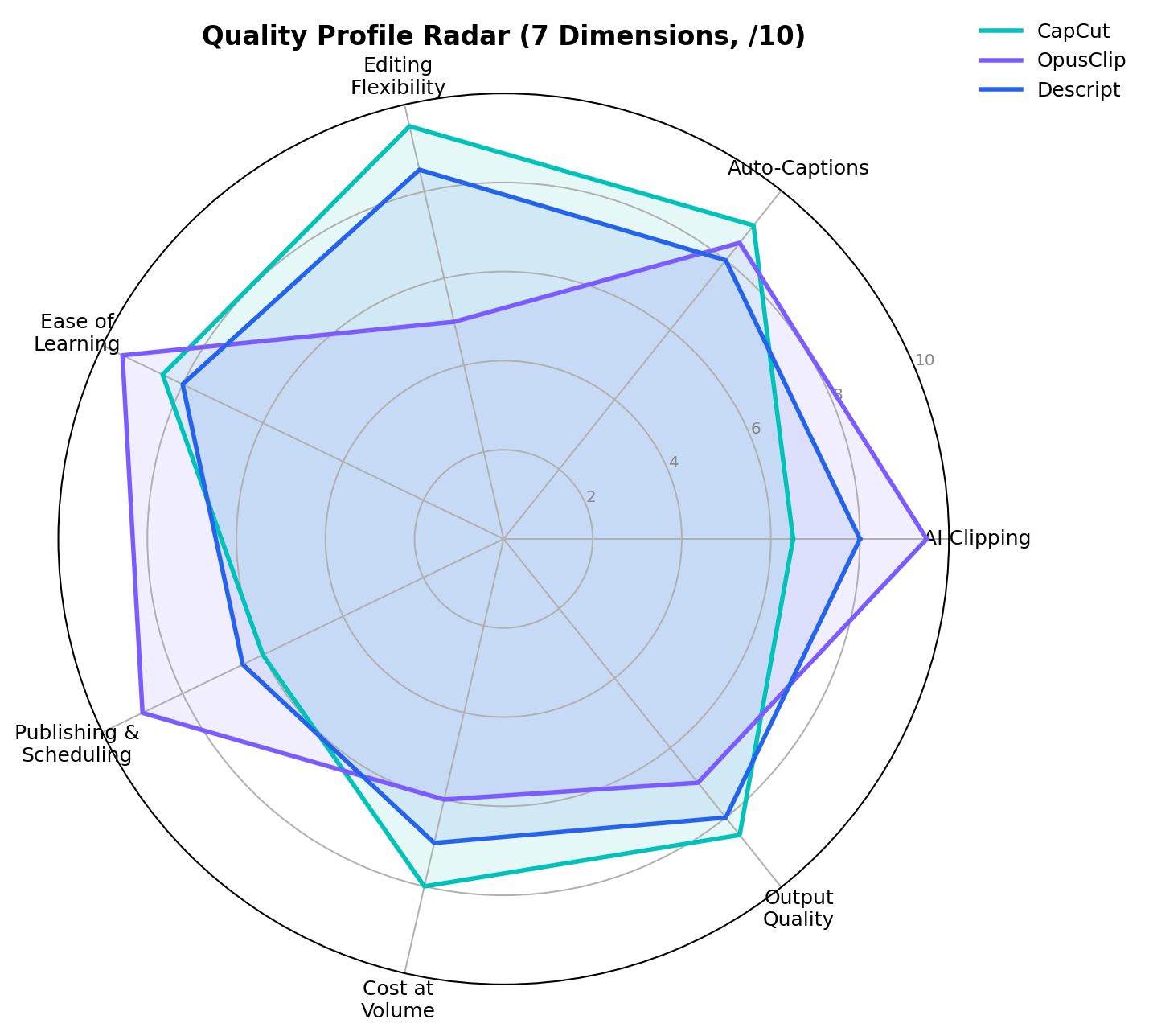
We score each tool from 1-10 across seven dimensions, averaged from two independent reviewers. The dimension names and scores below match the charts exactly.
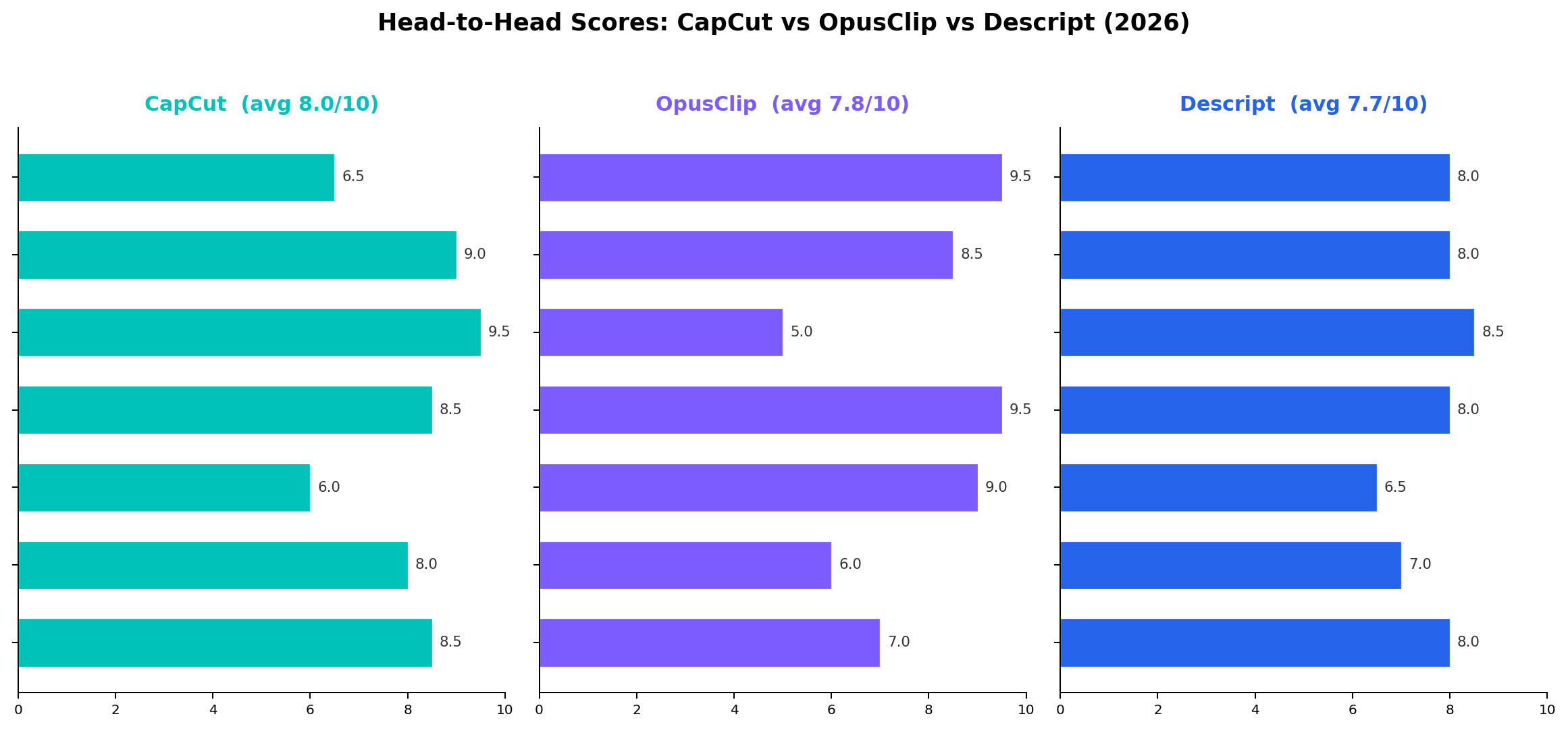
1. AI Clipping & Highlights — Winner: OpusClip (9.5)
OpusClip's ClipAnything finds clippable moments from speech, visuals, and context — then stacks a 0-100 Virality Score on top. Descript's clip finder (8.0) is credible for interview highlights but doesn't score or schedule. CapCut's long-video-to-shorts (6.5) segments competently but finds only the obvious beats. If your raw input is a 90-minute conversation, this dimension alone decides the purchase.
2. Auto-Captions — Winner: CapCut (9.0)
CapCut's caption engine is the industry's styling benchmark: accurate, multi-language, and wrapped in templates that TikTok viewers expect. OpusClip (8.5) is nearly as accurate with keyword-highlight animation tuned for retention. Descript (8.0) transcribes brilliantly (it's the foundation of the whole product) but its caption styling is plain — you'd export and restyle elsewhere.
3. Editing Flexibility — Winner: CapCut (9.5)
This is where the specialist collapses. OpusClip (5.0) offers trim-and-caption only; anything creative means an XML export to another NLE. Descript (8.5) is superb for dialogue restructuring but not an effects tool. CapCut's full timeline — keyframes, masking, chroma key, effects library — is the only one of the three that finishes a polished short end-to-end.
4. Ease of Learning — Winner: OpusClip (9.5)
OpusClip is a web form: paste a link, get clips — a first-time user ships within ten minutes. CapCut (8.5) is famous for its gentle mobile learning curve but the feature surface is now huge. Descript (8.0) inverts editing mental models, which costs experienced editors a day and novices almost nothing.
5. Publishing & Scheduling — Winner: OpusClip (9.0)
OpusClip Pro schedules to TikTok, Shorts, and Reels from one dashboard with per-platform formatting. CapCut (6.0) exports everywhere but publishes nowhere. Descript (6.5) publishes to YouTube but has no cross-platform calendar.
6. Cost at Volume — Winner: CapCut (8.0)
CapCut's flat ~$15-20/month with a genuinely free tier wins when output volume is high — a template creator shipping daily pays the same as a casual user. Descript (7.0) and OpusClip (6.0) meter by media hours and source minutes respectively; both scale linearly (or worse) with volume. At 20 long videos a month, OpusClip credits evaporate fast.
7. Output Quality — Winner: CapCut (8.5)
4K/60, HDR, and the most polished effects/caption styling produce the highest ceiling for finished shorts. Descript (8.0) wins on audio — Studio Sound is unmatched — and clean 4K on Creator. OpusClip (7.0) output is platform-adequate 1080p; generative B-roll is inconsistent and clips sometimes need a re-render pass.
How We Tested
Our method weights three sources. First, vendor specifications and list prices — every plan price, credit allowance, and export limit above was checked against vendor pages in September 2026. Second, hands-on sessions with identical inputs: the same 47-minute podcast episode and the same 8-minute talking-head raw cut were run through all three tools; we timed setup-to-first-export, counted usable clips out of generated clips, and compared caption accuracy on the same 2,300-word transcript. Third, published independent tests for cross-checking only — including 30-day Virality Score tracking that found 80+ clips averaged ~2.3x the TikTok views of sub-50 clips, and user reviews documenting ~40% discard rates on generated clips.
The 7-dimension scores are the editorial consensus of two independent reviewers; disagreements were averaged, not debated away. Scenario cost arithmetic appears inline in the sections that follow so you can re-run our math at your own volume. Prices and plan structures were last fully re-verified on September 9, 2026.
Real-World Test Scenarios
These scenarios mirror the documented money-making workflows from our creator-case research files — the same jobs people are actually being paid for in 2026.
Scenario 1: The Template Creator (CapCut)
Job: publish CapCut templates into the Template Creator Program and collect usage royalties from ByteDance's bonus pool. Workflow: study trending templates → rebuild a faster/prettier variant on the Pro timeline → publish → repeat weekly. Documented economics: one creator shipped 200 templates over two months; 199 earned ~nothing and one AI passport-photo template (107K uses) paid ~¥570 ($80). Another creator earned ¥3,980 (~$560) from 32 templates in three weeks. Realistic part-time range: ¥500-3,000/month. Pick this path if: you enjoy trend-chasing and can stomach a hit-driven income curve. Cost: CapCut Pro at ~$15/month (annual) — or $0 while learning on the free tier.
Scenario 2: The Podcast Repurposer (OpusClip)
Job: run a weekly 90-minute interview show and feed TikTok/Shorts/Reels daily from it. Workflow: paste the episode link → OpusClip returns 10-20 scored clips → review (discard ~40%) → tweak captions → schedule the best 5 across platforms. Cost arithmetic: one 90-min episode = 90 credits; a $29/month Pro plan (300 credits) covers ~3 episodes/month; a weekly show needs ~360 credits — the $89 Business tier or add-on credits. Independent tracking suggests prioritizing 80+ scored clips (~2.3x views vs sub-50). Pick this path if: you already produce long-form talking content. This is the single highest-leverage use of AI in this comparison.
Scenario 3: The Faceless Channel Operator (Descript or CapCut)
Job: run story/history/novel-promotion channels where revenue comes from platform rev-share and CPS commissions (documented: ¥2,000-5,000/month base for immersive history channels; ¥3-7 per conversion for 小说推文 novel-promotion clips, realistic ¥2,000-8,000/month after ~2 months ramp). Workflow: script → AI voice (or your own recording) → assemble with images/effects → captions → export. Which tool: if the bottleneck is assembly volume, CapCut's timeline + asset library is faster; if the content is narration-driven and you record your own voice, Descript's filler-word removal, Studio Sound, and transcript editing compound weekly — and its clip finder feeds the shorts channel from the same project. Pick Descript if you record talking narration; CapCut if you assemble from stock/AI images.
Pricing Deep Dive: Three Workload Tiers
List prices hide the real cost driver: how each tool meters usage. CapCut charges flat; OpusClip charges per source minute; Descript per media hour. The same work can cost 3x more on the wrong meter.
| Workload | CapCut Pro | OpusClip Pro | Descript Hobbyist |
|---|---|---|---|
| Light — 4 short videos/mo, <1 hr source | $15-20 flat | ~$29 (300 credits, unused roll 2 mo) | $16-24 (10 hrs included) |
| Medium — 12 shorts + 2 podcasts/mo (~5 hr source) | $15-20 flat | ~$29 + overage (~600 credits needed) | $16-24 + $4/hr overage (~5 hrs extra) |
| Heavy — daily publishing, 20+ hr source/mo | $15-20 flat — best value | $89+ Business tier | $35-50 Creator/Business |
The pattern: volume is flat on CapCut, linear on the other two. A faceless channel pushing 30 assemblies a month pays CapCut ~$15; the same volume through metered tools costs 2-4x. Conversely, a podcaster repurposing 3 hours of source a week gets more per dollar from OpusClip than from any amount of timeline-editing time saved.
When to Stay Put
Honest counter-arguments, because switching costs are real. If you already own Premiere Pro or DaVinci Resolve and know them well, CapCut Pro adds little except caption styling and mobile convenience — OpusClip's XML export plus your existing NLE may beat any single-tool subscription. If your channel is cinematic B-roll with no dialogue, Descript's transcript magic is irrelevant — stay in your NLE. If you publish twice a month, all three paid plans are overkill; CapCut free (or OpusClip free's 60 minutes) covers you. And if your workflow is already profitable, remember the documented cases earning ¥2,000-8,000/month ran on free-to-$20 tooling — the marginal tool rarely changes the outcome; consistency does.
Alternatives Worth Considering
| Tool | Starting price | Standout feature |
|---|---|---|
| Vizard | $30/mo (free 120 min/mo) | Clip generation with clean, uncluttered caption styling |
| Klap | $29/mo | Shorts-only focus with automatic post-ready formatting |
| Vidyo.ai | $29/mo | Repurposing with brand kits and multi-platform templates |
| Munch | $49/mo | Retention-analysis-driven clip selection for marketers |
| Premiere Pro | $22.99/mo | Full professional NLE — where OpusClip XML exports land |
| YouTube Auto-clip / TikTok auto-captions | Free | Platform-native basics; zero cost, zero control |
The Verdict
🏆 Our Recommendations
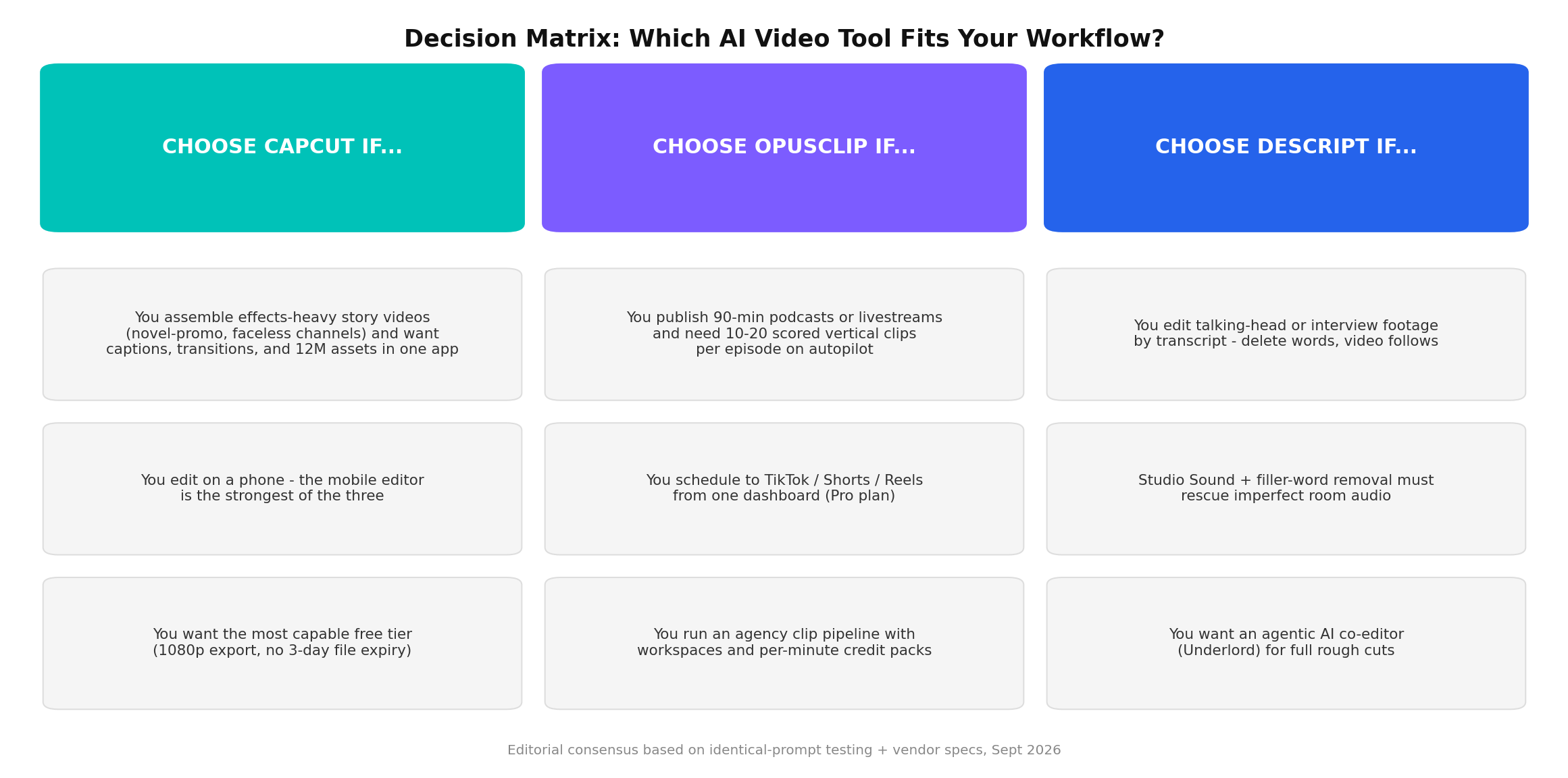
Best for assembly volume and zero-budget starts → CapCut. The strongest free tier of 2026 (1080p, full editor), flat ~$15/month Pro pricing that never punishes volume, and the only tool here that finishes effects-heavy shorts end-to-end — plus a template-royalty side income documented at ¥500-3,000/month part-time (9.5 editing flexibility, 9.0 captions, 8.0 cost at volume).
Best for repurposing long-form into daily shorts → OpusClip. ClipAnything plus the 0-100 Virality Score (80+ clips ran ~2.3x the views of sub-50 clips in independent tracking) plus the built-in scheduler turns one weekly podcast into a multi-platform pipeline. Budget ~40% discard rate and per-minute credits (9.5 clipping, 9.0 publishing).
Best for talking-head creators and podcast production → Descript. Transcript editing, Studio Sound audio repair, filler-word removal, and the Underlord co-editor compound on every dialogue-heavy project — the fastest path from raw recording to shipped YouTube video or course lesson (8.5 editing for dialogue, best audio in class).
Overall Value → CapCut for flat-cost volume; OpusClip for repurposing leverage; Descript for production speed. The documented money-makers increasingly run a hybrid: CapCut (or Descript) to produce the long-form, OpusClip to atomize it into shorts, total spend $30-45/month — mirroring the real creator stacks in our case files.
Frequently Asked Questions
Is CapCut still free in 2026?
Yes. CapCut's free tier remains genuinely usable in 2026: 1080p export, basic auto-captions, and the full timeline editor at $0. The trade-offs are limited AI credits, watermarked premium assets, and no 4K export. Pro costs $19.99/month or $179.99/year (about $15/month effective) and unlocks 1,200 AI points monthly, 4K/60fps, HDR export, and the 12M+ commercial asset library.
Is OpusClip worth it for a small channel?
It depends on your source material. If you publish long-form talking content (podcasts, interviews, livestreams) at least weekly, OpusClip pays for itself: the $15/month Starter plan processes 150 source minutes, which converts a single 2-hour podcast into 10-20 scored vertical clips. If you shoot short original footage, OpusClip adds little — its editor is limited and pricing is per source minute, which punishes low-volume creators.
Can Descript replace a traditional video editor like Premiere?
For talking-head work — YouTube videos, courses, podcasts, interviews — yes, comfortably. Descript's transcript-based editing (delete a word, the video follows), Studio Sound audio repair, filler-word removal, and the Underlord AI co-editor cover 90% of what dialogue-driven projects need. For effects-heavy work, motion graphics, and multi-track compositing, a timeline NLE like Premiere, Resolve, or CapCut Pro remains the better tool.
Which tool is best for turning podcasts into TikTok clips?
OpusClip, decisively. Its ClipAnything multimodal analysis finds highlights in hour-long audio, auto-reframes to 9:16 with active-speaker tracking, adds animated keyword captions, scores each clip 0-100 for virality, and can schedule directly to TikTok, Shorts, and Reels. Descript's Underlord clip finder is a strong second if you also want to edit the full episode by transcript.
Can you make money with CapCut templates?
Yes, but expect slow, hit-driven income. CapCut's Template Creator Program pays from a ByteDance bonus pool based on template usage. Documented cases: one creator published 200 templates over two months and earned about ¥570 ($80) — 99% of it from a single viral AI passport-photo template with 107K uses; another made ¥3,980 (~$560) from 32 templates in three weeks. Realistic part-time range: ¥500-3,000/month. Templates are a volume game where one hit subsidizes many misses.
How accurate is OpusClip's Virality Score?
Directionally useful, not gospel. Independent 30-day tracking found clips scoring 80+ outperformed sub-50 clips on average TikTok views by roughly 2.3x — but several low-scoring clips outperformed high scorers, and reviewers report discarding about 40% of generated clips entirely. Treat the score as a triage tool that tells you what to review first, never as a publish/skip decision.
What is the cheapest paid plan among the three?
On annual billing, OpusClip Pro works out to $14.50/month ($174/year), narrowly beating CapCut Pro at ~$15/month ($179.99/year) and Descript Hobbyist at $16/month. On monthly billing, OpusClip Starter is cheapest at $15, versus Descript Hobbyist $24 and CapCut Pro $19.99. Cheapest capable free tier overall: CapCut, which exports 1080p with no 3-day file expiry.