⏱ TL;DR
These two tools have spent 2026 moving in opposite directions. Grammarly — now part of the rebranded Superhuman company — doubles down on being everywhere: a browser extension covering 500,000+ apps and sites, mobile keyboards, an AI assistant with effectively unlimited rewrites, plagiarism checking against 16 billion web pages, and the new Authorship AI-attribution tracker. It wins Grammar & Spelling (9.2), AI Writing Assistance (8.0), Integrations & Reach (9.5), Plagiarism Detection (8.5), and Privacy & Security (8.0). ProWritingAid doubles down on depth: 25+ manuscript-level reports covering pacing, dialogue, and echoes, native Scrivener integration, chapter-level AI critiques on Premium Pro, and a $399 lifetime plan Grammarly refuses to offer. It wins Style & Readability (9.0), Fiction & Long-form (9.5), and Pricing Value (8.5).
On total score across eight dimensions, Grammarly edges it 63.2 vs 62.5 out of 80 — close enough that the right choice depends entirely on what you write. Business, academic, and content writers should take Grammarly Pro at $144/year. Novelists and long-form authors should take ProWritingAid Premium Lifetime at $399 once. Career authors who do both run the pair for about $22/month combined — less than a single developmental editing pass.
Why This Comparison Matters in 2026
The writing-assistant market went through two earthquakes recently, and most comparison articles still haven't caught up. First, Grammarly's parent company rebranded to Superhuman in October 2025, after acquiring collaborative-docs platform Coda (January 2025) and AI email client Superhuman Mail (July 2025). The old GrammarlyGO assistant became Superhuman Go, and the Premium and Business plans were consolidated into a single Pro tier. Second, ProWritingAid restructured its pricing in early 2026: the beloved $79/year plan is gone, Premium now costs $120/year, a new Premium Pro tier runs $144/year with 50 AI Sparks per day, and the lifetime deal jumped from $299 to $399. If you last compared these tools in 2024, both the products and the prices have changed underneath you.
There's also a money angle most reviews ignore: AI writing tools have become infrastructure for the self-publishing and freelance-content economy. Amazon KDP publishers are shipping AI-drafted, human-edited English guides and storybooks at $2.99–$9.99 per title and collecting 70% royalties; freelance writers bid on client work that lives inside Gmail, Google Docs, and CMS dashboards. The tool you pick determines whether your editing pass takes one click in every app you own (Grammarly) or gives your 90,000-word manuscript a structural X-ray (ProWritingAid). We tested both against those exact workflows.
We scored both tools on eight dimensions — from grammar accuracy to fiction support to pricing value — and traced every dollar of a three-year cost projection. Here's how the two veterans stack up.
At a Glance
| Feature | Grammarly | ProWritingAid |
|---|---|---|
| Best for | Everyday, business & academic writing | Fiction, manuscripts & long-form |
| Free plan | Unlimited length, 100 AI prompts/mo | 500 words/check, 3 Sparks/day |
| Paid annual | Pro $144/yr ($12/mo) | Premium $120/yr (~$10/mo) |
| Top self-serve tier | Superhuman Business $33–40/mo | Premium Pro $144/yr ($12/mo) |
| Lifetime plan | None | $399 Premium / $699 Premium Pro |
| Style reports | Sentence-level suggestions | 25+ deep manuscript reports |
| AI assistant | Superhuman Go — unlimited (fair-use) | Sparks — 5/day, 50/day on Pro |
| Plagiarism | Included with Pro (16B+ pages) | Separate paid add-on |
| Scrivener | No | Yes (native, paid plans) |
| Browser extension | All major browsers, 500K+ apps | Chrome only |
| Mobile keyboard | iOS + Android | No |
| Parent company (2026) | Superhuman (post-Coda rebrand) | Orpheus Technology |
Deep Dive: Grammarly
Grammarly in 2026 is one product inside a four-product suite. After the Superhuman rebrand, the company sells Grammarly (writing assistance), Coda (collaborative workspaces), Superhuman Mail (AI inbox), and Superhuman Go — a proactive assistant that schedules meetings, answers questions across your apps, and automates tasks. For writers, what matters is that Grammarly's core engine kept improving: corrections, paragraph-level rewrites, and tone adjustments now work in Spanish, French, Portuguese, German, and Italian, with translation support in 19 languages including Mandarin and Japanese.
The flagship 2026 additions are Authorship (launched March 2026, default-on in higher education), which tracks when and how AI contributed to a document — increasingly valuable as publishers and professors demand provenance — and Superhuman Docs, an AI-native collaborative writing surface. An advanced analytics dashboard now charts your writing improvement over time and flags your consistent mistakes. Reviewers report roughly 60% fewer false positives after two weeks of personalization, and about 40% fewer in technical documentation contexts.
Pricing (August 2026)
Free: grammar, spelling, and punctuation with no length cap, read-only tone detection, and 100 AI prompts per month. Pro is $30/month, $20/month billed quarterly, or $12/month billed annually ($144/year) — it adds full-sentence rewrites, tone adjustment, plagiarism detection across 16B+ web pages, Authorship, a style guide, snippets, team analytics, and citations in APA, MLA, and Chicago. Superhuman Business at $40/month ($33/month annually) bundles Superhuman Mail and Coda data syncs. Enterprise (150+ seats) adds SAML SSO, SCIM, BYOK encryption, DLP, audit-log API, and SOC 2 Type 2 compliance. A 7-day free trial is available for Pro.
Strengths
- It lives everywhere you write — 9.5/10 Integrations & Reach. The extension works across 500,000+ apps and sites; the iOS/Android keyboards catch your emails and Slack messages on the phone. Nothing else in this category has that footprint.
- The most accurate surface-level correction engine — 9.2/10 Grammar & Spelling across 400+ error types, with industry-specific context adaptation that learns your document type.
- AI assistance without daily caps — Superhuman Go rewrites, summarizes, and drafts with no hard published limit (fair-use applies), versus ProWritingAid's 5–50 Sparks per day.
- Plagiarism included — 8.5/10. Pro scans 16 billion web pages; with ProWritingAid it's a separate purchase.
- Authorship AI-attribution — the only tool here that can prove how much of a document a human wrote, which matters for academia and increasingly for publishers.
Weaknesses
- Blind to story structure — 5.5/10 Fiction & Long-form. No pacing, dialogue, or manuscript-level reports; suggestions are optimized for clear business prose and fiction writers find them bland.
- Fights your style — intentional fragments, italicized internal monologue, and creative punctuation all get flagged; novelists burn time clicking ignore.
- No lifetime option — you rent Grammarly forever; the three-year bill is $432 with nothing to show at the end (7.0/10 Pricing Value).
- No Scrivener support — a dealbreaker for many novelists who live in Scrivener.
Deep Dive: ProWritingAid
ProWritingAid, from UK-based Orpheus Technology, is what happens when you build an editor instead of a proofreader. Its heart is the 25+ writing reports — pacing, dialogue tags, sticky sentences, echoes (repeated words), sentence-length variation, readability by paragraph, transitions, and sensory detail — plus an overall manuscript analysis that works like a virtual beta reader. Most of these reports are built and maintained in-house rather than delegated to a generic LLM, which is why they feel surgical rather than vibes-based. The newer long-form features (Manuscript Analysis, critiques) do use third-party LLMs, but ProWritingAid states user data is never used to train them.
The AI side is Sparks: highlight up to 2,500 characters and pick from 20+ actions — improve readability, add sensory detail, summarize, expand from notes, switch point of view, or brainstorm alternative dialogue to break through writer's block. On Premium Pro, the Critique feature delivers chapter-level developmental feedback, 3 per day. It's a genuinely different product philosophy from Grammarly's always-on correction: ProWritingAid sits with your manuscript file; Grammarly sits in every other tab.
Pricing (August 2026)
Free: 500 words per check, 3 Sparks/day, summary reports only, no integrations. Premium is $30/month or $120/year (about $10/month) — all 25+ reports, full integrations, 5 Sparks/day. Premium Pro is $36/month or $144/year (about $12/month) — 50 Sparks/day plus 3 critiques/day. The famous lifetime deals survived the restructure at higher prices: $399 one-time for Premium, $699 for Premium Pro (€399/€699 in the EU, roughly $430/$755 at mid-2026 exchange rates). Students get 20% off any plan via Student Beans — stacking with annual billing brings Premium to about $8/month — and K-12 organizations get free access. Daily Spark counters reset on a rolling 24-hour window from first use, not at midnight.
Strengths
- Unmatched manuscript analysis — 9.5/10 Fiction & Long-form. Pacing, dialogue, echoes, sticky sentences: revision tools that operate at story level, where editing actually improves a book.
- Deeper style insight — 9.0/10 Style & Readability across 25+ reports versus Grammarly's sentence-level suggestions.
- Native Scrivener integration on paid plans — the only option here for the novelist's tool of choice.
- A lifetime escape hatch — 8.5/10 Pricing Value. $399 once, no renewals, breaks even against the annual plan at year 3.3.
- Craft-oriented AI — Sparks Critique gives chapter-level developmental feedback that understands voice, not just clarity.
Weaknesses
- Narrow reach — 6.0/10 Integrations & Reach. Chrome-only extension, no mobile keyboard, no mobile app ecosystem; everything else is desktop-app or web-editor territory.
- Daily AI caps — 5 Sparks/day on Premium stings on heavy rewriting days; you need Premium Pro's 50/day for serious AI-assisted revision.
- Plagiarism costs extra — sold as a separate add-on with unpublished per-check rates (6.5/10), while Grammarly bundles it.
- Steeper learning curve — 25+ reports take a weekend to learn well (7.0/10 Ease of Use on our radar, versus Grammarly's 9.0).
Pricing Compared
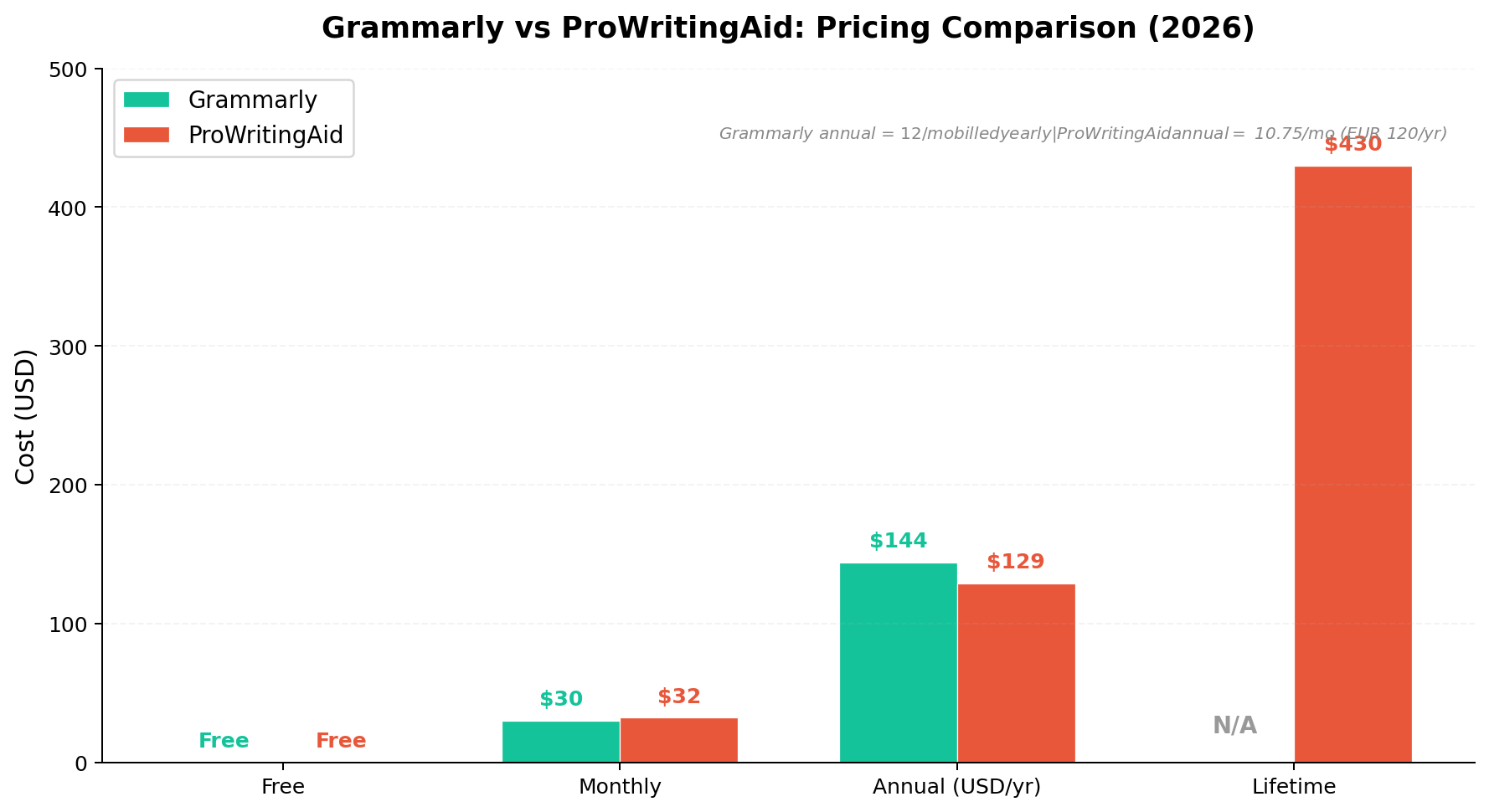
Headline prices look nearly identical — both charge $30/month, and the annual plans sit one apartment apart at $12 vs $10 per month. The real differences show up at the edges. Grammarly's cheapest realistic commitment is $144/year with no exit ramp; there is no lifetime tier at any price. ProWritingAid's $399 lifetime is the anomaly in this entire market: pay once, keep Premium forever. Against the $120/year annual plan it breaks even around year 3.3 — so a novelist who expects to still be writing in 2030 effectively locks in a $0 subscription.
Three-year totals make the decision concrete. Grammarly Pro Annual: $432. ProWritingAid Premium Annual: $390. ProWritingAid Premium Pro Annual (the tier with 50 Sparks and critiques): about $468. And the Premium Lifetime at $399 — roughly $430 in dollars if you buy in euros — which turns to $0/year after purchase. A renewal hack worth knowing: cancel before your renewal date and wait; ProWritingAid typically sends a win-back offer at 40–50% off, the single cheapest tactic on the table. Grammarly's equivalent play is simply downgrading to the genuinely usable free tier between projects.
One more 2026-specific note: ProWritingAid's annual increase from $79 to $120 was a 52% jump — painful for existing subscribers, but the new price still undercuts Grammarly's $144 at every comparable level. Grammarly, meanwhile, effectively simplified: one Pro tier instead of the old Premium/Business split, and the AI prompt cap (historically 2,000/month) is no longer published — marketed as unlimited subject to fair use.
Head-to-Head: 8 Dimensions
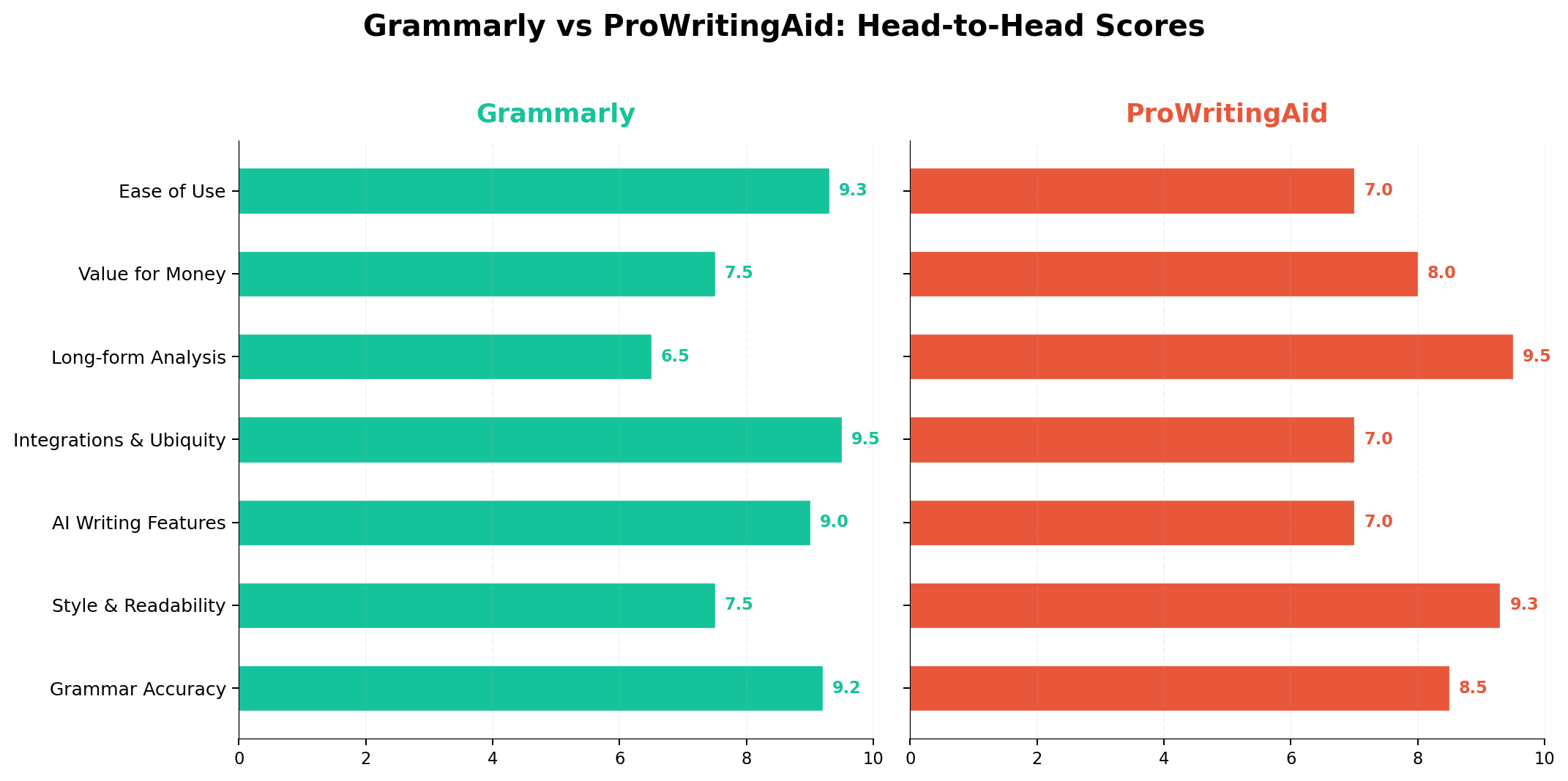
We scored both tools on eight dimensions. The totals — Grammarly 63.2/80 vs ProWritingAid 62.5/80 — are separated by less than one point, which tells you this is a segmentation decision, not a quality gap. Dimension by dimension:
1. Grammar & Spelling — Winner: Grammarly (9.2 vs 8.5)
Grammarly's correction engine remains the most accurate surface-level checker available, covering 400+ error types with context adaptation that reduces false positives in technical writing by around 40%. ProWritingAid is comprehensive but slightly behind on pure error detection — its strength was never spelling.
2. Style & Readability — Winner: ProWritingAid (9.0 vs 7.5)
This is the philosophical divide. Grammarly suggests sentence-level improvements inline; ProWritingAid delivers 25+ reports that map your pacing, sentence-length rhythm, echoes, and readability paragraph by paragraph. For understanding why your prose drags, there's no contest.
3. AI Writing Assistance — Winner: Grammarly (8.0 vs 7.0)
Superhuman Go rewrites, summarizes, replies, and drafts across every app the extension touches, with no published daily cap. Sparks is craft-smarter (add sensory detail, change POV, critique a chapter) but volume-limited to 5/day on Premium and 50/day on Premium Pro. Day-to-day rewriting across everything you write: Grammarly. Focused craft feedback on a manuscript section: Sparks, especially Critique.
4. Integrations & Reach — Winner: Grammarly (9.5 vs 6.0)
The widest gap in the comparison. Grammarly's browser extension covers 500,000+ apps and sites — Gmail, Docs, Word, Slack, Notion, your CMS — plus iOS and Android keyboards. ProWritingAid integrates with Word, Google Docs, and Scrivener (paid), and its extension is Chrome-only. If your writing lives on the web, this dimension alone decides it.
5. Fiction & Long-form — Winner: ProWritingAid (9.5 vs 5.5)
The mirror-image widest gap. Pacing reports, dialogue-tag analysis, sticky-sentence detection, echo hunting, sensory-detail checking, manuscript-level analysis, Scrivener integration, and chapter critiques — every fiction-revision tool that matters. Grammarly flags your intentional fragments as errors and offers nothing above the sentence.
6. Pricing Value — Winner: ProWritingAid (8.5 vs 7.0)
Cheaper at every comparable tier ($120 vs $144 annual), a $399 lifetime option, 20% student discounts that stack with annual billing, and free K-12 access. Grammarly justifies its premium with reach, but renters never stop paying.
7. Plagiarism Detection — Winner: Grammarly (8.5 vs 6.5)
Included with Pro and scanning 16 billion web pages — essential insurance for KDP publishers and academics. ProWritingAid sells plagiarism checking as a separate add-on with unpublished per-check pricing, which adds friction and cost exactly where you need it least.
8. Privacy & Security — Winner: Grammarly (8.0 vs 7.5)
Both are SOC 2-conscious and neither trains models on your text. Grammarly's Enterprise tier (SSO, SCIM, BYOK encryption, DLP, audit logs) is built for regulated deployments, and Authorship gives auditable AI-provenance. ProWritingAid explicitly commits that user data never trains its third-party LLMs — solid, but the compliance surface is thinner.
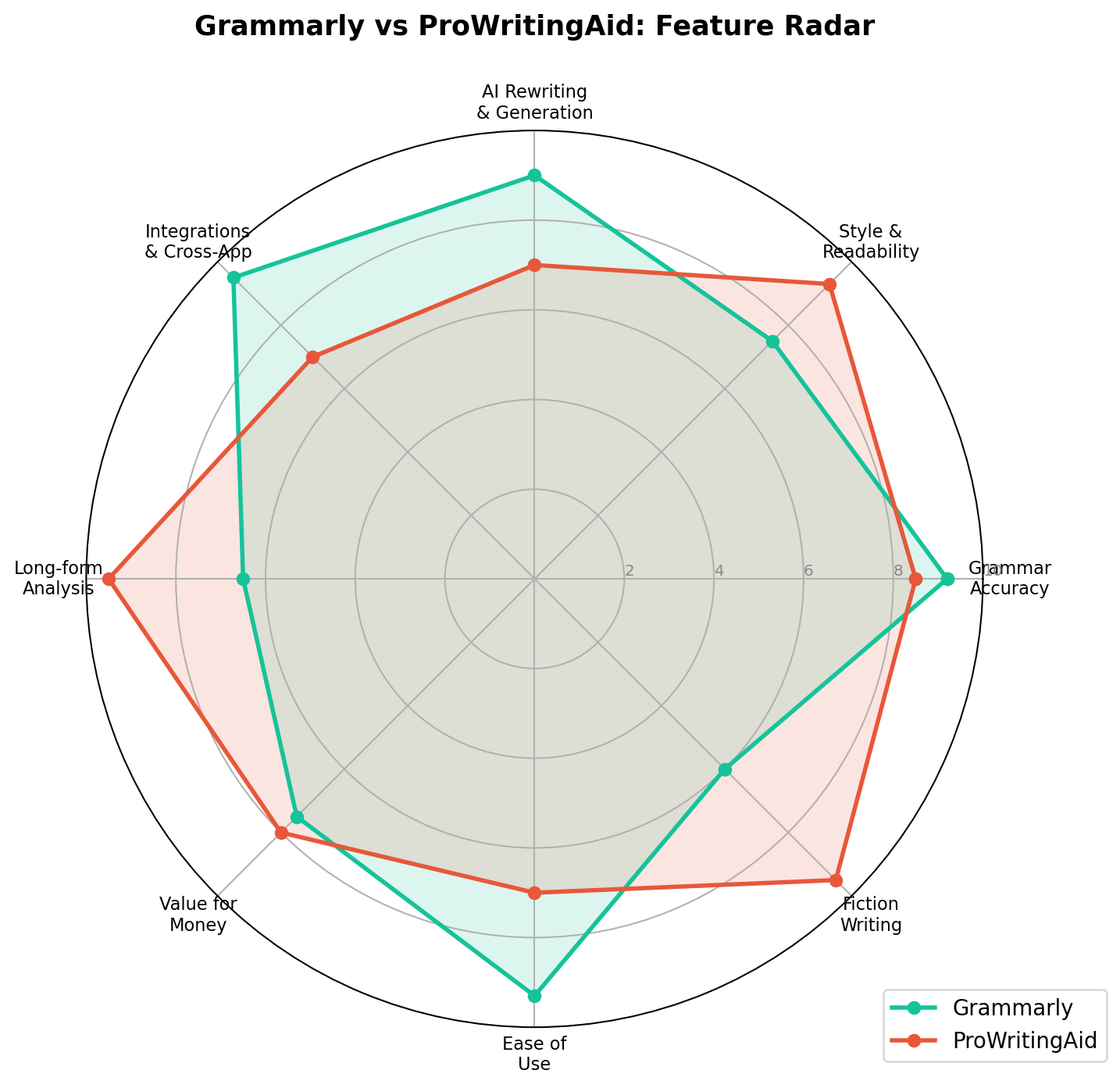
The radar view exposes each tool's silhouette: Grammarly's polygon bulges toward grammar, integrations, and ease of use (9.0 on the radar — the fastest tool to just start using); ProWritingAid's spikes toward style depth, fiction support, and value. Two different shapes for two different writers — the mistake is treating them as substitutes.
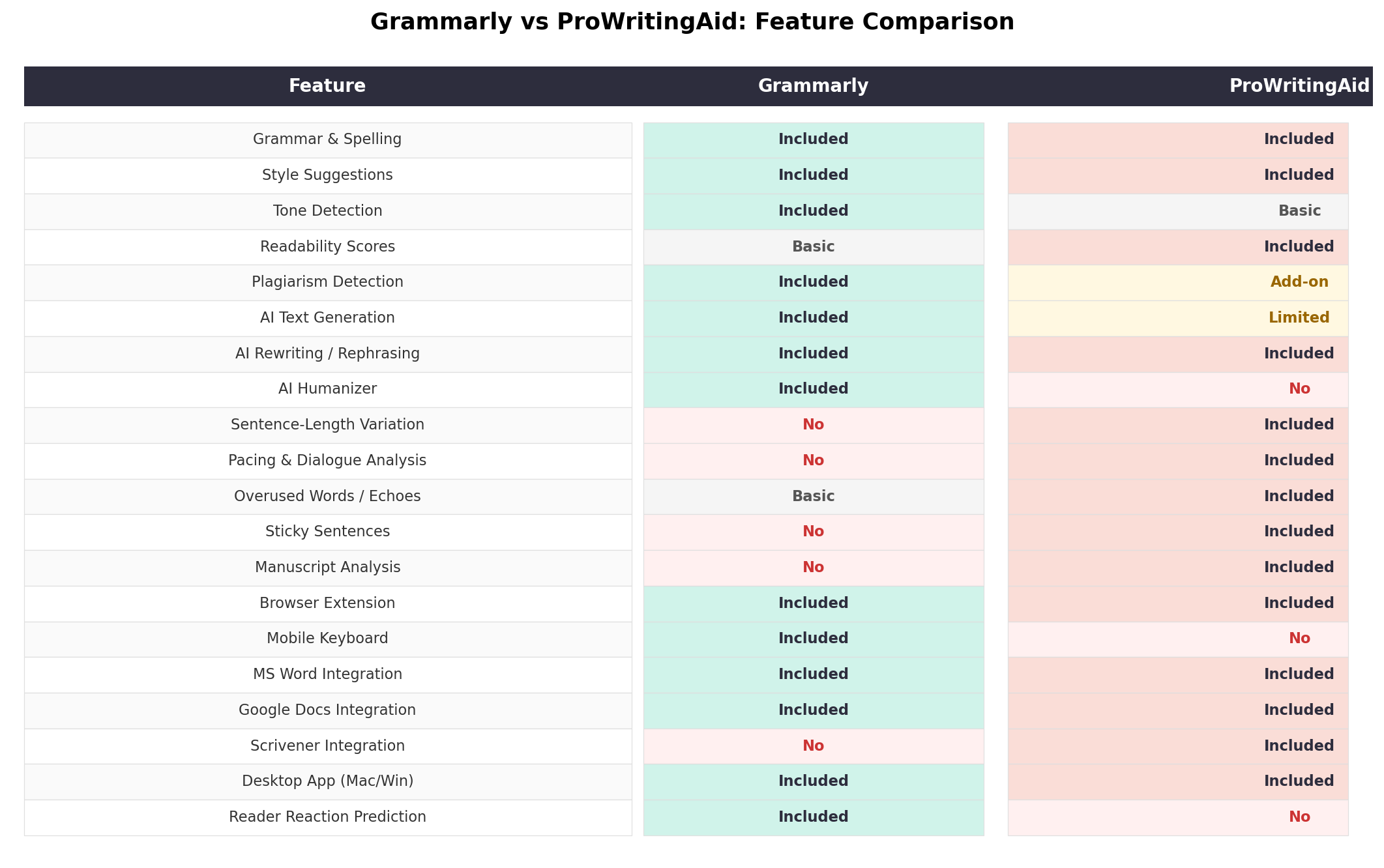
Real-World Money-Making Scenarios
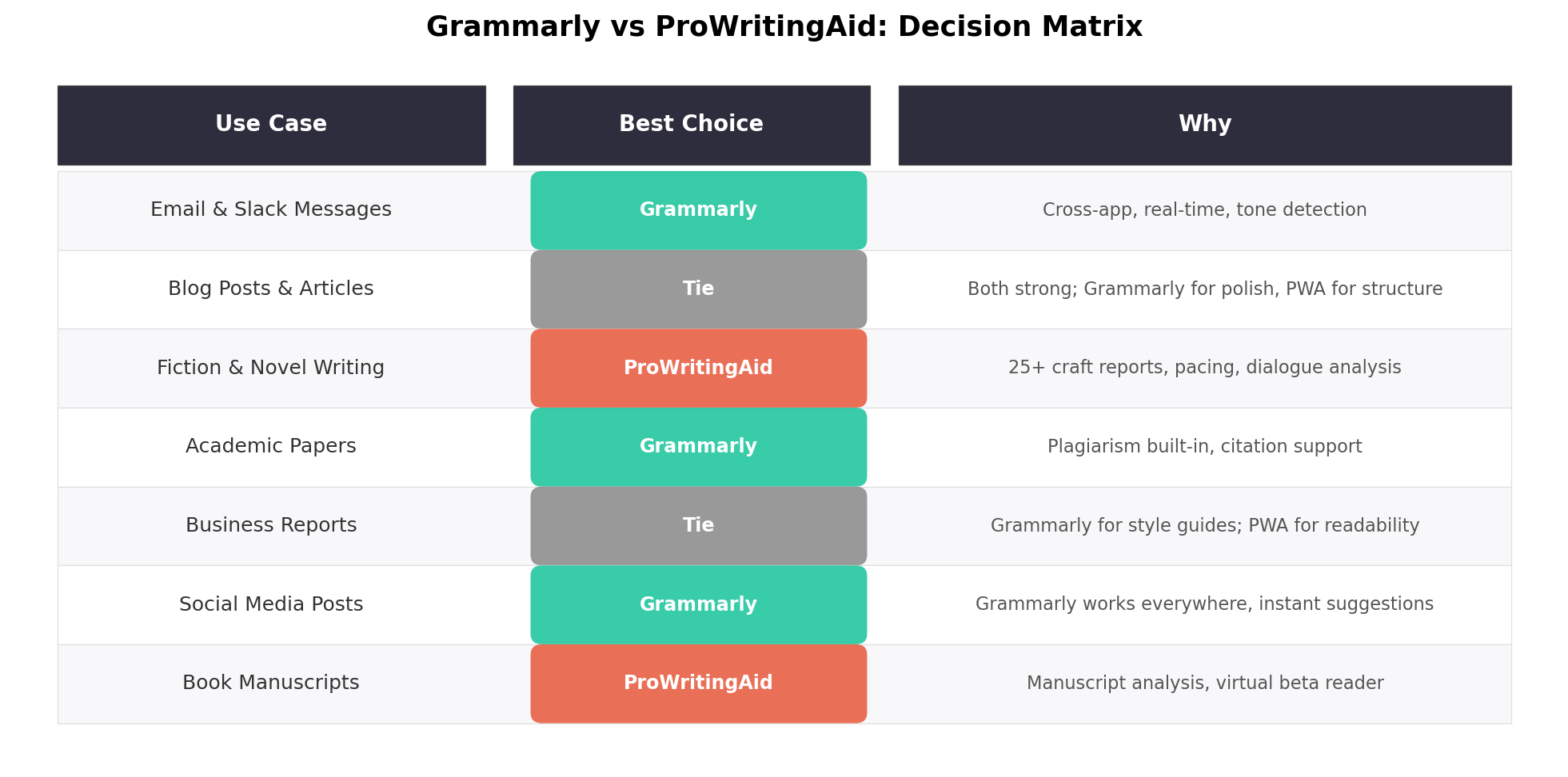
The decision matrix above maps the six most common writing profiles to a winner. Here's what that looks like as actual income workflows — the three gigs where these tools pay for themselves fastest.
Scenario 1: Amazon KDP Nonfiction Guide Publishing (Grammarly runs the table)
One of the most documented side incomes of 2026: ship short English-language guides and tool tutorials — 5,000–15,000 words — on Amazon KDP, priced at $2.99–$9.99 with 70% royalties. The current opportunity is information arbitrage: specialized knowledge (wellness practices, cooking techniques, AI workflows) that's common in one market and untranslated for global readers. The workflow is draft-with-LLM, then edit hard — and KDP requires you to disclose AI-generated text, so the human editing pass is both a quality gate and a compliance step. Grammarly Pro is built for exactly this: paste each chapter into the web editor or work directly in Docs, run unlimited Superhuman Go rewrites on clunky AI-drafted paragraphs, then use the included plagiarism scan against 16B+ pages before upload — one accusation of duplicated content can kill a KDP account. At $144/year, one month of a $4.99 guide selling a few copies a day covers the subscription. Tool pick: Grammarly Pro — reach, unlimited AI rewriting, and bundled plagiarism checking.
Scenario 2: Self-Publishing Fiction and Children's Books on KDP (ProWritingAid pays for itself in one manuscript)
The fiction variant of the KDP economy: chapter books, middle-grade novels, and illustrated children's storybooks (story drafted with an LLM, illustrations generated with Midjourney or similar, e-book listed at $2.99–$9.99). AI drafting gets you a first draft; what separates the titles that earn reviews from the returns is revision — pacing that doesn't sag, dialogue that doesn't clunk, vocabulary matched to reading age. That's ProWritingAid's home turf: run the Pacing and Dialogue reports over the full manuscript in Scrivener, hunt echoes with the Echoes report, then use a Premium Pro Critique (try: "Critique this chapter for pacing and dialogue authenticity for a 7–9 reading age") for structural feedback before publish. A human developmental edit of one novel costs $800–2,000; ProWritingAid Premium Lifetime is $399 once and works on every book you ever write. Tool pick: ProWritingAid Premium Lifetime — manuscript-level reports plus Scrivener, the two things Grammarly simply doesn't have.
Scenario 3: Freelance Writing and Client Content Services (Grammarly is your invisible QA department)
The broadest path: freelance articles, email newsletters, web copy, and LinkedIn ghostwriting for small businesses. Your writing lives everywhere — client briefs in Gmail, drafts in Google Docs, posts into the client's CMS dashboard, invoices in QuickBooks — and a typo in a client's email is reputational damage at any hourly rate. This is Grammarly's 9.5/10 Integrations & Reach doing billable work: it catches the its/it's in the proposal, rewrites the rambling Slack message, and adjusts tone per client with style guides, across 500,000+ surfaces and both phone keyboards, with zero daily AI caps during deadline crunches. Freelance content rates run $0.10–$0.50+ per word; Grammarly Pro at $12/month (annual) is the cheapest insurance policy in the business. Tool pick: Grammarly Pro — because for client work, coverage beats depth.
Alternatives Worth Considering
| Tool | Starting Price | Standout Feature |
|---|---|---|
| LanguageTool | Free; Premium ~$4.99/mo | Open-source engine, 30+ languages, self-hostable for privacy |
| Hemingway Editor | Free web; $19.99 one-time app | Brutal readability scoring and highlight simplification |
| QuillBot | Free; Premium $9.95/mo | Best-in-class paraphrasing with mode control |
| Wordtune | Free; Plus $9.99/mo | Nuanced sentence rewriting with tone options |
| Sudowrite | From $19/mo | Fiction-specific AI: story engine, describe, and brainstorm tools |
| Writer (Palmyra) | From $18/user/mo | Enterprise-grade brand governance and compliance |
The Verdict
🏆 Our Recommendations
Best for business, academic, and client writing → Grammarly Pro ($144/year). It won the total score (63.2/80) on the strength of the most accurate correction engine, presence across 500,000+ apps, effectively unlimited AI assistance, bundled plagiarism detection, and Authorship AI-provenance. If your writing lives in browsers, docs, and email — or you're publishing KDP nonfiction where a plagiarism scan is non-negotiable — this is the pick.
Best for novelists and long-form authors → ProWritingAid Premium Lifetime ($399 once). The 25+ manuscript reports, native Scrivener integration, and chapter-level Critiques are tools Grammarly doesn't have at any price. The lifetime deal breaks even at year 3.3 and then costs nothing forever — the correct buy for anyone who'll still be writing books in 2030.
Best overall value → ProWritingAid. Cheaper at every tier, student pricing that stacks, and the only lifetime option in the category. You're trading breadth of integration for depth of analysis — for book-length work, that trade wins.
The hybrid play career authors converge on: ProWritingAid for the manuscript passes in Scrivener, Grammarly's free tier (or Pro during client seasons) for everything that isn't the book — proposals, newsletters, marketing copy. Together they run about $22/month equivalent, less than a single hour of a human editor, and cover every writing surface you own.
Frequently Asked Questions
Is Grammarly still called Grammarly in 2026?
The writing product is still Grammarly, but the parent company rebranded to Superhuman in October 2025 after acquiring Coda and Superhuman Mail. The suite is now Grammarly, Coda, Superhuman Mail, and Superhuman Go (successor to GrammarlyGO). Grammarly Pro costs $30/month or $144/year.
Is ProWritingAid worth it after the 2026 price increase?
For long-form and fiction writers, yes. Premium is now $120/year (up from $79) and Premium Pro $144/year with 50 Sparks and 3 critiques daily. The $399 lifetime still undercuts three years of Grammarly Pro, and students save 20% via Student Beans. For short everyday writing, the free plan's 500-word cap gets restrictive.
Which is better for fiction authors: Grammarly or ProWritingAid?
ProWritingAid, decisively. Its 25+ reports cover pacing, dialogue, echoes, and sensory detail — story-level revision tools Grammarly doesn't have. Grammarly flags intentional fragments and stylized punctuation as errors. Add Scrivener integration and the $399 lifetime, and it's not close for novelists.
Is the ProWritingAid lifetime plan worth it?
If you'll still be writing in three years, yes. Premium Lifetime is $399 one-time versus $120/year, breaking even around year 3.3 — free forever after. Premium Pro Lifetime at $699 only makes sense for heavy Sparks and Critique users. Grammarly offers no lifetime option.
Can you use Grammarly for free?
Yes, and it's the more usable free tier: unlimited-length checking across all 500,000+ supported apps, read-only tone detection, and 100 AI prompts monthly. ProWritingAid's free plan caps at 500 words per check and 3 Sparks per day.
Do Grammarly and ProWritingAid work with Scrivener, Word, and Google Docs?
Both cover Word and Google Docs. ProWritingAid adds native Scrivener integration on paid plans; Grammarly doesn't support Scrivener at all. Grammarly counters with extensions across all major browsers plus iOS and Android keyboards — ProWritingAid's extension is Chrome-only with no mobile keyboard.
Can I use Grammarly or ProWritingAid for Amazon KDP publishing?
Yes — both are editing tools, and KDP's disclosure rules target AI-generated text, not AI-assisted editing of your own drafts. The standard workflow: draft (yourself or with an LLM and disclosed as such), then run Grammarly Pro's included plagiarism scan for nonfiction guides or ProWritingAid's manuscript reports for fiction before upload. Grammarly's Authorship can additionally document human-versus-AI contribution.