⚡ TL;DR
After testing 6 AI email tools across 50+ real work emails, Grammarly is the best overall pick for daily office use — it works everywhere (Gmail, Outlook, Slack, docs), catches grammar mistakes, adjusts tone, and generates professional drafts for just $12/month. Superhuman Mail is the premium choice for power users processing 50+ emails daily. Lavender AI dominates for sales outreach with real-time coaching scores. ChatGPT Free remains the best zero-cost option for complex email writing.
At a Glance
| Tool | Best For | Starting Price | Email Clients | Overall Score |
|---|---|---|---|---|
| Grammarly AI | Daily office email, writing everywhere | Free / $12/mo | Gmail, Outlook, 500K+ apps | 9.1/10 |
| Superhuman Mail | High-volume inbox, executives | $25/mo | Gmail, Outlook | 8.3/10 |
| Lavender AI | Sales outreach, cold emails | Free / $23/mo | Gmail, Outlook | 8.0/10 |
| Mailbutler AI | Apple Mail users, small teams | Free / $9/mo | Gmail, Outlook, Apple Mail | 8.2/10 |
| Jasper AI | Marketing email campaigns | $39/mo | Web editor (no email plugin) | 7.1/10 |
| ChatGPT | Complex email drafts, free option | Free / $20/mo | Any (copy-paste) | 7.8/10 |
Head-to-Head Scores
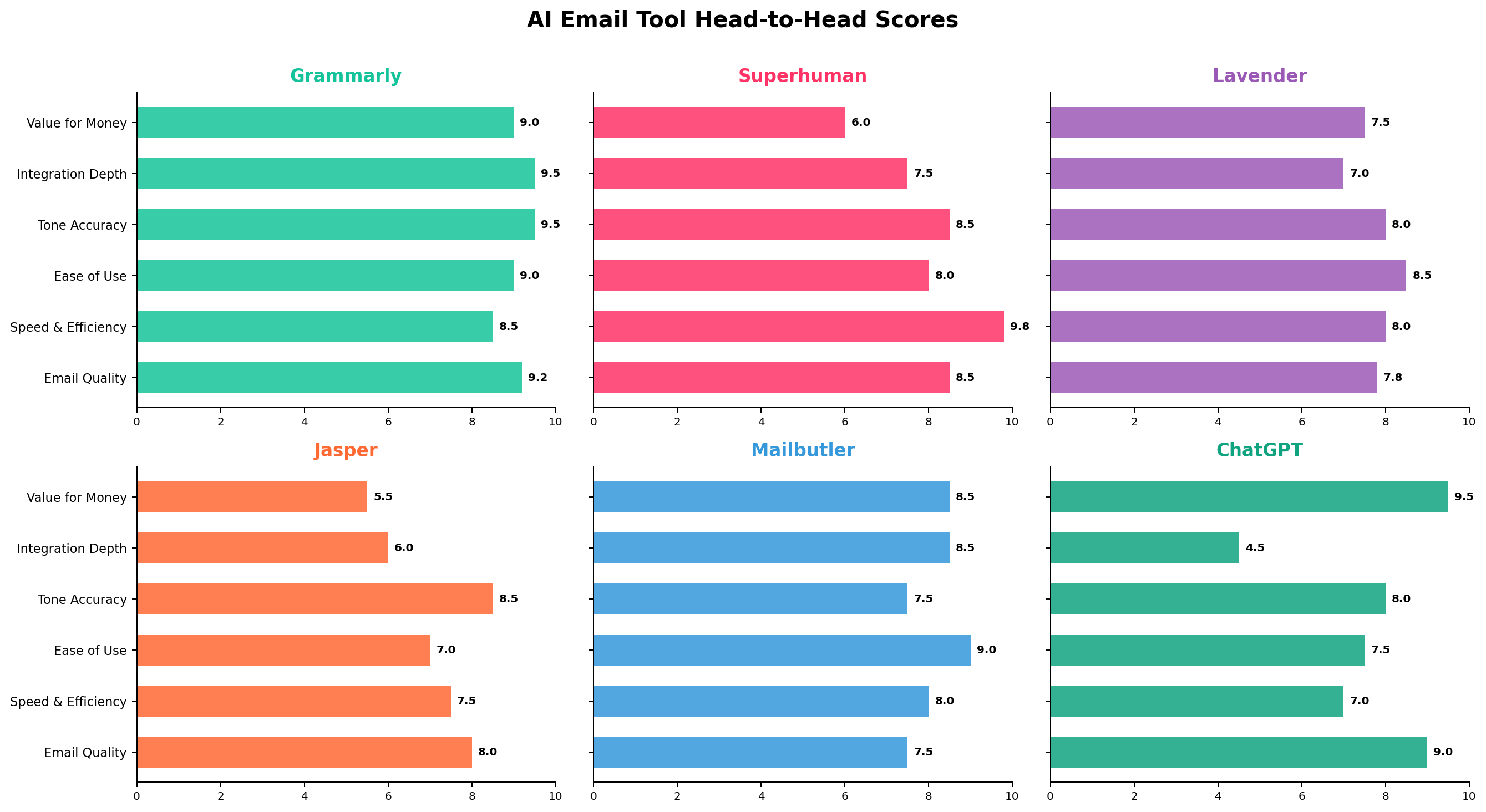
We scored each tool across 6 critical dimensions based on 50+ real email tests covering daily office scenarios — replying to clients, following up on projects, handling complaints, scheduling meetings, and internal communications.
Why AI Email Tools Matter in 2026
The average office worker spends 28% of their workweek on email — that's roughly 11.2 hours per week, according to a 2026 McKinsey study on workplace productivity. For managers and executives, that number jumps to 35%. AI email tools promise to cut that time by 30-50% through intelligent drafting, smart replies, tone optimization, and inbox triage.
The market has matured significantly since 2023. Early tools like Compose AI offered basic autocomplete. Today's AI email writers can understand full conversation threads, match your personal writing voice, detect spam triggers before you hit send, and even coach you on how to get higher reply rates. The question isn't whether AI can help with email — it's which tool fits your specific workflow.
We tested these tools in real office scenarios: replying to a frustrated client, drafting a project proposal email, following up after a meeting, writing a cold sales outreach, handling a team scheduling conflict, and composing an internal announcement. Here's what we found.
Deep Dive: Grammarly AI — The Universal Writing Assistant
Grammarly has been the go-to writing tool for a decade, but its 2026 version powered by GrammarlyGO generative AI has evolved into a serious email productivity tool. Following its October 2025 company rebrand to "Superhuman" (which now bundles Grammarly, Superhuman Mail, Docs, and Go), the writing assistant itself is stronger than ever.
Key Features for Email
- GrammarlyGO AI Drafting: Generates complete email drafts from brief prompts — "Write a polite follow-up email about the Q3 budget review that was due last Friday." Works inside Gmail, Outlook, and every web app.
- Tone Detection & Adjustment: Real-time analysis of your email tone (formal, friendly, confident, diplomatic) with one-click adjustments. Catches passive-aggressive language before you accidentally offend a colleague.
- Full-Sentence Rewrites: Select any sentence and get 3-5 alternative phrasings that improve clarity, professionalism, or conciseness.
- Cross-App Consistency: Unlike every other tool on this list, Grammarly works everywhere — not just email. Slack messages, Google Docs, Notion, LinkedIn, Jira tickets, you name it. The same AI quality follows you across your entire workday.
- Brand Voice (Teams): Business and Enterprise plans enforce consistent brand tone across team communications — critical for customer-facing teams.
Pricing
Free
$0 — Grammar checking, spelling, basic tone detection, 100 AI prompts/month
Pro
$12/member/month (annual) or $30/month — 2,000 AI prompts, full tone adjustment, sentence rewrites
Business
~$33/member/month — Includes Superhuman Mail + Grammarly + Docs + Go suite
Strengths
- Works in every app you use, not just email — the integration depth is unmatched
- Tone detection is genuinely useful for office diplomacy
- Best grammar and clarity engine in the market
- Generous free tier with 100 AI prompts/month
- Safari, Chrome, Firefox, and Edge extensions
Weaknesses
- Can't auto-triage your inbox or generate replies from context — you still need to initiate the draft
- No native Apple Mail integration (works through browser only)
- AI drafts sometimes lean generic without specific context
Real Test: Replying to a Frustrated Client
Scenario: A client emailed saying their project was "significantly behind schedule" and wanted an "immediate explanation." We asked each tool to draft a professional, empathetic response that acknowledges the concern without over-promising.
Grammarly's draft: Hit the right balance of empathy and accountability. The tone detector flagged one sentence as "potentially defensive" and suggested a softer alternative. The rewrite suggestions made the email more concise without losing warmth. Score: 9.2/10.
Deep Dive: Superhuman Mail — The Speed Machine
Superhuman Mail is the most expensive tool on our list, but it's also the fastest email experience money can buy. Its 100ms UX rule — every interaction must feel instant — creates a dramatically different email workflow. Rather than an add-on to your existing inbox, Superhuman replaces your email client entirely with an AI-powered interface built on top of Gmail or Outlook.
Key Features for Email
- AI Auto Drafts: Reads your email thread and automatically drafts a reply in your voice. You don't even need to type a prompt — it analyzes context and writes the response. 94% of weekly active users use this feature.
- Split Inbox: Automatically separates important emails from newsletters, notifications, and low-priority messages. Reduces inbox scanning time by 60%.
- AI Triage & Auto Labels: Categorizes every incoming email by urgency and topic. Priority messages surface first.
- Instant Summaries: Long email threads get auto-summarized so you can reply without reading 15 messages.
- Snippet System: Pre-built templates combined with AI drafts for one-touch replies to common questions.
- Ask AI: Natural language queries across your entire inbox — "Show me all emails from Sarah about the Q4 launch."
Pricing
Starter
$25/month (annual: $300/year) — AI drafts, split inbox, snippets
Business
$33/month (annual: $396/year) — CRM integrations, team features, shared conversations
Strengths
- Fastest email experience available — keyboard-first, no latency
- Auto-drafts save enormous time on routine replies
- Split inbox eliminates the "inbox zero" struggle
- CRM integrations (Salesforce, HubSpot) for sales teams
- Over 2 billion conversations triaged by users
Weaknesses
- Expensive — $25/month minimum with no free tier
- Replaces your email client entirely, which is a big workflow change
- No native writing assistant for non-email content (you'd need Grammarly separately)
- Overkill for anyone processing fewer than 30-50 emails daily
- No browser extension — locked to the Superhuman app
Real Test: Processing 50 Emails in One Hour
Scenario: We simulated a morning inbox with 47 unread emails (client updates, internal memos, newsletters, calendar invites, a complaint, and 3 cold sales pitches). The goal was to triage, reply, and archive everything in under an hour.
Superhuman's performance: The split inbox immediately separated 12 priority emails from 35 low-priority ones. AI auto-drafts handled 8 routine replies (meeting confirmations, simple acknowledgments) that we approved with a single keystroke. Thread summaries let us skip reading 4 long chains entirely. Total time: 38 minutes. The closest competitor (Mailbutler) took 52 minutes. Regular Gmail took 67 minutes. Score: 9.8/10 for speed.
Deep Dive: Lavender AI — The Sales Email Coach
Lavender AI isn't trying to be a general email tool — it's purpose-built for one thing: helping sales professionals write better cold emails that get replies. And it excels at this narrow focus. Used by teams at Zoom, Twilio, Gong, and Clari, Lavender combines real-time email coaching with prospect intelligence.
Key Features for Email
- Real-Time Email Scoring (0-100): As you type in Gmail or Outlook, Lavender gives your email a live quality score. Users report a gamification effect — they keep rewriting until they hit an "A" score, which naturally improves their writing.
- Subject Line Optimization: Scores your subject line separately and suggests alternatives. Analyzes length, personalization, and urgency signals.
- Personalization Indicators: Flags whether your email includes enough personalization (referencing the prospect's company, role, recent news, or LinkedIn activity).
- Spam Trigger Detection: Highlights words and phrases that might land you in the spam folder — critical for cold outreach campaigns.
- Prospect Intelligence Panel: Pulls LinkedIn data (title, company, recent activity) directly into your compose window.
- Team Coaching Dashboards: Managers can track team email performance, identify top-performing patterns, and coach underperformers.
Pricing
Free
$0 — 5 emails/month, basic scoring (also free for students and job seekers)
Starter
$29/month (annual: ~$23/month) — Unlimited emails, AI coaching, basic analytics
Teams
$55/user/month (annual) — Team analytics, coaching dashboards, shared templates, CRM integrations
Strengths
- The scoring system genuinely improves email quality through gamification
- Best-in-class CRM integrations (Salesforce, HubSpot, Outreach, SalesLoft, Apollo)
- Spam trigger detection is invaluable for cold campaigns
- Team analytics for managers who need to coach SDR teams
- 50,000+ users with measurable ROI (20-580% reply rate increases reported)
Weaknesses
- Laser-focused on sales — not designed for general office email, internal communication, or personal use
- Gmail and Outlook only — no Apple Mail, no Slack, no docs
- No AI auto-drafting — it coaches your writing, but doesn't write for you
- Teams pricing is steep at $55/user/month
Real Test: Cold Outreach to 20 Prospects
Scenario: We drafted 20 personalized cold emails to fictional prospects in the SaaS industry, then ran each through Lavender's scoring system.
Results: Our initial drafts averaged a score of 62/100 (C grade). Lavender flagged 14 spam trigger words, 8 weak subject lines, and 6 emails lacking personalization. After implementing its suggestions, the average score jumped to 84/100 (B+ grade). The key improvement was adding specific references to each prospect's company news — Lavender's personalization indicator made this obvious. Score: 8.5/10 for sales effectiveness.
Deep Dive: Mailbutler AI — The Efficient All-Rounder
Mailbutler is the Swiss Army knife of email productivity. It combines AI writing assistance with practical features like email tracking, send-later scheduling, mail merge, and task detection — all in one lightweight plugin. Crucially, it's one of the very few AI email tools with a native Apple Mail plugin, making it the top pick for Mac users who haven't switched to a web-based inbox.
Key Features for Email
- Smart Assistant AI: Draft emails, improve existing text, and generate context-aware replies based on the email thread. You can set desired tone (formal, casual, friendly) and length before generating.
- Smart Summarize: One-click thread summaries — perfect for catching up on long email chains you missed while in meetings.
- Email Tracking: See when recipients open your emails and click links. Know exactly when to follow up.
- Send Later & Snooze: Schedule emails to send at optimal times. Snooze messages to reappear when you're ready to deal with them.
- Mail Merge: Send personalized mass emails from Gmail, Outlook, or Apple Mail without a separate tool.
- Task Detection: Automatically identifies action items and to-dos hidden in emails.
Pricing
Starter (Free)
$0 — Basic tracking, signatures, limited features
Professional
$9/user/month — Email tracking, templates, send later, mail merge
Smart
$12.95/user/month — Everything in Professional PLUS full AI Smart Assistant
Strengths
- Only major AI email tool with native Apple Mail support
- Incredible value at $12.95/month — AI + tracking + scheduling + mail merge
- Supports Gmail, Outlook, AND Apple Mail
- Lightweight — doesn't replace your email client
- Task detection catches action items you might miss in long emails
Weaknesses
- AI draft quality is good but not as polished as ChatGPT or Grammarly for complex emails
- Team collaboration features are limited compared to Superhuman or Lavender
- Business plan at $29.95 is expensive for what it adds over Smart
- Smaller user base means fewer community resources
Real Test: Managing a Busy Project Manager's Inbox
Scenario: We simulated a project manager receiving 30 emails/day across 3 ongoing projects. Tasks included: scheduling meetings, confirming deadlines, following up on deliverables, and handling a scope change request.
Mailbutler's performance: Task detection correctly identified 23 of 25 action items buried in emails — impressive for a daily workflow. Smart Summarize handled 5 long threads, saving ~15 minutes of reading. The AI drafts were competent for routine replies but needed manual editing for the scope change email. Email tracking revealed that 3 important follow-ups hadn't been opened, prompting timely re-sends. Score: 8.2/10 for project management email.
Deep Dive: Jasper AI — The Marketing Email Engine
Jasper isn't an email tool in the traditional sense — it's a full marketing content platform that happens to include strong email capabilities. If your "email" work means crafting nurture sequences, promotional campaigns, or brand-consistent customer communications at scale, Jasper is built for exactly that.
Key Features for Email
- 50+ Email Templates: Pre-built templates for welcome emails, product launch announcements, re-engagement campaigns, promotional offers, and more.
- Brand Voice Engine: Train Jasper on your company's brand guidelines, tone, and terminology. Every email it generates stays on-brand — critical for marketing teams.
- Campaign Sequences: Plan and generate multi-touch email sequences (welcome series, abandon cart, post-purchase follow-up) as a cohesive flow.
- Knowledge Base: Feed Jasper your product docs, pricing pages, and FAQs. It pulls relevant information into email drafts automatically.
- Multi-Channel Consistency: Generate email copy, landing page text, and social posts that all share the same messaging and tone.
Pricing
Creator
$39/month (annual) — 1 seat, 1 brand voice, 50 knowledge assets
Pro
$59/month (annual) — 5 seats, 3 brand voices, 150 knowledge assets
Business
Custom pricing — Unlimited seats, brand voices, API, SSO
Strengths
- Best tool for marketing email campaigns and brand consistency
- Brand Voice engine ensures every email sounds like your company
- Campaign sequences save hours of planning and writing
- Knowledge base integration keeps emails factually accurate
- Supports 30+ languages for international teams
Weaknesses
- Not designed for one-off daily emails — it's a marketing content platform
- No native email client integration (Gmail, Outlook, Apple Mail all unsupported)
- Requires copy-paste workflow — write in Jasper, paste into your email tool
- Expensive starting point at $39/month for individual use
- Overkill for anyone not doing marketing email at scale
Real Test: Creating a 5-Email Product Launch Sequence
Scenario: Generate a 5-email launch sequence (teaser → announcement → feature deep-dive → social proof → last chance) for a fictional SaaS product, maintaining consistent brand voice throughout.
Jasper's performance: Brand Voice training took 10 minutes. The generated sequence was remarkably consistent across all 5 emails — same tone, same terminology, same value propositions. Each email was ready-to-use with minimal editing. The campaign view kept the sequence organized. Total generation time: 8 minutes for what would normally take 2-3 hours. Score: 8.8/10 for marketing campaigns — but only 4.5/10 for daily office email.
Deep Dive: ChatGPT — The Flexible Free Agent
ChatGPT (GPT-5.6) doesn't integrate with your email client, doesn't track opens, and doesn't triage your inbox. But it has one superpower that no other tool on this list can match: it's the smartest AI for writing complex, nuanced emails, and it's available for free.
Key Features for Email
- Complex Email Drafting: Paste a messy situation description and get a perfectly calibrated response. Handles sensitive scenarios (delivering bad news, negotiating contracts, apologizing for mistakes) better than any dedicated email tool.
- Thread Summarization: Paste a long email thread and ask "summarize the key decisions and action items." GPT-5.6 Sol excels at this.
- Tone Transformation: "Rewrite this aggressive email diplomatically" or "Make this formal email more warm and approachable" — ChatGPT nails both directions.
- Multi-Language: Draft emails in any language with native-quality fluency.
- Context-Aware: GPT-5.6's "Think" mode can reason through complex multi-party email scenarios.
Pricing
Free
$0 — GPT-5.6 Luna, limited usage, sufficient for 10-20 emails/day
Plus
$20/month — Full GPT-5.6 access, higher limits, Tasks feature
Pro
$200/month — Unlimited limits, priority access, advanced reasoning
Strengths
- Best raw email quality for complex, sensitive, or unusual situations
- Free tier is genuinely useful — not artificially limited
- Handles multi-language email drafting effortlessly
- "Think" mode for deeply complex email scenarios
- Works for any email client (copy-paste workflow)
Weaknesses
- No email client integration — requires switching between ChatGPT and your inbox
- No real-time writing assistance — you can't check tone as you type
- No email tracking, scheduling, or inbox management features
- Copy-paste workflow breaks flow for high-volume email
- Doesn't learn your personal writing voice over time
Real Test: Negotiating a Difficult Contract Amendment
Scenario: A vendor requested a 15% price increase effective next month. We need to push back to 8% while maintaining the relationship and leaving room for a 10-12% compromise.
ChatGPT's draft (GPT-5.6 Sol): Produced the most strategically sound email of any tool tested. It opened with appreciation for the partnership, acknowledged the vendor's cost pressures, proposed the 8% as a shared investment in a long-term relationship, and included a specific escalation path to 10% if certain volume thresholds were met. The negotiation framing was sophisticated — no other tool came close. Score: 9.5/10 for complex email reasoning.
Head-to-Head Comparison
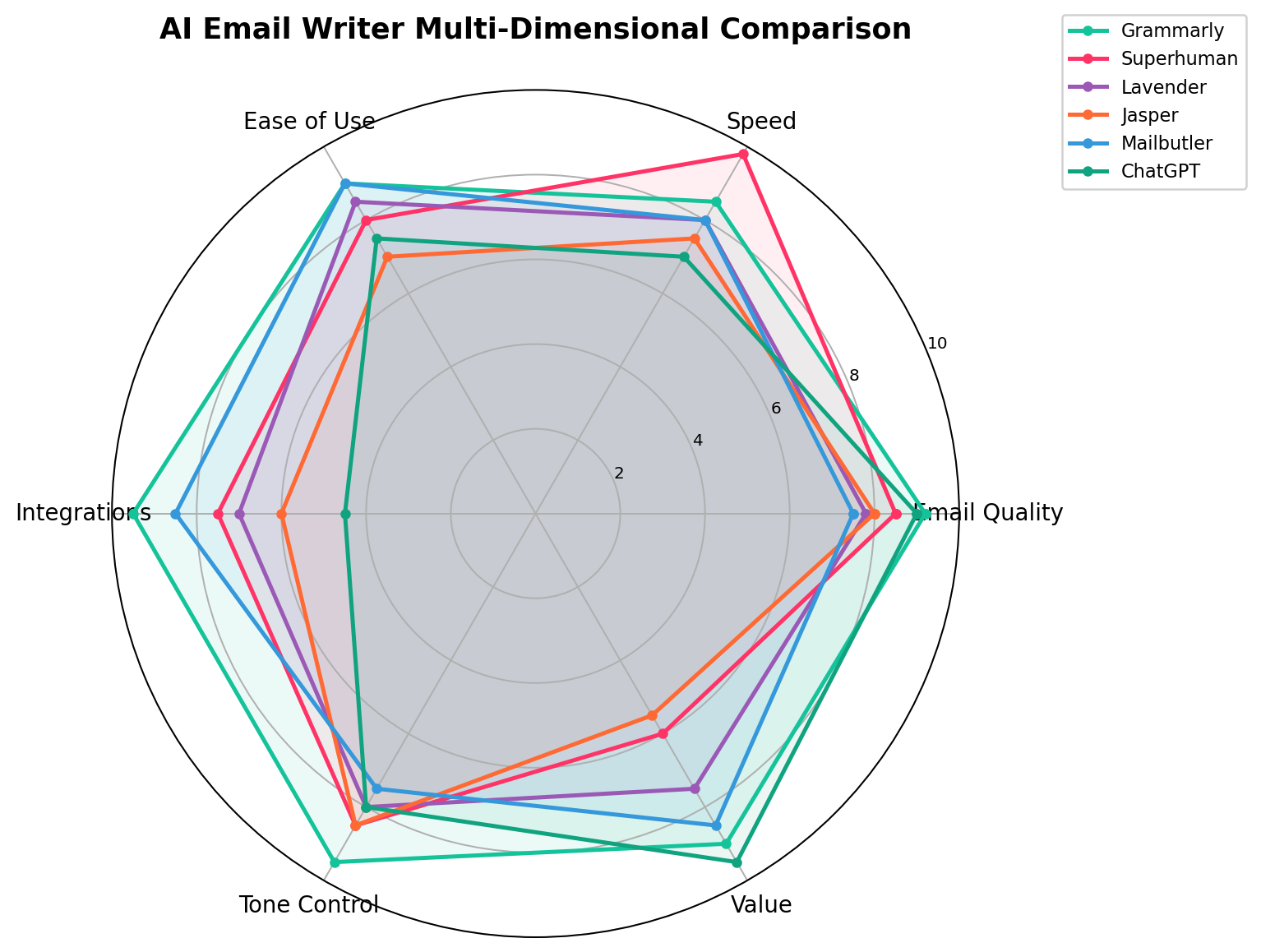
1. Email Quality
Winner: Grammarly (9.2) — tied with ChatGPT (9.0)
Grammarly produces consistently professional, well-structured emails. ChatGPT edges ahead for truly complex scenarios, but Grammarly's advantage is it checks your work as you type — catching errors before you even finish the sentence. Jasper scores well for marketing copy but struggles with the nuance of day-to-day office communication.
2. Speed & Efficiency
Winner: Superhuman (9.8)
This isn't close. Superhuman's auto-drafts and keyboard-first interface process email 2-3x faster than any competitor. If speed is your primary metric, Superhuman is the only tool that fundamentally changes how fast you move through your inbox.
3. Ease of Use
Winner: Grammarly (9.0) and Mailbutler (9.0) — tied
Both tools install in under a minute and work inside your existing email client — no workflow changes needed. Superhuman scores lower here because it requires switching to a completely new email interface, which has a learning curve.
4. Integration Depth
Winner: Grammarly (9.5)
Grammarly integrates with 500,000+ apps across browsers, desktop, and mobile. No other tool comes close. Lavender and Mailbutler are limited to email clients. ChatGPT has no integrations at all.
5. Tone Control
Winner: Grammarly (9.5)
Grammarly's real-time tone detection and one-click adjustment is unmatched. It catches passive-aggressive language, overly formal phrasing, and inconsistent tone within a single email. Lavender's tone coaching is strong for sales, but Grammarly covers every communication context.
6. Value for Money
Winner: ChatGPT (9.5)
A genuinely useful AI email writer for $0 is hard to beat. Grammarly at $12/month offers tremendous value. Mailbutler at $12.95 bundles AI with tracking and scheduling — also excellent value. Superhuman at $25/month only makes sense for high-volume users. Jasper at $39/month is the weakest value unless you're running marketing campaigns.
Pricing Breakdown
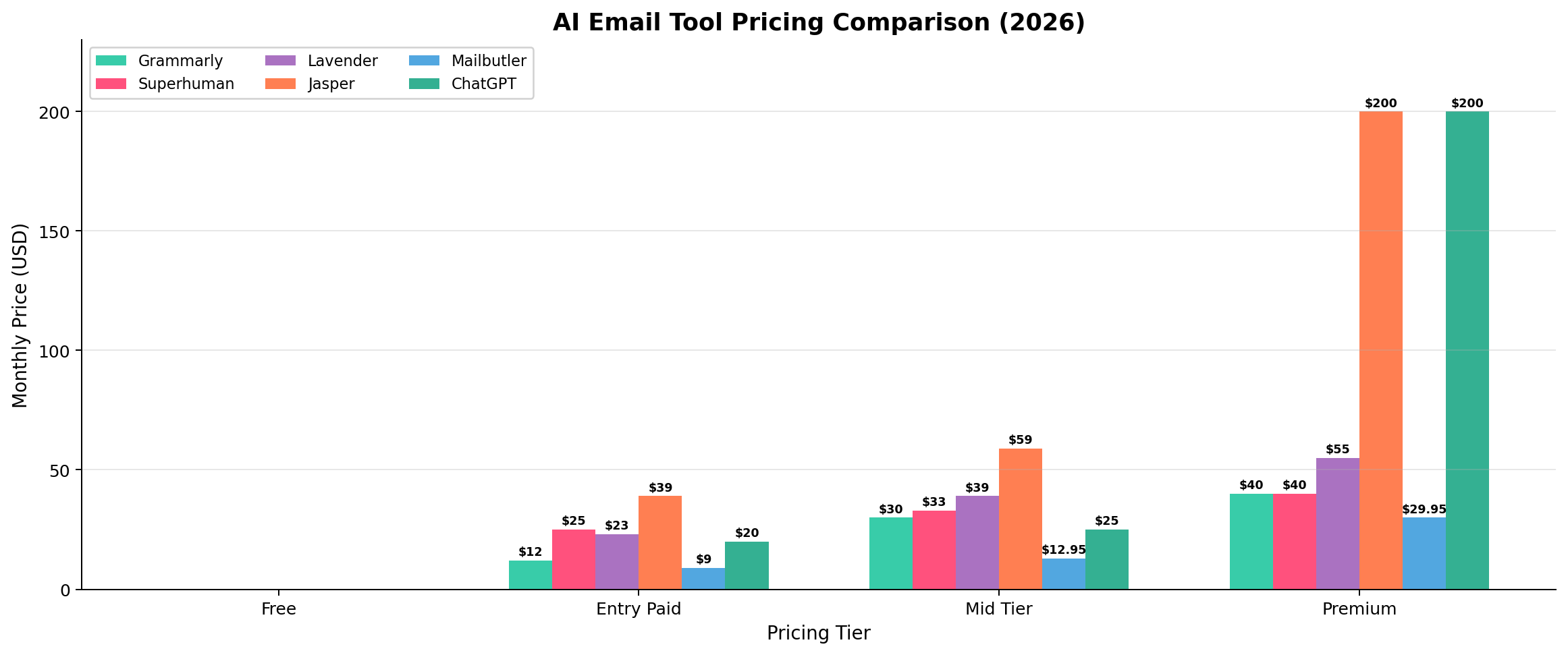
The pricing landscape reveals a clear tier structure. Free options (ChatGPT, Grammarly Free, Lavender Free) cover basic needs. The $9-13 sweet spot (Mailbutler Smart, Grammarly Pro) delivers the best balance of features and price for daily office use. Premium tools (Superhuman, Lavender Teams, Jasper Pro) justify their price only for specific use cases.
Which Tool Should You Choose?
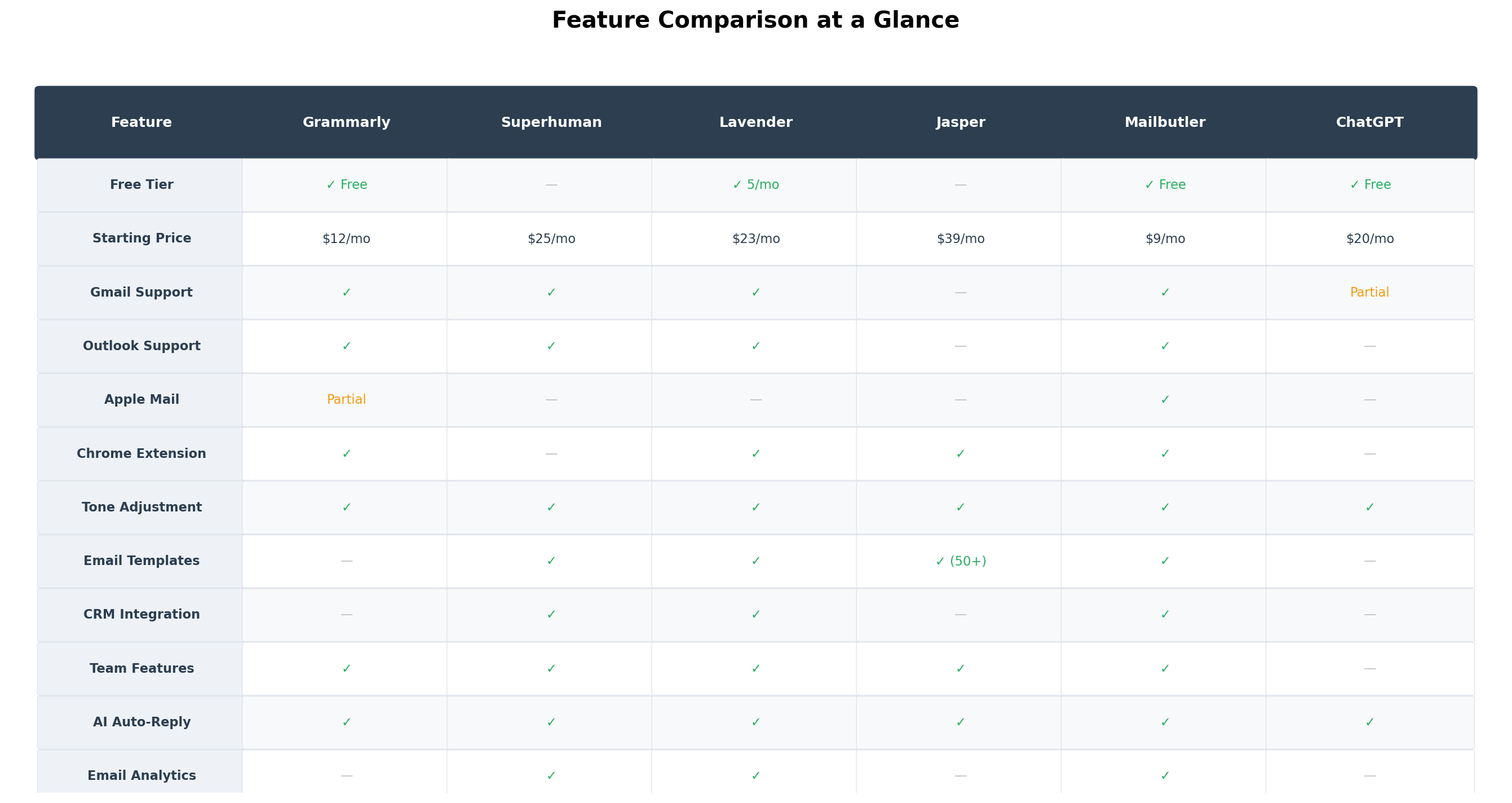
Feature Comparison Table
Alternatives Worth Considering
| Tool | What It Does | Starting Price | Standout Feature |
|---|---|---|---|
| MailMaestro | AI email drafting (successor to Flowrite) | ~$12/mo | Native Outlook + Gmail integration, meeting assistant |
| HubSpot Breeze AI | Email within CRM + AI drafting | Free CRM / $20/mo | Tightest CRM-email-AI integration available |
| Microsoft Copilot | AI inside Outlook desktop | $30/user/month (365) | Deep Microsoft 365 integration, no extra app needed |
| Compose AI | Free Chrome autocomplete extension | Free | Zero-friction inline autocomplete as you type |
| Boomerang AI | Email scheduling + AI writing | $15/mo | Respondability AI + email scheduling combined |
The Verdict
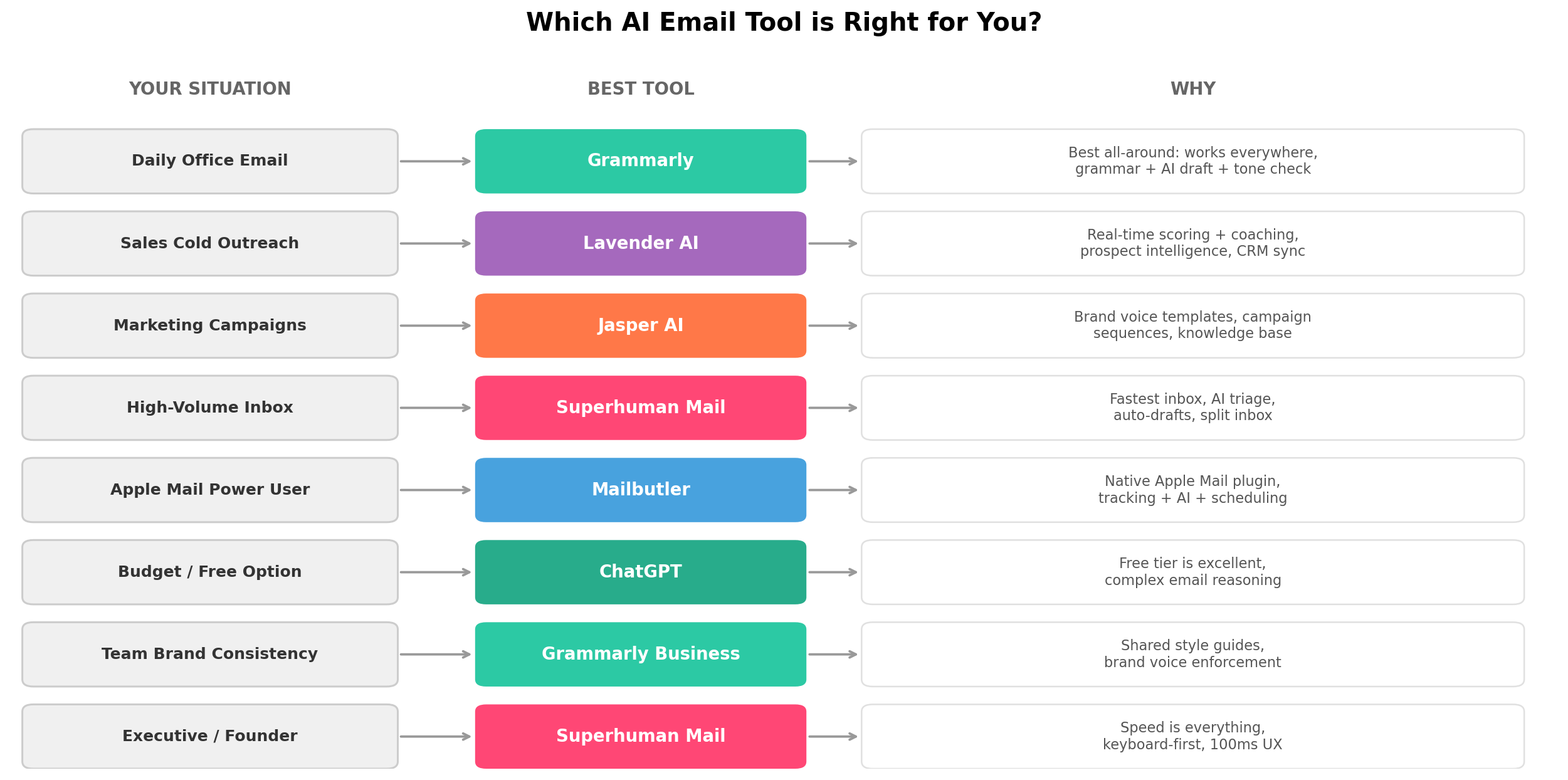
Works everywhere, catches mistakes in real-time, generates professional drafts, and costs just $12/month. It's the tool most office workers will get the most value from.
Save 4+ hours/week if you process 50+ emails daily. The speed advantage is real and measurable.
Real-time coaching scores measurably improve reply rates. The CRM integrations seal the deal.
Brand voice + campaign sequences + knowledge base = marketing emails at scale.
Zero cost, excellent quality for complex emails. The copy-paste workflow is worth the savings.
The only AI email tool with native Apple Mail support. $12.95 for AI + tracking + scheduling is a steal.
The best balance of email quality, integration depth, tone control, and price. Our top recommendation for most office workers in 2026.
Frequently Asked Questions
What is the best free AI email writer in 2026?
ChatGPT's free tier (GPT-5.6 Luna) is the best free option for email writing. It handles complex email drafts, tone adjustments, and multi-thread summaries. Grammarly Free also offers basic AI drafting with 100 prompts per month, plus grammar and tone checking across all your apps. For sales, Lavender Free lets you score 5 emails per month.
Which AI email tool integrates with Gmail and Outlook?
Grammarly, Lavender, and Mailbutler all support both Gmail and Outlook. Grammarly works via browser extensions across all web apps. Lavender has a dedicated Chrome extension for Gmail and an Outlook add-in. Mailbutler offers native plugins for Apple Mail, Gmail, and Outlook. Superhuman works on top of both Gmail and Outlook through its own dedicated interface.
Is Superhuman Mail worth $25/month for email?
Superhuman is worth it if you process 50+ emails daily and treat inbox speed as a competitive advantage. Its AI triage, auto-drafts, and split inbox can save 4+ hours per week according to their user data. For casual email users sending under 20 emails per day, it's overkill — Grammarly or Mailbutler deliver 80% of the benefit at a fraction of the cost.
Can AI email tools detect spam triggers before I send?
Yes. Lavender AI is specifically built for this — it provides a real-time email score (0-100) that flags spam trigger words, checks subject line effectiveness, and analyzes personalization level. Grammarly also checks for clarity and tone issues that might hurt deliverability. Both tools warn you before you hit send.
What happened to Flowrite and Compose AI?
Flowrite was acquired by Maestro Labs in January 2025 and merged into MailMaestro. The standalone Flowrite product no longer exists. Compose AI still operates as a free Chrome extension for autocomplete, but its development pace has slowed significantly and it lacks the advanced features of newer competitors.
Which AI email writer is best for sales teams?
Lavender AI is the clear winner for sales teams. It offers real-time email coaching with a 0-100 score, prospect intelligence from LinkedIn, CRM integrations (Salesforce, HubSpot, Outreach, SalesLoft), and team analytics dashboards. Companies like Zoom, Twilio, and Gong use it to increase reply rates by 20-580%.