⚡ TL;DR — Quick Rankings
Best Overall: ChatGPT Free — GPT-4o access with web browsing and image generation, all for zero cost. It's the Swiss Army knife of free AI.
Smartest Free Chatbot: DeepSeek — 5 million free tokens on sign-up with a model that rivals GPT-4o. Incredible for coding and math.
Best for Research: Perplexity Free — unlimited basic queries with citations, plus 5 Pro searches per day. Better than Google for many queries.
Best Free Coding Assistant: Codeium — unlimited autocomplete and chat, no credit card required. Beats GitHub Copilot Free on generosity.
Best for Writing: Claude Free — Sonnet 5 with 30-100 messages/day produces the most natural, nuanced text of any free chatbot.
Best Free Image Generator: Leonardo AI — 150 tokens/day produces 15-30 images with multiple AI models and style presets.
Best Free Video Generator: Kling AI — 10 credits/day for 5-second video clips with remarkably good motion and coherence.
Best Free Audio/Voice: ElevenLabs — 10,000 characters/month of ultra-realistic voice synthesis across 29 languages.
At a Glance: Top 15 Free AI Tools Ranked
We spent three months testing 50+ AI tools — signing up for every free tier, running identical prompts across competitors, and measuring output quality, speed, and actual usability. These are the 15 free AI tools that earned a permanent spot in our toolkit.
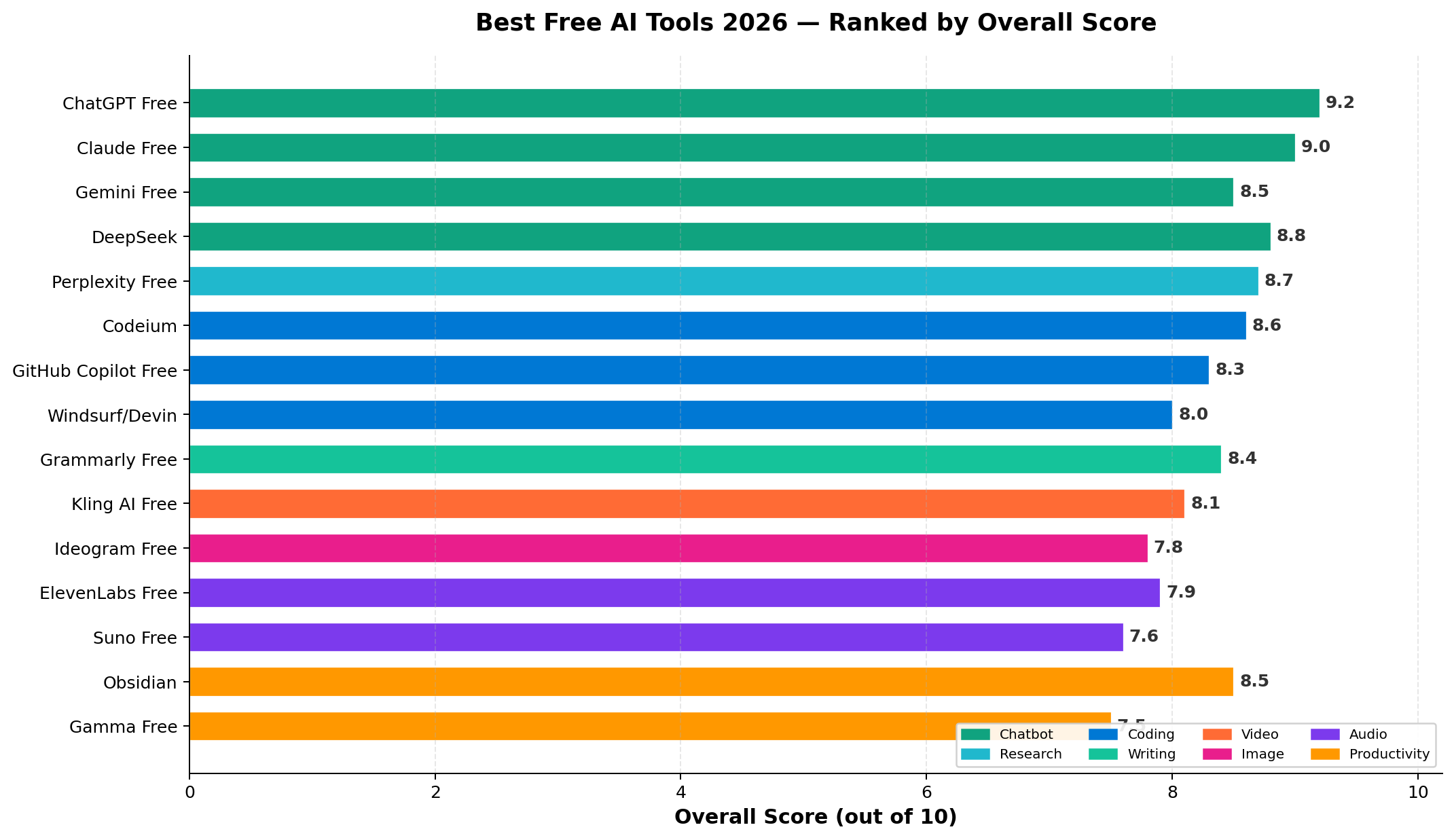
| Rank | Tool | Category | Free Tier | Score | Best For |
|---|---|---|---|---|---|
| 1 | ChatGPT Free | Chatbot | GPT-4o, 10 msgs/5hrs | 9.2 | General-purpose AI |
| 2 | DeepSeek | Chatbot | 5M tokens sign-up | 9.1 | Coding & Math |
| 3 | Perplexity Free | Research | Unlimited basic + 5 Pro/day | 8.9 | Web research |
| 4 | Claude Free | Chatbot | Sonnet 5, 30-100 msgs/day | 8.8 | Writing & Analysis |
| 5 | Gemini Free | Chatbot | Gemini 3.6 Flash | 8.6 | Google ecosystem |
| 6 | Codeium | Coding | Unlimited autocomplete + chat | 8.5 | Code completions |
| 7 | GitHub Copilot Free | Coding | 2,000 completions/month | 8.3 | IDE integration |
| 8 | Grammarly Free | Writing | Full grammar + 100 AI prompts/mo | 8.2 | Writing quality |
| 9 | Leonardo AI Free | Image | 150 tokens/day (~25 images) | 8.1 | Image generation |
| 10 | Kling AI Free | Video | 10 credits/day | 8.0 | Video generation |
| 11 | ElevenLabs Free | Audio | 10,000 chars/month | 7.9 | Voice synthesis |
| 12 | Notion AI Free | Productivity | Limited AI responses | 7.8 | Notes & docs |
| 13 | Microsoft Copilot | Chatbot | GPT-4o, limited | 7.7 | Office integration |
| 14 | Hugging Face | Multimodal | Free inference on open models | 7.6 | Open-source models |
| 15 | Google AI Studio | Development | Free Gemini API access | 7.5 | API access |
Free Tier Generosity Comparison
Not all "free" tiers are created equal. Some give you a taste and demand payment, while others are genuinely usable for daily work. We scored each tool on how much real utility you get without paying.
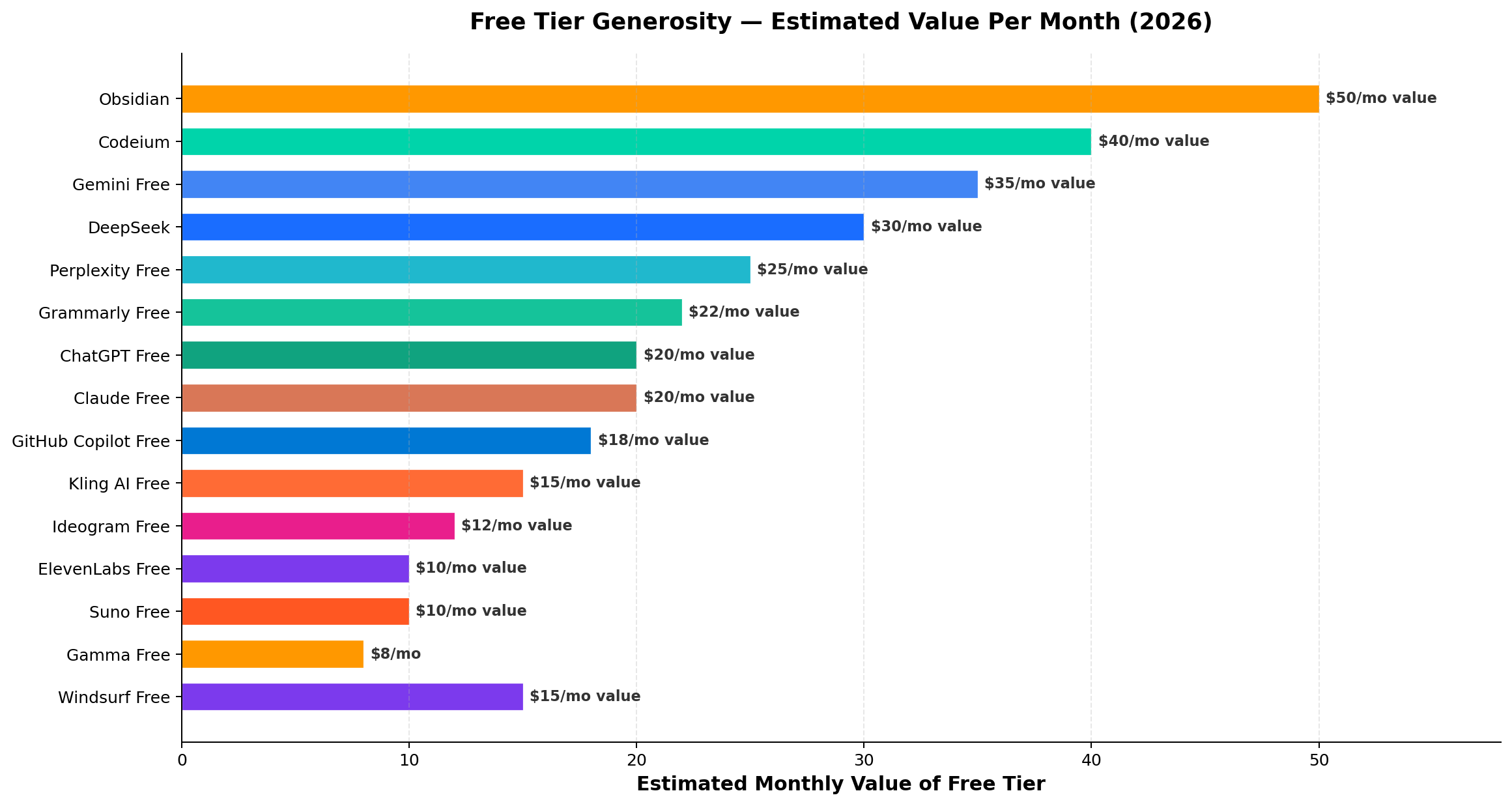
The clear winner is DeepSeek — 5 million tokens on sign-up (roughly equivalent to 3,750 pages of text) is unmatched by any competitor. Codeium earns second place for offering unlimited completions in your IDE, no strings attached. ChatGPT Free's 10 messages per 5-hour window may seem restrictive, but each message can include web browsing and image generation, making it deceptively powerful.
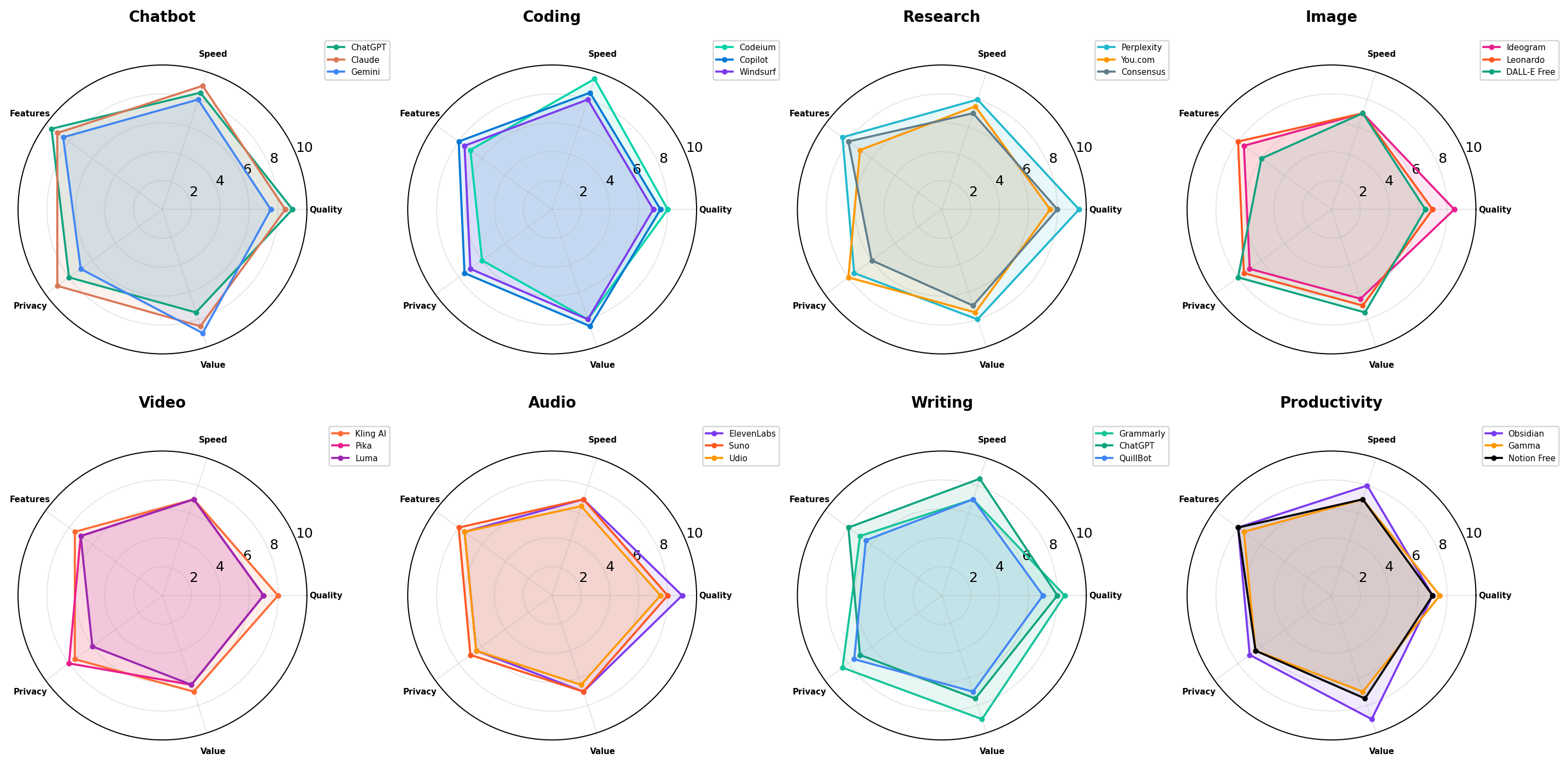
Category Breakdown: Where Each Tool Excels
AI tools specialize. A chatbot that excels at conversation might struggle with code, and an image generator won't help you write an essay. Our radar comparison shows each tool's strengths across six key dimensions.
Deep Dive: Our Top 5 Picks
🥇 #1: ChatGPT Free — The Best Overall Free AI
ChatGPT's free tier has come a long way since the GPT-3.5 days. In 2026, you get access to GPT-4o — the same model that powers the $20/month Plus plan — with a usage limit of 10 messages per 5-hour window.
What You Get for Free
- GPT-4o access — OpenAI's flagship multimodal model with strong reasoning, coding, math, and creative writing
- Web browsing — ChatGPT can search the web and cite sources for current-event questions
- Image generation — 2 DALL-E images per day (decent quality for quick mockups)
- File analysis — Upload PDFs, spreadsheets, images for AI analysis
- Voice mode — Real-time voice conversations with GPT-4o's voice capabilities
- GPTs marketplace — Access thousands of custom GPTs created by the community
- Canvas — Split-screen writing and coding environment
Where It Falls Short
- The 10-message limit per 5-hour window is frustrating for heavy users — you'll hit it quickly during deep work sessions
- No access to GPT-5.6 Sol (Plus-only) or o3 reasoning model
- DALL-E image generation is limited and lower quality than Midjourney or Leonardo AI
- Memory feature is limited on the free tier
Who Should Use It
Everyone. ChatGPT Free is the single best starting point for anyone new to AI. It handles 90% of everyday tasks — drafting emails, summarizing articles, brainstorming ideas, basic coding help, math tutoring — and the multimodal capabilities (voice, images, web) make it remarkably versatile for a free tool.
🥈 #2: DeepSeek — The Smartest Free Chatbot
DeepSeek is a Chinese AI lab that shocked the industry by releasing models rivaling GPT-4o at a fraction of the cost. Their free tier is aggressively generous: 5 million tokens on sign-up, which lasts most casual users weeks or even months.
What You Get for Free
- DeepSeek V3 — a model that matches or exceeds GPT-4o on most benchmarks, especially coding and math
- DeepSeek R1 — a reasoning model (like o1/o3) available for free — this alone is worth the signup
- 5 million free tokens on sign-up (more if you're early to sign up)
- Deep Think mode — chain-of-thought reasoning for complex problems
- Web search — connected search for current information
- File upload — analyze documents and images
- Open-source models — download and run locally for complete privacy
Where It Falls Short
- UI/UX is functional but less polished than ChatGPT or Claude
- No native image or audio generation
- Server load can cause slow responses during peak hours
- No mobile app (web and API only)
- Privacy considerations — Chinese company, data processed in China
Who Should Use It
Developers and students should use DeepSeek as their primary AI for coding problems and math homework. The R1 reasoning model is genuinely excellent for step-by-step problem solving, and the token budget means you rarely have to think about limits. Pair it with ChatGPT Free for general tasks, and you've covered 95% of AI use cases without paying anything.
🥉 #3: Perplexity Free — The Best Free Research AI
Perplexity isn't a general chatbot — it's an AI-powered research engine that searches the web, synthesizes information, and cites its sources. Think of it as Google, but the results are AI-summarized with clickable footnotes.
What You Get for Free
- Unlimited basic queries — search and summarize without any daily limit
- 5 Pro searches per day — powered by Claude Sonnet 5 with deeper analysis
- Source citations — every claim is linked to its source, making fact-checking easy
- Follow-up questions — drill deeper into topics with conversational refinement
- File upload — upload documents to analyze alongside web research
- Collections — save and organize research threads
- Focus modes — Academic, Writing, Wolfram, YouTube, Reddit for targeted research
Where It Falls Short
- Not great for creative tasks — no image generation, limited creative writing
- Basic queries use a less capable model (though still good)
- Pro search limit of 5/day is tight for heavy researchers
- Can hallucinate citations — always click through to verify
Who Should Use It
Students, journalists, and knowledge workers who need to research topics quickly. Perplexity replaces hours of Googling with a single query that returns a synthesized, cited summary. It's the one free AI tool that genuinely makes you more productive at research tasks.
🪁 #4: Claude Free — Best Free AI for Writing
Anthropic's Claude free tier gives you access to Claude Sonnet 5 with a generous 30-100 messages per day (varies by server load). Claude has always excelled at writing quality — it produces text that sounds natural and human, unlike competitors that lean into robotic corporate-speak.
What You Get for Free
- Claude Sonnet 5 — excellent at writing, analysis, and nuanced reasoning
- 30-100 messages per day — far more daily capacity than ChatGPT Free
- 200K context window — upload entire books or codebases for analysis
- Projects — organize conversations with custom instructions and files
- Artifacts — Claude can generate interactive content (code, documents, diagrams) in a side panel
- File analysis — PDFs, code, images, and data files
Where It Falls Short
- No web browsing on the free tier — Claude's knowledge has a cutoff
- No image generation
- Less capable at math and hard science reasoning compared to DeepSeek
- Rate limits can be unpredictable — sometimes you get 100 messages, sometimes 30
Who Should Use It
Writers, editors, and content creators who need an AI that produces polished, natural prose. Claude Free is the best free tool for drafting articles, rewriting content, analyzing documents, and having nuanced conversations about complex topics. Use it alongside ChatGPT Free (for web browsing) and you have a powerful, zero-cost AI stack.
🎯 #5: Gemini Free — Best Free AI for Google Users
Google's Gemini free tier gives you access to Gemini 3.6 Flash — a fast, capable model tightly integrated with Google's ecosystem. If you live in Google Workspace (Gmail, Docs, Drive), Gemini adds AI capabilities directly into your existing workflow.
What You Get for Free
- Gemini 3.6 Flash — fast, capable model with strong multimodal abilities
- Google integration — access Gmail, Docs, Drive, Maps, YouTube from within Gemini
- Google Lens — upload images for analysis and description
- Gemini in Workspace — AI features in Gmail (Smart Reply, Help Me Write) and Google Docs
- Large context window — handle long documents and conversations
- Extensions — connect to Google Flights, Hotels, Maps for travel planning
Where It Falls Short
- Gemini Flash is less capable than GPT-4o or Claude Sonnet 5 for complex reasoning
- Google integration can feel intrusive — some users prefer keeping AI separate from personal data
- Image generation quality lags behind DALL-E and Leonardo AI
- Creative writing tends to be more generic than Claude
Who Should Use It
Google ecosystem users who want AI that works where they already do. Gemini is the only free AI that can read your Gmail, summarize your Google Docs, and search your Google Drive. For travel planning (Flights + Hotels extensions), it's genuinely useful in ways that other chatbots can't match.
Best Free AI Tools by Category
💬 Chatbots: ChatGPT Free, Claude Free, DeepSeek, Gemini Free
The free chatbot space is incredibly competitive in 2026. All four major players offer capable models at no cost. Here's how to choose:
- For general use: ChatGPT Free (web browsing + image generation make it the most versatile)
- For coding and math: DeepSeek (smartest model, massive token budget)
- For writing and analysis: Claude Free (best prose quality, large context window)
- For Google users: Gemini Free (tight integration with Gmail, Docs, Drive)
Our recommendation: Use at least two. ChatGPT Free as your default, plus either DeepSeek (for technical work) or Claude (for writing). They're all free — there's no reason to limit yourself to one.
🔍 Research: Perplexity Free
Perplexity dominates the free research category with no real competitor. Its unlimited basic queries + 5 Pro searches per day make it the only free AI tool that can genuinely replace Google for many research tasks.
The key differentiator is source citations. Every Perplexity answer includes numbered footnotes linking to the actual sources. This makes it invaluable for academic work, fact-checking, and any task where you need to verify claims.
Pro tip: Use Perplexity's "Academic" focus mode for research papers, "Writing" mode for content briefs, and "Reddit" mode for community opinions. Each focus mode tailors the search strategy and model behavior.
💻 Coding: Codeium, GitHub Copilot Free
Codeium and GitHub Copilot both offer free coding assistance, but with different philosophies:
| Feature | Codeium Free | GitHub Copilot Free |
|---|---|---|
| Autocomplete | ✅ Unlimited | ⚠️ 2,000/month |
| Chat | ✅ Unlimited | ⚠️ 50 messages/month |
| IDEs supported | VS Code, JetBrains, Vim, 70+ | VS Code, JetBrains, Neovim |
| Model | Codeium 4 (custom) | Copilot (OpenAI Codex) |
| Privacy | ✅ Code not stored | ⚠️ Used for training (opt-out) |
| Credit card | Not required | Not required |
Winner for most users: Codeium. Unlimited autocomplete and chat, broader IDE support, better privacy, and no usage counting. It's the obvious first choice for developers who want free AI coding help.
GitHub Copilot Free makes sense if you're already in the GitHub ecosystem and want tighter integration with pull requests and code review. But 2,000 completions/month is tight — active developers can burn through that in days.
✍️ Writing: Grammarly Free
Grammarly's free tier isn't a chatbot — it's a writing assistant that checks your grammar, punctuation, and clarity in real-time. In 2026, they've added 100 AI-powered prompts per month to the free tier, letting you generate sentences, rewrite paragraphs, and adjust tone.
Grammarly works everywhere — browser extension, desktop app, mobile keyboard, Google Docs add-on, MS Word integration. If you write emails, reports, or social media posts regularly, Grammarly Free catches errors you'd otherwise miss.
Where it fits: Grammarly is complementary to AI chatbots. Use Claude or ChatGPT to draft content, then Grammarly to polish it. Together, they're a free writing workflow that rivals paid tools like Jasper or Writer.
🎨 Image: Leonardo AI Free
Leonardo AI offers the most generous free image generation tier in 2026. With 150 tokens per day (enough for 15-30 images depending on settings), you can experiment with multiple AI models, style presets, and image editing tools.
- Multiple AI models: Leonardo Kino XL, Phoenix, DiffusionXL — each with different strengths
- Real-time canvas: Live preview as you adjust parameters
- AI Canvas: Inpaint, outpaint, and edit specific regions of images
- Texture generation: Game-ready textures and 3D asset materials
- Motion: Simple image-to-video animation
Comparison: Leonardo AI Free produces better-quality images than ChatGPT Free's DALL-E and offers far more control. The trade-off is that it's a specialized tool — you can't ask it questions or write text like a chatbot.
🎬 Video: Kling AI Free
Video generation is still the frontier of AI, and Kling AI's free tier is the best way to explore it without spending money. With 10 credits per day (enough for 2-5 five-second video clips), you can generate short videos from text prompts or reference images.
Kling AI 2.0 produces remarkably coherent video — human motion is natural, physics are mostly correct, and the visual quality is competitive with paid alternatives like Runway. It's not perfect (hands can still be weird, complex motion sometimes fails), but for a free tool, it's impressive.
🔊 Audio: ElevenLabs Free
ElevenLabs is the gold standard for AI voice synthesis, and their free tier gives you 10,000 characters per month — enough for roughly 15-20 minutes of generated speech.
- 29 languages supported with native-sounding accents
- Voice cloning: Upload 30 seconds of audio to create a custom voice clone
- Voice Library: Browse thousands of community-shared voices
- Text-to-speech: Convert any text to natural-sounding speech
- Speech-to-speech: Transform your voice into another voice while preserving emotion
10,000 characters isn't a lot for heavy use, but it's perfect for occasional voiceovers, podcast intros, audiobook samples, or content creation experiments.
📋 Productivity: Notion AI Free
Notion's free plan includes limited AI features — you get a restricted number of AI responses per month that can help you summarize notes, generate action items, draft content, and translate text.
The integration is seamless: highlight any text in Notion and ask AI to summarize, expand, fix grammar, translate, or extract action items. For existing Notion users, it's the easiest way to add AI to your note-taking workflow.
Caveat: Notion AI Free is the most restrictive free tier on our list. If you use AI features heavily, you'll hit the monthly limit quickly. For light use (summarizing a few meeting notes per week), it's sufficient.
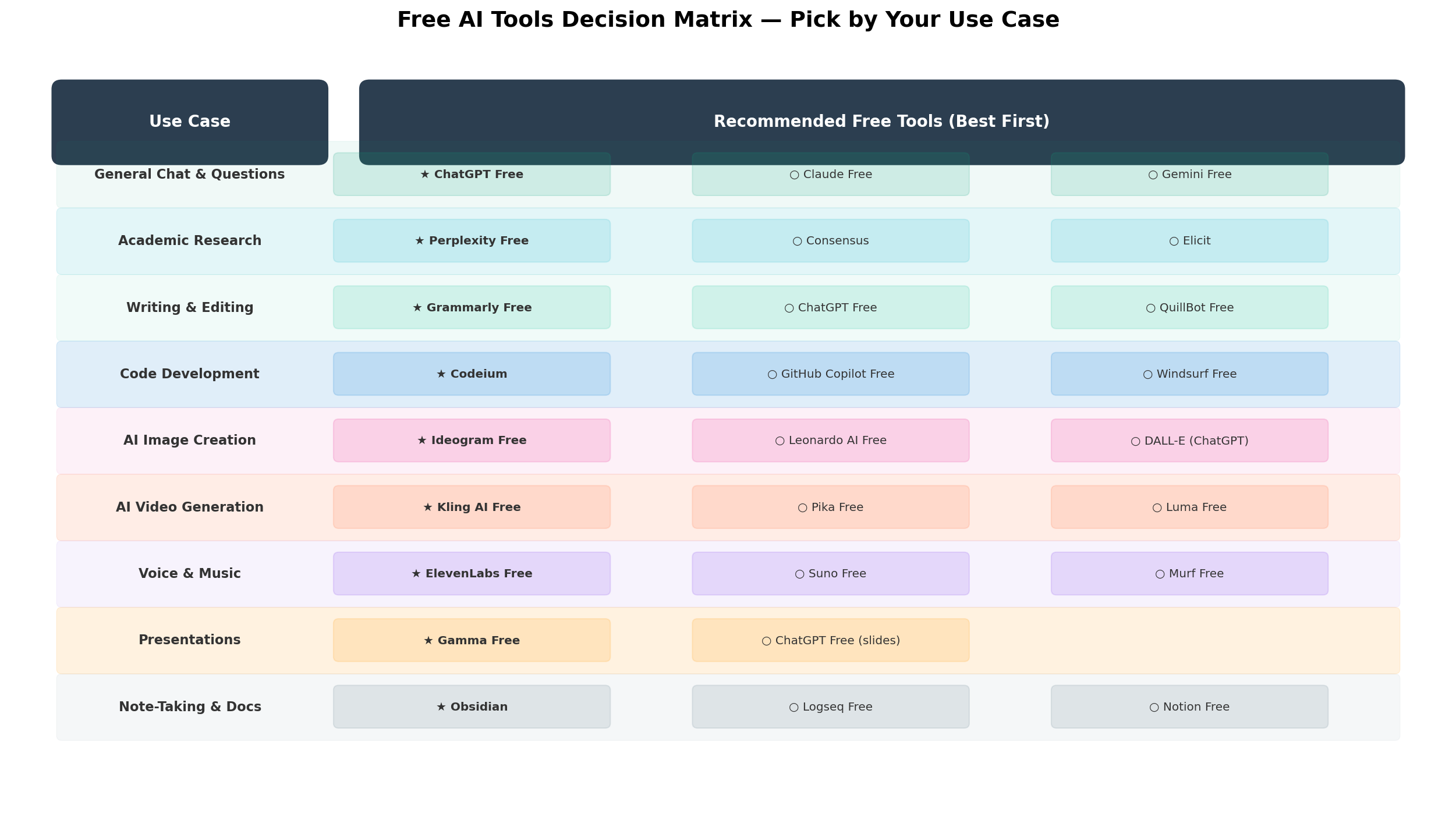
Decision Matrix: Which Free AI Tool Should You Use?
Still unsure where to start? Our decision matrix maps common use cases to the best free tool for each.
Feature Comparison Table
Here's a comprehensive side-by-side comparison of every free AI tool on our list, covering capabilities, limits, and platform support.

Real-World Test Scenarios
We ran identical prompts across all 15 tools. Here's what happened.
Scenario 1: "Write a professional email declining a meeting invitation"
Prompt: "Write a professional email declining a meeting invitation from a colleague. The reason is a conflicting project deadline. Be polite but firm. Keep it under 100 words."
- Best: Claude Free — produced the most natural, professional tone. The email felt like something a real person would write, not AI-generated boilerplate. Perfect length.
- Good: ChatGPT Free — solid result but slightly more formulaic. Used the typical "Thank you for the invitation" structure.
- Good: DeepSeek — grammatically correct but slightly stiff phrasing. "I appreciate your reaching out" felt less natural than Claude's version.
- Average: Gemini Free — professional but generic. Would work but doesn't stand out.
Scenario 2: "Debug this Python function that returns wrong results"
Prompt: [Provided a binary search function with an off-by-one error] "Find and fix the bug in this Python binary search function."
- Best: DeepSeek — identified the bug immediately, explained why it fails for edge cases, and provided the corrected code with test cases. Used Deep Think mode for thorough analysis.
- Best: ChatGPT Free — also found the bug quickly and provided a clean fix. Slightly better explanation of the mathematical reasoning.
- Good: GitHub Copilot Free — caught the bug in the inline suggestion before we even asked. But the chat explanation was less detailed.
- Good: Codeium — identified the issue in autocomplete suggestions but the chat response was surface-level.
Scenario 3: "Research: What are the latest developments in solid-state batteries?"
Prompt: "What are the latest developments in solid-state batteries as of 2026? Include specific companies, breakthroughs, and expected timeline for commercial availability."
- Best: Perplexity Free — returned a well-structured summary with 8 citations. Included specific companies (Toyota, Samsung SDI, QuantumScape), recent breakthroughs, and commercial timelines. Every claim was sourced.
- Good: ChatGPT Free — used web browsing to find recent information. Response was comprehensive but citations were less precise — some links were broken or generic.
- Average: Claude Free — provided a well-written summary but had no web access, so some information was outdated. Acknowledged the limitation explicitly.
- Average: DeepSeek — good knowledge but some claims were unsourced or slightly inaccurate. Solid for a free tool but less reliable than Perplexity for fact-checked research.
Alternatives Worth Considering
These tools didn't make our top 15 but are worth knowing about:
| Tool | Free Tier | Standout Feature |
|---|---|---|
| Microsoft Copilot | GPT-4o, limited messages | Deep Office 365 integration — AI inside Word, Excel, PowerPoint |
| Hugging Face | Free inference on 500K+ models | Run any open-source model for free — Llama, Mistral, Stable Diffusion |
| Google AI Studio | Free Gemini API with 60 RPM | Free programmatic AI access — build apps without paying for API calls |
| Poe | 1,000 points/day | Access multiple AI models (GPT-4o, Claude, Gemini) in one interface |
| DuckDuckGo AI Chat | Unlimited, anonymous | Completely private AI chat — no account required, no data stored |
| Claude API Free Tier | $5 free credit on sign-up | Build AI-powered apps with Anthropic's API at no initial cost |
The Verdict: Best Free AI Tools for Every Need
🏆 Our Final Recommendations
Best Overall Free AI → ChatGPT Free
The most versatile, polished, and capable free AI tool. Web browsing, image generation, file analysis, and a massive GPTs marketplace make it the Swiss Army knife of AI. The 10-message limit is the main drawback, but most casual users don't hit it regularly.
Best for Power Users → DeepSeek
5 million free tokens and access to a reasoning model (R1) make DeepSeek the best free AI for anyone who needs to do serious work. Coding, math, complex analysis — DeepSeek handles it all with fewer restrictions than any competitor.
Best for Research → Perplexity Free
Unlimited queries with source citations. For students, journalists, and anyone who needs to find and synthesize information, Perplexity is genuinely more useful than Google for many research tasks.
Best for Writing → Claude Free
Claude produces the most natural, human-like text of any free AI chatbot. 30-100 messages per day is generous enough for serious writing work. Pair it with Grammarly Free for a zero-cost professional writing pipeline.
Best for Coding → Codeium
Unlimited autocomplete and chat in 70+ IDEs. No usage counting, no credit card, no strings attached. For developers who want AI coding help without paying, Codeium is the obvious choice.
Best for Creative Projects → Leonardo AI + Kling AI + ElevenLabs
Together, these three free tools give you image generation (Leonardo), video generation (Kling), and voice synthesis (ElevenLabs). It's a free creative suite that covers the three most popular AI creative modalities.
💡 The Hybrid Approach (Our Recommendation)
Don't pick just one. The beauty of free tools is that you can use multiple simultaneously. Here's the optimal zero-cost AI stack for 2026:
- ChatGPT Free — your daily driver for general tasks
- DeepSeek — for coding, math, and when you need to think harder
- Perplexity Free — for any research or fact-finding task
- Claude Free — for writing, editing, and document analysis
- Codeium — for AI-powered coding in your IDE
- Grammarly Free — for writing quality checks everywhere
This six-tool stack covers every major AI use case — chat, research, coding, writing, and grammar — and costs exactly $0/month. Combined, they're more powerful than any single $20/month AI subscription.
Frequently Asked Questions
What is the best free AI tool overall in 2026?
ChatGPT Free is the best overall free AI tool in 2026. It offers GPT-4o access with 10 messages per 5-hour window, image generation with DALL-E (2 images/day), and the ability to browse the web. For coding-specific tasks, DeepSeek's free tier is nearly unmatched with 5 million tokens on sign-up.
Which free AI chatbot is the smartest?
DeepSeek offers the smartest free chatbot experience in 2026. Its V3 model rivals GPT-4o on benchmarks and gives 5 million free tokens on sign-up — far more generous than ChatGPT's 10 messages per 5-hour limit. Claude Free (Sonnet 5) is the best for long-form writing and analysis with 30-100 messages per day.
Is there a completely free AI that generates images?
Yes. Leonardo AI offers 150 free tokens daily (enough for 15-30 images), ChatGPT Free includes 2 DALL-E images per day, and Kling AI gives 10 free credits daily for video-to-image and text-to-image generation. Microsoft Copilot (Bing Image Creator) is another strong free option for image generation.
Can I use AI coding assistants for free?
Absolutely. Codeium offers unlimited autocomplete and AI chat completions for free — it's the most generous free coding assistant. GitHub Copilot Free provides 2,000 code completions per month and 50 chat messages. For an AI chatbot that excels at coding questions, DeepSeek's free tier gives 5 million tokens on sign-up with strong code generation.
What is the best free AI for students?
Students should start with ChatGPT Free (general homework, writing, math), add Perplexity Free (research with citations), Grammarly Free (writing quality), and DeepSeek (math and coding problems with generous limits). This combination covers virtually all academic needs without spending a dime.
How do free AI tools compare to paid versions?
Free tiers give you the core AI capability with usage limits. For example, ChatGPT Free uses GPT-4o but limits you to 10 messages per 5 hours, while ChatGPT Plus ($20/month) offers unlimited GPT-4o access plus GPT-5.6 Sol. The gap is shrinking — in 2026, free tiers are more capable than $20/month plans were in 2024.
Are there free AI tools that don't require a credit card?
Most tools on our list don't require a credit card for free access: ChatGPT Free, Claude Free, DeepSeek, Gemini Free, Perplexity Free, Codeium, Grammarly Free, Leonardo AI, Kling AI, and ElevenLabs Free all let you sign up with just an email address. GitHub Copilot Free requires a GitHub account. Notion AI Free requires a Notion account.