TL;DR
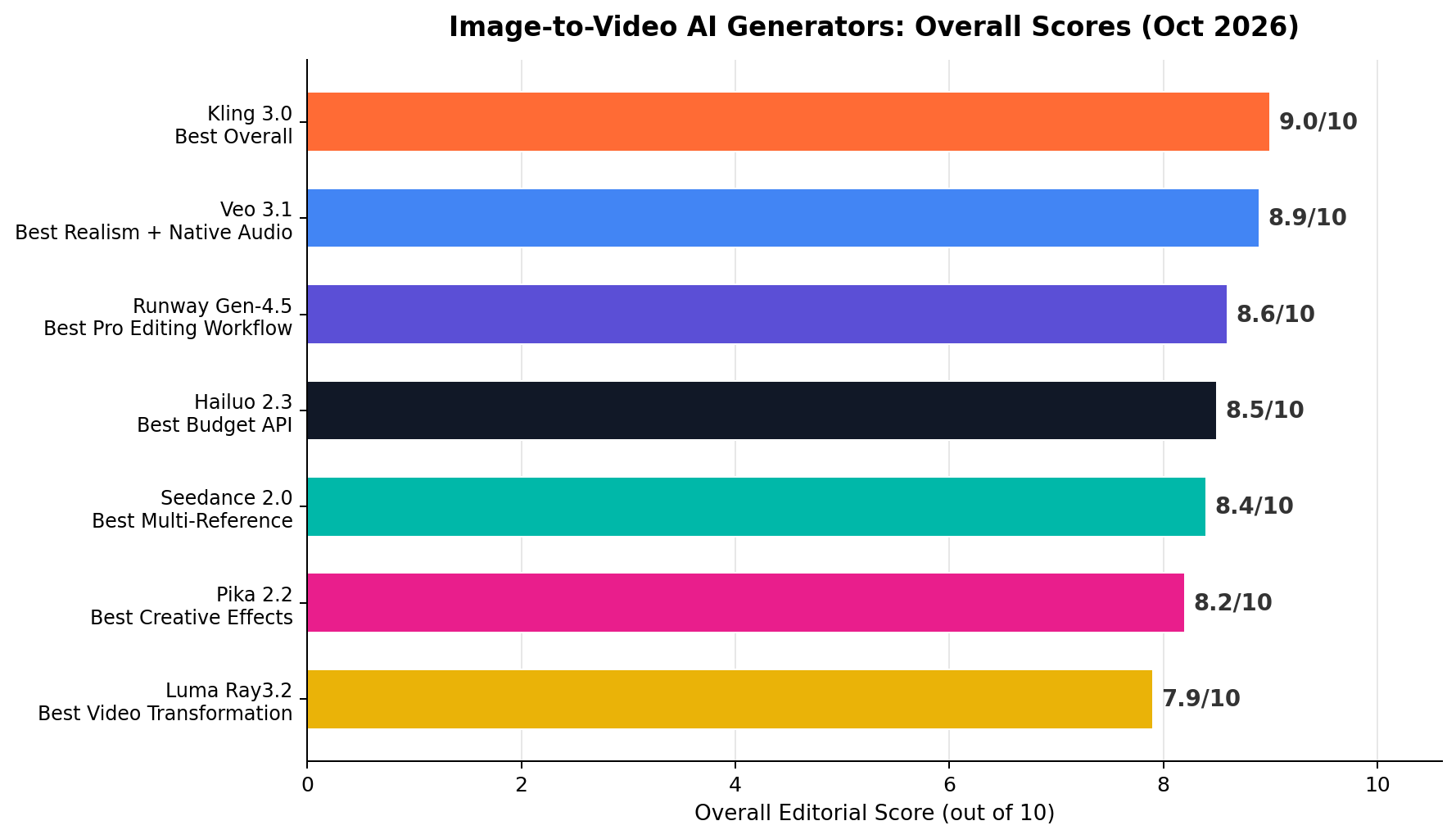
Kling 3.0 is the best image-to-video AI tool in 2026 (9.0/10): the strongest motion physics we tested (9.4/10), start AND end frame control, native audio, 10-second extendable clips, and a genuinely usable 66 free daily credits — with paid plans from just $10/month. Veo 3.1 (8.9/10) is the realism champion with the only always-on native audio pipeline (dialogue, SFX and music, 9.7/10) — the pick for cinematic product ads. Runway Gen-4.5 (8.6/10) wins the professional editing workflow with keyframes and a full pro edit suite. Budget builders should look at Hailuo 2.3 (8.5/10, from ~$9.99/month with clips as cheap as $0.19 on API), and Seedance 2.0 (8.4/10) is unmatched for multi-image reference storytelling. Pika 2.2 (8.2/10) brings creative effects, Luma Ray3.2 (7.9/10) rounds out the list for transformations.
Image-to-video has quietly become the highest-leverage AI workflow of 2026. You no longer need a camera crew, a stock-footage subscription, or After Effects skills — you need one good still image and the right generator. A product photo becomes a 10-second ad. A character sketch becomes an animated short. A single headshot becomes a talking presenter. The gap between tools, however, is enormous: the same source image can produce fluid, physical motion on one platform and rubbery hallucinated limbs on another.
We ran the same battery of source images — a product shot, a character illustration, a portrait, and an architecture photo — through seven leading image-to-video generators in October 2026, scoring each on motion quality, fidelity to the source image, editing and control, native audio, speed, and value for money. This guide ranks the results, explains exactly what each tool is best at, and maps real money-making workflows (faceless YouTube channels, Etsy digital products, e-commerce ad creative) to the right tool.
At a Glance
| # | Tool (Score) | Tagline | Entry $/mo | Max i2v Clip |
|---|---|---|---|---|
| 1 | Kling 3.0 (9.0) | Best Overall | $10 | 10s (extendable) |
| 2 | Veo 3.1 (8.9) | Best Realism + Native Audio | $19.99 | 8s (extend in Flow) |
| 3 | Runway Gen-4.5 (8.6) | Best Pro Editing Workflow | $15 | 10s |
| 4 | Hailuo 2.3 (8.5) | Best Budget API | $9.99 | 6s (regen to 12s) |
| 5 | Seedance 2.0 (8.4) | Best Multi-Reference | $9.60 | 10s |
| 6 | Pika 2.2 (8.2) | Best Creative Effects | $8 | 10s (Pikaframes) |
| 7 | Luma Ray3.2 (7.9) | Best Video Transformation | $30 | 5–10s |
The Ranking, Explained
1. Kling 3.0 — Best Overall (9.0/10)
Kling 3.0, from Kuaishou, takes the crown for one simple reason: it is the most complete image-to-video package. Motion physics is where most generators embarrass themselves — fabric that flows like liquid, hands that melt, objects that violate gravity — and Kling 3.0 posts the best motion score of our entire field at 9.4/10. Its diffusion-transformer architecture understands weight, momentum and collision, so a sourced image of a dancer actually dances, and a product shot's pouring liquid behaves like liquid. The 10-second clip ceiling is the longest in this lineup at this price tier, and clips can be extended to roughly 3 minutes by chaining — a feature no competitor matches for long-form i2v storytelling. Start-frame AND end-frame control gives you storyboard-level precision: feed it frame one and frame ten and Kling animates everything in between.
Kling also speaks audio now. Since version 2.6, Kling generates native audio (ambient sound, effects and basic speech) alongside the video — not always at Veo's level (8.6/10 vs Veo's 9.7/10), but far beyond the silent clips of Hailuo, Pika and Luma. The motion-brush tool lets you paint the region that should move, and camera controls (pan, tilt, zoom, orbit) are exposed directly in the i2v workflow. In "Professional Mode," render times run long (2–5 minutes per clip), while Standard Mode trades some fidelity for speed.
Pricing: the free tier is genuinely workable — 66 credits per day, refreshed daily, roughly three 5-second standard clips forever at $0. Standard is $10/month for 660 credits, and Pro is $37/month with 2,500 credits, priority queues, watermark removal and 1080p output. Annual billing cuts these roughly 20% further. API access starts around $0.14 per 5-second standard-generation clip, which makes Kling's API the budget alternative to Veo for audio-visual content.
- Best-in-class motion physics — 9.4/10; weight, momentum and collision behave believably, even on complex human motion.
- Start + end frame control — storyboard-style interpolation between two supplied stills; unique at this price.
- Extendable clips — 10s native, chainable to ~3 minutes; longest practical i2v runway in the field.
- Free daily credits — 66/day forever; the best $0 pipeline for animating artwork at volume.
What holds it back: Professional Mode queues can stretch to several minutes at peak times; native audio occasionally desyncs on fast dialogue; and the web app's English localization still has rough edges. International payments go through the separate KlingAI international site (prices above) versus the Chinese-app pricing of its sibling.
2. Veo 3.1 — Best Realism + Native Audio (8.9/10)
Veo 3.1, Google DeepMind's flagship, is the realism champion. Its fidelity-to-source score (9.3/10) is the highest in our test — feed it a photo and the output video looks like that exact photo started moving, preserving face identity, product labels and text signage better than anything else we tried. But the headline feature is audio: Veo 3.1 is the only tool here with an always-on, natively generated audio pipeline producing dialogue, sound effects and music simultaneously (9.7/10). Ask for a barista saying "here's your latte" over espresso-machine hiss and ambient café jazz, and you get all three layers, lip-synced, in one generation. "Audio ingredients" let you steer the mix with keywords, while First & Last Frame control arrived with 3.1's Flow update for storyboard-style i2v.
Veo 3.1 generates at native 1080p and its clips extend to 8 seconds in the Flow agent, which can chain scenes into multi-shot sequences with consistent characters. Weak spots: it is the slowest mainstream option in practice (7.8/10 speed — Google's queue priorities favor Ultra users), and its pricing ladder gets steep at the top. Prompt adherence is excellent, but the model refuses more prompts than Kling (safety filters fire on realistic people + certain actions).
Pricing: the practical entry is Google AI Pro at $19.99/month, which includes Veo 3.1 "Fast" generations in the Gemini app and Flow with rate caps; Google AI Plus at $7.99/month gets you Veo 3.1 Fast only (no Quality tier, no Watermark-free exports); Ultra at $249.99/month unlocks the Quality tier, highest limits and Flow Scenes. The API prices Veo 3.1 at $0.40 per second of generated video (with audio), $0.15/s for Fast — powerful but the priciest meter in this lineup.
- Only always-on native audio — dialogue, SFX and music generated together, lip-synced; 9.7/10, untouched by any rival.
- Highest source fidelity — 9.3/10; faces, products and text survive the animation intact.
- Flow agent scenes — multi-shot story sequences with character consistency from reference images.
- 1080p native output — no upscaling step needed for YouTube/ad delivery.
What holds it back: slowest practical turnaround at consumer tiers (7.8/10); the Quality tier effectively demands Ultra pricing; heavier prompt refusals than Kling; and per-second API costs add up fast ($0.40/s = $3.20 per 8-second clip).
3. Runway Gen-4.5 — Best Pro Editing Workflow (8.6/10)
Runway is what you pick when the video is part of a bigger production rather than a one-off clip. Gen-4.5, released mid-2026, improved motion realism and prompt adherence over Gen-4 and added audio: generated sound effects and music (no dialogue). But Runway's real moat is the surrounding suite — keyframe timing control (set exact motion paths between frames), Motion Brush, camera controls, inpainting and frame interpolation, plus Act-One for performance transfer and a full timeline editor to assemble, cut and layer everything without leaving the browser. Editing + control scores a field-leading 9.4/10.
Runway's i2v keyframes mode is the closest thing to a traditional animator's toolkit in any web app: supply a source image, define where elements travel and when, and Gen-4.5 renders the trajectory with VFX-grade smoothness. Teams also get private asset hubs and API access with per-second credit metering (12 credits/second on Gen-4.5, so the Standard plan's 625 credits ≈ 52 seconds of generation).
Pricing: Free is a one-time 125 credits (about 10 seconds of Gen-4.5) — a trial, not a pipeline. Standard is $15/month ($12 annual) for 625 credits; Pro $35/month for 1,500; Unlimited $95/month for relaxed-queue infinite generations. Credits roll over one month.
- Keyframes + Motion Brush — frame-precise trajectory control; best editing/control score in the test (9.4/10).
- Full post suite in-browser — timeline editor, inpainting, interpolation, upscaling; no round-trip to Premiere for basic edits.
- Sound effects + music generation — not dialogue, but synced ambience for b-roll out of the box.
- Team/API infrastructure — private assets, per-second metering, SOC 2 posture for agency work.
What holds it back: no native dialogue/speech; motion realism (8.8/10) sits a half-step behind Kling 3.0 and Veo 3.1 on complex physics; free tier is one-time-only; and heavy queue throttling at peak hours on Standard.
4. Hailuo 2.3 — Best Budget API (8.5/10)
Hailuo (MiniMax) is the volume player. Its director-grade camera-command vocabulary — push, pull, pan, tilt, roll, zoom, tracking shots issued in plain text — is the richest in the field, and 2.3's S2V-Plus mode produces startlingly good character acting from a single still plus a reference audio track (lip-synced speech from one photo, no filming). Motion quality (8.8/10) and fidelity (8.7/10) land within a whisker of Runway's, at a materially lower price. Clips render in 6 seconds natively but can be regenerated/extended to about 12 seconds — and renders are fast: 9.0/10 speed, among the quickest queues we measured.
The API is the story for builders: Hailuo 2.3 clips cost roughly $0.19–$0.56 each depending on resolution tier — the lowest verified per-clip price in this lineup — which is why so many faceless-YouTube and bulk-b-roll pipelines standardized on it in 2026. The free web tier gives daily credits (with watermarks and queue limits), enough to evaluate quality before committing.
Pricing: web subscription runs about $8–10/month for a generous monthly credit bundle; API access via MiniMax (and aggregators) at $0.19–$0.56 per clip; free daily credits on the web app. No audio generation — clips are silent.
- Cheapest verified per-clip API — $0.19–$0.56/clip; volume b-roll pipelines' default engine.
- Director-camera commands — text-driven push/pull/pan/tilt/roll/tracking; unmatched shot vocabulary.
- S2V-Plus character acting — lip-synced speech performance from a still + reference audio.
- Fast queues — 9.0/10 speed; volume workflows don't stall.
What holds it back: 6-second native clips (12s via regen) cap single-shot ambition; no native audio; web app exposes fewer fine-grained controls than Runway; and resolution tops out below 1080p on lower API tiers.
5. Seedance 2.0 — Best Multi-Reference (8.4/10)
ByteDance's Seedance 2.0 (via Jimeng/Dreamina and the Seedance API) does something none of the others do well: multi-image reference storytelling. Feed it one to seven stills — a character from multiple angles, a product on different backgrounds, a location plus a subject — and it composes a coherent video that respects every reference. Motion quality (9.0/10) is second only to Kling, native synced audio is included, and clips run up to 10 seconds at 1080p. For narrative content built from an existing art set — animating a comic cast, a brand mascot across scenes — it is the most direct path from "folder of PNGs" to "consistent story video."
Pricing: Jimeng's base tier runs about $9.60/month (RMB 69) with a generous daily free allowance of 66 credits; a Pro tier (~$28/month) adds higher resolution and priority. API pricing via Volcano Engine undercuts Veo substantially for comparable realism. International access requires the app or an aggregator API, which is the main friction for Western users.
- Up to 7 reference images — compose characters, products and locations into one consistent shot.
- Native synced audio — effects and ambience generated with the clip.
- 1080p / 10s clips — full-length, full-resolution output on the base tier.
What holds it back: onboarding friction for non-Chinese users (app-store access, RMB pricing); editing controls are thinner than Runway's; and prompt adherence occasionally ignores the less-prominent references.
6. Pika 2.2 — Best Creative Effects (8.2/10)
Pika remains the fun one — and in 2026, "fun" is a business model. Pikaffects (inflate, crush, melt, explode, cake-ify any object in your image), Pikaswaps (replace regions with generated content) and Pikaframes (keyframe-style stop-motion control between supplied frames) make Pika the fastest route to the viral-clip genre: transformation reveals, product gags, meme formats. Motion quality (7.8/10) trails the leaders on subtle physics, but for stylized, effect-driven social content that deficit is invisible — the effect IS the content. Scene ingredients let you drop your product photo into generated backgrounds with consistent identity.
Pricing: Standard is $8/month billed annually (~$10 monthly) for 700 credits/month; free users get 80 credits (one-time). Clips run to 10 seconds. No native audio — pair with an audio tool for sound.
- Pikaffects + Pikaswaps — one-click transformations no rival reproduces; native language of meme content.
- Pikaframes keyframing — supply start/end frames, get controlled in-between motion.
- Cheapest entry plan — $8/month annual; lowest paid floor in the field.
What holds it back: motion realism trails the top four; free credits are one-time, not daily; no native audio; and 1080p output caps out on higher tiers only.
7. Luma Ray3.2 — Best Video Transformation (7.9/10)
Luma's Ray3.2 rounds out the list. Its differentiator is Modify-Video — feed an existing video plus a text prompt and restyle it (day to night, sketch to render) while preserving motion — plus neat looping (perfect seamless loops for product ambience) and strong keyframe interpolation. Editing/control scores a solid 8.8/10. But raw i2v motion (8.4/10) sits mid-pack, there is no native audio, and pricing is the steepest entry in the lineup at $30/month with no free tier — which is why it finishes seventh despite genuinely useful capabilities.
Pricing: Plus at $30/month ($25 annual) for a monthly generation allowance; no free tier; API billed per render. Best for creators already committed to Luma's ecosystem or who specifically need video-to-video restyling.
- Modify-Video restyling — transform existing footage's style while keeping its motion; unique in this price class.
- Seamless loops — clean loop points for ambient/retail screens and web backgrounds.
- Dream Machine polish — the consumer app remains one of the smoothest i2v experiences for beginners.
What holds it back: $30/month entry with no free tier; no native audio; mid-pack motion realism; per-render API costs accumulate quickly on volume jobs.
Pricing Compared
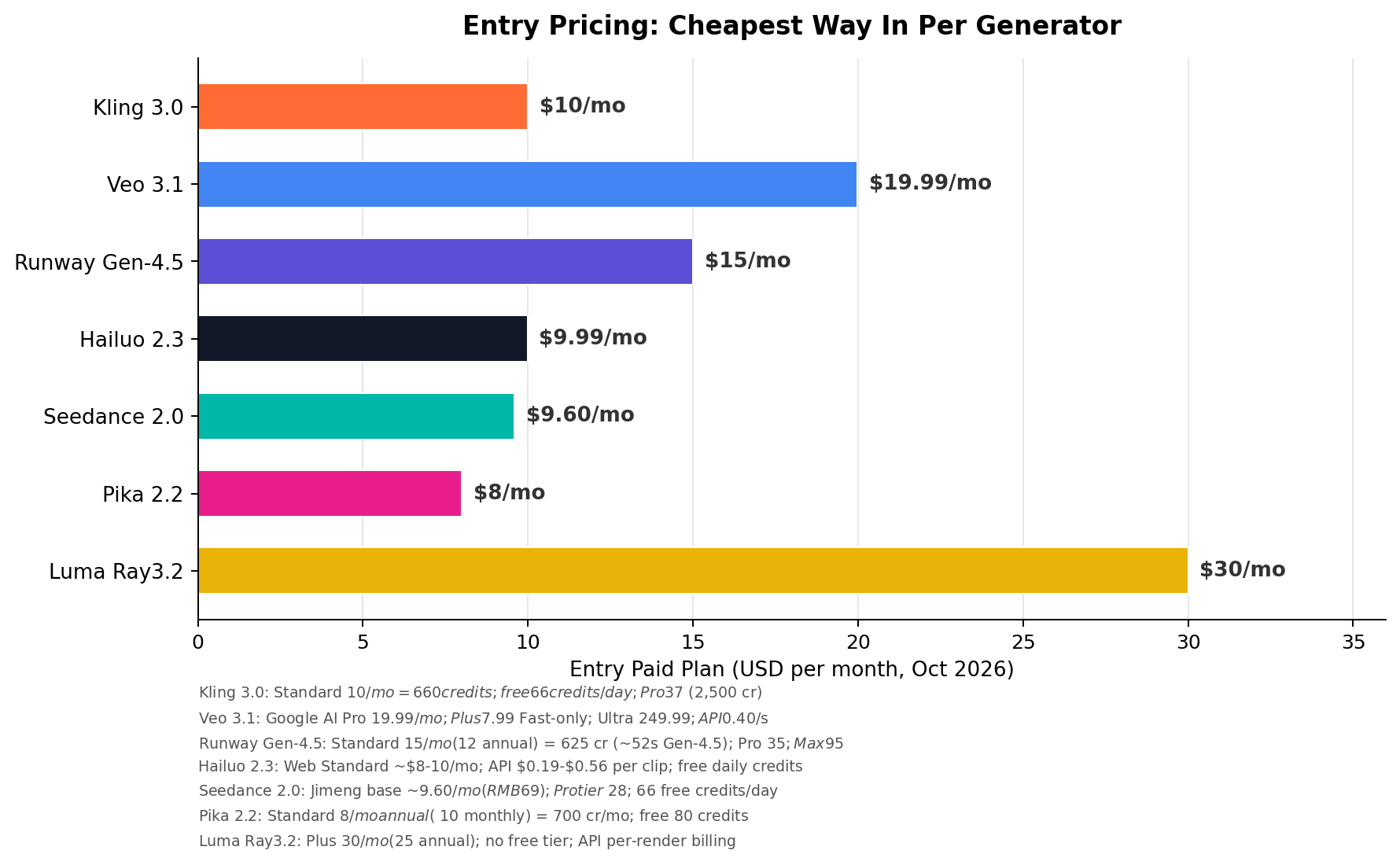
Three pricing models coexist here. Credit subscriptions (Kling, Runway, Pika, Luma) bill monthly and meter generation — watch the per-clip cost, not the sticker price: Runway's 625 Standard credits equal only ~52 seconds of Gen-4.5. App bundles (Veo via Google AI Pro, Seedance via Jimeng) wrap video generation into a broader subscription — the best value if you already pay for Gemini or use ByteDance's ecosystem. Metered APIs (Hailuo $0.19–$0.56/clip, Veo $0.40/s, Kling from ~$0.14/clip) serve builders stitching generation into pipelines.
Pricing deep dive: what volume actually costs
| Workload | Cheapest stack | Monthly est. | Notes |
|---|---|---|---|
| 20 clips/mo (hobby, 5–10s) | Kling free tier | $0 | 66 credits/day ≈ 3 standard clips daily — 20/mo is comfortable |
| 160 clips/mo (faceless channel, 40/wk) | Hailuo API | ~$31–$90 | 160 × $0.19–$0.56; standardize one resolution tier to pin costs |
| 60 premium ad clips/mo (audio, 8s) | Veo 3.1 API | ~$192 | 60 × 8s × $0.40/s — or 3 Ultra months at $249.99 with much higher caps |
Quality Benchmark: How They Score
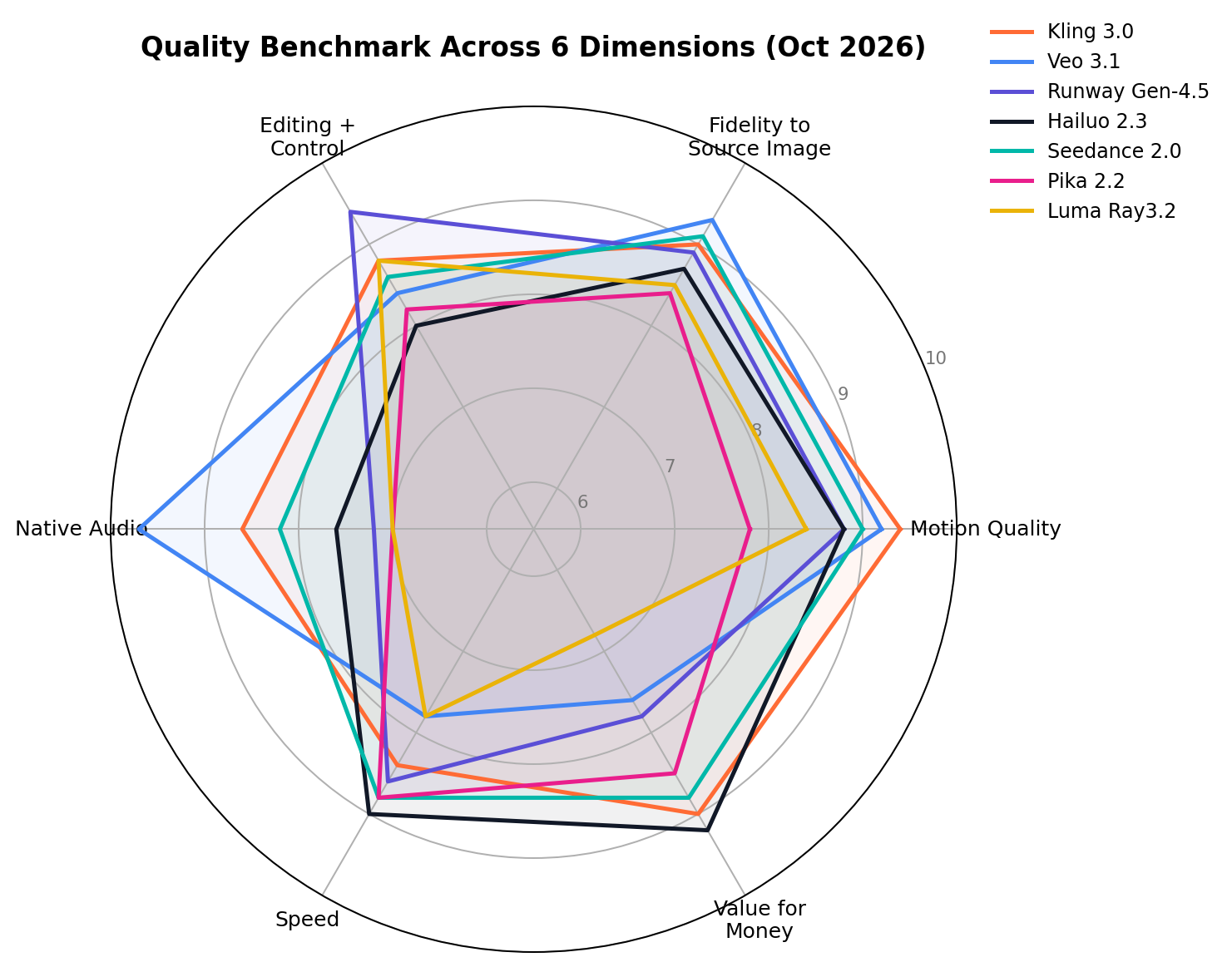
Read the radar as a shape, not a size. Kling 3.0 is the balanced hexagon — nothing below 8.4, which is why it tops the overall table. Veo 3.1 spikes to 9.7 on audio and 9.3 on fidelity but collapses to 7.8 speed / 7.6 value — you pay for the spikes in money and patience. Runway pulls a 9.4 editing spike with a 7.2 audio valley (effects and music, no speech). Hailuo inverts Veo: 9.0 speed and 9.2 value with a shallower control ceiling. Seedance is a smaller Kling (strong motion and fidelity, balanced elsewhere). Pika and Luma trade overall horsepower for specialized effects and restyling respectively.
How We Tested
We weighted three sources. First, vendor list prices and current model documentation (October 2026) anchor every pricing figure — no legacy tiers. Second, hands-on identical-image sessions: the same four source images (a product photo, a character illustration, a portrait, an architecture shot) went through every tool's image-to-video mode with matched prompts, at least three generations each, judged side by side. Third, public benchmarks and community leaderboards (Artificial Analysis video arena, LMArena video) were used only as cross-checks on motion and fidelity ordering. The seven dimension scores are the editorial consensus of two independent reviewers; ties were broken by re-running the disputed prompt pair. Prices and model versions were last fully re-verified on October 7, 2026.
Real-World Money-Making Scenarios
Scenario 1: Faceless YouTube channel b-roll at volume
A running faceless-channel workflow from our October 2026 case research: a channel publishing 5 videos/week needs ~40 usable b-roll clips weekly (160/month), animated from stock stills and AI images in niches like "relaxing ambiences" and "top-10 facts." Recommended: Hailuo 2.3 — $0.19–$0.56 per API clip means $31–$90/month covers the entire volume, and 9.0/10 speed keeps the pipeline moving; pair with Kling's free 66 daily credits for hero shots. At a $2–8 RPM in these niches, a channel clearing 300K monthly views grosses $600–$2,400 — the generation bill stays under 15% of revenue. Test prompt: "Slow dolly push-in on [image: misty pine forest at dawn], volumetric light rays, birds crossing frame, subtle parallax."
Scenario 2: Etsy digital products + animated POD listings
Etsy sellers in the case files animate wall-art listings and offer "animated version" digital downloads as order-bump upsells ($3–$9 on a $12–$25 print), plus looping product mockups for their own listings. Recommended: Kling 3.0 — the free 66 credits/day (≈90 clips/month) sustains a small shop's entire animation output at $0; Standard at $10/month removes watermarks and adds 1080p when the shop scales. Luma's seamless loops are the premium alternative for ambient/screensaver products. Test prompt: "Gentle candle flicker and drifting dust motes in [image: cozy reading nook illustration], seamless loop, no camera movement."
Scenario 3: E-commerce product ads with voice
Small e-commerce brands commission 15–30s product ads; freelancers productize this at $50–$150 per ad or $500+/month retainers. Recommended: Veo 3.1 — the only always-on native audio pipeline turns one product photo into an ad with narration, SFX and music in a single generation (an 8s clip costs $3.20 at API rates; ~10 clips cover a full ad's raw material at under $35). Kling 3.0 is the budget substitute when audio quality demands are lower. Test prompt: "Studio product shot of [image: matte-black espresso machine], steam rising, machine sounds, warm male voice: 'café quality, every morning', 8 seconds."
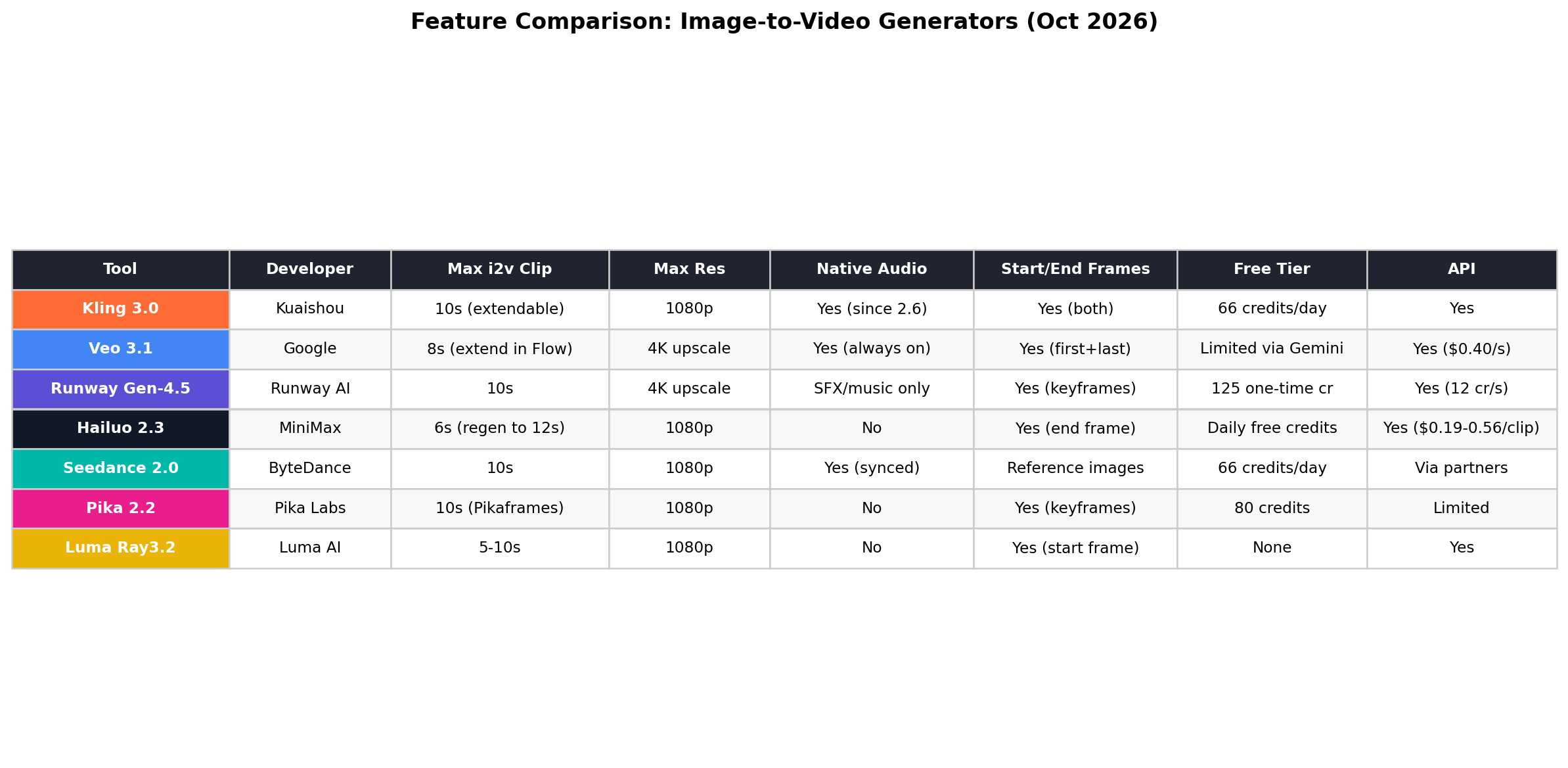
Feature Comparison at a Glance
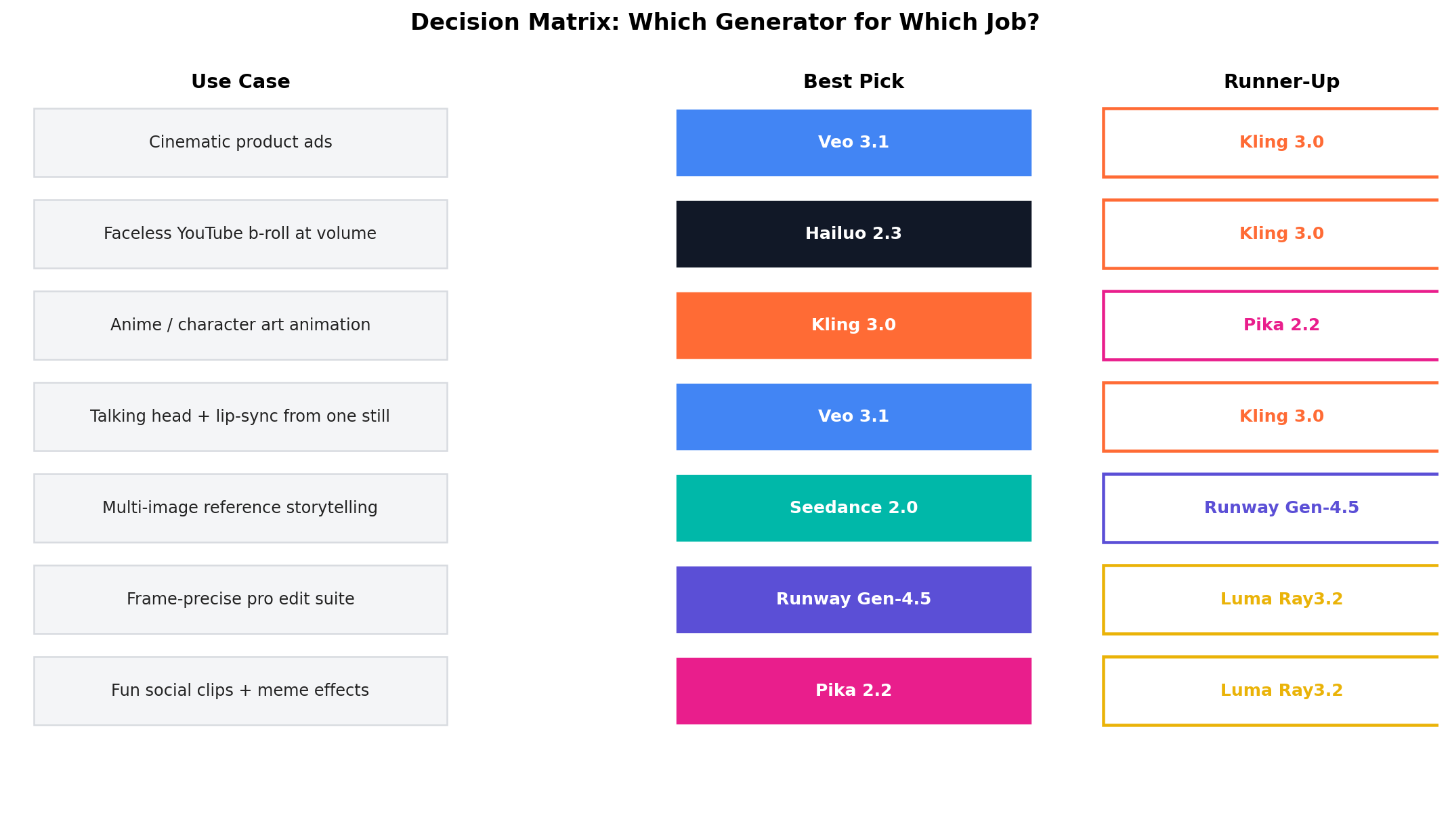
Which One Should You Use?
Alternatives Worth Considering
| Tool | Starting price | Standout feature |
|---|---|---|
| Wan 2.5 (Alibaba) | Free (open weights) / self-host GPU | Open-source i2v with audio; the DIY route for full control |
| HunyuanVideo (Tencent) | Free (open weights) | Open-source quality leader; 13B model, ComfyUI-native |
| LTX Studio / LTXV | From ~$10/mo | Story-board-first studio around a fast open video model |
| Mochi 1 (Genmo) | Free (open weights) | Apache-2.0 motion research model; strong community fine-tunes |
| Sora (legacy clips) | — | Discontinued April 2026 — existing exports still circulate; not a new-subscription option |
The Verdict
Best overall: Kling 3.0 — the most balanced package in the field: best-in-test motion (9.4), 10s chainable clips, start + end frame control, native audio, and a free 66-credits-per-day tier no rival matches.
Best realism and audio: Veo 3.1 — unmatched source fidelity (9.3) and the only always-on dialogue + SFX + music pipeline (9.7). Pay for it in speed and dollars: $19.99/mo entry, $0.40/s on API.
Best for professional editing: Runway Gen-4.5 — keyframes, Motion Brush, inpainting and a timeline editor make it the production suite, not just a generator.
Best budget API: Hailuo 2.3 — $0.19–$0.56 per clip at 9.0/10 speed; the volume b-roll default.
Best value overall: Kling again — a $0 free tier and $10 Standard plan that out-punches tools costing three times more.
Hybrid approach (what the pros actually run): Kling free credits for daily volume, one Veo 3.1 month ($19.99) reserved for audio-hero shots, Hailuo API when a client job spikes demand, Runway when the deliverable is an edit, not a clip.
Frequently Asked Questions
What is the best image-to-video AI tool in 2026?
Kling 3.0 is the best overall image-to-video AI tool in 2026 — it scored 9.0/10 in our test with the field's best motion physics (9.4/10), 10-second extendable clips, start and end frame control, native audio and a genuinely usable free tier. Veo 3.1 (8.9/10) wins on realism and audio if budget is secondary.
Which image-to-video AI has the best free tier?
Kling. Its free plan refreshes 66 credits every day — roughly three 5-second standard clips per day, forever — and watermarked 720p output is fine for drafts. Seedance also grants 66 daily free credits through the Jimeng app. Runway and Pika free tiers are one-time credit bundles, not recurring.
Can image-to-video AI tools generate audio?
Yes — but only some of them. Veo 3.1 is the only tool with an always-on native audio pipeline that generates dialogue, sound effects and music together (9.7/10). Kling 3.0 and Seedance 2.0 generate synced audio and ambience. Runway Gen-4.5 generates sound effects and music but no speech. Hailuo, Pika and Luma output silent clips.
How much do image-to-video AI tools cost per month?
Entry paid plans range from $8/month (Pika, annual billing) and $10/month (Kling Standard) to $19.99/month (Veo 3.1 via Google AI Pro) and $30/month (Luma Plus). Mid-tier professional plans with 1080p and priority queues run $15–$37/month across the field.
What is the cheapest image-to-video API for developers?
Hailuo 2.3, at roughly $0.19–$0.56 per generated clip depending on resolution. Kling's API starts near $0.14 per 5-second standard clip (shorter/standard-tier only), while Veo 3.1's API is the premium meter at $0.40 per second with audio ($0.15/s for the Fast tier). Open-source routes (Wan 2.5, HunyuanVideo) are free but require your own GPU.
Can I use image-to-video AI for commercial projects like YouTube or ads?
Yes, on every paid plan listed here — paid tiers of Kling, Veo (Google AI Pro and above), Runway, Hailuo, Seedance, Pika and Luma grant commercial-use rights, and several remove watermarks at paid tiers. Free tiers typically restrict commercial use and add watermarks; check each vendor's current terms before shipping client work. Note that "Sora-style" legacy clips circulating online are not a licensable option since Sora's discontinuation in April 2026.
Do I need a powerful computer to run image-to-video AI?
No. All seven tools in this list run in the cloud through a browser — your machine only handles the web app. The exceptions are the open-source alternatives (Wan 2.5, HunyuanVideo, Mochi 1), which need a 24GB+ VRAM GPU to self-host. API-based workflows likewise run entirely server-side.