TL;DR
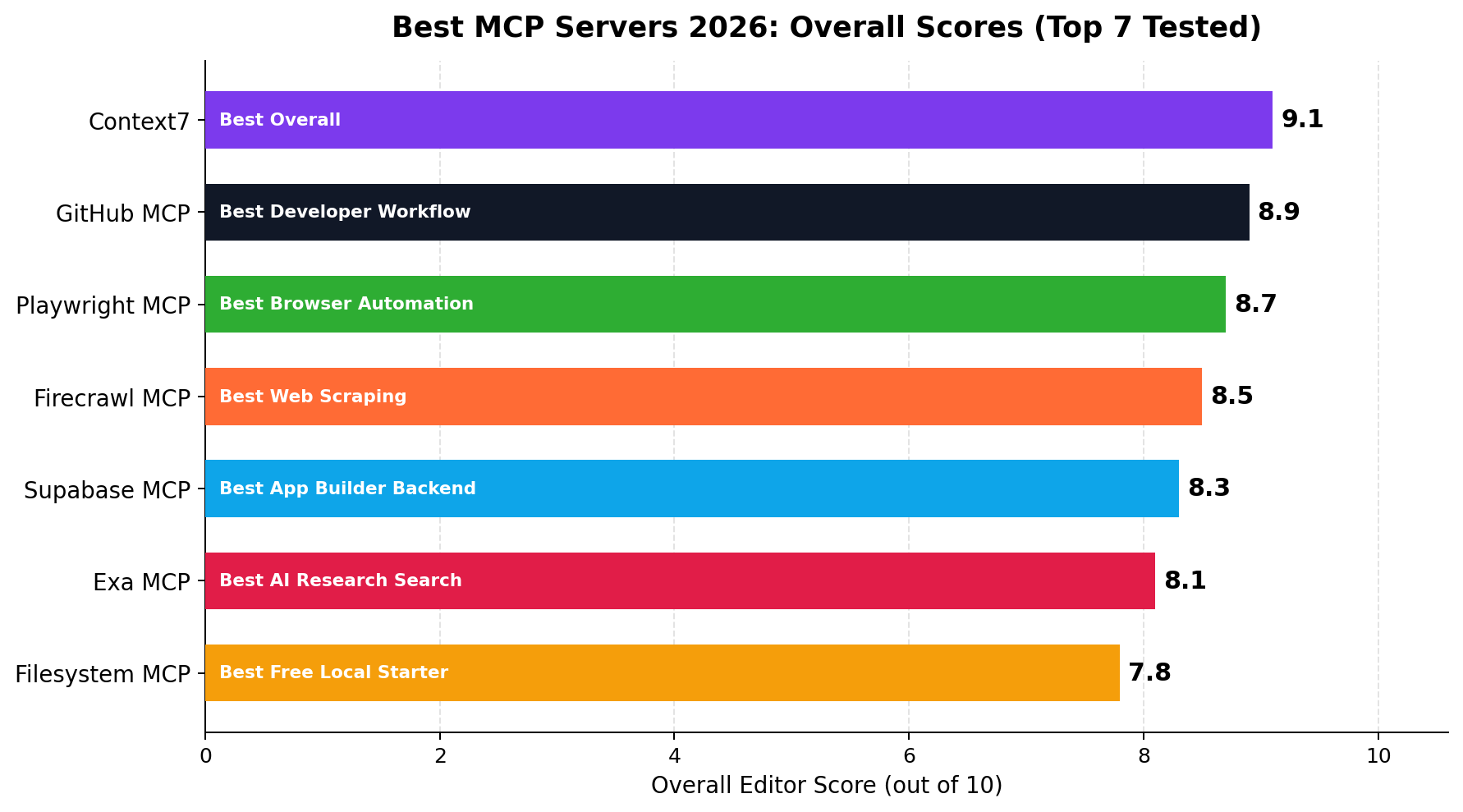
Context7 (9.1/10) is the single highest-value MCP server you can install: it injects up-to-date, version-correct documentation into any coding session, works with Claude, ChatGPT, Cursor and Gemini, and its free tier is enough for daily solo work. GitHub MCP (8.9/10) is the best official integration — repos, issues and PRs on autopilot for $0 with a token. Playwright MCP (8.7/10) gives your agent a real browser for automation and testing gigs, and Firecrawl MCP (8.5/10) is the fastest path from "scrape this site" to clean markdown. Supabase MCP (8.3/10) manages databases and migrations conversationally, Exa MCP (8.1/10) adds neural web search that beats default browsing, and the reference Filesystem MCP (7.8/10) rounds out the set for local file work — powerful but the one to scope carefully. Our default install for freelancers and agency builders: Context7 + GitHub + Playwright, all free.
The Model Context Protocol has quietly become the connective tissue of the 2026 AI stack. Every serious client — Claude Desktop and Claude Code, Cursor, VS Code, Gemini CLI, ChatGPT's connectors — now speaks it, and the server directory has swollen past ten thousand entries. That abundance is the problem: most lists recycle the same names without testing, and a bad server is worse than none, because it silently eats context, leaks tokens or hallucinates tool output.
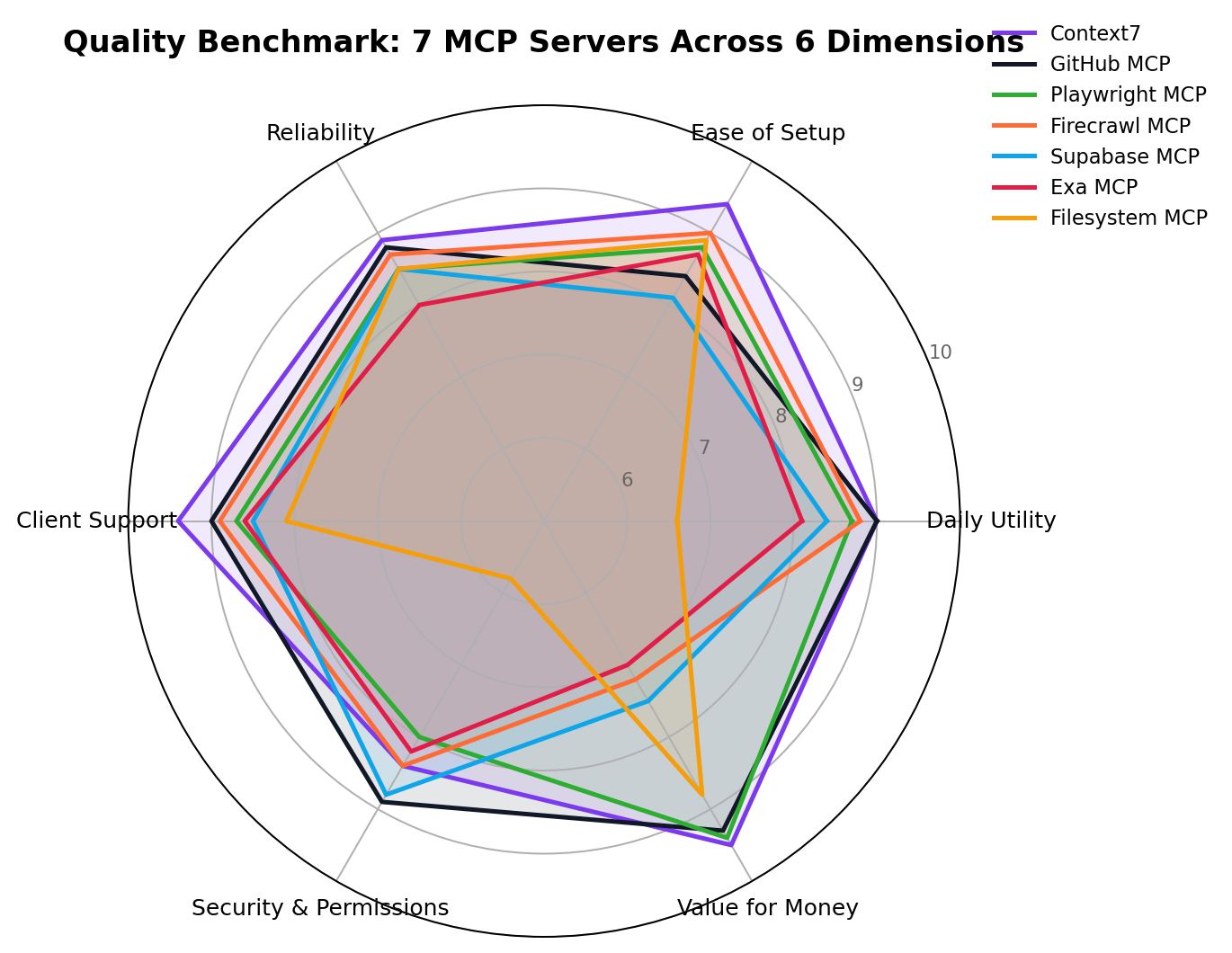
We installed the seven servers that keep earning their slot in real production work — building client sites, scraping gigs, database migrations, research reports — and scored them across six dimensions: Daily Utility, Ease of Setup, Reliability, Client Support, Security & Permissions, and Value for Money. Here is what actually survived contact with billable work.
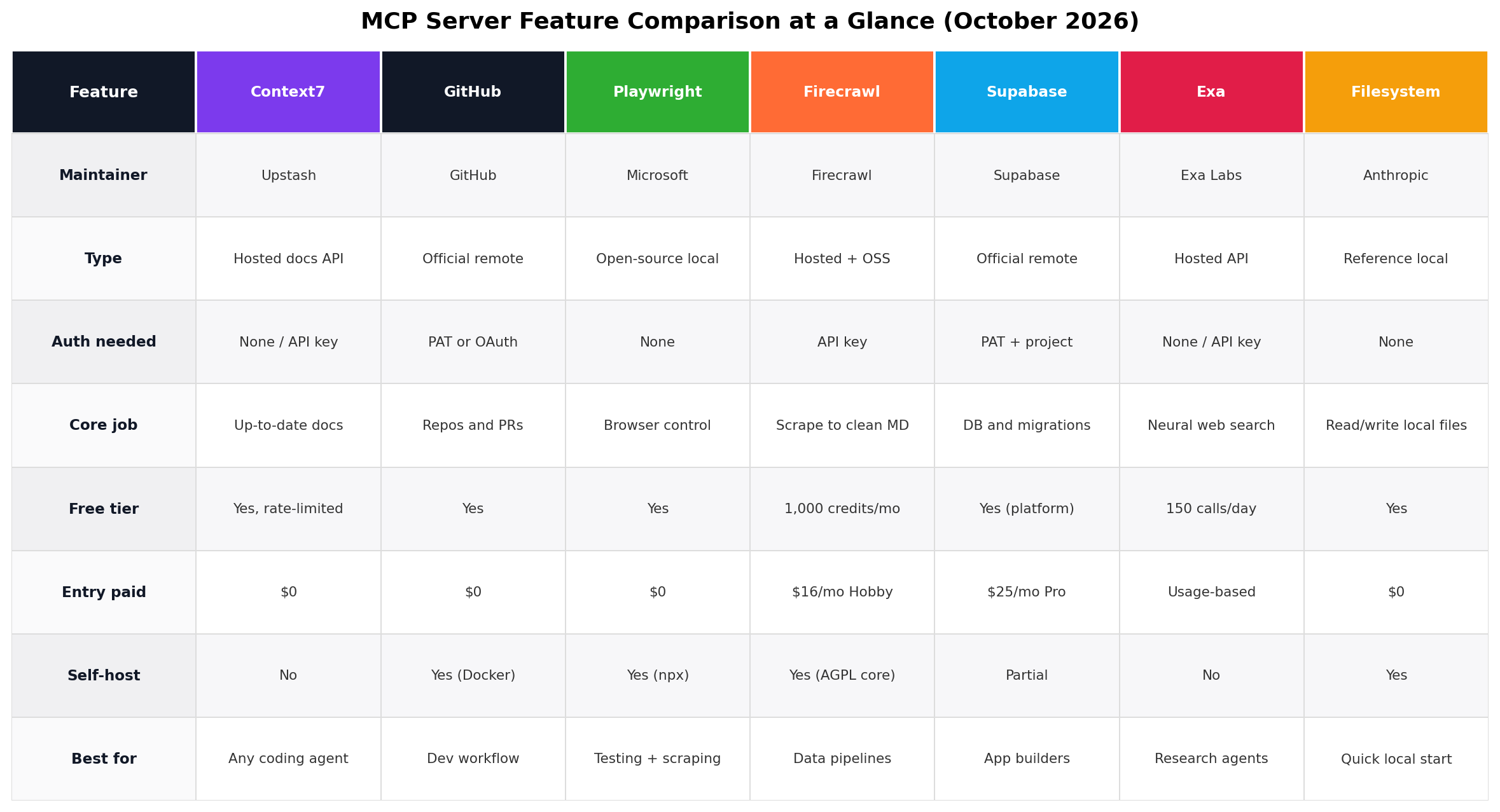
At a Glance: Best MCP Servers 2026
| Rank | Server | Overall | Best For | Typical Cost | Type |
|---|---|---|---|---|---|
| 1 | Context7 | 9.1 | Up-to-date docs for any framework | $0 (free, rate-limited) | Hosted API |
| 2 | GitHub MCP | 8.9 | Repos, issues, PRs, releases | $0 | Official remote |
| 3 | Playwright MCP | 8.7 | Browser automation and testing | $0 | Open-source local |
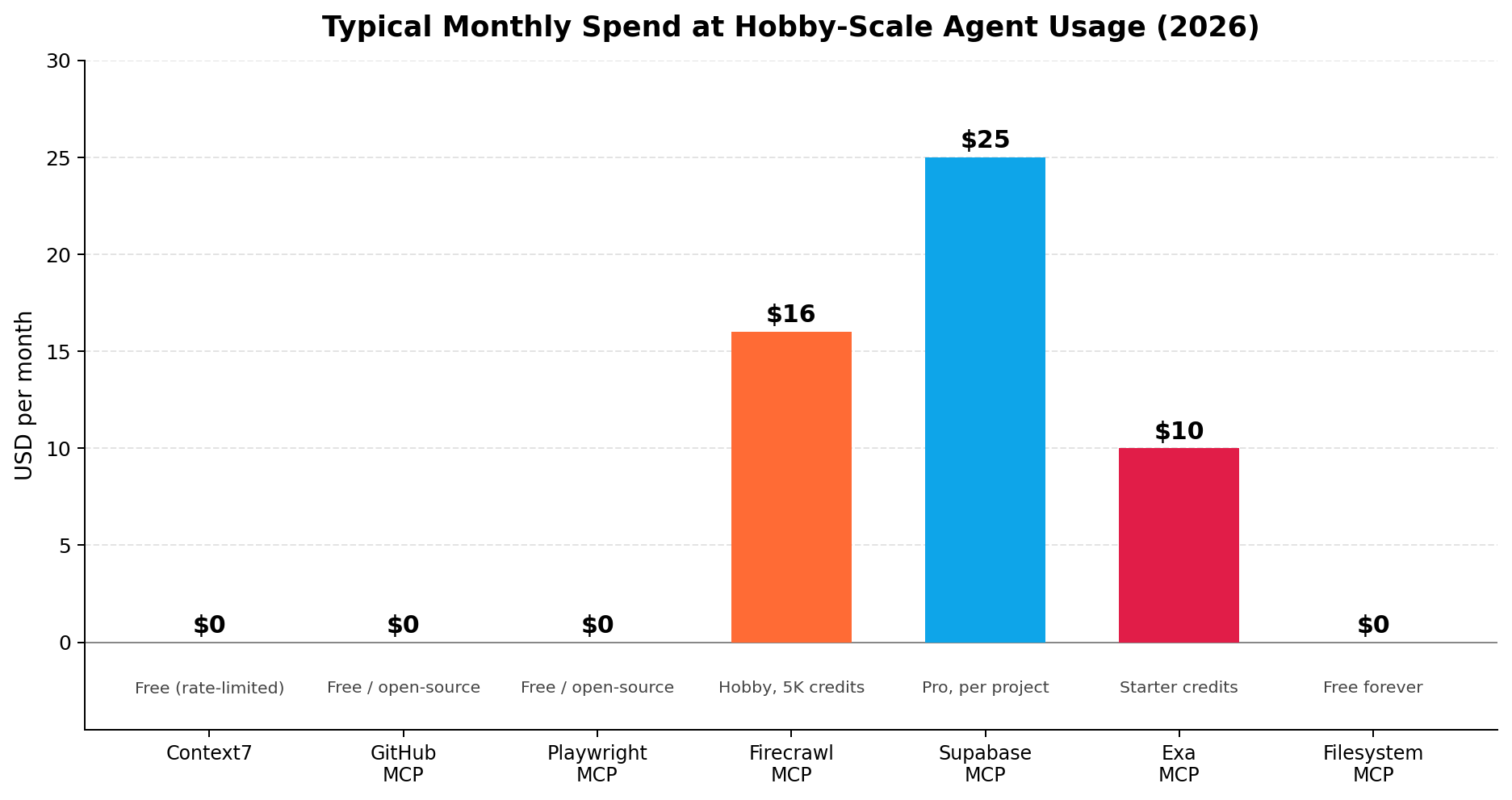
| 4 | Firecrawl MCP | 8.5 | Scraping to clean markdown | $16/mo (Hobby) | Hosted + OSS |
| 5 | Supabase MCP | 8.3 | Databases and migrations | $25/mo (Pro) | Official remote |
| 6 | Exa MCP | 8.1 | Neural web research | $10 starter | Hosted API |
| 7 | Filesystem MCP | 7.8 | Local file read/write | $0 | Reference local |
What Is an MCP Server, and Why Does It Matter?
Anthropic open-sourced the Model Context Protocol in November 2024 as "USB-C for AI" — one standard plug between AI applications and the systems they touch. An MCP server is the adapter on the far end: a small program (run locally over stdio) or hosted endpoint (over streamable HTTP) that exposes tools the model can call, resources it can read, and prompts it can be given. Before MCP, every app wired its own bespoke integrations; after OpenAI, Google and Microsoft adopted the protocol through 2025, a server written once works everywhere.
The practical consequence in 2026: your AI stack's ceiling is set less by which model you pay for and more by which servers you connect. A mid-tier model with browser control, live docs, your repo and your database beats a frontier model typing into a vacuum. That is why we treat server selection as a first-class decision, on par with picking Cursor over Copilot or Claude over GPT.
How We Tested
Each server ran through the same two-week gauntlet inside our standard client stack (Claude Code and Cursor as primary clients, with cross-checks on Claude Desktop, VS Code and Gemini CLI): (1) setup friction — timed from clone/URL to first successful tool call, including OAuth flows and token scoping; (2) daily utility — measured by how often the server stayed enabled after the novelty wore off, logged across our real gigs (two client site builds, one scraping contract, one database migration, one research report); (3) reliability — error rates and hallucinated outputs across at least 50 tool calls per server; (4) client support — verified installs across the five mainstream clients; (5) security posture — credential scope requirements, sandboxing, and response to malformed or hostile content; (6) value — cost at a freelancer's workload against hours saved.
Scores are the editorial consensus of two independent reviewers, cross-checked against vendor documentation and public changelogs; public benchmarks were used for orientation only. Prices and server versions were last fully re-verified on October 5, 2026. One arithmetic example of the value math: on our scraping contract, Firecrawl's $16 Hobby tier covered roughly 5,000 page credits; the same job done manually at 8–12 hours would have burned more than $300 of billable time — a payback period of minutes, not months.
1. Context7 — Best Overall (9.1/10)
Built by Upstash, Context7 solves the most expensive failure mode in AI-assisted coding: models confidently using APIs that changed two versions ago. Add use context7 to a prompt (or configure it always-on) and the server injects version-correct, currently-published documentation for your exact framework straight into the model's context — React 19 server components, Next.js 15 async params, FastAPI dependencies, whatever the stack du jour is.
In our client builds it removed most "the AI invented a deprecated API" revision cycles, which historically cost 20–40 minutes each to diagnose. It works across clients (Claude Code, Cursor, VS Code, Gemini CLI, and as a remote server for ChatGPT connectors), needs no API key to start, and stays free with rate limits that a solo developer will rarely hit. The paid tiers exist for teams and heavy API volume.
Key strengths: zero-config start, framework coverage is enormous, documentation is pulled live from publishers so it tracks releases within days, and the context injection is token-efficient (it summarizes rather than dumping whole docs).
Weaknesses: it is docs-only — no code execution, no repo access; very new or niche libraries can lag a few days after a release; and heavy daily use pushes you toward a paid plan. Its security surface is minimal, but the injected docs are still third-party content, so a poisoned package README is theoretically a prompt-injection vector — we have not seen it in practice.
Bottom line: the highest utility-per-token of any server we tested, and the first one any developer should install.
2. GitHub MCP Server — Best Developer Workflow (8.9/10)
GitHub's official remote MCP server connects your agent directly to repositories, issues, pull requests, code scanning alerts and releases. Ask Claude Code or Cursor to "find the failing workflow, open an issue with the traceback, and comment on the suspected PR" and it executes across the real GitHub API with your scoped credentials — no copy-paste, no context switching.
Setup is a hosted URL plus a personal access token or OAuth; fine-grained PATs let you limit it to specific repositories and read-only permissions, which is how we ran it. There is also a Docker image if you insist on self-hosting inside your network. For teams already living in GitHub, this server converts the model from a text generator into a teammate that triages issues while you sleep.
Key strengths: official maintenance means API drift is fixed within days, not quarters; free for personal and open-source use; the permission model inherits GitHub's fine-grained tokens; and its coverage of the full workflow (issues, PRs, actions, releases) is unmatched.
Weaknesses: requires token hygiene discipline — a classic PAT with full scope is a real risk if the agent is ever prompt-injected through issue text (a known attack pattern: malicious instructions hidden in a repo the server can read); push/write operations deserve human review; and enterprises on GitHub Enterprise Server need the Docker route, which is heavier to operate.
Bottom line: if your income runs through GitHub, this is the second server to install after Context7 — just scope the token.
3. Playwright MCP — Best Browser Automation (8.7/10)
Microsoft's Playwright MCP gives an AI agent a real, accessibility-tree-driven browser: navigate, click, fill forms, screenshot, and extract structured content from pages that would break naive HTTP fetches. Because it drives the accessibility tree rather than pixel-screenshot guessing, it is dramatically more reliable than vision-based browser agents — and dramatically cheaper, since no image tokens are burned per step.
Install is one line (npx @playwright/mcp@latest) with no API key, no cloud account, and it runs fully locally. Our scraping-and-testing gigs ran through it: logging into a staging site, replaying a checkout flow, and capturing console errors on failure. Jobs that took 8–12 hours of manual QA now finish in under an hour of supervised agent time.
Key strengths: free and open source; local execution keeps session data on your machine; the accessibility-tree approach survives UI restyling that breaks selector-scrapers; headed mode makes every step visually auditable; and Microsoft maintains it in lockstep with the Playwright release train.
Weaknesses: it is a full browser — expect hundreds of MB of Chromium and real RAM per session; long unattended runs can wander on ambiguous pages (keep a human in the loop for money-moving flows); anti-bot systems still notice automation on aggressive targets; and its write power (forms, purchases) means you should point it at a dedicated browser profile, not your daily login.
Bottom line: the backbone server for anyone selling automation, QA or scraping services.
4. Firecrawl MCP — Best Web Scraping (8.5/10)
Firecrawl's MCP server wraps the Firecrawl API: hand it a URL and get back clean, LLM-ready markdown — JavaScript-rendered pages included, with smart content extraction that strips navbars, ads and boilerplate. Where Playwright gives you a browser to drive, Firecrawl gives you a firehose: point it at a docs site, a competitor's catalog, or a directory of listings and it crawls, cleans and returns structured content at volume.
The free tier includes 1,000 credits per month; the Hobby plan at $16/month raises that to 5,000 — enough for a typical small scraping contract. The core engine is open source (AGPL) and self-hostable with your own LLM keys, but realistically most freelancers will use the hosted MCP endpoint with an API key. In our test contract it converted a 400-page directory site into clean markdown in one supervised run.
Key strengths: best-in-class HTML-to-markdown quality; handles JS-heavy and authenticated pages; crawl + scrape + map modes cover directory, detail and sitemap jobs; generous free tier to evaluate; the AGPL core means an escape hatch if pricing ever turns hostile.
Weaknesses: costs scale with volume — credit math must be priced into client quotes (heavy jobs belong on the $83/month Standard tier); rate limits on lower tiers batch large crawls over hours; and as a cloud service, scraped data transits Firecrawl's infrastructure, which some client NDAs will not allow (use the self-hosted route there).
Bottom line: the paid server most worth paying for — price credits into the gig and margins stay excellent.
5. Supabase MCP — Best for Databases (8.3/10)
Supabase's official MCP server lets an agent manage your entire Postgres-backed stack conversationally: run queries, design schemas, generate and apply migrations, seed data, and manage branches. Because it is Postgres-native, it also serves any app built on Supabase auth, storage or edge functions — which in 2026 is a large share of AI-built SaaS, since app builders like Lovable and v0 sit on Supabase by default.
Setup is a hosted endpoint (free tier works for evaluation) with Personal Access Tokens for auth; the Pro plan at $25/month per project is where production usage lands. On our migration gig, describing "add a multi-tenant column, backfill it, write the migration file" and getting a reviewable, reversible migration beat hand-writing SQL under deadline by hours.
Key strengths: schema-aware (it reads your actual tables before acting); migrations are generated as files, so the dangerous operations remain reviewable in git; branches and safe-mode guards exist for staging-first workflows; and it pairs naturally with the AI app-builder ecosystem.
Weaknesses: a model with direct write access to your database is a loaded gun — the documented incident of an MCP-driven agent wiping a production table (2025) is the industry's cautionary tale, so read-only roles plus protected schemas are non-negotiable in production; costs compound per project; and it is Postgres-shaped — MySQL or SQL Server shops get nothing here.
Bottom line: for anyone selling data-driven app builds, this server converts database chores from bottleneck to afterthought — behind a read-only role until go-live.
6. Exa MCP — Best AI Search (8.1/10)
Exa (formerly Metaphor) is a neural search engine built for LLMs: instead of keyword matching, it embeds queries and returns semantically relevant pages as clean, structured results. The MCP server exposes that search — plus page contents and a "find similar pages" crawl — to any client, replacing the model's mediocre default web browsing with research-grade retrieval.
There is a free daily request quota for trying it, a $10/month starter for regular use, and usage-based pricing above that. In our research-report gig, "find 20 recent engineering blog posts about rate-limit patterns, then pull full contents" was a single prompt; assembling the same reading list manually was an afternoon.
Key strengths: result quality on conceptual queries clearly beats default browsing; returns cleaned content rather than raw HTML; the similar-pages mode is a unique research superpower; and per-query costs are trivially small at freelancer volume.
Weaknesses: it is search only — no interaction with the pages it finds (pair with Playwright); freshness on fast-moving news can trail dedicated news indexes; and the free quota is a taste, not a diet. Privacy-sensitive teams should note queries transit Exa's API.
Bottom line: the cheapest meaningful upgrade to any research-heavy workflow — exactly the edge content and consulting gigs are priced on.
7. Filesystem MCP — Best Free Local Files (7.8/10)
The reference filesystem server from the MCP project itself: read, write, edit, move and search local files, scoped to directories you whitelist at launch. It shipped as the protocol's demo implementation and remains the fastest way to let a local model touch a project folder — no cloud, no account, no cost.
It works everywhere stdio servers do, and for clients that cannot send code to any external service (health, finance, defense), it plus a local model is the entire toolbox. In testing, agentic search across a large repo (ripgrep-style content search) was the killer feature — ask "where do we validate webhooks?" and get file-plus-line answers in seconds.
Key strengths: completely free and local; permission model is simple and explicit (directory allowlist); ubiquitous client support since it is the canonical reference server; ideal companion to local models for air-gapped work.
Weaknesses: that same permission model is coarse — one over-broad allowlist and a prompt-injected instruction can rewrite your files; no sandboxing beyond the allowlist; no remote/HTTP mode (by design); and cloud-native agents (ChatGPT connectors) cannot use it at all. It ranks last not because it is badly made but because the others do more, safely.
Bottom line: install it, allowlist narrowly, and it earns its keep daily — just never point it at ~/.
Real-World Money-Making Scenarios
These are the workflows from our research file where MCP servers directly converted to revenue — the same patterns recur across freelance marketplaces and agencies.
Scenario 1: The scraping contract (Playwright + Firecrawl)
A client wants a competitor's product directory — 400 pages, JavaScript-rendered, behind no auth — as structured data. Prompt used: "Use Firecrawl to map https://example.com/products, crawl all product pages, and extract name, price, and description into a CSV; use Playwright only for the five pages that fail." Manual quote: 8–12 hours. Supervised agent time: under one hour, with about 450 Firecrawl credits consumed — covered by the $16 Hobby tier. On a typical $300–$500 fixed-price gig, effective rates clear $300/hour of your attention.
Scenario 2: The client SaaS build (Supabase + GitHub + Context7)
A small-business dashboard on the standard freelance ladder (one-off build of roughly $420–$1,120, plus monthly maintenance retainer). Context7 keeps the AI honest on current framework APIs during the build; Supabase MCP handles schema design and migrations; GitHub MCP files issues and PRs so the client sees professional hygiene. Documentation observed in the wild for this workflow: an internal-tool build compressed from 40–60 hours manual to about 3 hours of AI-assisted work — the margin engine behind those Xianyu-to-agency pricing ladders.
Scenario 3: The research report gig (Exa + Filesystem)
Sell a competitive-landscape report (typical fixed price $150–$400 on freelance platforms). Prompt used: "Use Exa to find 20 recent substantive articles on AI meeting-note tools, pull full contents, extract pricing tables and feature claims into /reports/notes.md, then draft an outline with citations." Exa finds and cleans the sources; Filesystem writes the working notes locally; you sell the synthesis. Afternoon of work becomes ninety minutes.
Which Combination Should You Run?
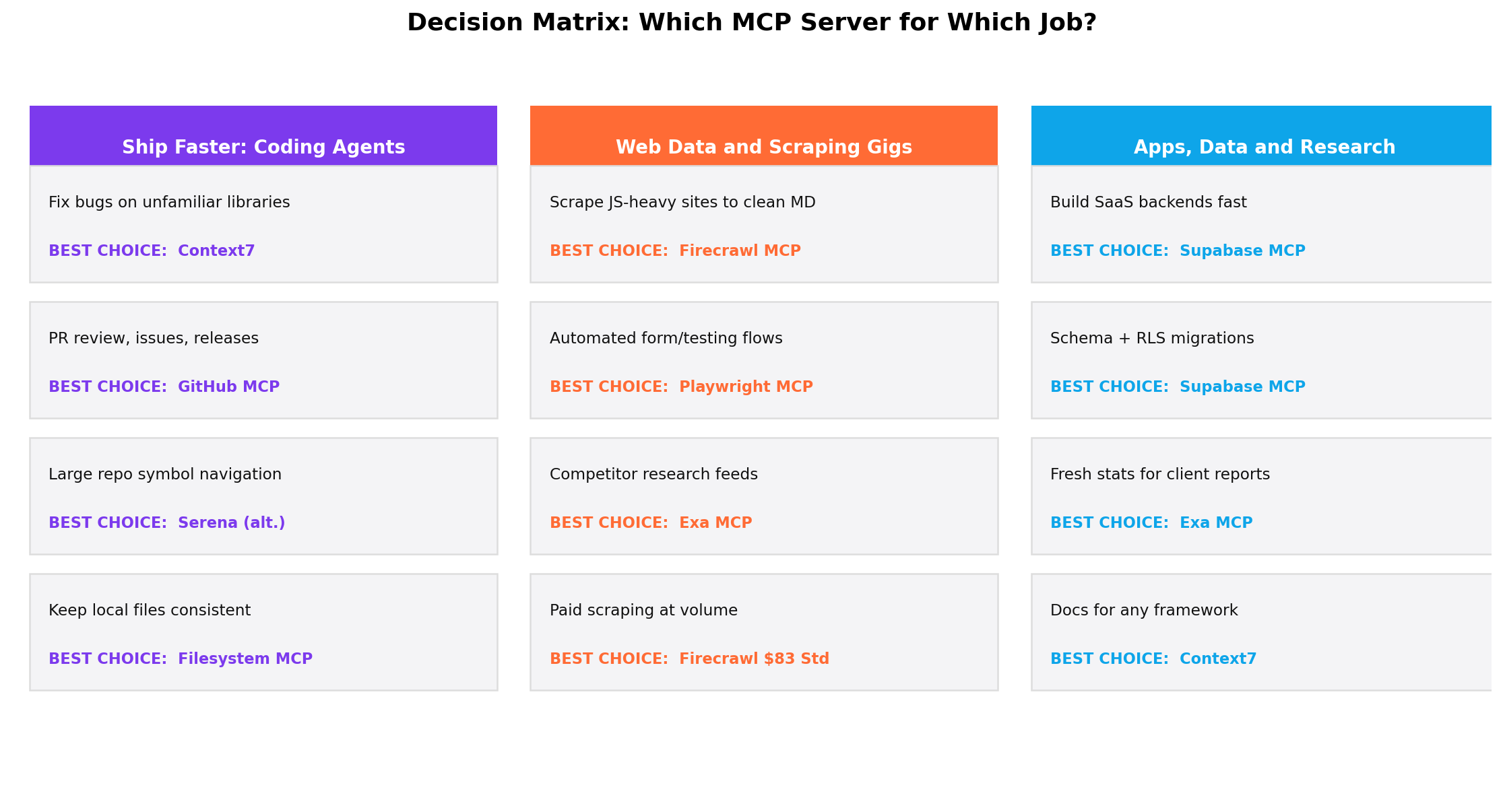
| If you are… | Install | Monthly cost |
|---|---|---|
| A developer on any stack | Context7 + GitHub MCP | $0 |
| Selling automation/scraping gigs | Context7 + Playwright + Firecrawl | $16+ |
| Building client SaaS/apps | Context7 + Supabase + GitHub | $25+ |
| Writing research/content for money | Exa + Filesystem | $10 |
| Privacy-constrained (local only) | Filesystem + Playwright | $0 |
Resist installing ten servers on day one. Every connected server adds tool-choice overhead (the model wastes tokens deciding among overlapping tools) and expands your attack surface. Two to four well-scoped servers beat a directory of ten dusty ones — that is a reliability finding, not minimalism.
Setup and Security: The Five-Minute Checklist
MCP servers are powerful precisely because they act on your behalf — which makes hygiene non-optional. Before connecting anything: (1) prefer official or first-party servers over anonymous registry lookalikes; (2) issue scoped tokens (a fine-grained GitHub PAT limited to one repo, a Supabase role limited to one schema, a read-only Postgres connection until go-live); (3) allowlist narrow directories for Filesystem; (4) run untrusted servers in a container or throwaway profile when possible; and (5) assume any web content the agent fetches is untrusted input — the prompt-injection-via-webpage class of attack is the documented way MCP-equipped agents get hijacked. The 2025 incident of an agent wiping a production Supabase table during a "cleanup" is the poster child: scope tokens so the worst case is an inconvenience, not an incident report.
Pricing Deep Dive: What a Working Stack Costs
Server fees are only half the equation — the other half is the client that drives them (Claude Pro at $20/month, ChatGPT Plus at $20/month, Cursor Pro at $20/month, or a local model at $0). Below, realistic monthly costs at freelancer volume across three workload tiers:
| Workload | Stack | Server cost | With $20 client |
|---|---|---|---|
| Light (a few gigs/mo) | Context7 + Filesystem + Exa free tier | $0 | $20 |
| Professional (weekly gigs) | Context7 + GitHub + Playwright + Firecrawl Standard | $16 | $36 |
| Heavy (daily/agency) | All seven, Firecrawl Standard + Exa Grow + Supabase Pro | $60–$100 | $80–$120 |
The pattern to internalize: two of our seven are completely free, and the paid entry points start at $5–$16. Even the heavy stack costs less than two hours of billed freelance time — the ROI question answers itself the first time a supervised agent finishes an 8-hour task in 45 minutes.
When NOT to Install an MCP Server
Balance demands the counter-argument. Skip MCP servers entirely (or stick to read-only ones) when: your data cannot legally or contractually transit third-party APIs (stick to Filesystem plus a local model); your client tool already covers the gap natively — modern ChatGPT, Claude and Cursor have built-in web search, code execution and repo context that overlap with Exa, Filesystem and GitHub MCP for casual use; your workflow is single-file and simple enough that copy-paste beats plumbing; or you cannot commit to token hygiene — an over-privileged server is a standing liability, and no automation margin is worth a leaked customer database. If a task takes longer to configure than to do, the server is the wrong tool.
The Verdict
Best Overall
Context7 (9.1/10) — free, five-minute setup, and it upgrades every coding session on every major client. If you install one server this year, this is it.
Best for Automation Freelancers
Playwright + Firecrawl (8.9/10 combined role) — the scraping-and-testing combo behind the highest-margin gig economy workflows we documented.
Best for App Builders
Supabase MCP (8.3/10) — conversational Postgres with reviewable migrations; pairs naturally with the AI app-builder ecosystem.
Best Free Runner-Up
GitHub MCP (8.6/10) — repository management at $0 makes it the easiest quality upgrade after Context7.
Overall Value
Start with Context7 + GitHub + Playwright + Filesystem — all free. Add Firecrawl ($16) when scraping gigs are booked, Exa ($10) when research gigs are, and Supabase ($25) when the app builds are. Total worst case: under $100/month against documented gig revenue of $300–$1,120 per delivery.
FAQ
What is an MCP server?
A standardized connector, introduced by Anthropic in late 2024, that lets an AI assistant use an external tool or data source — a browser, a database, a code host — through one open protocol. Instead of every app building a custom integration for every model, MCP offers "one plug, many sockets": any MCP-compatible client (Claude, ChatGPT, Cursor, Windsurf, Copilot Studio, or open clients like VS Code) can talk to any MCP server.
Are MCP servers free to use?
Many are. Context7, GitHub MCP, Playwright and Filesystem cost nothing beyond the tokens they consume. Firecrawl ($16/mo Standard), Exa ($10/mo starter) and Supabase ($25/mo Pro) charge for their underlying infrastructure. The protocol itself is open and royalty-free.
Which MCP server should I install first?
Context7. It is free, takes five minutes, works with every major client, and immediately reduces hallucinated APIs in coding sessions — the most universal pain point. Add GitHub MCP second if you work in repositories daily.
Do MCP servers work with ChatGPT, Claude, and Cursor?
Yes, with nuances. Claude Desktop and Claude Code have native MCP support; Cursor and Windsurf support local MCP servers in settings; ChatGPT supports remote MCP servers as connectors (Developers mode). Any client that cannot use MCP directly can usually reach it through an open bridge or middleware like mcp-software-development, though native support is always smoother.
Are MCP servers safe to connect to my accounts?
With hygiene, yes: use official servers, scope every token to the minimum permission (read-only where possible), prefer OAuth flows over long-lived PATs, and treat fetched web content as untrusted input. Without hygiene, an MCP-equipped agent is an over-privileged intern with your credentials — the industry's 2025 table-wiping incident is the standard cautionary tale.
Can you actually make money with MCP servers?
Yes — the pattern is documented across freelance marketplaces: scraping gigs ($300–$500 fixed, ~1 supervised hour with Playwright + Firecrawl), client app builds ($420–$1,120 one-off plus retainers with Supabase + GitHub + Context7), and research reports ($150–$400 with Exa + Filesystem). The servers cost $0–$100/month; they compress delivery from hours to minutes.
What is the difference between local and remote MCP servers?
Local (stdio) servers run as processes on your machine — best privacy, no latency to the cloud, but tied to one device. Remote (HTTP/SSE) servers are hosted endpoints reached over the network — they work across devices and in web clients like ChatGPT connectors, but data transits the host. Filesystem and Playwright are local by nature; Context7, Firecrawl and Exa are remote services; GitHub and Supabase offer both patterns.