⏱ TL;DR
Suno v5.5 is the clear winner for most creators. It produces the best AI vocals in the industry, offers full MP3/WAV downloads, includes a built-in DAW (Suno Studio) with stem separation on Premier plans, and grants commercial usage rights. At $8/month (annual), it's one of the most powerful creative tools you can subscribe to. Udio v4 produces marginally better instrumentals and electronic music, but downloads were permanently disabled in October 2025 following a UMG legal settlement. You can listen to music on Udio's platform but cannot export, download, or use the audio anywhere else. For any practical purpose — YouTube videos, podcasts, games, social media content — Udio's output is trapped in a walled garden.
Bottom line: Suno wins across virtually every dimension that matters for real-world use. Udio is only worth exploring as a listening/inspiration tool for electronic music producers, and even then, its utility is severely limited by the no-download restriction.
🚨 Udio's Download Feature Is Dead
In October 2025, Udio settled a copyright lawsuit with Universal Music Group. As part of the agreement, all audio downloads and file exports were permanently disabled. Udio is now a closed listening platform — you generate music, listen to it in your browser, and... that's it. No MP3 files. No WAV exports. No way to use the audio in videos, podcasts, games, or any external project.
Udio's Trustpilot rating dropped to 1.5/5 stars after this change, with users describing it as "useless" and "a trap." Several competing features like stem separation were also removed.
This single fact changes everything about the Suno vs Udio comparison. We'll cover Udio's remaining strengths honestly — its instrumentals genuinely are impressive — but for 95% of creators reading this, Suno is the only practical choice.
📊 At a Glance
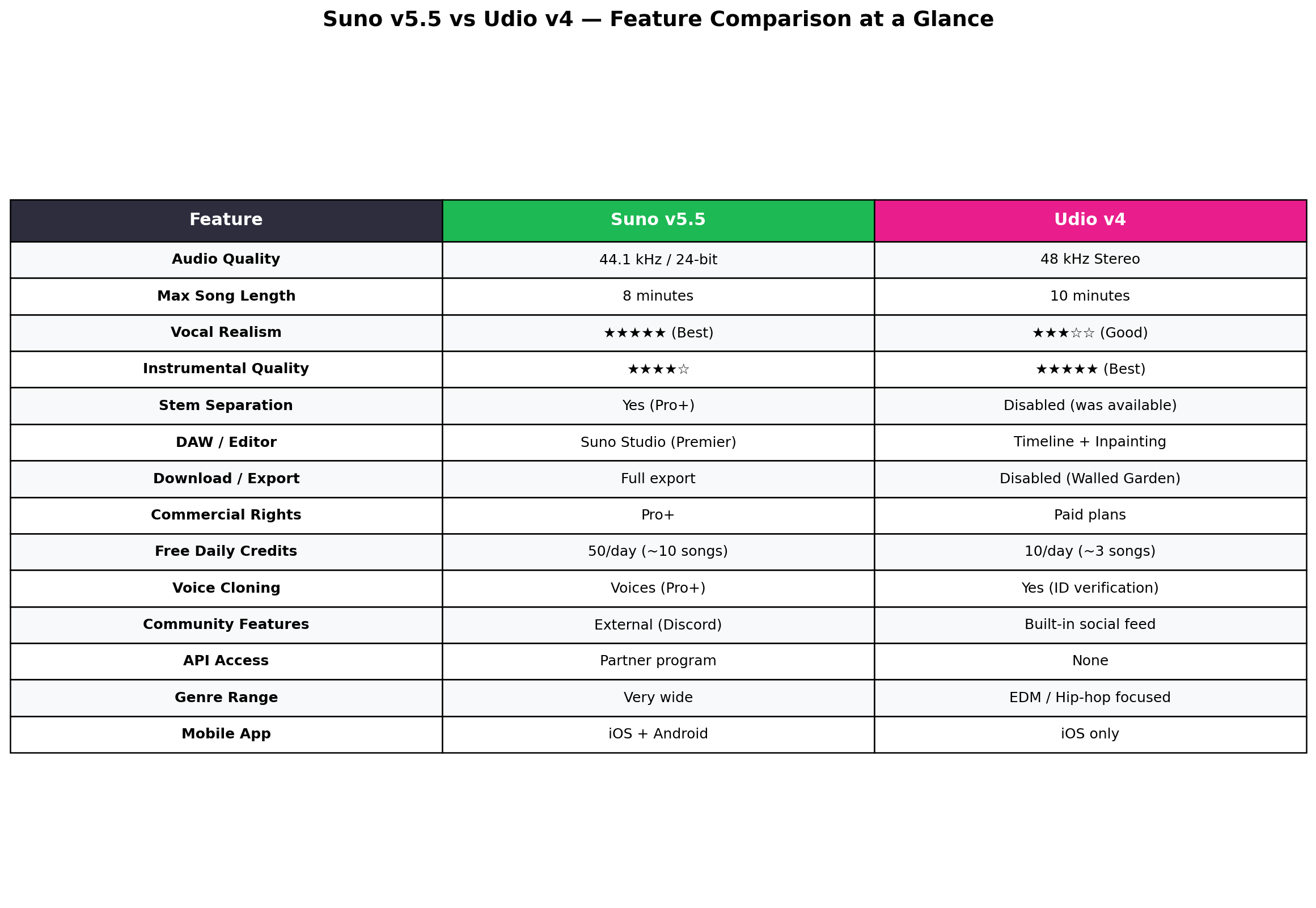
| Feature | Suno v5.5 | Udio v4 |
|---|---|---|
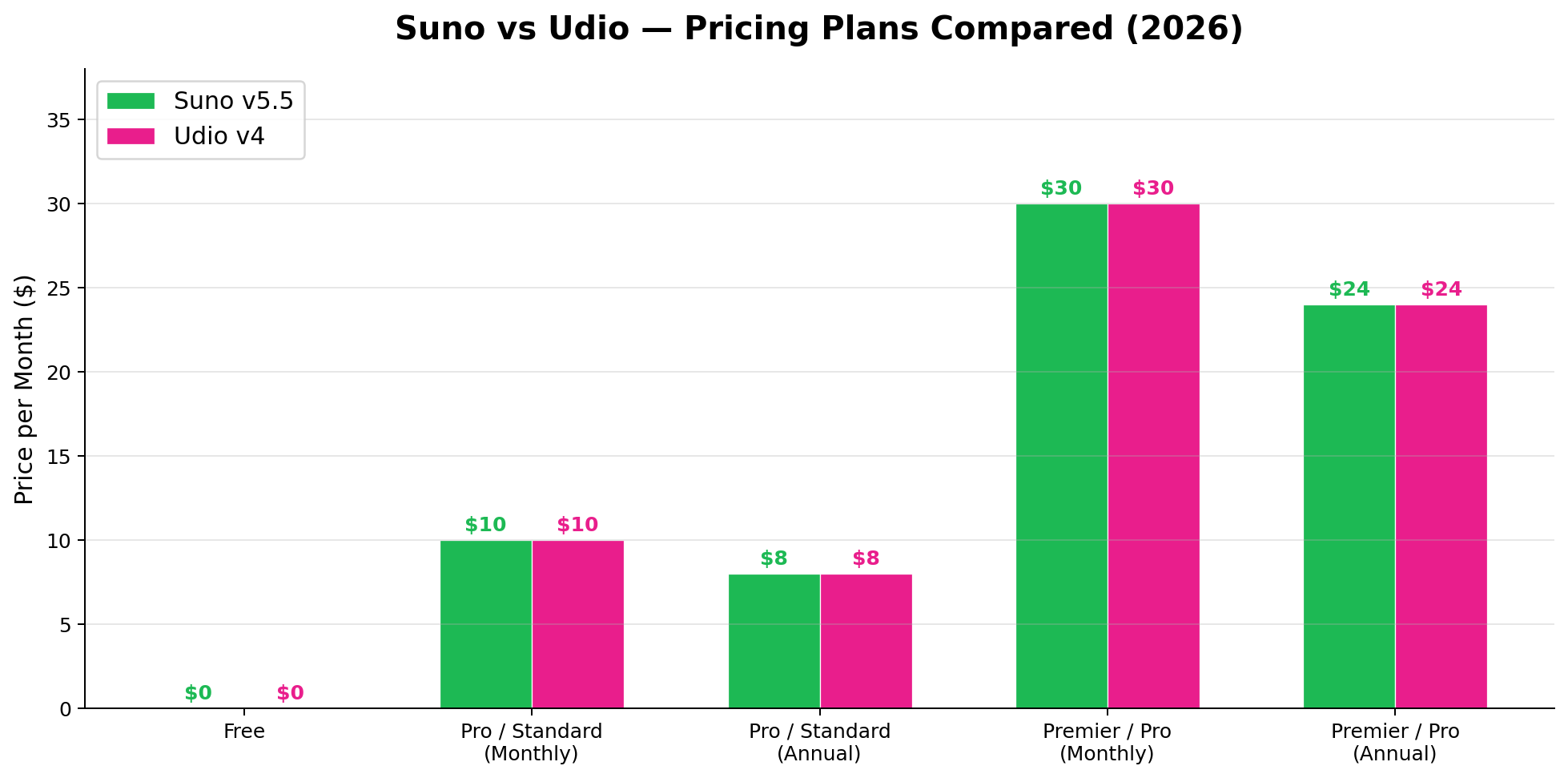
| Free Tier | 50 credits/day (~10 songs) | 10 credits/day (~3 songs) |
| Entry Paid Plan | $10/month ($8/month annual) | $10/month ($8/month annual) |
| Premium Plan | $30/month ($24/month annual) | $30/month ($24/month annual) |
| Credits (Entry Plan) | 2,500/month | 2,400/month |
| Audio Quality | 44.1 kHz / 24-bit | 48 kHz stereo |
| Max Song Length | 8 minutes | 10 minutes |
| Vocal Quality | ★★★★★ (Industry-leading) | ★★★☆☆ (Decent, sometimes robotic) |
| Instrumental Quality | ★★★★☆ (Very good) | ★★★★★ (Excellent) |
| Download / Export | MP3 + WAV (Pro+) | ❌ Disabled (Walled Garden) |
| DAW / Editor | Suno Studio (stem sep, timeline) | Timeline + inpainting (no stem sep) |
| Commercial Rights | Yes (Pro+) | Yes (paid plans, platform-only) |
| Voice Cloning | Voices (Pro+) | Yes (requires ID verification) |
| Mobile App | iOS + Android | iOS only |
🎸 Deep Dive: Suno v5.5
Suno has come a long way since its early "barking AI" meme days. Version 5.5, released in mid-2026, represents a mature, production-ready AI music platform backed by a $5.4 billion valuation and $400 million in Series D funding. That's serious money — and it shows in the product.
What Makes Suno Special
Vocals that actually sound human. This is Suno's single biggest differentiator and it's not close. Suno v5.5 generates vocals with natural breath control, emotional dynamics, vibrato, and phrasing that can fool casual listeners. The AI understands genre-specific vocal styles — a country singer sounds different from an R&B vocalist, and both sound different from a death metal growler. Earlier AI music tools (including Suno's own v3) had a telltale "AI voice" quality; v5.5 has largely eliminated it.
Suno Studio: A real DAW. This is Suno's killer feature for Premier subscribers ($24/month annual). Suno Studio is a full multi-track digital audio workstation built into the browser. It includes:
- Stem separation — isolate vocals, drums, bass, melody, and other stems from any generated song. This alone is worth the subscription for producers who want to remix or sample AI-generated tracks.
- Multi-track timeline — arrange, edit, and layer multiple generated clips on a visual timeline.
- Loop tools — extract loops from generated songs for beat-making and sampling.
- Mixing controls — adjust volume, pan, and basic effects per track.
Think of it as Garage Band meets AI generation. You prompt Suno to create a track, then use Studio to take it apart, modify stems, add new elements, and produce a final mix. No external software required.
Voices: Custom voice cloning. Available on Pro plans and above, Suno's "Voices" feature lets you create custom voice profiles. You can train the AI on a specific vocal style (your own singing, a reference artist style, or a completely fictional voice) and generate new songs using that voice. The clone quality is impressive — consistent tone, timbre, and delivery across different songs and genres.
Full audio export. This sounds basic, but it's the feature Udio lacks. Suno lets you download your generated songs as MP3 or WAV files. Pro users get MP3; Premier users get uncompressed WAV. These files are yours — use them in videos, podcasts, games, social media posts, or any project. Commercial rights are included with all paid plans.
Suno Pricing Breakdown
| Plan | Price | Credits | Downloads | Key Features |
|---|---|---|---|---|
| Free | $0 | 50/day (non-cumulative) | ❌ Listen only | Basic generation, 50 daily credits |
| Pro | $10/mo ($8/mo annual) | 2,500/month | ✅ MP3 | Downloads, commercial rights, Voices, Custom Models |
| Premier | $30/mo ($24/mo annual) | 10,000/month | ✅ MP3 + WAV | Everything in Pro + Suno Studio, stem separation, priority generation |
At 2,500 credits/month on Pro (approximately 250–500 songs depending on length and complexity), that's roughly $0.02–0.04 per song. Premier at 10,000 credits brings it down to about $0.002–0.005 per song. These are insanely low costs for original music — even the cheapest stock music libraries charge $15–50 per track.
Suno's Weaknesses
Instrumentals aren't Udio-level. While Suno's instrumentals are good — well-mixed, genre-appropriate, and musically coherent — Udio still has an edge in pure instrumental quality. Udio's electronic productions are tighter, its orchestral arrangements have more depth, and its sound design is more refined. If you're generating purely instrumental cinematic scores or EDM tracks, Udio might produce slightly better output. The gap is smaller than it used to be, but it exists.
Song structure can be repetitive. Even in v5.5, longer songs (5+ minutes) sometimes fall into repetitive patterns — the same chorus structure, similar bridge progressions, predictable arrangement choices. You can mitigate this with creative prompting (specifying structure changes, key modulations, or instrumental breaks) and by using Suno Studio to edit the final product.
No API for developers. Suno doesn't offer a public API. If you want to integrate AI music generation into your app or workflow programmatically, you're out of luck. There's a partner program for enterprise deals, but nothing self-serve. Udio also lacks an API, so this is a tie — but it's worth noting for developers evaluating the space.
🎹 Deep Dive: Udio v4
Udio burst onto the scene in 2024 with impressive audio quality that immediately turned heads in the electronic music community. Version 4 continues that tradition with 48kHz stereo output, inpainting tools, and a timeline editor. The sound quality is genuinely excellent — particularly for electronic, hip-hop, and cinematic genres.
But there's an elephant in the room, and it's a very large elephant wearing a UMG badge.
The UMG Settlement That Changed Everything
In mid-2025, Universal Music Group filed a massive copyright infringement lawsuit against Udio, alleging that the platform trained its models on copyrighted recordings without permission. The case was closely watched by the entire AI industry — it was one of the first major label vs. AI music generator lawsuits to reach a resolution.
In October 2025, Udio settled. The terms weren't fully disclosed, but the practical impact on users was immediate and devastating:
- All downloads disabled. Users could no longer save audio files — no MP3, no WAV, no stems, nothing.
- File exports removed. No way to transfer audio to external applications, video editors, or DAWs.
- Stem separation removed. Previously available as a feature, stem separation was stripped out.
- Platform became a closed ecosystem. Udio effectively became a "listen-only" platform — generate music, listen in-browser, share within Udio's social feed. That's it.
The user backlash was severe. Udio's Trustpilot rating plummeted to 1.5/5 stars. The App Store reviews are filled with 1-star complaints about the inability to download. Long-time users who had built workflows around Udio's exports were stranded.
What Udio Still Does Well
Despite the export restrictions, Udio v4's core generation engine is genuinely capable. Here's what keeps people coming back:
Best-in-class instrumentals. Udio's electronic music production is arguably the best in the AI music space. The sound design is sophisticated — thick synth textures, well-crafted basslines, detailed percussion patterns, and professional-quality mixing. EDM, house, techno, drum and bass, ambient, lo-fi — these genres sound particularly strong on Udio. The AI understands production techniques that simpler models miss: sidechain compression, filter sweeps, stereo widening, and other studio-quality effects.
Cinematic and orchestral quality. Udio excels at cinematic scoring — sweeping orchestral arrangements, atmospheric pads, dynamic builds and drops. If you need to audition ideas for film scores or game soundtracks (even if you can't export them directly), Udio's output can serve as high-quality reference material.
Inpainting and timeline editing. Udio v4 includes an inpainting feature that lets you select a specific section of a generated song and regenerate just that portion while keeping the rest intact. Want to change the bridge without affecting the verse? Select the bridge, re-prompt, and Udio swaps it out. The timeline editor also lets you extend songs, rearrange sections, and fine-tune transitions.
Longer track generation. Udio supports tracks up to 10 minutes — two minutes longer than Suno's 8-minute limit. This matters for ambient, cinematic, and progressive genres where extended compositions are expected.
Higher sample rate. Udio generates at 48kHz stereo compared to Suno's 44.1 kHz/24-bit. In practice, the audible difference is minimal for most listeners, but it's technically a higher spec.
Udio Pricing Breakdown
| Plan | Price | Credits | Downloads | Key Features |
|---|---|---|---|---|
| Free | $0 | 10/day + 100 monthly backup | ❌ Listen only | Basic generation, social features |
| Standard | $10/mo ($8/mo annual) | 2,400/month | ❌ Platform only | Extended generation, commercial rights (in-platform) |
| Pro | $30/mo ($24/mo annual) | 6,000/month | ❌ Platform only | Priority generation, inpainting, longer tracks |
Notice the "Downloads" column: every plan shows ❌. You're paying $10–30/month for the privilege of generating music you can listen to on Udio's website. That's the fundamental problem.
Udio's Fatal Flaw: The Walled Garden
Let's be blunt about what Udio's no-export policy means for different types of creators:
| Creator Type | Can You Use Udio? | Why |
|---|---|---|
| YouTube content creator | ❌ No | Need downloadable audio for video editing |
| Podcast producer | ❌ No | Need downloadable intro/outro music |
| Game developer | ❌ No | Need audio files for game engine integration |
| Social media creator | ❌ No | Need downloadable clips for TikTok, Reels, Shorts |
| Music producer | ⚠️ Barely | Can listen for inspiration but can't sample or remix |
| Casual listener | ✅ Yes | Generate and listen for personal entertainment |
For 5 out of 6 creator types, Udio is functionally useless. The only people who can derive value from Udio post-settlement are those who treat it as a generative radio — type in a mood or genre, listen to what comes out, and move on. For anyone who needs actual audio files (which is nearly everyone reading an AI tools comparison article), Udio cannot deliver.
⚔️ Head-to-Head Comparison
1. Vocal Quality — Winner: Suno v5.5
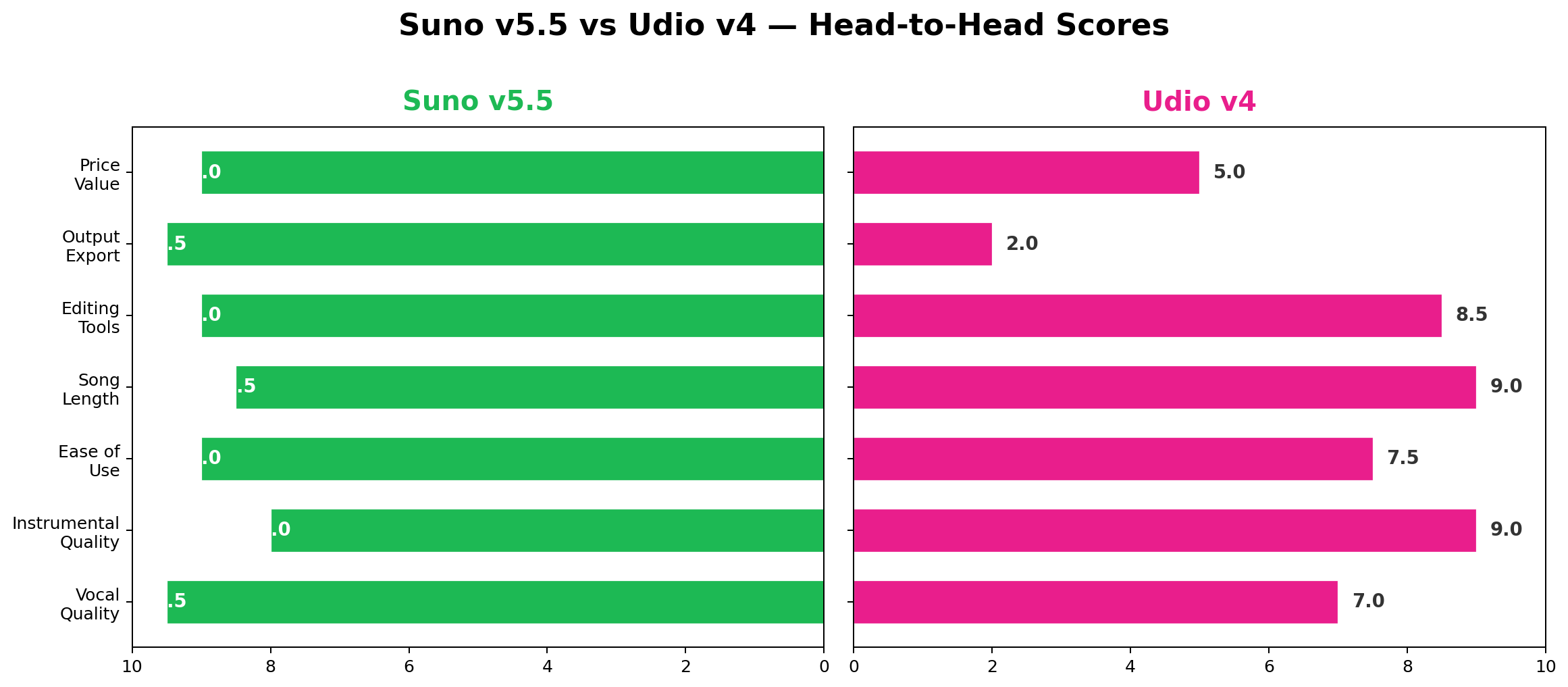
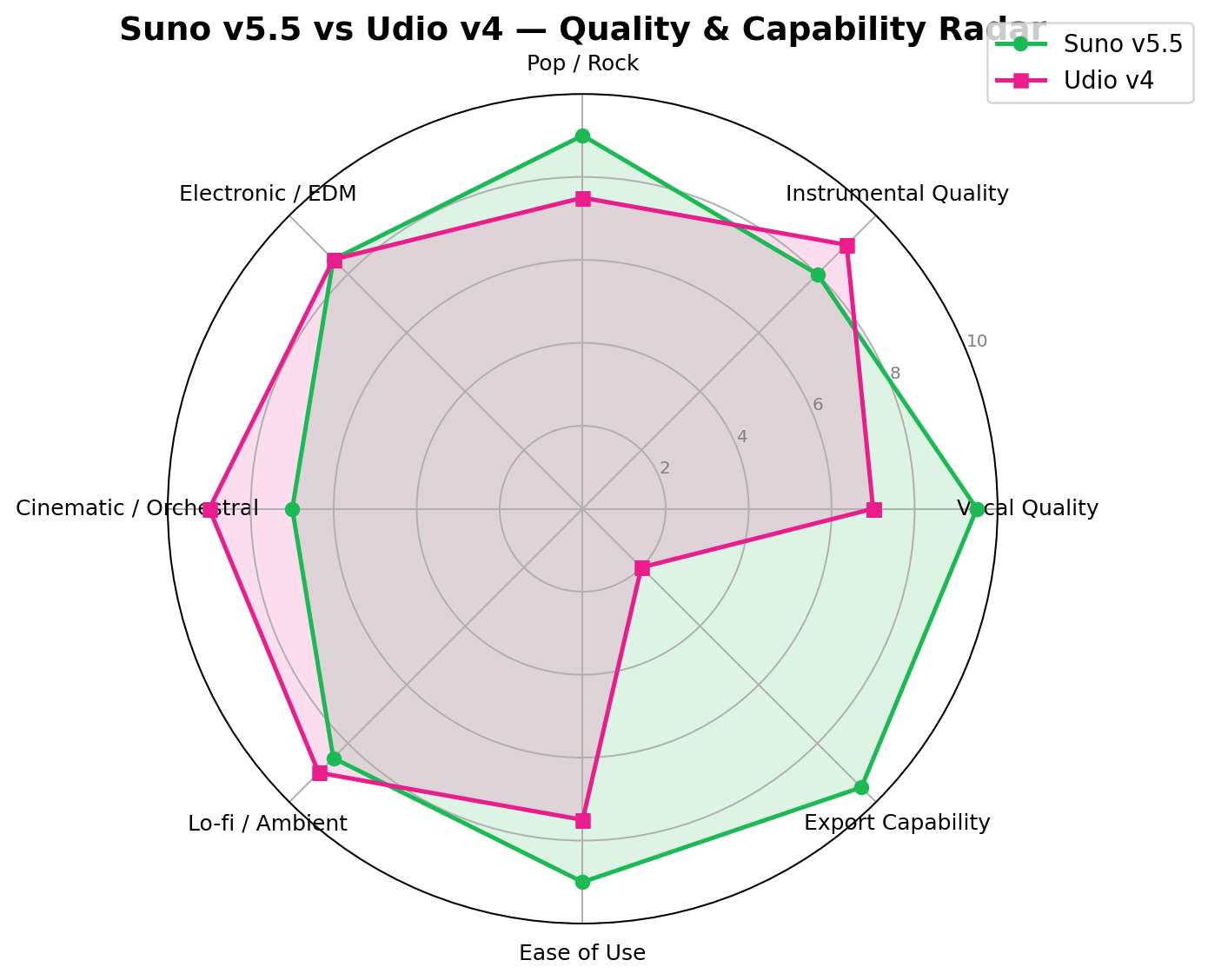
This isn't a close competition. Suno v5.5 generates vocals that sound like a real person singing in a real studio. The AI captures genre-specific vocal techniques — country twang, R&B runs, rock grit, pop polish — with convincing emotional delivery. Breath sounds, vibrato, dynamics, and phrasing are natural and consistent throughout a song.
Udio v4's vocals are... okay. They've improved since earlier versions but still carry an audible "AI quality" — slightly flattened emotion, occasional pitch inconsistencies, and a tendency toward generic delivery regardless of the lyrical content. For background vocals or heavily processed styles (autotune-heavy pop, distorted rock), Udio can produce passable results. For lead vocals where the voice is the star, Suno is in a different league.
Suno v5.5: 9.5/10 · Udio v4: 7.0/10
2. Instrumental Quality — Winner: Udio v4
Udio's instrumentals are its genuine superpower. The electronic music production is sophisticated — proper layering, professional mixing, and genre-authentic sound design. Synth patches are rich and varied, bass lines are tight, and drum programming is creative. Orchestral arrangements have depth and nuance. Lo-fi and ambient tracks feel warm and textured.
Suno's instrumentals are solid but not at Udio's level. They're well-constructed and musically coherent, but the production is slightly more generic — fewer sonic surprises, less depth in the mix, and a tendency toward safe arrangements. For background music or supporting a vocal performance, Suno's instrumentals work fine. For stand-alone instrumental tracks where production quality is the whole point, Udio has the edge.
Suno v5.5: 8.0/10 · Udio v4: 9.0/10
3. Ease of Use — Winner: Suno v5.5
Both platforms use a text-prompt interface, but Suno's UX is more polished and beginner-friendly. The prompt parser is smarter — it understands natural language descriptions, genre combinations, mood specifications, and even structural instructions ("start with piano, add drums at 0:30, build to a chorus at 1:00"). Song generation is faster (typically 30–60 seconds vs. Udio's 45–90 seconds), and the results page provides clear play, download, and remix options.
Udio's interface is functional but feels less refined. The prompt input is more structured (genre tags, mood descriptors), which can be limiting for casual users who don't think in music production terms. The social feed — while interesting conceptually — clutters the main interface and makes it harder to focus on generation.
Suno also wins on platform availability: iOS, Android, and web. Udio is web and iOS only — no Android app.
Suno v5.5: 9.0/10 · Udio v4: 7.5/10
4. Song Length & Structure — Winner: Udio v4
Udio supports tracks up to 10 minutes; Suno caps at 8 minutes. For most use cases (3–5 minute songs), this difference doesn't matter. But for ambient, cinematic, or progressive genres where longer compositions are standard, Udio's extra 2 minutes is a real advantage.
Udio also handles longer structures slightly better — its arrangements maintain coherence over extended durations with fewer repetitive loops. Suno can struggle with 6+ minute tracks, sometimes falling into predictable verse-chorus patterns. Both platforms benefit from structured prompting (specifying "3:00 bridge", "4:00 key change") to maintain interest in longer tracks.
Suno v5.5: 8.5/10 · Udio v4: 9.0/10
5. Editing & Production Tools — Winner: Suno v5.5
Suno Studio gives Suno a decisive advantage here. Having a built-in DAW with stem separation, multi-track editing, and mixing capabilities transforms Suno from a "generation tool" into a "production platform." You can generate a song, pull apart the stems, replace the vocals with a different take, adjust the drum mix, extend a section, and export the final result — all without leaving the browser.
Udio's editing tools are decent but limited by comparison. The timeline editor lets you rearrange sections and extend tracks, and the inpainting feature is genuinely useful for regenerating specific passages. But without stem separation or a mixer, you can't do the kind of detailed post-production that Suno Studio enables.
Suno v5.5: 9.0/10 · Udio v4: 8.5/10
6. Output Export — Winner: Suno v5.5 (by default)
This is the most lopsided category in the entire comparison. Suno provides full MP3 and WAV downloads on paid plans — you own the audio files and can use them anywhere. Udio provides nothing. Zero. You cannot download your music. Period.
The export dimension is so fundamental to the entire value proposition of an AI music tool that we almost didn't include it — it felt like comparing cars on the basis of "does it have wheels." But we included it because it's the single most important factor for 95% of potential users, and Udio's score of 2/10 (the 2 is for the ability to share within the platform's social feed) reflects just how devastating the UMG settlement was to the product's utility.
Suno v5.5: 9.5/10 · Udio v4: 2.0/10
7. Price Value — Winner: Suno v5.5
Both platforms have nearly identical pricing structures: free tier, $10/month entry, $30/month premium. The raw cost-per-credit is similar. But value isn't just about credits — it's about what you can actually do with them.
Suno's Pro plan ($8/month annual) gives you 2,500 credits plus downloads, commercial rights, voice cloning, and custom models. You get usable audio files you can deploy in real projects. Suno's Premier plan ($24/month annual) adds a full DAW with stem separation. At those prices, the value proposition is extraordinary — you're getting original, royalty-free music for less than the cost of a single stock music track.
Udio's Standard plan ($8/month annual) gives you 2,400 credits plus... the ability to listen to music on Udio's website. Same for the Pro plan ($24/month annual) with 6,000 credits. Since you can't download, export, or use the audio externally, you're essentially paying a subscription fee for a generative jukebox. The value is questionable at any price point.
Suno v5.5: 9.0/10 · Udio v4: 5.0/10
🧪 Real-World Test Scenarios
We tested both platforms with three practical scenarios that represent common use cases for AI music generation. Here's what happened.
Scenario 1: YouTube Video Background Music
Prompt: "Upbeat electronic background music for a tech review video, 3 minutes, modern and energetic but not distracting, synth-led with subtle bass groove"
Suno v5.5 result: Generated a polished, well-structured 3-minute electronic track with a clear intro, build, and outro. The synth work was solid — bright leads, textured pads, and a bass line that drove the energy without overwhelming. Vocal-free (as requested). Downloaded as WAV in one click. Dropped it directly into the video editor timeline. Total time from prompt to usable audio: ~90 seconds.
Udio v4 result: Generated a slightly richer electronic track with more sophisticated sound design — better filter sweeps, tighter percussion, and more layered synth work. The production quality was genuinely superior to Suno's output. But then... nothing. Can't download it. Can't export it. The track exists only on Udio's website. To use it in a video, we'd have to record our computer's audio output (with quality loss) or screen-record the browser (with metadata and UI artifacts). Neither approach produces professional-quality audio.
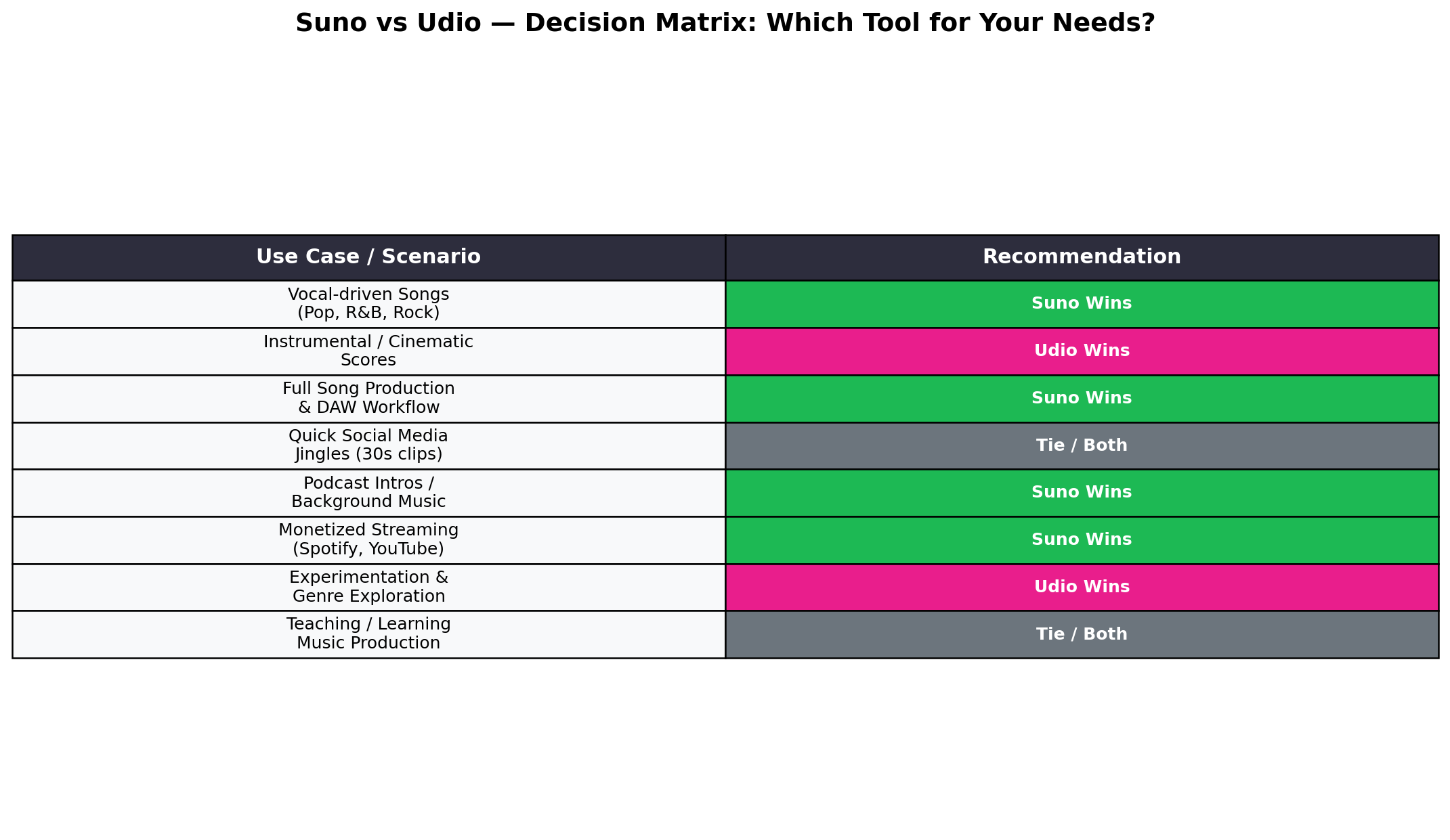
Winner: Suno — by default. Udio generated better-sounding audio, but Suno generated usable audio. For a YouTube creator, there's no contest.
Scenario 2: Pop Song with Vocals
Prompt: "An indie pop song about summer adventures, female vocals, upbeat tempo, guitar-driven with synth accents, memorable chorus hook, 3.5 minutes"
Suno v5.5 result: Outstanding. The vocals were the standout — natural, expressive, with emotional dynamics that fit the lyrical content. The singer sounded like she was actually enjoying the song, not reading words off a screen. The guitar tone was authentic (not the generic "AI guitar" sound), the synth accents were well-placed, and the chorus hook was genuinely catchy. We downloaded it, pulled stems in Suno Studio, adjusted the vocal mix slightly, and exported the final version. The whole process took about 5 minutes.
Udio v4 result: The instrumental backing was excellent — better guitar tone and more interesting arrangement than Suno. But the vocals were the weak link. The voice had an identifiable "AI quality" — slightly flattened dynamics, occasional pitch wobbles, and a generic emotional delivery that didn't match the upbeat lyrical content. The chorus didn't have the same hook quality. And again, no downloads. Even if the vocals had been perfect, we couldn't use the track anywhere.
Winner: Suno — dominant. Better vocals, downloadable output, and post-production tools make this a one-sided comparison.
Scenario 3: Cinematic Orchestral Score
Prompt: "Epic cinematic orchestral score, building tension, strings and brass, 2 minutes, film trailer style, dramatic climax at the end"
Suno v5.5 result: Generated a competent orchestral piece with good structure and dynamics. The string sections were rich, the brass had power, and the build toward the climax was effective. However, some of the mid-range orchestration felt a bit thin — the kind of "good but not great" output you'd expect from AI. Downloadable as WAV, so immediately usable for a film project.
Udio v4 result: This is where Udio showed its strength. The orchestral output was genuinely impressive — fuller arrangements, more depth in the lower registers, and a more cinematic feel overall. The brass section had weight and authority, the strings had lush harmonics, and the percussion added real dramatic impact. The climax at 1:45 was genuinely thrilling. The mixing was also superior — wider stereo field, better dynamic range, and more professional mastering.
But again: no downloads. If you're scoring a film and need AI-generated orchestral reference material you can actually use, Udio can't help you despite producing better output.
Winner: Tie — Udio produced better audio, but Suno produced usable audio. For cinematic scoring specifically, this is the one scenario where you might wish you could use Udio's output — and it's frustrating that you can't.
🔀 Alternatives Worth Considering
If neither Suno nor Udio perfectly fits your needs, here are other AI music tools worth exploring:
| Tool | Starting Price | Standout Feature | Best For |
|---|---|---|---|
| Suno v5.5 | $8/mo (annual) | Best vocals + DAW + downloads | Full music production & content creation |
| Udio v4 | $8/mo (annual) | Best instrumentals (but no downloads) | Listening/inspiration only |
| AIVA | $11/mo | Designed for composers & filmmakers | Cinematic scoring with full MIDI export |
| Soundful | $10/mo | Track-level stem downloads | Creators needing customizable stems |
| Boomy | $2.99/mo | Cheapest entry point + Spotify distribution | Beginners & hobbyists |
| Amper Music (Shutterstock) | $16/mo | Enterprise licensing + Shutterstock integration | Enterprise & commercial production |
| ElevenLabs | $5/mo | Best AI voice (not music, but vocals) | Voice generation for music narration |
For a deeper look at AI voice generation (separate from music), check out our ElevenLabs vs Cartesia vs Murf comparison which covers the text-to-speech tools that podcasters and voiceover artists actually use.
Among the alternatives, AIVA deserves special mention for filmmakers and game developers. Unlike Udio, AIVA provides full MIDI export — you get the actual note data, not just rendered audio. This means you can take AIVA's compositions into your DAW of choice (Ableton, Logic, FL Studio) and edit every note, change instruments, adjust dynamics, and produce a truly custom final product. It's more work than Suno's "generate and download" workflow, but it gives you far more creative control.
🏆 The Verdict
Best for Content Creators (YouTube, Social Media, Podcasts)
Suno v5.5 — This isn't even close. If you need downloadable audio files for your content, Suno is the only viable choice between these two. Pro plan at $8/month gives you 2,500 generations with full MP3 downloads and commercial rights. That's months of background music, intro themes, and transition sounds for less than the cost of a single stock music subscription.
Best for Music Producers & Hobbyists
Suno v5.5 (Premier) — Suno Studio's DAW with stem separation makes it a genuine production tool. Generate a song, pull the stems, remix in the browser, export the final mix. At $24/month, it's cheaper than most plugin subscriptions and gives you unlimited original source material.
Best for Electronic Music Listening
Udio v4 — If you purely want to generate and listen to electronic/EDM music as entertainment, Udio's instrumentals are superior. But this is a niche use case, and even here, the 10 credits/day free tier is probably sufficient.
Overall Value Winner
Suno v5.5 — Suno wins this comparison decisively. Better vocals, full export capabilities, a built-in DAW, voice cloning, and commercial rights at the same price point as a tool that can't even let you download your own creations. The $8/month Pro plan is one of the best values in the entire AI tools landscape.
The Hybrid Approach
Suno Pro ($8/mo) + Udio Free ($0) — If you're curious about Udio's instrumentals, use the free tier to generate and listen. If you hear something you want to recreate, try to approximate the style in Suno (which you can actually download). This costs nothing extra and gives you access to both engines' strengths.
❓ Frequently Asked Questions
Is Udio still available in 2026?
Yes, Udio is still operational with its v4 model. However, downloads were disabled in October 2025 following a legal settlement with UMG. You can listen to music on the Udio platform but cannot export or download audio files. This makes Udio a walled garden — useful for listening but impractical for creators who need usable audio files.
Which AI music generator sounds better — Suno or Udio?
It depends on the genre. Suno v5.5 produces significantly better vocals — its voice generation is industry-leading, with natural phrasing, emotion, and breath control. Udio v4 has an edge in instrumental quality and electronic/EDM production, with cleaner mixing and richer sound design. For vocal-driven music (pop, rock, R&B), Suno wins clearly. For instrumental and cinematic tracks, Udio has a slight advantage.
Can I download music from Suno?
Yes. Suno allows full audio downloads in both MP3 and WAV formats on paid plans (Pro and Premier). Free tier users can listen to songs on the platform but cannot download. Paid subscribers also get commercial usage rights, making Suno's output suitable for YouTube videos, podcasts, games, and other monetized content.
Is Suno worth paying for?
For most creators, yes. The Pro plan at $10/month ($8/month annual) gives you 2,500 credits (roughly 250–500 songs), full MP3/WAV downloads, commercial rights, and access to Suno Studio (the built-in DAW). At that price point, it's one of the most cost-effective creative tools available. The free tier with 50 credits/day is also generous for casual experimentation.
What is Suno Studio?
Suno Studio is a full-featured DAW (Digital Audio Workstation) built into the Suno platform. Available on Premier plans ($24/month annual), it includes stem separation (isolating vocals, drums, bass, etc.), a multi-track timeline editor, loop tools, and mixing capabilities. It lets you take AI-generated songs and remix, edit, and refine them without leaving the platform.
Can I use AI-generated music commercially?
Suno grants commercial usage rights on all paid plans (Pro and Premier). Free tier output is for personal use only. For Udio, paid plans also include commercial rights within the platform ecosystem — but since you cannot download files, commercial use is limited to sharing within Udio's platform. If you need downloadable, commercially-licensed music, Suno is the only viable option between the two.
What happened to Udio's download feature?
In October 2025, Udio reached a legal settlement with Universal Music Group (UMG) over copyright infringement claims. As part of the settlement, Udio disabled all audio downloads and removed the ability to export generated music. The platform became a closed, listening-only ecosystem — often described as a "walled garden." Users can generate and listen to music on Udio but cannot save files to their device, use them in videos, or distribute them elsewhere.