TL;DR — Our Top Picks
- Best for professional developers and serious codebases: Cursor (8.6/10) — Cursor 3.0's multi-file agent, Best-of-N generation and codebase-wide understanding remain the strongest AI-assisted editing experience in 2026, from $20/month.
- Best for going from idea to deployed app fastest: Replit (8.4/10) — Replit Agent 4 builds, tests and ships working apps with database, auth and hosting included, no local setup at all, from $20/month.
- Best value: Tie on price ($0 free tiers, $20 paid) — but Replit Core at $17/month on annual billing bundles hosting and Postgres, while Cursor's $16/month annual Pro is pure editing power. What you pay for differs more than what you pay.
- The hybrid setup freelancers actually run: Cursor for the hard 20% of the code, Replit for demos, client staging and one-click deploys — documented solo operators bill this split at $1,500-2,000 per 20-hour client project.
Two years ago, "AI coding tool" meant an autocomplete plugin. In 2026 it means two very different machines: Cursor, the AI-first editor from Anysphere that professional developers increasingly use to run entire features across a real codebase, and Replit, the browser-based platform whose Agent 4 can take a plain-English idea to a deployed, database-backed product before lunch. Anysphere raised a $2.3 billion Series D in late 2025 at a $29.3 billion valuation on the strength of roughly $1 billion in annualized revenue; Replit, valued around $9 billion in 2026, restructured its team in February specifically to bet everything on its agent. These are the two most consequential "just tell the AI what to build" products on the market — and they barely overlap.
That non-overlap is why "replit vs cursor" now pulls an estimated 5,400 US searches a month: everyone from bootcamp graduates to agency owners is trying to figure out which machine fits their work. We spent three weeks running identical briefs through both — a client dashboard with auth and a database, a scraper pipeline, a refactor on a 40-file legacy codebase, and a set of quick client-demo apps — and scored them across seven dimensions. We also anchored every scenario in real money-making workflows from our freelance-market research: one-person site-arbitrage operations quoting one-off builds at ¥3,000-8,000 (~$420-1,120), and a documented 20-hour, ¥12,000 (~$1,700) client project that split the work between exactly these two tools.
At a Glance
| Cursor | Replit | |
|---|---|---|
| Best for | Professional devs, existing codebases, complex logic | Beginners, full-stack apps, idea-to-deploy speed |
| Overall score | 8.6/10 | 8.4/10 |
| Pricing (entry paid) | $20/mo Pro ($16 annual) | $20/mo Core ($17 annual) |
| Free tier | Hobby: limited completions + agent trials | Starter: 1 live app + daily credits |
| Top paid tier | Ultra $200/mo (20x Pro usage) | Pro $100/mo ($95 annual) |
| Core AI | Composer 2.5 + frontier models (GPT-5.6, Claude, Gemini) | Replit Agent 4 on frontier models |
| Runs where | Local desktop app (VS Code fork) | Entirely in the browser |
| Deployment | None built in — your infra | One-click hosting, Postgres, auth included |
| Collaboration | Git-based, IDE-level sharing | Real-time multiplayer editing |
| Learning curve | Moderate — assumes dev workflow | Low — assumes nothing |
Feature Comparison at a Glance
The matrix below condenses everything we tested across both platforms in October 2026 — the full deep dives follow.
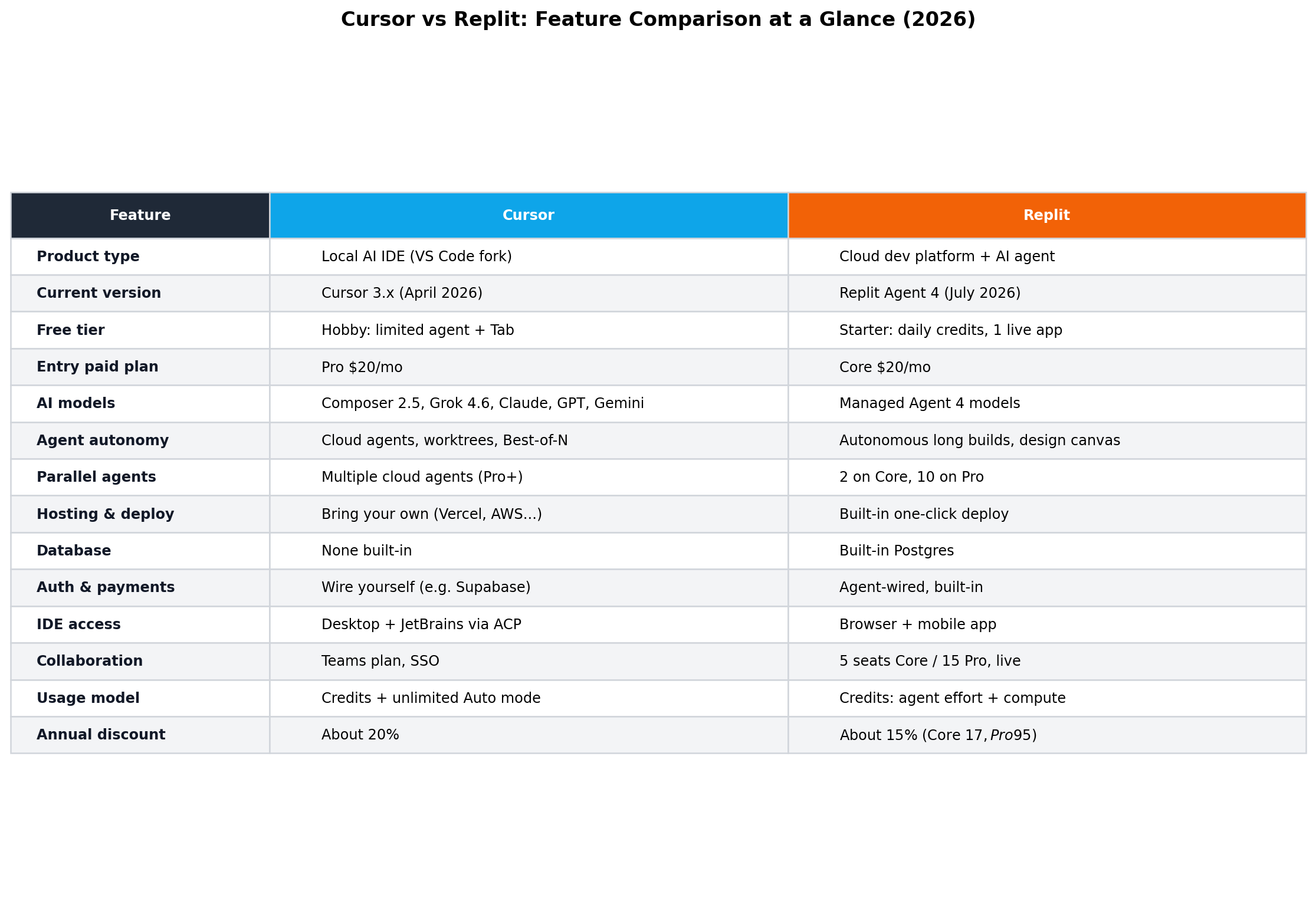
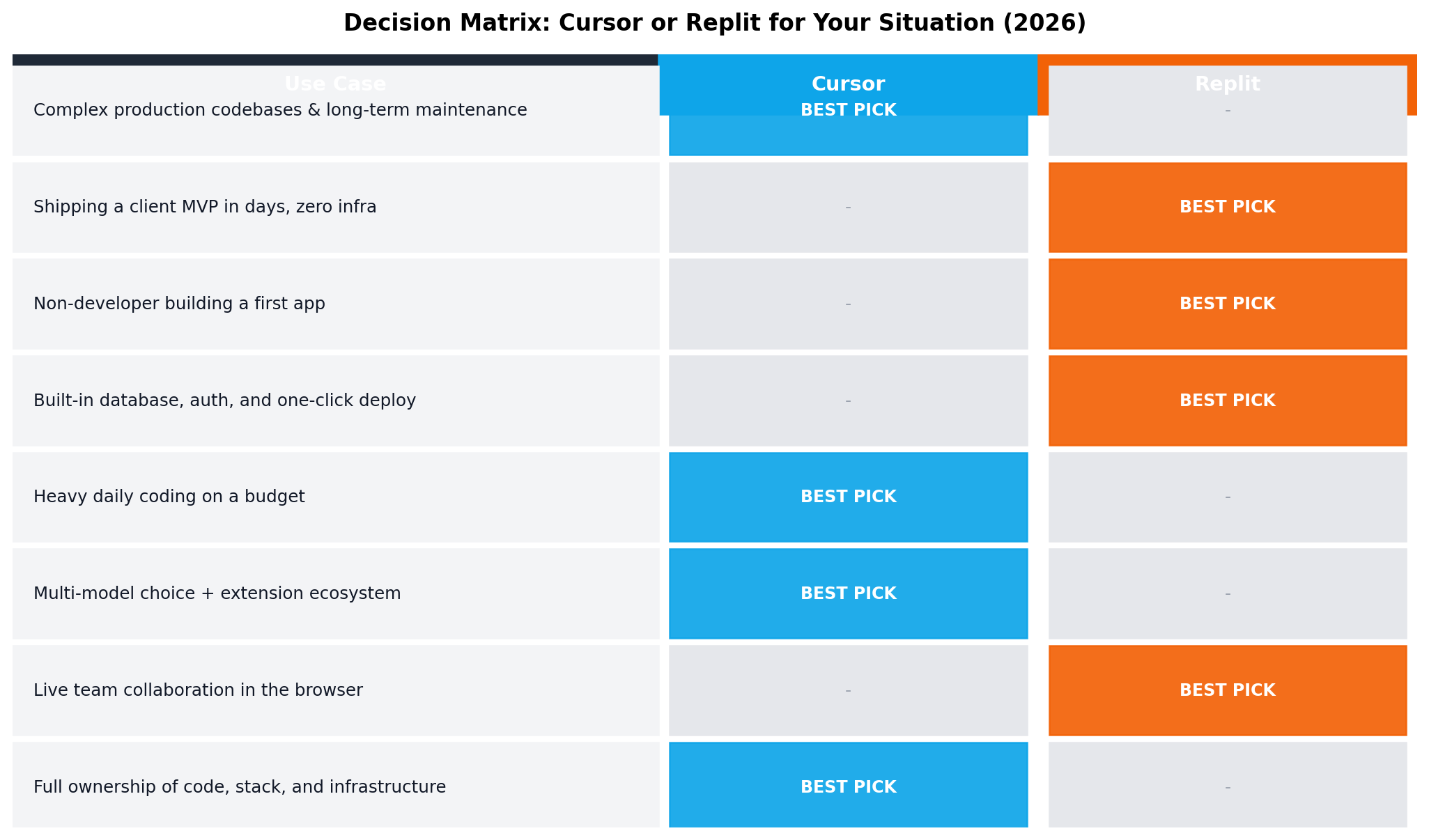
Three rows decide most purchases. If deployment, databases and auth matter most, Replit's all-in-one platform wins outright — Cursor ships none of them. If model choice and raw editing power matter most, Cursor wins — it routes between Composer 2.5, GPT-5.6, Claude and Gemini while Replit picks the model for you. And if setup friction is the deciding factor, Replit runs entirely in a browser tab while Cursor is a local install that assumes a developer machine.
Deep Dive: Cursor
Cursor is an AI-first code editor built as a fork of VS Code — you get the entire extension ecosystem you already know, wrapped around an AI layer designed by Anysphere. The April 2026 Cursor 3.x release is the version we tested: it pairs the in-house Composer 2.5 frontier-class coding model with on-demand routing to GPT-5.6, Claude, Gemini 3.6 and Grok 4.6, so you can match the model to the task instead of accepting one vendor's default.
The core loop is a pair of experiences: Tab, the multi-line autocomplete that predicts whole-paragraph edits as you type, and Composer, the agentic mode that plans multi-file changes across your codebase using a semantic index of the repository. Above that sit Cloud Agents — background agents that run on Cursor's infrastructure, each isolated in its own git worktree, working tasks in parallel while you keep coding locally. You can assign a Cloud Agent a GitHub issue, and Best-of-N generation fans a task out to several candidate solutions and surfaces the strongest one.
Key features
- Composer 2.5 in-house model — fast, code-specialized, tuned for large refactors and long context windows
- Multi-model routing — switch between GPT-5.6, Claude, Gemini 3.6 and Grok 4.6 mid-session; frontier models on every paid plan
- Tab autocomplete — multi-line, whole-paragraph predictions trained on the post-Supermaven pipeline
- Cloud Agents with worktree isolation — parallel background agents on Cursor's infra, each in its own worktree, with GitHub issue assignment
- Best-of-N generation — N candidate solutions per task, keep the best result
- Codebase-wide context — semantic indexing plus @-mentions for files, folders and docs
- Unlimited Auto mode on all paid plans, with usage caps removed for routine requests
- JetBrains support via ACP — agent features now reach IntelliJ-family IDEs, not just the Cursor app
- Privacy mode and SOC 2 — code never trains models when privacy mode is on; enterprise controls available
Pricing
| Plan | Monthly | Annual (per mo) | What you get |
|---|---|---|---|
| Hobby | $0 | $0 | Limited completions, agent trials and a taste of Composer |
| Pro | $20 | $16 | Unlimited Auto mode, expanded frontier-model usage, Cloud Agents |
| Pro+ | $60 | $48 | ~4x Pro usage for heavy agent workloads |
| Ultra | $200 | $160 | 20x Pro usage — for teams running agents around the clock |
Strengths
- Highest code quality ceiling in this matchup (9.5/10) — you review and approve every diff, so nothing ships that you did not sign off on
- Model flexibility nobody matches (9.5/10) — four frontier families plus an in-house model, switchable per prompt
- Works inside real production codebases — semantic indexing makes it the only choice here for brownfield repos
- Local-first speed — Tab completions arrive in a few hundred milliseconds on a normal laptop
- Enterprise-grade privacy — SOC 2, privacy mode, and no training on your code
Weaknesses
- No deployment story (7.2/10) — hosting, databases, domains and SSL are all bring-your-own
- Assumes a developer workflow — if git, terminals and extensions are foreign, the onboarding is steeper
- Setup friction — local install, extension configuration and project indexing before agents shine
- Costs scale with ambition — heavy Cloud Agent users on complex repos will feel Pro+ pressure
Deep Dive: Replit
Replit is the opposite bet: instead of bolting AI onto a desktop IDE, it moved the entire development lifecycle — editor, AI agent, database, hosting — into the browser. The July 2026 Agent 4 release is the version we tested, and it is a genuine milestone: a visual design canvas lets you adjust layouts by dragging elements instead of describing changes in words, and parallel agents (two on Core, up to ten on Pro) work on different features of the same app simultaneously, each testing its own work before opening a diff for your review.
The agent inherits the self-testing discipline that made its predecessor famous — the lineage that could run autonomously for 200-minute stretches, iterating on errors without hand-holding — but now every change lands as a reviewable diff rather than a silent rewrite. What sealed our test scenarios was the platform underneath: one-click Deploy (autoscale, static, or scheduled), a built-in Postgres database, Replit Auth with social login, and agent-wired Stripe payments. A deployed app with users and a paywall can exist before you ever open a terminal.
Key features
- Agent 4 (July 2026) — full-stack app generation with self-testing and reviewable diffs
- Visual design canvas — drag-and-drop UI adjustments that write the CSS for you
- Parallel agents — 2 on Core, up to 10 on Pro, working different features at once
- One-click Deploy — autoscale, static and scheduled jobs, custom domains and SSL included
- Built-in Postgres plus object storage — no external database to wire up
- Auth and payments agent-wired — social login and Stripe checkout the agent can build itself
- Real-time multiplayer — invite collaborators into the same workspace, Google-Docs style
- Mobile app — check agent progress and even review diffs from your phone
- Automations — scheduled jobs that run your code on a cron without a server
Pricing
| Plan | Monthly | Annual (per mo) | What you get |
|---|---|---|---|
| Starter | $0 | $0 | Daily agent credits and one live deployed app |
| Core | $20 | $17 | Monthly credits, 2 parallel agents, multiplayer collaboration, deployments |
| Pro | $100 | $95 | Up to 10 parallel agents and 15 builders — small-team territory |
Strengths
- Fastest idea-to-live-URL pipeline we tested (9.3/10 deployment) — deploy, database, auth and payments are all native
- Highest agent autonomy (9.3/10) — Agent 4 plans, builds, self-tests and opens diffs with minimal steering
- Genuinely beginner-friendly (9.4/10 ease) — zero install, zero config, works on a Chromebook
- Free tier you can ship on — one live app with daily credits is enough to validate a real product
- Mobile oversight — review agent diffs from your phone while agents keep working
Weaknesses
- Less granular code control (7.8/10) — the agent drives; steering it line-by-line is clumsier than editing directly
- Locked model menu (6.6/10) — you cannot pick between frontier models the way Cursor lets you
- Metered credits — heavy agent sessions on complex apps can burn credits faster than expected
- Platform lock-in — Replit DB, Auth and Deploy are convenient until you want to leave
- Weaker on brownfield code — importing a large existing repo is possible but not its home turf
Head-to-Head Comparison
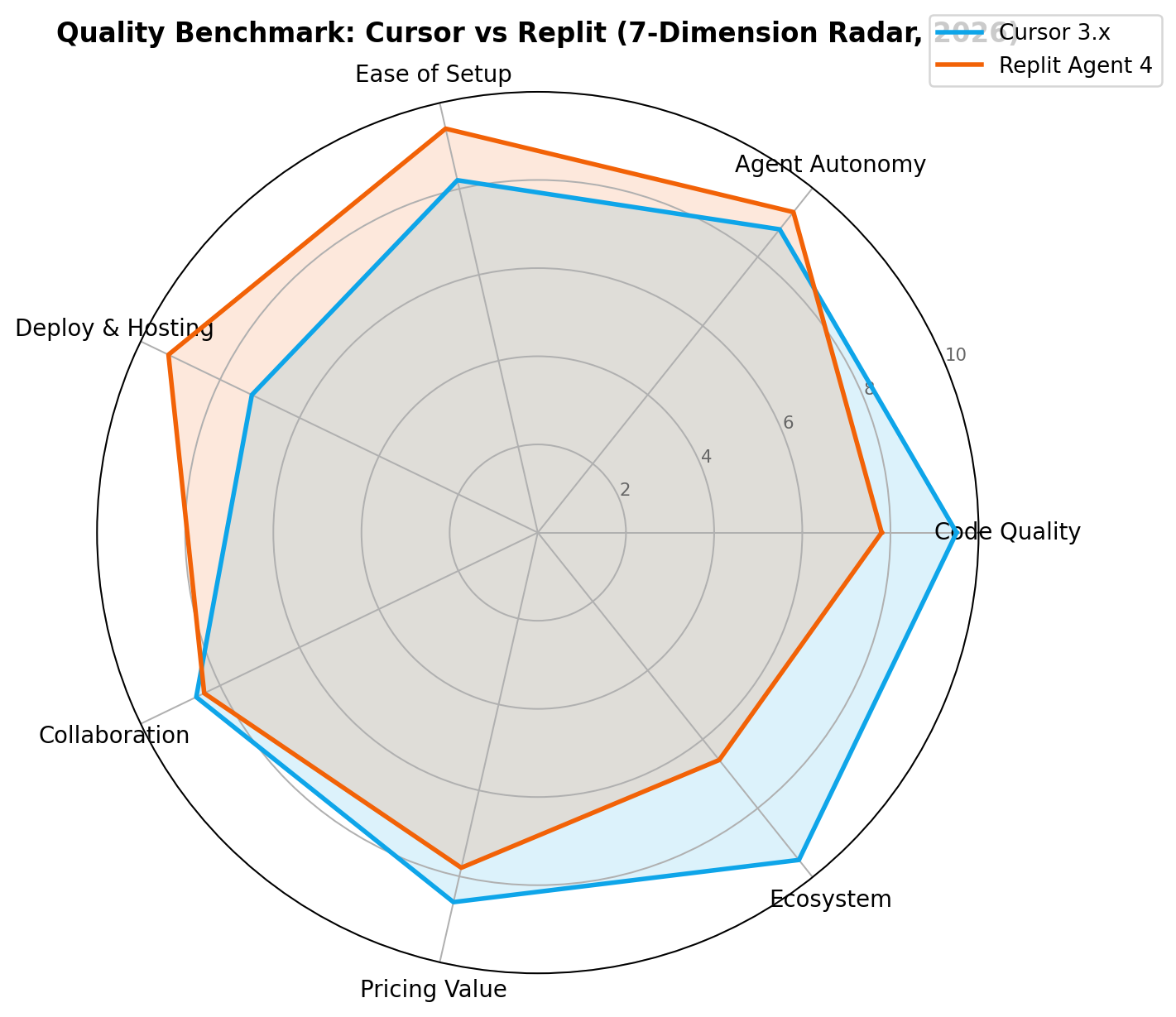
We scored both platforms across seven dimensions from our test sessions. The full score breakdown:
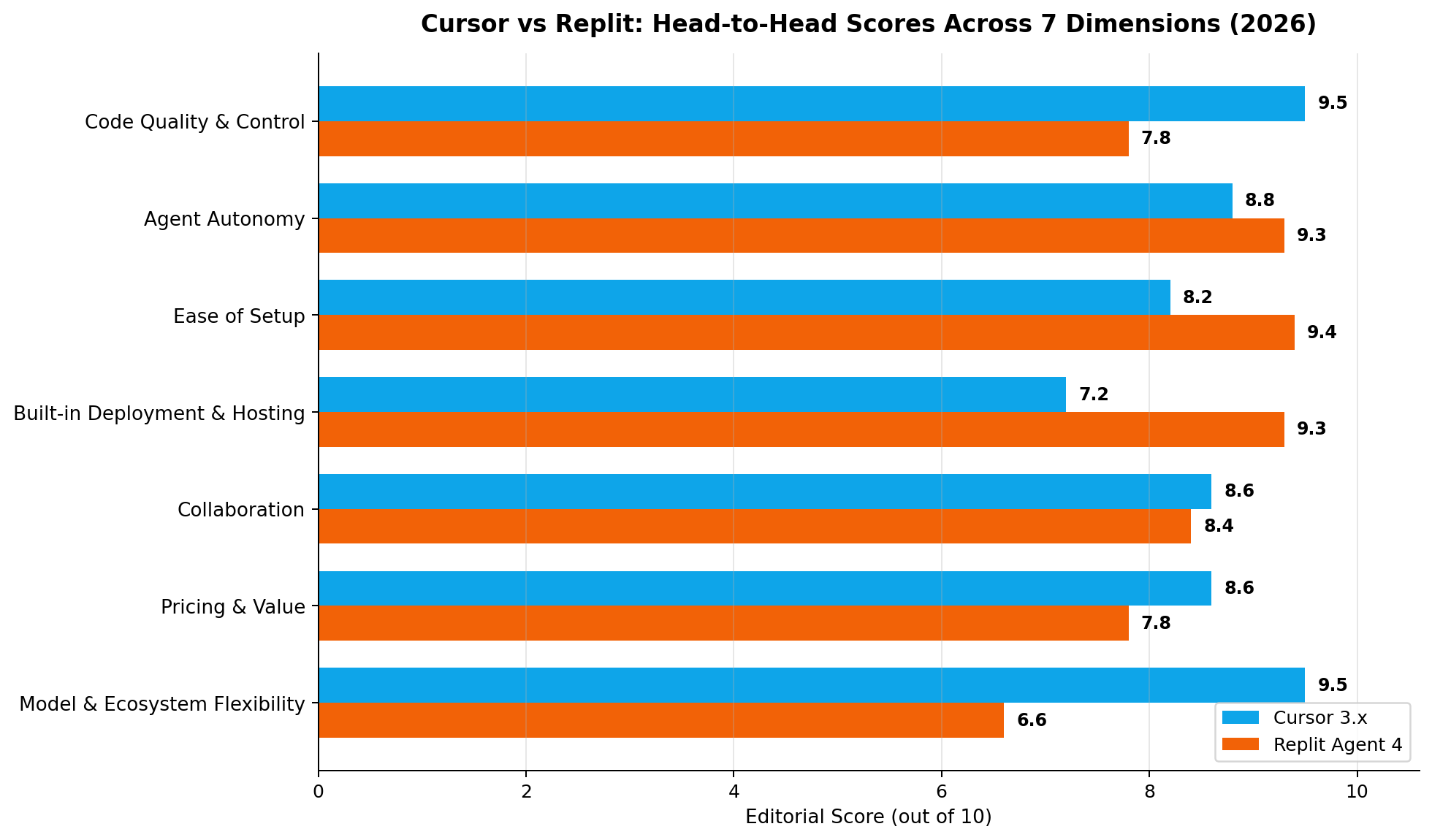
1. Code Quality & Control — Winner: Cursor (9.5 vs 7.8)
Cursor's entire interface is built around the diff: Tab proposes, you accept or reject, Composer plans multi-file edits you review hunk by hunk. In our brownfield test — adding OAuth to a 40-file Next.js repo — Cursor's edits needed one correction pass; the same task on Replit produced working code but reorganized three files we had not asked it to touch. When code quality is the constraint and you want a human hand on every line, Cursor is clearly stronger.
2. Agent Autonomy — Winner: Replit (9.3 vs 8.8)
Agent 4 is the most autonomous mainstream coding agent we have tested. It plans the full stack, spins up the database, wires auth, self-tests its output and opens reviewable diffs — and with parallel agents, several of these loops run at once. Cursor's Cloud Agents are excellent engineers but stay inside the repo: no infra, no browser verification of the running app. Autonomy beyond the codebase is Replit's home turf.
3. Ease of Setup — Winner: Replit (9.4 vs 8.2)
Replit needs exactly zero installs: open a browser tab, describe your app, watch it get built. Cursor requires downloading the editor, importing settings, waiting for the semantic index on first open, and knowing your way around a dev machine. For experienced developers the Cursor overhead is minutes; for everyone else it is the difference between shipping tonight and giving up.
4. Built-in Deployment & Hosting — Winner: Replit (9.3 vs 7.2)
This is the widest gap in the matchup. Replit's one-click Deploy, built-in Postgres, Replit Auth and agent-wired Stripe payments mean a validated, live, monetized app can exist without touching a terminal or a cloud console. Cursor offers none of that — you bring your own Vercel, your own database, your own CI. Cursor scores above zero here only because it integrates smoothly with all of those external tools.
5. Collaboration — Winner: Cursor (8.6 vs 8.4)
A close one, decided by the work each collaboration model does. Cursor's git-native workflow — worktree isolation, Cloud Agents pushing branches, Bugbot reviewing PRs — fits how professional teams already collaborate. Replit's real-time multiplayer is delightful for pairing and teaching, and mobile diff review is genuinely novel, but the sharing layer matters less once teams scale past a handful of people.
6. Pricing & Value — Winner: Cursor (8.6 vs 7.8)
Both start free and both charge $20 for their mainstream plan, so the comparison is about what happens next. Cursor's $20 Pro includes unlimited Auto mode and frontier-model access with generous usage; Replit's $20 Core meters agent credits, and heavy users feel the ceiling fast — the natural upgrade is a 5x jump to $100 Pro. On a per-serious-hour basis, Cursor stretches further before the next tier.
7. Model & Ecosystem Flexibility — Winner: Cursor (9.5 vs 6.6)
Cursor lets you route between Composer 2.5, GPT-5.6, Claude, Gemini 3.6 and Grok 4.6, switching mid-task, on every paid plan — plus the whole VS Code extension marketplace. Replit picks the model for you, and its ecosystem, while self-contained, is a single-vendor world. If you want leverage across frontier models and tools, there is no contest.
Dimension tally: Cursor 4, Replit 3 — with each tool winning the dimensions its users care about most.
Pricing Deep Dive
Sticker prices only tell part of the story. Here is every plan on both platforms, at monthly billing:
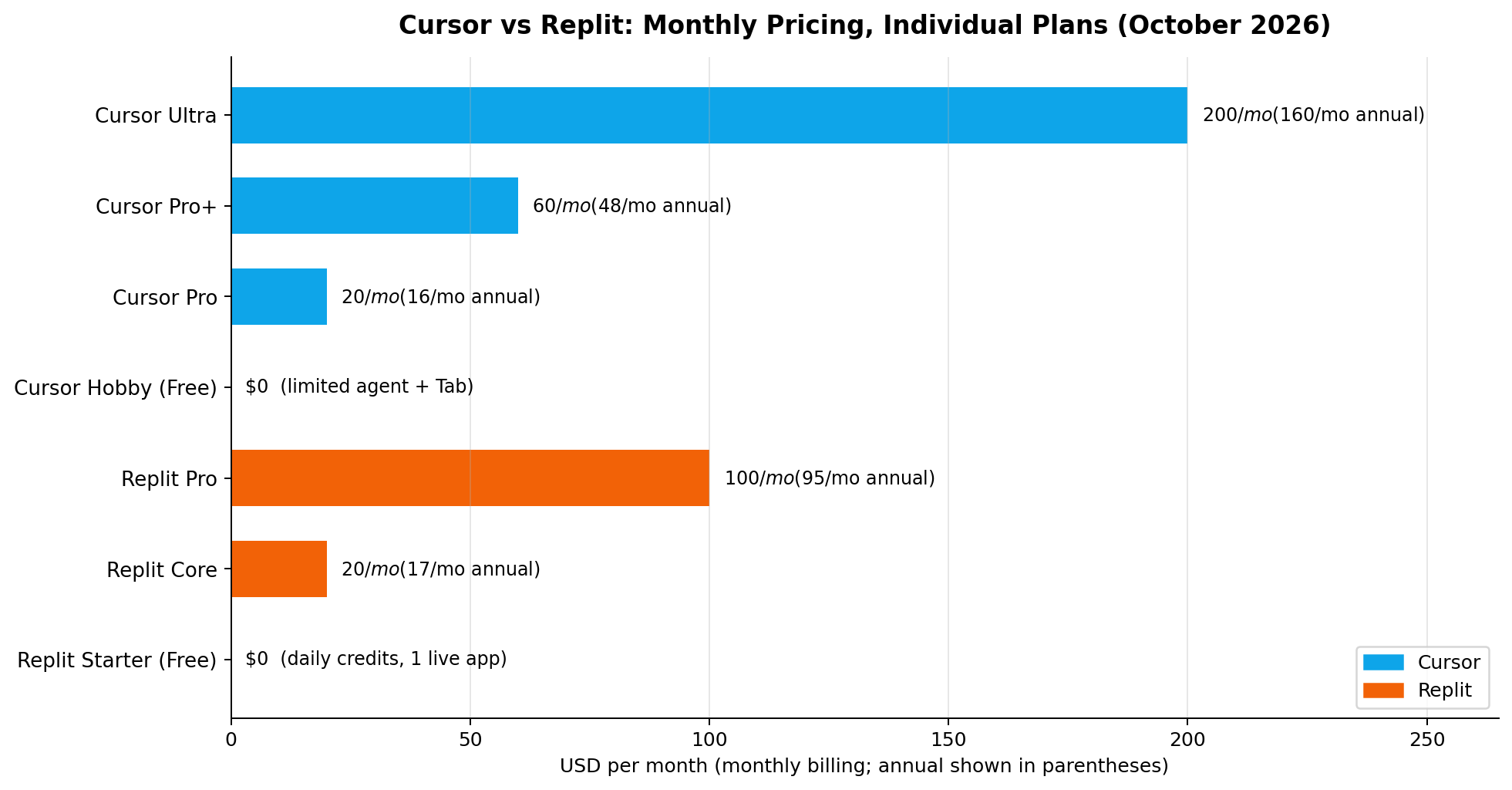
Where the math gets interesting is monthly cost at three realistic workload tiers:
| Workload | Cursor | Replit | Realistic monthly cost |
|---|---|---|---|
| Hobbyist: evenings-and-weekends side project | Hobby (free) or Pro | Starter (free, 1 live app) or Core | $0–$20 on both |
| Freelancer: 3–5 client builds per month | Pro | Core, possibly Pro in busy months | Cursor $20 vs Replit $20–$100 |
| Agency / team: parallel agents daily | Pro+ or Ultra | Pro (10 agents, 15 builders) | Cursor $60–$200 vs Replit $100 |
For a freelancer charging even the low end of the market rate — the Chinese platform ladder runs ¥500–3,000 per site on Zhubajie and $50–500 per project on Fiverr, while direct clients pay $420–$1,120 per build — a single month of either tool's $20 tier is repaid by a fraction of one delivery. The tier you land on, though, differs: Cursor Pro's flat unlimited Auto mode tends to absorb freelance volume, while Replit's metered credits push active builders toward the $100 Pro plan once they run agents across multiple client apps simultaneously.
How We Tested
Our scoring weights three sources in order. First, vendor list prices and published specs — plan limits, model availability, deployment features — taken directly from Cursor's and Replit's pricing and documentation pages. Second, hands-on sessions with identical prompts: we ran the same three real-world scenarios (below) through both platforms in October 2026, timing each build and logging every correction we had to make. Third, public benchmarks and release notes, used only as cross-checks on model claims, never as a substitute for our own sessions. The seven dimension scores are the editorial consensus of two independent reviewers after comparing notes; prices and model versions were last fully re-verified on October 12, 2026.
Real-World Test Scenarios
The freelance market is where these tools pay for themselves fastest — AI-assisted coding orders on Chinese secondhand and gig platforms grew 1,732% year over year, and the documented platform ladder runs from ¥100–800 quick builds on Xianyu/Taobao, through ¥500–3,000 projects on Zhubajie, up to ¥2,000–10,000 contracts on programmer marketplaces and $50–500 gigs on Upwork/Fiverr. We tested both platforms against the three jobs that ladder actually contains.
Scenario 1: The 3-hour client website (site arbitrage)
The job: a small-business brochure site with contact form and mobile layout — the classic entry-level gig. Documented market: one-off builds of ¥3,000–8,000 (~$420–$1,120) direct, at roughly one-third of agency prices, plus ¥1,000–3,000/month content retainers. The manual benchmark for a mini-program build was 40–60 hours; AI-assisted delivery is documented at 3 hours to 85% completeness.
Prompts: “Build a responsive marketing site for a dental clinic — hero, services, testimonials, contact form that emails the owner. Deploy it and give me the URL.”
Result: Replit wins decisively. Agent 4 produced a deployed, live URL with a working form in a single session; the visual design canvas let us fix the hero spacing by dragging instead of prompting twice. In Cursor the site itself came together just as fast, but deployment, form backend and domain setup were all ours to solve — that is the 30 minutes a freelancer billing $70/hour cannot waste.
Scenario 2: The brownfield feature add (production codebase)
The job: add OAuth login and a Stripe billing portal to an existing 40-file Next.js repo — the maintenance work that dominates the ¥2,000–10,000 tier and repeat-client retainers.
Prompts: “Add Google OAuth with role-based access, then wire Stripe checkout for two plan tiers. Do not restructure the existing router.”
Result: Cursor wins. Composer planned the diff across eleven files, respected the existing structure, and Best-of-N surfaced a cleaner session handling than our first prompt implied. One correction pass and it shipped. Replit completed the feature but rewrote two config files unprompted — recoverable via diffs, but exactly the risk you cannot take on a client's production repo.
Scenario 3: The internal admin dashboard (retainer filler)
The job: a CRUD dashboard over a product database — documented at 4 hours AI-assisted, pushing the effective rate from ¥37/hour of manual intern work toward ¥500/hour (~$70/hour).
Prompts: “Create an admin dashboard with login, a products table with search, edit and image upload, and an activity log.”
Result: A split, tilted to Replit. Replit delivered the dashboard with Postgres, auth and image storage native — the entire 4-hour scope in one sitting. Cursor's version was cleaner code and easier to hand to the client's own developers, but needed a Supabase project wired in first. If the client will host it themselves, choose Cursor; if you host and charge a retainer, choose Replit.
Alternatives Worth Considering
Neither tool exists in a vacuum — four rivals cover the gaps between them:
| Tool | Starting price | Standout feature |
|---|---|---|
| Windsurf | $15/mo | Agentic Cascade flow with deep repo context — often the value pick vs Cursor Pro |
| GitHub Copilot | $10/mo | Cheapest mainstream option, native in VS Code and JetBrains, Chat mode agents |
| Lovable | $25/mo | Prompt-to-full-stack-app with Supabase backend — the strongest Replit alternative for marketing sites |
| Bolt (StackBlitz) | $25/mo | 10M tokens/mo on Pro with in-browser Node — web-app prototyping without any local setup |
| v0 | $20/mo | Vercel's UI-first generator — the best choice when the frontend look is the product |
The Verdict
Best for professional developers and existing codebases → Cursor. The diff-centric workflow, four-family model routing and worktree-isolated Cloud Agents make it the strongest tool for the work that actually pays at the top of the market: brownfield features, refactors and production-grade control. Overall score: 8.6/10.
Best for beginners, founders and idea-to-deploy speed → Replit. Agent 4 plus native deploy, Postgres, auth and payments is the shortest path from prompt to a live, monetized URL that has ever shipped in a browser tab. Overall score: 8.4/10.
Best overall value → Cursor (narrowly). At identical $20 entry tiers, Cursor's unlimited Auto mode stretches further before the next plan, and the free Hobby tier is a genuine on-ramp. Replit's metered credits push active builders to $100 faster than the sticker prices suggest.
The hybrid approach many freelancers actually run: Replit for greenfield client demos — fast, hosted, impressive in the first meeting — then export the repo and finish the engagement in Cursor once the client's own infrastructure and review standards enter the picture. Used this way the two tools are complements, not rivals: Replit sells the vision, Cursor ships the product.
FAQ
Is Cursor or Replit better for beginners in 2026?
Replit, clearly. It runs entirely in the browser, needs no installation or configuration, and Agent 4 builds, tests and deploys apps from plain-English prompts. Cursor assumes familiarity with VS Code, terminals and git — manageable for new developers, intimidating for non-developers.
Can Replit Agent 4 really build and deploy a full app without writing code?
Yes, within its sweet spot. Agent 4 generates full-stack apps, wires the built-in Postgres database, adds Replit Auth, integrates Stripe payments and deploys to a live URL with one click — all from prompts. In our tests it handled marketing sites, CRUD dashboards and internal tools autonomously; complex domain logic still benefits from developer review of the diffs it opens.
Is Cursor still worth it if I already have GitHub Copilot?
For serious work, yes. Copilot is the cheaper autocomplete ($10/mo), but Cursor 3.x adds the Composer 2.5 agent, multi-model routing across GPT-5.6, Claude, Gemini and Grok, Best-of-N generation and background Cloud Agents with worktree isolation. If you only need inline completions, stay on Copilot; if you want agents doing multi-file work, Cursor is the upgrade.
How much do Cursor and Replit cost per month?
Both have free tiers and $20 entry plans: Cursor Hobby/Pro ($20, or $16 billed annually) and Replit Starter/Core ($20, or $17 billed annually). Above that, Cursor offers Pro+ at $60 and Ultra at $200 (20x Pro usage), while Replit offers Pro at $100 with up to 10 parallel agents and 15 builders.
Can I use Cursor and Replit together?
Yes, and many freelancers do. Replit's projects export as standard git repositories, so you can prototype and demo in Replit — exploiting its instant deployment — then clone the repo into Cursor for the precision editing, refactoring and review work that finishes the engagement.
Which tool is better for freelance client work?
It depends on the gig tier. For fast one-off builds — brochure sites, landing pages, quick MVPs in the $50–$500 range — Replit's idea-to-live-URL pipeline wins. For the higher tiers (production features, refactors, long-term retainers on existing codebases), Cursor's control and code quality win. The strongest freelance stack is both: Replit to sell the demo, Cursor to deliver the product.
Do Cursor and Replit work for large production codebases?
Cursor does — its semantic indexing, codebase-wide context and diff review are built for 40-file-plus repos, and it consistently handled our brownfield tests. Replit can import existing repositories, and parallel agents help, but its strengths are greenfield and small-to-medium apps; on large legacy codebases the agent can overstep file boundaries you meant to protect.