⏱ TL;DR
DeepL is the best translation tool for European languages and professional workflows. It supports 36 languages with industry-leading accuracy (winning 65% of language pairs in independent benchmarks), preserves document formatting perfectly, and offers enterprise features like glossaries, translation memory, and style rules. Its Individual plan starts at $8.74/month (annual billing) with a generous free tier of 50,000 characters/month.
Google Translate is the best choice for language breadth and casual use. It supports 249 languages for free, handles over 1 trillion words per month for its 1 billion+ users, and recently integrated Gemini for significantly improved idiom and context handling. Its real-time voice translation (Gemini 3.5 Live Translate) covers 70+ languages. The free consumer tier is unmatched — zero cost, zero signup.
ChatGPT (GPT-5.6) is the best tool for context-aware, tone-specific translation. It understands nuance, can adapt translations to specific audiences (formal, casual, academic, marketing), handles ambiguity better than any dedicated translator, and lets you iterate on results conversationally. The trade-off: it's slower, more expensive for heavy use, and doesn't preserve document formatting. ChatGPT Translate (launched January 2026) offers a free, Google Translate-like interface with ChatGPT's quality.
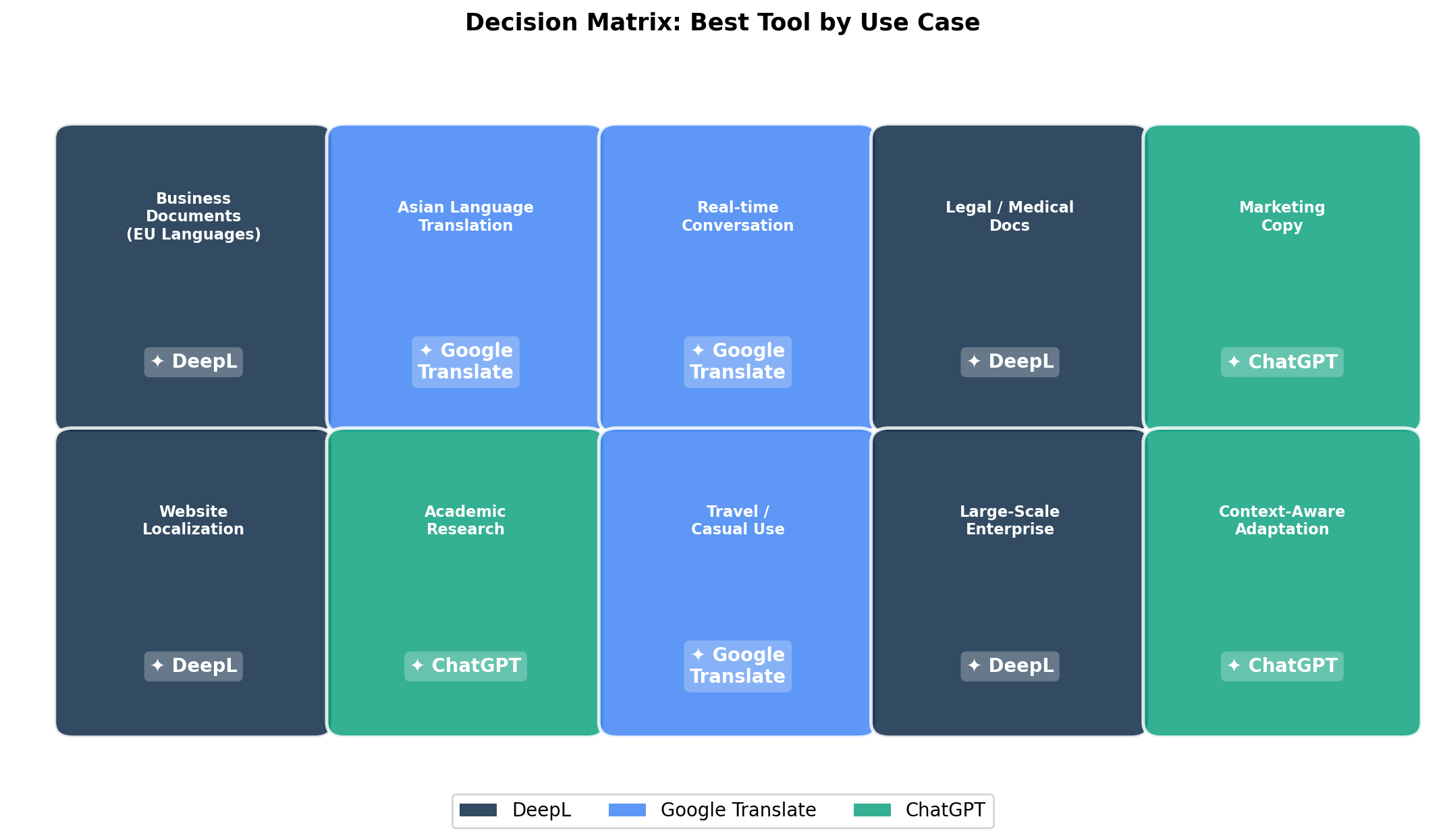
Quick picks: European business documents → DeepL. Travel or casual translation → Google Translate. Marketing copy or context-heavy content → ChatGPT. Maximum language coverage → Google Translate. Professional translation workflow → DeepL.
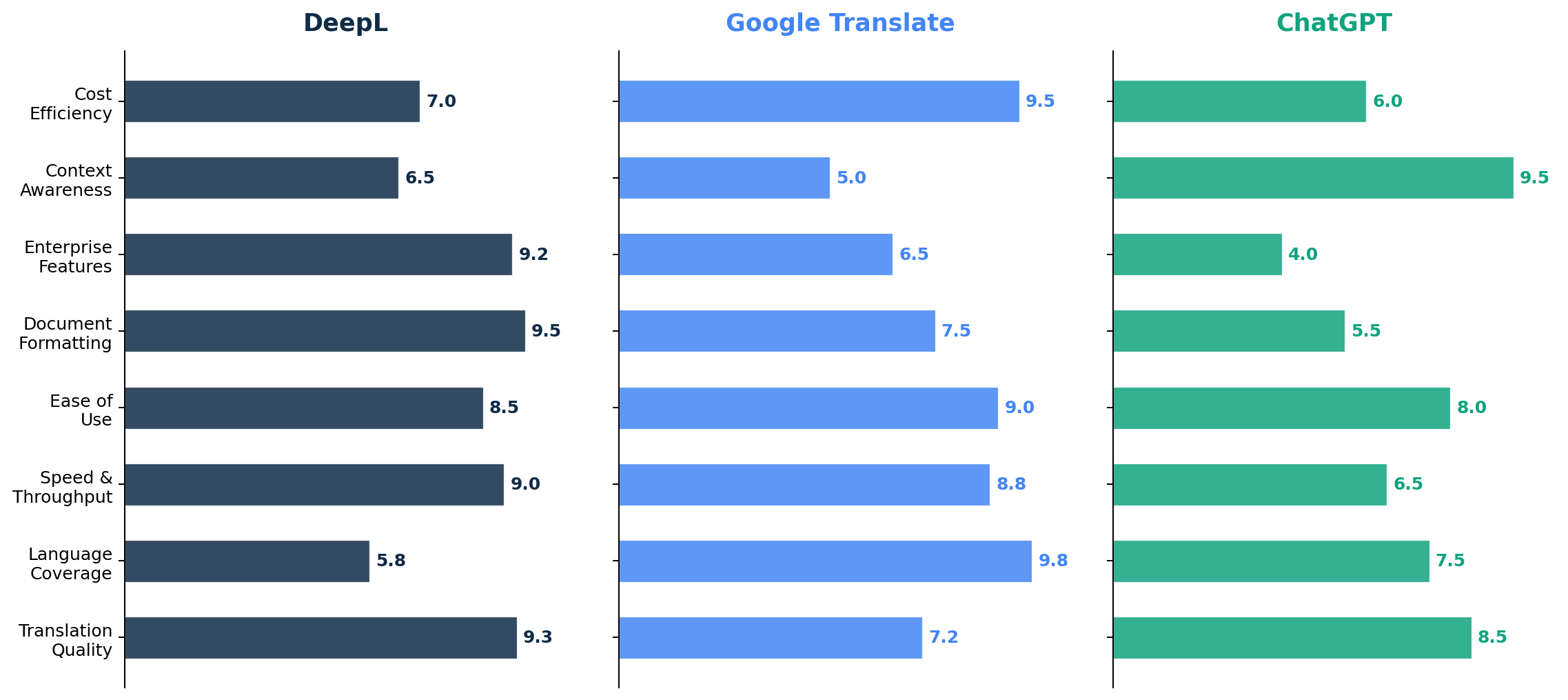
📊 At a Glance
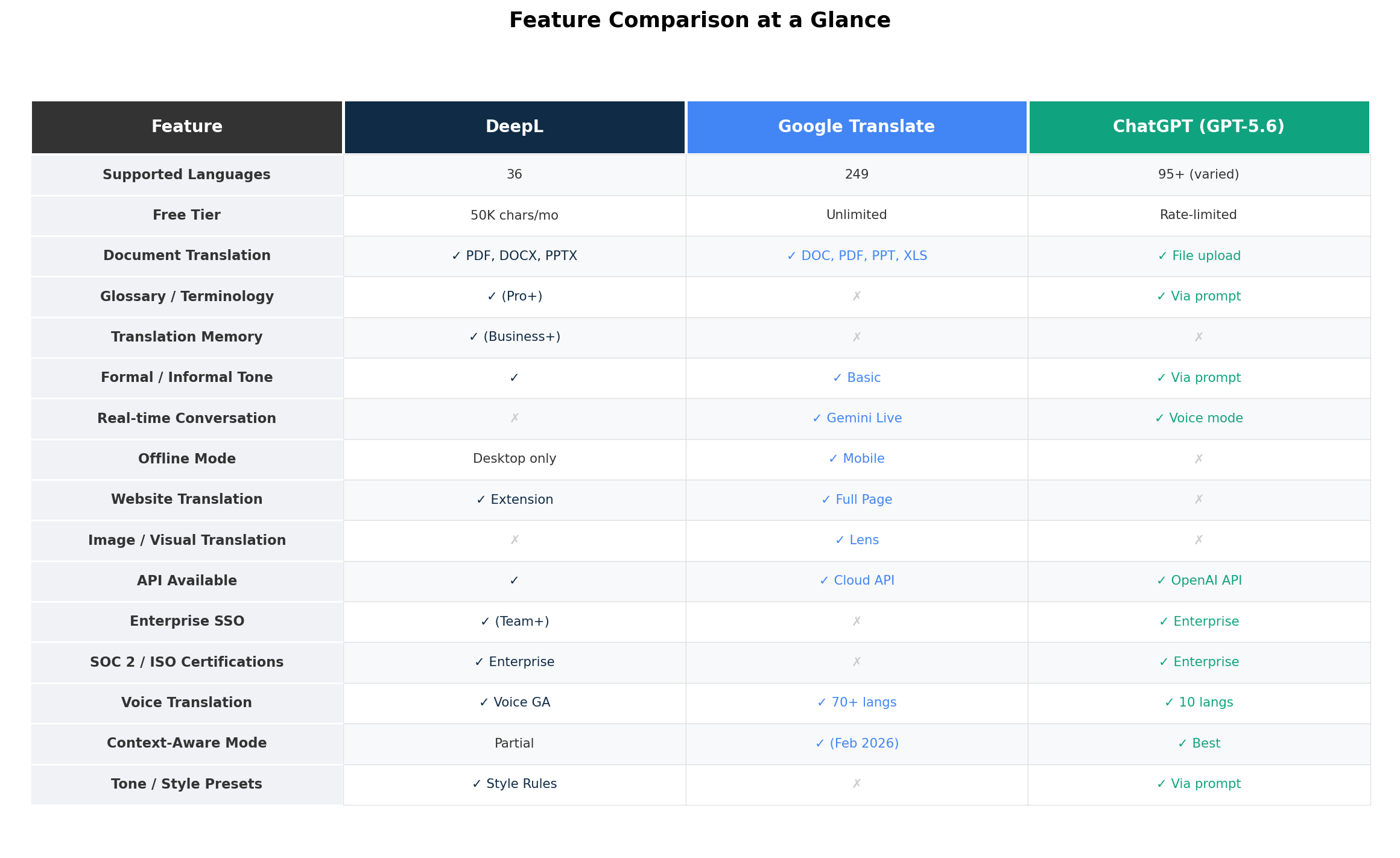
| Feature | DeepL | Google Translate | ChatGPT (GPT-5.6) |
|---|---|---|---|
| Supported Languages | 36 | 249 | 95+ (varied quality) |
| Free Tier | 50K chars/month | Unlimited | Rate-limited |
| Entry Paid Plan | $8.74/month (annual) | $20/M chars (API) | $8/month (Go plan) |
| Translation Quality (EU) | ★★★★★ (Best-in-class) | ★★★☆☆ (Good) | ★★★★☆ (Very good) |
| Translation Quality (Asian) | ★★★☆☆ (Moderate) | ★★★★★ (Strong) | ★★★★☆ (Very good) |
| Context Awareness | ★★★☆☆ (Sentence-level) | ★★☆☆☆ (Minimal) | ★★★★★ (Best) |
| Document Formatting | ★★★★★ (Preserves layout) | ★★★★☆ (Good) | ★★☆☆☆ (Plain text only) |
| Speed | ★★★★★ (Fastest) | ★★★★☆ (Fast) | ★★★☆☆ (Slower) |
| Glossaries / Terminology | ✓ (All paid plans) | ✗ | ✓ (Via prompting) |
| Translation Memory | ✓ (Business+) | ✗ | ✗ |
| Real-time Voice | ✓ (DeepL Voice, 17 langs) | ✓ (Gemini Live, 70+ langs) | ✓ (Voice mode, 10 langs) |
| Enterprise (SSO, SOC 2) | ✓ (Business+) | ✗ (API only) | ✓ (Enterprise plan) |
🔤 DeepL — The European Language Specialist
DeepL, founded in Cologne, Germany in 2017 by former Google Translate researcher Jarosław (Jarek) Kutylowski, has grown from a niche academic project into the most respected machine translation engine for European languages. Backed by $300M in funding at a $2B valuation (and reportedly pursuing a $5B IPO), DeepL has positioned itself as the professional's choice for translation.
The Technology Behind DeepL
In January 2025, DeepL released its next-generation LLM model — a specialized neural architecture trained exclusively on proprietary translation data. Unlike general-purpose LLMs (GPT, Claude, Gemini) that handle translation as one of many tasks, DeepL's model is purpose-built. The results are impressive: 1.3x to 2.3x better human preference rates compared to competitors, with 1.4x improvement for European languages and 1.7x improvement for Japanese and Chinese over the previous model. The model uses FP8 precision for both training and inference, enabling fast processing without sacrificing quality.
DeepL's approach differs fundamentally from both Google and OpenAI. Where Google Translate and ChatGPT use massive general-purpose models, DeepL invests in specialization: curated bilingual training corpora, language-specific fine-tuning, and a focus on the nuances that make translated text sound natural rather than machine-generated. This is why professional translators consistently prefer DeepL — it produces output that requires significantly less post-editing.
Key Features
Document Translation: DeepL's standout feature. Upload a DOCX, PDF, or PPTX file and get back a translated version with formatting, layouts, tables, and images preserved. This alone saves hours compared to copy-pasting text into other translators and manually reformatting. The Individual plan allows 3 documents/month (up to 30 MB each); Business plan allows 100.
Glossaries: Define terminology once and DeepL enforces it consistently across all translations. The Individual plan includes 1 glossary (5 entries per language pair), while Team and Business plans support up to 1,000 entries per pair with sharing across team members. For companies with product-specific terminology, legal terms, or brand guidelines, this feature is essential.
Translation Memory: Available on Business and Enterprise plans, this feature automatically reuses previously approved translations. If you translate "Terms of Service" as "Nutzungsbedingungen" once, DeepL remembers and applies that consistently in all future documents. This dramatically improves consistency across large projects and reduces costs over time.
Style Rules: Beyond simple glossaries, DeepL's style rules let you define how translations should handle specific patterns — for example, always using passive voice in German technical documentation, or maintaining British English spellings. Team plans include 5 style rules; Business plans include 20; Enterprise gets unlimited.
Formal / Informal Tone: A simple toggle that switches between formal ("Sie") and informal ("du") register in applicable languages. This is surprisingly nuanced — DeepL doesn't just swap pronouns but adjusts sentence structure, vocabulary choices, and phrasing to match the selected register.
DeepL Voice: Launched in general availability in April 2026, DeepL Voice provides real-time voice-to-voice translation for meetings and conversations. It integrates with Microsoft Teams and Zoom, supporting 17 languages. In June 2026, DeepL acquired Mixhalo, a San Francisco-based live-event audio company, signaling expansion into stadium-scale translation for conferences and events.
DeepL Write: An AI-powered writing assistant (separate add-on at $7.49/user/month, included in Business+) that provides grammar correction, clarity improvements, and tone controls. While not a translation feature per se, it's valuable for post-translation editing — polishing translated text to meet publication standards.
Pricing
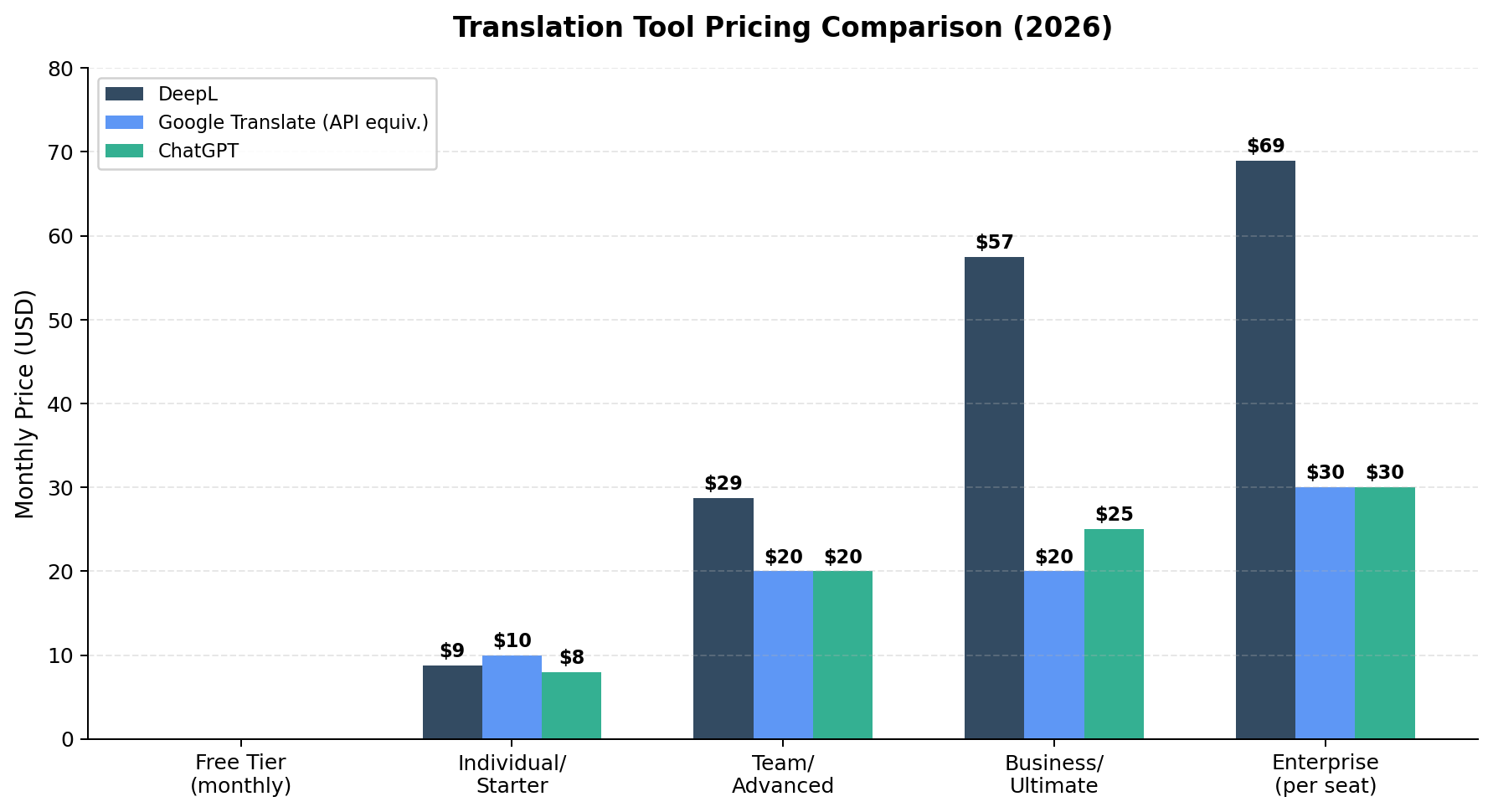
| Plan | Monthly Price (Annual) | Characters/Month | Documents/Month | Key Features |
|---|---|---|---|---|
| Free | $0 | 50,000 | 1 (5 MB max) | Basic translation, 1 glossary |
| Individual | $8.74 | 300,000 | 3 (30 MB max) | More docs, formal/informal toggle |
| Team | $28.74/user | 1,000,000 | 20 | 5 glossaries (1,000 entries), 5 style rules, shared team resources |
| Business | $57.49/user | Unlimited* | 100 | Translation memory, 20 style rules, Write Pro included, 99% SLA |
| Enterprise | Custom | Custom | Custom (100 MB max) | SSO, BYOK, SOC 2, ISO 27001, 99.9% SLA, dedicated support |
*Unlimited subject to fair usage policy.
DeepL's API is priced separately: a free Developer tier includes 1 million characters total (non-resetting), the Growth tier costs $26/month plus $27.50 per additional million characters, and Enterprise API pricing is custom.
Strengths
- Best-in-class European language quality: DeepL consistently tops independent benchmarks for German, French, Spanish, Italian, Dutch, Polish, Russian, and other European languages. In blind human evaluations, it regularly beats both Google Translate and ChatGPT.
- Excellent document formatting: Translated documents look like the originals — tables, layouts, fonts, and images are preserved. This is a significant time-saver for business translation workflows.
- Professional translation tools: Glossaries, translation memory, style rules, and terminology management make DeepL the only viable choice for translation agencies and enterprise localization teams.
- Fast and reliable: Purpose-built translation engine means faster processing than general-purpose LLMs. DeepL handles high-volume batch translation without the timeout or quality inconsistency issues that plague ChatGPT.
- Privacy-focused: Enterprise plans include BYOK (Bring Your Own Key) encryption, data processing agreements, and are SOC 2 Type 2 and ISO 27001 certified. European data residency is available.
Weaknesses
- Limited language support: Only 36 languages. If you need Hindi, Bengali, Swahili, Tagalog, or dozens of other world languages, DeepL simply can't help you.
- Weaker for Asian languages: While DeepL supports Chinese, Japanese, and Korean, its quality for these languages trails both Google Translate (with Gemini integration) and ChatGPT. Independent benchmarks show ChatGPT and Google outperforming DeepL for EN→ZH, EN→JA, and EN→KO pairs.
- Expensive for teams: The Team plan at $28.74/user/month adds up quickly. A 10-person team would pay $287/month — significantly more than equivalent Google Translate API usage for most workloads.
- No contextual understanding across documents: DeepL translates sentence-by-sentence or document-by-document. It can't maintain context from previous conversations or adapt based on your ongoing project requirements the way ChatGPT can.
- Corporate restructuring concerns: In June 2026, DeepL laid off approximately 250 employees (25% of workforce) and announced a restructuring toward "DeepL Agents" for CRM integration. While the core translation product remains strong, the company's strategic direction is shifting.
🌐 Google Translate — The Undisputed King of Coverage
Google Translate turned 20 in April 2026, and its scale is staggering: over 1 billion monthly active users, roughly 1 trillion words translated per month, and 249 language varieties covering an estimated 95% of the world's population. It is, by any measure, the most widely used translation tool on the planet — and it's completely free for consumers.
The Gemini Upgrade
In December 2025, Google integrated its Gemini language model into Google Translate, marking the most significant quality improvement in years. The upgrade moved Google Translate from "word-for-word equivalents" toward meaning and register-based translation. The results: leading performance on the WMT25 Machine Translation benchmark (per Google's announcement), significantly better handling of idioms and slang, and more natural phrasing across supported languages.
The February 2026 update added "Understand" and "Ask" features — contextual disambiguation tools that explain why a translation was chosen and let you ask follow-up questions. This brought a degree of interactivity that Google Translate had never offered before.
In June 2026, Gemini 3.5 Live Translate launched, delivering near real-time speech-to-speech translation in 70+ languages with continuous streaming. The feature works via a phone earpiece ("listening mode") and integrates with Google Meet for multilingual video calls. All voice translations include SynthID watermarking for content provenance.
Key Features
249 Languages: This is Google Translate's killer feature. No other translation tool comes close. The June 2024 expansion added 110 new languages in the single largest expansion ever, powered by PaLM 2. Whether you need Amharic, Cantonese, Igbo, Mongolian, Punjabi, or Telugu — Google Translate probably supports it.
Google Lens Integration: Point your camera at signs, menus, packaging, or any printed text and get instant visual overlay translation. Integrated into Samsung's Circle to Search for continuous translation while scrolling. This is the best feature for travelers — no typing required.
Offline Mode: Download language packs on Android and iOS for translation without an internet connection. Camera, text input, and typing all work offline. Essential for international travel where data roaming is expensive or unavailable.
Website Translation: Paste any URL into translate.google.com and get the entire page translated. Chrome browser auto-translates pages automatically. This is the simplest way to browse foreign-language websites.
Conversation Mode: Two-way real-time speech translation, now powered by Gemini audio-to-audio models. Supports bilingual conversations where each person speaks their own language and both hear translations in real time.
Document Translation: Supports DOC, DOCX, ODF, PDF, PPT, PPTX, RTF, TXT, XLS, and XLSX files. The formatting preservation is decent but not as polished as DeepL's.
Pronunciation Practice: Launched April 2026, this feature provides AI-powered syllable-level pronunciation feedback for English, Spanish, and Hindi (US and India initially). It's a language learning feature rather than a translation feature, but it shows Google expanding Translate's scope.
Pricing
| Component | Free Tier | Paid Rate |
|---|---|---|
| Web / App (Consumer) | Unlimited — completely free | N/A |
| Cloud Translation API (Basic v2) | 500K chars/month | $20 per million characters |
| Cloud Translation API (Advanced v3) | 500K chars/month | $20 per million characters |
| Translation LLM | No free tier | $10/M input + $10/M output chars |
| Document Translation | No free tier | $0.08 per page |
Strengths
- Unmatched language coverage: 249 languages covering 95% of the world's population. If you need to translate to or from any language, Google Translate is almost certainly your best (or only) option.
- Completely free for consumers: No signup required, no character limits on the web interface, no paywall. This makes it accessible to everyone, everywhere.
- Best travel companion: Camera translation (Google Lens), offline language packs, conversation mode, and tap-to-translate overlay make it indispensable for international travel.
- Gemini-powered quality improvements: The December 2025 Gemini integration significantly closed the quality gap with DeepL for common language pairs, especially for idioms and contextual phrases.
- Massive infrastructure: 1 billion+ users means Google Translate is virtually always available, fast, and reliable. It handles peak loads that would crash smaller services.
Weaknesses
- Still behind DeepL for European languages: Despite the Gemini upgrade, independent benchmarks consistently show DeepL producing more natural, accurate translations for German, French, Spanish, and other European languages. Professional translators report roughly 10 errors from Google Translate versus ~5 from DeepL for equivalent European language content.
- No terminology management: No glossaries, no translation memory, no style rules. Google Translate treats every sentence as independent, making it unsuitable for professional translation workflows where consistency matters.
- Limited context awareness: Despite the February 2026 "Understand" feature, Google Translate still lacks the conversational, iterative context that ChatGPT provides. It can't remember your preferences or adapt to your specific use case across multiple translations.
- Privacy concerns: Consumer Google Translate data may be used to improve Google's models. For sensitive content (legal documents, medical records, proprietary business information), this is a deal-breaker without a Google Cloud enterprise agreement.
- No enterprise compliance: No SOC 2 certification, no BYOK encryption, no SSO. The API is enterprise-grade but the consumer product lacks the compliance features that regulated industries require.
🤖 ChatGPT — The Context-Aware Translation Powerhouse
ChatGPT wasn't built as a translation tool — it's a general-purpose AI chatbot that happens to translate remarkably well. But in 2026, that distinction matters less than ever. With GPT-5.6 Sol (the flagship model launched July 2026), ChatGPT's translation quality rivals or exceeds dedicated translators in specific scenarios, particularly where context, tone, and audience adaptation are critical.
What Makes ChatGPT Different for Translation
ChatGPT approaches translation fundamentally differently from DeepL and Google Translate. Those tools process text through specialized translation models optimized for accuracy and speed. ChatGPT uses a general-purpose reasoning model that understands meaning, context, audience, and intent before producing a translation.
This matters in practice. Consider translating a marketing slogan: "Think Different." DeepL would likely produce a literal or near-literal equivalent. Google Translate would too. But ChatGPT understands you're translating marketing copy — it can produce translations that preserve the punchy, aspirational tone rather than just the words. You can ask it to make the translation "catchy for a billboard" or "formal enough for a legal disclaimer" and it adapts accordingly.
The January 2026 launch of ChatGPT Translate — a free, standalone translation interface — brought this quality to users who don't want to pay for ChatGPT Plus. The dual-pane interface (similar to Google Translate) supports 50+ languages with tone presets (business formal, more fluent, academic, simplified). As of August 2026, it supports text input only, with voice and image translation planned.
Key Features for Translation
Tone and Style Adaptation: This is ChatGPT's killer translation feature. You can specify exactly how you want the translation to sound: formal business German, casual conversational Spanish, academic Japanese, simplified English for non-native speakers. ChatGPT adjusts vocabulary, sentence structure, and register accordingly. For marketing, legal, and creative content, this is transformative.
Iterative Refinement: Unlike DeepL or Google Translate (which give you one output), ChatGPT lets you iterate. "Make it more formal." "Use simpler words." "That word doesn't sound right — try an alternative." "Explain why you chose that translation." This conversational workflow is impossible with traditional translation tools and is invaluable for getting translations exactly right.
Context Preservation: ChatGPT maintains conversation context across multiple turns. If you're translating a series of related emails, it remembers the terminology and tone you've established. You can upload reference documents and ask it to match the style. This multi-turn context is ChatGPT's most underappreciated translation advantage.
Glossary Enforcement via Prompting: While ChatGPT doesn't have a formal glossary feature like DeepL, you can achieve similar results by including terminology instructions in your prompt: "When translating, always use 'Revenue' for 'Umsatz', never 'Turnover'." ChatGPT follows these instructions reliably for the duration of the conversation.
Cross-Language Understanding: ChatGPT doesn't just translate — it understands. You can ask it to explain cultural nuances, flag potentially offensive translations, suggest alternatives for idioms that don't have direct equivalents, and provide localization advice. This makes it useful for content that needs cultural adaptation, not just linguistic translation.
Document Translation (Plus+ plans): On Plus plans ($20/month) and above, you can upload PDF and DOCX files for translation. The catch: ChatGPT returns plain text and does not preserve document formatting. For formatted documents, this means you'll need to manually recreate the layout in the target language. For extracting and understanding long documents, however, this works well.
Pricing
| Plan | Price | Translation Features |
|---|---|---|
| Free | $0 | GPT-5.6 Luna, rate-limited; ChatGPT Translate available (separate, free) |
| Go | $8/month | GPT-5.5-era models, ~10× Free limits, ad-supported |
| Plus | $20/month | GPT-5.6 Sol, file upload translation, voice mode, thinking mode |
| Pro | $100-200/month | GPT-5.6 Sol Pro (highest accuracy), maximum usage volume |
| Enterprise | Custom (>$30/user/mo) | BYOK, HIPAA BAA, 99.9% SLA, SSO, domain capture |
| API | Per-token | GPT-5.6 Sol: $5/M input + $30/M output tokens |
The API pricing is worth comparing to competitors: at roughly $5-30 per million tokens (depending on model tier), ChatGPT's API is more expensive than Google Translate ($20/M chars) and DeepL API ($27.50/M chars) for pure character throughput, though GPT-5.5 mini at $2.50/$15 per million tokens narrows the gap for high-volume use.
Strengths
- Unmatched context awareness: ChatGPT understands the meaning behind words, not just the words themselves. It handles ambiguity, adapts to audience, and maintains consistency across long conversations in ways no dedicated translator can match.
- Tone and style control: The ability to specify and iterate on translation tone (formal, casual, academic, marketing, simplified) is a superpower for content creators, marketers, and anyone who needs translations that read naturally.
- Best for Asian language nuance: Benchmarks show GPT-5 series models outperforming both DeepL and Google Translate for English to Chinese, Japanese, and Korean — especially for content that requires cultural understanding.
- ChatGPT Translate is free: The January 2026 standalone tool brings GPT-quality translation to everyone at no cost, with a familiar dual-pane interface.
- Explain and iterate: ChatGPT can explain its translation choices, suggest alternatives, and refine output based on feedback. This interactive workflow is impossible with traditional translation APIs.
Weaknesses
- No document formatting: Uploaded documents come back as plain text. Tables, layouts, fonts, headers — all gone. For formatted business documents, this is a deal-breaker compared to DeepL.
- Slower for batch translation: GPT-5 series models are slower than GPT-4.1 for high-volume translation tasks. Reports from translation professionals note "severe performance degradation vs GPT-4.1 for batch translation" with occasional incomplete outputs requiring retries.
- More expensive at scale: For pure character throughput, ChatGPT's API costs 1.5x-3x more than Google Translate or DeepL API. For enterprises translating millions of characters per month, the cost difference is significant.
- No professional translation tools: No glossaries (only prompt-based), no translation memory, no style rule lists, no TMS integration. For professional translation agencies, ChatGPT supplements but cannot replace dedicated tools like DeepL.
- Inconsistent quality for low-resource languages: While ChatGPT handles major languages well, quality drops noticeably for less common languages. GPT-5.6 improved on GPT-4, but DeepL's specialization approach still produces more reliable output for its supported languages.
⚔️ Head-to-Head Comparison
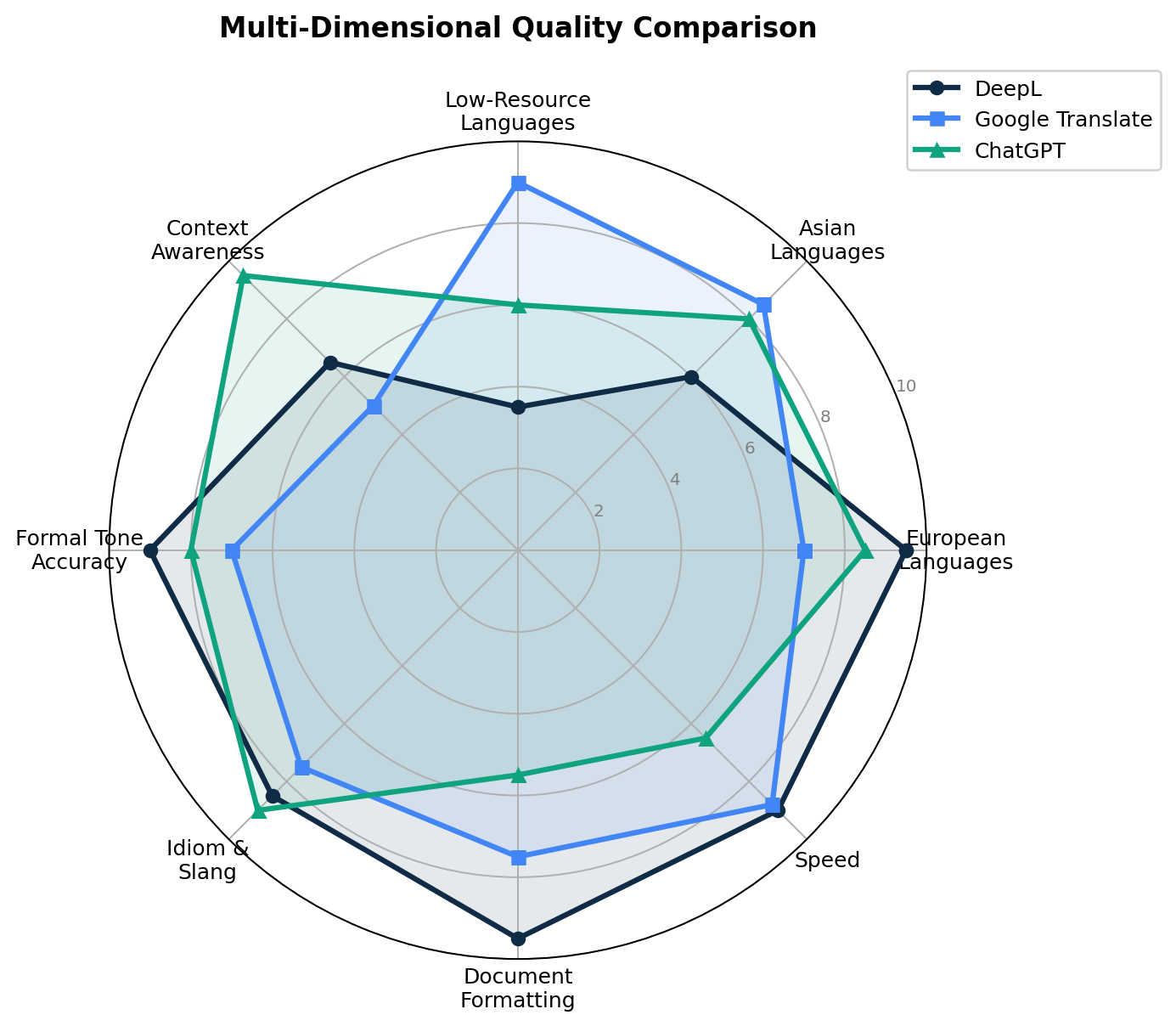
1. Translation Quality
Winner: DeepL (European languages) / ChatGPT (Asian languages & context)
The quality picture is more nuanced than a single winner. For European language pairs (English to German, French, Spanish, Italian, Dutch, Polish, Russian, Portuguese), DeepL consistently leads. Independent benchmarks (Intento, IntlPull) show DeepL winning 65% of language pairs tested, with BLEU scores 20-30% higher than Google Translate for these routes. ChatGPT (GPT-5.6) is close but still trails DeepL for European languages by a small margin.
For Asian languages (English to Chinese, Japanese, Korean), ChatGPT and Google Translate both outperform DeepL. GPT-5.6 scores highest on EN→ZH, EN→JA, and EN→KO pairs, with Google Translate close behind thanks to its Gemini integration. DeepL's quality for these languages is adequate but not class-leading.
For low-resource and regional languages, Google Translate wins by default — it supports languages that neither DeepL nor ChatGPT can translate.
2. Language Coverage
Winner: Google Translate
Google Translate's 249 languages dwarf DeepL's 36 and ChatGPT's ~95 (with highly variable quality). If you need to translate to or from Amharic, Cantonese, Hausa, Igbo, Malayalam, Nepali, Swahili, Yoruba, or dozens of other languages, Google Translate is your only viable option. Its June 2024 expansion of 110 new languages was the largest single expansion in machine translation history.
3. Speed and Throughput
Winner: DeepL
DeepL's purpose-built translation engine processes text faster than both Google Translate and especially ChatGPT. For high-volume batch translation, DeepL maintains consistent speed without the timeout or rate-limiting issues that ChatGPT experiences. Google Translate is also fast but slightly trails DeepL for equivalent workloads. ChatGPT is the slowest by a significant margin, particularly with GPT-5.6 which is slower than GPT-4.1 for batch operations.
4. Ease of Use
Winner: Google Translate
Google Translate requires no account, no payment, and no learning curve. Paste text, select language, get translation. Its mobile apps are optimized for quick, on-the-go translation with camera, voice, and offline features. DeepL and ChatGPT both require accounts for full functionality (though both offer free tiers). ChatGPT Translate narrowed this gap by offering a free, no-signup interface, but it currently supports text only (no camera, voice, or image translation).
5. Document Formatting
Winner: DeepL
This isn't close. DeepL preserves document formatting (layouts, tables, fonts, images) for DOCX, PDF, PPTX, and XLSX files with remarkable fidelity. Google Translate does a decent job but occasionally breaks complex layouts. ChatGPT returns plain text — all formatting is lost. For anyone translating formatted business documents, contracts, presentations, or reports, DeepL is the clear winner.
6. Enterprise Features
Winner: DeepL
DeepL offers the most complete enterprise translation toolkit: glossaries, translation memory, style rules, SSO, SOC 2 Type 2, ISO 27001, BYOK encryption, and 99.9% SLA. An estimated 82% of language service companies use DeepL (Smartling 2026 survey). ChatGPT Enterprise offers strong security features (BYOK, HIPAA BAA) but lacks dedicated translation management tools. Google Translate's enterprise offering is API-only with no consumer-facing enterprise features.
7. Context Awareness
Winner: ChatGPT
This is ChatGPT's domain. It understands meaning, maintains conversation context, adapts to audience instructions, and can explain its translation choices. Where DeepL and Google Translate produce one output per input, ChatGPT engages in a translation dialogue — refining, adjusting, and improving based on your feedback. For marketing copy, creative writing, culturally sensitive content, and any translation where nuance matters, ChatGPT is unmatched.
8. Cost Efficiency
Winner: Google Translate (consumers) / DeepL (professionals)
For casual users, Google Translate is free and unlimited — no contest. For professionals, the math depends on volume. DeepL's Individual plan at $8.74/month covers 300,000 characters — roughly equivalent to a 100-page book. Google Cloud Translation API at $20/million characters is cheaper per character but requires technical setup. ChatGPT Plus at $20/month offers more than translation (it's a full AI assistant) but is the most expensive option if translation is your only use case.
🧪 Real-World Test Scenarios
Scenario 1: Translating a German Business Contract
Prompt: Translate a 15-page German employment contract (Arbeitsvertrag) into English, preserving all formatting, legal terminology, and clause numbering.
DeepL: Handles this flawlessly. Upload the PDF, select German→English, and receive a formatted English document with all tables, clause numbers, and signatures preserved. Legal terminology is translated accurately — "Arbeitsvertrag" becomes "Employment Contract," not "Work Contract." Processing time: under 30 seconds. Rating: 9.5/10.
Google Translate: Acceptable but loses some formatting. Complex table layouts get slightly scrambled. Legal terminology is mostly correct but occasionally too literal — "Kündigungsfrist" becomes "notice period" correctly, but some clause structures read awkwardly. Rating: 7/10.
ChatGPT: Produces excellent English translation with good legal phrasing, but returns plain text. All formatting is lost — no tables, no clause numbering, no signature blocks. You'd need to manually reconstruct the document layout. For understanding the contract's meaning, it's excellent. For producing a usable translated document, it's impractical. Rating: 6/10 (quality) / 3/10 (formatting).
Scenario 2: Translating Marketing Copy with Tone Adaptation
Prompt: Translate this English marketing tagline into Japanese: "Unlock your team's potential with AI-powered workflows that actually work." Make it sound natural and compelling for Japanese B2B buyers — not just a literal translation.
ChatGPT: Excels here. It understands this is marketing copy, not a technical document. It produces a translation that uses appropriate Japanese business language (けいけん語 / 敬語), adjusts sentence structure for natural Japanese flow, and captures the aspirational tone. You can ask for alternatives: "Make it more casual" or "Try a version that emphasizes efficiency" and it delivers variations. Rating: 9/10.
DeepL: Produces a grammatically correct translation that's slightly stiff for marketing. The Japanese is natural but doesn't capture the punchy, persuasive tone of English marketing copy. Without tone/style instructions, DeepL defaults to a neutral, formal register. Rating: 7/10.
Google Translate: Produces a literal translation that reads as translated. Japanese readers would immediately recognize it as machine-translated English. The phrasing doesn't follow Japanese marketing conventions. Rating: 5/10.
Scenario 3: Translating a Menu While Traveling in Thailand
Prompt: You're in Bangkok and need to know what's on this Thai menu. Translate it and flag any dishes with common allergens (peanuts, shellfish).
Google Translate: Instant camera translation via Google Lens — point your phone at the menu and see Thai text replaced with English overlay. It recognizes dish names and provides reasonable translations. The real-time overlay makes it the clear winner for this use case. Offline language packs mean it works even without internet. Rating: 9/10.
ChatGPT: You'd need to type or photograph the text first, then upload it. ChatGPT can translate and flag allergens, but the multi-step process is cumbersome compared to Google's instant camera overlay. Also, ChatGPT doesn't work well offline. Rating: 6/10.
DeepL: Thai was just added (June 2025) but is still rolling out to the consumer app. Even when available, DeepL has no camera translation feature. You'd need to type Thai characters, which most travelers can't do. Rating: 2/10 for this scenario.
🔍 Alternatives Worth Considering
| Tool | Starting Price | Languages | Standout Feature |
|---|---|---|---|
| Microsoft Translator (Azure AI) | $10/M chars (2M free) | 100+ | Deep Microsoft ecosystem integration (Office, Teams, Azure); real-time multilingual meetings; on-premises containers |
| Amazon Translate | $15/M chars (2M free × 12mo) | 75+ | AWS ecosystem integration; custom terminology (free); parallel data customization for domain-specific models |
| Papago (Naver) | Free | 14 | Best-in-class for Korean, Japanese, and Chinese; strong cultural understanding; free with no ads |
| Reverso | Free (premium available) | 15+ | Contextual translations with real-world usage examples; vocabulary lists and grammar tools for language learners |
| Lingva Translate | Free (open source) | 100+ | Privacy-focused; no data collection; uses Google Translate API without tracking; self-hostable |
When to Consider These Alternatives
Microsoft Translator is the best choice for enterprises already invested in the Microsoft ecosystem. Its Teams integration enables real-time multilingual meetings with live translated captions, and its Azure deployment options include on-premises containers for regulated industries. At $10 per million characters (half Google's API price), it's also the cheapest enterprise option.
Papago is the hidden gem for East Asian translation. Developed by Naver (Korea's largest search engine), it produces noticeably better Korean, Japanese, and Chinese translations than any Western tool — it understands cultural context, honorifics, and colloquial expressions that Google Translate and DeepL miss. And it's completely free.
Reverso is ideal for language learners and editors who need contextual examples alongside translations. Its massive parallel text corpus provides real-world usage examples that help you understand how a word or phrase is actually used, not just its dictionary definition.
🏆 The Verdict
Best for European Language Business Documents → DeepL
If you translate contracts, reports, presentations, or marketing materials between European languages, DeepL is the clear winner. Its translation quality is best-in-class, document formatting is preserved perfectly, and professional features (glossaries, translation memory, style rules) make it the only tool that scales for enterprise translation workflows. At $8.74/month for the Individual plan, it's also affordable for freelancers and small teams.
Best for Travel and Casual Translation → Google Translate
For travelers, students, and anyone who needs quick translations on the go, Google Translate is unbeatable. It's free, supports virtually every language on Earth, works offline, and its camera translation (Google Lens) is a must-have for navigating foreign countries. The new Gemini 3.5 Live Translate (70+ languages, real-time speech) makes it even more indispensable.
Best for Context-Aware and Creative Translation → ChatGPT
When translation quality depends on understanding context, audience, and tone — marketing copy, literary content, culturally sensitive materials, or any content where a literal translation would miss the point — ChatGPT is the superior choice. Its ability to adapt tone, explain choices, and iterate makes it the most versatile translation tool, even if it can't match DeepL's raw accuracy for standard European language pairs.
Best Overall Value → Google Translate (free) or DeepL Individual ($8.74/mo)
For zero-cost translation of any language, Google Translate can't be beaten. For professional-quality European language translation at a reasonable price, DeepL Individual at $8.74/month is the best value in the translation industry. ChatGPT offers the most versatility but is the most expensive option when translation is your only use case.
The Hybrid Approach (Recommended)
Many professionals use all three tools for different purposes: DeepL for European language documents and professional workflows, Google Translate for quick lookups, travel, and languages outside DeepL's support, and ChatGPT for creative content, marketing copy, and any translation where context and tone matter more than raw accuracy. This isn't overkill — each tool genuinely excels in different scenarios, and the total cost ($8.74 + $0 + $0 = $8.74/month) is less than many single-tool subscriptions.
❓ Frequently Asked Questions
Is DeepL better than Google Translate?
For European languages, yes — by a significant margin. DeepL consistently wins blind human evaluations for German, French, Spanish, Italian, Dutch, Polish, and Russian translations, requiring roughly 30% less post-editing than Google Translate. But Google Translate supports 249 languages vs DeepL's 36, and Google is stronger for Asian, African, and low-resource languages. Google Translate is also completely free. For casual translation of common European languages, DeepL's free tier (50K chars/month) is worth trying — many users find the quality difference immediately apparent.
Can ChatGPT translate better than DeepL?
It depends on what you're translating. For standard business documents in European languages, DeepL produces more accurate and consistent results. But ChatGPT excels in areas where understanding matters: marketing copy that needs to sound persuasive in the target language, literary content with cultural references, ambiguous text where the correct translation depends on surrounding context, and any content that requires specific tone or formality adjustments. ChatGPT's ability to iterate — "make it more formal" or "that word doesn't sound right, try another" — gives it an adaptability that no dedicated translation tool can match.
Is DeepL free to use?
Yes. DeepL's free tier includes 50,000 characters per month (enough for roughly 15-20 pages of text), one document translation per month (up to 5 MB), and one glossary. All 36 languages are included. For comparison, that's enough to translate a typical business report or a handful of emails each month. If you regularly translate more than that, the Individual plan at $8.74/month (annual billing) raises the limit to 300,000 characters and 3 documents.
Which translation tool is best for businesses?
For professional translation workflows, DeepL is the strongest all-around choice. Its Business plan ($57.49/user/month) includes translation memory, unlimited glossaries, style rule enforcement, 99% SLA, and SOC 2 Type 2 certification — the full toolkit that translation agencies need. For enterprises in the Microsoft ecosystem, Azure AI Translator offers deep Office and Teams integration at a lower per-character price. For maximum language coverage at scale, Google Cloud Translation API is the most cost-effective option. ChatGPT Enterprise offers strong security but lacks dedicated translation management features.
How many languages does DeepL support compared to Google Translate?
Google Translate supports 249 language varieties covering 95% of the world's population. DeepL supports 36 languages, focused on European languages plus Chinese (both simplified and traditional), Japanese, Korean, Arabic, Indonesian, Vietnamese, Hebrew, and Thai. DeepL's quality within its 36 languages is generally superior — especially for German, French, and Spanish — but if you need Hindi, Swahili, Tagalog, or any of the 200+ languages DeepL doesn't support, Google Translate is your best option.
Can ChatGPT translate entire documents?
Yes, on Plus plans ($20/month) and above, you can upload PDF and DOCX files. However, the translation comes back as plain text — all formatting is lost. Tables, layouts, fonts, headers, and other design elements are not preserved. If you need a formatted translated document, DeepL is far more practical. ChatGPT's document translation works best for understanding long texts, extracting key information, or translating content that you'll then re-format in your own template.
What is ChatGPT Translate and how is it different from regular ChatGPT?
ChatGPT Translate is a free standalone translation tool that OpenAI launched in January 2026. It has a dual-pane interface (like Google Translate and DeepL), automatic language detection, and support for 50+ languages. Unlike the full ChatGPT, it's purpose-built for translation with tone presets (business formal, more fluent, academic, simplified). It can redirect to full ChatGPT for conversational refinement. As of August 2026, it supports text input only — voice and image translation were announced but not yet live.