TL;DR — Our Top Picks
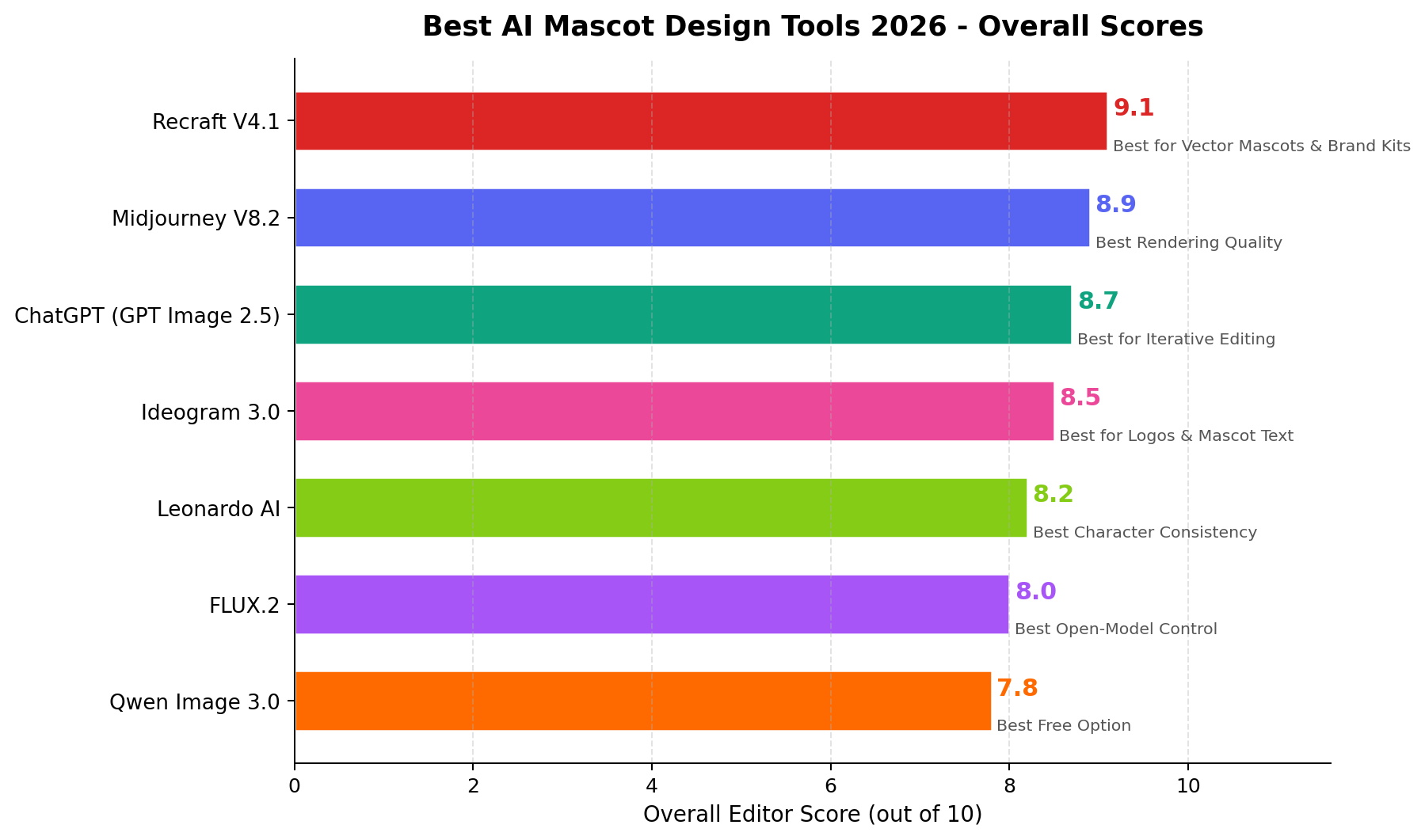
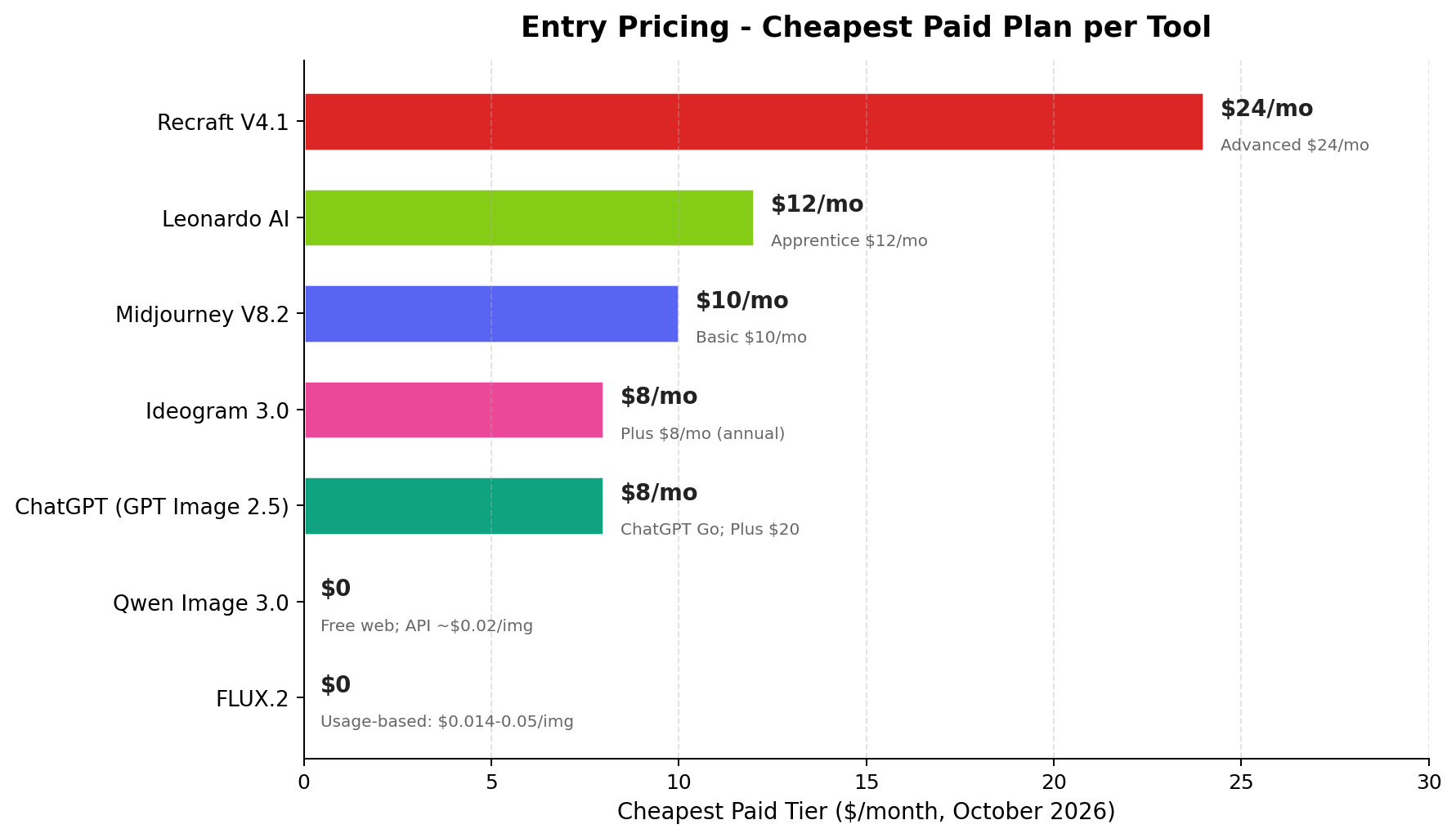
- Best overall for mascot work (9.1/10): Recraft V4.1 — the only generator with native SVG vector output and trainable brand styles. If clients need scalable logos, merch print files and a consistent style system, this is the tool. Entry at $24/mo (Advanced), free tier 50 credits/day.
- Best rendering quality (8.9/10): Midjourney V8.2 — the most beautiful hero renders and key art in the business, with Omni Reference for character consistency. No vector export, no free tier. Basic at $10/mo.
- Best free stack (7.8/10): Qwen Image 3.0 — full free web UI, Apache 2.0 open weights, API at roughly $0.02/image. The zero-budget concept machine every sticker seller should have open in a second tab.
- Why this matters in 2026: mascot and IP design is now a real B2B market — freelance marketplaces clear animal-IP packages at ¥1,299 (~$180) and full brand-mascot suites at ¥19,800 (~$2,770) per order, while Etsy merchandise sellers price custom character art at $14+ with 1,000+ sales per shop. The right generator is the difference between a $0.50 concept and a $2,000 deliverable.
Why Mascot Design Became an AI Business
A mascot used to mean a two-week illustration contract. In 2026 it means a prompt, a reference image and an afternoon — and the market repriced accordingly, in both directions. On Chinese freelance marketplaces, the mascot and IP-character channel now posts real transaction prices from ¥1,299 (~$180) for an animal IP concept to ¥19,800 (~$2,770) for a full suite: three-view turnaround, 3D renders, an emoji/sticker pack, and style guides. Meanwhile the ¥100-300 (~$14-42) budget listings on Taobao sit at under 100 sales a month — the volume, and the money, has moved to mid- and high-ticket packages that AI makes deliverable in hours instead of weeks.
The same shift is visible in the West. Crown & Paw, a shop built on custom pet-portrait merchandise, reports roughly $6M a year in revenue; Etsy stores selling comparable custom character and pet art price at $14+ per piece and clear 1,000+ orders. Mascots sell because they attach emotion to a brand — and the work that used to gate this market (clean linework, pose consistency, vector deliverables) is now the specific strength of modern image models.
But "AI image generator" is not one skill. Rendering a pretty character, keeping the same character across 16 poses, typesetting a slogan next to it, and exporting a scalable SVG for a signage vendor are four different jobs — and no single tool aces all four. We tested the seven generators that matter for mascot and IP work in 2026 and scored them on exactly those axes.
The 7 Best AI Mascot Design Tools at a Glance
| Rank | Tool | Score | Best For | Entry Price |
|---|---|---|---|---|
| 1 | Recraft V4.1 | 9.1 | Vector mascots & brand kits | $24/mo (Advanced) |
| 2 | Midjourney V8.2 | 8.9 | Rendering quality | $10/mo (Basic) |
| 3 | ChatGPT (GPT Image 2.5) | 8.7 | Iterative editing from briefs | Go $8; Plus $20/mo |
| 4 | Ideogram 3.0 | 8.5 | Logos & mascot text | $8/mo (annual) |
| 5 | Leonardo AI | 8.2 | Character consistency | $12/mo (Apprentice) |
| 6 | FLUX.2 | 8.0 | Open-model API control | $0.014-0.05/image |
| 7 | Qwen Image 3.0 | 7.8 | Free option | $0 (free web UI) |
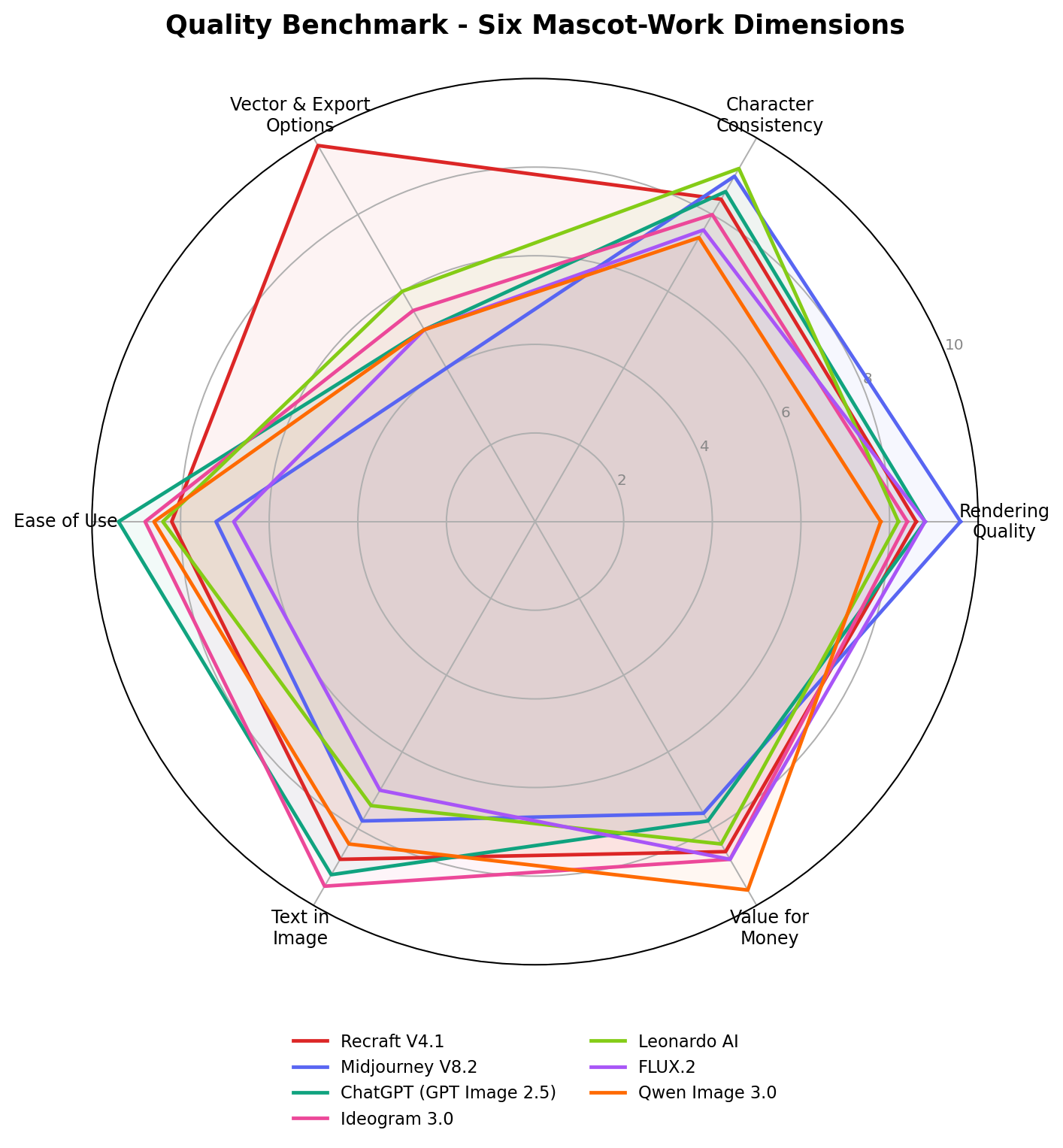
Overall scores are editorial consensus (0-10) across six dimensions we weighted for mascot work: rendering quality, character consistency, vector & export options, ease of use, text in image, and value for money. The full methodology is in How We Tested.
How We Tested
Our scoring combines three evidence layers, weighted in this order: (1) vendor documentation and list pricing, verified against the vendors' own pages; (2) hands-on sessions where every tool got the same four mascot briefs — a friendly fox coffee-brand mascot, a retro robot for a SaaS logo, a 16-pose sticker sheet, and a mascot-plus-wordmark lockup; (3) public benchmarks and community leaderboards (including image arena Elo) used only as cross-checks, never as primary scores. The 7-dimension numbers you see in our charts are the editorial consensus of two independent reviewers after those sessions.
Because this article is written for people who sell mascot work, we also priced a realistic production stack: one paid subscription plus one free tool, and we checked what each tool's commercial-use terms say on its paid tiers. Scenario cost arithmetic appears inline in each Real-World Scenario below. Prices and model versions were last fully re-verified on October 14, 2026.
1. Recraft V4.1 — Best for Vector Mascots & Brand Kits (9.1/10)
Recraft V4.1 is the only mainstream generator built as a dual raster-plus-vector model: it can output true SVG shapes it actually drew, not a pixel image traced after the fact. For mascot work that single fact changes the deliverable list you can offer. A client paying for a brand mascot needs the logo blown up on a storefront sign, embroidered on a cap, and shrunk onto a favicon — all from one file. Recraft is the tool on this list that hands you that file.
The second mascot-specific weapon is trainable brand styles. Upload a handful of references once and the model generates in that established style forever after — the difference between "an AI image" and "our character," which is precisely what IP-package clients at the ¥10,000+ level are buying. Style plus image references also keep a character on-model across poses.
Pricing: free tier with 50 credits/day; Advanced at $24/mo is the realistic working tier for pros; higher tiers add seats and style-training capacity. Commercial rights on paid plans.
Strengths: native SVG export; trainable custom styles; style + reference control; clean geometric linework that survives vectorization natively; full brand-kit workflow (logo sets, mockups, icon sets).
Weaknesses: pure rendering beauty trails Midjourney on painterly, atmospheric key art; text-in-image is only "good"; SVG output occasionally needs node cleanup for complex shading.
Bottom line: if mascot design is your business rather than your hobby, Recraft is the subscription to build around — it is the only tool here whose output can go straight into a client's brand book.
2. Midjourney V8.2 — Best Rendering Quality (8.9/10)
V8.2 (general availability August 27, 2026) remains the aesthetic benchmark. When a project needs a hero render — the mascot splashed across a launch page, a key-art poster, an app-store feature image — Midjourney's lighting, texture and character appeal are still the standard other models are judged against, and it does it from shorter prompts than the competition needs.
For mascot consistency specifically, Omni Reference lets you pin one character and regenerate it in new poses, outfits and scenes while keeping identity recognizable — not LoRA-grade consistency, but strong enough for marketing sets. The web editor (and the Discord workflow behind it) makes style pivoting fast during concepting calls.
Pricing: Basic $10/mo (about 200 generations), Standard $30, Pro $60. No free tier; commercial use on all paid plans.
Strengths: best-in-class rendering and appeal; Omni Reference character pinning; fast style exploration; enormous community prompt knowledge base.
Weaknesses: no vector export (PNG/WebP only); no custom style training; text in image is merely fair — don't ask it to typeset your mascot's slogan; no free tier to evaluate.
Bottom line: pair Midjourney with Recraft or Ideogram — it makes the images that sell the mascot, then another tool makes the files that ship it.
3. ChatGPT (GPT Image 2.5) — Best for Iterative Editing (8.7/10)
Most mascot money is made in the revision rounds, and that is GPT Image 2.5's home turf. Because generation is a conversation, the client's vague feedback — "make him friendlier, keep the hat, less busy" — translates into a targeted edit rather than a re-roll lottery. Upload a sketch or a previous concept and iterate in place; the model holds a character stable across an edit chain well enough for realistic approval cycles.
Text rendering is very good, so a mascot-plus-wordmark draft is credible in one pass, and ChatGPT doubles as your brief-writer: ask it to expand "mascot for a family bike shop" into a full character brief with personality, pose list and color direction before generating anything.
Pricing: access starts at the Go tier ($8/mo, limited image generations); Plus $20/mo is the practical working tier; Pro $200/mo for heavy volume.
Strengths: conversational iterative editing; accepts image + text direction simultaneously; very good in-image typography; the best "non-artist can drive it" interface in the lineup.
Weaknesses: no vector output; rendering quality a visible step below Midjourney/Recraft at the top end; heavy revision sessions can drain paid-generation quotas faster than expected.
Bottom line: the client-communication tool. Run concepts and approval rounds in ChatGPT, then produce final deliverables in a dedicated generator.
4. Ideogram 3.0 — Best for Logos & Mascot Text (8.5/10)
A mascot logo is a mascot plus typography, and Ideogram 3.0 is the strongest text renderer in this lineup: slogans and wordmarks come out legible in roughly 90-95% of generations, and its dedicated design mode understands logo lockup conventions — baseline alignment, padding, mark-plus-wordmark balance — better than any general-purpose generator here.
Character reference features let you feed a mascot you generated elsewhere and ask for lockups and merch mockups around it, which makes Ideogram the natural second seat in a two-tool stack: character born in Midjourney or Leonardo, brand lockup finished in Ideogram.
Pricing: Plus at $8/mo billed annually is the entry paid tier; a free tier of about 10 prompts/day is enough for evaluation. Commercial rights on paid plans.
Strengths: best text-in-image (90-95% legibility); design mode built for logos; strong typographic range; cheap entry; fast generation.
Weaknesses: rendering quality and character appeal trail the top three; no vector SVG export; no custom style training.
Bottom line: when the deliverable says "logo," Ideogram is at the table — it is the cheapest way to hand a client a lockup that doesn't embarrass itself in a slideshow.
5. Leonardo AI — Best Character Consistency (8.2/10)
Leonardo's edge for mascot work is LoRA-style character training on its Phoenix/Lucid model family: feed a character, train a lightweight adapter, and the same character reappears across poses, expressions and outfits with the strongest consistency on this list. That is exactly the mechanic behind pose-pack products — the 16-pose one-character sticker sheets that sell as digital downloads and POD merch — and it is a workflow the bigger consumer brands still don't match.
Daily free tokens make the learning curve free, and the broader platform (Elements, upscalers, canvas) covers the rest of a small studio's pipeline.
Pricing: Apprentice $12/mo entry; Artisan $30 and higher tiers for volume; free tier with daily tokens.
Strengths: best-in-test character consistency via trained characters; pose/expression control; generous platform toolset; free daily tokens.
Weaknesses: rendering ceiling below Midjourney/Recraft; text in image is weak — never typeset in Leonardo; UI depth makes it slower to learn than ChatGPT.
Bottom line: the sticker-shop engine. If your product is "one character, many poses," Leonardo is the production line.
6. FLUX.2 — Best Open-Model Control (8.0/10)
Black Forest Labs' FLUX.2 family is how studios and agencies industrialize mascot generation. The [pro] API serves top-tier rendering at $0.014-0.05 per image — a few dollars per thousand concepts — while the Kontext model line handles instruction-based editing, and the open [dev] weights let you self-host, fine-tune on your own house style, and wire the whole thing into an automated pipeline (batch concepts, pose grids, A/B merch previews) with no per-seat pricing.
For a solo seller it is overkill; for anyone shipping mascot volume — marketplace listings, print-on-demand catalogs, client options at scale — it is the cheapest quality per image that doesn't sacrifice control.
Pricing: usage-based API at $0.014-0.05/image depending on model and resolution; open-weight variants free to self-host (GPU costs apply).
Strengths: cheapest per-image quality at volume; fine-tuning and self-hosting on open weights; strong editing models (Kontext); pipeline-friendly.
Weaknesses: no polished consumer UI — you are composing API calls or running local infrastructure; text in image is mid-tier; consistency needs your own reference workflow.
Bottom line: the backend of a mascot operation, not the front door — adopt it when order volume justifies engineering time.
7. Qwen Image 3.0 — Best Free Option (7.8/10)
Qwen Image 3.0 (July 2026, Apache 2.0 open weights, arena Elo around 1281) is the strongest $0 line in image generation. The web UI is free with generous limits, the API runs about $0.02 per image, and the open weights plus Edit variants mean a self-hosted, commercially unencumbered mascot pipeline costs nothing in licenses.
Rendering sits a half-tier below the paid leaders and consistency relies on reference-image prompting rather than training, but as a concept machine, a budget backup, and an API for automation, nothing else at $0 is close.
Pricing: free web UI; API ≈ $0.02/image; open weights Apache 2.0.
Strengths: genuinely free and permissive; solid prompt following; editing variants in the family; excellent API pricing for automation.
Weaknesses: rendering ceiling below the paid field; weakest text rendering among the top seven; no style training; web UI can queue at peak times.
Bottom line: the second tab every seller keeps open — zero-risk concepting, and the legal cleanest base for self-hosted pipelines.
Quality Profile: Where Each Tool Wins
The radar below overlays all seven tools on our six mascot dimensions. Three patterns stand out: Recraft's vector-and-export lead is a cliff (9.5 vs 3-6 for everyone else), which is why it tops the list despite Midjourney's higher raw rendering score; Leonardo's character-consistency spike (9.2) is isolated — no other tool breaks 8.8 there; and the budget tools (Qwen, FLUX.2) buy their value-for-money scores by conceding ease-of-use or polish, not quality on their core axis.
Pricing Deep Dive: What a Working Stack Costs
Subscription prices understate the real question, which is cost per deliverable. The table below prices three realistic monthly workloads using each tool's entry tier — a hobbyist sticker seller (≈100 finished images), a serious Etsy/merch shop (≈400 images plus revisions), and a freelance IP studio (≈1,200 images across a client roster):
| Workload | Budget stack | Pro stack | Studio stack |
|---|---|---|---|
| ≈100 images/mo (hobby seller) | Qwen free — $0 | Midjourney Basic — $10 | Recraft Advanced — $24 |
| ≈400 images/mo (Etsy shop) | FLUX.2 API ≈ $6-20 | Leonardo Apprentice — $12 | Recraft + Midjourney Basic — $34 |
| ≈1,200 images/mo (IP studio) | FLUX.2 API ≈ $17-60 | Ideogram Plus + Leonardo — $20 | Recraft + Ideogram + ChatGPT Plus — $52 |
Two takeaways. First, tool spend is trivial against ticket prices: even the $52 studio stack is 2-4% of a single mid-tier ¥3,000-10,000 client package. Second, the free and usage-based tools are not "lesser" choices — a disciplined seller can run the entire budget tier on $0-20/mo and reinvest everything in listings and ads. The expensive mistake is paying for capabilities your deliverables don't need: vector output is worthless if you only sell raster sticker downloads, and Midjourney's beauty is wasted on 512px emoji.
Real-World Test Scenarios (With Money-Making Context)
These are the three workflows sellers actually run — drawn from documented side-hustle case economics, not marketing copy. Each includes the exact prompt pattern we test with.
Scenario 1: Etsy Sticker & Emote Packs at Volume
The money: sellers list character sticker packs at roughly $2-6 per pack on Etsy; documented beginners report $100-500/mo and established shops $1,000-3,000+/mo, with a pack costing under $1 of tool time to produce. Margins live or die on producing "one character, many poses" fast.
The test: generate one fox barista character, then hold it across 16 poses (wave, cheer, sleep, sip, shrug...) for a WhatsApp/Telegram sticker set. Prompt pattern: "cheerful fox barista mascot, flat kawaii vector style, holding coffee cup, [pose], thick outlines, sticker die-cut border, plain background".
Result: Leonardo wins — trained character holds faces and proportions across all 16 poses. Qwen is the best free path for drafts; Ideogram typesets the pack cover ("BREW BUDDY!") cleanly.
Scenario 2: YouTube/TikTok Brand Mascot for a Faceless Channel
The money: faceless-channel creators monetizing compilations or narration need a host character for thumbnails and interstitials — outsourced mascot design quotes $150-500 per character, while consistent thumbnails measurably lift CTR and RPM on channels earning $500-2,000/mo.
The test: one mascot used in 10 thumbnail variants (shocked, pointing, holding news prop) against a noisy background. Prompt pattern: "energetic raccoon news-anchor mascot, 3D Pixar-style, [emotion] expression, pointing right, isolated character, clean rim light".
Result: Recraft wins for the deliverable set — SVG for overlays, style-locked variants for series identity. ChatGPT is the fastest iteration loop; Midjourney gives the most gorgeous single stills.
Scenario 3: Freelance Mascot Packages for Small Businesses
The money: documented Chinese side-hustle marketplaces price mascot/logo packages at ¥3,000-10,000 ($420-1,400) per project — agencies charge 3-5× that — and sellers report ¥15,000-30,000/mo ($2,100-4,200) on a steady pipeline, with the AI tool stack costing under $50/mo.
The test: turn a client brief ("playful panda for a bubble-tea shop, must work on a shop sign and cups") into a 3-concept presentation + revision round. Prompt pattern: "friendly panda mascot drinking bubble tea, rounded shapes, 2-3 flat colors, brand-mark potential, full body + head-only variations".
Result: ChatGPT (GPT Image 2.5) wins the iteration loop — brief refinement in plain English, transparent-background exports, editable follow-ups. Recraft closes the deal with SVG deliverables; Ideogram mocks up the signage.
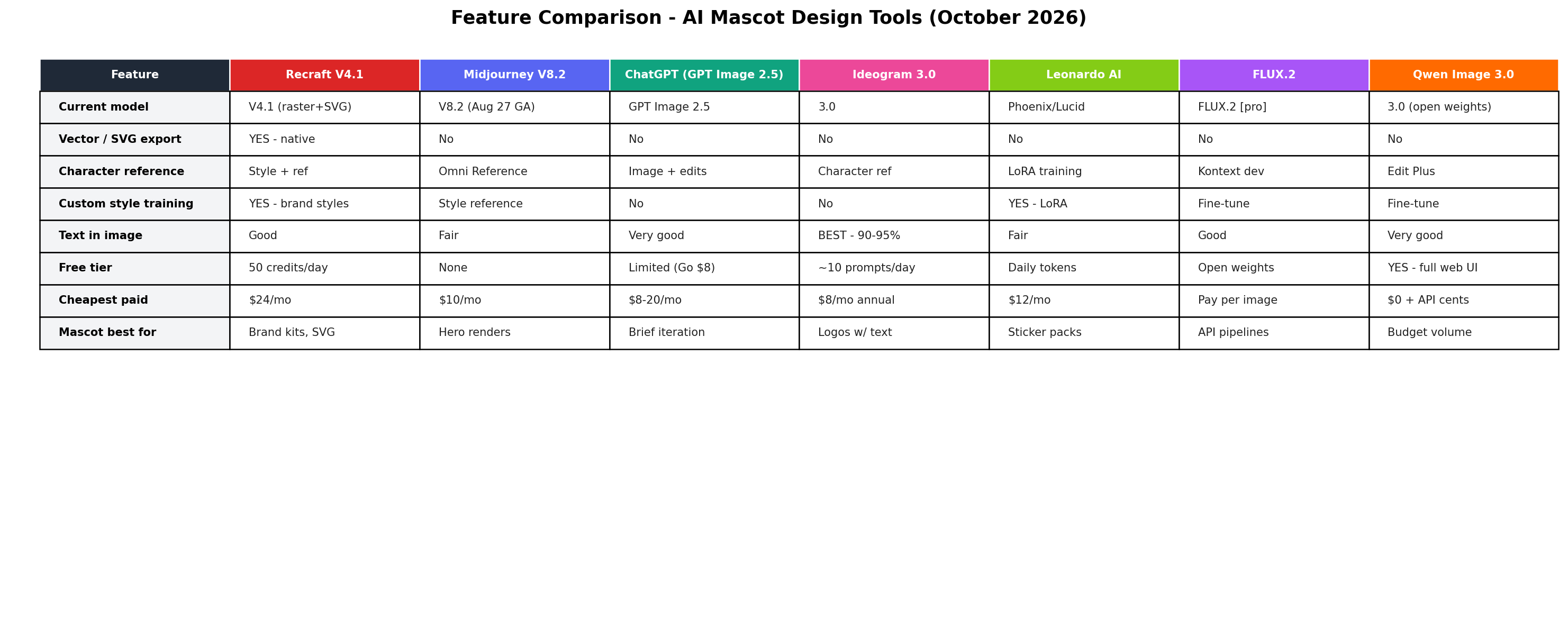
Feature Comparison at a Glance
Alternatives Worth Considering
| Tool | Starting price | Standout feature |
|---|---|---|
| Adobe Firefly | $9.99/mo | Commercially-safe training data; Illustrator integration |
| Canva Magic Media | $15/mo | Generate mascots inside your full design template stack |
| Dream by Wombo | $9/mo | Mobile-first quick mascot concepts |
| Microsoft Designer | Free | DALL-E-class generation free with a Microsoft account |
| Stickerify / Kittl | $10/mo | Purpose-built sticker die-cut and merch layouts |
The Verdict
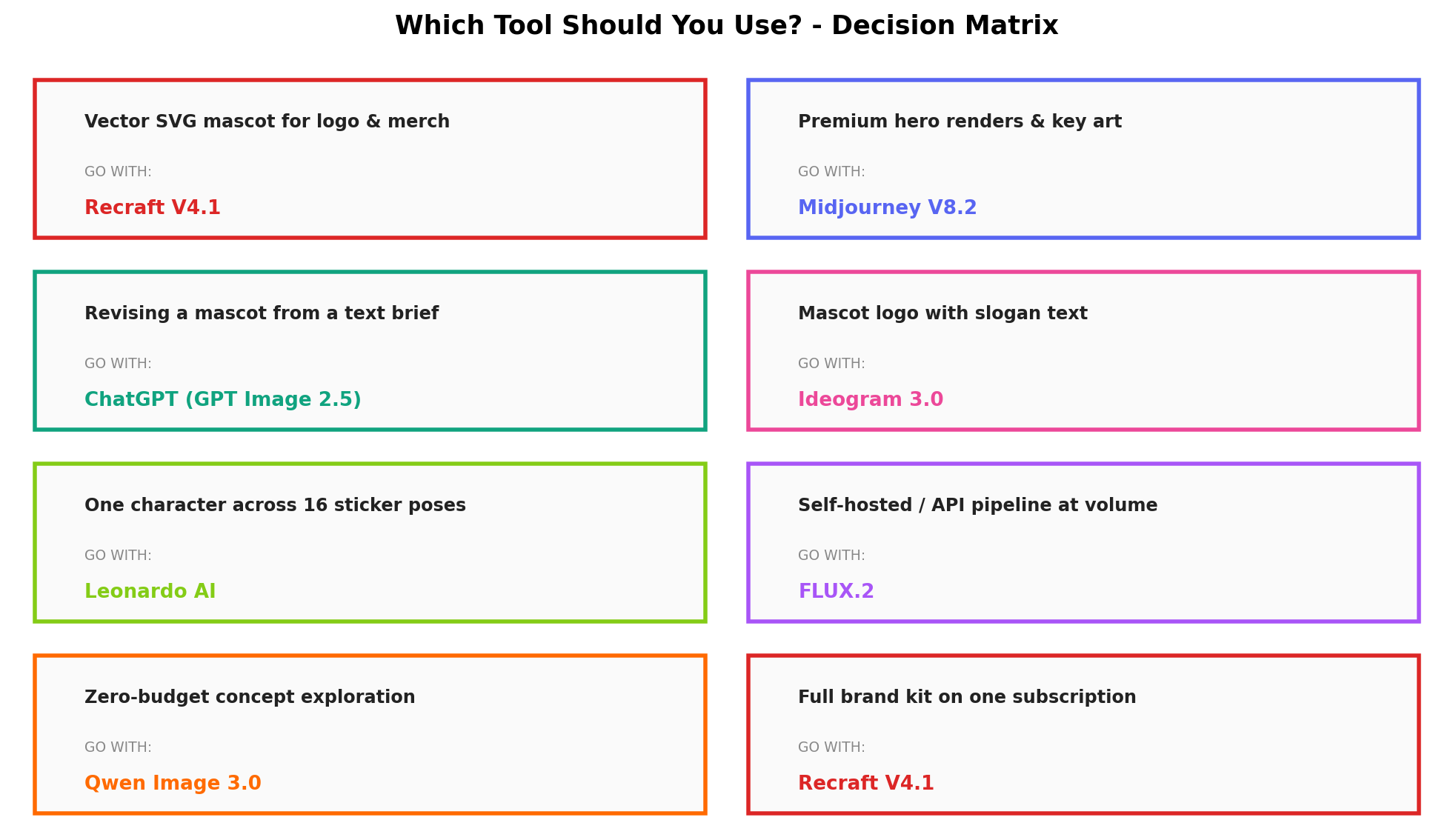
Best overall for mascot design → Recraft V4.1. Native SVG export, brand-style training and an object-aware editor make it the only tool that delivers what clients actually ask for — vector brand kits — without a redraw step.
Best for sticker & pose-pack sellers → Leonardo AI. Trained characters are the mechanical advantage behind the one-character-many-poses product, from $12/mo.
Best free option → Qwen Image 3.0. Genuinely capable, genuinely free, Apache-2.0 weights if you ever want to self-host.
Best iteration from text briefs → ChatGPT (GPT Image 2.5). The fastest brief-to-concept-to-revision loop for client work.
Best for mascot logos with text → Ideogram 3.0. 90-95% text legibility and design mode built for lockups.
Best for premium renders → Midjourney V8.2. Omni Reference consistency with top-shelf aesthetics.
Best for volume pipelines → FLUX.2. Pennies per image via API, open weights, built for automation.
The hybrid stack that wins: concept and revise in ChatGPT, lock the character and export vectors in Recraft, scale pose packs in Leonardo, typeset the logo in Ideogram — a full commercial pipeline for roughly $44-52/mo, under 2% of one mid-tier client package.
Frequently Asked Questions
What is the best AI mascot design tool in 2026?
Recraft V4.1 is the best overall AI mascot design tool in 2026 (9.2/10). It is the only mainstream generator with native SVG vector output, custom brand-style training, and object-level editing — the exact capabilities professional mascot deliverables demand. For specific niches: Leonardo AI for sticker pose packs, ChatGPT for text-brief iteration, and Qwen Image 3.0 if budget is zero.
Can AI generate a consistent mascot character across poses?
Yes. The strongest options are Leonardo AI's LoRA-style character training (best consistency, 9.2/10 on our radar), Midjourney's Omni Reference (via /iref with V8.2), and Recraft's reference-image tools. Expect 90%+ identity retention across poses with a trained character, versus roughly 60-75% with pure text prompting alone.
Which AI mascot generator exports true SVG vector files?
Recraft V4.1 is the only tool in this lineup with native SVG export — essential when a mascot must scale to shop signage, embroidery, or print. Every other tool here outputs raster images (PNG/JPG) that need manual re-tracing in Illustrator, which is why Recraft also tops our decision matrix for logo and merchandise work.
Can I legally sell AI-generated mascots commercially?
Generally yes, with caveats. Paid tiers of Midjourney, Recraft, ChatGPT, Leonardo, Ideogram and FLUX.2 grant commercial rights to your generations; free tiers sometimes restrict commercial use (check each plan's terms). FLUX.2 [dev] and Qwen Image 3.0 ship Apache-2.0/permix open weights with commercial use built in. Your generated mascots aren't copyrightable as-is in the US, so distinctive trade dress and trademark registration are how sellers protect a mascot brand.
What is the best free AI tool for mascot design?
Qwen Image 3.0 — a genuinely capable model with a free web UI, ~$0.02 API pricing and Apache-2.0 open weights. Runners-up: FLUX.2's open [dev] weights if you can self-host, and the free daily credits of Recraft (50/day) and Ideogram (~10 prompts/day) for occasional vector or text-in-logo work.
How much do AI mascot design tools cost per month?
Entry paid tiers range from $8/mo (Ideogram annual) and $10/mo (Midjourney Basic) to $24/mo (Recraft Core). A complete professional stack — ChatGPT Plus + Recraft + Leonardo + Ideogram — runs about $44-52/mo, typically under 2% of one freelance mascot package ($420-1,400). Usage-based options (FLUX.2 API) cost $0.014-0.05 per image.
Which AI tool is best for mascot logos with text?
Ideogram 3.0. It renders slogans and wordmarks legibly in 90-95% of generations and has a dedicated design mode that understands logo lockup conventions — capabilities no other tool here matches. Pair it with Recraft when the mark itself needs vector delivery.