TL;DR
Gamma wins on speed, multi-format output, and pricing. Generate a full presentation in under 60 seconds from a single prompt, export to PPTX, PDF, or publish to the web, and start free with 400 AI credits. It's the best choice for individuals, startups, and anyone who needs presentations fast.
Beautiful.ai wins on design polish, brand governance, and team features. Its Smart Slides auto-formatting ensures pixel-perfect layouts every time, unlimited AI generation on paid plans, and enterprise-grade security (SOC 2 Type II). It's the best choice for sales teams, marketing departments, and enterprises that need consistent branded decks at scale.
Bottom line: Choose Gamma for speed and versatility. Choose Beautiful.ai for design quality and enterprise brand control.
At a Glance
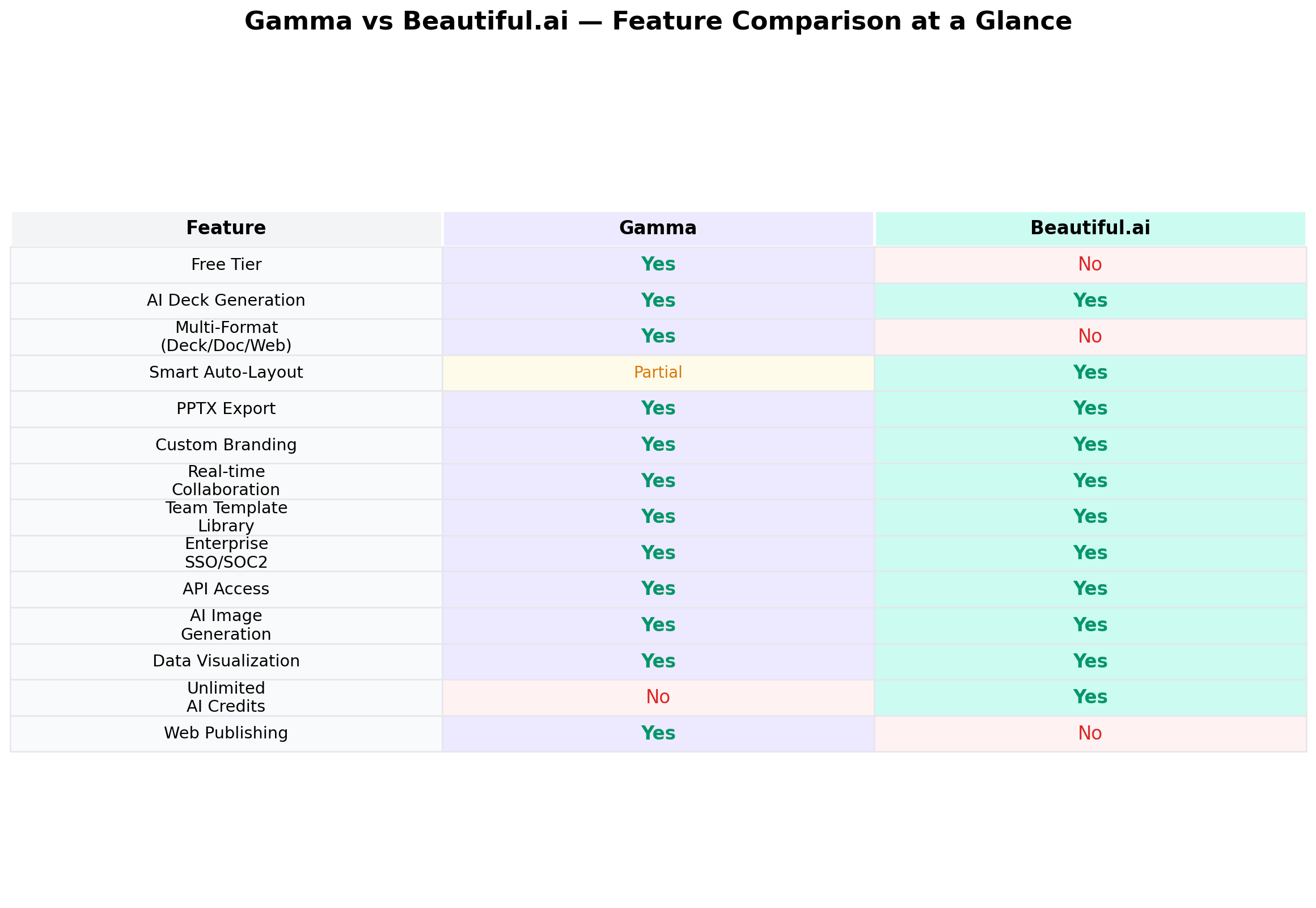
| Feature | Gamma | Beautiful.ai |
|---|---|---|
| Best For | Speed, multi-format, individuals | Design polish, enterprise teams |
| Free Tier | Yes (400 credits) | No (14-day trial) |
| Starting Price | $9/mo (Plus, annual) | $12/mo (Pro, annual) |
| AI Generation | Credit-based (up to 75 slides/prompt) | Unlimited on all paid plans |
| Output Formats | PPTX, PDF, PNG, Web, Doc, Social | PPTX, PDF, Google Slides |
| Smart Auto-Layout | Basic (card-based) | Advanced (Smart Slides) |
| Enterprise Security | SOC 2 Type II | SOC 2 Type II, PCI |
| Users | 70M+ | 100K+ businesses |
| Valuation | $2.1B (Nov 2025) | $61M total funding |
What About Tome?
If you've been researching AI presentation tools, you may have heard of Tome. Originally one of the most hyped AI tools (30M users, $81.6M raised at a $300M valuation), Tome was permanently shut down on April 30, 2025. Despite explosive growth, the company couldn't monetize (ARR stayed under $4M) and never shipped PowerPoint export, leaving users locked into a proprietary format. The brand was acquired by AngelList for legal document AI, and the original team pivoted to Lightfield, an AI CRM. This comparison focuses on the two active market leaders.
Gamma — Deep Dive
Overview
Gamma has become the dominant force in AI-powered presentations since its founding in 2020 by a team of former Optimizely executives. Valued at $2.1 billion following a $68M Series B led by Andreessen Horowitz in November 2025, the company has reached $100M+ ARR with just 52 employees — an extraordinary capital efficiency ratio that underscores product-market fit.
With over 70 million users who've created more than 400 million pieces of content (over 1 million pieces daily), Gamma has evolved beyond a simple presentation maker into what the company calls a "visual storytelling platform." The tool generates presentations, documents, web pages, and social media content from a single AI workflow, making it one of the most versatile AI content tools available.
Key Features
Gamma Agent: The flagship AI feature, launched with Gamma 3.0 in September 2025. Unlike simple prompt-to-deck generators, Gamma Agent is a conversational AI design partner that can research the web (with citations), refine content, restyle entire decks, and provide design feedback through natural-language conversation. It's the closest thing to having an AI design consultant working alongside you.
Multi-Format Output: Gamma is the only AI presentation tool that produces presentations, documents, web pages, and social media posts from a single workflow. You can generate a deck, then one-click publish it as a website with a custom domain, analytics, and Google indexing.
AI Image Generation: Gamma uses multiple AI image models (Claude, ChatGPT + DALL-E, Gemini + Imagen, Flux, Recraft, Playground, Ideogram, Luma, Leonardo) for its Gamma Imagine feature (March 2026), which generates charts, social graphics, and infographics — not just slide decorations.
Smart Charts: Native real, editable charts (line, bar, pie, scatter) generated from data — not static images. This is a significant advantage over tools that only create chart images.
Interactive Embeds: Embed YouTube/Vimeo videos, GIFs, live charts, forms (Typeform, Google Forms, Calendly), Figma prototypes, Miro boards, Airtable views, and Power BI dashboards directly into your decks.
API Access: Full REST API (launched January 2026) with Zapier and Make.com integrations for workflow automation across 8,000+ apps.
Pricing
| Plan | Monthly | Annual | AI Credits | Cards/Prompt |
|---|---|---|---|---|
| Free | $0 | $0 | 400 (one-time) | Up to 10 |
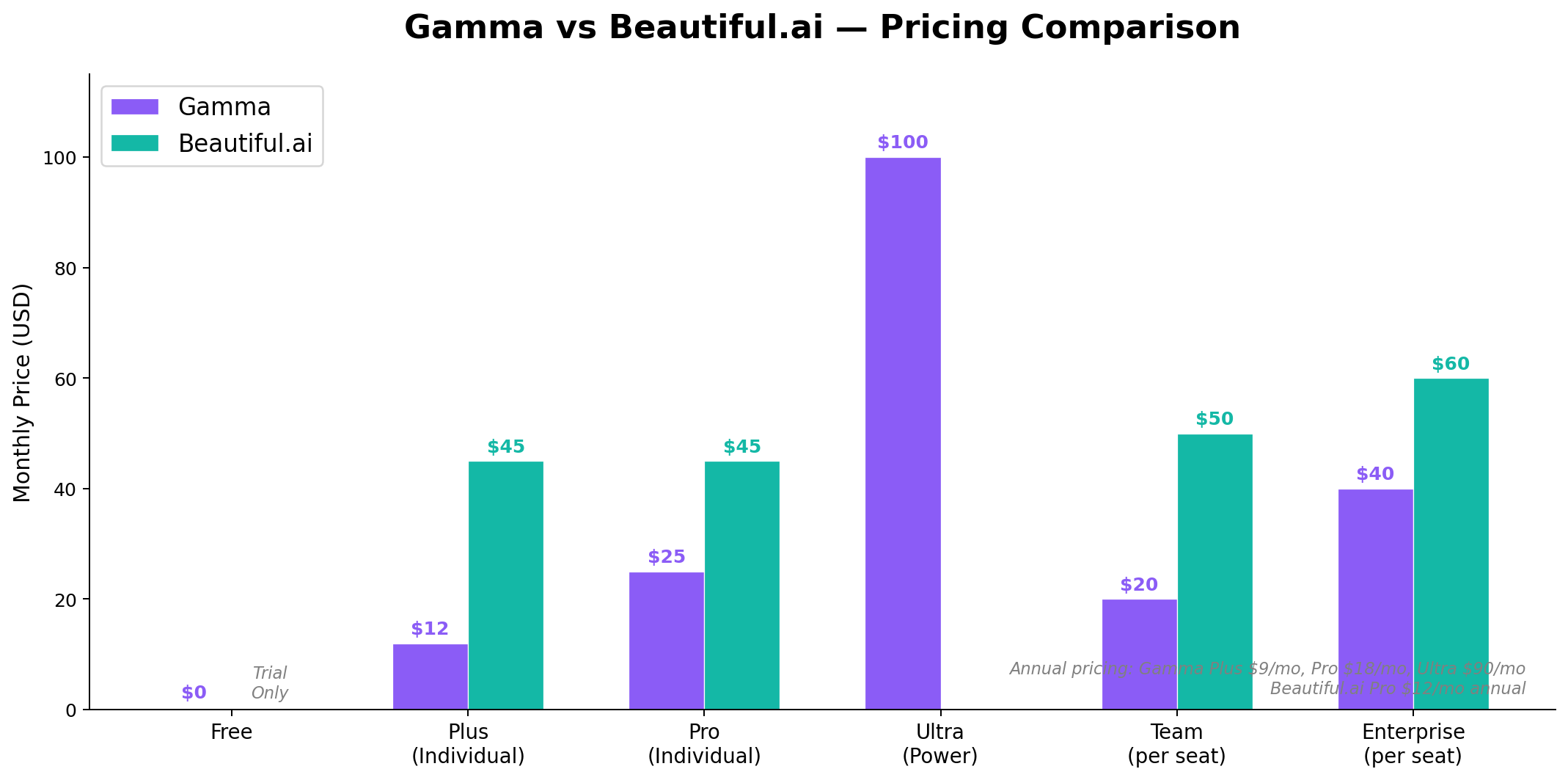
| Plus | $12/mo | $9/mo | 1,000/month | Up to 75 |
| Pro | $25/mo | $18/mo | 4,000/month | Up to 60 |
| Ultra | $100/mo | $90/mo | 20,000/month | Up to 75 |
| Team | — | $20/seat/mo | 6,000/seat/month | Up to 75 |
| Business | — | $40/seat/mo | 10,000/seat/month | Up to 75 |
All paid tiers use a credit system. Unused credits roll over up to 2x the monthly amount. Annual billing saves 20-28%. The free tier exports to PDF, PPTX, PNG, and Google Slides — no paid upgrade required for basic export.
Strengths
- Unmatched speed: Full deck from a one-sentence prompt in under 60 seconds
- Multi-format versatility: Only tool producing presentations, documents, web pages, and social content
- Generous free tier: 400 credits with full export capability
- Best-in-class AI Agent: Conversational editing with web research and citations
- Lean operations: $100M ARR with 52 employees means focused product development
- Strong funding: $87M total, backed by a16z and Accel
- Web publishing: One-click publish with custom domains and analytics
- API + integrations: REST API, Zapier, Make.com for automation
Weaknesses
- PPTX export quality: Card-based architecture doesn't map cleanly to 16:9 slides — layout shifts, broken formatting, flattened layers are common
- Credit system complexity: Not truly unlimited; heavy Plus/Pro users can exhaust monthly credits
- Repetitive designs: Decks can feel generic with similar block structures across different prompts
- Limited pixel-level control: Can't freely reposition elements like traditional design tools
- Gamma Agent overcorrection: Editing one slide can unexpectedly alter others; undo doesn't always catch everything
Beautiful.ai — Deep Dive
Overview
Beautiful.ai is the oldest dedicated AI presentation tool, founded in 2016 by Mitch Grasso (who previously founded SlideRocket, acquired by VMware). With $61 million in total funding — including a significant $45 million growth investment from General Catalyst in March 2026 — the company serves over 100,000 business customers across 193 countries who've created more than 100 million slides.
Beautiful.ai takes a fundamentally different approach from Gamma. Where Gamma prioritizes speed and versatility, Beautiful.ai focuses on design intelligence and brand governance. Its core technology — Smart Slides — automatically adjusts fonts, spacing, element placement, and visual hierarchy as you add content, ensuring that every slide looks professionally designed without manual tweaking.
The company's enterprise client list includes Rakuten, Cvent, Jostens, Meltwater, Playa Hotels & Resorts, and Visit Indy — a testament to its strength in consistent, brand-governed business communications.
Key Features
Smart Slides: The crown jewel. Over 300 Smart Slide layouts that auto-adjust when content is added or removed. Fonts scale, elements rebalance, spacing stays consistent. It's like having a designer automatically fixing your layout decisions in real time. This is the single most differentiating feature in the AI presentation space.
DesignerBot: AI-powered deck generation from text prompts. Creates full presentations or modifies individual slides on demand. Unlike Gamma's credit system, Beautiful.ai offers unlimited AI generation on all paid plans — no worrying about running out of credits mid-project.
Context-Aware AI Workflow (March 2026): The biggest product update of the year. A conversational interface that takes users from first prompt to finished presentation, accepting text prompts, outlines, or attached documents. Generates a structured outline and draft deck, then allows iterative refinement through a chat-style interface without losing context.
Claude Connector (July 2026): Direct integration with Anthropic's Claude, allowing users to turn Claude conversations into presentation-ready decks — a unique workflow for teams already using Claude for content development.
Team Features: Real-time collaborative editing, centralized slide/template library (unlimited on Team+), version control, locked slides, shared asset library, viewer analytics with engagement alerts, and custom branded themes.
Enterprise Security: SOC 2 Type II, GDPR, CCPA, and PCI compliance. Beautiful.ai has the most comprehensive security certifications in the AI presentation category.
Data Visualization: Dynamic charts and tables that auto-match slide design. Live data linking on Team+ plans, connecting directly to data sources for always-up-to-date visuals.
Integrations: Slack, Salesforce, PowerPoint import/export, Google Slides, API (March 2026), PowerPoint Add-on, and a ChatGPT App (March 2026) that brings Beautiful.ai directly into ChatGPT's interface.
Pricing
| Plan | Monthly | Annual | AI Generation | Key Features |
|---|---|---|---|---|
| Pro | $45/mo | $12/mo | Unlimited | 300+ Smart Slides, DesignerBot, PPTX export |
| Team | $50/user/mo | $40/user/mo | Unlimited | Collaboration, shared libraries, analytics, live data |
| Enterprise | Custom | Custom | Unlimited | SSO, brand guardrails, admin controls, PCI |
No free tier. Only a 14-day free trial (requires credit card, auto-bills if not cancelled). Students can get a free year with a valid .edu email. The monthly plan is significantly more expensive ($45/mo vs $12/mo annual), making annual billing the practical choice. Team pricing at $40/user/month annual is the most expensive in the AI presentation category.
Strengths
- Smart Slides auto-formatting: The best automatic layout engine in any presentation tool — fonts, spacing, and hierarchy adjust in real time
- Unlimited AI generation: No credit caps on any paid plan — no surprises or restrictions
- Enterprise brand governance: Enforced brand standards, consistent templates across teams
- Comprehensive security: SOC 2 Type II, GDPR, CCPA, PCI — the most certified tool in the category
- Better PPTX export: Traditional slide architecture produces cleaner PowerPoint exports than Gamma's card-based format
- Team collaboration maturity: Shared libraries, version control, locked slides, engagement analytics
- Claude + ChatGPT integrations: Direct connectors for teams using these AI platforms
- 10-year product maturity: The most battle-tested AI presentation tool on the market
Weaknesses
- No free tier: 14-day trial only with credit card required — higher barrier to entry than Gamma
- Expensive monthly pricing: $45/month on monthly billing is steep for individuals
- Team pricing scales fast: 10-person team costs $4,800/year
- Slide-centric only: No document, webpage, or social media output options (unlike Gamma)
- Limited creative freedom: Template-driven approach constrains custom layouts
- PPTX export still imperfect: Fonts and layouts can shift between Beautiful.ai and PowerPoint
- Customer support complaints: Billing friction, slow response times, cancellation issues
- Brand guardrails Enterprise-only: Small teams can't access brand consistency features without Enterprise plan
Head-to-Head Comparison
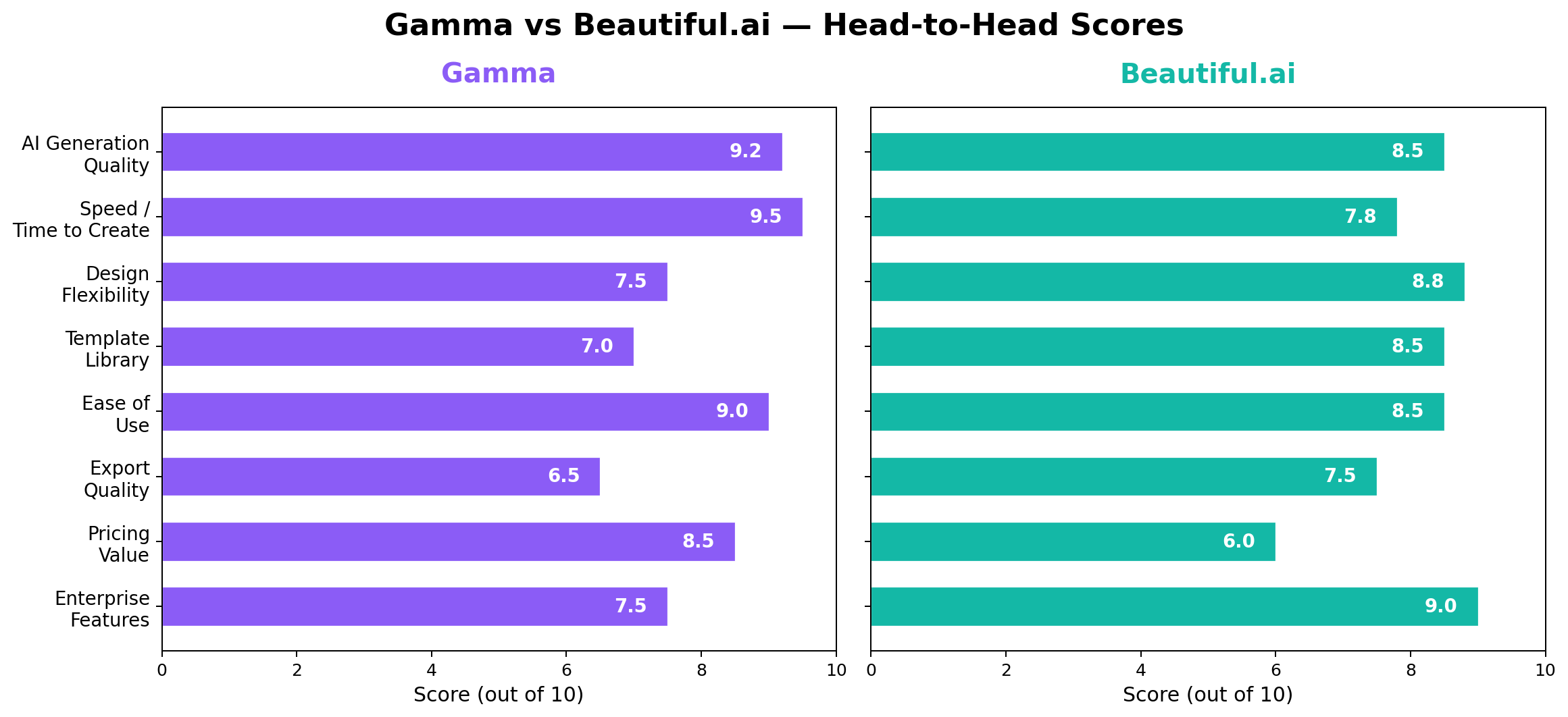
1. AI Generation Quality — Winner: Gamma
Both tools produce impressive AI-generated presentations, but they excel in different ways. Gamma generates more nuanced, narrative-driven content thanks to its Gamma Agent, which can research the web, cite sources, and refine content through conversation. The AI writing quality is noticeably better — Gamma's decks read more like a well-crafted story than a bullet-point summary. Beautiful.ai generates solid content but leans toward templated structures with less narrative variation. Its strength is in the visual presentation rather than content depth.
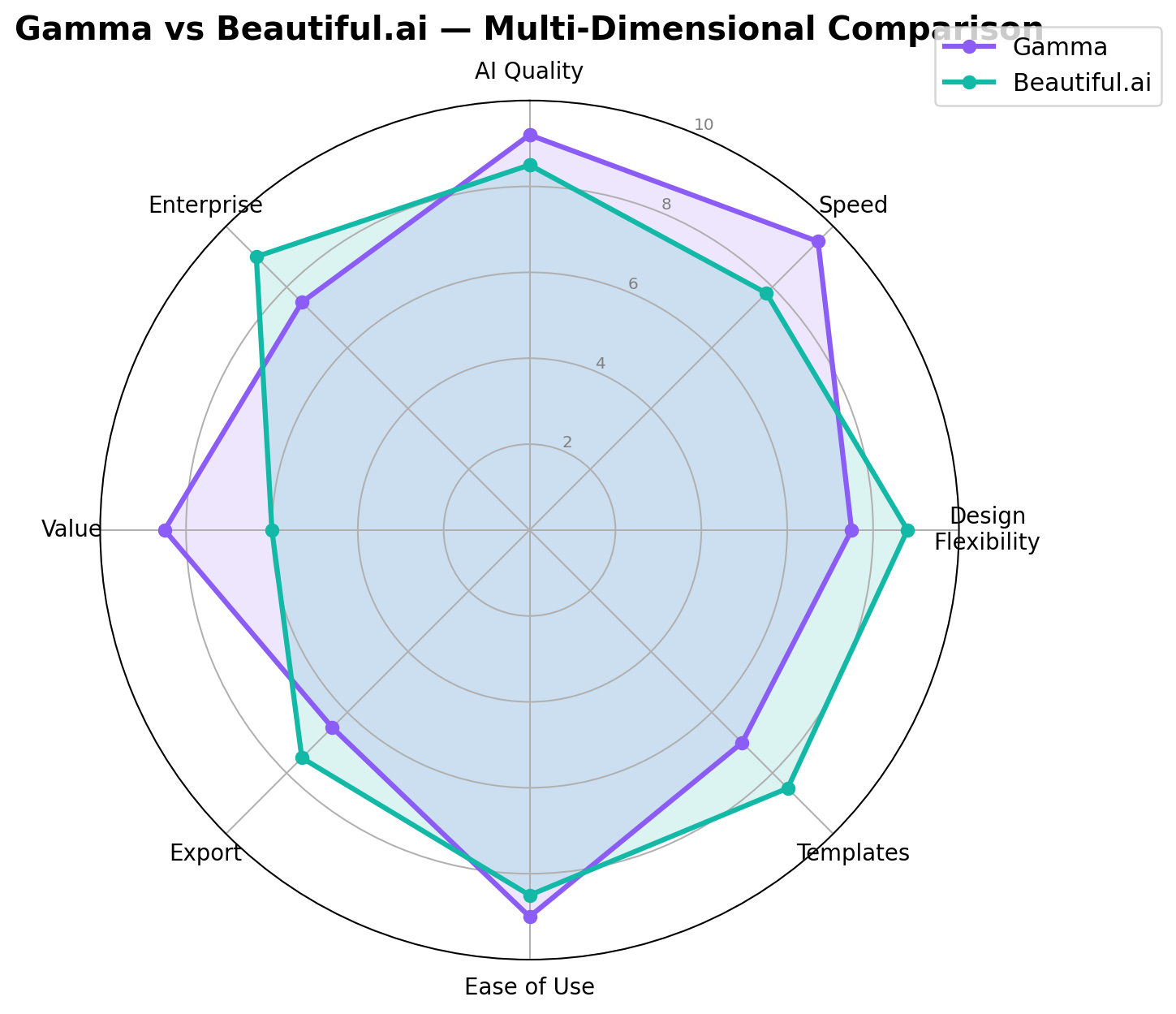
Scores: Gamma 9.2 — Beautiful.ai 8.5
2. Speed and Time to Create — Winner: Gamma
This isn't close. Gamma generates a complete, polished presentation from a single sentence in under 60 seconds — and it often looks ready to present immediately. The Gamma Agent's conversational editing means you can iterate on the entire deck through natural language without manually editing individual slides. Beautiful.ai is fast by traditional standards, but its workflow typically involves more manual adjustment (choosing Smart Slide templates, fine-tuning layouts) to reach the same polish level. For a quick first draft under a tight deadline, Gamma has no equal.
Scores: Gamma 9.5 — Beautiful.ai 7.8
3. Design Flexibility and Polish — Winner: Beautiful.ai
Beautiful.ai's Smart Slides are the gold standard for automated design. When you add or remove content, the entire slide rebalances — fonts scale, images reposition, spacing adjusts. It's a level of design intelligence that Gamma's card-based system can't match. Gamma's approach is faster but more rigid — you're working within card templates rather than fluid slide layouts. For pixel-perfect business presentations where every visual element matters, Beautiful.ai consistently delivers a more polished result.
Scores: Beautiful.ai 8.8 — Gamma 7.5
4. Template Library — Winner: Beautiful.ai
Beautiful.ai offers over 300+ Smart Slide templates covering virtually every presentation use case: pitch decks, quarterly reports, product launches, team updates, data dashboards, and more. Each template is designed by professionals and auto-adjusts based on content. Gamma has fewer traditional templates but compensates with its AI generation capabilities — most Gamma users don't browse templates because the AI creates custom layouts from prompts. If you prefer a curated template library, Beautiful.ai wins. If you prefer AI-generated layouts, Gamma's approach is more flexible.
Scores: Beautiful.ai 8.5 — Gamma 7.0
5. Ease of Use — Winner: Gamma
Gamma's learning curve is essentially zero. Type a sentence, get a presentation. The card-based editing is intuitive (similar to Notion or modern web builders), and the Gamma Agent lets you refine everything through conversation. Beautiful.ai requires slightly more engagement — choosing templates, understanding Smart Slide behaviors, and learning the auto-formatting system. Both are far easier than PowerPoint or Keynote, but Gamma's "prompt-and-done" workflow is unmatched for simplicity.
Scores: Gamma 9.0 — Beautiful.ai 8.5
6. Export Quality — Winner: Beautiful.ai
This is a critical dimension where the architectural differences between the tools really show. Beautiful.ai uses traditional slide architecture, so PPTX exports maintain reasonable fidelity — fonts, layouts, and elements transfer with fewer issues. Gamma uses a vertical card-based format that doesn't map cleanly to 16:9 PowerPoint slides. Users consistently report layout shifts, broken formatting, and flattened layers in Gamma's PPTX exports. If your workflow requires clean PowerPoint files (for sharing with clients using PowerPoint, presenting at conferences with venue equipment, etc.), Beautiful.ai is the more reliable choice. Both export to PDF without issues.
Scores: Beautiful.ai 7.5 — Gamma 6.5
7. Pricing and Value — Winner: Gamma
Gamma offers significantly better value for most users. The free tier (400 credits with full export) lets you test the product thoroughly. The Plus plan at $9/month annual is affordable for individuals. The Pro plan at $18/month annual offers strong features for the price. Beautiful.ai has no free tier and starts at $12/month annual — which is competitive — but the $45/month monthly billing is expensive. Where the value gap really widens is team pricing: Gamma Team at $20/seat/month vs Beautiful.ai Team at $40/seat/month annual ($50 monthly). For a 10-person team, that's $2,400/year (Gamma) vs $4,800/year (Beautiful.ai).
Scores: Gamma 8.5 — Beautiful.ai 6.0
8. Enterprise and Team Features — Winner: Beautiful.ai
Beautiful.ai has the most mature enterprise feature set in the AI presentation category. Shared template libraries, version control with locked slides, engagement analytics (track how prospects interact with your deck), live data linking, and the most comprehensive security certifications (SOC 2 Type II + PCI). Brand guardrails (enforced brand standards) are available on Enterprise plans. Gamma has caught up with SOC 2 Type II certification and offers team/business tiers with shared libraries, but its enterprise feature set is less mature. The unlimited AI generation on all Beautiful.ai paid plans is also a significant enterprise advantage — no credit management overhead.
Scores: Beautiful.ai 9.0 — Gamma 7.5
Real-World Test Scenarios
Scenario 1: Startup Investor Pitch Deck
Prompt: "Create a 12-slide investor pitch deck for a Series A AI startup focused on enterprise document automation. Include: problem statement, market size ($4.2B TAM), product demo overview, business model (SaaS), traction (200 enterprise customers, $2M ARR), competitive landscape, team background, and the ask ($8M Series A)."
Gamma Result: Generated a complete 12-slide deck in 45 seconds with a strong narrative arc. The content was well-structured with compelling framing and data callouts. Gamma Agent even suggested adding a "why now" slide based on web research about AI document trends. Design was clean but some slides felt template-similar. The web-publish feature would be useful for sharing a live version with investors.
Beautiful.ai Result: Took about 3 minutes to generate, with more manual template selection required. However, each slide had superior visual polish — the market size slide used an automatically formatted chart, the team slide had professional bio cards, and the financial model slide was cleaner. The Smart Slides auto-formatting made every slide feel brand-consistent.
Winner: Beautiful.ai for the final deliverable. Investors expect pixel-perfect pitch decks, and Beautiful.ai's design quality is worth the extra time. Use Gamma for initial drafts, then refine in Beautiful.ai.
Scenario 2: Weekly Team Standup Report
Prompt: "Generate a 6-slide weekly team standup report showing: last week's accomplishments (3 items), this week's priorities (4 items), blocked items (1 item with owner), key metrics (velocity chart, bug count, sprint progress), and action items with deadlines."
Gamma Result: Created the deck in under 30 seconds. Simple, clean, functional. Perfectly adequate for an internal standup. Exported to PDF easily for archiving.
Beautiful.ai Result: Also generated quickly (about 90 seconds) with better chart formatting. The metrics slide with auto-generated visualizations was noticeably more polished. But for a weekly internal report that gets archived and forgotten, the extra design polish is overkill.
Winner: Gamma. For recurring, low-stakes internal presentations where speed matters more than polish, Gamma is the practical choice. The free tier means you don't even need a subscription for this use case.
Scenario 3: Client Proposal with Brand Guidelines
Prompt: "Create a 15-slide client proposal for a digital marketing agency pitching social media management services to a mid-size e-commerce brand ($5M annual revenue). Include: audit findings, recommended strategy (3 platforms), content calendar preview, expected ROI projections, case study, team introduction, pricing tiers, and next steps."
Gamma Result: Generated quickly (under 60 seconds) with strong content. The proposal read well and covered all required sections. However, the design didn't feel "agency-grade" — the card-based layout made some slides feel more like a blog post than a client proposal. Exporting to PPTX revealed some layout issues that would need manual fixing before sending to a client.
Beautiful.ai Result: The Smart Slides system produced a significantly more polished proposal. The pricing tier slide auto-formatted into a clean comparison table. The case study slide had proper image-text layouts. The ROI projection slide featured auto-generated charts. Most importantly, the PPTX export was clean enough to send directly to the client without manual fixes.
Winner: Beautiful.ai. Client-facing deliverables demand design polish and clean exports. Beautiful.ai's Smart Slides and better PPTX fidelity make it the right tool for proposals, quotes, and client presentations.
Alternatives Worth Considering
| Tool | Starting Price | Standout Feature | Best For |
|---|---|---|---|
| Canva (with Magic Design) | Free / $13/mo Pro | Vastest template library (250K+), full design suite | Marketing teams needing design flexibility beyond presentations |
| Microsoft Copilot + PowerPoint | $30/mo (Microsoft 365) | Native PowerPoint integration, enterprise deployment | Organizations already in Microsoft ecosystem |
| Google Slides + Gemini | $20/mo (Workspace) | Native Google integration, real-time collaboration | Teams in Google ecosystem needing simple AI assistance |
| Pitch | $10/mo (Pro) | Story-first approach, strong collaboration | Remote teams that prioritize storytelling |
| Plus AI | $10/mo | Native Google Slides & PowerPoint integration | Users who want AI help within existing tools |
For a broader comparison of AI productivity tools, see our Notion vs Obsidian vs Logseq guide and our AI coding tools comparison.
The Verdict
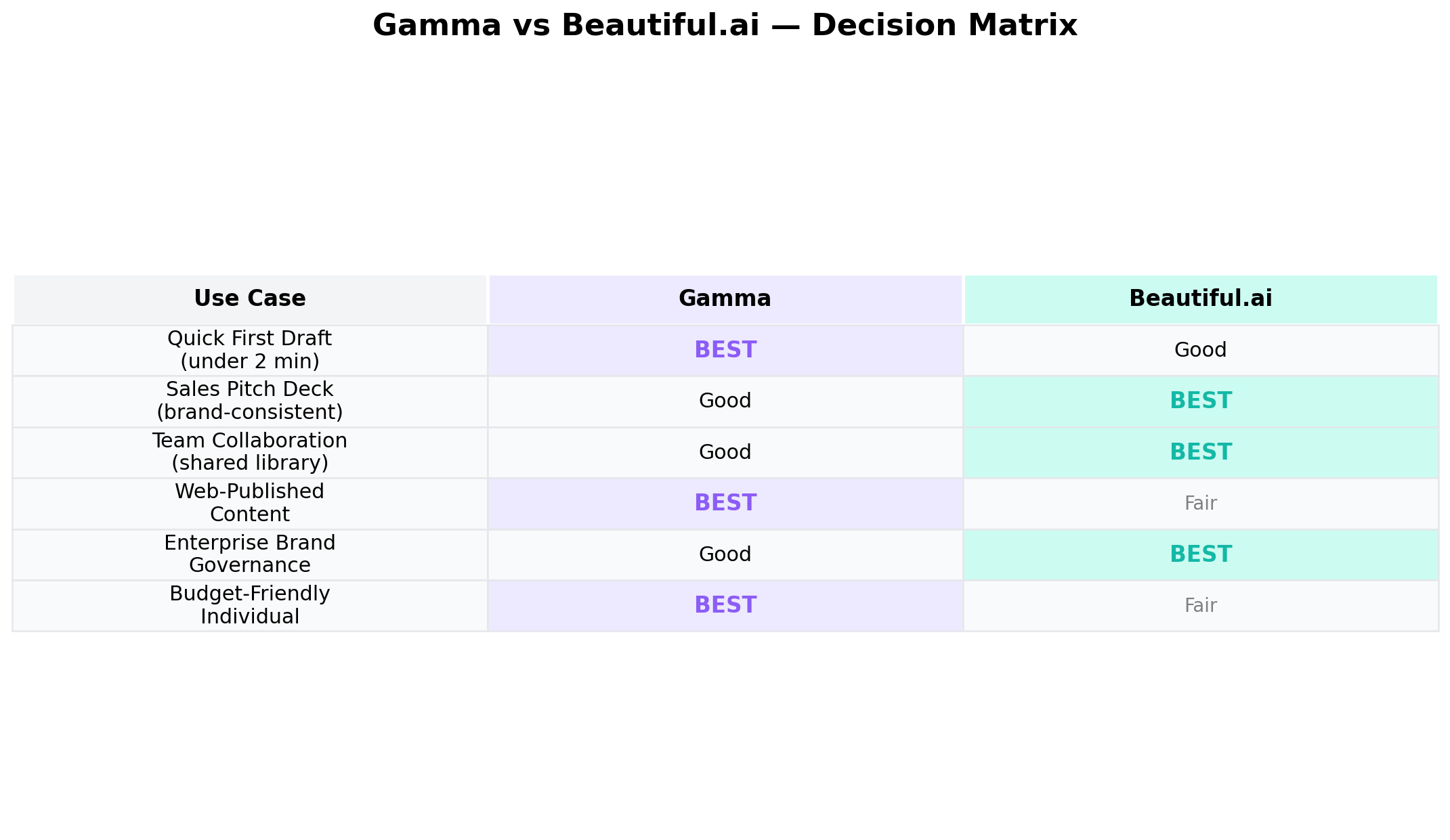
Best for Speed & Versatility → Gamma
If you need presentations created fast — from a single prompt, in under a minute — Gamma is unmatched. Its multi-format output (presentations, documents, web pages, social posts) gives it versatility that no competitor matches. The free tier is generous enough for casual use, and the Plus plan at $9/month is excellent value. Best for: freelancers, startups, content creators, educators, and anyone who prioritizes speed over pixel-perfect design.
Best for Design Polish & Enterprise → Beautiful.ai
If you need polished, brand-governed presentations that look professional in every detail, Beautiful.ai delivers. Smart Slides auto-formatting, unlimited AI generation, superior PPTX exports, and the most comprehensive enterprise security in the category make it the safe choice for teams and enterprises. Best for: sales teams, marketing departments, agencies, and enterprises that need consistent branded decks at scale.
Best Overall Value → Gamma
For most individual users and small teams, Gamma offers the best balance of features, speed, and price. The free tier alone is sufficient for many use cases, and the Pro plan at $18/month covers most professional needs. The speed advantage alone saves hours per week compared to Beautiful.ai's slightly more manual workflow.
The Hybrid Approach
Many teams we've spoken to use both: Gamma for first drafts and rapid prototyping, then export to Beautiful.ai for final polish and brand governance. This captures Gamma's speed advantage while leveraging Beautiful.ai's design quality — though it does require managing two subscriptions. For budget-conscious teams, picking one and sticking with it is the more practical approach.
Frequently Asked Questions
Is Gamma better than Beautiful.ai?
It depends on your use case. Gamma is better for speed, multi-format output (presentations, documents, web pages), and budget-friendly pricing with a free tier. Beautiful.ai is better for pixel-perfect slide design, enterprise brand governance, and teams that need unlimited AI credits without a credit system. For individuals and small teams, Gamma generally offers better value. For enterprise sales and marketing teams, Beautiful.ai is the stronger choice.
Does Gamma export to PowerPoint?
Yes, Gamma exports to PPTX on all plans including the free tier. However, because Gamma uses a card-based vertical layout rather than traditional 16:9 slides, the PPTX export can have layout shifts, broken formatting, and flattened layers. If your final deliverable must be a clean PowerPoint file, Beautiful.ai produces more consistent PPTX exports thanks to its traditional slide architecture.
Is Beautiful.ai free?
No, Beautiful.ai does not have a free tier. It offers a 14-day free trial (requires credit card, auto-bills if not cancelled) after which you need a paid plan starting at $12/month (billed annually) or $45/month (billed monthly). Students can get a free year with a valid .edu email address. For a free AI presentation alternative, Gamma's free tier is the best option.
What happened to Tome AI?
Tome AI was permanently shut down on April 30, 2025. Despite raising $81.6M and reaching 30M users, the company couldn't monetize effectively (ARR stayed under $4M) and never shipped PowerPoint export, leaving users locked into a proprietary format. The brand was acquired by AngelList for legal document AI, while the original team pivoted to Lightfield, an AI-native CRM. Gamma is widely considered Tome's closest successor — both use card-based layouts and AI-first workflows.
Can I use Gamma for team presentations?
Yes, Gamma offers Team ($20/seat/month) and Business ($40/seat/month) plans with shared libraries, collaboration, and admin controls. However, Beautiful.ai's team features are more mature with centralized slide libraries, version control, locked slides, and engagement analytics that track how viewers interact with shared decks. For teams where presentation consistency and analytics matter, Beautiful.ai's team plan is the more complete solution.
Which AI presentation tool is best for sales decks?
Beautiful.ai is the better choice for sales decks. Its Smart Slides auto-formatting ensures consistent branding across every slide, and the team plan includes shared template libraries and engagement analytics so you can track how prospects interact with your deck. Gamma is faster for creating initial drafts but Beautiful.ai produces more polished, brand-governed final decks that make a stronger impression on clients and investors.