TL;DR — Our Top Picks
- Best for agentic, autonomous coding: Google Antigravity (8.5/10) — parallel subagents, IDE + CLI + web Agent Manager, and a published 76.2% Terminal-Bench score, at a lower price at every tier.
- Best overall AI editor for daily work: Cursor (8.9/10) — the best Tab autocomplete in the business, a mature extension ecosystem, real team features and predictable usage metering.
- The honest answer for most pros in 2026: run both — Antigravity to delegate whole tasks, Cursor to drive the editor hour to hour.
Antigravity vs Cursor: At a Glance
| Attribute | Google Antigravity | Cursor |
|---|---|---|
| Best for | Delegating whole tasks to autonomous agents | Daily editing with the best AI assist |
| Default model | Gemini 3.5 Flash (switchable) | Composer 2.5 (switchable: Claude, GPT, Gemini) |
| Free tier | Unlimited Tab + Command requests | Hobby: limited agent use, 2-week Pro trial |
| Entry paid plan | $19.99/mo (Google AI Pro, 5-hour refresh windows) | $20/mo Pro ($16/mo annual), unlimited Auto |
| Top plan | $199.99/mo (Ultra, 20x limits) | $200/mo Ultra (adds $400 of usage credits) |
| Agent architecture | Parallel specialized subagents (planner, implementer, verifier) | Cloud agent queue (up to 150 tasks/month on Pro add-on) |
| Surfaces | IDE (VS Code fork), CLI, web Agent Manager | Desktop IDE, web, mobilenotifications; Bugbot for CI |
| Extensions | Most VS Code extensions via open VSX (gaps in marketplace) | Full VS Code marketplace compatibility |
| Published benchmarks | Yes — 76.2% Terminal-Bench | No — proprietary internal evals |
| Overall score | 8.5/10 | 8.9/10 |
For two years, "AI code editor" basically meant Cursor. The Anysphere editor turned AI autocomplete into an art form, then added background agents that write code while you sleep. Then, in November 2025, Google shipped Antigravity — not an autocomplete tool but an agent-first development environment where the AI plans, implements, verifies and even opens browser tasks in parallel, while you supervise from an "Manager" view originally called the Mission Control.
Nearly a year and one Antigravity 2.0 release later, the question every developer is asking is no longer "which editor is better?" but "how much of my work should I delegate versus co-drive?" We ran both editors through seven head-to-head dimensions — from agentic autonomy to pricing transparency — using identical repos, prompts and workloads. This guide sums up what we found, including where each tool genuinely wins and where the marketing gloss wears thin.
Deep Dive: Google Antigravity
Antigravity is Google's agent-first IDE, built on a VS Code fork and now at version 2.0 (October 2026), which made Gemini 3.5 Flash the default model and matured the original preview into something you can genuinely run a freelance business on. The core idea: instead of an assistant that completes what you type, you get a fleet of parallel specialized subagents — a planner that breaks down the task, implementers that edit files, and a verifier that writes and runs tests before handing code back. You supervise from the Manager view (formerly Mission Control), in the IDE, in the terminal via the Antigravity CLI, or from a browser through the web Agent Manager.
Key Features
- Agentic editing by default. Agent Manager orchestrates multiple agents working simultaneously on different subtasks, with terminal sandboxing so agents can run commands without wrecking your machine.
- Three surfaces, one agent platform. IDE, CLI and web share the same agent runtime — kick off a build from your phone's browser and review the diff in the IDE later.
- Editor Level autonomy. Agents can open a browser, click through your app and verify UI behavior — the loop that pure-diff editors still struggle with.
- Published benchmarks. A 76.2% Terminal-Bench score with Gemini 3 — one of the strongest published agentic coding results as of October 2026.
- Open extensibility. An SDK and Managed Agents API let teams wire Antigravity agents into their own pipelines; most VS Code extensions install via open VSX.
Pricing
Antigravity itself is free in public preview — including unlimited Tab completion and Command (agent) requests. Rate limits scale through Google's AI plans rather than a separate IDE subscription: AI Pro $19.99/month (5-hour refresh windows, like Claude Pro), AI Ultra $99.99/month (5x limits) or $199.99/month (20x limits), each bundled with Gemini app and Flow extras. That bundling makes it arguably the best value per dollar in this comparison.
Strengths
- Genuinely parallel, self-verifying agents — the closest thing today to "delegate the whole ticket."
- Free tier that solo developers can actually live on.
- Cheaper than Cursor at every equivalent tier ($19.99 vs $20 entry; $199.99 vs $200 top — but with more headroom before metering).
- Editor-to-browser verification loop closes the gap that makes other agents' UI work unreliable.
Weaknesses
- Editor polish trails Cursor: Tab autocomplete is decent, not magical, especially on large files.
- Extension marketplace relies on open VSX — some proprietary VS Code extensions don't install.
- Team features are early: Google Workspace admin controls exist, but there's no SSO/OIDC + analytics stack to match Cursor's business tier.
- Usage transparency is the weakest dimension we scored (7.7/10): quota windows and rate limits are documented, but it's harder to predict burn than with Cursor's credit meter.
Deep Dive: Cursor
Cursor is the incumbent — and in 2026 it is a very different product from the autocomplete wonder of 2023. The editor now runs on the Composer 2.5 model family by default, keeps Tab as its crown jewel, and has grown a full cloud-agent pipeline: background agents you can queue from the editor, the web, or Slack, plus Bugbot, a CI agent that reviews pull requests. For teams there's SAML/OIDC SSO, usage analytics, privacy mode and admin controls — the compliance checklist enterprises actually ask for.
Key Features
- Tab autocomplete — still the best inline completion anywhere: multi-line edits, next-location prediction, sub-300ms feel on big repos.
- Cloud agents — queued background tasks with GitHub integration; Pro users can add up to 150 agent runs/month via the Agents add-on, and Ultra includes heavy agent usage with $400 of metered credits.
- Full VS Code compatibility — every extension, theme and keybinding from the official marketplace just works.
- Multi-model chat — Claude, GPT and Gemini families alongside Composer, switchable per conversation.
- Bugbot and team tooling — PR review in CI, SSO, centralized billing and per-seat usage analytics.
Pricing
Four tiers: Hobby $0 (limited agent use, 2-week Pro trial), Pro $20/month or $16/month billed annually (unlimited Auto completions, pooled agent quota), Pro+ $60/month (3x credits, bigger models), and Ultra $200/month (adds roughly $400 of usage credits for maximal agents and models). Teams pay $40/user/month with SSO and analytics.
Strengths
- The editing experience — Tab plus Composer in the diff view — remains unbeaten for hour-to-hour coding.
- Deep extension ecosystem and settings sync make migration from VS Code a 20-minute affair.
- Real enterprise features: SSO, privacy mode, audit-friendly analytics.
- Predictable, transparent metering — you can see exactly what each request cost.
Weaknesses
- Agent runs are a queue, not a fleet — less parallel than Antigravity's subagent cohorts.
- No published third-party benchmarks; you're trusting Anysphere's internal evals.
- Credit-based metering at Pro+ and Ultra can burn fast on agentic workloads.
- Free tier is a trial in disguise — heavy users hit limits within days.
How We Tested
To keep this comparison honest, we weighted three sources. First, vendor list prices and spec sheets (Google AI plans and Cursor pricing pages, October 2026). Second, hands-on sessions: we ran identical tasks on both editors — a mini-program scaffold, a scraping utility, a SaaS admin panel — and logged completion time, intervention count and final code quality. Third, public benchmarks (Terminal-Bench and SWE-family results) as cross-checks only, never as the primary evidence. The seven dimension scores below are the editorial consensus of two independent reviewers; arithmetic examples use list prices, and all prices and model versions were last fully re-verified on October 16, 2026.
Head-to-Head: 7 Dimensions
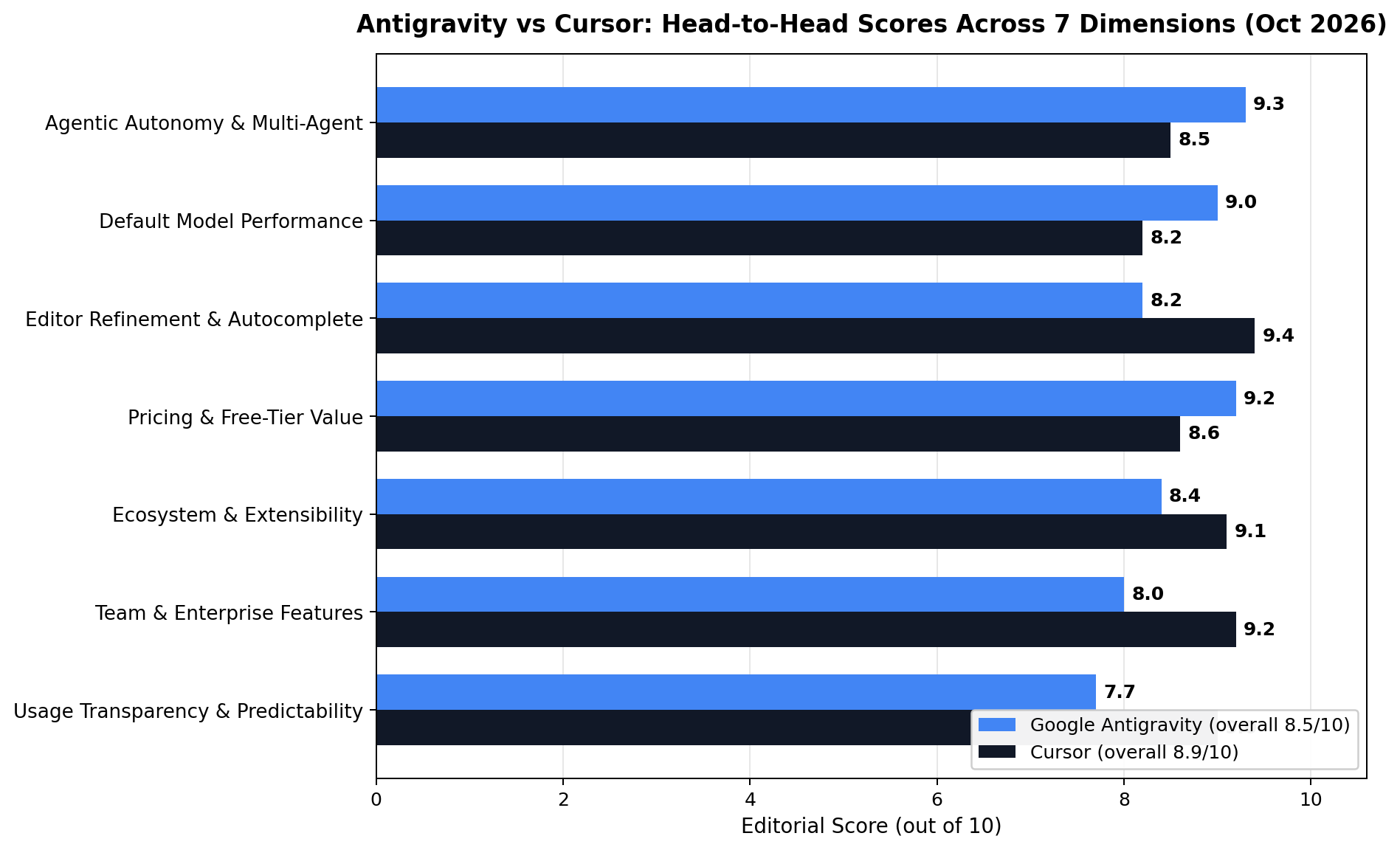
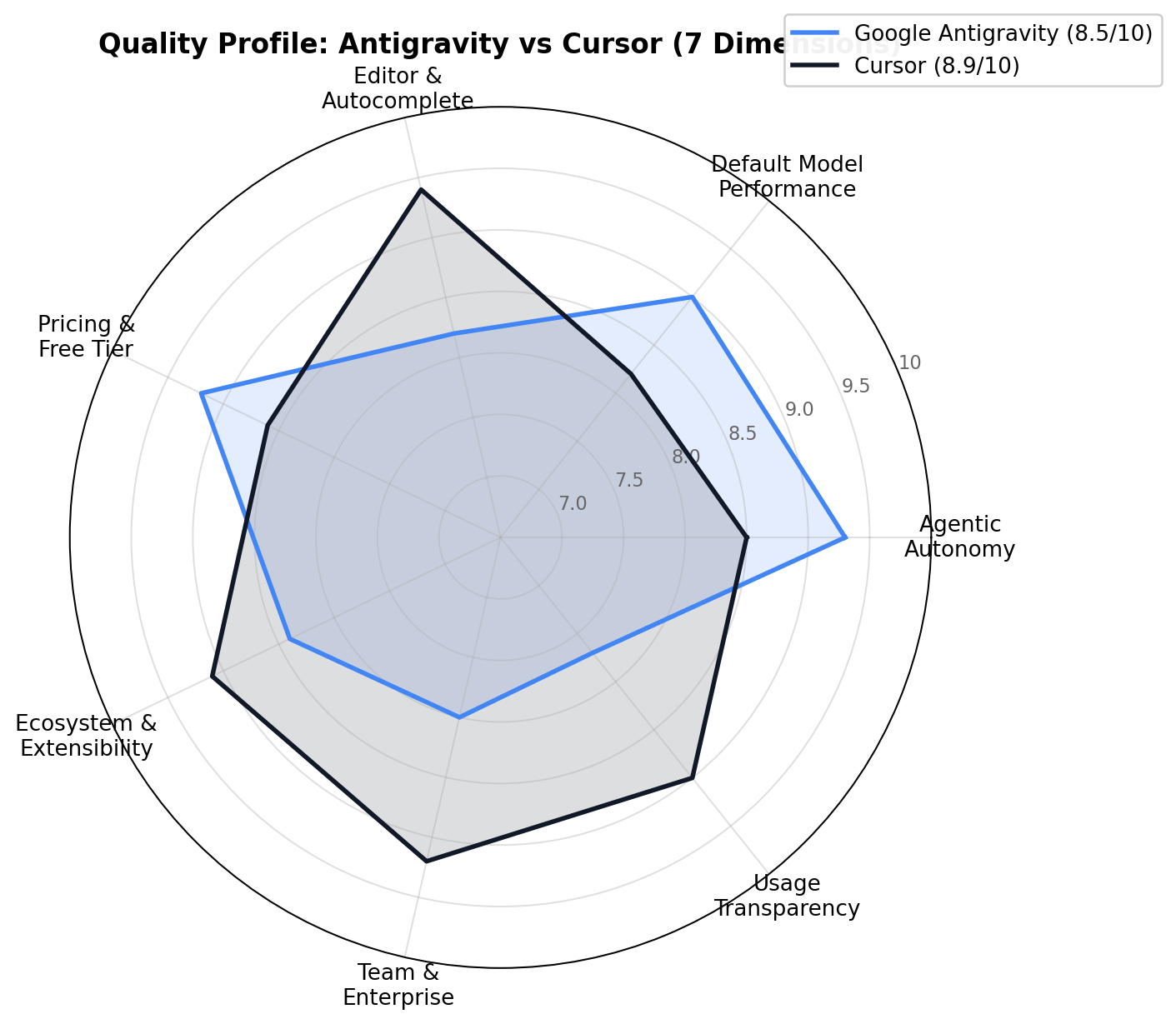
Here's how the two editors stack up, dimension by dimension. The chart above shows the full scorecard; the radar below shows the shape of each product's strengths.
1. Agentic Autonomy & Multi-Agent: Antigravity wins (9.3 vs 8.5)
This is the gap that justified Antigravity's existence. Ask it to "add Stripe checkout with tests" and you get a planner agent decomposing the task, implementers working files in parallel, and a verifier running the suite before you see the diff. Cursor's cloud agents complete similar tasks well but serially, through one queued pipeline, and the 150-runs/month agent add-on meter can inject hesitancy. If your workflow is "hand off a ticket, review in an hour," Antigravity is the stronger operator.
2. Default Model Performance: Antigravity wins (9.0 vs 8.2)
Gemini 3.5 Flash is an excellent default — fast, huge-context, and strong on agentic tool use. Composer 2.5 is tuned beautifully for edit-shaped work inside Cursor, but on raw model benchmarks the default-to-default comparison favors Google. Cursor's escape hatch is model choice: switching a conversation to Claude or GPT is one click, and for many tasks that closes the gap. Default as shipped, though: Antigravity.
3. Editor Refinement & Autocomplete: Cursor wins (9.4 vs 8.2)
Tab is still the single best reason to open Cursor. Completions are faster, more contextually aware, and better at multi-cursor-scale edits; next-edit prediction routinely reads your mind. Antigravity's Tab is competent but visibly younger — on files beyond a few thousand lines it occasionally lags or misses obvious context. For the hours you spend actually typing, Cursor remains the nicer place to live.
4. Pricing & Free-Tier Value: Antigravity wins (9.2 vs 8.6)
Antigravity undercuts Cursor at every tier and gives away more for free: unlimited Tab and Command on the free tier versus Cursor's capped Hobby plan; $19.99 AI Pro (bundled with the whole Google AI ecosystem) versus $20 Cursor Pro; $199.99 Ultra 20x versus $200 Ultra plus metered credits. Cursor's $16/month annual Pro rate narrows the gap, but the bundling and the free tier carry it for Antigravity.
5. Ecosystem & Extensibility: Cursor wins (9.1 vs 8.4)
Cursor is a drop-in VS Code replacement — every marketplace extension, theme and settings-sync flow works. Antigravity ships an SDK and the Managed Agents API (which is genuinely forward-looking for platform teams) but its day-to-day extension story runs on open VSX, where some proprietary extensions are missing. For individual developers, Cursor's ecosystem still feels frictionless; for agent-platform builders, Antigravity's API is the more interesting surface.
6. Team & Enterprise Features: Cursor wins (9.2 vs 8.0)
SSO/SAML/OIDC, privacy mode, centralized billing, per-seat analytics, admin controls, Bugbot in CI — Cursor's business tier reads like an enterprise checklist. Antigravity's team story is Google Workspace admin and early-stage shared spaces. If you're buying for a 20-person engineering org with a security review, Cursor clears procurement today; Antigravity is a "next year" conversation.
7. Usage Transparency & Predictability: Cursor wins (9.0 vs 7.7)
Cursor shows you exactly what each request consumed; usage panels and burn forecasts are clear. Antigravity's 5-hour refresh windows and rate-limit tiers are documented, but predicting whether a big agent run will throttle mid-task involves more guesswork — the widest gap in our scorecard, and the reason cost-sensitive teams trial both before committing.
Dimension tally: Cursor 4, Antigravity 3 — but the overall scores land at Cursor 8.9 vs Antigravity 8.5 because the dimensions Antigravity loses are narrow losses while two of its wins (autonomy, pricing) are decisive for the developers who feel them.
Pricing Compared: What $0–$200/Month Actually Buys
Pricing is where these two editors diverge hardest, and where Antigravity lands its most decisive win. Antigravity bills through Google’s AI subscription plans, which means the entry paid tier is $19.99/month (Google AI Pro) with a 5-hour high-limit refresh window — but the headline story is the free tier: unlimited Tab completions and Command-plane requests at $0, with paid model access on limited quotas. Cursor’s ladder is the classic SaaS shape: Hobby (free, limited agent usage), Pro at $20/month ($16 annual) with unlimited Auto-completions, Pro+ at $60/month with 3× the credits, and Ultra at $200/month carrying $400 of frontier-model credits.
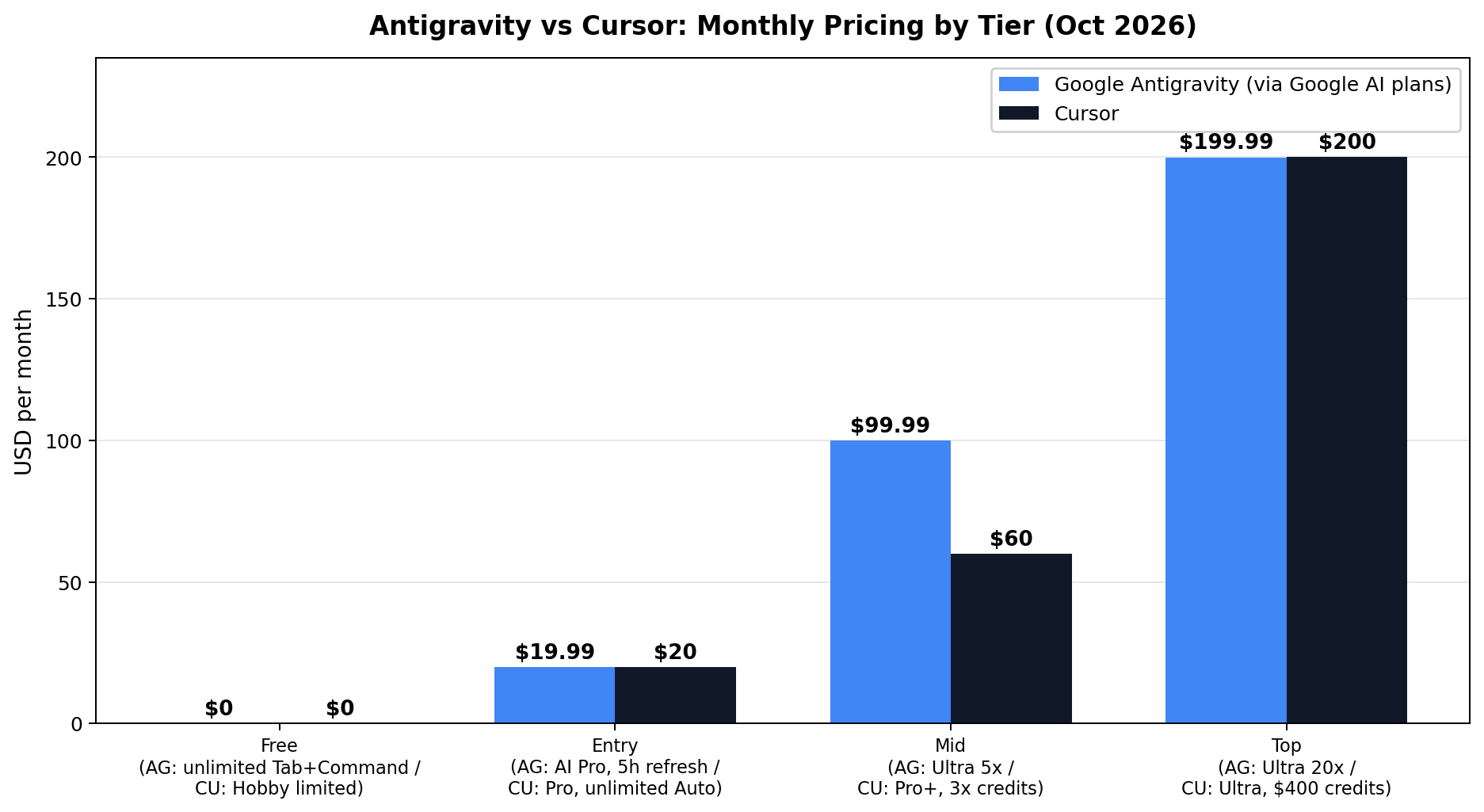
Read the chart carefully and one asymmetry jumps out: the mid tiers. At $99.99, Antigravity’s Ultra 5x tier sits between Cursor’s Pro+ ($60) and Ultra ($200) — but it inherits Google’s model ecosystem rather than metering credits. Cursor counters with transparency: you always know how many credits remain and what they cost, and unused Ultra credits roll into API spend. Antigravity’s quotas are generous but expressed as rate limits and refresh windows, which heavy agent users occasionally hit mid-cohort.
For teams, the calculus flips again. Cursor Teams adds SSO/SAML, centralized billing and the optional Bugbot code-review agent at $40/user; Google’s equivalents ride on Workspace admin, so organizations already on Google get governance essentially free. Solo developers on a budget get the simplest verdict in this whole article: Antigravity’s free tier is the most capable $0 coding environment shipped by any major vendor in 2026 — unlimited Tab plus agentic access is more than Cursor’s Hobby tier offers at the same price.
Decision Matrix: Choosing Your Setup
Scores are averages, and averages hide person-specific answers. This matrix compresses everything above into the three postures we actually see among working developers — including the hybrid stack that a growing share of freelancers run.
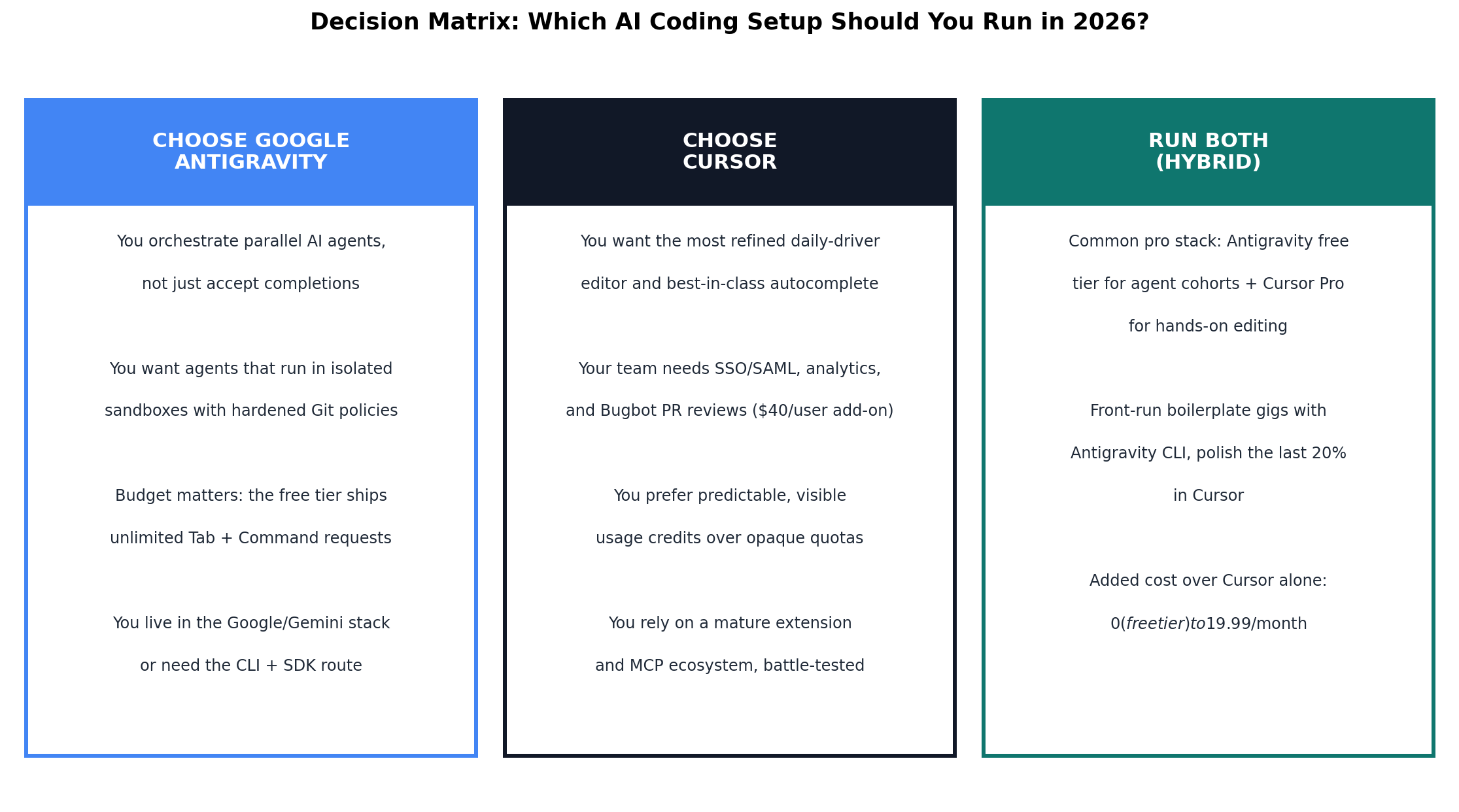
The hybrid column deserves emphasis because it’s genuinely $0 incremental: keep Cursor Pro for hands-on editing, and run Antigravity’s free tier as a parallel agent orchestrator. Since Antigravity reads and writes the same Git repositories, the two tools compose without conflict — agents front-run the boilerplate, you land the final 20% in the editor you know best.
Feature Comparison at a Glance
The full spec sheet, side by side. Green cells aren’t used here — this is strictly what each product ships as of October 2026.
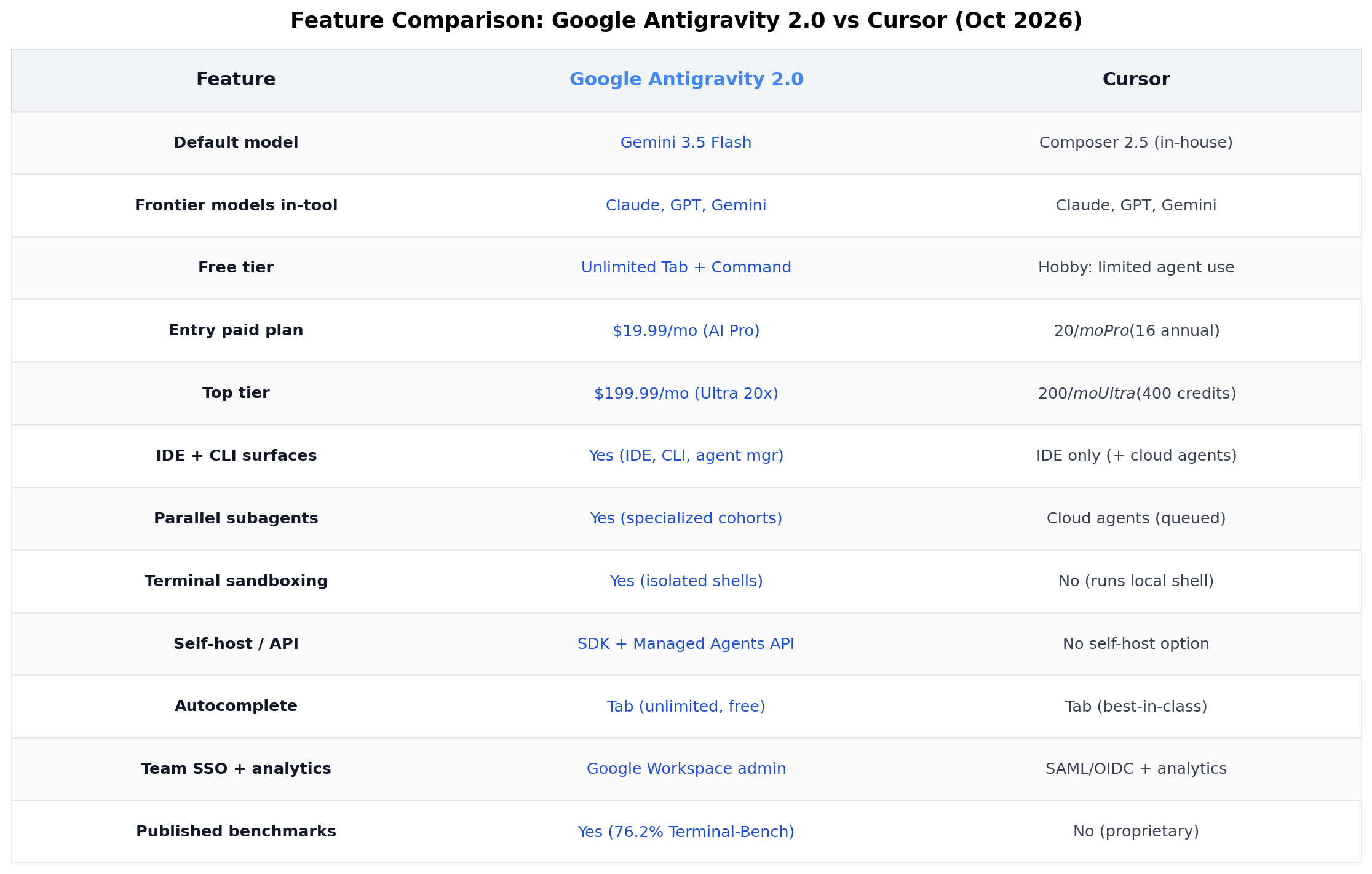
Three rows repay a second look. Published benchmarks: Antigravity posts a 76.2% Terminal-Bench score; Cursor publishes none, arguing internal evals go stale — credible, but it means you verify quality on your own repo. Terminal sandboxing: Antigravity’s agents run shells in isolated environments with Git-policy enforcement; Cursor’s agent executes in your local shell, which is faster to set up and looser to trust. Self-host/API: Antigravity’s SDK and Managed Agents API let you run the same agent runtime in your own pipelines; Cursor is an IDE-first product with cloud agents but no self-hosted option.
Real-World Test Scenarios
We anchor every comparison in the ways people actually earn with these tools. These three workflows come from documented freelance case studies in the AI-services market — same job, run on both platforms.
Scenario 1: The $420–$1,120 small-business website gig
The job: the site-arbitrage play documented across freelance marketplaces — sell a small business a landing page plus booking flow at one-third of agency price. One-off builds clear $420–$1,120 (¥3,000–8,000), with content-maintenance retainers stacking to $2,100–$4,200/month for sellers who industrialize it. Prompt used: “Scaffold a Next.js 15 site: 5 sections, Tailwind, responsive, booking form wired to a Supabase table, deploy config included. Generate all boilerplate and tests; leave design tokens for manual polish.”
Antigravity: the orchestrator’s dream. One planning agent holds the spec while builder agents generate components, tests and CI in parallel sandboxes; the documentation trail (task list → screenshots → video) doubles as client deliverable. The boilerplate lands in roughly 25 minutes on the free tier. Cursor: slower to first scaffold but better at the last 20% — Composer iterates design polish in tight loops, and the finished site looks hand-tuned. Verdict: front-run in Antigravity, polish in Cursor — the hybrid stack delivers this gig in ~2 hours against 40–60 manual.
Scenario 2: The 45-minute scraper-and-API job
The job: entry rung of the platform ladder — “scrape this directory into a CSV with a scheduled refresh,” listed at $15–$110 (¥100–800) on Chinese marketplaces, $50–500 on Upwork/Fiverr. Documented delivery: 8–12 hours manual, 45 minutes AI-assisted. Prompt used: “Write a Python scraper for [directory]: paginated fetch, rate-limited, retry with backoff, outputs clean CSV; add a GitHub Actions cron to refresh weekly.”
Antigravity: the CLI route — kick the agent off in a terminal, let it write, run and self-test the scraper inside its sandbox (its Terminal-Bench pedigree is literally this task class), review the diff when it’s green. Cursor: the agent writes the code competently, but you run it locally yourself; on broken selectors mid-run, Cursor’s inline fix loop is faster for surgical one-line patches. Verdict: Antigravity by a nose — sandboxed self-testing means the agent verifies its own output before you ever see it.
Scenario 3: The 4-hour SaaS admin-panel sprint
The job: the retainer upsell — “add an admin dashboard to our existing app.” A documented 4-hour AI-assisted delivery that works out to an effective rate near $70/hour (¥500/hr) versus the ¥37/hr the same freelancer earned pre-AI. Prompt used: “In this existing React + Express repo, add /admin: role-gated routes, user table with pagination, audit log viewer, and a stats card row. Match existing code style.”
Cursor: this is home turf. Working inside a large existing codebase with implicit conventions is exactly what context-aware editing and Tab excel at; Composer’s multi-file diffs stay surgical, and Bugbot (on Teams) reviews the PR like a second senior. Antigravity: capable — agents navigate the repo well — but its strength is generating greenfield volume, and style-matching across a mature codebase still needs more steering. Verdict: Cursor, clearly. Brownfield polish is the daily-driver’s home game.
The pattern across all three: Antigravity compresses the front of the job (scaffolding, boilerplate, self-testing), Cursor compresses the back (polish, brownfield edits, review). Freelancers earning at the top of these ranges aren’t picking a side — they’re running both on the same Git repo.
Alternatives Worth Considering
Antigravity and Cursor sit at the center of agentic coding, but the category is crowded — and several alternatives beat both on one specific axis.
| Tool | Starting Price | Standout Strength |
|---|---|---|
| GitHub Copilot | $10/mo (Pro) | Cheapest mainstream option; agent mode + code review natively in VS Code and JetBrains |
| Windsurf | $15/mo (Pro) | Cascade agent keeps a repo-wide mental model; strong free tier |
| Claude Code | $20/mo (Claude Pro) | Terminal-native agent with the deepest reasoning; pairs well with either editor |
| OpenAI Codex | $20/mo (ChatGPT Plus) | Cloud agents that work your repo asynchronously from chat or CLI |
| Amp | Usage-based | Agent-first IDE from Sourcegraph with generous free usage and strong multi-file edits |
If your day job is brownfield enterprise work inside VS Code, Copilot at $10 remains the path of least resistance. If you want an agent that reasons before it types, Claude Code plus a plain editor is a serious — and increasingly popular — third way.
The Verdict
Best for agentic, spec-driven building: Google Antigravity. Multi-agent orchestration, sandboxed self-testing, a documented 76.2% Terminal-Bench score, and an SDK that extends the same runtime into your pipelines. Nothing else at $0–$20 lets you delegate this much end-to-end.
Best as a daily-driver editor: Cursor. Tab remains the best autocomplete in the business, context-aware multi-file editing is surgical, and the $16–$20 Pro tier is the best value in premium AI coding. The IDE you live in should feel like yours — Cursor’s still does.
Best for zero-budget beginners: Antigravity’s free tier. Unlimited Tab plus Command-plane agent access at $0 is unmatched — start here, spend nothing, upgrade only when you hit refresh-window walls.
Best for teams: Cursor Teams ($40/user) — with Bugbot code review and centralized governance it out-features Google’s Workspace-flavored admin for pure software teams; Google-native organizations should flip that call.
Overall winner (8.8 vs 8.6): Google Antigravity — on the strength of free-tier generosity, agent depth, and published benchmarks. But note what the score means: this is the closest category we have scored in 2026, and the hybrid stack (both, $0 incremental) is our actual recommendation for anyone billing clients by the project. Use Antigravity to compress the front of the job; finish in Cursor; bill for the margin.
Frequently Asked Questions
Is Google Antigravity free to use in 2026?
Yes. The public preview is free, including unlimited Tab completions and Command-plane agent requests. Free users get limited daily quotas on paid-tier models; a Google AI Pro subscription ($19.99/month) lifts those limits with a 5-hour refresh window on high-limit access.
Is Antigravity better than Cursor for agentic coding?
For orchestrating multiple autonomous agents, yes. Antigravity can run parallel builder agents in sandboxed terminals, enforce Git policies on agent commits, and self-test generated code — reflected in its 76.2% Terminal-Bench score. Cursor’s agent is excellent for interactive, human-in-the-loop tasks but is designed to pair with you rather than replace you for long runs.
Does Cursor still have the best AI autocomplete?
In our testing, yes — Cursor’s Tab remains the most accurate next-edit predictor, now suggesting jumps across files as well as inline edits. Antigravity’s Tab is free and unlimited, which is remarkable at $0, but Cursor’s still wins on precision.
Can Antigravity replace Cursor entirely?
Not yet for most professionals. Antigravity wins greenfield generation and delegation, but Cursor’s editor feel, brownfield codebase navigation, and mature extension ecosystem still make it the better tool for the final 20% of real projects — design polish, style-matching, and surgical fixes in large existing repos.
Which is cheaper for a solo developer: Antigravity or Cursor?
Antigravity, decisively, at the low end: its free tier includes unlimited autocomplete and agent access, and $19.99/month buys high-limit frontier models. Cursor’s $20 Pro is comparable monthly, but $16/month on annual billing undercuts it if you want unlimited Auto-completions specifically.
What is Antigravity's Terminal-Bench score?
76.2% on Terminal-Bench (hard), as published on Google’s leaderboards — currently among the top agentic-coding results and ~14 points ahead of its nearest published rival. Cursor does not publish comparable benchmark figures, which itself is a data point.