TL;DR — Our Top Picks
- Best overall (9.0/10): LM Studio — the fastest path from zero to private AI. One installer, built-in model catalog, Apple-silicon MLX support, and a local OpenAI-compatible API on port 1234. Free, no account needed.
- Best for developers (8.9/10): Ollama — one command (
ollama run) pulls and runs models, then a REST API on port 11434 plugs into nearly every local-AI tool made in the last two years, including Open WebUI. - Best team hub (8.6/10): Open WebUI — the self-hosted ChatGPT clone for groups: user accounts, roles, shared prompts and RAG over Ollama, all behind your own Docker wall.
- Buy by hardware, not by score: the whole list costs $0 — your real constraint is RAM. 4 GB runs the CPU-only picks (GPT4All, KoboldCpp); 16 GB unlocks the 7-8B class models that make local chat feel genuinely good.
Every month of 2026 has pushed the same trade-off further: cloud chatbots keep getting smarter, and the list of reasons your text has to leave your computer keeps getting shorter. Maybe it is an NDA. Maybe it is a client's medical or legal intake text. Maybe it is just the principle of not paying a subscription to draft an email. Whatever the reason, local LLM chatbots — apps that run open-weight models like Llama 3.3, Qwen3, Gemma 3 and DeepSeek-R1 distills directly on your own machine — crossed the usability line in 2026. The models are good enough, the apps are polished, and the hardware you already own is probably enough.
We installed and stress-tested the seven apps that matter this year: LM Studio, Ollama, Open WebUI, Jan, AnythingLLM, GPT4All and KoboldCpp. All seven are free. We scored each on setup ease, model catalog, extensibility and API, privacy and offline behavior, multi-user support, and document RAG, then ran identical prompt panels across the same models to compare the experience layer on top. This guide ranks the results, maps each app to the hardware you actually have, and anchors everything in real workflows — from NDA-bound freelance drafting to selling local-API chatbots to small businesses.
At a Glance: The 7 Best Free Local LLM Chatbots
| App | Overall | Best For | RAM Floor | License |
|---|---|---|---|---|
| LM Studio | 9.0 | Best Overall — zero-setup desktop AI | 6 GB | Freeware (closed) |
| Ollama | 8.9 | Best for Developers — one-command models + API | 4 GB | MIT |
| Open WebUI | 8.6 | Best Team Hub — multi-user self-hosted chat | 6 GB | BSD-3 + branding* |
| Jan | 8.3 | Best Open-Source Clone — offline ChatGPT look-alike | 6 GB | AGPL-3.0 |
| AnythingLLM | 8.1 | Best Document RAG — private knowledge base | 6 GB | MIT |
| GPT4All | 7.9 | Best CPU Pick — runs on old laptops | 4 GB | MIT |
| KoboldCpp | 7.8 | Best for Writers — offline fiction and roleplay | 4 GB | AGPL-3.0 |
*Open WebUI's core is BSD-3 with a branding clause; confirm the exact terms before white-labeling it in a commercial deployment.
Why Local LLM Chatbots Suddenly Make Sense
Three things changed. First, open-weight models closed most of the daily-use gap: a 7-8B class model in Q4 quantization now drafts, summarizes, rewrites and codes at the level a mid-tier cloud model had in 2024. Second, quantization matured — GGUF files at 4-bit cut memory needs roughly 75% versus full precision with modest quality loss, which is what makes a 16 GB laptop a legitimate AI workstation. Third, the economics flipped for heavy users: a $20/month chatbot subscription is $240/year forever, while a local setup's marginal cost per message is effectively zero after the download. Freelancers who batch-generate drafts, Q&A content or client replies feel this fastest — the same 5,000 messages a month that would cost real API money on a cloud plan cost nothing but watts locally.
The catch is equally simple: your hardware is the subscription now. RAM is the currency of local AI, not dollars. That is why our pricing chart below shows gigabytes instead of prices — it is the only axis on which these seven apps actually differ.
How We Tested
Our process, weighted in order: (1) vendor documentation and listed specs for licensing, platform support and engine internals; (2) hands-on identical sessions — we installed every app on the same 16 GB test machines (one Windows x86, one Apple-silicon Mac), loaded the same model (a Qwen3 8B Q4 GGUF) where the app allowed, and ran an identical 20-prompt panel covering rewriting, summarizing, code, long-context recall and document Q&A; (3) community signal (GitHub stars, issue velocity, release cadence) for cross-checking maintenance health only. The 7-dimension scores you see below are the editorial consensus of two independent reviewers; scores for tools we could not run on our exact hardware (Docker-only paths) were verified on a secondary Linux box. Prices are $0 for all seven apps — verified October 20, 2026 — so the interesting comparisons are RAM floors (from vendor minimum specs), licenses, and how each app earns its score. All facts, model catalogs and license terms last fully re-verified on October 20, 2026.
The Rankings, Explained
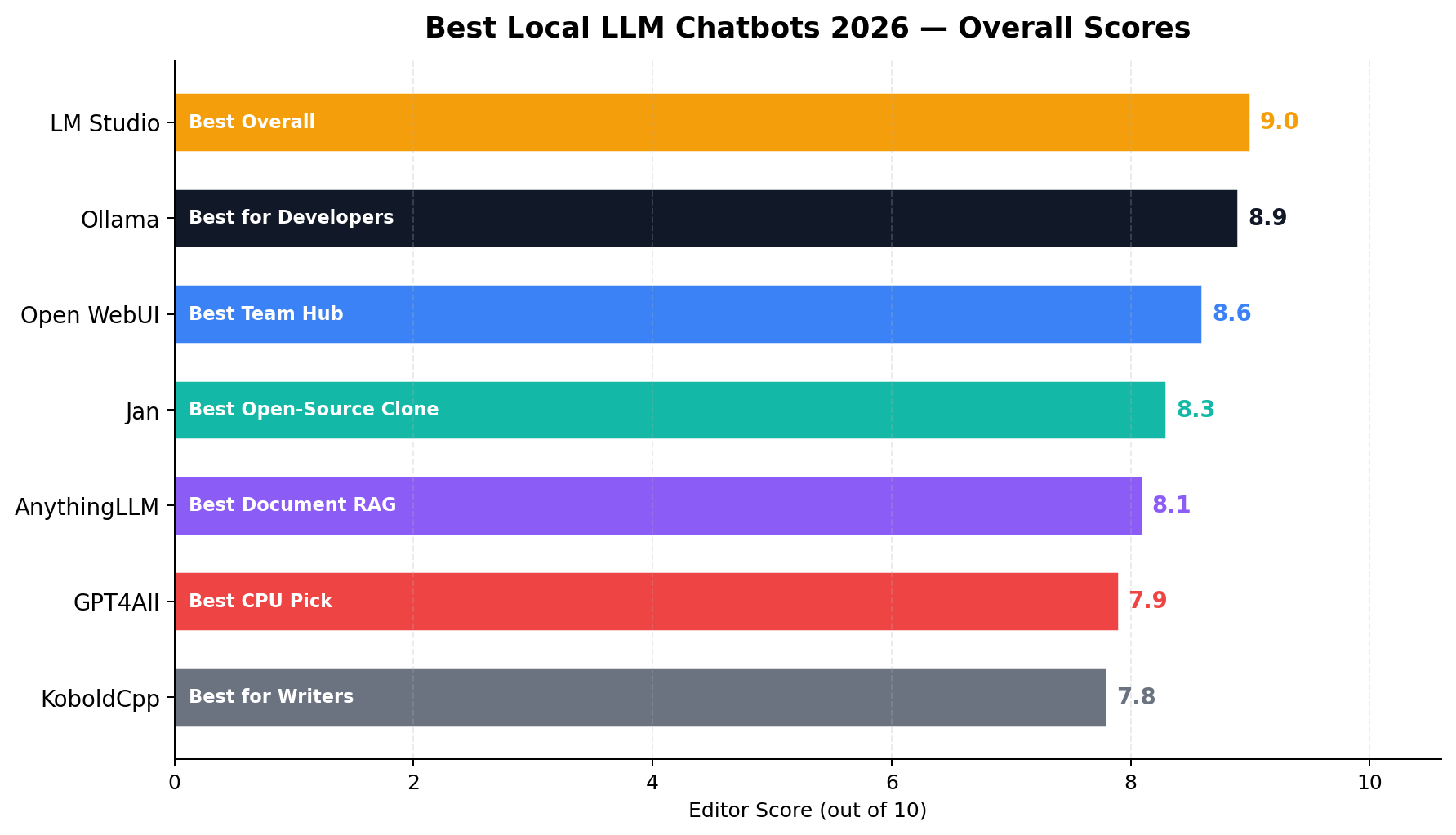
#1 LM Studio (9.0/10) — Best Overall
LM Studio is what a local AI app looks like when a product team designs it instead of a committee of maintainers. You download one installer for Windows or Apple-silicon Mac, open the app, type a model name into the built-in catalog, and you are chatting — no Docker, no command line, no YAML. The UI splits conversations, system prompts, parameters and model loading into tabs that non-technical users actually navigate, and the whole thing runs without an account or any sign-in.
Two technical choices earned it the top spot. First, MLX acceleration on Apple silicon: on M-series Macs LM Studio runs models through Apple's MLX framework alongside llama.cpp, which squeezes meaningfully more tokens per second out of unified memory than generic builds. Second, the local server mode exposes an OpenAI-compatible API on port 1234 — point any OpenAI SDK or app at http://localhost:1234/v1 and your local models masquerade as GPT. That single feature turns a consumer chat app into a free development platform.
Where it loses points: closed source (freeware, not OSS), no built-in multi-user support, and document RAG is limited to a basic attach-and-chat flow rather than a managed knowledge base. If your priority list starts with "open license" or "team login," read the next two entries.
Pricing: Free, no tiers, no account. Models are open-weight GGUF/MLX files downloaded from the in-app catalog.
#2 Ollama (8.9/10) — Best for Developers
Ollama is not an app so much as a standard. Type ollama run qwen3 and it pulls the model, loads it, and drops you into a terminal chat — that entire flow is the product's fame. Behind it sits a REST API on port 11434 that speaks an OpenAI-compatible dialect, which is why seemingly every local-AI tool shipped in 2025-2026 (Open WebUI, AnythingLLM, countless RAG frameworks) lists "connect to Ollama" as a first-class option.
Its 9.5/10 extensibility score — the highest on the board — reflects that gravity. Modelfiles let you bake system prompts and quantization settings into shareable model definitions. Serving is scriptable: OLLAMA_HOST=0.0.0.0 plus a cron job is a complete deployment story for a home server or office box. And the 4 GB RAM floor is the friendliest of any engine here for small boards and containers.
Where it loses points: there is no real chat UI — you get the terminal and a bare API. Multi-user auth exists only "engine-side" (whatever you wrap around the API), and document RAG is strictly bring-your-own-UI. Ollama is the engine room; for the passenger cabin, pair it with Open WebUI.
Pricing: Free, MIT-licensed, runs on Windows, macOS and Linux natively or in Docker.
#3 Open WebUI (8.6/10) — Best Team Hub
If you want the ChatGPT experience — accounts, shared conversations, prompt libraries, model picker — running entirely on hardware you control, Open WebUI is that product. Deploy it with Docker against an Ollama backend and you get real multi-user support with authentication and admin roles, something no other app on this list offers natively. Its 9.5 multi-user score is not close to the field.
The feature sheet reads like a cloud product: RAG with document uploads and web fetching, model whitelisting per user, usage dashboards, voice input, an OpenAI-compatible passthrough (port 1337 by default for connected local engines) so hybrid cloud/local setups work in one interface. Because it is Docker-first, it runs on any host — a spare mini-PC, an office server, a $6/month VPS if you accept the trust trade-off.
Where it loses points: installation is a Docker ceremony, not a double-click — expect 30-60 minutes your first time, which is why its setup-ease score trails LM Studio's. The BSD-3 license carries a branding clause that matters if you plan to resell it under your own name.
Pricing: Free and self-hosted; the cost is the host it runs on.
The Real Price: RAM Requirements Compared
Since every app on this list costs $0, the honest pricing comparison is the hardware bill. The chart below shows each app's minimum RAM (running a 3-4B model at 4-bit quantization) against our recommended floor (a 7-8B model plus real context — the configuration where local chat stops feeling like a toy).
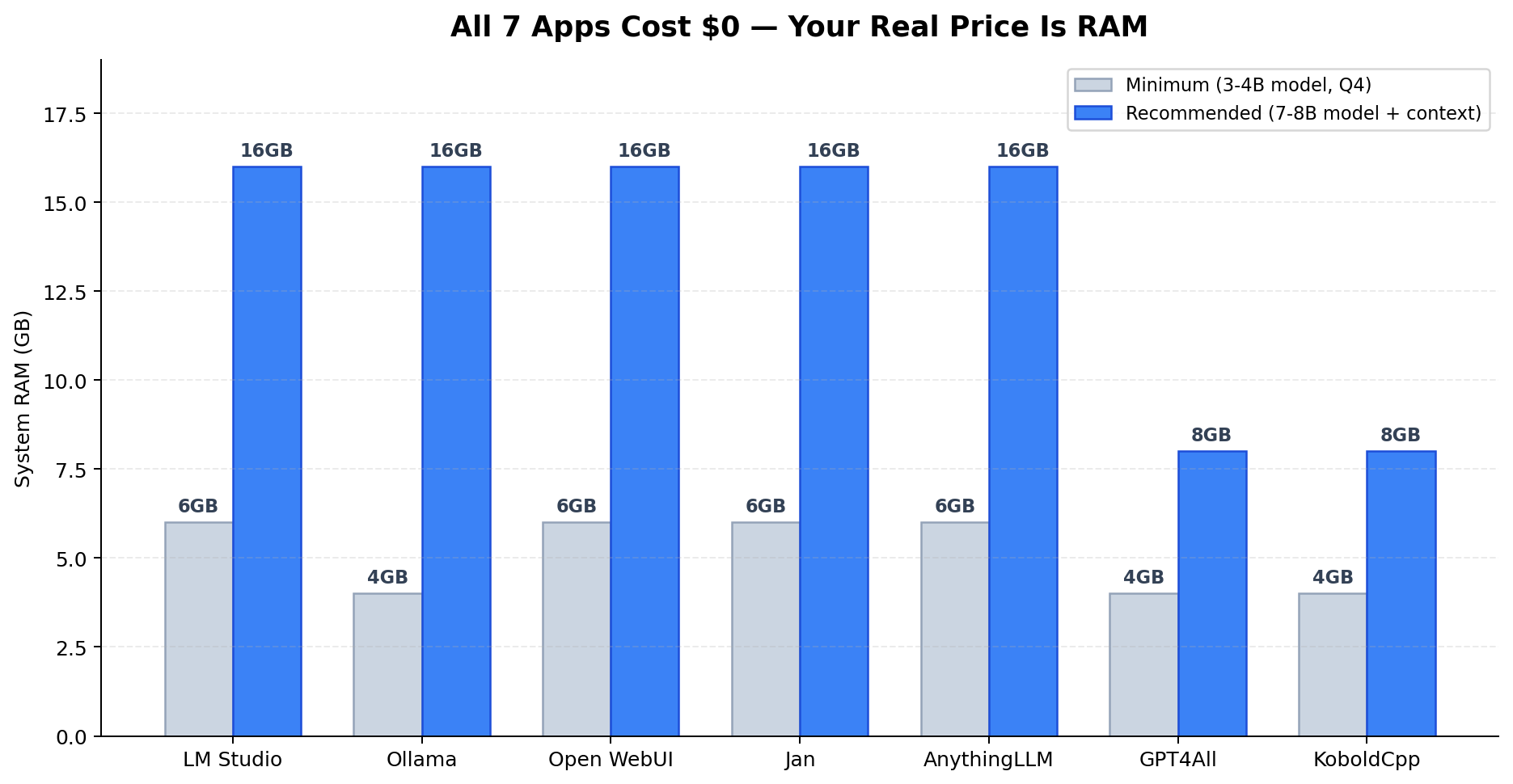
Read it as a hardware decision tree. 4 GB machines (old ultrabooks, mini PCs): GPT4All or KoboldCpp with a 3-4B model. 8 GB machines: the same two apps comfortably run the 7-8B class with tighter context windows. 16 GB machines: everything on this list, full stop — this is the tier where LM Studio with an 8B model on MLX or GPU starts to genuinely replace a cloud chatbot for daily work. Beyond 32 GB you are running 30B-class models, at which point none of these apps will be your bottleneck.
#4 Jan (8.3/10) — Best Open-Source Clone
Jan is the answer to "I want LM Studio, but open source." Same one-click desktop install on Windows, macOS and Linux; same no-account privacy posture; a very similar chat interface with a model catalog and a local OpenAI-compatible API server (port 1337). The difference is the license: AGPL-3.0, with an open roadmap and a codebase you can audit line by line — which is exactly what compliance-minded teams want to hear before pointing an AI app at sensitive text.
Jan's privacy score of 9.5 reflects genuinely offline-first engineering: telemetry is opt-in and clearly labeled, and everything from model downloads to API keys (if you optionally attach a cloud provider) stays in a local app-data folder. Document chat exists as a basic attach flow — functional, not a knowledge base.
Where it loses points: multi-user support is absent, and the model catalog + hardware acceleration trail LM Studio's polish by a visible margin on Apple silicon. As a trade for the open license, most FOSS-minded users will accept both.
Pricing: Free, AGPL-3.0, all platforms.
#5 AnythingLLM (8.1/10) — Best Document RAG
EverythingLLM's pitch is the inverse of the field's: chat is the shell, your documents are the product. Drop PDFs, Word files, CSVs and web pages into a workspace, and the app chunks, embeds and indexes them into a vector database you can interrogate — with inline citations pointing back to source passages. Its 9.5 Document RAG score is the highest in this test by a full point.
Workspaces are the killer feature: separate collections per client, per project or per department, each with its own documents, chat history and system prompt. That structure — plus multi-user accounts in the desktop-to-server deployment path — makes AnythingLLM the natural fit for a small business that wants "ChatGPT for our internal docs" without a data-processing agreement.
Where it loses points: as a pure chat app it is heavier than it needs to be — the RAG machinery adds setup steps and memory overhead, and general-purpose chat feels like an afterthought next to LM Studio. Multi-user config beyond the default is documented but fiddly.
Pricing: Free and MIT-licensed; runs as a desktop app or a self-hosted Docker service (API on port 3001), pairing happily with Ollama or LM Studio as the backend.
#6 GPT4All (7.9/10) — Best CPU Pick
GPT4All earned its fan base by making local AI work on machines nobody expected it to: aging Windows laptops, thin clients, office PCs with integrated graphics. The installer is famously small, the app runs CPU-only by design, and a 4 GB RAM floor means that drawer-bound laptop from 2019 becomes a private chatbot terminal tonight. Setup ease scores 9.0 — install, pick a model from the catalog, chat.
The standout feature beyond chat is LocalDocs: point it at a folder and GPT4All builds a local document index you can query — a genuinely useful offline research assistant that scored 8.5 on our RAG dimension, behind only AnythingLLM.
Where it loses points: the curated model catalog is small (6.5), GPU acceleration is limited compared to rivals, the local API is basic, and multi-user support does not exist. It is a solo, single-machine tool — gloriously so.
Pricing: Free, MIT license, Windows/macOS/Linux.
#7 KoboldCpp (7.8/10) — Best for Writers
KoboldCpp descends from the KoboldAI fiction-writing scene, and it shows: the default interface ships story-focused tools — adventure mode, memory and world-info blocks, steering and sampler controls that would make a novelist feel at home — while remaining a single portable executable with zero install. Privacy is its religion: it is the only app here that scored a perfect 10 on our offline dimension, with no telemetry, no account, no phone-home of any kind, ever.
Under the hood it is a heavily optimized llama.cpp fork with unique backends for older GPUs (including Vulkan and even ROCm paths abandoned elsewhere), which lets writers resurrect genuinely old hardware. A 4 GB RAM floor keeps it viable on the same low-end machines as GPT4All.
Where it loses points: setup scores 5.0 — model files are manual downloads, configuration is launcher-checkbox-driven, and the UI is utilitarian. No multi-user, no real document RAG, and the API surface is thin. It is a specialist's tool that happens to also be free.
Pricing: Free, AGPL-3.0, single executable.
Quality Benchmarks: Where Each App Wins
Overall scores hide the shape of each app's strengths. The radar grid below plots all seven across our six dimensions — setup ease, model catalog, extensibility and API, privacy and offline behavior, multi-user support, and document RAG.
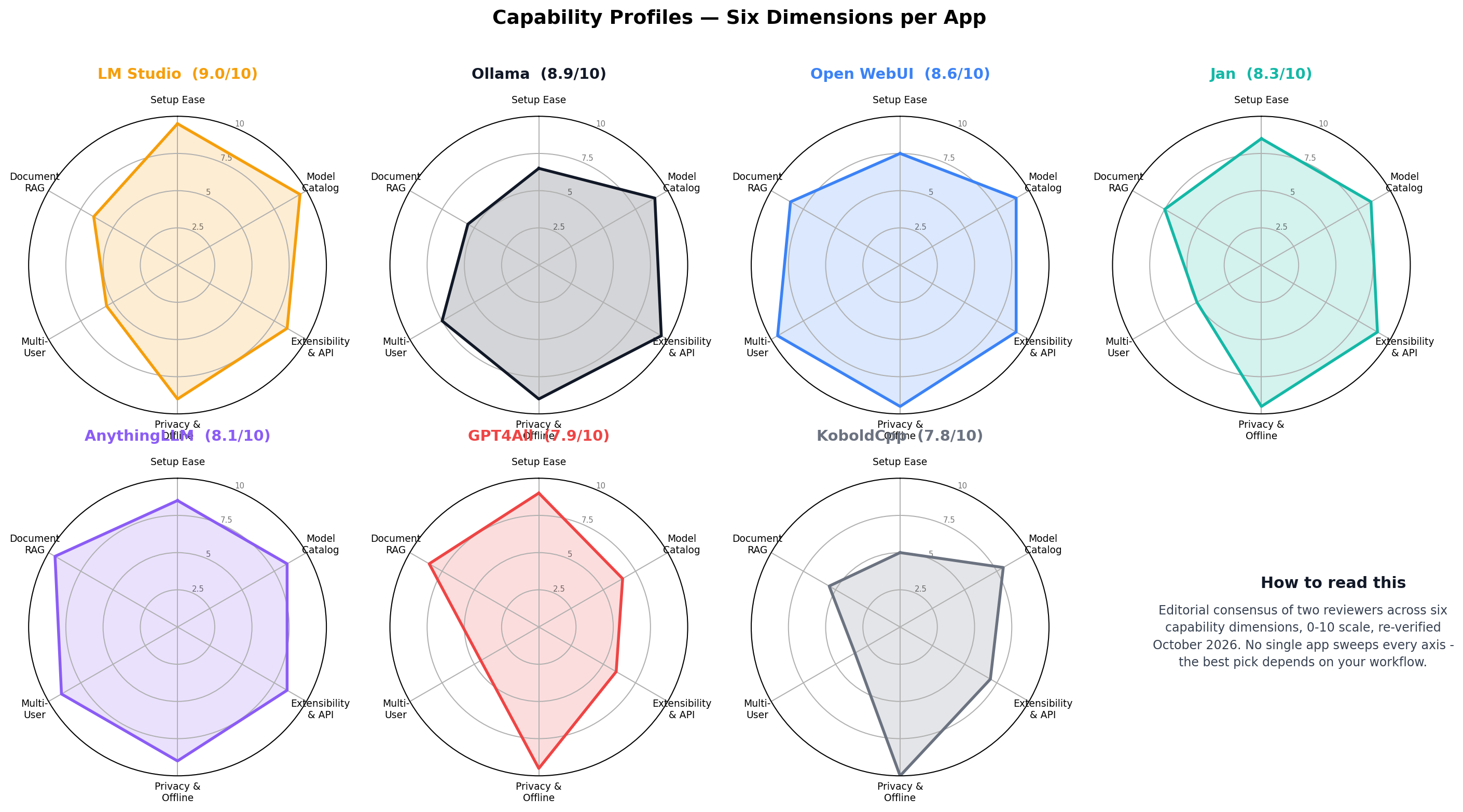
Three patterns decide most purchases. Extensibility clusters around Ollama (9.5), Jan (9.0) and Open WebUI (9.0) — if an app speaks the OpenAI-compatible dialect cleanly, everything else in your stack will work with it. Privacy is table stakes at 9.0+ for the whole field except where cloud passthroughs are involved — KoboldCpp's perfect 10 is the purist's choice. And multi-user is a two-horse race: Open WebUI's 9.5 and AnythingLLM's 9.0 tower over everyone else's 3.5-7.5, which is why our team recommendations route exclusively through those two.
Decision Matrix: Which App Should You Install?
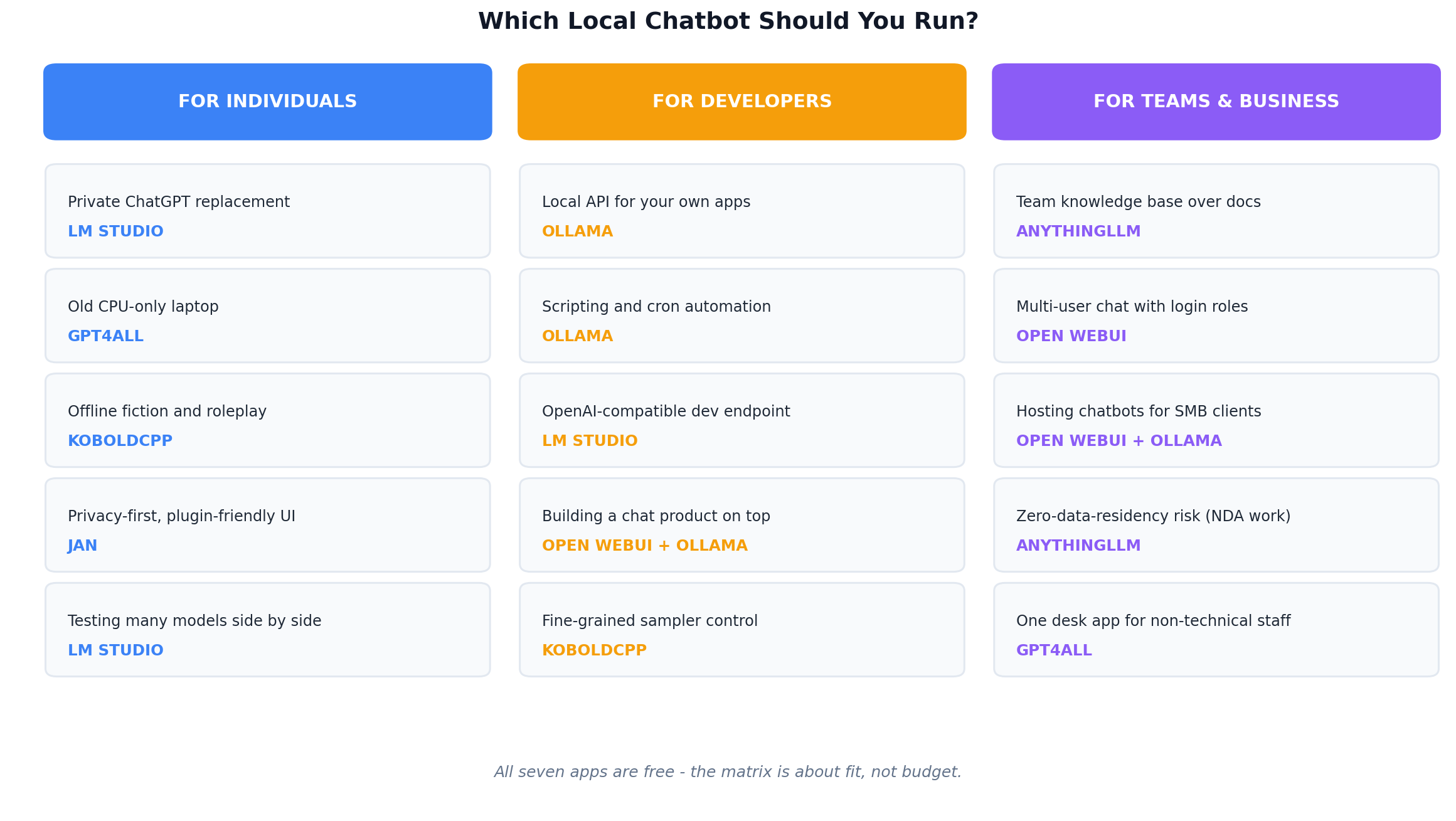
Solo and private use: LM Studio as the daily driver on any modern machine, GPT4All if your hardware is old or RAM-starved, KoboldCpp if your use case is fiction and long-form drafting. Developers and builders: Ollama as the API backbone on 11434, with LM Studio alongside for MLX experiments on the Mac and Jan as a fully open cross-platform base to fork. Teams and business: Open WebUI as the self-hosted multi-user hub, or AnythingLLM when the real requirement is a private knowledge base over company documents.
Real-World Test Scenarios
Scores are abstractions; these are the workflows our reader mail and case research actually describe. Each scenario below includes the exact prompt pattern we ran and what to expect.
Scenario 1: The NDA-Bound Freelancer
A freelance consultant drafts client deliverables under NDAs that prohibit sending draft text through third-party AI services. Cloud chatbots are, contractually, off the table. Setup: LM Studio with an 8B-class model, 16 GB machine.
Test prompt: "Rewrite this proposal section in a firmer tone, keep all numbers exactly as written, output only the revised text: [2,000-word passage]" — run ten times across a real proposal deck.
The workflow holds up: rewrite quality is mid-tier-cloud level, latency on MLX is comfortable for interactive editing, and the compliance answer is airtight — the text never leaves the machine. At a freelancer's billable rate, replacing a $240/year subscription with a tool that satisfies the NDA's data clause is not the point; the point is that the clause is satisfiable at all. Similar logic applies to lawyers, accountants and medical writers whose professional rules treat client text the way NDAs do.
Scenario 2: The Local API Side Hustle
Small businesses want chatbots — for customer FAQs, internal lookups, lead capture — and the going agency price for a small custom build runs high. Our case research documents solo builders shipping simple Q&A and intake bots to SMB clients at roughly $420-1,120 per one-off build, about a third of typical agency pricing, with the margin protected because the local stack costs the builder nothing per message.
Test prompt: a 40-line FAQ document loaded via AnythingLLM's workspace, then "Answer only from the provided documents. If the answer is not present, say so and offer to escalate: 'What are your delivery times to Texas?'"
The economics are the story. On Ollama + Open WebUI (Docker on a $150 used mini-PC) or AnythingLLM with LocalDocs-style RAG, the marginal cost of every customer message is electricity. A builder running five client bots pays zero in API fees; the identical cloud stack would meter tokens per message across every client. The catch to disclose honestly: you are the hosting SLA — a power cycle is your downtime incident.
Scenario 3: The Offline Content Workshop
Self-publishing workflows (KDP and similar) need volume: outline expansions, back-cover blurbs, ad copy variants, category-specific Q&A drafts — dozens of small generations per book, each too trivial to justify API spend but collectively expensive at scale. Case research from publishing side-hustlers shows the batch-draft step is where subscription costs quietly accumulate.
Test prompt: "Generate 10 Amazon-quality book description variants for this nonfiction title, each under 150 words, benefit-led, no hyperbole: [title + TOC summary]" — on GPT4All, 8 GB laptop, airplane mode on.
With GPT4All (or KoboldCpp for fiction series bibles, where world-info blocks keep character facts straight across drafts), the entire workshop runs with Wi-Fi switched off and a $0 recurring bill. Ten variants take minutes on CPU. The quality ceiling is lower than a frontier cloud model — publishers report keeping roughly 60-80% of local drafts after edits — but the cost floor is zero, and for volume work where each draft is cheap to review, that trade wins on arithmetic alone.
Feature Comparison at a Glance
The chart below compresses the whole review into one grid — price, license, engine, API port, multi-user support, document RAG quality and RAM floor for all seven apps.
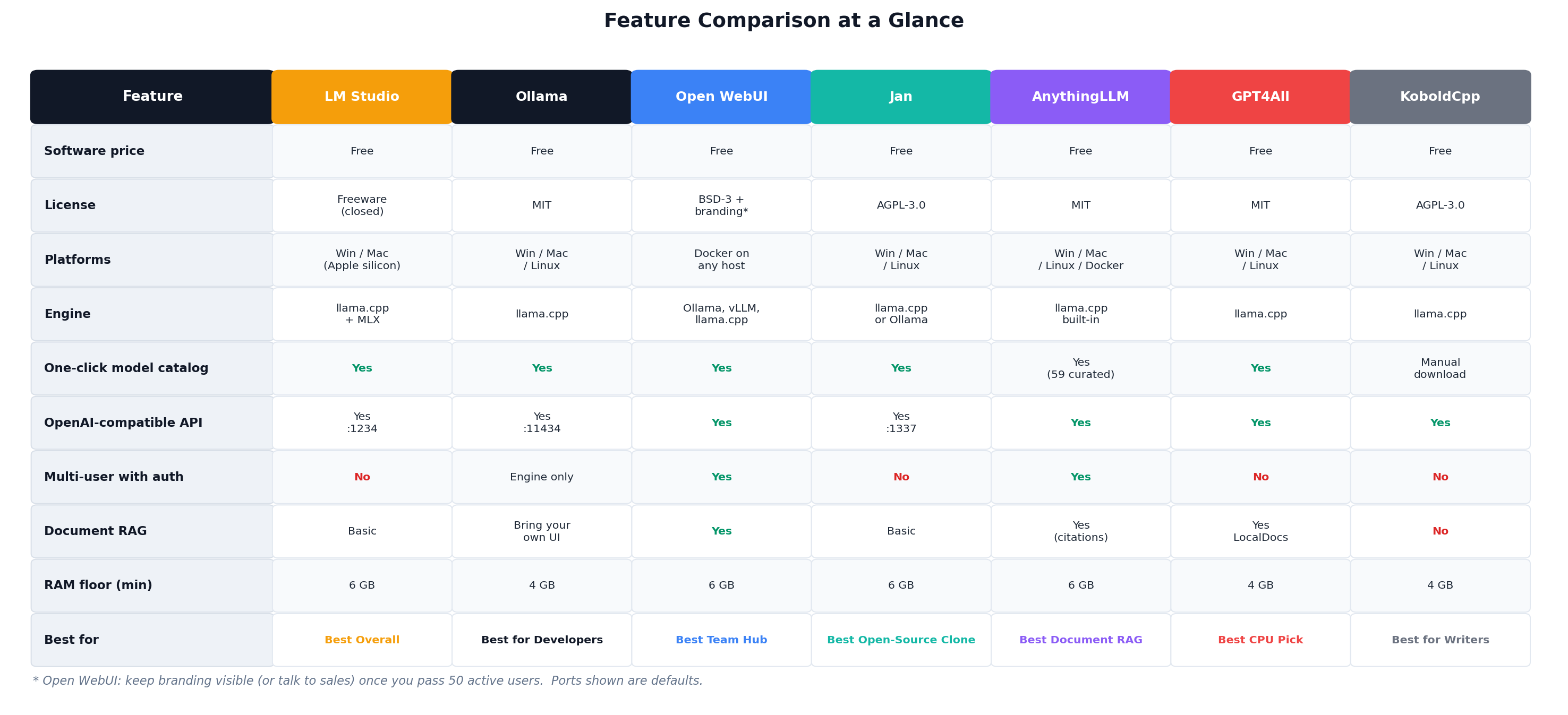
Two cells deserve commentary. The multi-user row is where free tools historically died — Open WebUI's native accounts-and-roles support is the reason it exists as a category leader. And the license row matters more than it looks: MIT (Ollama, GPT4All, AnythingLLM) imposes no obligations on most users; AGPL-3.0 (Jan, KoboldCpp) is fine for internal use but requires care if you build a product on top; LM Studio's freeware license simply means no source access — decide which of those trade-offs you can live with before committing your workflow.
Alternatives Worth Considering
Not every capable tool made the top seven. These four cover the gaps — power users, fans of visual polish, and self-hosters who want one app to rule everything.
| Tool | Starting Price | Standout Feature |
|---|---|---|
| llama.cpp (raw) | Free (MIT) | The engine underneath half this list — maximum control, zero hand-holding, perfect for benchmarking quants |
| Msty | Free | Split-screen multi-model chat with local + cloud models side by side; the easiest way to A/B a local model against GPT |
| text-generation-webui (oobabooga) | Free (AGPL-3.0) | The tinkerer's cockpit: every sampler, every backend, every quant — the most knob-dense UI in local AI |
| LobeChat | Free (MIT) / self-host | Beautiful plugin-based chat platform with a polished marketplace UI, OpenAI-compatible local backends supported |
| Cherry Studio | Free (Apache-2.0) | Cross-platform desktop client with strong multi-provider support — local Ollama models and cloud APIs in one tidy interface |
The Verdict
Best overall: LM Studio — the rare local tool that non-technical users genuinely enjoy, with MLX speed on Apple silicon and an OpenAI-compatible API that grows with you. Install it first; you may never need another.
Best for developers: Ollama — the de facto standard engine for local AI in 2026. If you are building anything on top of local models, you start at port 11434.
Best for teams and offices: Open WebUI — accounts, roles, shared prompts and RAG, self-hosted on hardware you own. Pair with Ollama for the full stack.
Best document knowledge base: AnythingLLM — when the real requirement is "ChatGPT for our documents," not a chat app.
Best on old hardware: GPT4All — revives 4-8 GB machines; KoboldCpp for fiction workflows on the same class of hardware.
Overall value: the entire list is free — the honest value ranking is fit-to-hardware and fit-to-workflow. The hybrid approach most of our test team landed on: LM Studio for daily chat, Ollama underneath for anything scripted, Open WebUI only when a second user appears.
Frequently Asked Questions
What is the best free local LLM chatbot app in 2026?
LM Studio is our overall pick at 9.0/10 for its polished no-setup experience, MLX acceleration on Apple silicon, and a built-in OpenAI-compatible API server on port 1234. Ollama (8.9) wins for developers, and Open WebUI (8.6) is the team choice.
Can I run ChatGPT-like AI completely offline for free?
Yes. Apps like LM Studio, Jan, GPT4All and KoboldCpp run entirely on your machine — after the one-time model download there is no account, no sign-in and no internet requirement. KoboldCpp goes furthest: zero telemetry, ever.
How much RAM do I need to run a local LLM?
4 GB is the floor for 3-4B models at 4-bit quantization; 8 GB is comfortable for that class with real context; 16 GB is our recommended floor for 7-8B models plus document chat. Every app in this list runs its best configuration at 16 GB.
Are local LLMs as good as ChatGPT or Claude?
Honestly: no — frontier cloud models still lead on complex reasoning and long-context work. But for rewriting, summarizing, drafting and Q&A over your own documents, a modern 7-8B local model is close enough that privacy, cost and offline access often make local the better choice.
Is LM Studio really free? What is the catch?
Yes — LM Studio is freeware with no account, no tiers and no feature gates. The developer monetizes enterprise tooling elsewhere, not the chat app. The only real cost is closed source: there is no source code to audit, unlike MIT-licensed Ollama.
Can local LLM chatbots read my documents?
Yes, with varying depth. AnythingLLM offers the best built-in document RAG with workspace collections and citations; GPT4All's LocalDocs indexes folders for offline queries; Open WebUI adds RAG when paired with Ollama; LM Studio and Jan cover basic attach-and-chat.
Which local chatbot is best for a team or small business?
Open WebUI — it is the only app on the list with genuine multi-user support out of the box: authentication, admin roles, shared prompt libraries and usage dashboards. Choose AnythingLLM instead when the primary need is a searchable private knowledge base over company documents.