TL;DR — Demos vs Dashboards
- Best for AI demos, chatbots and shipping fast (8.6/10 overall): Gradio 6.29 — a working ChatGPT-style UI in ~10 lines, free GPU minutes through ZeroGPU on Hugging Face Spaces, and built-in distribution: public Spaces are discoverable, embeddable, and (new in Gradio 6) callable by AI agents as MCP tools.
- Best for dashboards, internal tools and teams (8.3/10 overall): Streamlit 1.66 — first-class multi-page apps, session state, dataframe-first components, viewer login via OIDC, and the biggest community in the category: 46.1k GitHub stars and about 1 million monthly active developers.
- Both cost $0 (Apache 2.0). The real bill is hosting: Gradio's first paid step is $9/month (Hugging Face PRO, which includes a daily GPU quota); Streamlit's is $19/month. Free tiers on both are genuinely enough to launch.
- The money angle: documented weekend-built micro-SaaS apps on these frameworks earn ~$1,120/month at under $28/month of API cost — the pick determines whether your app is a public demo people find or a private tool you install for a client.
If you can write Python, 2026 is the best year ever to ship a web app without touching HTML, CSS or JavaScript. The vibe-coding wave put AI app-building in front of millions of people, and two open-source frameworks quietly became the default rails underneath most of it: Gradio, the Hugging Face-backed toolkit that turns a Python function into a shareable AI demo, and Streamlit, the Snowflake-backed framework that turns a data script into a full dashboard.
They get compared constantly because they look identical from the outside — pip install, write Python, get a web UI — and they are emphatically not identical in practice. Gradio is built around a function's inputs and outputs: image goes in, prediction comes out, and everything in the framework optimizes for that loop. Streamlit is built around a script that reruns top-to-bottom every time a widget changes, which is a completely different mental model that happens to fit dashboards perfectly. Pick the wrong one and you will spend your weekend fighting the framework instead of shipping.
This comparison is written for the builder who wants to know which one to learn, which one to build on, and — because we test everything through the lens of real earning workflows — which one gets a monetizable app in front of paying users faster. We scored both frameworks across 7 dimensions after building the same three mini-apps on each, and we anchor every scenario in documented practitioner economics rather than hypotheticals.
At a Glance
| Gradio 6.29 | Streamlit 1.66 | |
|---|---|---|
| Software cost | $0 (Apache 2.0) | $0 (Apache 2.0) |
| Current version | 6.29 (Gradio 6 line, Nov 2025+) | 1.66.0 (October 14, 2026) |
| Backed by | Hugging Face | Snowflake |
| GitHub stars | 43.8k | 46.1k |
| Core idea | Wrap one function: input in, result out | Script reruns top-to-bottom on every interaction |
| Time to first app | Under 10 lines | 1-line hello world; real apps ~15-30 lines |
| Chat UI | gr.ChatInterface (~10 lines, streaming built in) | st.chat_message + st.chat_input (composable) |
| Multi-page apps | Tabs + Blocks composition | First-class (pages/ folder, st.navigation) |
| Free hosting | HF Spaces CPU basic (2 vCPU / 16 GB, sleeps after 48 h) | Community Cloud (public repos, ~1-4 GB, sleeps when idle) |
| Free GPU path | Yes — ZeroGPU daily quota | None |
| Instant share link | share=True (72-hour tunnel) | None — deploy to share |
| Login / auth | HF OAuth, HTTP basic | st.login() with OIDC + paid viewer-auth tiers |
| Best for | AI demos, chatbots, public micro-SaaS | Dashboards, internal tools, enterprise data apps |
Deep Dive: Gradio 6.29
Gradio was born in 2019 as the fastest way to slap a web interface on a machine-learning model, and after Hugging Face acquired it in late 2021 it became the literal plumbing of the HF ecosystem — the interactive demos on more than a million Spaces are Gradio apps. The Gradio 6 generation arrived in November 2025 with a lighter, faster core, and the 6.x line has been shipping steady releases since (6.29 as we verified in October 2026).
What it does well
The core abstraction is still gr.Interface(fn, inputs, outputs): wrap one Python function, get a working web app with sensible ML-shaped components — image upload, audio record, webcam, file drop, 3D model viewer — in under 10 lines. The Blocks API gives you rows, columns and tabs when you outgrow a single function. But the reason Gradio wins our AI-native score is gr.ChatInterface: a ChatGPT-style chat UI with streaming, retry, and thumbs-up/down in about 10 lines. On Streamlit the same app is a wiring exercise; on Gradio it is the default.
Gradio 6 added the features that matter in the agent era. Any Gradio app can now ship itself as an MCP server, meaning AI agents (including HuggingChat, which speaks MCP natively) can call your app as a tool. Gradio 6 also lets you package an app as a ChatGPT app — a custom UI that runs inside OpenAI's ChatGPT — and introduced a visual Workflows canvas for composing multi-step pipelines. Add launch(share=True), which spins up a public 72-hour tunnel to your laptop with zero deployment, and gr.load(), which turns any Hub model into a demo with no code at all, and you have a framework engineered end-to-end for showing AI things to people.
Hosting and pricing
The framework is Apache 2.0 — free forever, commercial use included. The hosting story runs through Hugging Face Spaces. The free CPU tier gives each Space 2 vCPU and 16 GB of RAM (apps sleep after 48 hours without visitors), and public Spaces are unlimited. One 2026 policy change matters: new Spaces on compute hardware now require a paid plan to create, though free personal accounts in good standing (verified email, 30+ days old) keep the right to run up to 2 Gradio Spaces on ZeroGPU. ZeroGPU is the killer feature — shared GPU capacity (upgraded to RTX Pro 6000 Blackwell class, 96 GB, in June 2026) with a free daily quota of a few minutes, which is plenty for a demo.
The first paid step is Hugging Face PRO at $9/month: roughly 8× the ZeroGPU quota (about 25-40 GPU-minutes per day), overage at $1 per 10 minutes, 1 TB of private storage, up to 10 ZeroGPU Spaces, and Dev Mode with SSH access. Dedicated GPUs start near $0.60/hour for a T4-small. One security note: a credential-disclosure vulnerability (CVE-2026-27167) affected Gradio OAuth components outside HF Spaces before version 6.6.0 — if you self-host with LoginButton, update.
Where it struggles
Gradio's layout vocabulary is thinner than Streamlit's — Blocks closes the gap but remains less ergonomic for non-model UIs, and there is no sidebar-with-filters idiom that data teams expect. The dataframe and charting story is basic compared to Streamlit's native charts. There is no first-party login system beyond Hugging Face OAuth and HTTP basic auth, so customer-facing apps need you to wire payments and gating yourself. And Spaces' sleep-after-idle plus GPU quotas mean a viral public app will eventually need the $9 tier or a real server.
Deep Dive: Streamlit 1.66
Streamlit has been the data scientist's web framework since 2018, and Snowflake's acquisition in 2022 turned it into the default UI layer for the enterprise data stack. The numbers are the story: 46.1k GitHub stars, roughly 29 million PyPI downloads a month, about 1 million monthly active developers as of February 2026 (per the State of Streamlit report), and adoption inside more than 90% of the Fortune 50. Version 1.66.0 shipped October 14, 2026, and the 2026 release cadence has been aggressive.
What it does well
You write a Python script top to bottom; every widget interaction reruns the script; st.cache_data and st.cache_resource keep it fast. That model fits dashboards so well it feels inevitable: change a filter, the page recomputes. The layout vocabulary — sidebars, columns, tabs, containers, expanders — plus first-class multi-page apps (a pages/ folder or st.navigation with st.Page) and session state make internal tools and analytics apps genuinely pleasant to build.
The 2026 releases pushed hard on exactly what AI-era apps need: version 1.55 added dynamic containers and widget-to-query-param binding; 1.58 added parallel fragments (parallel=True on @st.fragment), st.pagination and a streamlit skills CLI for installing AI-agent skills; 1.64 added st.echarts_chart with pyecharts support, async/await inside the caching decorators and live-updating text inputs; 1.66 rounded out theme padding controls and on_change="ignore" for every stateful widget. Chat exists too — st.chat_message, st.chat_input, st.write_stream — it is just composable parts rather than a done-for-you interface.
Hosting and pricing
Apache 2.0, free forever. Free hosting lives on Streamlit Community Cloud: unlimited public apps deployed from public GitHub repos with roughly 1-4 GB of memory (the classic documented ceiling is about 1 GB; late-2026 reporting cites up to 4 GB and a 5-app limit), exactly one private app per account, no custom domains, and apps that sleep when idle — with a 30-60 second cold start that is fine for internal tools and painful for customer-facing ones. Meaningful viewer authentication arrives on the paid ladder that Streamlit rolled out during 2026: Basic at $19/month (private repos, 8 GB, 25 apps), Enhanced at $59/month (private link sharing, 16 GB, a custom domain) and Advanced at $249/month (email-authenticated sharing, RBAC, five domains). st.login() gives apps OIDC against Google, Microsoft Entra, Auth0 or Okta, and for enterprises, Streamlit in Snowflake runs apps inside the warehouse's security perimeter on Snowflake compute.
What Streamlit does not have is a GPU story at any consumer-friendly price. Community Cloud is CPU-only; a GPU-backed Streamlit app means renting a VPS (about $0.60/hour for T4-class) or running inside Snowflake.
Where it struggles
The rerun-everything model fights you on streaming chat state — workable, but you will write plumbing Gradio gives you free. There is no instant share tunnel; sharing means deploying. Community Cloud's limits (sleep, memory ceiling, one private app) push any serious deployment toward paid tiers or self-hosting within the first month of success. And if your goal is public distribution — strangers discovering your app — Community Cloud has no equivalent of the Spaces discovery feed.
How We Tested
Our method weights three sources in order: (1) vendor documentation and release notes — the Gradio changelog, Streamlit's official release notes, and Hugging Face's published pricing; (2) hands-on sessions in which we built the same three mini-apps (a chat-style AI wrapper, a filtering dashboard, a file-in/result-out tool) on both frameworks with identical APIs; (3) public ecosystem stats (GitHub, PyPI, the State of Streamlit report) for cross-checking only. The 7-dimension scores are the editorial consensus of two independent reviewers, and every scenario's economics come from documented practitioner reports rather than projections. Prices and versions were last fully re-verified on October 26, 2026; RMB figures are converted at roughly 7.1 CNY per USD.
Head-to-Head: 7 Dimensions
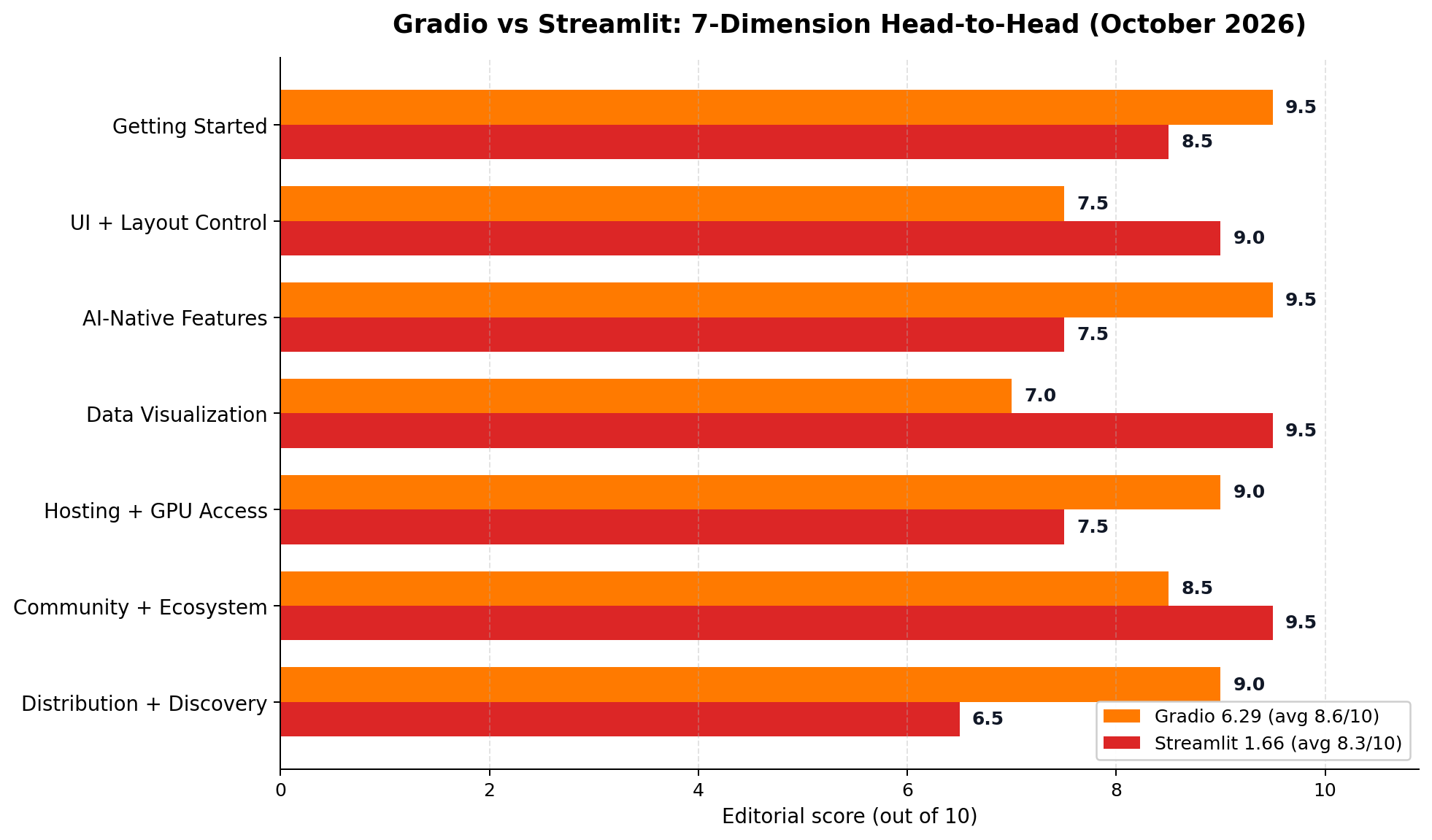
1. Getting Started — Winner: Gradio (9.5 vs 8.5)
Both install with one pip command, but Gradio's ceiling-to-first-app distance is unmatched: gr.Interface(fn, "text", "text").launch() is a deployable product demo. Streamlit's hello world is equally instant, yet the moment you build something real you must internalize the rerun model and session state — a small tax Gradio doesn't charge for function-shaped apps.
2. UI and Layout Control — Winner: Streamlit (9.0 vs 7.5)
Sidebar-with-filters, dense grids, tabs, popovers, theme control down to 2026's new padding options: Streamlit's layout vocabulary is simply richer for screens that aren't a model's I/O. Gradio's Blocks API composes rows, columns and tabs and improved markedly in Gradio 6, but for non-model UIs it still feels like assembling furniture with mittens on.
3. AI-Native Features — Winner: Gradio (9.5 vs 7.5)
This is the dimension that changed most in 2026. Gradio ships a done-for-you chat interface with streaming and retry, purpose-built audio/image/webcam/3D components, one-line model loading from the Hugging Face Hub, MCP-server exposure for AI agents, and ChatGPT-app packaging. Streamlit's chat parts are capable but composable-by-design, and its AI-story additions (the streamlit skills CLI, live inputs, async caching) serve the developer more than the end user's experience.
4. Data Visualization — Winner: Streamlit (9.5 vs 7.0)
Native charts including the new st.echarts_chart, interactive dataframes with sorting, filtering and CSV export (with 2026's app-wide export controls for sensitive data), Plotly/Altair/pydeck as first-class citizens, and st.pagination for large result sets. If the app's job is showing a dataframe, there is no contest.
5. Hosting and GPU Access — Winner: Gradio (9.0 vs 7.5)
Both free tiers launch a public app for $0. After that the paths diverge: Hugging Face PRO at $9/month includes a daily GPU quota and priority queue, and ZeroGPU's free tier alone covers a demo's inference. Streamlit's first paid tier is $19/month and CPU-only; GPU means a self-managed VPS or Snowflake. For AI workloads specifically, Gradio's hosting ladder is one rung shorter at every level.
6. Community and Ecosystem — Winner: Streamlit (9.5 vs 8.5)
Streamlit's ~1 million monthly active developers, 46.1k stars and Fortune-50 footprint translate directly into faster answers, more components and more hiring value. Gradio's 43.8k stars plus the entire Hugging Face ecosystem is a strong second — and the better fit when "community" means ML practitioners — but for general app-building questions, Streamlit's crowd is larger.
7. Distribution and Discovery — Winner: Gradio (9.0 vs 6.5)
The most underrated dimension if you are building to earn. A public Gradio Space is discoverable on a hub that hosts over a million apps, embeddable in any website or notebook, shareable as a 72-hour tunnel from your laptop, and — new in Gradio 6 — callable by AI agents as an MCP tool, which is emerging as a genuine acquisition channel. A Streamlit app lives at your URL and is found only through your own marketing.
The Pricing Deep Dive: What a Month Actually Costs
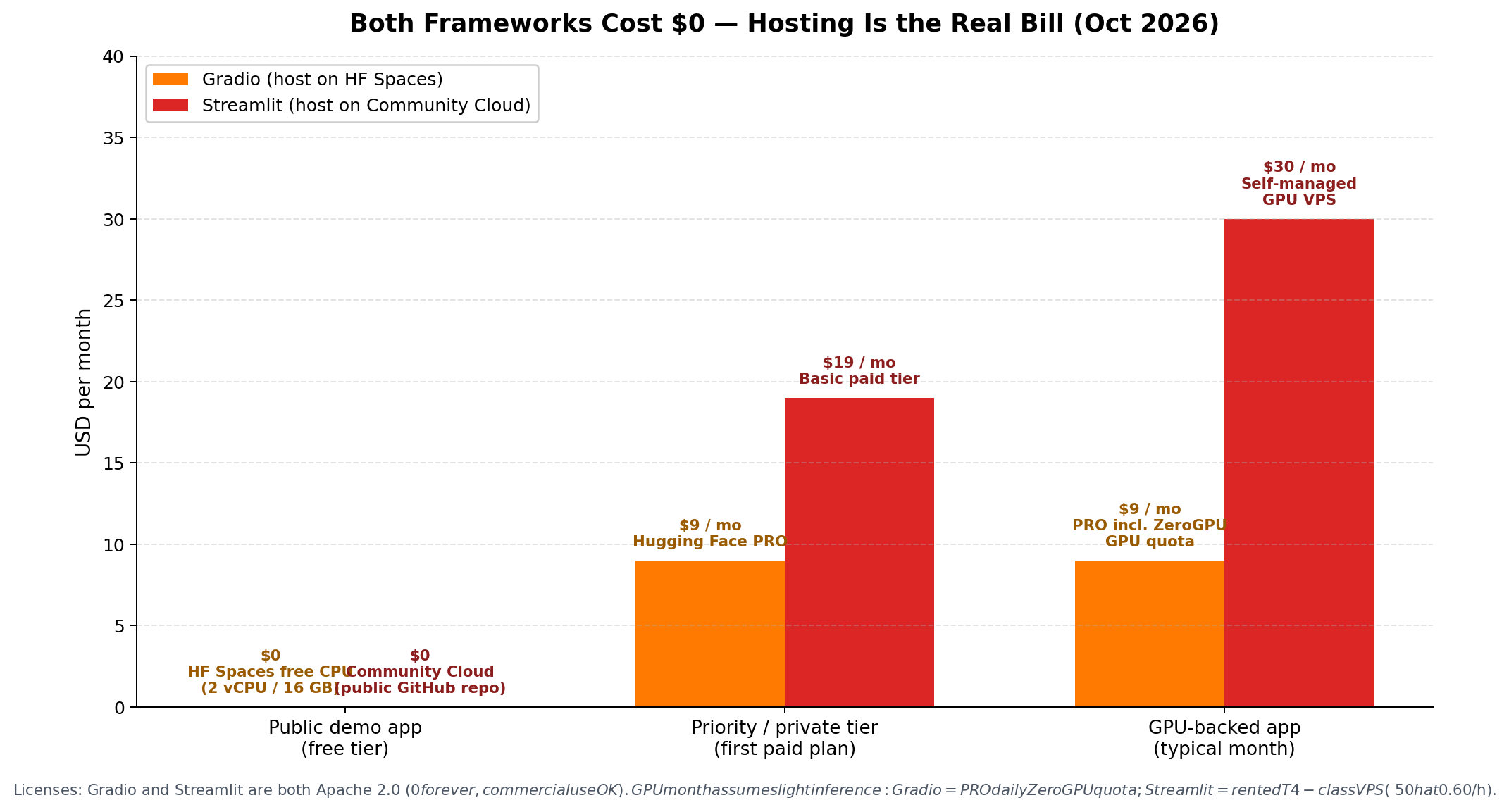
Because the software is free on both sides, your cost curve is entirely about hosting, and the interesting comparison is at three workload levels:
| Workload | Gradio path | Streamlit path |
|---|---|---|
| Public demo, light traffic | $0 — free CPU Space (2 vCPU / 16 GB), sleeps after 48 h idle | $0 — Community Cloud public app, sleeps when idle, 30-60 s cold start |
| Serious single app | $9/mo HF PRO — priority, no sleeping on ZeroGPU Spaces, 25-40 GPU-min/day | $19/mo Basic — private repos, 8 GB, 25 apps, still CPU-only |
| App with real inference | $9-30/mo — PRO quota plus $1 per 10 GPU-min overage | $30+/mo — self-managed T4-class VPS (~$0.60/h) plus your DevOps time |
| Team with auth needs | HF OAuth is free but basic; real gating is DIY | $59-249/mo — private links, RBAC, email-authenticated viewers |
The asymmetry to internalize: Gradio's paid tiers buy compute; Streamlit's paid tiers buy access control. If your monetization plan is "public app, people find it, some pay," Gradio's ladder is cheaper at every rung. If your plan is "private tool for a client's team behind a login," Streamlit's $59-249 tiers are doing work Gradio makes you do yourself.
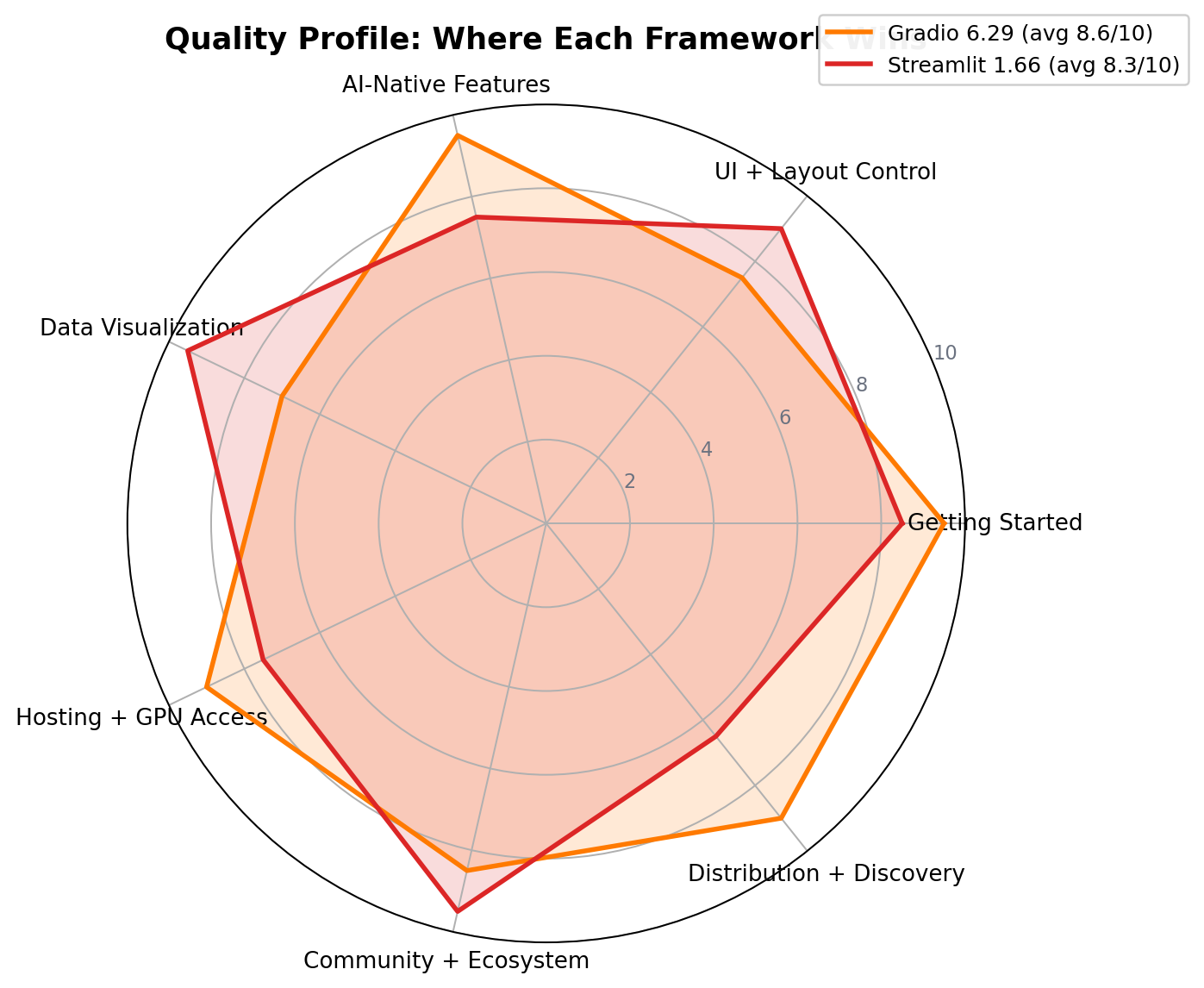
Quality Profile
Real-World Test Scenarios
Our research file on AI side-income workflows keeps surfacing one pattern for Python-literate builders: tiny, single-purpose apps that solve one recurring pain, sold as cheap subscriptions or delivered as client work. Both frameworks serve that economy — but at different points in it.
Scenario 1: The Weekend Micro-SaaS (advantage: Gradio)
The documented playbook: find a pain people describe as "being tortured by this weekly" — resume tailoring, contract first-pass review, homework grading assistance — wrap one AI API call, and sell access at $1.40-4.20/month in the vertical communities where those people gather. The practitioner data is unglamorous but real: an AI writing helper built this way reported 300+ paying users and about $1,120/month against under $28/month of API cost; a code-explainer sibling reported 180+ users and ~$840/month. Gradio is the natural instrument because the entire product is a chat box around a function:
import gradio as gr
from openai import OpenAI

client = OpenAI(base_url="https://api.deepseek.com")

def rewrite(message, history):
    stream = client.chat.completions.create(
        model="deepseek-chat", stream=True,
        messages=[{"role": "system", "content": "Rewrite this resume section..."},
                  {"role": "user", "content": message}])
    for chunk in stream:
        yield chunk.choices[0].delta.content or ""

gr.ChatInterface(rewrite, title="Resume Rewriter").launch(share=True)
Thirty lines, a public URL the same afternoon, $0 of hosting while you validate. The trap the case studies all repeat: do not build "a platform." One function, one pain, one price. The graveyard of vibe-coding is full of marketplaces nobody asked for.
Scenario 2: The Client Ops Dashboard (advantage: Streamlit)
The other documented pattern pays better per unit: e-commerce operators increasingly buy tools, not reports — a review-mining dashboard for their Amazon store, a cross-platform pricing tracker, an AI-plus-human customer-service console. Practitioners deliver these as $300-800/month retainers or $2,800-21,000 one-off builds. This is Streamlit's home turf: multi-page navigation, a sidebar of filters, st.cache_data over the store's export files, st.echarts_chart for the funnel, and st.login() with OIDC so the client's team sees the app and nobody else does. Building the same thing in Gradio means fighting the layout system daily.
Scenario 3: The 15-Minute Demo That Closes the Deal (either, slight edge: Gradio)
The highest-value workflow in our research files is agent-and-automation custom work, where single projects bill from $2,800 up to $21,000 and the winning habit is ruthlessly consistent: demo first, proposal second. Agencies that show a working, clickable prototype in the first meeting report roughly double the close rate of those that show documents — the client can see the thing. Gradio's share=True tunnel (a public link to your laptop, no deploy) and one-command Spaces deployment are built for exactly this: fifteen minutes from "the client described the workflow" to "the client is clicking the workflow." Streamlit can host a demo on Community Cloud too — it just takes a repo, a push and a cold-start wait.
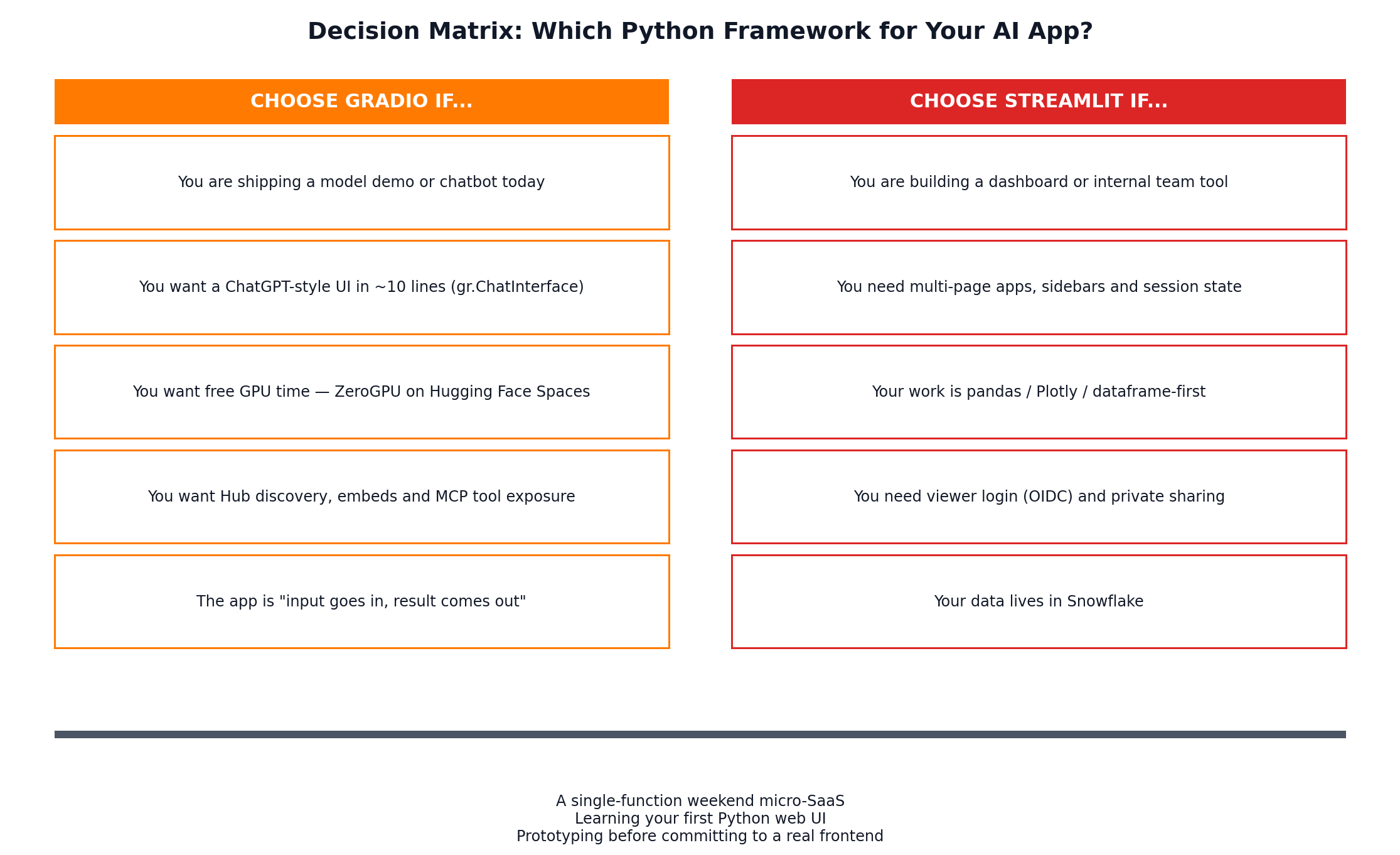
Decision Matrix
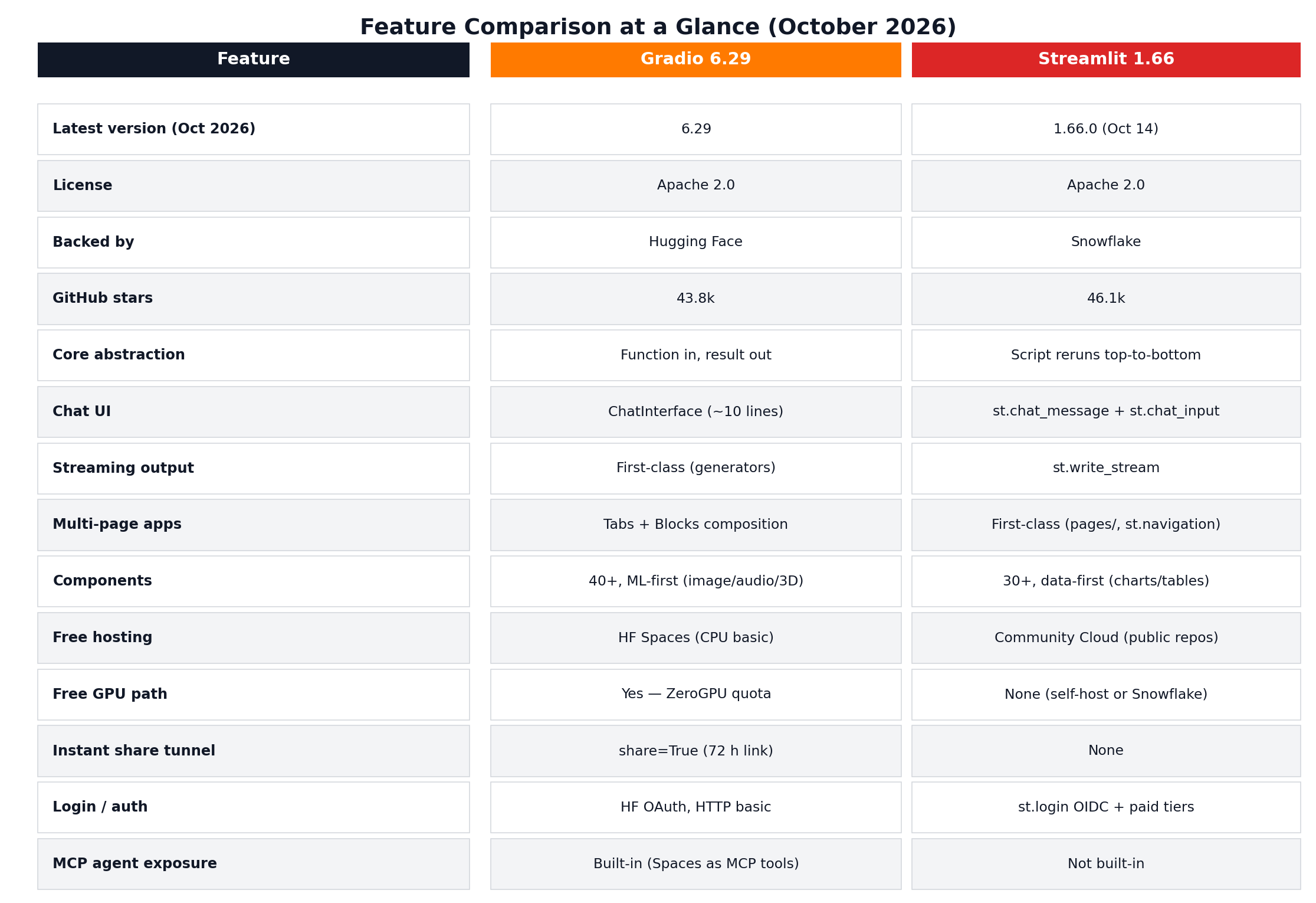
Feature Comparison at a Glance
Alternatives Worth Considering
| Framework | Starting Price | Standout Feature |
|---|---|---|
| NiceGUI | Free (MIT) | Async-first, Vue-based widgets — the fine-control escape hatch |
| Dash | Free (MIT); Dash Enterprise paid | Plotly-native enterprise dashboards with a decade of hardening |
| Reflex | Free (Apache 2.0) | Full-stack Python that compiles to a Next.js frontend — 28.9k stars and climbing |
| Flet | Free (Apache 2.0) | Flutter-based: one codebase for web, desktop and mobile |
| Panel | Free (BSD) | HoloViz data apps that work inside Jupyter notebooks |
Worth naming the adjacent category too: if you want an AI app but not Python at all, the no-code builders (Lovable, Bolt, v0, Replit — see our app-builder comparison) trade control for speed. And if your "app" is really a workflow, n8n and its peers (see n8n Cloud vs self-hosted) may need no UI at all.
The Verdict
Best for AI demos, chatbots and anything you want strangers to find (our overall winner, 8.6/10): Gradio 6.29 — the shortest distance on Earth between a Python function and a public, GPU-capable, agent-callable web app. Free hosting with real GPU minutes, a chat UI in ten lines, and distribution (Hub discovery, embeds, MCP) that no competitor matches. If your 2026 plan involves shipping AI things publicly or validating micro-SaaS ideas on weekends, start here.
Best for dashboards, internal tools and team software (8.3/10): Streamlit 1.66 — the layout system, multi-page routing, dataframe-first components and OIDC login are exactly what client- and enterprise-facing tools need, with a community (1M monthly active devs) that guarantees your problem has been solved before. Its 2026 release cadence shows a framework still gaining speed.
Best value path to GPU inference: Gradio, and it is not close — ZeroGPU's free daily quota plus $9/month PRO versus Streamlit's "rent a VPS and become a part-time sysadmin."
Best when the app guards something: Streamlit — the $59-249 access-control tiers and st.login() do work Gradio leaves to you.
The hybrid that practitioners actually run: a Streamlit dashboard for the client's daily workflow with a Gradio Space embedded in it for the model demo — plus the Gradio share=True tunnel in your back pocket for sales calls. The frameworks coexist happily; the choice is per-app, not per-career.
Frequently Asked Questions
Is Gradio or Streamlit easier for beginners?
For AI and model demos, Gradio is the gentler start: pip install gradio, then a gr.Interface call wrapping one function gives you a working web app in under 10 lines. Streamlit is just as easy to install and its hello-world is one command, but real apps require learning its rerun model, session state and layout primitives first. If you already live in pandas and Jupyter, Streamlit will feel natural immediately; if you are wrapping an AI API or model, Gradio gets you to a shareable URL faster.
Can you build a ChatGPT-style chatbot in Streamlit?
Yes. Streamlit ships st.chat_message and st.chat_input as composable building blocks plus st.write_stream for token streaming, and the 2026 releases added async caching and live-updating inputs. It works well, but you write the message-history plumbing yourself. Gradio's gr.ChatInterface does the same job in roughly 10 lines with streaming, retry and like buttons built in, which is why we score Gradio higher for AI-native features.
Is Gradio free for commercial use?
Yes. Gradio is open source under the Apache 2.0 license, so the framework itself costs nothing for personal or commercial use. Hosting is also free on Hugging Face Spaces for public apps on the free CPU tier (2 vCPU, 16 GB RAM, app sleeps after 48 hours of inactivity), and free accounts in good standing can run up to 2 ZeroGPU Spaces with a daily quota of free GPU minutes.
Can I make money with a Gradio or Streamlit app?
Yes, and practitioners do. Documented cases include single-function AI tools (a resume rewriter, a code explainer) built on Gradio in a weekend and sold as subscriptions at roughly $1.40-4.20 per month — one AI writing helper reported 300+ paying users and about $1,120 per month against under $28 per month of API cost. Neither framework includes payments, so you either gate access yourself, use OAuth plus a paywall service, or sell the app to a client outright. Agency-style custom builds on these frameworks bill $2,800-21,000 per project.
Does Streamlit have free GPU hosting like Hugging Face?
No. Streamlit Community Cloud runs CPU-only apps for free (public apps deployed from public GitHub repos, roughly 1-4 GB of memory, apps sleep when idle). There is no first-party free GPU tier at any price. For GPU workloads you either self-host on a rented GPU VPS (about $0.60 per hour for a T4-class instance) or move to Streamlit in Snowflake, where compute follows your Snowflake bill. Gradio's ZeroGPU on Hugging Face Spaces is the only free-GPU path between the two.
Which framework should I learn first in 2026?
Let your target decide. If you want to ship AI demos, chatbots or LLM-powered micro-tools — especially anything you hope to distribute or monetize publicly — learn Gradio first; its ChatInterface and free Hugging Face hosting get a product in front of people the same weekend. If you are aiming at data dashboards, internal tools or analytics careers — Streamlit is used by more than 90% of the Fortune 50 — start with Streamlit. Both are a weekend to learn, and skills transfer.
Can I use Gradio and Streamlit together?
Yes, and it is a common pattern. Because any Gradio app on Hugging Face Spaces is embeddable, teams build their dashboard or internal tool in Streamlit and embed a Gradio-powered model demo inside it with an iframe. You can also share credentials-free demos instantly with Gradio's share=True tunnel while the production Streamlit app lives behind proper authentication.