TL;DR — Convenience vs Control
- Best for most teams (7.4/10 overall): n8n Cloud — first workflow live in five minutes, zero maintenance, unlimited workflows/steps/users from the $24 Starter tier, and no license questions. Ideal below roughly 10,000 executions a month.
- Best for volume and control (7.0/10 overall): Self-Hosted Community Edition — $0 software with unlimited executions on a $6-25/month VPS, data that never leaves your server, and queue-mode scaling as far as your hardware goes.
- The math that decides it: at 1 million executions a month, Cloud on Business plus $4,800-per-300K overage buckets lands near $20,000/month; a production VPS runs the same volume for about $80/month. That 250x gap is why high-volume operators self-host — and why a paid deployment-and-workflow service niche now exists around it.
n8n has become the default automation backbone for AI-era workflows — the connective tissue between LLMs, CRMs, e-commerce platforms and messaging apps. But every new user hits the same fork in the road within minutes of signing up: pay for n8n Cloud, the managed SaaS run by the n8n team, or download the Community Edition and self-host it on your own server.
In 2026 this decision has real money attached. n8n's 2025 pricing overhaul removed limits on workflows, steps and users but doubled down on per-execution billing — and the curve gets steep fast. At the same time, the self-hosted edition remains genuinely free with unlimited executions under its Sustainable Use License, provided your use case fits the license terms. Pick wrong in either direction and you either burn a four-figure monthly bill you did not need, or you inherit a production server nobody on your team knows how to operate.
We ran both side by side — a Cloud Starter workspace and a Docker-Compose Community instance on a six-dollar VPS — checked every price against n8n's own October 2026 pricing page, and read the license text so you do not have to. Here is the honest breakdown.
At a Glance
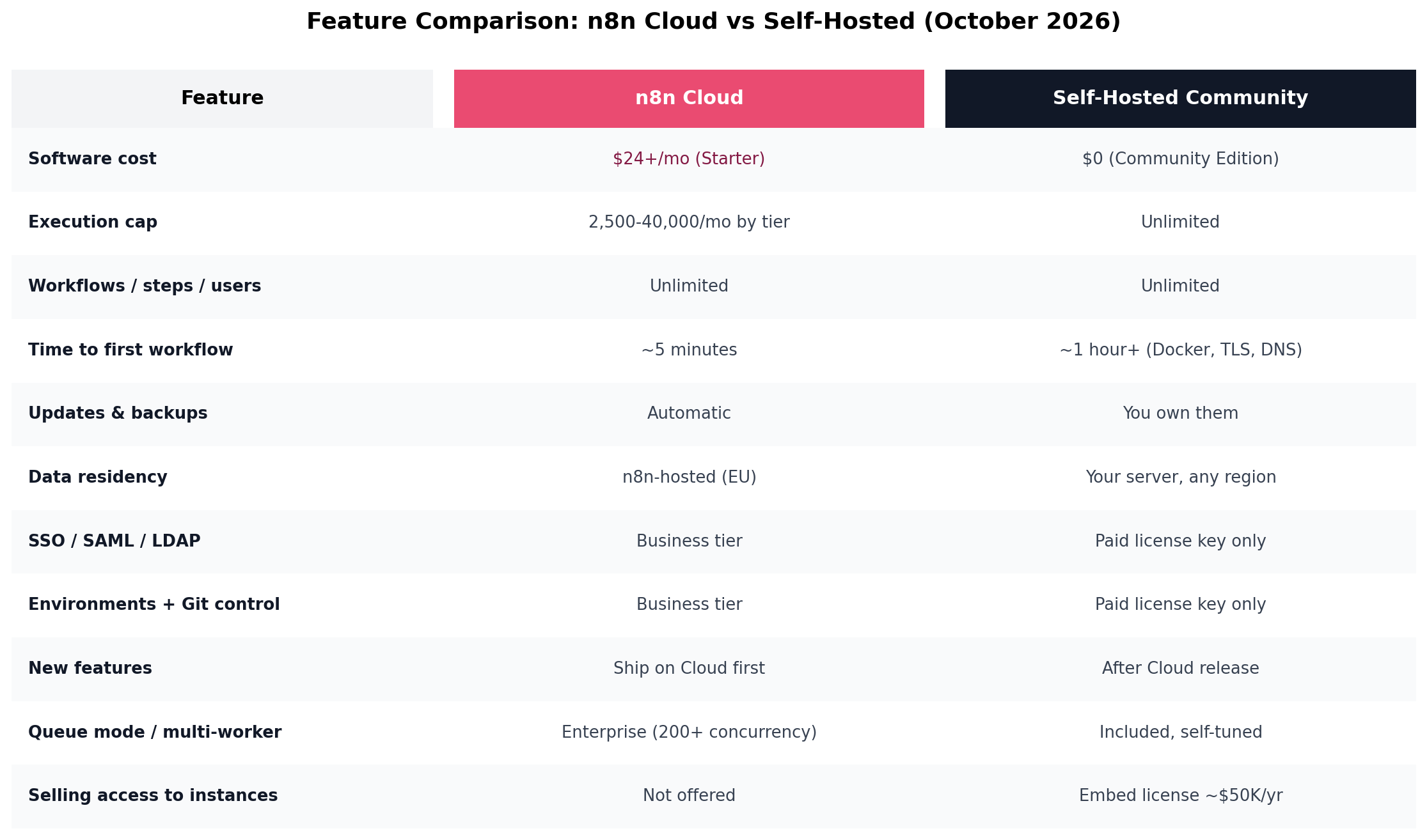
| n8n Cloud | Self-Hosted Community | |
|---|---|---|
| Software cost | From $24/month (Starter) | $0 |
| Execution cap | 2,500–40,000/month by tier | Unlimited |
| Workflows / steps / users | Unlimited on all tiers | Unlimited |
| Time to first workflow | ~5 minutes | ~1 hour+ (Docker, DNS, TLS) |
| Maintenance | None (automatic) | You own updates, backups, security |
| Data location | n8n-hosted (EU) | Your server, any region |
| SSO / environments / Git | Business tier (~$800/mo) | Paid license key only |
| License constraints | None — you are the customer | Internal use free; embedding needs paid license |
| Best for | Non-technical teams, fast starts, modest volume | High volume, strict data rules, DevOps capacity |
Deep Dive: n8n Cloud
n8n Cloud is the managed offering from the n8n team — the same workflow engine, run on their infrastructure, with every operational task handled for you. You sign up, confirm your email, and you are building workflows against the full node catalog within minutes.
What you get
- Zero-ops operation. Updates, security patches, backups, uptime and infrastructure scaling are all n8n's problem. If nobody on your team can comfortably administer a Linux server, this alone justifies the subscription.
- Instant onboarding. A hosted URL, a login, and the editor is live. New features typically appear on Cloud first and reach self-hosted releases afterward.
- Per-execution billing with unlimited everything else. Since the 2025 pricing overhaul, every tier includes unlimited workflows, unlimited steps, unlimited users and the full integration catalog. You are billed on workflow executions only — a run counts once no matter how many nodes it passes through (with one gotcha we cover below).
- Included AI credits. Cloud plans bundle monthly AI credits — 2,300 on Starter, scaling to 13,700 on Pro — for nodes that call n8n's AI models, separate from any external LLM API bills.
- Governance tiers when you need them. SSO (SAML/LDAP), environments, Git-based version control, log streaming and projects unlock on the Business tier without you managing license keys.
Pricing (October 2026)
n8n publishes prices in euros; we give USD approximations. Monthly billing: Starter $24/mo (2,500 executions), Pro $60/mo (10,000 executions), Business ~$800/mo (40,000 executions). Annual billing drops those to €20, €50 and €667 respectively. Enterprise is a custom quote that adds 200+ concurrent executions, external secrets, 365-day insights and SLA support.
The two Cloud gotchas
1. The execution cliff. On Starter and Pro, once you hit the monthly cap, new executions fail immediately — they are not queued, and there is no per-execution top-up on those tiers (a small temporary buffer sometimes applies, and monthly Pro-2 plans can add execution packs). If an abandoned-cart workflow dies silently at 2,501 runs during your Black Friday sale, that is not a bug; it is the billing model. Business plans keep running and settle overage later.
2. Polling triggers count even when nothing happens. A workflow that polls an API every hour "just to check" fires 24 executions a day — about 730 a month — whether or not the trigger ever passes data downstream. Six casually-configured polling workflows can quietly eat a Starter plan before lunch. Webhook-triggered workflows only count when they actually run, so trigger design directly drives your bill.
Strengths
- Genuinely five-minute setup; no Docker, DNS or TLS knowledge required
- No maintenance debt — the platform is always current
- License-simple: you are n8n's customer, so there is nothing to comply with
- Predictable experience for agencies handing clients a login
Weaknesses
- Cost curve turns violent past 10K executions/month — the Business wall is a 13x price jump from Pro for 4x the executions
- Your credentials and execution data live on n8n's servers (EU-hosted; Enterprise adds PrivateLink, IP restrictions, SOC 2/ISO 27001/HIPAA/GDPR commitments)
- Hard caps on Starter/Pro with fail-fast behavior at the limit
- Lower tiers run on shared infrastructure; serious concurrency needs Enterprise
Deep Dive: Self-Hosted n8n (Community Edition)
The Community Edition is the same engine, downloadable for free under n8n's Sustainable Use License — a "fair-code" license that is source-available but not OSI open source. You run it on your own hardware or a VPS via Docker, Docker Compose, npm, or Kubernetes, and it ships with every core capability: the full node catalog, AI Agent nodes with memory, tools and RAG, the REST API, webhook triggers, code nodes in JavaScript or Python, and unlimited executions, workflows and users.
What it takes to run well
For testing, n8n's documented minimums are modest — roughly 2 cores, 2 GB RAM and 20 GB of storage, and SQLite will do. Production is a different story: plan on 2-4 vCPU, 4 GB RAM, 25-64 GB of NVMe and PostgreSQL 13-17 behind a reverse proxy (Nginx or Caddy) for HTTPS. That maps to a $12-25/month VPS. Once you are running dozens of concurrent executions, you add Redis and switch to queue mode with extra worker processes — the same architecture n8n itself uses at scale, just operated by you. Every execution writes to PostgreSQL, which is why NVMe and a tuned database matter more than raw CPU.
The maintenance ledger
Self-hosting trades a subscription for a checklist: container updates (skip too many and the eventual jump gets risky), database backups, TLS certificate renewal, security hardening (never expose the instance port directly to the internet), execution-data pruning so the database does not bloat, and monitoring so you notice a dead workflow before your client does. None of this is hard for anyone comfortable with Docker; all of it is permanent. The honest question is not "can I set it up?" but "will someone own it in month nine?"
The license, in plain words
The Sustainable Use License permits free use "for your own internal business purposes" — including charging customers for workflow creation, setup, maintenance, training and consultancy, which n8n's FAQ confirms explicitly. What it forbids is monetizing n8n itself: white-labeling it, hosting it and selling access to external users, or embedding it in a product whose value derives substantially from n8n functionality. Those need a paid Embed license (community-reported around $50,000/year) or an Enterprise agreement. There is also a genuine gray zone around workflows that use client-provided credentials to operate on client systems — worth a careful read of the license FAQ before you build an agency practice on that pattern.
What the free edition lacks
Community Edition omits SSO (SAML/LDAP), environments, Git-based version control, log streaming, projects, multi-main mode, external secrets and sharing beyond the instance owner — the governance tier. Those unlock only with a paid self-hosted license key (Business at €667/month billed annually, or Enterprise). Registering your instance (free, email-based) adds folders, in-editor debugging and custom execution data. For solo operators and small teams, the gaps rarely matter; for regulated organizations, they are the whole conversation.
Strengths
- Unlimited executions at any volume for $0 in software
- Total data control — credentials and execution data never leave your perimeter, which simplifies GDPR, HIPAA and internal-data-policy conversations
- Connect private LLM endpoints, internal APIs and on-prem systems that Cloud cannot reach
- Queue-mode scaling to whatever hardware you throw at it
Weaknesses
- Setup and ongoing operations require real (if modest) DevOps capacity
- Governance features sit behind paid license keys
- You are the SLA: 3 a.m. failures are yours to fix
- License terms need reading before commercial use — especially anything touching external users or client credentials
Head-to-Head: 7 Dimensions
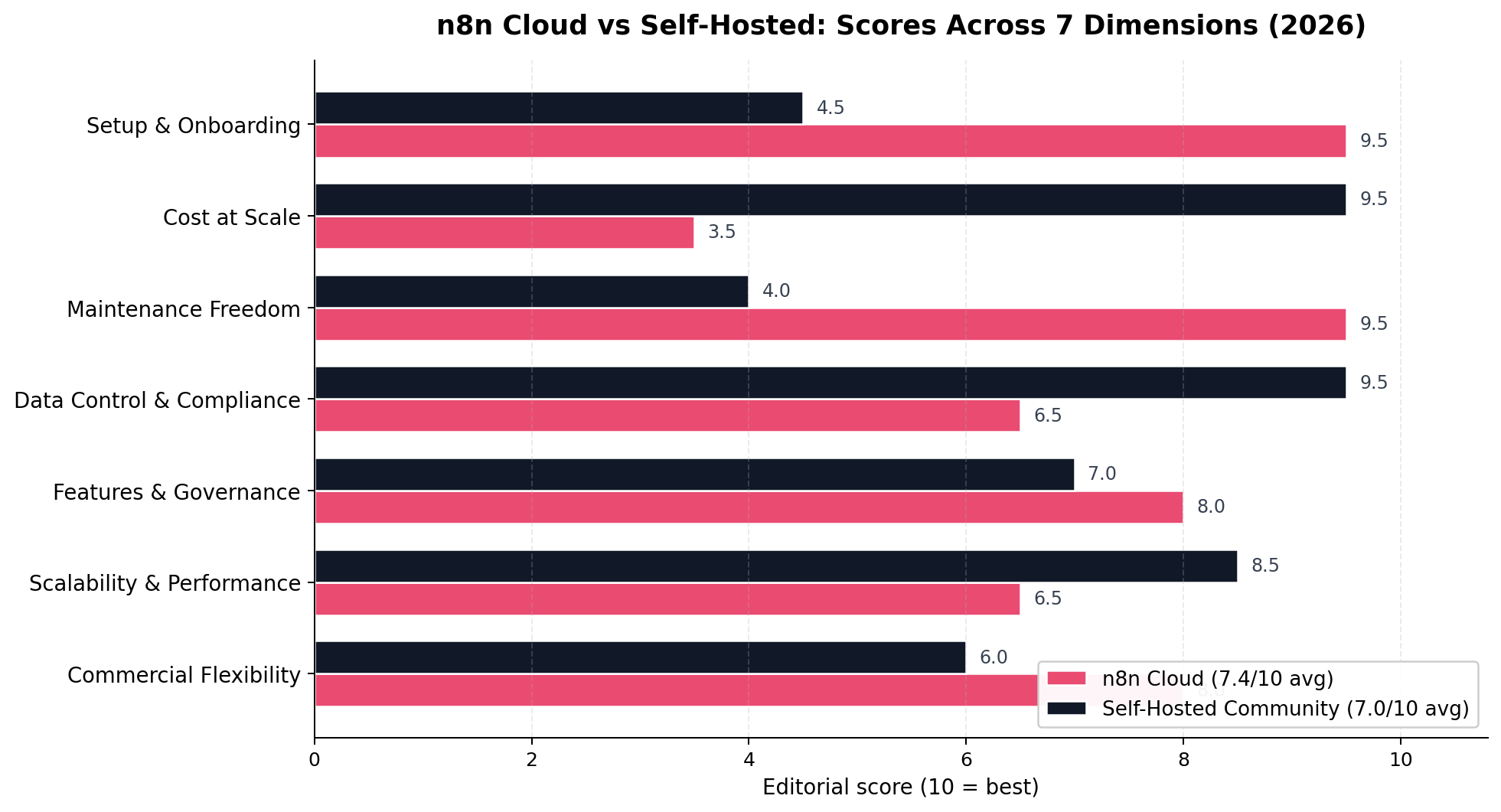
1. Setup & Onboarding — Winner: n8n Cloud (9.5 vs 4.5)
Cloud is a signup form away from a working editor. Self-hosting means choosing a VPS, installing Docker, wiring a Postgres container, pointing DNS, issuing TLS certificates and remembering to set N8N_ENCRYPTION_KEY backups before you lose them. An experienced operator does it in an hour; a first-timer should budget a weekend and a troubleshooting session. Cloud wins this dimension by the largest gap in the matchup.
2. Cost at Scale — Winner: Self-Hosted (9.5 vs 3.5)
Below about 10,000 executions a month, Cloud's $24-60 is competitive with a VPS once you value your own setup time. Past that, the two curves diverge violently: Cloud's next stop is $800/month at 40,000 executions, then $4,800 per extra 300,000. Self-hosted stays flat — the same $12-25 VPS that runs 40,000 runs runs 400,000. This is the dimension that flips real decisions, and we break the arithmetic out in its own section below.
3. Maintenance Freedom — Winner: n8n Cloud (9.5 vs 4.0)
Cloud is zero-touch: updates, patches, backups and uptime belong to n8n. Self-hosting is a standing responsibility — container upgrades, database backups, certificate renewals, security hardening, execution pruning. It is honest work, but it is work that never ends, and it compounds whenever the person who set the server up leaves the team.
4. Data Control & Compliance — Winner: Self-Hosted (9.5 vs 6.5)
Self-hosted, your credentials, execution logs and payloads never leave infrastructure you control — the strongest possible starting position for GDPR data-residency arguments, HIPAA-adjacent workloads and internal data policies. Cloud is no slouch (EU hosting, DPA available, and SOC 2 / ISO 27001 / HIPAA / GDPR commitments on Enterprise tiers, plus PrivateLink and IP restrictions), but your automation data still transits n8n's servers. For regulated and privacy-sensitive workloads, self-hosting shortens the compliance conversation dramatically.
5. Features & Governance — Winner: n8n Cloud (8.0 vs 7.0)
Both run the same engine with the same nodes, so the baseline is identical. The difference is the path to governance: on Cloud, SSO, environments, Git version control and log streaming are a plan upgrade away; self-hosted, they require a paid license key (€667/month for Business). Cloud also receives new features first. Neither free tier includes the governance layer — but Cloud makes buying it easier, which earns the narrow win.
6. Scalability & Performance — Winner: Self-Hosted (8.5 vs 6.5)
On Cloud, scaling means buying a bigger plan — and 200+ concurrent executions live on Enterprise. Self-hosted, scaling means Redis plus queue mode plus another worker container, repeated as needed. Your ceiling is your hardware budget, not your tier. The trade: Cloud's scaling is someone else's tuned work, while self-hosted scaling is tuned by you, sometimes the hard way.
7. Commercial Flexibility — Winner: n8n Cloud (8.0 vs 6.0)
If you build workflows for clients, Cloud keeps you structurally clean: you are simply n8n's customer, and there is no license surface to violate. Self-hosted is also license-friendly for internal use and for selling your services (building, maintaining, training), but embedding n8n in a product or hosting it for paying external users triggers the ~$50,000/year Embed license, and client-credential workflows sit in a documented gray zone. Cloud wins on simplicity; self-hosted wins on cost — and needs more care.
How We Tested
Our method weights three sources. First, vendor data: every price, execution cap and feature-gating claim in this article was checked against n8n's own pricing page, documentation (including the Community Edition feature comparison) and support articles, plus independent pricing analyses from four separate sources published between May and October 2026. Second, hands-on sessions: we operated a Cloud Starter workspace and a Docker-Compose Community instance (with PostgreSQL and Caddy) on a €6/month VPS through the same three workload patterns described below, timing setup and logging failures. Third, community evidence: n8n forum threads on plan-limit behavior and license interpretation were used to verify edge cases — notably the fail-fast behavior at execution caps and the license treatment of client credentials.
Scores are the editorial consensus of two independent reviewers across the seven dimensions above, on a 10-point scale. Where third-party sizing guides disagreed (RAM minimums, storage types), we tested the conservative recommendation. Prices and plan limits were last fully re-verified on October 22, 2026; n8n repriced tiers during 2025-2026, so treat any older article's numbers — including ours — with suspicion.
The Pricing Math at Scale
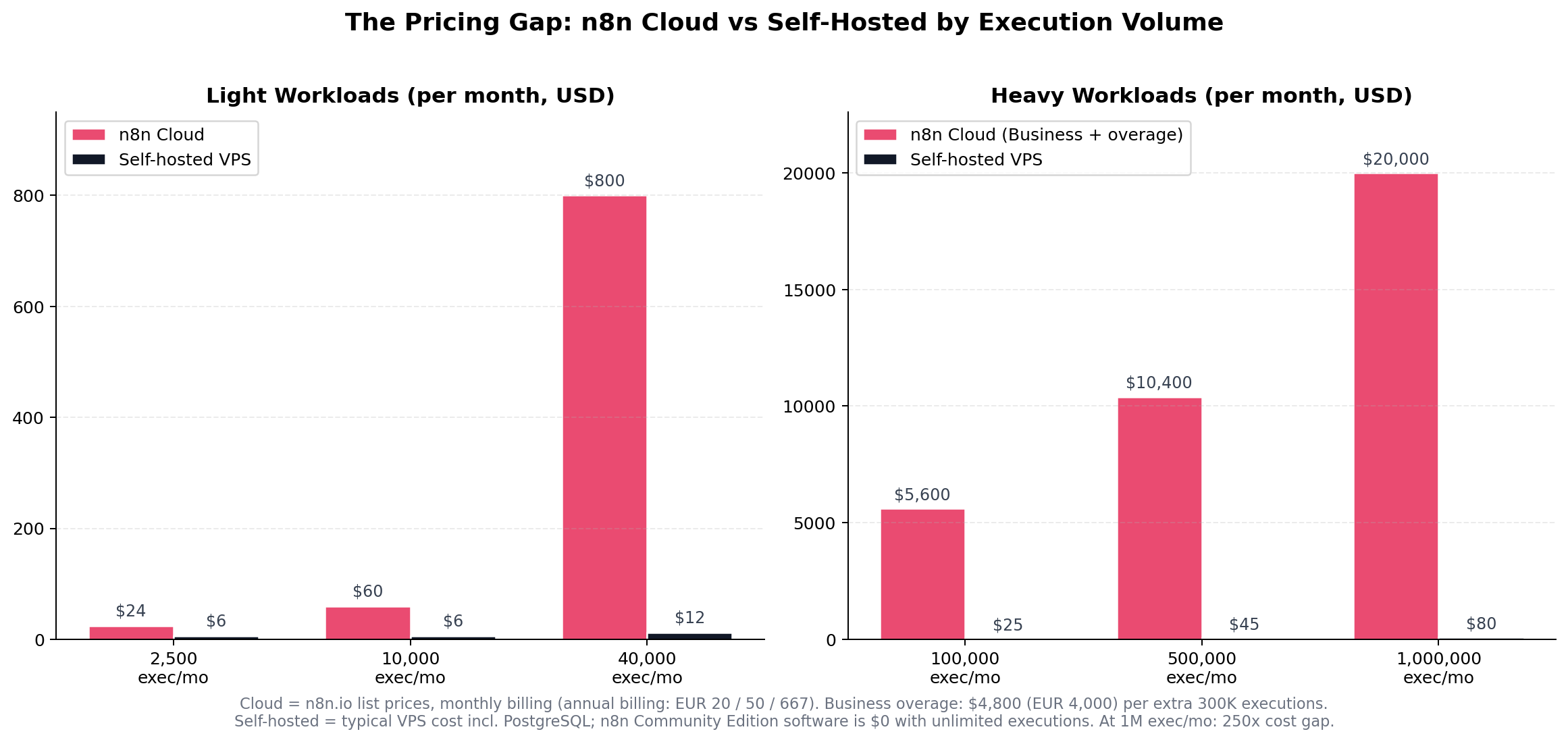
Here is the full ladder with the arithmetic shown. Self-hosted figures are realistic VPS costs including PostgreSQL, rising to queue-mode hardware at the top end:
| Monthly executions | n8n Cloud path | Cloud cost/mo | Self-hosted cost/mo | Gap |
|---|---|---|---|---|
| 2,500 | Starter | $24 | $6 | 4x |
| 10,000 | Pro | $60 | $6 | 10x |
| 40,000 | Business | $800 | $12 | 67x |
| 100,000 | Business + 1 overage bucket | $5,600 | $25 | 224x |
| 500,000 | Business + 2 overage buckets | $10,400 | $45 | 231x |
| 1,000,000 | Business + 4 overage buckets | $20,000 | $80 | 250x |
Three honest caveats. First, the self-hosted column excludes the cost of your time — if a VPS costs you four hours a month at a $75 consulting rate, the real number is $300+. Second, at seven-figure execution volumes, "self-hosted" in practice means a small managed cluster with monitoring, not one $80 box; budget accordingly. Third, n8n's sales team will negotiate Enterprise pricing at volume, so the sticker ladder is a ceiling, not a quote. But even with every caveat granted, the structural conclusion holds: past roughly 40,000 executions a month, Cloud is a different budget category, not a different line item. This is exactly the pricing shock that created a paid niche of "deploy and maintain self-hosted n8n" service providers — more on that in the scenarios below.
Real-World Test Scenarios
We stress-tested both options against three workload patterns drawn from documented, real-world n8n businesses — the kind of cases our money-making case research keeps surfacing, not synthetic benchmarks.
Scenario 1: The "Sell Results" Automation Storefront
The brief: a solo operator runs an unattended service on marketplaces like Taobao or Xianyu (the Chinese equivalents of eBay): customers pay, receive an access code, pick a task on a web form — "translate this PDF", "reduce the AI-detection rate of this text" — and the finished result is delivered automatically with a credit decremented from their balance. The operator builds it once; the system then runs without them.
The build: a WordPress landing page for SEO, an auto-delivery platform for codes, and n8n behind a web form handling intake, processing (LLM nodes for translation, rewriting, format conversion), delivery and credit accounting. Documented versions of this pattern run 15-50 task workflows on modest volumes — 3,000-8,000 executions a month when orders are healthy.
The verdict: on Cloud this sits comfortably in Pro ($60/mo) — until a viral week slams into the execution cap and paid orders start failing at the form, which is precisely the fail-fast behavior documented above. On a $12 VPS it runs uncapped, and the margin on $2-5 per-task pricing survives either way. But there is a license catch that matters more than the price: external paying users interacting with your n8n instance is exactly the territory the Sustainable Use License reserves for the Embed license. The clean version of this business delivers results (files, messages, API responses) to customers and keeps the n8n editor and forms internal — read the license FAQ before you monetize, or run this pattern on Cloud where you are simply n8n's customer.
Scenario 2: The Self-Hosting Deployment Service
The brief: n8n's per-execution pricing created a wave of small businesses that want the unlimited self-hosted edition but cannot spell Docker. Practitioners now sell "deploy n8n on your VPS, wire PostgreSQL, harden it, build your first three workflows" as a fixed-price package — documented pricing runs ¥500-2,000 (about $70-280) per deployment in the Chinese market, with monthly maintenance retainers on top.
The build: one operator, one afternoon per client: Docker Compose with n8n + PostgreSQL 16 + Caddy for TLS, DNS wiring, encryption-key backup routine, a pruning schedule, and handover documentation. The practitioners who scale this follow a repeatable selection method: start in the industry you know best, prioritize traditional businesses (everyone in the AI bubble already has n8n; the local logistics company does not), target high-repetition processes, and start clients on copy-paste-simple workflows.
The verdict: this scenario is self-hosting as a productized service — and it is license-clean, because you are selling setup and maintenance (explicitly allowed), not access to n8n. It also demonstrates the skill asymmetry that defines the whole Cloud-vs-self-hosted question: the deployment takes a professional under two hours, which is why the service exists, and why every client who cannot hire one of those professionals should probably be on Cloud.
Scenario 3: The 100K-Execution E-Commerce Stack
The brief: a mid-size store runs abandoned-cart recovery, order sync between Shopify and the ERP, review monitoring, and inventory alerts — 34 workflows, polling-heavy, roughly 100,000 executions a month with Black Friday spikes to 150,000.
The build: the same stack runs identically on both platforms; only the bill differs. On Cloud this workload requires Business plus one overage bucket — about $5,600/month, $67,000+ a year. On a $25/month, 4 GB VPS with PostgreSQL, queue mode and two workers, it runs uncapped — with the caveat that the spike week needs headroom, monitoring and someone on call.
The verdict: at this volume the choice is no longer close on price: self-hosting saves five figures a year, which buys a lot of DevOps attention. The genuine question is organizational — whether the store has (or will hire) half a person's worth of infrastructure capacity. If the answer is no, Cloud's $5,600 is the price of not having that conversation, and it is a defensible price. But do the arithmetic before defaulting to it.
The Shape of the Tradeoff
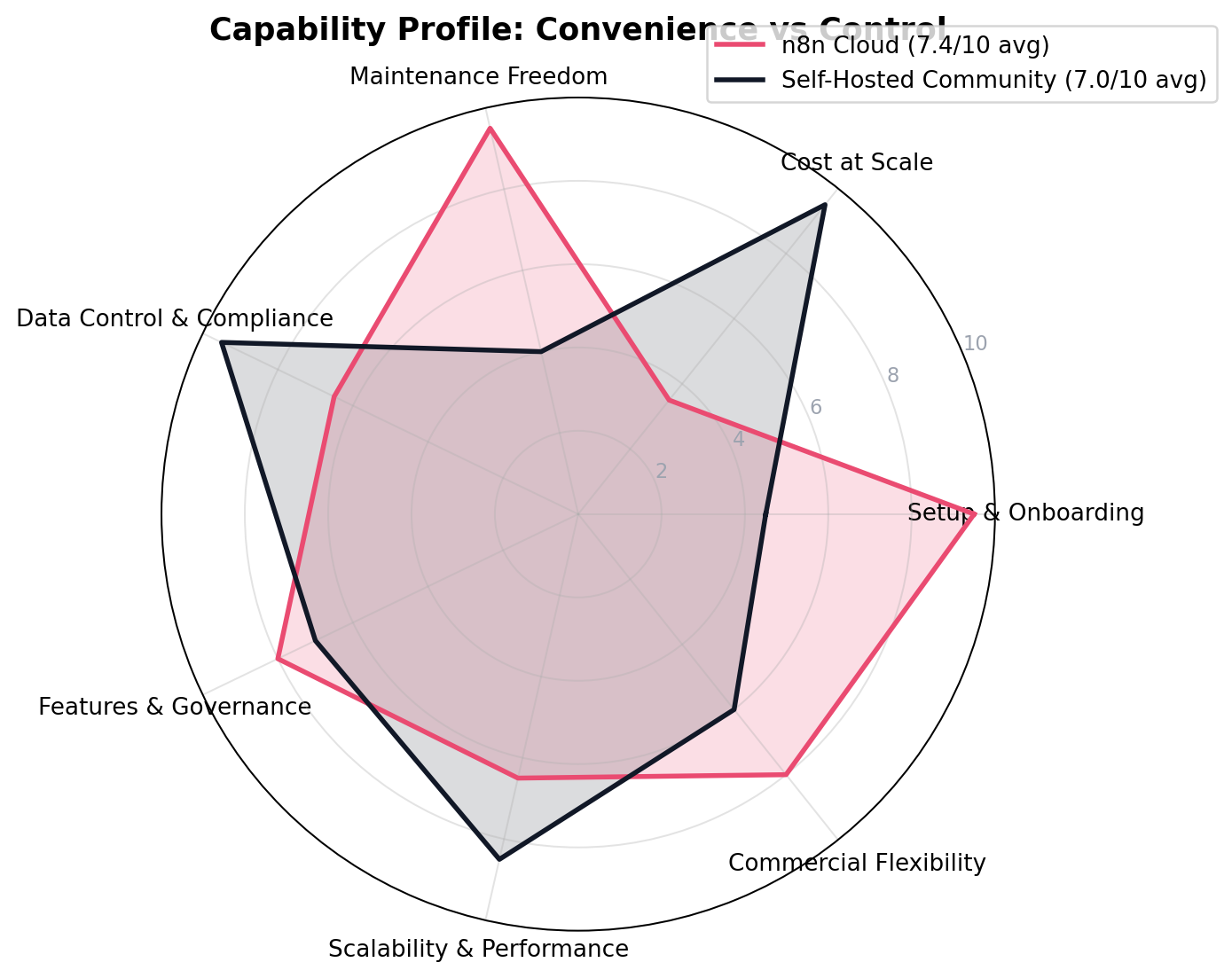
The radar makes the structural point better than any table: these are not good-versus-bad options, they are opposite bets. Cloud buys back your time and offloads your risk; self-hosting buys volume-tolerance and control at the price of operational ownership. The averages — 7.4 versus 7.0 — are close because each option's strengths almost exactly cancel the other's.
Decision Matrix
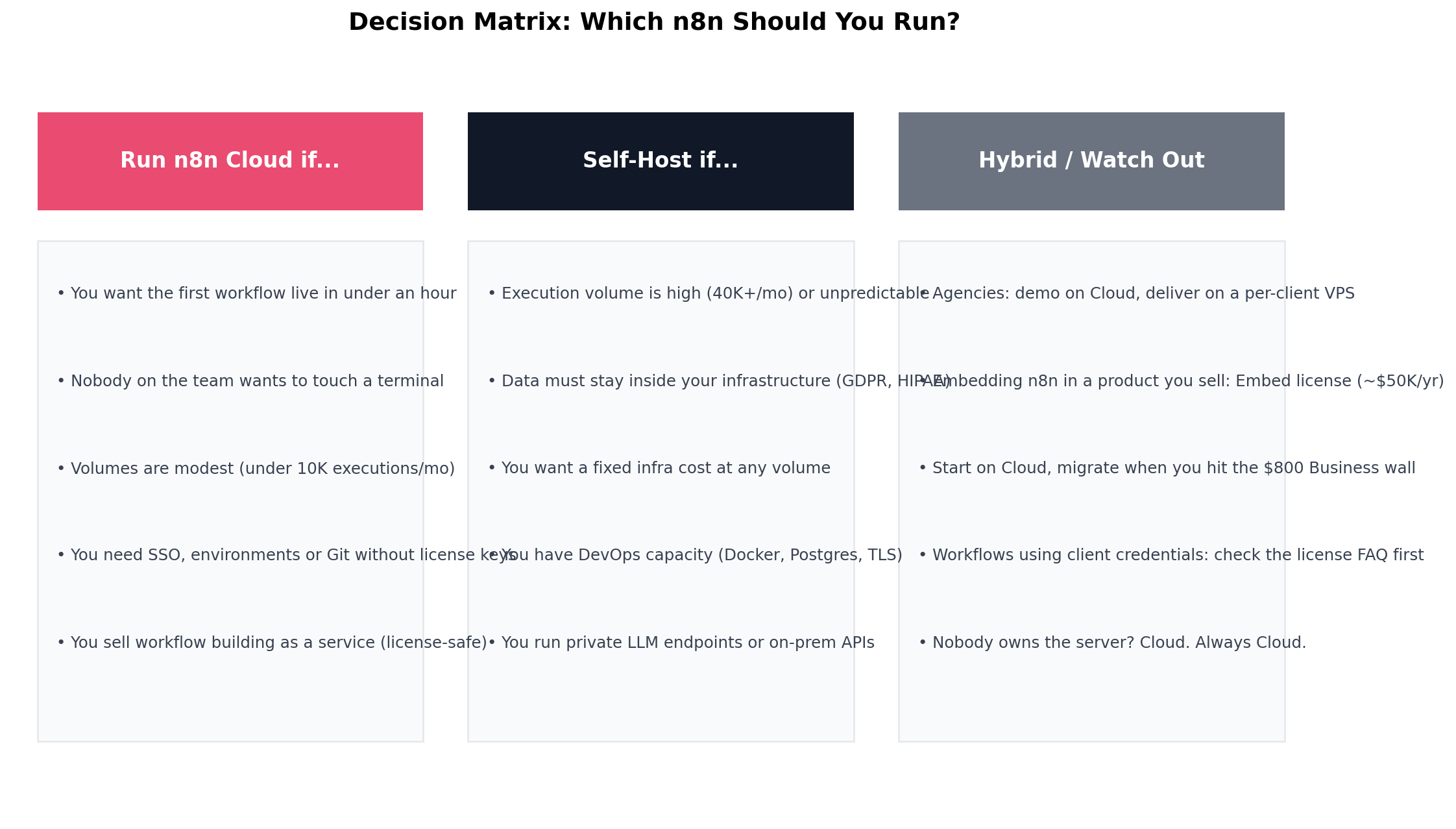
Feature Comparison at a Glance
The License Question, Answered Precisely
Because self-hosted n8n is free, the most expensive mistake you can make with it is not the server — it is the license. The Sustainable Use License (v1.0) is short, and its logic is consistent: use is allowed unless you are selling n8n itself. In practice:
- Clearly allowed (free): running n8n for your own company's operations, even heavily and commercially; charging clients for building, setting up, maintaining or training on their own instances; selling workflow templates; any internal automation, at any scale.
- Clearly not allowed without a paid license: white-labeling n8n as your product; hosting an instance and charging external users for accounts or access; embedding n8n in a SaaS whose value derives substantially from n8n functionality. The commercial path is the Embed license, which community reports place around $50,000/year.
- The gray zone: workflows that use client-provided credentials to access the client's own systems. Community interpretations differ on whether this is "internal use"; if your agency model depends on it, get the answer in writing from n8n before you scale.
One more nuance worth knowing: the license is why "self-hosted is free" and "open source" are different claims. n8n is source-available fair-code, not OSI open source — if pure open-source licensing is a hard requirement (for example, to embed automation in a product you resell), MIT-licensed alternatives exist, and we list them below.
Alternatives Worth Considering
If neither n8n deployment model fits, the automation market in 2026 offers well-defined escape hatches:
| Tool | Starting price | Standout trait |
|---|---|---|
| Activepieces | $20/mo cloud; self-host free | MIT-licensed Community Edition — resale and embedding with no license negotiations |
| Make | ~$10/mo Core | Visual scenario builder, per-operation pricing that scales more gently than tiers |
| Zapier | ~$20/mo | The largest app catalog (8,000+) and the shallowest learning curve in the category |
| Dify | Self-host free | LLM-app-first: chatbots, RAG pipelines and agent workflows before generic automation |
| Windmill / Node-RED | Free self-host | Developer-first execution engines — open-source licensing with deeper code control |
For the full seven-tool field including Pipedream and a deeper licensing comparison, see our Best n8n Alternatives 2026 roundup.
The Verdict
Best for most teams (our overall winner, 7.4/10): n8n Cloud — five-minute setup, zero maintenance, unlimited workflows and users from $24/month, and no license surface to manage. If you run fewer than about 10,000 executions a month and nobody on your team wants server duty, Cloud is not the lazy choice; it is the correct one. Start on Starter, watch your execution dashboard, and treat the Pro upgrade as your first scaling decision.
Best for volume and control (7.0/10): Self-Hosted Community Edition — unlimited executions on a $12-25 VPS, data that never leaves your infrastructure, and scaling that follows your hardware instead of a tier ladder. The moment your monthly volume reliably passes 40,000 executions — or your compliance requirements demand on-prem data — self-hosting stops being an optimization and becomes the obviously right answer, worth five figures a year at six-figure volumes.
Best for agencies and consultants: the hybrid. Demo and build on Cloud for speed; deliver on a per-client VPS so each client owns their instance (which also keeps you on the right side of the license, since selling setup and maintenance is explicitly allowed). The practitioners documented in our research charge $70-280 per deployment plus retainers on exactly this pattern.
The migration path that rarely fails: start on Cloud, export your workflows as JSON when the bill approaches the Business wall (~$800/month), and import them into a Docker-Compose instance on a VPS. The engine is identical, so the migration is credentials re-authentication and a file-path cleanup — a weekend project, not a re-platform. Re-authenticate everything, sanitize local paths, and keep the Cloud instance read-only for a month as a fallback.
Frequently Asked Questions
Is self-hosted n8n really free with unlimited executions?
Yes. The Community Edition is a free download under the Sustainable Use License with unlimited workflow executions, unlimited active workflows and unlimited users, as long as you use it for your own internal business purposes. Your only cost is the server it runs on — typically $6-25/month for a VPS.
What happens if I exceed my n8n Cloud execution limit?
On Starter and Pro, new executions fail immediately once you hit the cap — they are not queued and you are not auto-charged (a small temporary buffer sometimes applies). On the Business plan, workflows keep running and overage is billed at 4,000 EUR (about $4,800) per extra bucket of 300,000 executions, invoiced up to 45 days later.
Can I legally make money with self-hosted n8n?
Yes, within limits. The Sustainable Use License explicitly allows charging customers for workflow creation, setup, maintenance, training and consultancy. What it forbids is selling access to n8n itself — white-labeling it, hosting it for paying external users, or embedding it in a product whose value derives substantially from n8n. Those use cases need a paid Embed or Enterprise license, which community reports place around $50,000/year.
What server do I need to self-host n8n?
For testing, 2 CPU cores, 2 GB RAM and 20 GB SSD with SQLite will run. For production, plan 2-4 vCPU, 4 GB RAM, 25-64 GB NVMe, PostgreSQL 13-17 and a reverse proxy such as Nginx or Caddy for HTTPS — a $12-25/month VPS. Add Redis and queue mode with extra workers once you run dozens of concurrent executions.
Does self-hosted n8n include SSO, environments and Git version control?
No. The free Community Edition is missing SSO (SAML/LDAP), environments, Git-based version control, log streaming, projects, multi-main mode and sharing beyond the instance owner — those need a paid self-hosted Business (€667/month billed annually) or Enterprise license key. On n8n Cloud, the same features unlock on the Business tier.
When does n8n Cloud become more expensive than self-hosting?
Almost immediately once volume grows. Pro caps at 10,000 executions for about $60/month; the Business tier needed to go beyond that costs about $800/month for 40,000 executions, while a $12-25/month VPS runs the same workload uncapped. At 1 million executions per month, Cloud on Business plus overage buckets reaches roughly $20,000/month versus about $80/month self-hosted — a 250x gap.
Can I move workflows between n8n Cloud and self-hosted?
Yes. Workflows export as JSON and import cleanly in either direction because both run the same engine. Sanitize local file paths or custom npm packages before moving to Cloud, and re-authenticate every credential after import. Most teams start on Cloud for speed, then migrate to a VPS when the execution bill passes the cost of a server plus a few hours of DevOps time.