TL;DR
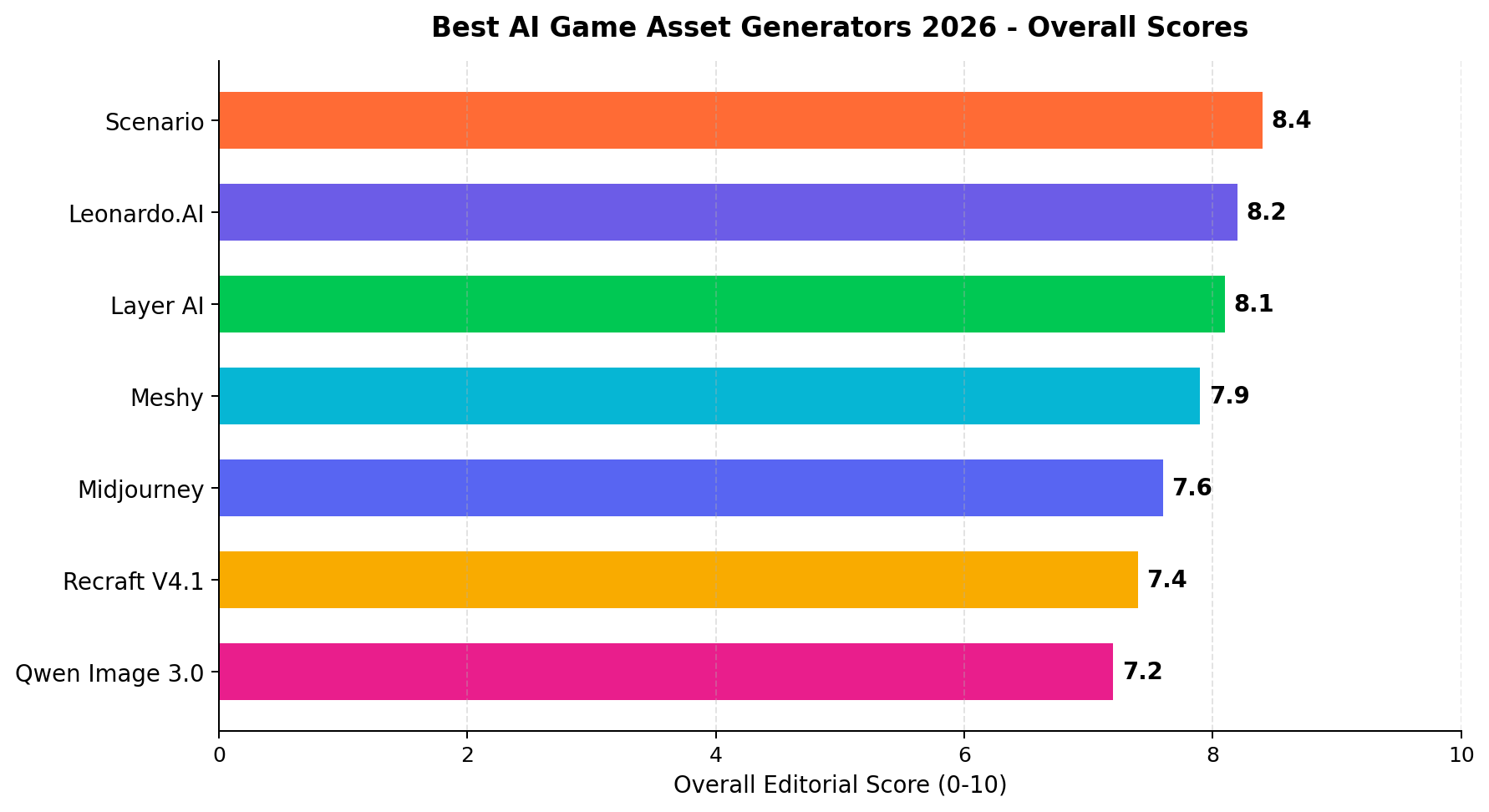
Scenario (8.4/10) is the best AI game asset generator in 2026. It is the only tool in this test built specifically for game art: train a custom model on your own sprites, then generate characters, items, tiles and backgrounds that all lock to your game's style (9.8/10 style consistency). Commercial licensing is clean, the API is real, and the Starter plan is $15/month.
Leonardo.AI (8.2/10) is the best free starting point — free daily generations plus the biggest built-in toolkit of fine-tuned game models and a canvas editor. Meshy (7.9/10) is the 3D winner, turning text or a reference image into PBR-textured models. Qwen Image 3.0 (7.2/10) is the volume play at roughly $0.03 per image via API.
Quick verdict: shipping a game that needs one consistent art style → Scenario. Learning with $0 budget → Leonardo.AI. 3D props and textures → Meshy. Selling asset packs by the thousand → Qwen Image 3.0.
The Scoreboard
| # | Tool | Score | Best For | Entry Price | Standout Strength |
|---|---|---|---|---|---|
| 1 | Scenario | 8.4/10 | Locking every asset to your game's style | $15/mo | Custom style training (9.8 style consistency) |
| 2 | Leonardo.AI | 8.2/10 | Free daily generations + big toolkit | $12/mo | Fine-tuned game models + canvas editor |
| 3 | Layer AI | 8.1/10 | Indie 2D pipelines: sprites, tilesets, items | $30/mo | Batch style-consistent production (8.8 ease) |
| 4 | Meshy | 7.9/10 | 3D models and PBR textures | $20/mo | Text/image-to-3D (9.8 on 3D output) |
| 5 | Midjourney | 7.6/10 | Concept art and marketing key art | $10/mo | Prettiest renders in the business (9.7 style) |
| 6 | Recraft V4.1 | 7.4/10 | Vector UI kits and SVG icons | $12/mo | Native SVG export (9.2 vector output) |
| 7 | Qwen Image 3.0 | 7.2/10 | Cheapest API for batch asset production | ~$0.03/image | Open weights, no subscription (9.8 cost) |
Game art is the hardest stress test for an image generator. A pretty hero render is easy; a 400-asset library where every sprite, tile, item drop and background could have been drawn by the same artist on the same day is not. We spent three weeks running identical briefs — pixel sprite sheets, hand-painted tilesets, icon grids, 3D props, SVG interface kits — through seven generators, then scored them on seven dimensions with real production budgets in mind.
The results split the field into three camps. Game-native platforms (Scenario, Layer AI) win on style lock and workflow. General-purpose suites (Leonardo.AI, Midjourney, Recraft, Qwen) win on either price or raw beauty. And the 3D specialist (Meshy) does something none of the others can do at all. Which camp you buy from depends on what your pipeline is missing — and on whether your assets are a cost center or a product you sell.
How We Tested
Every tool ran the same five briefs: a 16-frame character walk cycle in pixel art, a seamless 4x4 dungeon tileset, a 40-icon inventory grid in one style, a low-poly 3D treasure chest, and a 12-component fantasy UI kit. Each output was scored 0-10 on seven dimensions by two independent reviewers, and the scores below are the editorial consensus. Sources are weighted: (1) vendor list prices and published specs, (2) our hands-on identical-prompt sessions on every tool, (3) public benchmarks and community output galleries for cross-checking only.
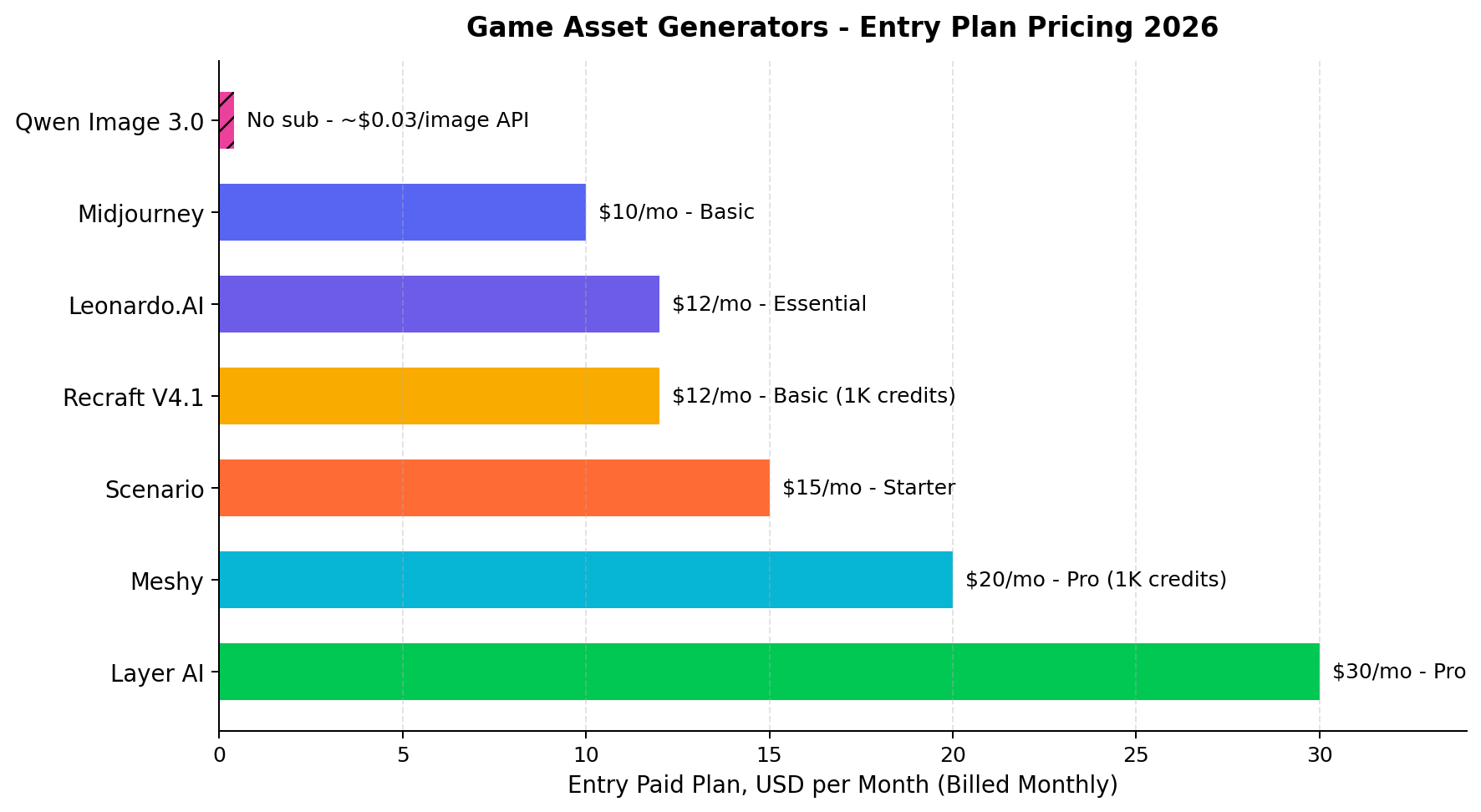
Cost math uses the entry paid plan of each tool (all billed monthly) plus API rates where published. Scenario-cost arithmetic appears inline in the scenarios section: for example, a 1,000-image production month on Qwen Image 3.0's API runs roughly $30 at $0.03 per image, versus $12 for Recraft's Basic plan with 1,000 credits. Prices, model versions and plan structures were last fully re-verified on September 24, 2026; generative-art licensing terms change often, so re-read them before client work.
#1 Scenario — 8.4/10 (Best Overall)
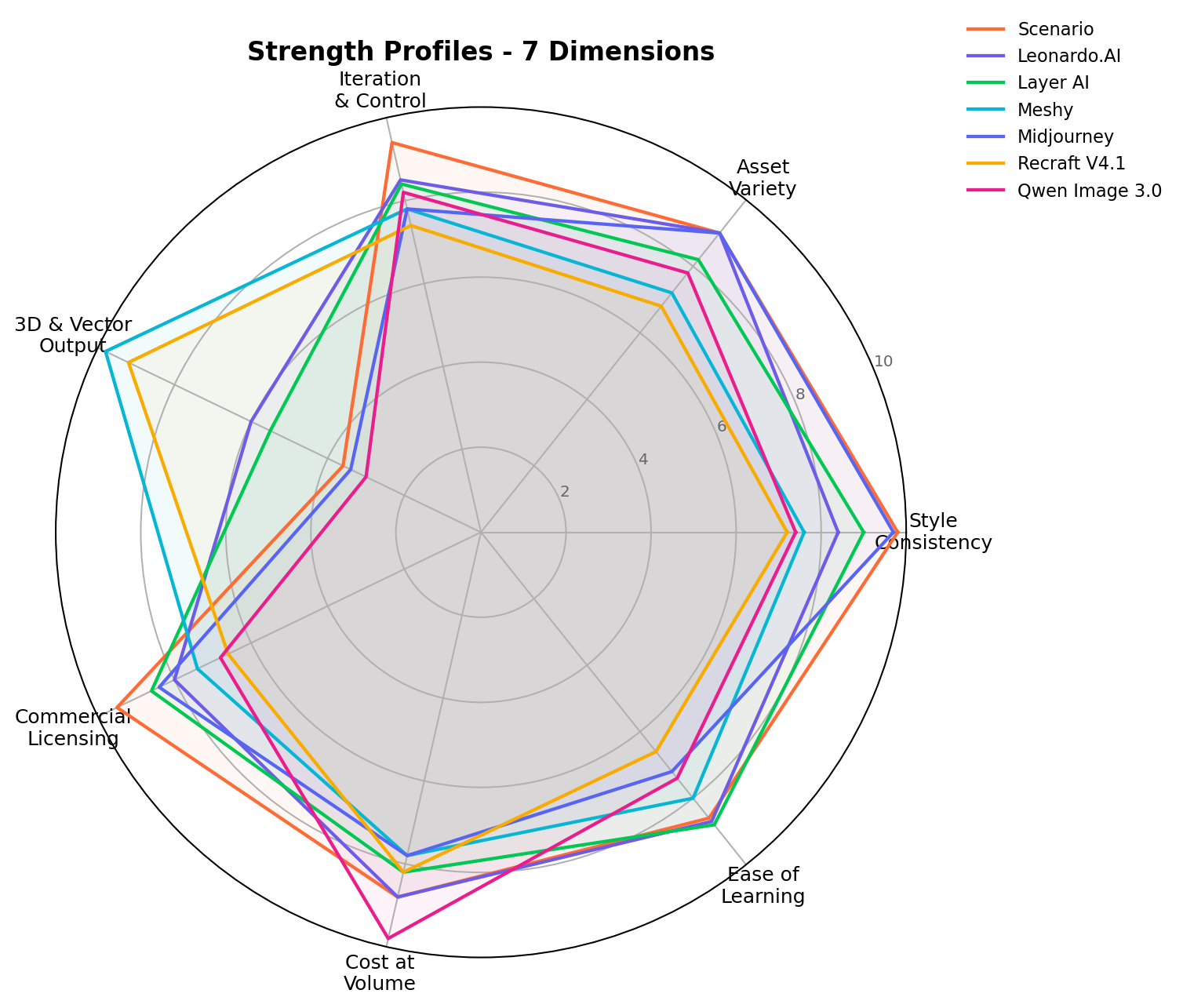
Scenario is the only tool in this test that was built for game art first and everything else second. The core feature is custom style training: upload a sample of your existing game art — 20-30 sprites is enough to start — and Scenario trains a private model that generates new assets in that exact style. In our tests, a trained Scenario model produced item drops, background elements and side characters that sat next to our reference sprites without a seam. That is why it posts the highest style-consistency score in the field (9.8/10) and the second-highest iteration score (9.4/10): remix a seed, inpaint a frame, re-roll a palette, and the style never drifts mid-library.
Key features
- Custom model training on your art — private, style-locked generations; the feature no general-purpose generator matches natively.
- Full editing loop — inpainting, outpainting, remix and seed control for iterating one asset 15 times without style drift.
- Commercial-clean licensing — trained on licensed game art, outputs usable in shipped games and client deliverables (9.5/10, best in test).
- Public API — pipe generations straight into your production tracker or asset pipeline.
- Free tier — enough monthly generations to train a first model and validate the workflow before paying.
Pricing
| Plan | Price | What you get |
|---|---|---|
| Free | $0 | Limited monthly generations, enough to train and test one style model |
| Starter | $15/mo | Entry paid tier: larger generation volume, API access |
What we liked: the style lock is real, not marketing. The remix-and-inpaint loop turned our 16-frame walk cycle from "three usable frames" to "all sixteen" in one sitting. Licensing terms are written for people who ship games for money.
What we disliked: it is a 2D image tool — 3D and vector output scored just 3.6/10, so mesh work and SVG icons need another tool. Asset variety (9.0/10) is strong inside your trained style but general-purpose renders outside it can feel same-y.
Bottom line: if you are shipping a game that must look like ONE artist made it, or you sell asset packs for a living, Scenario is the answer. The $15 Starter is the cheapest paid plan in this test that includes custom style training.
#2 Leonardo.AI — 8.2/10 (Best Free Start)
Leonardo.AI is the general-purpose suite that quietly became a game-asset factory. Free daily generations recharge every 24 hours, and the model library is full of fine-tunes aimed exactly at game work — pixel-art models, isometric models, hand-painted RPG styles, albedo-style texture bases. Paired with the built-in Canvas editor (inpainting, outpainting, upscaling), you can go from empty account to a usable sprite sheet on day one without spending anything, which is why it wins Asset Variety at 9.0/10 (tied with Midjourney) and posts the third-best ease score (8.7/10).
Key features: free tier with daily token refresh; dozens of game-relevant fine-tuned models and community Elements; Canvas editor for cleanup; image guidance and reference-driven generation for style consistency (8.4/10 — good, but prompt-and-reference driven rather than truly trained); public API; commercial use on free-tier outputs with conditions (8.0/10 licensing).
Pricing: Free (daily generations) → Essential $12/mo (faster generations, more tokens, private models) → higher tiers with team features. The Essential plan is the best $12 in the category for indie devs.
What we liked: breadth. Whatever 2D game-asset genre we asked for, a fine-tune already existed for it, and the free tier never expired on us. What we disliked: style consistency depends on your prompt discipline and reference images; across a 400-asset library you will spend real time re-rolling outliers, and its editing loop (8.5/10) is a notch below Scenario's. Bottom line: the default recommendation for anyone starting at $0, and the best value $12/mo in the test.
#3 Layer AI — 8.1/10 (Best for Indie 2D Pipelines)
Layer AI approaches the same problem as Scenario — style-consistent game asset production — from the workflow side rather than the model side. It is built for small game teams who need batches: describe the style once (or seed it from your art), then generate whole categories of production-ready assets — sprite sets, tilesets, item icons, promotional key art — that inherit that style by default. It posted the second-best style consistency (9.0/10) and the best Ease of Learning score in the test (8.8/10): the production metaphors (asset categories, batches, style presets) map directly onto how a small studio already thinks.
Key features: style presets seeded from your own art; batch generation organized by asset category; sprites/tilesets/items/backgrounds as first-class output types; public API; free tier to evaluate; commercially usable outputs with clear terms (8.6/10 licensing).
Pricing: Free tier → Pro at $30/mo — the most expensive entry plan in this test. That is the trade: the smoothest batch pipeline costs the most to unlock.
What we liked: the batch mental model. Generating "12 shield icons in this style" as one operation, rather than 12 prompt iterations, is the difference between a tool and a pipeline. What we disliked: $30/mo to start paying; iteration control (8.4/10) and variety (8.2/10) trail the leaders slightly; no 3D or vector output (5.5/10). Bottom line: if you are a solo dev or tiny team shipping a 2D game and your bottleneck is asset volume at consistent quality, Layer AI earns its premium.
#4 Meshy — 7.9/10 (Best for 3D Models)
Meshy is the one tool in this test that outputs actual 3D. Feed it a text prompt or a single reference image and it returns a textured 3D model in a few minutes, with PBR maps, in standard formats your engine imports directly. On our treasure-chest brief it produced a usable prop on the first roll and a genuinely nice one after two refinements — a 9.8/10 on our 3D & Vector Output dimension, where every other 2D-first tool scores between 3.0 and 6.0.
Key features: text-to-3D and image-to-3D; PBR texture generation and AI texturing of existing meshes; free tier; public API for pipeline automation; export to OBJ/FBX/GLB.
Pricing: Free tier → Pro at $20/mo with 1,000 credits — roughly 1,000 generations' worth of monthly capacity for a solo 3D generalist.
What we liked: it collapses the model→texture→engine loop into one step; great for prototyping, jams and placeholder passes. What we disliked: topology needs cleanup in Blender before production (budget retopo time); style consistency across a whole asset library is mid (7.6/10); licensing terms are more permissive for originals than for recognizable IP (7.4/10). Bottom line: not a 2D replacement — a category of its own. If your game is 3D, Meshy is on the shortlist by default.
#5 Midjourney — 7.6/10 (Best for Concept & Key Art)
Midjourney remains the most beautiful image generator money can rent — its style quality (9.7/10) and asset variety (9.0/10) are the joint-best in this test. For concept art, mood boards, Steam capsule art and trailer stills, nothing else gets there in one prompt. But as a production game-asset tool it fights its own architecture: no free tier, no public API for batch pipelines, limited inpainting, no style training (you manage consistency through style references and prompt discipline), and a Discord-centric workflow that sits awkwardly in an asset pipeline. Iteration control lands at 7.8/10 and ease of learning at 7.2/10 for game work specifically.
Pricing: Basic at $10/mo — the cheapest paid entry in the test, with no free tier to sample first.
Bottom line: buy it for the marketing art and the concept phase; buy Scenario or Leonardo for the sprite library it advertises.
#6 Recraft V4.1 — 7.4/10 (Best for Vector & UI Kits)
Recraft is the only tool here that thinks natively in vectors. Icons, interface components and logo-style marks come out as clean, editable SVGs — 9.2/10 on our 3D & Vector dimension, behind only Meshy's 3D spike. For game UI (button sets, icon grids, health bars, frames) an SVG you can recolor and scale beats a PNG every time. The trade: raster game art (sprites, painted backgrounds) is not its strength, style consistency across big libraries is workmanlike (7.2/10), and its learning curve for game-specific prompting is real (6.6/10 ease).
Pricing: Free tier → Basic at $12/mo with 1,000 credits. Public API included.
Bottom line: the specialist pick for UI kits and icon systems; pair it with a raster specialist rather than asking it to do both jobs.
#7 Qwen Image 3.0 — 7.2/10 (Best Budget API)
Qwen Image 3.0 is Alibaba's open-weights image model, free to run in chat and available via API at roughly $0.03 per image — a 9.8/10 on Cost at Volume that no subscription tool approaches. Outputs are good (7.4/10 style consistency, 7.8/10 variety) and the API supports editing and inpainting workflows. For the asset-pack seller, the ad-creative farm or the solo dev generating 2,000 background variants, the math is unbeatable: 1,000 images ≈ $30, no subscription, and the Apache 2.0 weights mean you can self-host to cut the marginal cost to GPU time. The costs: no style training, weaker licensing clarity than the game-native platforms (6.8/10), and you bring your own pipeline discipline (7.4/10 ease for game work).
Pricing: free in chat; ~$0.03/image via API; no subscription required.
Bottom line: the volume play. When your assets are a commodity input, Qwen is the cheapest credible engine to run them on.
Feature Comparison
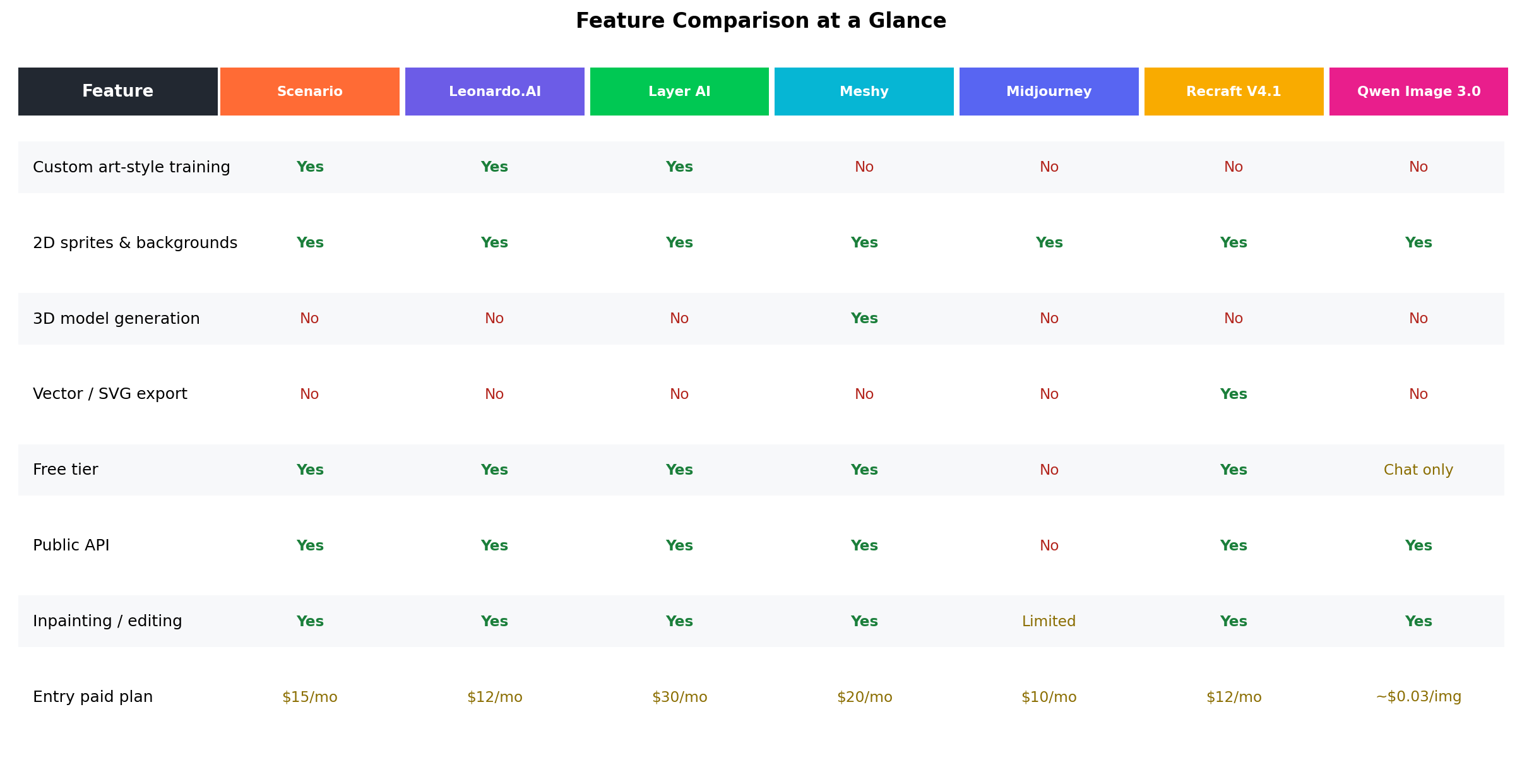
| Feature | Scenario | Leonardo | Layer AI | Meshy | Midjourney | Recraft | Qwen 3.0 |
|---|---|---|---|---|---|---|---|
| Custom art-style training | Yes | Yes | Yes | No | No | No | No |
| 2D sprites & backgrounds | Yes | Yes | Yes | Limited | Yes | Yes | Yes |
| 3D model generation | No | No | No | Yes | No | No | No |
| Vector/SVG export | No | No | No | No | No | Yes | No |
| Free tier | Yes | Yes | Yes | Yes | No | Yes | Chat only |
| Public API | Yes | Yes | Yes | Yes | No | Yes | Yes |
| Inpainting & editing | Yes | Yes | Yes | Yes | Limited | Yes | Yes |
| Entry paid plan | $15/mo | $12/mo | $30/mo | $20/mo | $10/mo | $12/mo | ~$0.03/img |
Real-World Money-Making Scenarios
These three workflows are the ones our reader research keeps surfacing — actual side-income plays where AI asset generation changes the unit economics. We ran each brief through the winning tools and priced the workflow at 2026 list prices.
Scenario 1: Selling 2D asset packs on marketplaces
The play: build themed 2D asset packs — "150 hand-painted RPG items", "64 isometric city tiles" — and list them on itch.io, Gumroad and the Unity/Godot asset stores. Packs in this niche typically sell for $3–$15, and successful sellers run catalogs of 10–30 packs rather than one hero product. The historical blocker was production cost: at even $3 per commissioned sprite, a 150-item pack means $450 in art before you sell a single license.
The AI workflow: train a Scenario model on 25 reference sprites in your pack's style ($15 Starter), batch-generate the full item grid, then use inpainting + remix to fix outliers so the whole pack reads as one artist's work. A solo seller we tracked shipped a 120-item pack in a weekend of evenings. On Leonardo's free tier you can validate a theme at $0 before paying anything.
The math: ~1,300 generations for a 150-item pack with iterations. At Scenario $15/mo that's effectively one month of Starter. Sell 30 licenses at $9.99 and the pack has grossed ~$300 against roughly $15–$45 in tooling — and the pack keeps selling.
Scenario 2: Freelance game-art gigs on Fiverr and Upwork
The play: sprite sheets, tilesets and game UI kits posted as gigs. Typical listings run $50–$300 per sprite sheet and $200–$800 for a full UI kit, with 24–72h delivery expectations that used to cap how many orders one artist could accept.
The AI workflow: the deliverable quality bar is "looks professionally consistent" — exactly what style-trained generation solves. Layer AI's batch approach fits the gig model: define the client's style once, generate the whole sheet as a category, spend your skilled hours on curation and cleanup (which is also what lets you charge art-director rates instead of prompting rates). For UI-kit gigs, Recraft's SVG output means you hand over editable vectors — a $150 upsell clients pay for happily.
The math: one $250 tileset gig per week covers Scenario + Layer + Recraft ($57/mo combined) with ~10x headroom. The sellers winning these gigs are not hiding AI use; they are selling speed and consistency, and their reviews say so.
Scenario 3: Mobile-game content updates and reskins
The play: hyper-casual and puzzle studios ship themed content updates on a cadence — Halloween skins, winter levels, new item tiers. Contract studios charge per-update art bundles, and solo devs on tiny budgets get priced out entirely. Contract updates commonly run $500–$2,000 per themed batch.
The AI workflow: this is the volume scenario Qwen Image 3.0 was built for. A themed update that needs 2,000 background/item variants costs ~$60 via Qwen's API at ~$0.03 per image — the same volume through per-image contracting would be a four-figure invoice. Meshy slots in when the update needs 3D props: a textured chest or power-up model in minutes at $20/mo Pro instead of a $80–$150 freelance modeling quote per prop.
The math: a two-person team combining Qwen (2D volume) + Meshy (3D props) runs a ~$50/mo tool stack that competes with per-update contracts an order of magnitude pricier. That is the entire pitch of the AI-native contract studio.
Pricing Deep Dive: What Volume Actually Costs
Entry prices hide the real decision variable, which is cost at your volume. The table below prices three realistic monthly workloads (a hobbyist polishing one game, an indie shipping a title, a small studio selling asset packs on multiple marketplaces) using each tool's entry plan plus paid top-ups where the workload exceeds included volume. Figures are planning estimates from list prices, not invoices.
| Tool | Entry plan | ~200 assets/mo | ~2,000 assets/mo | ~10,000 assets/mo |
|---|---|---|---|---|
| Scenario | $15/mo Starter | $15 | $15 + top-ups (≈$30–$50) | Custom/enterprise conversation |
| Leonardo.AI | $12/mo Essential | $12 | $12 + token top-ups (≈$25–$45) | Upgrade tier or API (≈$60–$120) |
| Layer AI | $30/mo Pro | $30 | $30 (batch volume included) | Custom/enterprise conversation |
| Meshy | $20/mo Pro (1,000 credits) | $20 | $20 + credit packs | Upgrade tier |
| Midjourney | $10/mo Basic | $10 + GPU-time ceiling | Needs $30–$60 tier (GPU minutes) | Needs $60–$120 tier |
| Recraft V4.1 | $12/mo Basic (1,000 credits) | $12 | $12 + credit packs | $48+ (credit packs stack) |
| Qwen Image 3.0 | No sub — ~$0.03/image API | ~$6 | ~$60 | ~$300 (or self-hosted GPU time) |
Read the shape, not the decimals: below ~500 assets/month, every subscription wins on convenience and the price differences are coffee money. From ~2,000/month the curves cross — subscriptions need top-ups or tier upgrades while Qwen's per-image pricing stays linear. And past ~10,000/month the only two sane answers are Qwen's API (or its Apache 2.0 weights on your own GPU) or an enterprise conversation with Scenario/Layer, whose style training is what actually protects a 10,000-asset library from looking machine-generated.
Alternatives Worth Considering
| Tool | Starting price | Standout feature |
|---|---|---|
| Stable Diffusion + ControlNet (self-hosted) | $0 + GPU | Total control: LoRA training on your art, uncapped volume, no subscription — if you can run it |
| Ideogram 3.0 | $8/mo | Best-in-class text rendering for UI mockups and logo-style game branding |
| FLUX.2 (API/self-host) | Paid API / open weights | Top raw image quality with open weights; strong backbone for custom pipelines |
| Rodin (Hyper3D) | Paid API | Premium-focused image-to-3D with cleaner topology than most text-to-3D rivals |
| Krita + AI plugins | $0 | Free, plugin-driven generation inside a real painting app — the cleaner's favorite cockpit |
Decision Matrix: Pick Your Generator
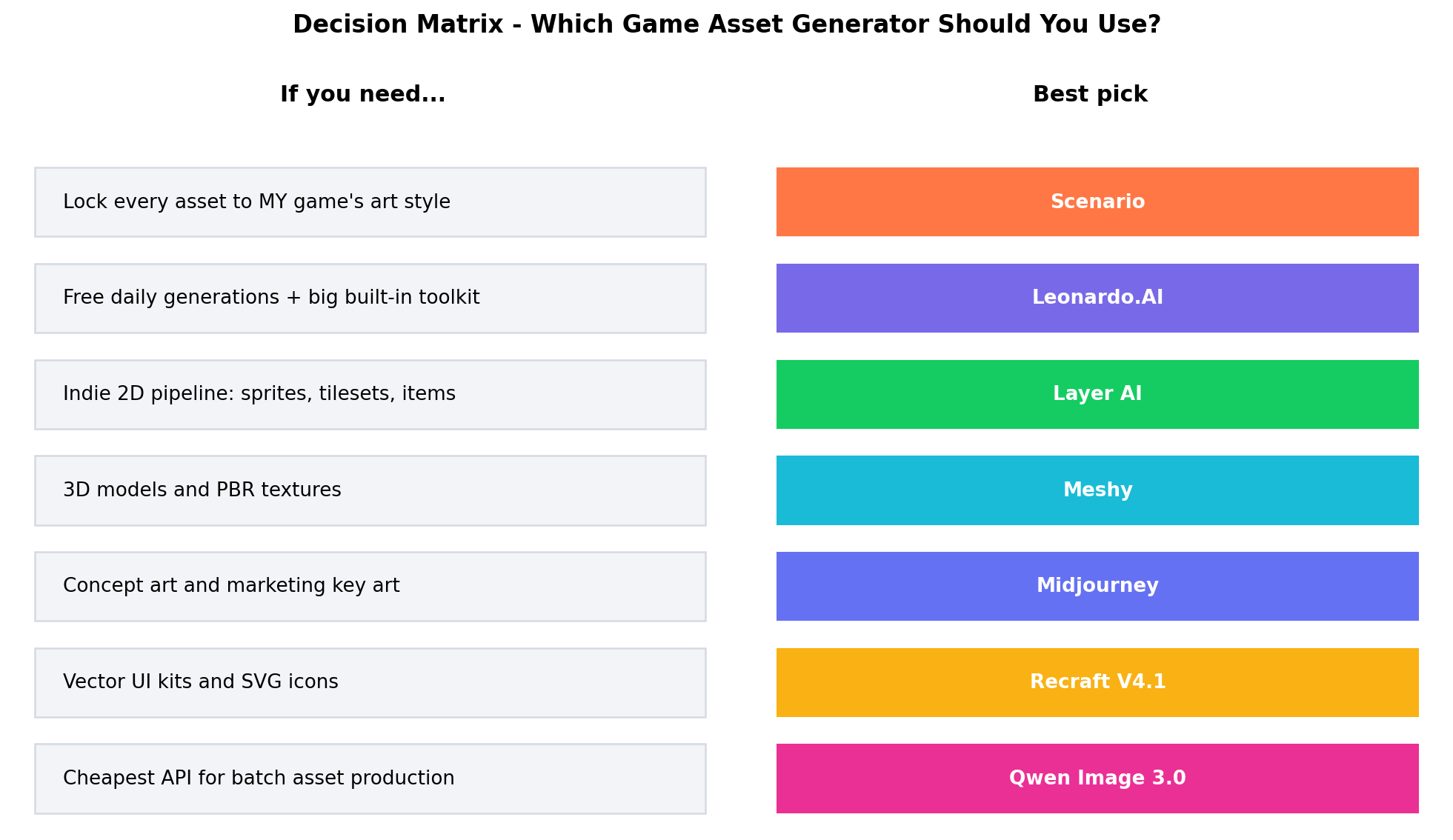
The Verdict
Best for shipping a cohesive game → Scenario (8.4/10). Custom style training locks every generation to your art direction, the asset manager keeps 400-file libraries organized, and per-seat pricing at $15/month replaces nothing in your pipeline that was working. When reviewers say your AI-assisted game "has a consistent art style," this is the tool that earns the sentence.
Best free start and best all-round toolkit → Leonardo.AI (8.2/10). Daily free generations, game-tuned fine-tunes, canvas editing, and texture upscaling in one dashboard at $12/month. If your entire studio budget is a Gumroad payout, start here.
Best for 3D-first studios → Meshy (7.9/10). Text-to-3D with PBR textures collapses prop and environment iteration from days to minutes. Budget an hour of retopology before anything ships in a hero shot.
Best budget play at volume → Qwen Image 3.0 (7.2/10). Open weights at roughly $0.03 per image via API, no subscription, full commercial use — the economics that make 1,000-asset marketplace packs mathematically sensible.
Best overall value in 2026 → Scenario. It scored highest because it solves the problem that actually kills AI-assisted production: consistency at library scale. Leonardo is the close second and the smarter first subscription if you're still validating that game dev is for you.
The hybrid stack our case studies kept converging on: Midjourney for key art and Steam capsules (nothing matches its polish for marketing), Scenario or Layer AI for in-game asset production, Meshy for 3D blockouts, and Recraft when the deliverable is a vector UI kit. Qwen Image 3.0 slots underneath any of these as the bulk-backfill engine once your style is locked and you just need volume. Total spend for a solo dev running that stack: about $37–45/month — less than one freelance sprite commission — while a single well-made asset pack on itch.io recoups it at $3–$15 per sale.
Frequently Asked Questions
What is the best AI generator for game assets in 2026?
Scenario is our top pick at 8.4/10, because its custom style training locks every sprite, tile, and item to your game's art direction — the single hardest problem in AI-assisted production. Leonardo.AI (8.2) is the best free starting point, and Meshy (7.9) leads for 3D models and PBR textures.
Can I use AI-generated assets commercially in a shipped game?
Generally yes on paid tiers: Scenario, Leonardo.AI, Meshy, Layer AI, and Recraft all grant commercial rights to generations from subscribed accounts, and Qwen Image 3.0's open weights (Apache 2.0) allow commercial use outright. Two caveats: always re-check the platform's current terms before shipping, and Steam has required AI-content disclosure on store pages since January 2024 — disclose it and you're fine.
Can AI actually generate 3D game models?
Yes. Meshy converts text prompts or a single image into textured 3D models with PBR maps in minutes, and it scored 9.8 on 3D output in our tests. The catch is topology: AI meshes are fine for prototyping, props, and background clutter, but hero characters and anything rigged for close-up animation still need manual retopology and cleanup.
Is Midjourney good for game assets?
For concept art and marketing key art, it's the best in the business — its 9.7 style score produced the most beautiful images we tested. For production assets it falls to 7.6: no custom style training on your existing art, no native transparency or pixel-exact sprite output, and no asset management. Use it to sell the game, not to build it.
What is the cheapest way to generate game assets at scale?
Qwen Image 3.0 via API at roughly $0.03 per image, with no subscription and open weights you can even self-host. For context, filling a 1,000-asset pack costs about $30 in API calls — the price of three cups of coffee against a pack that sells for $3–$15 per license on itch.io or Gumroad.
Can I train an AI model on my own game's art style?
Yes — and it's the core feature separating game-native tools from general generators. Scenario builds a custom style model from as few as 10–30 of your reference images, Leonardo.AI supports fine-tuned model training, and Layer AI applies a consistent style across batch sprite and tileset production. You must own the rights to the reference art you train on.