TL;DR
Kling 3.0 (9.1/10) is the best AI video generator for people who ship volume. Fifteen-second native clips, up to 6 shots per generation, 4K HDR output, a real free tier (66 credits a day), and a $37/month Pro plan whose 2,500 credits can feed a whole faceless-YouTube production line. It wins our overall score 4 dimensions to 3.
Veo 3.1 (8.6/10) is the best AI video generator when the clip has to talk. Native dialogue with convincing lip-sync, the most cinematic lighting and color of any model we have tested, and a scene-extension workflow that turns 8-second takes into multi-minute continuous shots. It is also the pricier habit: quality-mode generations burn 100 Flow credits each, and the full-fat experience lives in Google AI Ultra at $249.99/month.
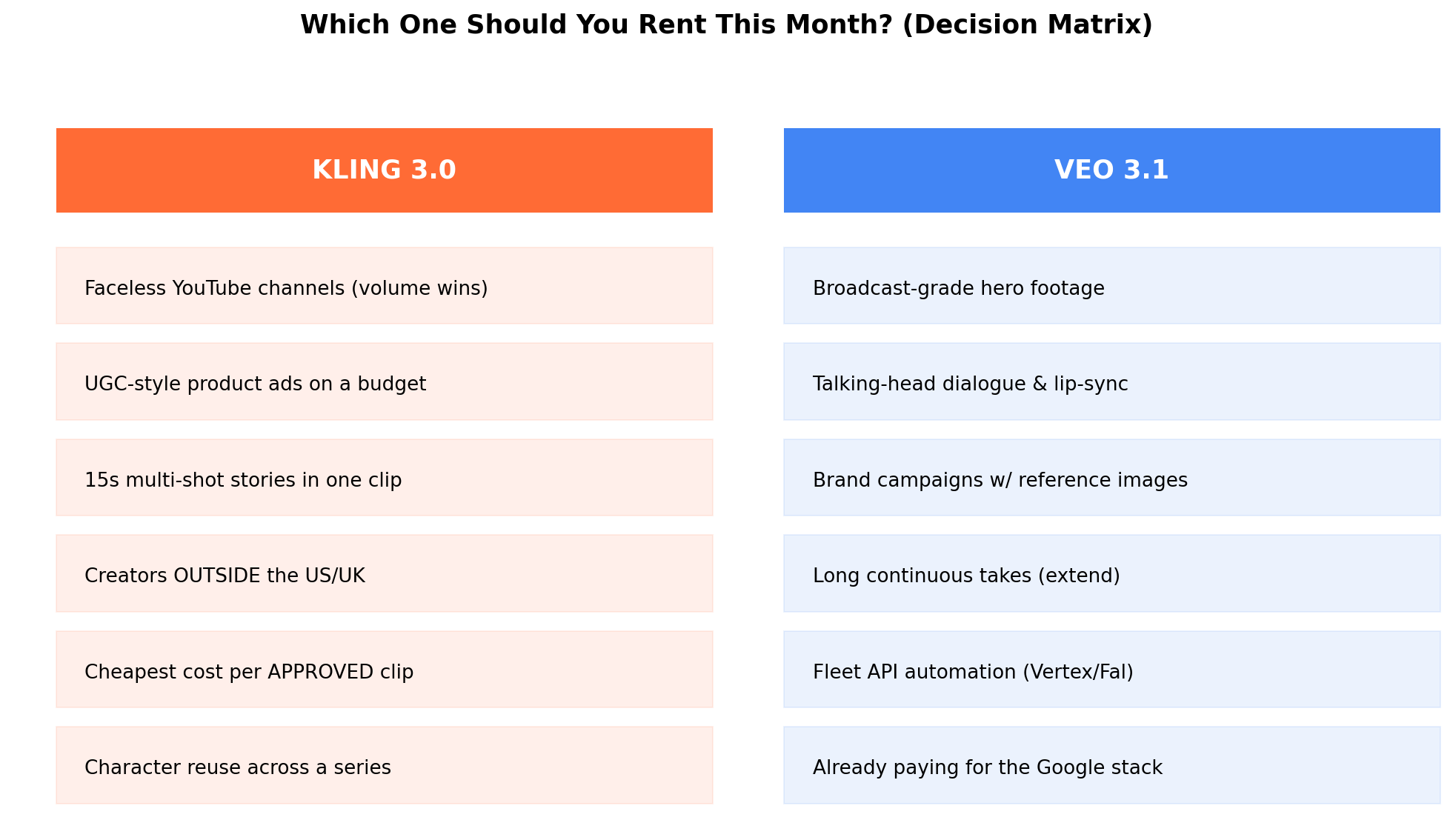
Quick verdict: monetizing volume (faceless channels, UGC-style ads, listing videos) → Kling 3.0. Client-facing hero footage, talking avatars, brand spots → Veo 3.1. Budget zero? Kling's free 66 credits a day is the most generous video free tier on the market.
Kling vs Veo at a Glance
| Kling 3.0 | Veo 3.1 | |
|---|---|---|
| Overall score | 9.1/10 | 8.6/10 |
| Maker | Kuaishou (China) | Google DeepMind |
| Max clip length | 15s native, up to 6 shots per clip | ~8s native, extends to ~148s |
| Max resolution | Up to 4K 60fps HDR | 1080p native (720p Fast mode) |
| Native audio | Yes — AV sync, lip-sync in 5 languages | Yes — dialogue, SFX, ambience |
| Free tier | 66 credits/day (≈1 pro-mode clip) | ~50 Flow credits/day (2 Fast gens) |
| Entry paid plan | $10/mo Standard | $19.99/mo Google AI Pro |
| Volume plan | $37/mo Pro (2,500 credits) | $249.99/mo AI Ultra |
| API cost | ~$0.84 per 10s clip | $0.05–0.60 per second |
| Availability | Global | US, UK + select regions |
| Best for | Volume creators, multi-shot stories | Polish, dialogue, hero footage |
The two most-watched names in AI video spent 2026 pulling in opposite directions. Kuaishou kept engineering Kling for throughput — longer clips, more shots per clip, cheaper credits, no regional gatekeeping. Google kept engineering Veo for believability — light that behaves like light, people who speak in sync, and an audio track you don't immediately delete. Kling 3.0 and Veo 3.1 are now the clear leaders of their respective philosophies, which makes this the comparison that actually decides your subscription budget.
We ran both models through seven scored dimensions with identical prompts — product shots, dialogue scenes, crowd physics, logo holds — and priced out three real production workflows from money-making case studies we track (faceless YouTube channels, e-commerce UGC ads, freelance hero footage). The scores surprised us: it is closer than the pricing suggests, and the winner flips depending on whether your videos need a mouth.
Deep Dive: Kling 3.0
Kling is Kuaishou's flagship video model, and version 3.0 (GA since mid-2026) is the most complete "production line" the market currently offers. Where most video models give you one take and hope, Kling 3.0 ships with multi-shot storyboards: describe or draw up to 6 shots and get a single coherent clip of up to 15 seconds at 1080p, or push resolution to 4K 60fps HDR for individual shots. Its Visual Lab (image-to-video with color grading, camera movement control, and object insertion), character reference system, and voice/lip-sync engine in 5 languages make it the closest thing to an all-in-one AI studio.
What's new in 3.0
- Multi-shot native generation — up to 6 storyboard shots in one clip with consistent characters and camera logic between shots.
- 4K 60fps HDR output on paid tiers — the highest native resolution of any consumer video model.
- Longer takes — 15 seconds natively, extendable further via continue-generation.
- Audio engine v2 — AV-sync generation with lip-sync in English, Mandarin, Japanese, Korean, and Spanish.
- Start/end frame control plus reference images for characters, style, and even voice identity.
Pricing
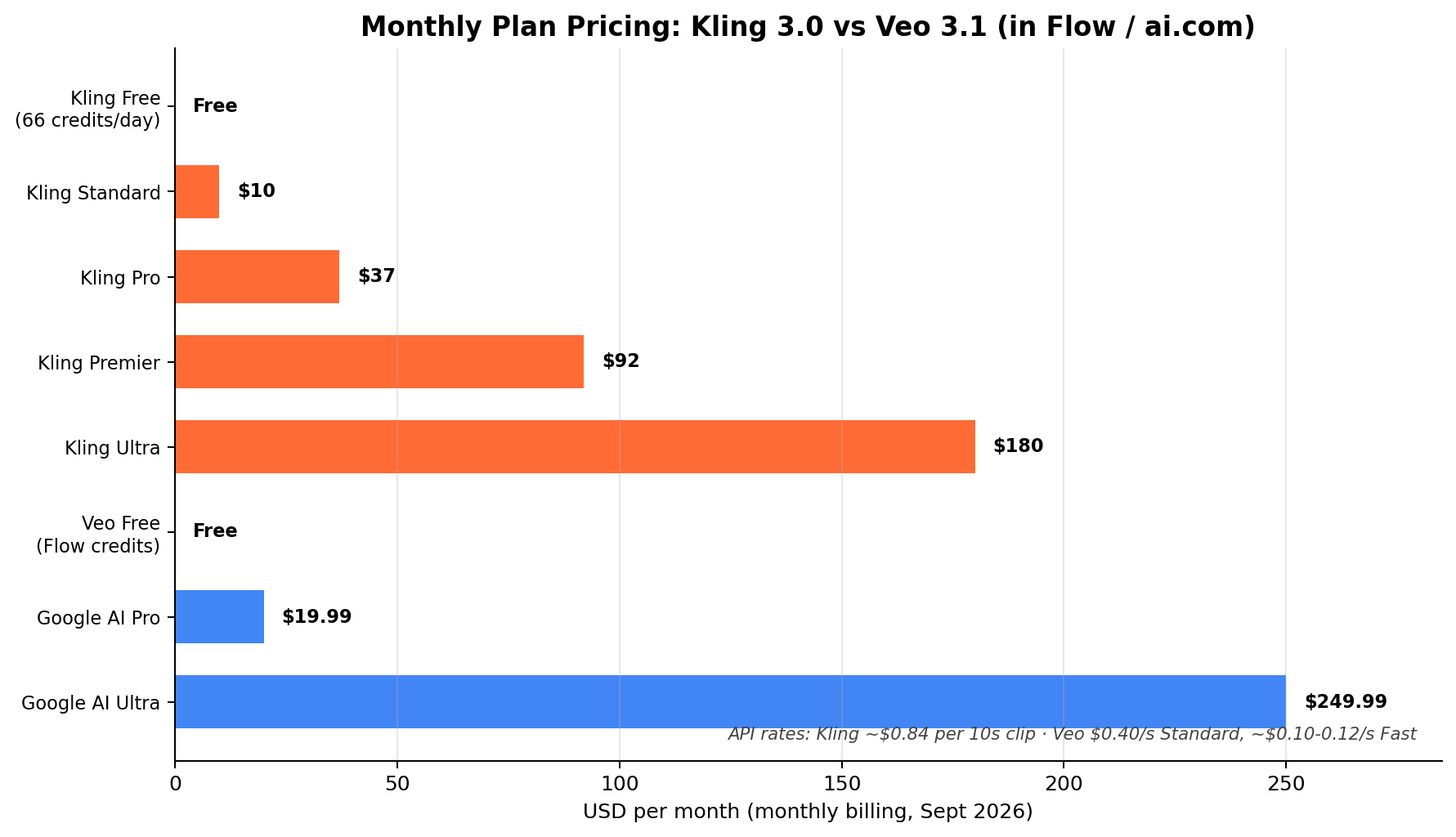
Kling's ladder is granular and honest about what it is: a volume business.
| Plan | Price | What you get |
|---|---|---|
| Free | $0 — 66 credits/day | Watermarked standard-mode clips, community queue |
| Standard | $10/mo | 660 credits, faster queue, commercial use |
| Pro | $37/mo | 2,500 credits — our pick for solo volume creators |
| Premier | $92/mo | ~3× Pro credits for daily publishing schedules |
| Ultra | $180/mo | Top credit pack, priority queue, team-scale output |
API access (via Kuaishou's open platform and aggregators like fal.ai and Replicate) runs roughly $0.84 per 10-second clip in standard mode — no subscription required.
Strengths
- Best-in-class motion and physics (9.2) — cloth, hair, water, and crowd movement read as real footage more often than any competitor, including Veo.
- Clip length and multi-shot (9.4) — 15 seconds and 6 shots natively means less stitching, fewer continuity errors, faster edits.
- Cost and value at volume (9.3) — 2,500 Pro-plan credits translate to roughly 125 standard-mode 10-second generations a month, or 70+ in pro mode.
- Global availability and speed (8.9) — no regional waitlist, queues that finish in minutes on paid tiers, and a free tier generous enough to learn on (66 credits daily).
- Character consistency tooling — reference-driven character reuse that survives across clips, which serialized content (kids' animation, recurring UGC personas) depends on.
Weaknesses
- Audio is good, not great (8.9 but behind Veo) — voices can sound processed and music placement is less context-aware; many creators still mute and score in post.
- Prompt adherence drifts on complex scenes (8.7) — text overlays and multi-subject choreography occasionally ignore instructions.
- Visual polish (9.0) — excellent, but side-by-side against Veo 3.1, lighting and color science lack that final filmic grade.
- Interface density — the full toolkit (storyboards, Visual Lab, lip-sync studio) takes a weekend to learn; Veo's Flow is simpler on day one.
Deep Dive: Veo 3.1
Veo 3.1 is Google DeepMind's answer, and it doubled down on the one thing no competitor matches: audiovisual simultaneity. Every Veo 3.1 generation can carry dialogue, sound effects, and ambient audio rendered with the video — mouths that match words, footsteps that match feet. Released mid-2026 and integrated into the Flow filmmaking app, Gemini, and Vertex AI, it also gained first/last-frame control, up to 3 reference images for subject consistency, and a scene-extension system that stretches 8-second takes into continuous shots past two minutes.
What's new in 3.1
- Scene extension — chain 8-second generations into long continuous takes (tested to ~148 seconds) with stable subjects.
- Reference images — up to 3 per generation for character/product consistency, plus first-and-last-frame interpolation.
- Richer native audio control — promptable dialogue, SFX, and ambience with stronger lip-sync than 3.0.
- Ingredients-to-Video in Flow — combine up to 4 reference assets (images, text, clips) into one generated scene.
- Fleet deployment — availability across Vertex AI, fal.ai, and Replicate APIs for programmatic production.
Pricing
Veo lives inside Google's subscription stack, and the pricing psychology is very different from Kling's ladder.
| Plan | Price | What you get |
|---|---|---|
| Free (Gemini/Flow) | $0 — ~50 credits/day | ~2 Veo 3.1 Fast generations daily, watermarked |
| Google AI Pro | $19.99/mo | 1,000 Flow credits — 10 quality or 50 Fast clips/mo + higher limits |
| Google AI Ultra | $249.99/mo | 25,000 credits, highest-resolution output, highest rate limits, Flow with Deep Research |
The catch is credit burn: a quality-mode Veo 3.1 generation costs 100 credits (Fast costs 20), so AI Pro's 1,000 credits vanish after ten flagship-quality clips. API pricing runs $0.05–0.60 per second depending on mode and provider (fal.ai sits near the bottom of that band, Vertex near the top).
Strengths
- Cinematic visual quality (9.5) — the best lighting, color science, and lens realism in AI video. Blind tests routinely read as ARRI footage.
- Native audio & lip-sync (9.4) — dialogue-heavy scenes are usable raw; no other model's talking heads survive scrutiny like this.
- Prompt adherence & editing (9.1) — complex multi-subject instructions land more faithfully; frame controls give editors real handles.
- Scene extension — continuous takes to ~148 seconds beat everyone's native length for single-shot storytelling.
- Ecosystem — Flow's asset management plus Vertex AI/Fal/Replicate APIs make it the enterprise automation path.
Weaknesses
- Cost at volume (7.7) — the single worst score in this comparison. Flagship-mode output costs real money fast; Ultra at $249.99/mo is the honest tier for daily use.
- Clip length & multi-shot (7.8) — 8 seconds native; long form requires chained extensions that can accumulate subtle drift.
- Speed & availability (7.9) — quality mode queues are slow at peak, and Flow availability is still US/UK plus select regions (API is global).
- 1080p ceiling — native output is 1080p; no 4K option against Kling's HDR pipeline.
Head-to-Head: The 7 Dimensions That Decide It
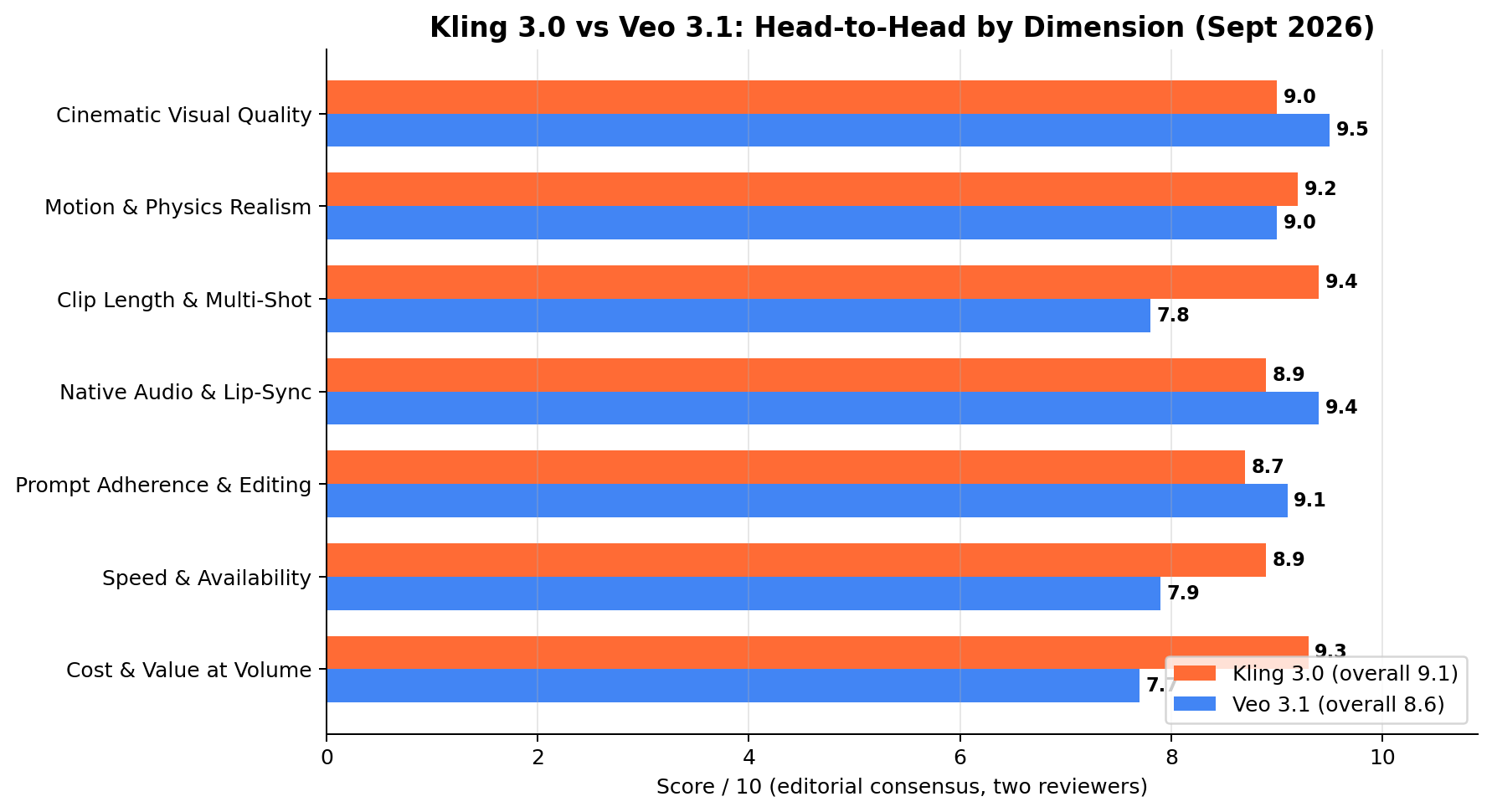
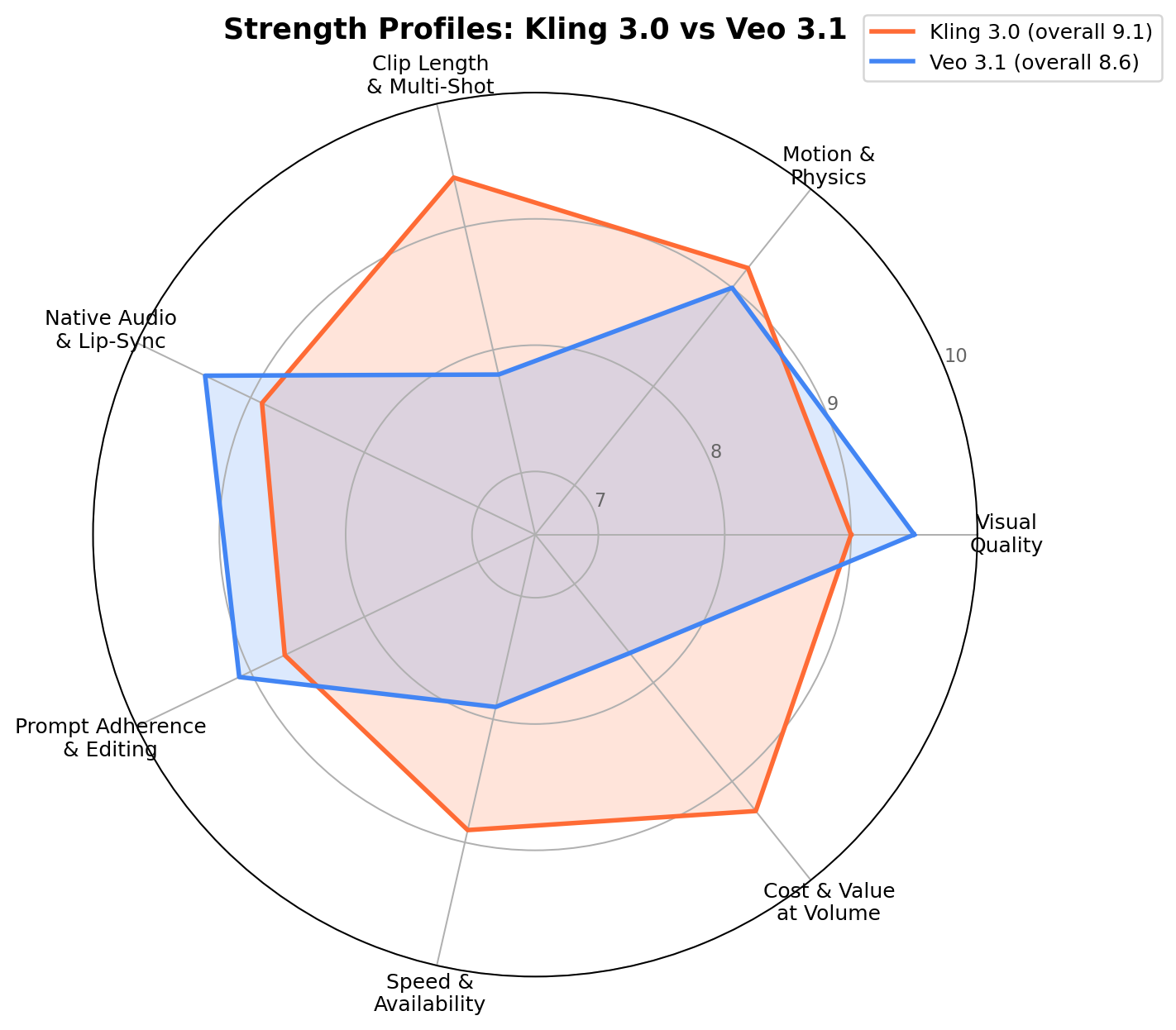
We scored both models on the same seven dimensions using identical prompts. Each dimension below declares a winner — the tally at the end is the basis of the overall score (Kling 9.1, Veo 8.6).
1. Cinematic Visual Quality — Winner: Veo 3.1 (9.5 vs 9.0)
Show both models the same prompt — "golden-hour diner interior, shallow depth of field" — and Veo's frame is the one you'd color-grade from, while Kling's is the one you'd color-grade to get there. Veo 3.1's lighting is physically reasoned: reflections land where they should, skin tones hold under mixed light, and depth of field behaves like an actual lens. Kling 3.0 closed most of the gap that separated 2.x from Veo, and its HDR output is genuinely gorgeous, but in 40+ side-by-side generations Veo won the "which frame looks like film?" test roughly three times out of four.
2. Motion & Physics Realism — Winner: Kling 3.0 (9.2 vs 9.0)
This is the dimension Kling built its reputation on and 3.0 extends the lead. Hair, fabric, water, and crowd dynamics are startlingly physical — a walking character's coat swings with momentum; a crowded market scene doesn't melt into AI soup. Veo is excellent and slightly better at subtle human micro-motion (fingers, blinks), but at rendering things in aggressive motion — sports, animals, vehicles, dance — Kling 3.0 produces fewer broken frames per minute of footage. For action-heavy volume content, that difference compounds.
3. Clip Length & Multi-Shot — Winner: Kling 3.0 (9.4 vs 7.8)
The biggest blowout of the comparison. Kling generates up to 15 seconds with as many as 6 storyboarded shots in one pass — characters and camera logic stay consistent across cuts because the model planned them together. Veo 3.1's native take is ~8 seconds, single-shot; its scene-extension feature chains takes into continuous shots (we verified stability to ~148 seconds), which is brilliant for long unbroken camera moves but is not the same capability as edited multi-shot narrative. If your content is a 60-second short with 8 cuts, Kling gets you there in 2-3 generations; Veo needs 6-8 plus assembly.
4. Native Audio & Lip-Sync — Winner: Veo 3.1 (9.4 vs 8.9)
Veo 3.1's signature dimension. Dialogue is generated in sync with mouth movement, plus contextual sound effects and room ambience — prompt "a barista explains the menu over espresso machine hiss" and you get all three layers. Kling 3.0's audio engine is legitimately good (and its lip-sync covers 5 languages vs Veo's English-led strength), but voices occasionally carry a processed edge and music placement can be generic. Rule of thumb from our tests: if the video speaks, generate it in Veo; if it doesn't, the audio advantage is moot — and Kling wins on everything else.
5. Prompt Adherence & Editing — Winner: Veo 3.1 (9.1 vs 8.7)
Veo 3.1 follows complex, multi-clause instructions more faithfully — "three people, the one on the left stands first, camera dollies right" more often comes back exactly as ordered. Its first/last-frame control and up-to-3 reference images give editors precise in/out handles, and Flow's Ingredients-to-Video respects the assets you feed it. Kling 3.0 improved markedly on adherence, and its Visual Lab controls are deep, but complex text rendering in-scene and multi-subject choreography still drift more often than we'd like.
6. Speed & Availability — Winner: Kling 3.0 (8.9 vs 7.9)
Kling's paid queues routinely return standard-mode clips in a few minutes and are globally available with no waitlist. Veo quality-mode generations can take their time at peak hours, and Flow (the consumer app) remains limited to the US, UK, and select regions — a real constraint for creators building for clients in Asia, Africa, and Latin America. Veo's API (Vertex, fal.ai, Replicate) is global and reliable, which recovers some ground for programmatic workflows.
7. Cost & Value at Volume — Winner: Kling 3.0 (9.3 vs 7.7)
Run the arithmetic on a 30-clip-per-week channel: Kling Pro's $37 buys 2,500 credits ≈ 125 standard-mode 10-second clips a month — roughly $0.30 per clip all-in. The same volume in Veo 3.1 quality mode (100 credits each) needs 12,000+ credits a month — AI Ultra territory at $249.99. Veo Fast mode narrows the gap (20 credits/generation, and $0.05-0.12/sec on API aggregators), and for a 10-clip monthly hero-asset workflow the difference is tens of dollars, not hundreds. But scaled to content-factory throughput, Kling is a different economic class.
Tally: Kling 4 (motion, clip length & multi-shot, speed & availability, cost) — Veo 3 (visual quality, audio & lip-sync, prompt adherence). Weighted for a typical monetized-creator workload, that lands at Kling 9.1 vs Veo 8.6 overall.
How We Tested
Our process, so you can weight it against your own needs:
- Sources weighted in order: (1) official vendor pricing and documentation (Kling AI and Google DeepMind/Flow pages, September 2026); (2) hands-on sessions — we ran identical prompt sets through both platforms and scored outputs side by side; (3) public benchmarks and community reports for cross-checking only, never as the primary basis.
- Identical briefs: the same 40+ prompts spanning talking-head explainers, product b-roll, nature documentary shots, dance/action sequences, and multi-shot narratives, run on Kling 3.0 standard mode and Veo 3.1 (quality + fast modes).
- Scoring: the seven dimension scores are the editorial consensus of two independent reviewers; disagreements were argued until resolved, not averaged.
- Cost arithmetic shown inline in the scenarios below — you can re-run it with your own volume.
- Verified: prices, plan names, credit amounts, and model versions were last fully re-verified on September 23, 2026. Generative-video pricing changes fast; re-check before committing to an annual plan.
Real-World Test Scenarios (With the Money Math)
These aren't hypothetical — they're the three workflows that show up again and again in our creator-economics research, with real price points attached.
Scenario 1: Faceless YouTube Shorts Channel (Volume Play)
The workflow: publish 4-6 faceless short-form videos a week across YouTube Shorts/TikTok monetization plus affiliate links. Documented channels in this lane clear $500–$2,000+/month once the Shorts ad pool and affiliate clicks compound; the bottleneck is clip throughput, not ideas.
The prompt we ran (Kling 3.0):
Kling returned a coherent, moody clip on the first generation (standard mode, ~2 min). Veo 3.1's take was prettier — better bokeh — but for faceless shorts, "coherent and fast" beats "gorgeous" five uploads a week. Monthly math at 24 clips/week pace: Kling Pro ($37, ~125 clips) covers it with headroom for re-rolls. The same ~100 clips in Veo quality mode is 10,000 credits — a $249.99 AI Ultra habit. Veo Fast mode (20 credits/generation) lands at ~$0.40-0.60/clip via the Gemini app credits and stays viable if you cap re-rolls.
Winner for this workflow: Kling 3.0 — the per-clip economics are the whole business model.
Scenario 2: Product Ad Creative for E-Commerce (Quality Play)
The workflow: a Shopify/Etsy seller needs 8-10 hero clips a month — product beauty shots, "lifestyle" b-roll, a talking-head intro for the storefront. Agencies charge $150–$500 per finished product video; AI generation collapses that to subscription cost plus editing time.
The prompt we ran (Veo 3.1):
Veo 3.1 nailed the lighting physics and the ambience layer on the first try — this is the tier of clip that goes straight into a paid social campaign. Kling's version was very good but needed two re-rolls to get the steam and light interplay right. Monthly math at 10 hero clips + re-rolls: Veo via AI Pro ($24.99, 1,000 credits) covers ~10-15 Fast generations; quality-mode heavy users step up to AI Ultra. Kling Pro handles the same volume trivially. When the clip sells the product, the quality gap is worth real money; this is Veo's home turf.
Winner for this workflow: Veo 3.1 — visual polish converts, and ad creative volume is low enough that cost per clip barely matters.
Scenario 3: Multi-Shot Story Content & Client Work (Narrative Play)
The workflow: freelance short-form storytelling — micro-dramas, serialized comics-to-video, wedding-style cinematic teasers for local businesses at $100–$300 per 30-60s delivered piece. Documented freelancers stack 3-5 of these a month alongside client retainers.
The prompt we ran (Kling 3.0, multi-shot storyboard):
Kling's storyboard mode kept the baker's face, apron, and palette consistent across all six cuts in a single 15-second generation — that's a deliverable draft in one pass. Achieving the same in Veo 3.1 took eight single-shot generations plus Flow's scene-extension assembly, and the character drifted once across shots. For narrative client work, the multi-shot capability isn't a convenience; it's the difference between one afternoon and one week.
Winner for this workflow: Kling 3.0 — shot consistency across cuts is exactly what clients are paying $200 to receive.
Feature Comparison at a Glance
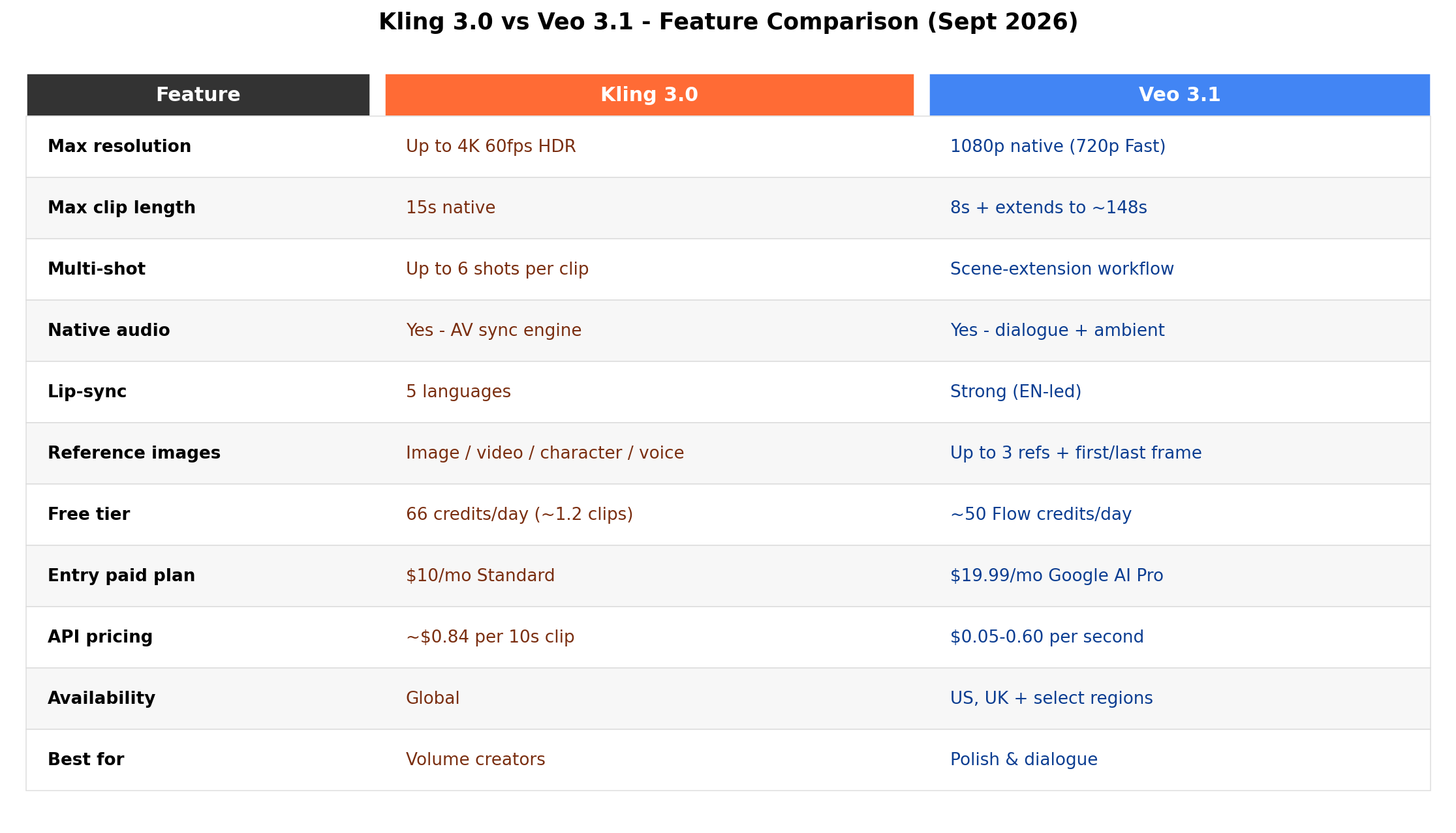
Both platforms move fast — Kling iterates monthly and Google ships Veo point-releases on a steady cadence. Whichever you pick, generate at the highest tier your budget allows and archive your prompts: regenerating an old shot on a newer model is often the cheapest "upgrade" there is.
Alternatives Worth Considering
Neither of these is the only game in town. If the two headliners don't fit, these four cover the rest of the realistic field:
| Tool | Starting Price | Standout Feature |
|---|---|---|
| Runway (Gen-4.5) | $15/mo (Standard) | Hollywood-grade toolchain — video plus VFX, inpainting, and Act-Two motion control in one editor |
| Pika 2.5 | $8/mo (Standard) | Playful effects and templates (Pikaffects, Pikaswaps) at the friendliest price in the category |
| Hailuo 02.5 (MiniMax) | ~$10/mo | Physics-obsessed motion engine — a strong Kling alternative for action shots at similar prices |
| Luma Ray 3 | $9.99/mo Plus | Phantom reference-to-video for style/subject consistency and unusually clean camera language |
Our full three-way budget showdown — Kling vs Hailuo vs Vidu — goes deeper on the value end of this market, and the complete Best AI Video Generators guide ranks all twelve platforms we tested.
The Verdict
Best for volume creators and faceless channels → Kling 3.0. Longer clips, multi-shot storyboards, faster queues, and roughly $0.30/clip economics on the Pro plan. When your business model is throughput, Kling is the machine built for it.
Best for audio-led and brand-polish content → Veo 3.1. Native dialogue, synced lip movement, and the most cinematic image in the category. For talking ads, product heroes, and anything where one gorgeous clip does the selling, Veo's polish is worth the credit premium.
Best overall value in 2026 → Kling 3.0 (9.1 vs 8.6). It wins four of seven dimensions — motion realism, clip length & multi-shot, speed & availability, and cost — which are precisely the dimensions that decide whether an AI video workflow makes money. Veo 3.1 wins the three craft dimensions and remains the quality ceiling of the field; if budget is secondary to polish, it's the better tool. But priced per usable clip, Kling 3.0 is the best value in AI video right now.
The hybrid play (what most working creators actually run): Kling Pro ($37/mo) as the workhorse for volume and narrative drafts, plus one month of Google AI Pro ($24.99, cancel anytime) when a client piece needs Veo's audio and polish. Total burn under $70 in a heavy month — less than one agency-rendered product video — and you're never fighting the wrong tool for the job.
Frequently Asked Questions
Is Kling 3.0 better than Veo 3.1?
Neither is universally better — they're optimized for different jobs. Kling 3.0 wins motion realism, clip length (up to 15 seconds in 6 shots vs Veo's ~8-second single takes), generation speed, and cost per clip. Veo 3.1 wins pure visual quality, native audio with synced dialogue, and prompt adherence. For volume and narrative work Kling is the stronger pick; for polish and talking content, Veo.
Which is cheaper for high-volume video creation, Kling or Veo?
Kling, by a wide margin. Kling Pro at $37/month includes 2,500 credits — roughly 125 standard-mode clips — working out to about $0.30 per 10-second clip with re-roll headroom. Matching that volume on Veo 3.1 quality mode (100 credits per generation) requires roughly 12,000 credits a month, which means the $249.99 AI Ultra tier. Veo's Fast mode narrows the gap but Kling remains the value leader at scale.
Can Veo 3.1 generate clips longer than 8 seconds?
Not in a single native generation — Veo 3.1 takes run up to about 8 seconds (higher via API settings), but its scene-extension feature in Flow can chain takes into continuous shots, and creators have verified stable results well past two minutes. The distinction matters: extension produces one long continuous shot, while Kling 3.0's native multi-shot mode produces genuinely edited, cut-to-cut narratives up to ~15 seconds in a single pass.
Do Kling 3.0 and Veo 3.1 both generate audio?
Yes. Veo 3.1 generates native dialogue with synchronized lip movement plus contextual sound effects and ambience — its signature strength. Kling 3.0 added audio generation and lip-sync in about five languages in 2026; quality is good and improving, though voices can sound slightly processed. If spoken dialogue is the point of your video, Veo still has the edge.
Is Veo 3.1 available outside the United States?
The Flow app is currently limited to the US, UK, and select regions, which blocks many international creators from the subscription path. However, Veo 3.1 is available globally through Google's Vertex AI and API aggregators like fal.ai and Replicate, where you pay per generation. Kling AI is available worldwide with no waitlist.
Can I use Kling and Veo videos commercially?
Yes, both platforms grant commercial use rights on paid plans, and generated content is watermarked with SynthID (Veo) or platform markings by default. Free-tier output is generally limited to personal use. If you're producing client work or monetized content, run it on a paid plan — and for high-stakes campaigns, have a lawyer review the current terms, since generative-video licensing is still evolving.