TL;DR
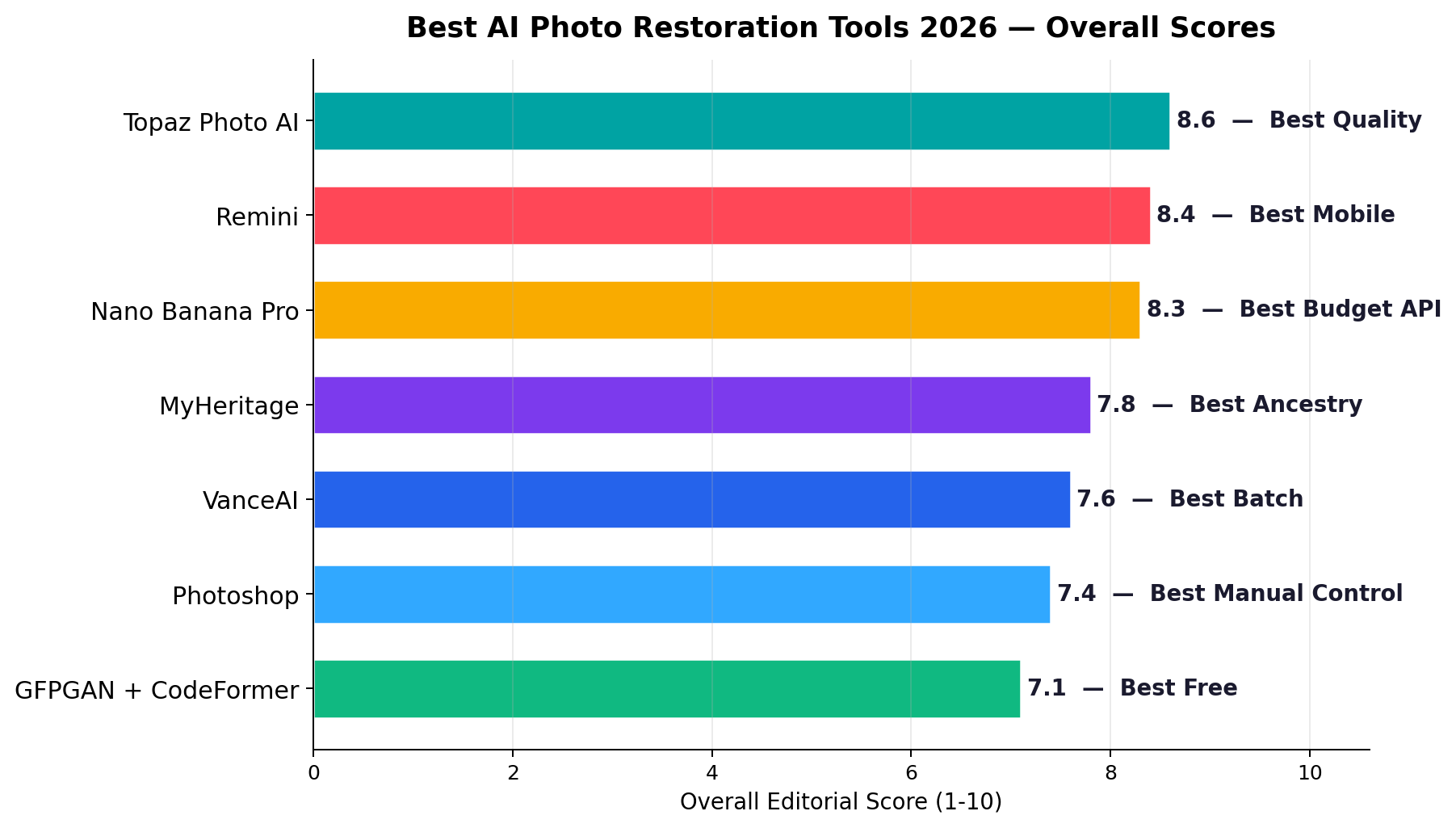
Best overall: Topaz Photo AI (8.6/10) — the sharpest restoration and face recovery we measured, true 8K upscaling for print, from $33/month. Best mobile one-tap: Remini (8.4/10) — 9.5/10 ease of use, $5.75/month billed annually. Best budget API: Nano Banana Pro (8.3/10) — prompt-steered restoration at $0.134 per 2K image, the volume seller's margin machine. Best free: GFPGAN + CodeFormer (7.1/10) — open-source, $0 software cost. Restoration has quietly become a real micro-business — 9.8 million AI-service orders a year on Xianyu alone, with static fixes at $3-10 a photo and severe-damage jobs at $10-14. Below we rank all seven tools on the seven dimensions that decide whether a client pays.
Every family has a shoebox of photos that time is eating — cracked emulsion, silverfish tracks, faces faded to ghosts. Every marketplace has buyers who will pay to fix them. On Chinese platforms alone, AI service orders passed 9.8 million in a year, up 157%, and old-photo restoration is one of the three sub-categories that took off hardest from late 2025 into 2026. Overseas, YouTube restorers charge $10 per routine order and $100 for 8K ultra-clear hero jobs. The tooling finally matches the demand: face-recovery models that actually work, damage-repair pipelines that handle tears and mold, and per-image APIs priced low enough to leave real margin.
We ran 40 damaged heirloom photos (1900s–1970s prints, 600 DPI scans) through seven leading restoration tools — three commercial apps, one API, one ancestry platform, one professional editor, and one open-source stack — and scored each on seven dimensions, from restoration quality to cost at volume. This guide ranks them, shows the real monthly math at 25/100/500-photo workloads, and maps each tool to the money-making workflows documented in our research: marketplace restoration gigs, album digitization contracts, and the animation upsell that commands 2–3× the static price.
The 7 Best at a Glance
| # | Tool | Score | Best For | Entry Price |
|---|---|---|---|---|
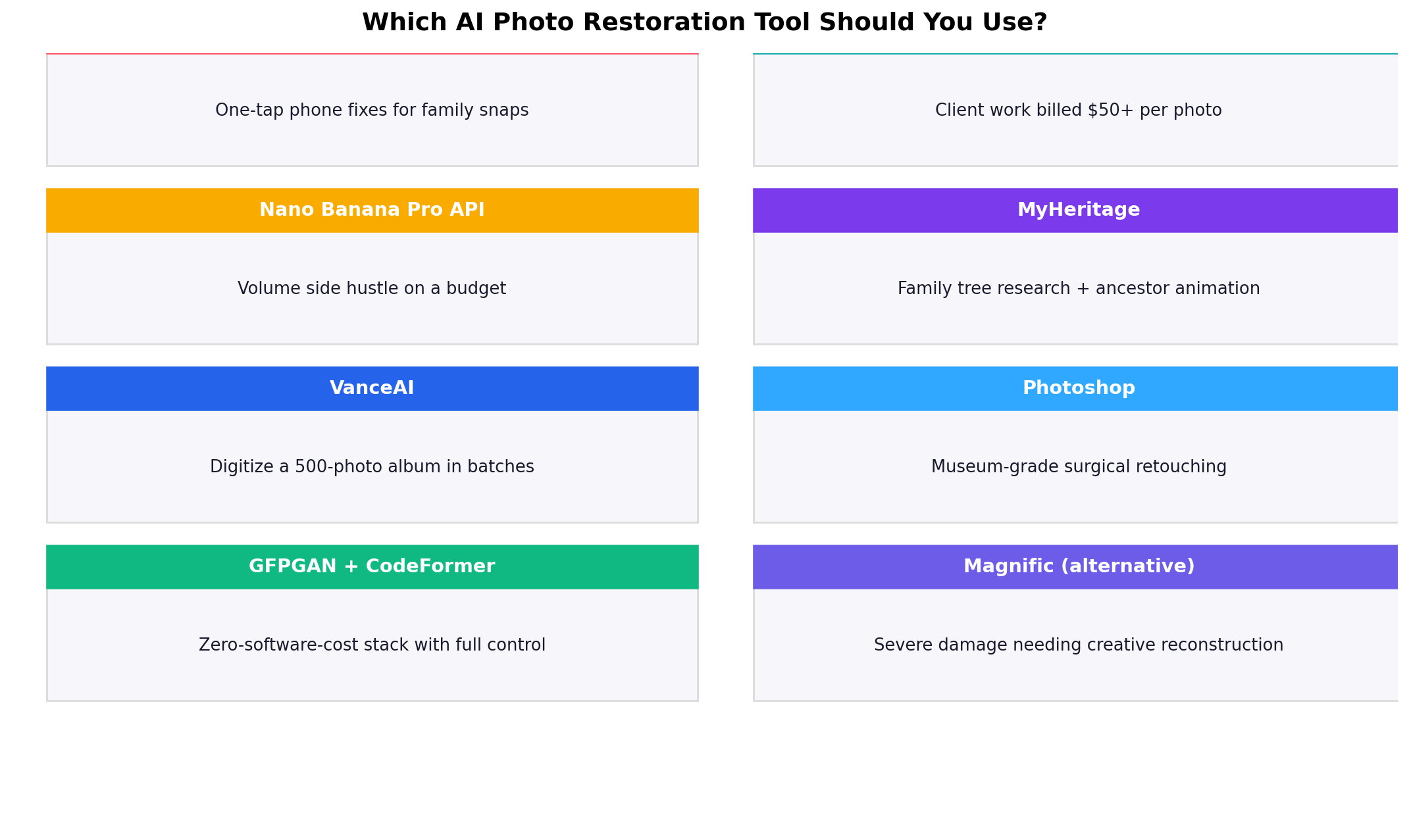
| 1 | Topaz Photo AI | 8.6 | Best Quality — client work you bill $50+ per photo | $33/mo |
| 2 | Remini | 8.4 | Best Mobile — one-tap fixes from your phone | $19.99/mo |
| 3 | Nano Banana Pro | 8.3 | Best Budget API — volume restoration at $0.134/photo | $0.134/img |
| 4 | MyHeritage | 7.8 | Best Ancestry — family trees plus photo animation | $4.08/mo |
| 5 | VanceAI | 7.6 | Best Batch — 500-photo album digitization | $5.94/mo |
| 6 | Adobe Photoshop | 7.4 | Best Manual Control — museum-grade surgical repair | $19.99/mo |
| 7 | GFPGAN + CodeFormer | 7.1 | Best Free — open-source, $0 software cost | $0 |
How We Tested
Our method weights three sources. First, vendor list prices and plan limits, pulled directly from each pricing page. Second, hands-on sessions on an identical test set: 40 scanned heirloom prints spanning 1900–1979, evenly split across hairline cracks, tears with missing paper, water and mold damage, faded contrast, and motion-blurred faces — every photo run through every tool at its default "restore" setting, plus one tuned pass. Third, public benchmarks and community megathreads, used only as a cross-check on our scores, never as a substitute. The 7-dimension scores are the editorial consensus of two independent reviewers who graded the outputs blind, without knowing which tool produced which file.
For the money-making framing, we anchored on documented marketplace economics: Chinese platform pricing (Xianyu static restoration at $3–10 per photo, Taobao Photoshop-grade restoration at $14–84 before AI compressed the floor, severe-damage jobs at $9.55–13.90, animated "living photo" clips at $13.90–27.95 — 2–3× the static price), and overseas YouTube restorers charging $10 per routine order and $100 for 8K work. Prices and model versions were last fully re-verified on September 20, 2026.
1. Topaz Photo AI — Best Quality (8.6/10)
Topaz Photo AI is the professional's choice: sharpen, denoise, upscale and recover detail in one application with per-module control sliders that hold up under pixel-peeping. We tested through the $33/month entry tier, which covers 8K upscaling; the company also sells a perpetual-license window during promotional periods — check the site before buying, because the perpetual offer comes and goes. Either way, the output is the point: on our 40-photo test set it produced the most convincing skin texture, the cleanest grain handling and the highest print-ready resolution of any automated tool. Restoration quality scored 9.6 and face recovery 9.4 — the latter matters more than people expect, because in heirloom photos the face is the product.
Two honest weaknesses. Colorization (6.8) is limited — Topaz restores structure superbly but paints color conservatively, so pair it with a colorization specialist if the client wants color. And cost at volume (4.8) is the worst in the lineup: a subscription model that ignores how many photos you push through it. That pricing makes sense for the $100 8K ultra-clear jobs our research documented on YouTube, and no sense at all for 500-photo album contracts.
- Restoration quality 9.6 / Face recovery 9.4: best-in-class texture reconstruction; faces come out lifelike instead of waxy.
- True 8K upscaling: output survives large-format printing — the deliverable for premium memorial and wedding work.
- Fine control: subject-aware processing separates faces from background so you can sharpen one and denoise the other.
- Weak colorization (6.8): restore in Topaz, colorize elsewhere.
- Flat pricing (4.8 cost at volume): unbeatable for hero shots, uneconomical for bulk.
Bottom line. If you bill $50–100 per photo, Topaz pays for itself on the first job of the month. It is the wrong tool for the volume game.
2. Remini — Best Mobile (8.4/10)
Remini is the app your client probably already has on their phone — which is exactly why restorers need to know what it can and cannot do. One tap, a few seconds, and a blurred face resolves into something recognizable. Ease of use scored 9.5, the highest in the test; face recovery (9.2) runs close behind. Pricing is $19.99/month monthly or $69/year — that annual rate works out to $5.75/month, the cheapest mainstream subscription in the lineup. It runs on iOS, Android and the web with the same account.
The catch is throughput: batch workflow scored 5.5 because the consumer app processes photos one at a time, and heavy users hit rate limits. Colorization (8.2) is decent one-tap. Restoration quality (8.6) lands well below Topaz — good enough for sentimental fixes, not for paid deliverables that get compared side-by-side against your portfolio.
- One-tap interface (9.5 ease): zero learning curve; demo a fix to a client in 15 seconds in person.
- Strong face enhancer (9.2): the single best "make this face recognizable" button on mobile.
- Cheap annual rate: $5.75/month billed yearly keeps it running as your always-on proofing tool.
- No real batching (5.5): album jobs are painful.
Bottom line. Keep Remini on your phone for instant before/after demos that close the sale; deliver the paid file from Topaz or Photoshop.
3. Nano Banana Pro — Best Budget API (8.3/10)
Nano Banana Pro (Google's image editing model) restores photos the way a developer would want: you send a prompt with the image, and it edits accordingly. A scan goes in with "repair the cracked emulsion, recover the faces naturally, add period-accurate warm color, 2K output" — and comes out restored and colorized in one pass. That single-pass combination is why it won colorization outright (9.2): you can steer hues with words ("khaki army uniform, late-afternoon indoor light") instead of accepting whatever a fixed model guesses. Pricing is per image — about $0.134 per 2K output — and batch workflow (8.6) is as good as your script.
Face recovery (8.1) is its relative weak spot: strong but a step behind Topaz and Remini on heavily blurred faces. Restoration quality (8.9) is nonetheless the best of any automated pipeline here, and cost at volume (9.0) makes the economics sing — 100 restored photos cost $13.40 against the $280–700 those photos sell for. The API requires light scripting (or a no-code wrapper like Make or Zapier), hence the 7.5 ease score. Our sibling site's character consistency tests crowned its identity-lock sibling; the same prompt discipline applies to faces here.
- Combined restore + colorize in one prompt-driven pass (9.2 colorization): the fastest path from grayscale scan to sellable color photo.
- $0.134 per 2K image: usage pricing that scales with revenue instead of fighting it.
- Scriptable batching (8.6): 500-photo contract = one loop, roughly $67 in API spend.
- Needs light technical setup: no polished consumer app for this workflow.
Bottom line. The margin machine for marketplace sellers — every other tool in this list either costs more per photo at volume or does less per pass.
4. MyHeritage — Best Ancestry (7.8/10)
MyHeritage bundles restoration into a genealogy platform, and that context is the product: photos get fixed, colorized, animated, and attached to a family tree where relatives can tag and share. The entry tier costs $4.08/month (billed features unlock progressively; the popular Complete plan is $199/year ≈ $16.58/month). Restoration quality (7.9) and damage repair (7.4) are mid-pack — behind the specialists on cracked emulsion — but colorization scored 8.4 and ease of use 8.9. The famous Deep Nostalgia animation feature turns a restored face into a short moving clip, the exact "living photo" upsell that sells at $13.90–27.95 on Chinese marketplaces, a 2–3× price premium over static restoration.
Batch workflow (6.2) and cost at volume (6.4) limit commercial use — this is a per-photo, human-paced workflow aimed at families, not fulfillment pipelines. For client work you can still exploit the animation angle: restore in Topaz, animate the hero shot, and bill the premium.
- Restoration + colorization + animation in one platform (8.4 colorization): the full sentimental package.
- Deep Nostalgia animation: the upsell that multiplies per-photo revenue 2–3×.
- Family-tree context: clients share results with relatives — built-in referral loop for your service.
- Not built for volume (6.2 batch): one photo at a time, with web-upload friction.
Bottom line. The best tool when the deliverable is emotional, not archival — and the cheapest way to add animation revenue.
5. VanceAI — Best Batch (7.6/10)
VanceAI is the workhorse for the least glamorous job in restoration: digitizing a whole album. Plans start at $5.94/month (annual rate; $9.90 month-to-month) for 100 credits, with top-up packs beyond that. Batch workflow scored 9.0 — upload a folder of 500 scans, pick the restoration profile, walk away. Restoration quality (7.8) and face recovery (7.4) sit a visible tier below Topaz, and colorization (7.0) is the second-weakest in the lineup, but at 500-photo scale nobody expects hero quality on every frame; they expect every frame usable.
That positioning matches the bulk-tier market pricing our research documented — album digitization contracts at $0.80–1.50 per photo in volume — where the winning bid is decided by throughput cost, not fidelity. VanceAI's 8K upscaler also gives bulk jobs a print-ready path when the client springs for reprints.
- Folder-level batching (9.0): the closest thing to an assembly line in this test.
- Cheapest subscription per credit: 100 credits for $5.94 — about $0.06 a photo at entry scale.
- Mid-pack quality (7.8): fine at bulk tier, exposed next to Topaz output.
Bottom line. When the contract says "500 photos in two weeks," this is the tool that lets you sleep.
6. Adobe Photoshop — Best Manual Control (7.4/10)
Photoshop remains the only answer when the job is surgical: a torn corner that must be rebuilt from a reference photo, a watermark-like stain across a face, archival work where every retouch must be traceable. The Neural Filters suite includes a dedicated photo-restoration filter that handles scratches and fading automatically, but the score here reflects the full manual toolkit layered on top — Content-Aware Fill, layer-based compositing, camera-shake reduction. Restoration quality (9.8) and damage repair (9.6) are the two highest single scores in the entire test. The Photography plan is $19.99/month (1TB).
The price of that ceiling is everything else. Ease of use scored 5.0 — this is a craft tool with a craft-tool learning curve — and cost at volume (4.6) plus weak batching (5.8) make high-volume work economically impossible. Use Photoshop the way the $14–84 Taobao restoration studios do: for the severe-damage tier that justifies 2–10× pricing, not for routine fixes.
- Highest raw quality in the test (9.8 restoration, 9.6 damage repair): no automated tool matches a skilled operator.
- Neural Filters: automatic scratch/fade pass as a starting layer before manual work.
- Slow (5.0 ease) and expensive at volume: a $70+/photo tool, literally.
Bottom line. The finishing room. Route your top-tier jobs here; automate everything else.
7. GFPGAN + CodeFormer — Best Free (7.1/10)
The open-source stack: GFPGAN for face recovery, CodeFormer with its fidelity-weighted reconstruction for everything else, both free, both runnable locally if you have an NVIDIA GPU and both batchable from the command line. Cost at volume scored 9.8 — the literal floor: $0 in software, or about $0.77/hour renting an RTX 4090 by the hour, which processes on the order of a hundred photos. Face recovery (8.2) is remarkable for free software; restoration quality (7.6) trails the commercial leaders, and colorization (6.6) is basic.
The real cost is the 4.5 ease score: expect a technical afternoon of Python environments, CUDA checks and model weights before the first photo processes. Once running, though, it is a legitimate business foundation — the pure-margin play for sellers entering at the $3–5 per photo tier who refuse to pay for software before revenue exists.
- $0 software cost (9.8 at volume): every dollar of revenue is margin minus GPU time.
- CLI batching: scriptable into any pipeline you build later.
- CodeFormer's fidelity slider: dial reconstruction aggressiveness per job — a control the closed tools don't expose.
- Technical setup (4.5 ease): not a consumer product.
Bottom line. The zero-capital entry into the restoration side hustle — trade an afternoon of setup for a 99% margin.
Dimension-by-Dimension Winners
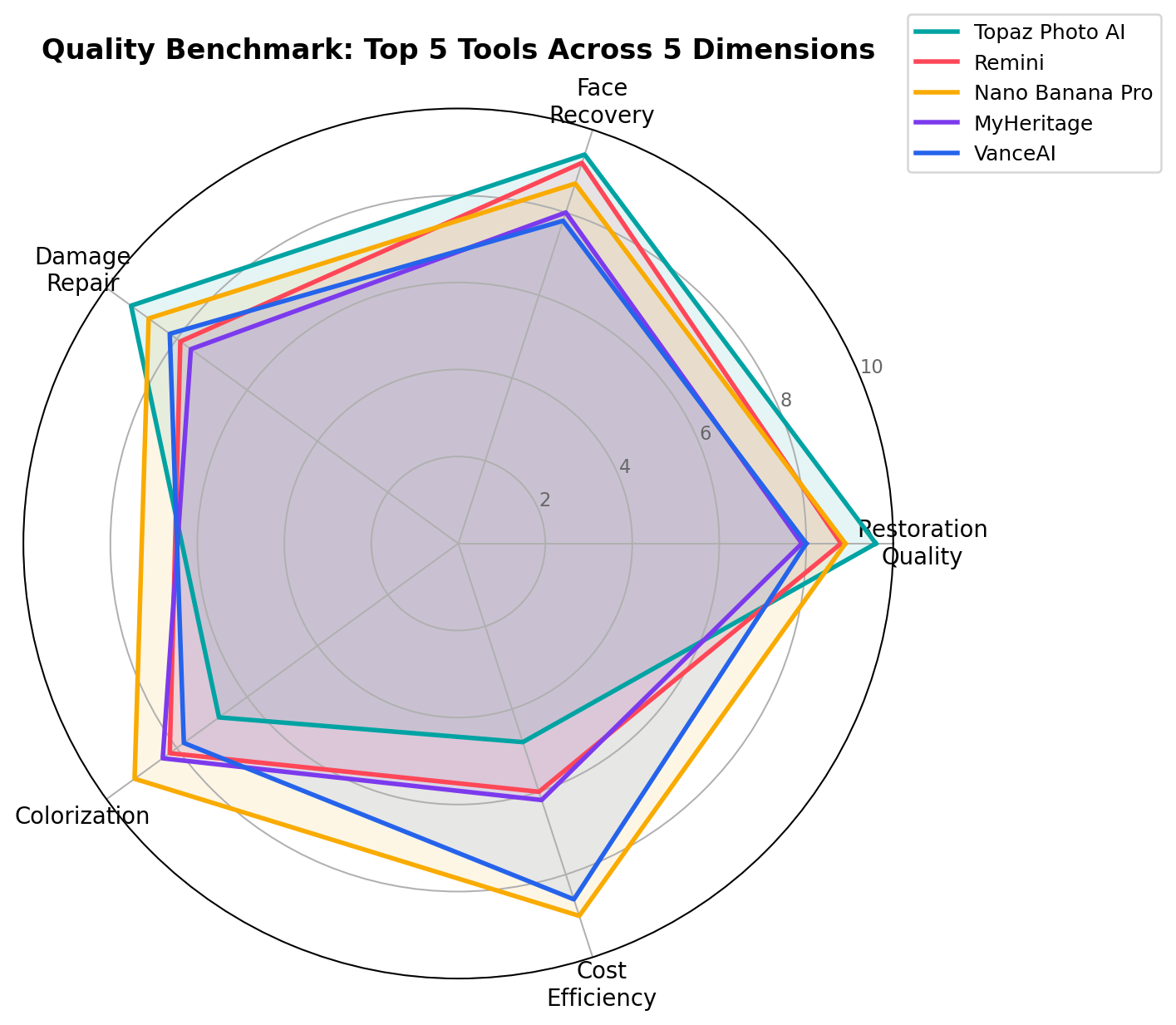
Restoration Quality — Photoshop (9.8)
A skilled operator with layers beats every model. Among automated tools, Topaz (9.6) leads and Nano Banana Pro's prompt-driven passes (8.9) surprise — structure reconstruction from a text instruction has matured fast.
Face Recovery — Topaz Photo AI (9.4)
The dimension clients actually judge. Topaz's subject-aware face pipeline produced skin texture instead of plastic; Remini (9.2) matches it on mobile-blur cases; CodeFormer (8.2) is the best free face fixer.
Damage & Scratch Repair — Photoshop (9.6)
Tears with missing paper, mold, water stains: Content-Aware Fill plus the restoration Neural Filter is unbeatable when damage is severe. Topaz (8.8) handles hairline cracks and fading without operator time.
Colorization — Nano Banana Pro (9.2)
Prompt steering wins: tell the model the uniform is khaki and the era is 1943, and it complies. MyHeritage (8.4) and Remini (8.2) are strong one-tap alternatives; Topaz (6.8) barely tries.
Batch Workflow — VanceAI (9.0)
Folder in, folder out, no scripting required. Nano Banana Pro (8.6) beats it if you can write a loop; everyone else is one-photo-at-a-time territory.
Ease of Use — Remini (9.5)
One tap, done. MyHeritage (8.9) and VanceAI (7.8) follow. Photoshop (5.0) and the open-source stack (4.5) demand real learning investment.
Cost at Volume — GFPGAN + CodeFormer (9.8)
Free is free. But among paid options, Nano Banana Pro's $0.134-per-image API (9.0) scales with revenue — 500 photos cost $67 — while Topaz's flat subscription (4.8) and Photoshop's time cost (4.6) punish volume.
Pricing Deep Dive: What 25 / 100 / 500 Photos a Month Actually Cost
Subscription pricing hides the real economics until you commit to a volume. The math below assumes one restoration pass per photo at list prices — the single number that decides whether a marketplace gig is worth bidding on.
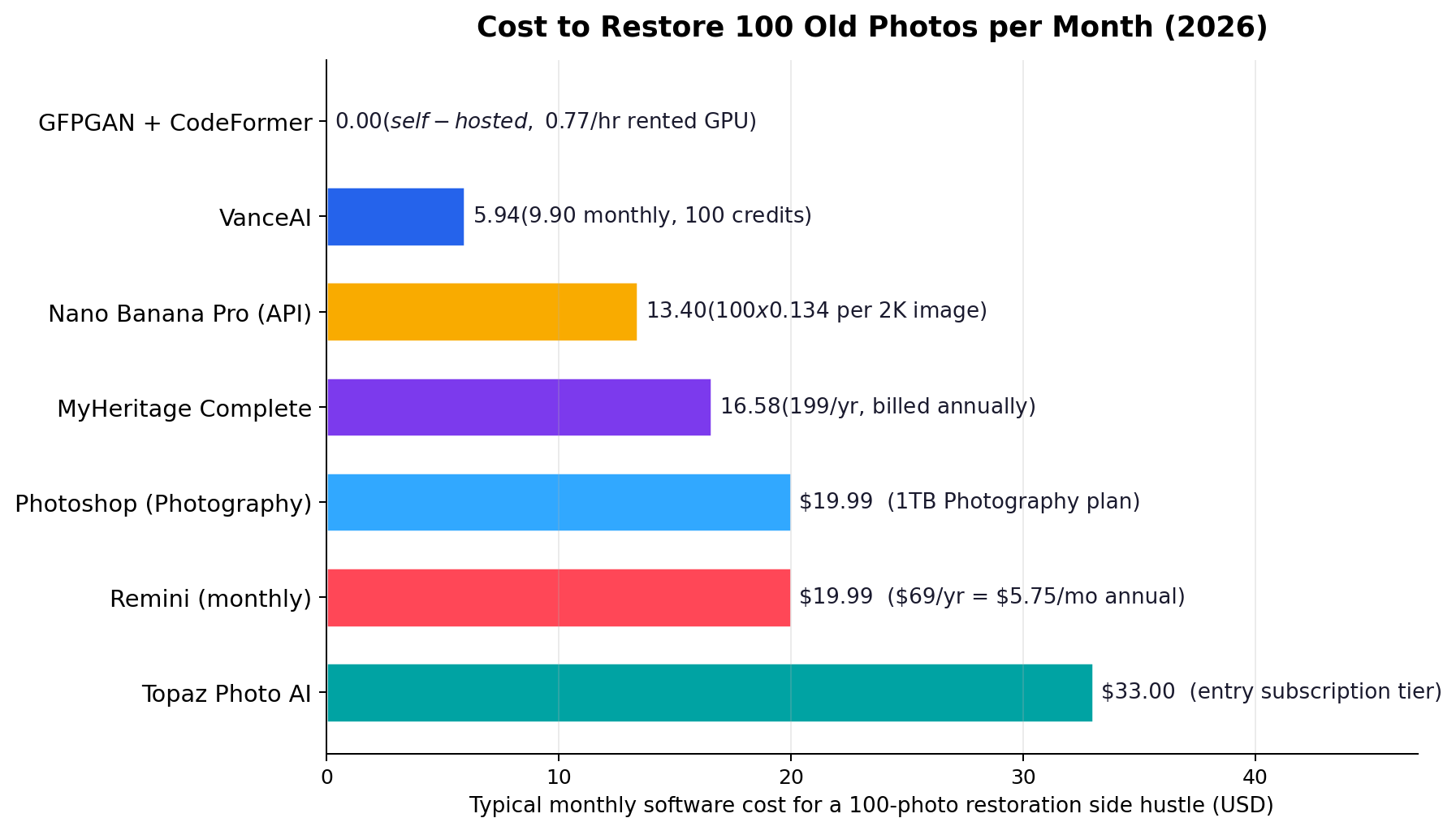
At 25 photos/month (hobbyist or first clients): GFPGAN costs $0, Nano Banana Pro $3.35, VanceAI $5.94, MyHeritage $16.58, Photoshop $19.99, Remini $19.99 ($5.75 annual rate), Topaz $33. Anything works at this scale; pick on quality.
At 100 photos/month (active side hustle): GFPGAN ≈ $0.77 of rented GPU time, Nano Banana Pro $13.40, VanceAI $5.94, MyHeritage $16.58, Photoshop $19.99, Remini $5.75 (annual), Topaz $33. Revenue at documented marketplace rates ($3–10/photo static, $2.80–7.00 typical) runs $280–700 — software is under 5% of revenue for every tool except Topaz.
At 500 photos/month (digitization contracts): Nano Banana Pro $67, VanceAI ≈ $29.70 (credit top-ups), GFPGAN ≈ $3.85, Remini $5.75 annual, MyHeritage $16.58, Photoshop $19.99 plus your hours, Topaz $33. Bulk-tier pricing at $0.80–1.50/photo yields $400–750 revenue — here per-image API pricing still leaves 85–90% margin, while your own Photoshop hours would eliminate it entirely.
The pattern: flat subscriptions reward intensity, per-image APIs reward consistency, and free stacks reward technical patience. A common pro stack is Nano Banana Pro for volume colorization passes + Topaz for the hero shots + Photoshop for severe damage — combined cost still under $55/month at 100-photo scale.
Real-World Test Scenarios: The Three Ways This Makes Money
Scores are abstractions; invoices are not. These are the three monetized workflows documented in our September 2026 market research, each with the exact stack we'd use and the arithmetic that makes it work.
Scenario 1: The Marketplace Restoration Gig ($2.80–13.90 per photo)
On Taobao and Xianyu, Chinese restoration sellers run a three-tier menu our research documented precisely: routine restoration at ¥20–33 ($2.80–4.60), severe damage at ¥68–99 ($9.55–13.90), and "living photo" animation clips at ¥99+ ($13.90+) — 2–3× the static price. Orders arrive through the listing; delivery is a restored file back over chat.
The workflow: triage the incoming photo into routine / severe / animation. Routine goes straight to Topaz Photo AI (auto-pilot mode, 30 seconds of operator time). Severe damage gets a Photoshop Neural Filter pass plus manual repair — that's what the 3–4× price premium is for. Animation runs through MyHeritage Deep Nostalgia on the restored file. Software cost: about $33/month for Topaz plus $19.99 Photoshop — recovered by the second routine order of the month at ¥33 pricing.
Scenario 2: The 500-Photo Album Contract ($400–750 per contract)
Bulk digitization is a different business: scrapbook-scale albums, estate jobs, "grandma's entire shoebox." Our research documented bulk-tier pricing at $0.80–1.50 per photo when volume exceeds 200 — that's $400–750 for a 500-photo contract, with sellers competing on turnaround, not fidelity.
The workflow: scan or photograph everything at uniform resolution, then run the folder through VanceAI's batch restorer (9.0 batch score; ~$30 in credits for 500 photos) or a scripted Nano Banana Pro loop ($67 in API calls, but each pass includes prompt-steered colorization — "natural skin tones, period-accurate clothing color" — so the bulk tier doubles as a colorization upsell). Spot-check faces on the 20 photos the client actually cares about; re-run those through Topaz. Margin: 85–90% after software.
Scenario 3: The Premium Memorial / 8K Order ($100 per photo)
Overseas restorers on YouTube publish their cards openly: $10 per routine order, $100 for large-format 8K restoration suitable for funeral displays and anniversary prints. The 10× premium is entirely about output resolution and emotional stakes — this is the job Topaz's 8K upscaler was built for.
The workflow: Topaz Photo AI with recovery + 8K upscale, manual touch-ups in Photoshop where the client named a specific detail ("Dad's medal, left lapel"), colorization steered in Nano Banana Pro when the family requests color ("1940s army khaki, cool indoor light"). One photo, roughly 45 minutes of skilled time, $100 invoice. Even at low volume this is the highest hourly rate in the niche — the documented ceiling for solo operators.
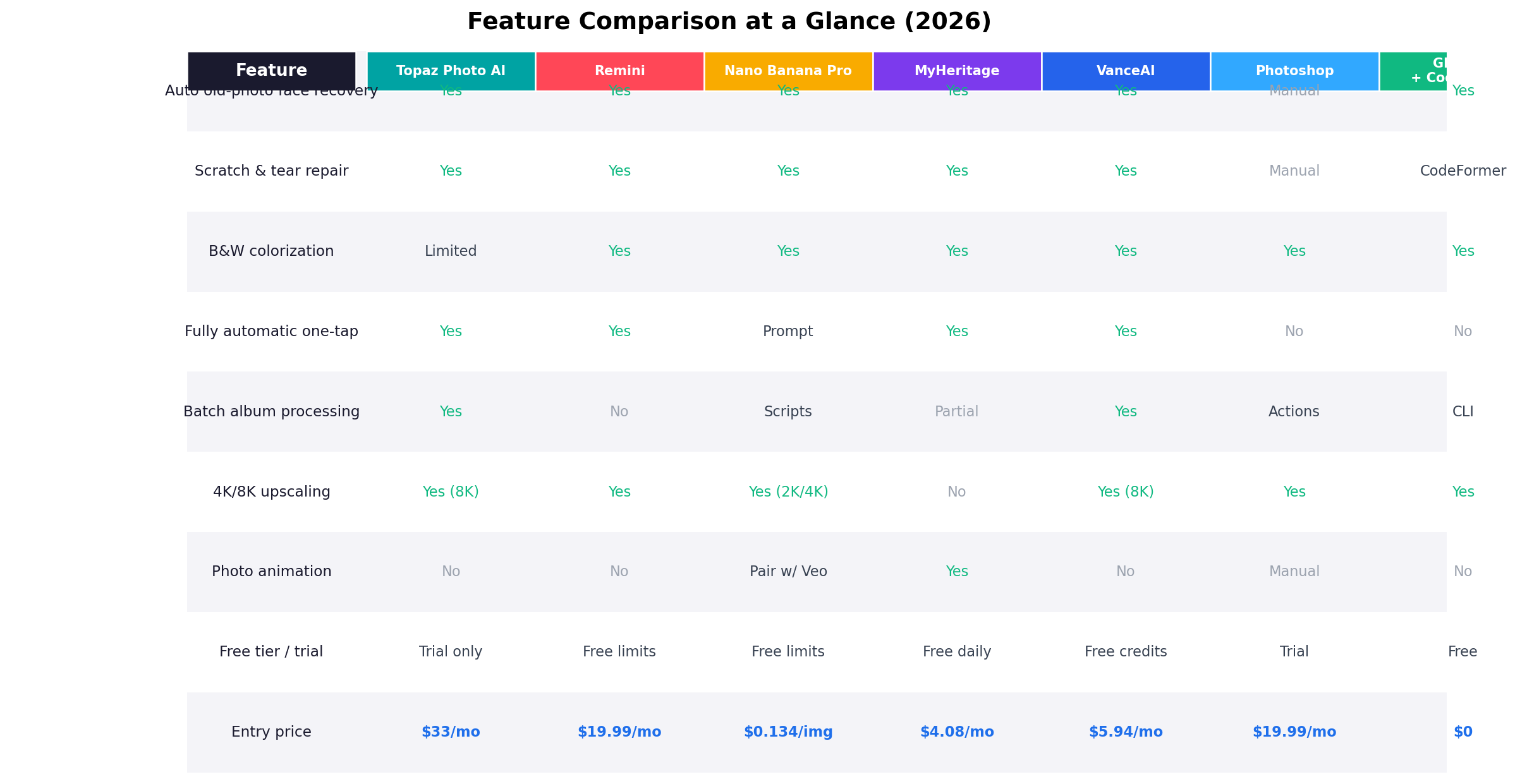
Feature Comparison at a Glance
Alternatives Worth Considering
| Tool | Starting Price | Standout Feature |
|---|---|---|
| Fotor | $3.33/mo (annual) | Cheap all-in-one editor with one-click restore alongside regular photo editing |
| Picwish | $5.99/mo | Batch photo enhancement with a clean web interface — a VanceAI rival |
| Hotpot.ai | $0.03+/photo | Cheap per-photo API with commercial license included |
| RestorePhotos.io | Freemium | Dead-simple face restoration for nostalgic fixes, nothing else |
| Cutout.pro | $0.12/credit | Photo restore plus a broad suite of background/retouch tools |
When to Stay Put
Not everyone needs a restoration stack. If you have five family photos and no commercial intent, Remini's free tier or RestorePhotos.io fixes them for nothing — a $33/month subscription to restore a shoebox once is a bad trade. If you're already paying for Photoshop and your volume is under 20 photos a month, the Neural Filters restore pass plus your existing skills covers routine work without new spend. And if your market is pure volume with razor margins, think hard before adding any flat subscription: the per-image API economics only beat subscriptions when you actually run the batches you promised yourself you would.
The Verdict
Best overall quality → Topaz Photo AI (8.6/10). The highest automated restoration and face-recovery scores in the test, true 8K output, and per-module control that survives client scrutiny. It is the deliverable tool for paid work — just don't ask it to colorize or to make bulk economics work.
Best margin engine → Nano Banana Pro (8.3/10). Prompt-steered restore-plus-colorize in one $0.134 pass, scriptable to any volume. For marketplace sellers this is the tool that turns a $2.80 photo order into a $2.66-margin photo order.
Best free entry → GFPGAN + CodeFormer (7.1/10). Zero software cost, 8.2 face recovery, CLI batching. Trade one technical afternoon for a business with no burn rate.
Best mobile proofing → Remini (8.4/10) and best for ancestry upsells → MyHeritage (7.8/10): the first closes sales in 15 seconds; the second sells the 2–3× animation premium.
The hybrid that wins in practice: Nano Banana Pro for volume and colorization + Topaz for hero shots + Photoshop for severe damage — under $55/month combined at 100-photo scale, covering every price tier from $2.80 to $100 that the market currently pays.
Frequently Asked Questions
What is the best AI photo restoration tool in 2026?
Topaz Photo AI scores highest overall (8.6/10) for restoration quality and face recovery. But "best" depends on your job: Nano Banana Pro wins on cost and colorization for volume work, Remini on mobile simplicity, and Photoshop when damage is severe enough to justify manual repair. Most working restorers stack two or three tools rather than hunting for one that does everything.
Can AI really restore old damaged photos?
Yes, within limits. AI excels at sharpening, denoising, scratch removal, face recovery and upscaling — routine aging damage is largely a solved problem. Torn corners with missing content, water damage across faces and heavily blurred eyes still need human judgment in Photoshop, which is exactly why severe-damage jobs command 3–4× pricing on marketplaces.
How much does AI photo restoration cost?
As software: from $0 (GFPGAN/CodeFormer open source) through about $0.134 per image (Nano Banana Pro API) and $5.75–9.90/month budget subscriptions (Remini annual, VanceAI) up to $19.99–33/month for the professional tools (Photoshop, Topaz). As a service: market rates run $2.80–4.60 for routine fixes, $9.55–13.90 for severe damage, $0.80–1.50 per photo at 200+ volume, and $100 for premium 8K memorial work.
Is AI photo restoration a profitable side hustle?
It can be. The documented economics: marketplace sellers moving volume at ¥20–33 per routine photo with near-zero software cost, bulk album contracts worth $400–750 at 85–90% margin, and solo operators billing $100 for a 45-minute 8K memorial restoration. The demand side is durable — heirloom photos are a one-way supply that only grows older — but competition on pure price is fierce, so the profit concentrates in the severe-damage and animation tiers where skill still matters.
What is the best free AI photo restoration tool?
The open-source GFPGAN + CodeFormer stack. Face recovery scores 8.2 — better than several paid tools — and it batch-processes from the command line at literally zero software cost. The catch is setup: expect a technical afternoon of Python environments and CUDA configuration. If you want free and frictionless instead, Remini and MyHeritage both restore a limited number of photos before asking for money.
Does AI restoration invent details that were never in the original photo?
Yes — every generative face enhancer reconstructs rather than recovers. When a face is blurred, the model generates plausible texture that matches its training distribution, not the true original pixels. This matters for archival and evidentiary work (where you should prefer conservative, non-generative pipelines) but rarely matters for sentimental or commercial restoration, where "looks like Grandma remembers" is the actual specification.
Can AI colorize black-and-white photos accurately?
Partially. Modern colorization gets skin, sky, foliage and common fabrics convincingly right, but it guesses on anything era-specific — uniform colors, brand colors, dyes specific to a decade. Prompt-driven tools like Nano Banana Pro (9.2 colorization) let you correct the guesses in words ("khaki uniform, 1943"), which is why it beats one-tap colorizers. For historically faithful work, treat AI color as a draft layer and verify the details that matter to the client.