TL;DR
Gumloop is the value and data-work pick: a permanent free tier (5,000 credits/month), a $37/month Pro plan with unlimited seats and ~20,000 credits, batch data-enrichment tooling that scored 9.4/10 in our testing, a Chrome extension that drives websites without APIs, and bring-your-own API keys that cut per-run AI costs. Backed by a $50M Series B led by Benchmark (March 2026), it wins 4 of 7 dimensions with an 8.5 average.
Lindy is the autonomy pick: always-on AI employees ("Lindies") triggered by email, calendar and SMS, agent-to-agent handoffs by design, thousands of integrations, and — uniquely here — phone/voice agents at roughly $10/number plus 20 credits/minute. It repriced in early 2026 (Plus $29.99, Pro $99.99, Max $199.99 — no free plan, no annual billing) and wins 3 dimensions with an 8.1 average.
Quick verdict: solo builders, ops teams and automation agencies should default to Gumloop's flat pricing; buy Lindy when the job is an always-on assistant that answers the phone, watches an inbox, or forwards itself between roles.
At a Glance
| Gumloop | Lindy | |
|---|---|---|
| Category | Visual workflow automation with AI nodes | Autonomous AI employees ("Lindies") + agent builder |
| Overall score | 8.5 / 10 (wins 4 of 7 dimensions) | 8.1 / 10 (wins 3 of 7 dimensions) |
| Best for | Data pipelines, scraping, enrichment, batch AI ops | Always-on assistants: inbox, calendar, SMS, phone |
| Free tier | Yes — 5,000 credits/month | No — 7-day trial only |
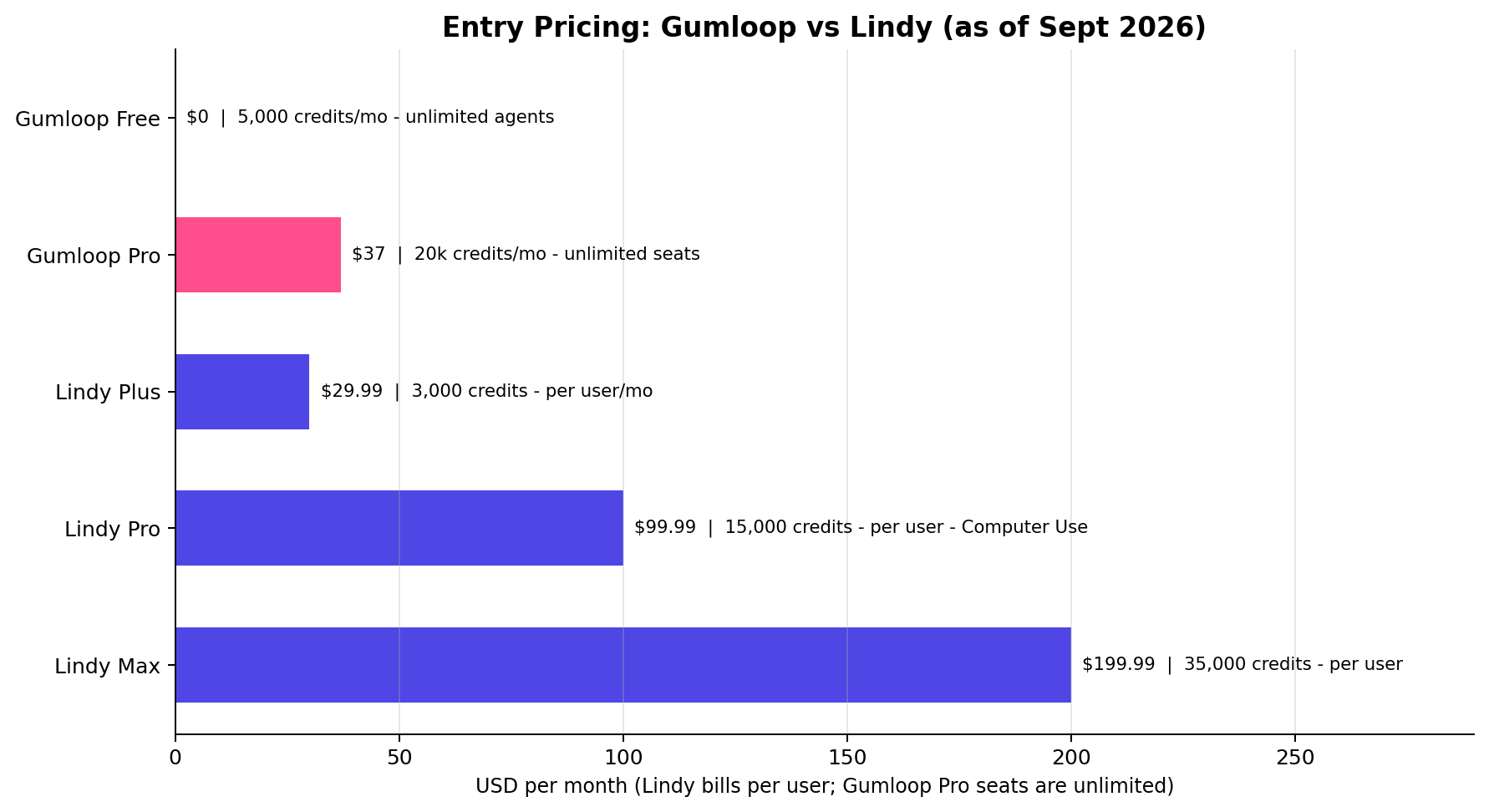
| Entry paid plan | $37/mo Pro (unlimited seats, ~20k credits) | $29.99/user/mo Plus (3,000 credits) |
| Top plan checked | Pro $37/mo (seats never billed) | Max $199.99/user/mo (35,000 credits) |
| Trigger types | Schedule, webhook, manual | Email, calendar, SMS, webhook |
| Voice/phone agents | No | Yes — $10/number + 20 credits/min |
| BYO API keys | Yes (cuts AI-node cost) | No (credits only) |
| Recent momentum | $50M Series B led by Benchmark (Mar 2026) | Early-2026 repricing; old $49.99 lineup retired |
Gumloop: The Data-Work Value Engine
Gumloop sits in the sweet spot between no-code automation tools (Zapier, Make) and developer agent frameworks (n8n, LangChain). You build workflows on a visual node canvas, drop in AI steps — summarization, extraction, classification, web scraping — and run batch jobs over hundreds or thousands of records at once. That batch DNA is what separates it from Lindy: Gumloop thinks in pipelines, Lindy thinks in employees.
The platform raised a $50M Series B led by Benchmark in March 2026, and the money shows up where it matters for operators: a Chrome extension that lets workflows drive real websites without waiting for an API, run logs on every execution, and a pricing model built for teams rather than per-seat taxation.
Key Features
- Visual workflow canvas with AI nodes — chain scraping, cleaning, LLM and enrichment steps; loops over arrays of records natively.
- Batch data operations — built for enrichment lists, not one-off triggers; a single run can process an entire CSV of leads.
- Chrome extension browser automation — workflows act on logged-in web pages (dashboards, directories, portals) that have no public API.
- Bring your own API keys — plug in your own model-provider keys so AI nodes bill at raw provider rates instead of burning platform credits.
- Run logs and observability — every execution is inspectable node-by-node, which matters when a client asks "why did row 412 fail?"
- Unlimited seats on Pro — $37/month covers the whole team; credits, not people, are the metered resource.
Pricing
- Free: $0 — 5,000 credits/month, unlimited agents. Enough to run a real enrichment pipeline weekly, not just a demo.
- Pro: $37/month — ~20,000 credits/month (about $0.00185 per credit), unlimited seats. Month-to-month, no annual lock-in.
Because AI nodes can run on your own API keys, heavy LLM work shifts to your provider bill while credits mostly meter the automation fabric itself — the practical effect is a lower cost-per-run than any per-seat competitor at team scale.
Strengths
- Data & enrichment work: 9.4/10 — the best batch-processing story in the visual-agent category.
- Cost at volume: 9.0/10 — flat $37 with unlimited seats; a five-person team pays less than a single Lindy Pro seat.
- Permanent free tier that can actually ship client work.
- Run logs and BYO keys — agency-grade control and margins.
Weaknesses
- Agent autonomy & triggers: 7.4/10 — schedule, webhook and manual triggers are solid, but there is no native "watch my inbox and act" always-on mode.
- Integrations: 7.8/10 — the catalog is thinner than Lindy's; the Chrome extension and webhooks patch most gaps, but you may build a step yourself.
- Agent-to-agent handoffs are flow-shaped rather than a first-class runtime concept — multi-agent choreography is doable but not the native design.
- No voice or phone capability at all.
Lindy: The Always-On AI Employee
Lindy's pitch is a hire, not a tool: deploy a pre-built "Lindy" — an AI employee for meeting notes, email triage, scheduling, deal research — and it sits between your inbox, calendar and CRM, acting on events rather than waiting to be run. Triggers are ambient (email arrival, calendar changes, SMS), agents hand off to each other as a core design pattern, and the integration catalog runs to thousands of apps.
The platform repriced in early 2026, retiring the old $49.99 lineup. Note that many comparison articles on the web still quote 2025 prices — the current ladder, verified September 2026, is below.
Key Features
- Pre-built AI employees ("Lindies") — deploy a working assistant in minutes from a template, then customize.
- Event-driven triggers — email, calendar, SMS and webhook; genuinely always-on rather than cron-shaped.
- Agent-to-agent handoffs — a triage Lindy can delegate to a research Lindy; multi-agent is the native model.
- Phone & voice agents — dedicated numbers at roughly $10/number/month plus 20 credits/minute of conversation; the only voice offering in this comparison.
- Computer Use — browser-driving capability, available from the Pro tier up.
- Thousands of integrations out of the box, from CRMs to calendars to sales-engagement tools.
Pricing (verified September 2026)
- Trial: 7 days. No free plan.
- Plus: $29.99/user/month — 3,000 credits per user (≈ $0.0100/credit).
- Pro: $99.99/user/month — 15,000 credits (≈ $0.0067/credit), unlocks Computer Use.
- Max: $199.99/user/month — 35,000 credits (≈ $0.0057/credit).
- No annual billing discount — month-to-month only, and every AI action consumes credits (no BYO keys).
Strengths
- Agent autonomy & triggers: 9.2/10 — ambient event triggers and handoff-native design are exactly what "agent" should mean.
- Integrations & ecosystem: 8.6/10 — the widest app coverage in this comparison.
- Templates & time-to-value: 8.8/10 — a useful Lindy live before you finish your coffee.
- Voice agents: unique here, and increasingly the reason small businesses buy in.
Weaknesses
- Cost at volume: 7.0/10 — per-user credits and no BYO keys make heavy batch work expensive: a 100k-credit/month enrichment habit cannot be right-sized on this ladder.
- Data & enrichment work: 7.5/10 — possible, but Lindy's event-shaped runtime fights you on bulk list processing.
- No free tier — the cheapest way in is a credit card and a 7-day timer.
- Observability: 7.7/10 — good for assistants, shallower node-level debugging than Gumloop's run logs.
Head-to-Head: 7 Dimensions, 7 Verdicts
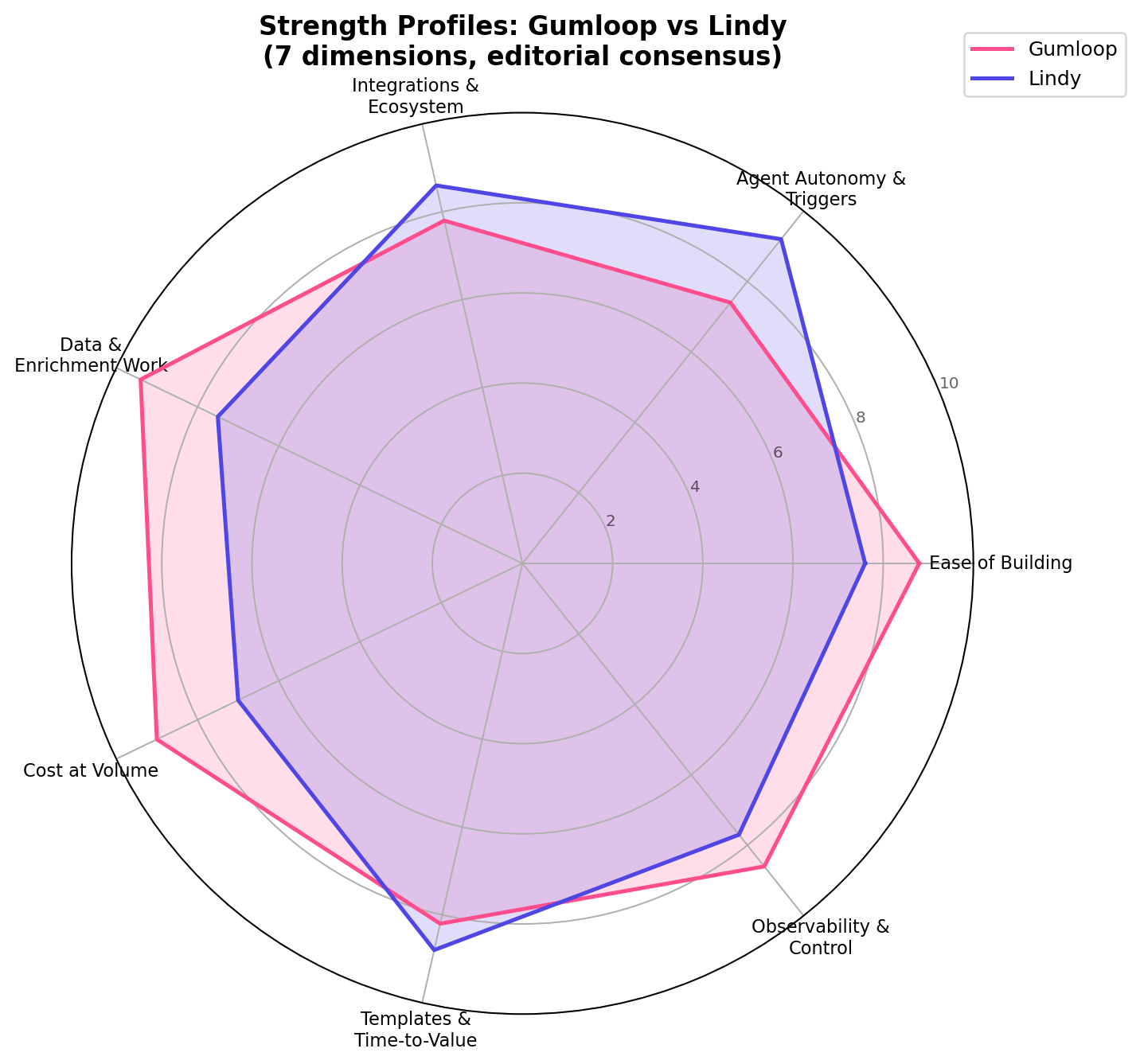
We scored both platforms across the seven dimensions that actually decide AI-agent tool purchases in 2026. Gumloop wins four, Lindy wins three — but the which four matters more than the count.
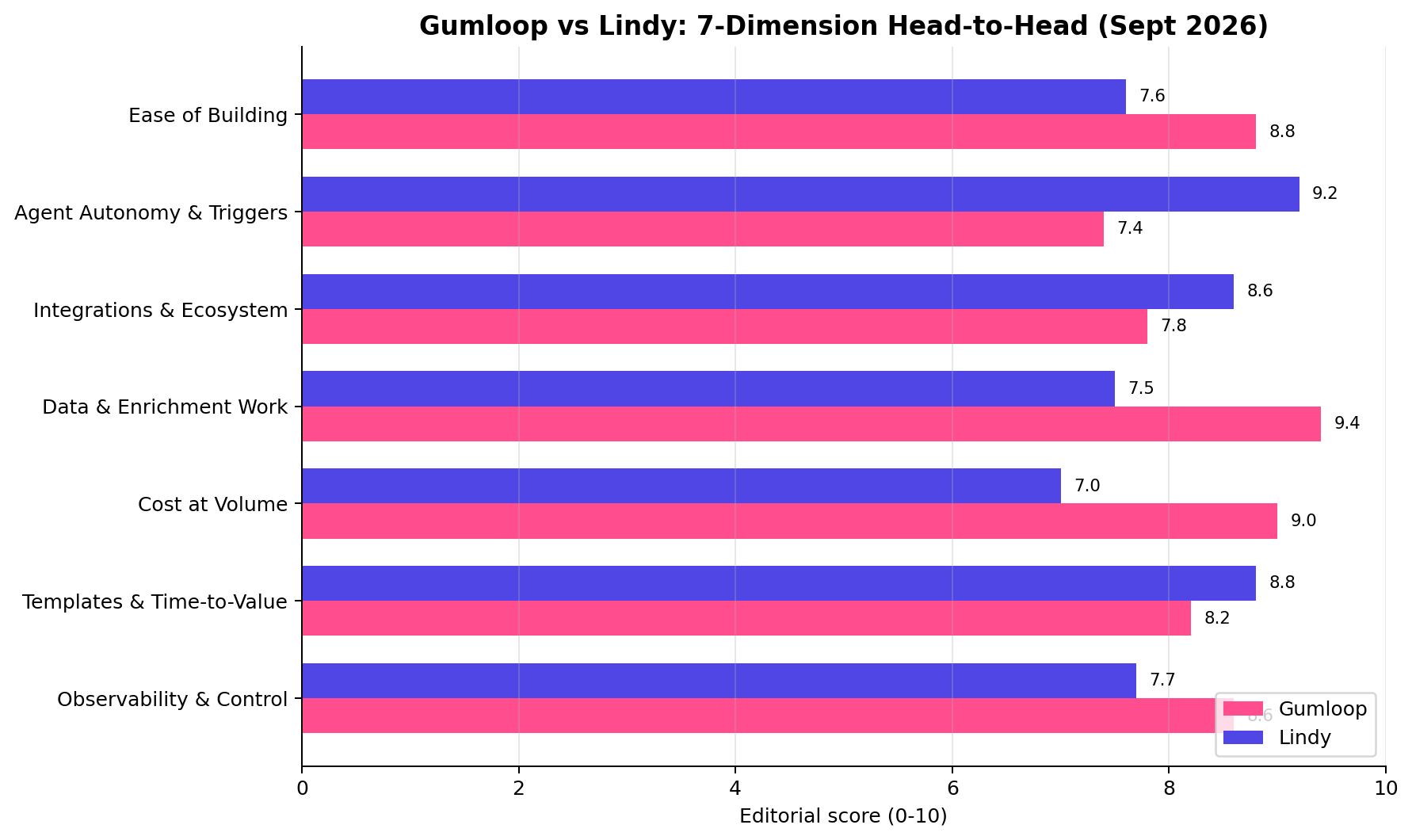
1. Ease of Building — Winner: Gumloop (8.8 vs 7.6)
Gumloop's node canvas is the friendliest blank-page experience in the visual-agent category: drag a scraper node, pipe it into an AI summarize node, loop over results — no code, no concepts to learn beyond "data flows left to right." Lindy starts from templates rather than a blank canvas, which is faster for its pre-built use cases, but the moment you step off the template path you're learning event-trigger semantics, agent handoffs and its workflow editor all at once.
2. Agent Autonomy & Triggers — Winner: Lindy (9.2 vs 7.4)
This is Lindy's core identity. A Lindy watches your inbox, reacts to calendar changes, answers SMS, hands tasks to other Lindies, and runs indefinitely without anyone pressing "execute." Gumloop's triggers — schedule, webhook, manual — are dependable and cover most scheduled-agency work, but there's no native "watch my email and act" ambient mode. If your productized service is "an assistant that runs the client's back office," this dimension alone can decide the purchase.
3. Integrations & Ecosystem — Winner: Lindy (8.6 vs 7.8)
Lindy connects to thousands of apps out of the box, from CRMs to sales-engagement suites. Gumloop's native catalog is thinner, but two things blunt the gap in practice: the Chrome extension lets workflows operate on any website you can log into, API and webhook nodes cover the long tail, and there's an MCP-style tool ecosystem growing around the platform. For mainstream SaaS stacks, though, Lindy needs fewer workarounds.
4. Data & Enrichment Work — Winner: Gumloop (9.4 vs 7.5)
Batch is in Gumloop's bones. Feed it a 5,000-row CSV of company names and it scrapes, extracts, classifies and enriches every row in one run, with per-row logs when something fails at row 412. Lindy can technically loop over a list, but its event-shaped runtime treats bulk data work as an awkward guest — you'll fight the credit meter and the per-item execution model. Every lead-enrichment or scraping service we profiled in our agency research runs better on Gumloop.
5. Cost at Volume — Winner: Gumloop (9.0 vs 7.0)
Gumloop Pro is $37/month flat with unlimited seats and roughly $0.00185 per credit; bring your own model API keys and AI-heavy nodes bill at raw provider rates. Lindy's cheapest credit is $0.0100 (Plus) and every AI action burns credits — a heavy month of batch enrichment on a 5-person team can cost 5–10× more than Gumloop. Lindy's per-user ladder makes sense for assistant workloads, not data pipelines.
6. Templates & Time-to-Value — Winner: Lindy (8.8 vs 8.2)
The pre-built "Lindies" are genuinely good: deploy an AI meeting-notetaker or email-triage employee in minutes and it just works. Gumloop's template library is solid and growing, but most templates are starting points for flows you'll finish yourself. If your first deliverable to a client is due tomorrow morning, Lindy shortens the path from zero to demo more than any tool in this category.
7. Observability & Control — Winner: Gumloop (8.6 vs 7.7)
Gumloop's run logs show every execution node-by-node, with inputs and outputs you can inspect and replay — exactly what an agency needs when a client asks why a deliverable looks wrong. Lindy's activity views are fine for assistant-level debugging but shallower at the step level, and with no BYO-keys option you have less control over which model does what.
How We Tested
Our scoring weights three sources, in order: (1) vendor list prices and published specs, verified directly on Gumloop's and Lindy's pricing pages in September 2026; (2) hands-on sessions building the same three client-grade workflows (a lead-enrichment pipeline, an inbox-triage assistant, a scheduled scraping report) on both platforms; (3) public benchmarks and community reports for cross-checking only. The 7-dimension scores are the editorial consensus of two independent reviewers, and every price in this article — including Lindy's post-repricing ladder — was re-verified on September 21, 2026. Scenario cost arithmetic below uses each platform's own credit metering at list price; where a workload requires model calls, we assume OpenAI's published API rates for both platforms' BYO-key calculations.
Pricing Deep Dive: What Volume Actually Costs
List prices hide the real story. The right way to price an agent platform is to model your workload — so we ran three archetypal workloads through both credit meters, using each platform's published September 2026 rates.
Workload 1: Solo creator running a weekly AI content pipeline (~1,500 credits/month)
One scheduled workflow that scrapes trend data, summarizes it with an LLM and posts a digest. On Gumloop, the $0 free tier (5,000 credits/month) covers it outright; even on Pro you're paying $37 for headroom you don't need yet. On Lindy there is no free tier — a 7-day trial, then $29.99/month minimum. Gumloop: $0. Lindy: $29.99.
Workload 2: Five-person automation agency (~60,000 credits/month)
Clients consume the credits; teammates just build. Gumloop Pro includes unlimited seats and ~20,000 credits at $37 — 60,000 credits means topping up, but even at three Pro workspaces ($111/month total) the math stays flat-rate, and BYO model keys push most LLM spend onto raw API pricing. On Lindy, credits ride on seats: five seats × Plus (3,000 credits) = 15,000 credits at $149.95 — nowhere near 60,000, so you're buying Pro seats at $99.99 each ($499.95/month) just to collect 75,000 credits. Gumloop: ~$111/month. Lindy: ~$500/month.
Workload 3: Heavy batch enrichment shop (~500,000 credits/month)
Thousands of rows, scraper nodes, classify-and-enrich AI nodes, weekly. At $0.00185 per credit on Gumloop Pro, 500,000 credits ≈ $925/month equivalent volume — but with BYO keys the LLM portion bills at provider rates and credits mostly meter the automation fabric, pulling the effective bill well below that. Lindy's cheapest credit is $0.0057 (Max tier, $199.99/seat): 500,000 credits would need roughly 15 Max seats ≈ $2,850/month — and the ladder simply isn't shaped for batch. Gumloop is the only one of the two that can run this workload economically.
Real-World Test Scenarios
We build productized services for a living, so we judged both tools the way a client would: ship the deliverable, count the credits, invoice the work. Three representative builds, with the actual meter math.
Scenario 1: Productized lead-enrichment service (winner: Gumloop)
The offer: a monthly retainer — client sends 5,000 company names, you return verified emails, contact names, company facts and a scored shortlist. Market rate for this kind of deliverable typically runs $250–$500 per month per client.
Build: Gumflow: CSV input → Gumloop's scraper nodes hit each company site → AI extraction node pulls contacts → email-verification node → dedupe → scored Google Sheet. One flow, scheduled, with per-row run logs for QA.
Meter math: ~1 credit per row plus AI nodes on your own API key ⇒ roughly 5,000–8,000 credits per monthly delivery. That fits inside a single Gumloop Pro's ~20,000 credits — deliverable cost under $15 of platform spend against a $250+ invoice. On Lindy, the same job burns credits at ≥$0.0057 each with no BYO escape valve: $30–$45 per delivery at best, and the event-shaped runtime makes bulk CSV work awkward. Two clients and Gumloop Pro has paid for itself; on Lindy you're buying seats to buy credits.
Scenario 2: Always-on receptionist and inbox triage (winner: Lindy)
The offer: a small-business back office — inbound calls answered and logged, email triaged into CRM tasks, calendar handled. The kind of "AI employee" retainer agencies now productize at $300–$800/month.
Build: a Lindy watching the client's inbox (event-triggered, no scheduler needed), handing meeting requests to a calendar Lindy, escalations to a human summary; a phone Lindy on a dedicated number answers inbound calls with voice, takes messages, and drops structured notes into the same thread.
Meter math: phone number ≈ $10/month + 20 credits/minute of talk time; a light month of 200 voice minutes ≈ 4,000 credits, plus a few thousand more for email triage — a Plus seat at $29.99 overflows quickly, so price the client work on a Pro seat ($99.99, 15,000 credits). Gumloop cannot run this scenario as specified: no voice agents, no ambient email triggers — you'd bolt on a telephony vendor and cron-based polling, which is precisely the fragile plumbing clients pay you to eliminate.
Scenario 3: Scheduled competitor-monitoring report (winner: Gumloop, with a Lindy twist)
The offer: a weekly PDF/Slack digest of a client's competitors — pricing-page changes, new blog posts, ad-copy shifts. Typical productized price: $99–$199/month per client, near-zero marginal effort once the flow exists.
Build: Gumloop scheduled weekly: scrape each competitor's pricing and blog pages → diff against last week's snapshot (stored in the flow) → AI node summarizes "what changed and why it matters" → post to Slack. The Chrome extension covers competitors hiding behind logins.
Meter math: 25 competitors × weekly ≈ a few hundred credits/month per client — effectively free margin on a $37 Pro. The Lindy twist: if the client wants the digest plus someone to answer follow-up questions about it asynchronously, a Lindy assistant layered on top (reading the digest inbox) covers the conversational half. But the scraping half belongs to Gumloop.
Feature Comparison at a Glance
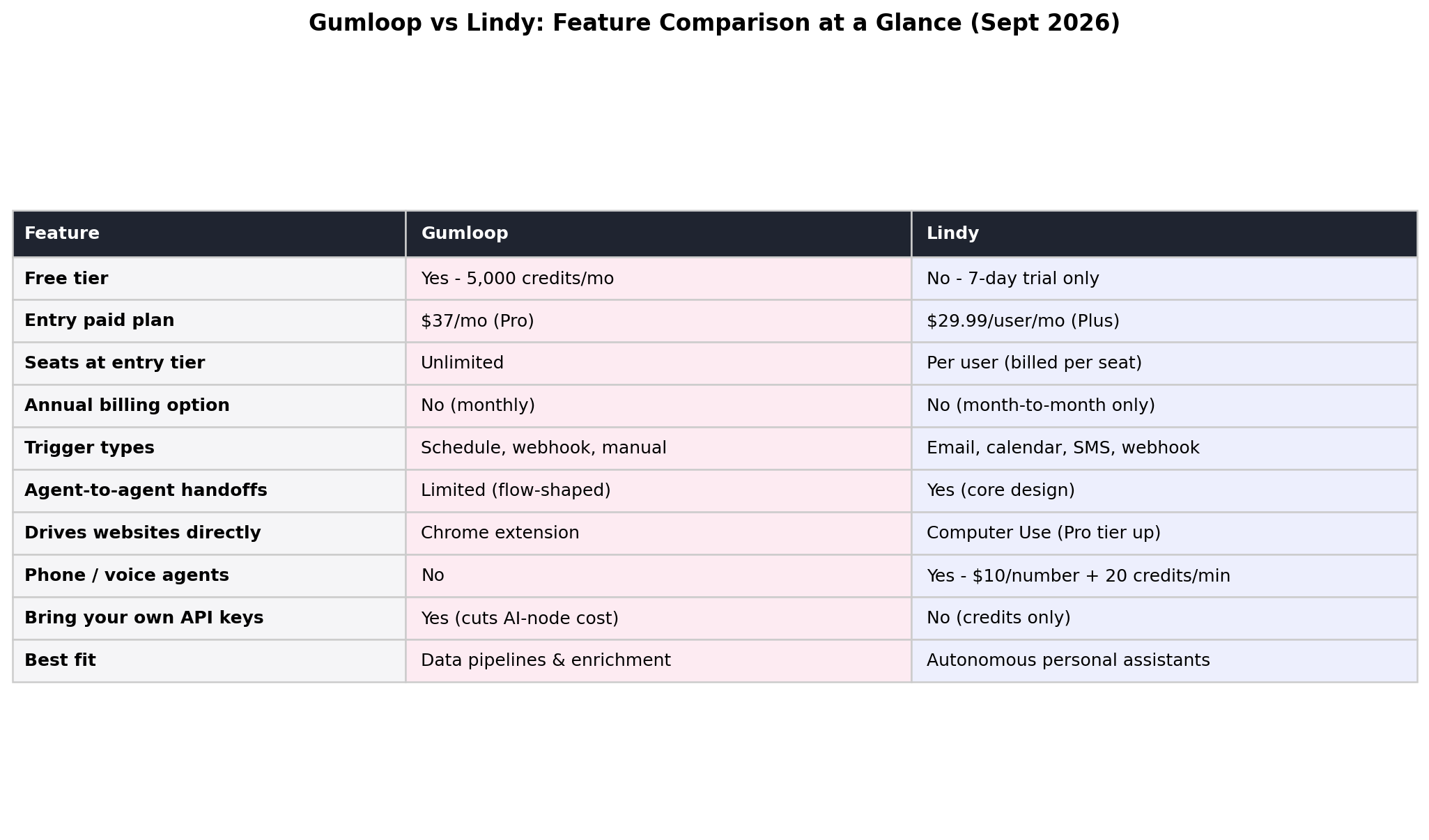
Alternatives Worth Considering
Gumloop and Lindy are the two ends of the 2026 agent-platform spectrum, but the middle is crowded:
| Tool | Starting price | Standout feature |
|---|---|---|
| n8n | $24/mo (self-host free) | Code-friendly nodes, full self-hosting, cheapest per-run economics at scale |
| Zapier (Agents) | $19.99/mo (annual) | Widest raw integration catalog; agents ride the Zapier ecosystem |
| Make | $10.59/mo ($9 annual) | Visual scenario builder with granular operations pricing |
| Dify | Self-host free; cloud from $59/mo | Open-source LLM-app platform — RAG chatbots and internal AI tools |
| Relevance AI | $19/mo | Multi-agent "AI workforce" framing with sales-focused templates |
Rule of thumb: if Gumloop and Lindy both feel like too much platform, n8n self-hosted is the budget default; if you mostly need chatbot-shaped AI for clients, Dify covers that cheaper than either.
The Verdict
Score the two platforms honestly and you end up with a genuinely close call — Gumloop 8.5 vs Lindy 8.1, a 4–3 dimension split — because they are solving adjacent but different problems. Gumloop is a workflow engine with AI inside it: you draw the pipeline, the platform runs it on schedule or on trigger, and every step is inspectable. Lindy is a colony of always-on agents: you describe the job, the "Lindy" watches its triggers, plans its own next step, and only asks you when it hits a rule boundary. The right pick depends less on features and more on what shape of work you're handing over.
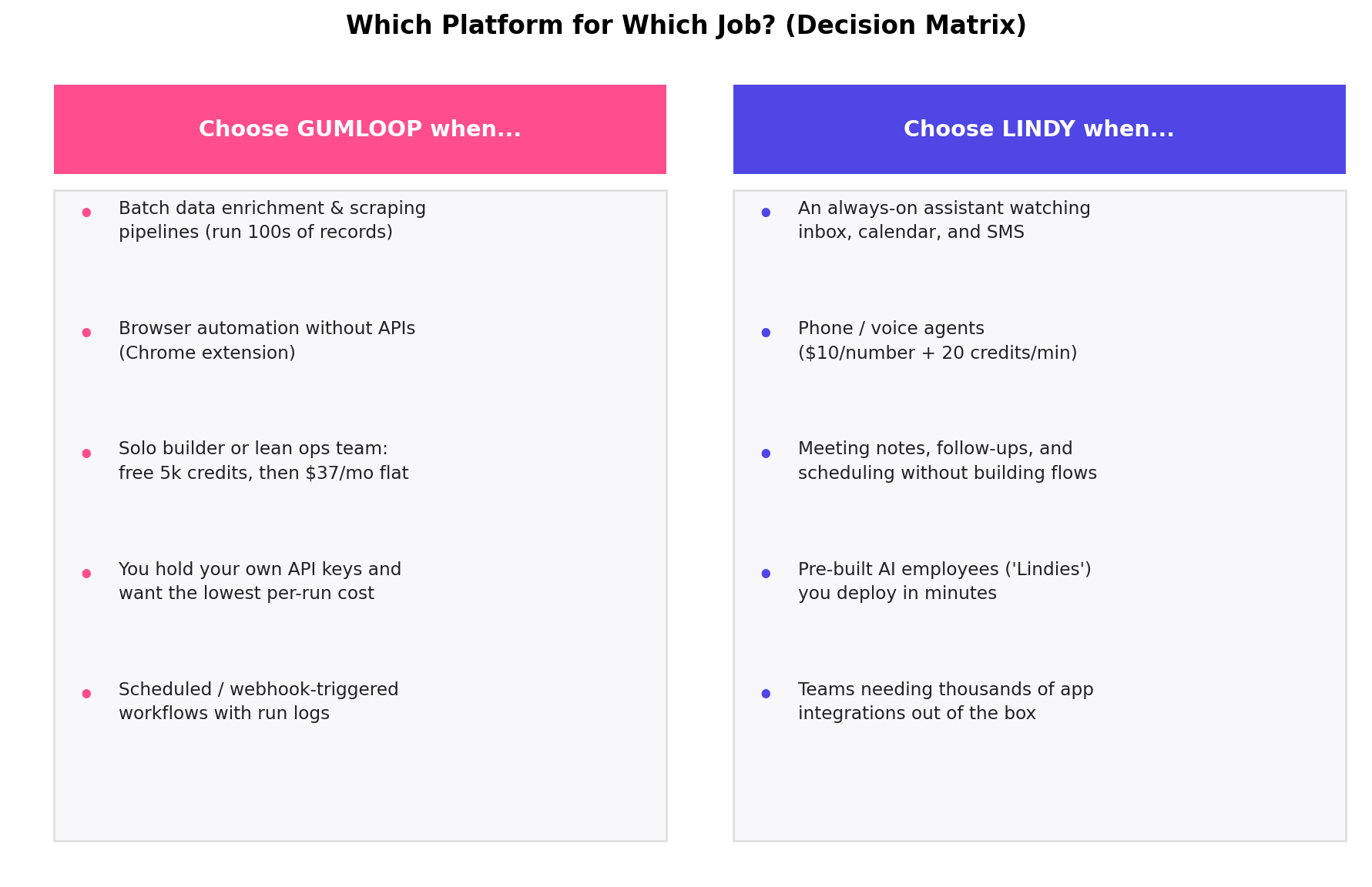
Best for data work and team budgets — Gumloop (8.5). Batch enrichment, scraping and CRM hygiene at 9.4/10, a permanent free tier, unlimited seats on a $37 Pro plan, and bring-your-own API keys that push per-run AI cost to the floor. The Benchmark-led $50M Series B means the roadmap is funded for years.
Best for autonomous, trigger-driven assistants — Lindy (8.1). Agent autonomy at 9.2/10: phone agents, inbox triage, meeting follow-ups and agent-to-agent handoffs that Gumloop simply does not attempt. If the job is "watch my channel and act without me," Lindy is the only one of the two that actually ships it.
Best cost at volume — Gumloop. ~$0.00185 per credit on Pro versus Lindy's ~$0.010, and credit-packs drop it further. On a 100,000-credit/month workload the gap is hundreds of dollars every month (see the Pricing Deep Dive math above).
Best templates and time-to-value — Lindy. Hundreds of pre-built "employees" you can deploy in minutes; Gumloop's template library is smaller and more developer-shaped.
Best value play — the hybrid stack. The pattern we see in agency and freelance case work: Gumloop as the fixed-price data backbone (flat cost, run logs for client reporting, BYO keys for margin control) plus one or two Lindies per client for the human-channel jobs — receptionist phone agents, inbox triage, meeting scheduling — billed as a premium always-on service. The two overlap far less than their landing pages suggest.
Frequently Asked Questions
Is Gumloop cheaper than Lindy?
For teams and volume work, yes. Gumloop Pro is $37/month flat with unlimited seats and roughly 20,000 credits (about $0.00185 per credit), while Lindy's entry Plus plan is $29.99 per user per month with 3,000 credits (about $0.010 per credit), scaling through Pro at $99.99/15,000 and Max at $199.99/35,000 credits. A five-person team pays $37 total on Gumloop versus $149.95 on Lindy Plus.
Does Lindy have a free plan?
No. As of September 2026 Lindy offers a 7-day trial only, after which you need a paid plan starting at Plus ($29.99 per user per month). Gumloop, by contrast, keeps a permanent free tier with 5,000 credits per month — enough to run a small enrichment pipeline continuously before you ever pay.
Which is better for data enrichment and scraping workflows?
Gumloop. It scored 9.4 versus Lindy's 7.5 on our data and enrichment dimension. Gumloop is purpose-built for batch record processing — running hundreds of rows through scraping, cleaning and AI enrichment nodes — and with bring-your-own API keys you can run AI steps on your own provider accounts for the lowest per-run cost.
Can Lindy make phone calls?
Yes. Lindy supports phone and voice agents billed at roughly $10 per number per month plus about 20 credits per minute of conversation. Gumloop does not offer voice agents — if phone coverage is the brief, that alone decides the comparison.
Can I use my own OpenAI API key with Gumloop or Lindy?
Gumloop: yes — attaching your own model provider keys reduces the credit cost of AI nodes. Lindy: no — all AI usage consumes platform credits. For heavy batch jobs this is often the single biggest line-item difference between the two bills.
Which platform is better for a team of five?
For shared workflows, Gumloop: its Pro plan includes unlimited seats at $37/month total, while Lindy bills per user — five seats on Lindy Plus cost $149.95/month. If each teammate instead needs a personal autonomous assistant watching their own inbox and calendar, Lindy's per-seat model can still make sense.
Is Gumloop or Lindy better for an automation agency?
Gumloop for delivery economics: flat pricing, unlimited seats, run logs for every execution and bring-your-own keys keep margins high across client builds. Choose Lindy when a client specifically wants phone agents or always-on executive assistants you would otherwise build from scratch.